
Object-Oriented Programming (OOP) is a way of writing code by organizing it into objects and classes. It helps in making code more modular, reusable, and easy to manage. In simple terms, OOP focuses on creating objects that contain both data and behavior.
- Modularity: Code is divided into small, manageable parts (objects).
- Reusability: Classes can be reused to avoid writing code again.
- Scalability: Makes it easier to build and maintain large applications.
Example: In a car system, a
Carclass can have properties like color and speed, and methods like start() and stop(). Different car objects (like BMW, Audi) can be created from the same class.

Real-World Examples
OOP is widely used to model real-world systems by representing real entities as objects with classes and relationships.
- Banking System: Classes like Account, Customer, and Transaction are used to manage deposits, withdrawals, and transfers in a structured way.
- E-commerce System: Classes like Product, Cart, and Order handle product listing, purchasing, and order processing efficiently.
- Library Management System: Classes like Book, Member, and Librarian manage issuing, returning, and tracking books.
Need of OOP
As software systems grow larger and multiple developers work on the same project, managing code becomes difficult without proper structure. OOP helps solve these problems by organizing code into modular and reusable components.
- Better Maintainability: Changes in one part of the system do not affect or break the entire application, making updates easier.
- Reduced Complexity: Avoids passing too many parameters in functions by organizing code into structured objects.
- Team Collaboration: Codebase can be divided into modules, allowing multiple developers to work efficiently in parallel.
- Code Reusability: Classes and components can be reused in different parts of the application, reducing duplication.
- Scalability: Modular design makes it easier to expand the system and handle increasing requirements or users.
Classes and Objects in OOP
Classes and objects are fundamental concepts in object-oriented programming (OOP), which is a system design approach used to simulate real-world items and their interactions
1. Classes
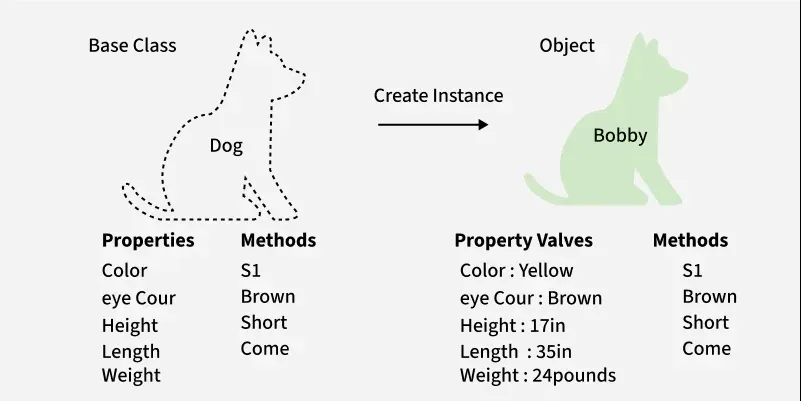
A class is a template or blueprint used to create objects. It specifies the characteristics (properties) and actions (methods) that objects of that class will have.
Attributes: Data an object holds (e.g., make, model, year in a Car class).
Methods: Actions an object can perform (e.g., startEngine(), accelerate()).
2. Objects
An object is an instance of a class. It is created based on the blueprint defined by the class.
- Attributes: These are the values represent the state of the object. For example, an object of the "Car" class might have attributes like "make" = "Toyota," "model" = "Camry," and "year" = 2022.
- Methods: To carry out certain tasks or processes, objects can call methods defined by their class. These methods can change the object's state and work with its data (attributes). The "start_engine," "accelerate," and "turn_off_engine" methods, for instance, can be used to manage the behavior of an object of the "Car" class.
Example:
#include <iostream>
using namespace std;

class Student {

public:
    int roll;
    string name;

    void takeLeave() {
        cout << "on leave" << endl;
    }

    void bunkClass() {
        cout << "Go out and play: " << endl;
    }
};

int main() {
    Student sid;
    sid.bunkClass();
    sid.name = "Siddhartha Hazra";
    cout << sid.name << endl;
    return 0;
}
#include <stdio.h>
#include <string.h>

typedef struct Student {
    int roll;
    char name[50];
} Student;

void takeLeave(Student *s) {
    printf("on leave\n");
}

void bunkClass(Student *s) {
    printf("Go out and play: \n");
}

int main() {
    Student sid;
    bunkClass(&sid);
    strcpy(sid.name, "Siddhartha Hazra");
    printf("%s\n", sid.name);
    return 0;
}
class Student {

    int roll;
    String name;

    void takeLeave() {
        System.out.println("on leave");
    }

    void bunkClass() {
        System.out.println("Go out and play: ");
    }
}

public class Main {

    public static void main(String args[]) {

        Student sid = new Student();
        sid.bunkClass();
        sid.name = "Siddhartha Hazra";
        System.out.println(sid.name);
    }
}
class Student:

    def __init__(self):
        self.roll = None
        self.name = None

    def takeLeave(self):
        print("on leave")

    def bunkClass(self):
        print("Go out and play: ")

sid = Student()
sid.bunkClass()
sid.name = "Siddhartha Hazra"
print(sid.name)
class Student {

    constructor() {
        this.roll = null;
        this.name = null;
    }

    takeLeave() {
        console.log('on leave');
    }

    bunkClass() {
        console.log('Go out and play: ');
    }
}

const sid = new Student();
sid.bunkClass();
sid.name = 'Siddhartha Hazra';
console.log(sid.name);
Four Pillars of OOP
These are the core concepts that define Object-Oriented Programming and help in building structured and efficient code. They make systems more secure, reusable, and easy to maintain.
1. Encapsulation
Encapsulation is the process of combining data and methods for working with the data into a single unit called a class. It makes it possible to hide a class's implementation details from outside users who engage with the class via its public interface.
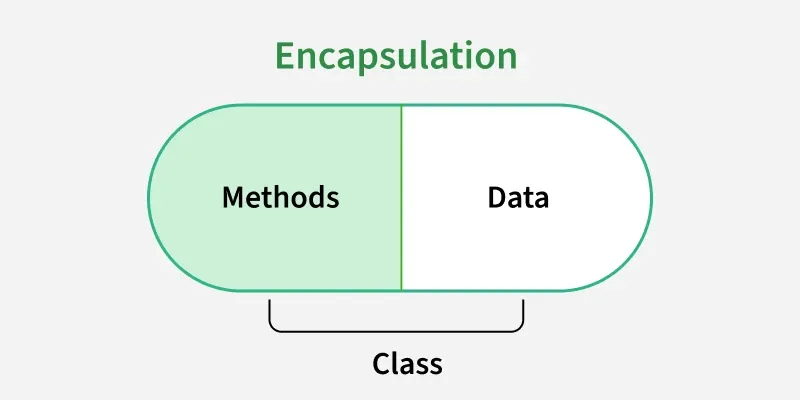
- Class as a Unit of Encapsulation: Classes include information (attributes) and actions (methods) associated with a particular entity or concept. The class's public methods allow users to interact with it without having to understand the inner workings of those methods.
- Access Modifiers: Access modifiers that regulate the visibility of class members (attributes and methods), such as public, private and protected, are used to enforce encapsulation. Private members can only be reached from within the class, whilst public members can be reached from outside.
Example:
#include <iostream>
#include <string>

class Employee {
private:
    int id;
    std::string name;

public:
    void setId(int id) {
        this->id = id;
    }

    void setName(std::string name) {
        this->name = name;
    }

    int getId() {
        return id;
    }

    std::string getName() {
        return name;
    }
};

int main() {
    Employee emp;

    // Using setters
    emp.setId(101);
    emp.setName("Geek");

    // Using getters
    std::cout << "Employee ID: " << emp.getId() << std::endl;
    std::cout << "Employee Name: " << emp.getName() << std::endl;

    return 0;
}
#include <stdio.h>
#include <string.h>

typedef struct Employee {
    int id;
    char name[50];
} Employee;

void setId(Employee* emp, int id) {
    emp->id = id;
}

void setName(Employee* emp, const char* name) {
    strcpy(emp->name, name);
}

int getId(Employee* emp) {
    return emp->id;
}

const char* getName(Employee* emp) {
    return emp->name;
}

int main() {
    Employee emp;

    // Using setters
    setId(&emp, 101);
    setName(&emp, "Geek");

    // Using getters
    printf("Employee ID: %d\n", getId(&emp));
    printf("Employee Name: %s\n", getName(&emp));

    return 0;
}
class Employee {
    // Private fields (encapsulated data)
    private int id;
    private String name;

    // Setter methods
    public void setId(int id) {
        this.id = id;
    }

    public void setName(String name) {
        this.name = name;
    }

    // Getter methods
    public int getId() {
        return id;
    }

    public String getName() {
        return name;
    }
}

public class Main {
    public static void main(String[] args) {
        Employee emp = new Employee();

        // Using setters
        emp.setId(101);
        emp.setName("Geek");

        // Using getters
        System.out.println("Employee ID: " + emp.getId());
        System.out.println("Employee Name: " + emp.getName());
    }
}
class Employee:
    def __init__(self):
        self.__id = None
        self.__name = None

    def set_id(self, id):
        self.__id = id

    def set_name(self, name):
        self.__name = name

    def get_id(self):
        return self.__id

    def get_name(self):
        return self.__name


emp = Employee()

# Using setters
emp.set_id(101)
emp.set_name("Geek")

# Using getters
print(f'Employee ID: {emp.get_id()}')
print(f'Employee Name: {emp.get_name()}')
class Employee {
    constructor() {
        this.id = null;
        this.name = null;
    }

    setId(id) {
        this.id = id;
    }

    setName(name) {
        this.name = name;
    }

    getId() {
        return this.id;
    }

    getName() {
        return this.name;
    }
}

const emp = new Employee();

// Using setters
emp.setId(101);
emp.setName('Geek');

// Using getters
console.log('Employee ID: ' + emp.getId());
console.log('Employee Name: ' + emp.getName());
2. Abstraction
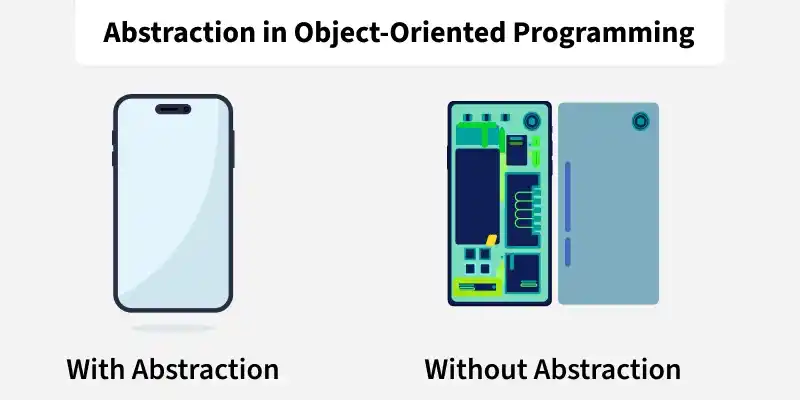
Abstraction is the process of concentrating on an object's or system's key features while disregarding unimportant elements. It enables programmers to produce models that simply and easily convey the core of real-world objects and ideas. We can achieve abstraction in two ways:
- Abstract Class: Abstract classes provide a way to create blueprints for objects without providing complete implementations. They serve as templates for other classes to inherit from, defining common behaviors and attributes that subclasses can extend and customize.
- Using Interface: Interfaces serve as blueprints for classes, defining a set of method signatures without specifying their implementations. Unlike classes, interfaces cannot contain instance fields but can include constants. They provide a way to achieve abstraction.
Example:
#include <iostream>

// Abstract class
class Vehicle {
public:
    // Pure virtual functions
    virtual void accelerate() = 0;
    virtual void brake() = 0;

    // Concrete method
    void startEngine() {
        std::cout << "Engine started!" << std::endl;
    }
};

// Concrete class
class Car : public Vehicle {
public:
    void accelerate() override {
        std::cout << "Car: Pressing gas pedal..." << std::endl;
        // Hidden complex logic: fuel injection, gear shifting, etc.
    }

    void brake() override {
        std::cout << "Car: Applying brakes..." << std::endl;
        // Hidden logic: hydraulic pressure, brake pads, etc.
    }
};

int main() {
    Vehicle* myCar = new Car();
    myCar->startEngine();
    myCar->accelerate();
    myCar->brake();
    delete myCar;
    return 0;
}
#include <stdio.h>

// Abstract class equivalent using struct and function pointers
typedef struct {
    void (*accelerate)(struct Vehicle*);
    void (*brake)(struct Vehicle*);
    void (*startEngine)(struct Vehicle*);
} Vehicle;

// Concrete methods
void startEngine(Vehicle* self) {
    printf("Engine started!\n");
}

void carAccelerate(Vehicle* self) {
    printf("Car: Pressing gas pedal...\n");
    // Hidden complex logic: fuel injection, gear shifting, etc.
}

void carBrake(Vehicle* self) {
    printf("Car: Applying brakes...\n");
    // Hidden logic: hydraulic pressure, brake pads, etc.
}

int main() {
    Vehicle myCar = {
        .accelerate = carAccelerate,
        .brake = carBrake,
        .startEngine = startEngine
    };
    myCar.startEngine(&myCar);
    myCar.accelerate(&myCar);
    myCar.brake(&myCar);
    return 0;
}
abstract class Vehicle {
    // Abstract methods (what it can do)
    abstract void accelerate();
    abstract void brake();

    // Concrete method (common to all vehicles)
    void startEngine() {
        System.out.println("Engine started!");
    }
}

// Concrete implementation (hidden details)
class Car extends Vehicle {
    @Override
    void accelerate() {
        System.out.println("Car: Pressing gas pedal...");
        // Hidden complex logic: fuel injection, gear shifting, etc.
    }

    @Override
    void brake() {
        System.out.println("Car: Applying brakes...");
        // Hidden logic: hydraulic pressure, brake pads, etc.
    }
}

public class Main {
    public static void main(String[] args) {
        Vehicle myCar = new Car();
        myCar.startEngine();
        myCar.accelerate();
        myCar.brake();
    }
}
from abc import ABC, abstractmethod

# Abstract class
class Vehicle(ABC):
    @abstractmethod
    def accelerate(self):
        pass

    @abstractmethod
    def brake(self):
        pass

    def startEngine(self):
        print("Engine started!")

# Concrete class
class Car(Vehicle):
    def accelerate(self):
        print("Car: Pressing gas pedal...")
        # Hidden complex logic: fuel injection, gear shifting, etc.

    def brake(self):
        print("Car: Applying brakes...")
        # Hidden logic: hydraulic pressure, brake pads, etc.

# Main execution
if __name__ == "__main__":
    myCar = Car()
    myCar.startEngine()
    myCar.accelerate()
    myCar.brake()
// Abstract class
class Vehicle {
    constructor() {
        if (this.constructor === Vehicle) {
            throw new Error("Abstract classes can't be instantiated.");
        }
    }

    // Abstract methods
    accelerate() {
        throw new Error("Method 'accelerate()' must be implemented.");
    }

    brake() {
        throw new Error("Method 'brake()' must be implemented.");
    }

    // Concrete method
    startEngine() {
        console.log('Engine started!');
    }
}

// Concrete class
class Car extends Vehicle {
    accelerate() {
        console.log('Car: Pressing gas pedal...');
        // Hidden complex logic: fuel injection, gear shifting, etc.
    }

    brake() {
        console.log('Car: Applying brakes...');
        // Hidden logic: hydraulic pressure, brake pads, etc.
    }
}

// Main execution
const myCar = new Car();
myCar.startEngine();
myCar.accelerate();
myCar.brake();
3. Inheritance
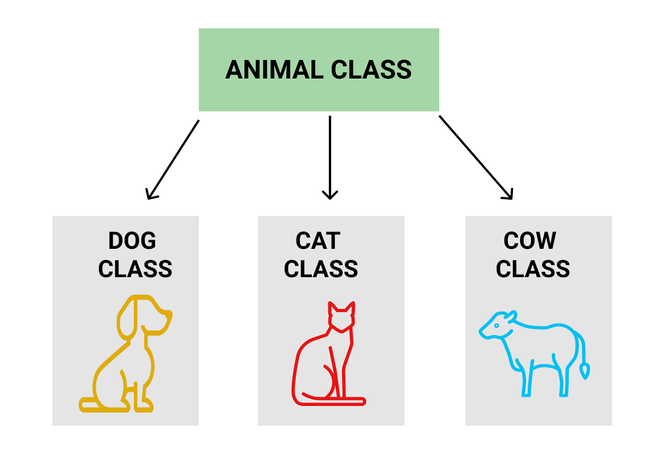
A class (subclass or derived class) can inherit properties and methods from another class (superclass or base class) through inheritance. While retaining its common characteristics, the subclass has the ability to add or change the superclass's functionality.
Syntax:
// Superclass
class Superclass {
// Superclass members
}// Subclass
class Subclass extends Superclass {
// Subclass members
}
Example:
// Superclass (Parent)
#include<iostream>
class Animal {
public:
    void eat() {
        std::cout << "Animal is eating..." << std::endl;
    }

    void sleep() {
        std::cout << "Animal is sleeping..." << std::endl;
    }
};

// Subclass (Child) - Inherits from Animal
class Dog : public Animal {
public:
    void bark() {
        std::cout << "Dog is barking!" << std::endl;
    }
};

int main() {
    Dog myDog;

    // Inherited methods (from Animal)
    myDog.eat();
    myDog.sleep();

    // Child class method
    myDog.bark();
    return 0;
}
// Superclass (Parent)
#include <stdio.h>

void eat() {
    printf("Animal is eating...\n");
}

void sleep() {
    printf("Animal is sleeping...\n");
}

void bark() {
    printf("Dog is barking!\n");
}

int main() {
    // Inherited methods (from Animal)
    eat();
    sleep();

    // Child class method
    bark();
    return 0;
}
// Superclass (Parent)
class Animal {
    void eat() {
        System.out.println("Animal is eating...");
    }

    void sleep() {
        System.out.println("Animal is sleeping...");
    }
}

// Subclass (Child) - Inherits from Animal
class Dog extends Animal {
    void bark() {
        System.out.println("Dog is barking!");
    }
}

public class Main {
    public static void main(String[] args) {
        Dog myDog = new Dog();

        // Inherited methods (from Animal)
        myDog.eat();
        myDog.sleep();

        // Child class method
        myDog.bark();
    }
}
# Superclass (Parent)
class Animal:
    def eat(self):
        print("Animal is eating...")

    def sleep(self):
        print("Animal is sleeping...")

# Subclass (Child) - Inherits from Animal
class Dog(Animal):
    def bark(self):
        print("Dog is barking!")

# Main
if __name__ == '__main__':
    myDog = Dog()

    # Inherited methods (from Animal)
    myDog.eat()
    myDog.sleep()

    # Child class method
    myDog.bark()
// Superclass (Parent)
class Animal {
    eat() {
        console.log('Animal is eating...');
    }

    sleep() {
        console.log('Animal is sleeping...');
    }
}

// Subclass (Child) - Inherits from Animal
class Dog extends Animal {
    bark() {
        console.log('Dog is barking!');
    }
}

// Main
const myDog = new Dog();

// Inherited methods (from Animal)
myDog.eat();
myDog.sleep();

// Child class method
myDog.bark();
4. Polymorphism
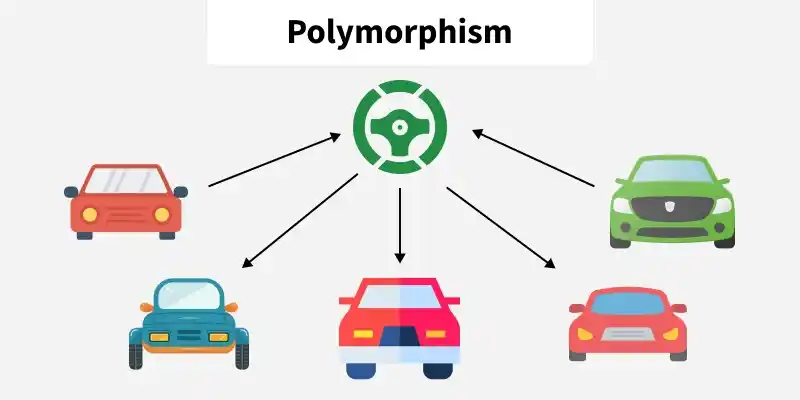
It makes code reuse, extension and flexibility possible by treating objects of different classes as belonging to the same superclass. Through a standard interface, it enables uniform treatment of objects of various categories. It allows the same code to work with several kinds of objects.
- Method Overriding: Method overriding, in which subclasses offer their own implementation of a method defined in their superclass, is a common way to establish polymorphism. Depending on the object's real type, the runtime environment chooses which implementation to call when a method is called on it.
- Interface-Based Polymorphism: Another way to accomplish polymorphism is by using interfaces or abstract classes, in which case several classes extend the same abstract class or implement the same interface.
- Method Overloading: This is a feature that allows a class to have multiple methods with the same name but different parameters. This enables developers to create methods that perform similar tasks but operate on different types of input or different numbers of parameters.
Example:
#include <iostream>

class Calculator {
public:
    // Method for adding two integers
    int add(int a, int b) {
        return a + b;
    }

    // Overloaded method for adding three integers
    int add(int a, int b, int c) {
        return a + b + c;
    }

    // Overloaded method for adding two doubles
    double add(double a, double b) {
        return a + b;
    }
};

int main() {
    Calculator myCalculator;

    // Example usage of the overloaded methods
    int sum1 = myCalculator.add(5, 3);
    int sum2 = myCalculator.add(4, 6, 2);
    double sum3 = myCalculator.add(3.5, 2.7);

    // Output the results
    std::cout << "Sum of 5 and 3: " << sum1 << std::endl;
    std::cout << "Sum of 4, 6, and 2: " << sum2 << std::endl;
    std::cout << "Sum of 3.5 and 2.7: " << sum3 << std::endl;

    return 0;
}
#include <stdio.h>

int add_int(int a, int b) {
    return a + b;
}

int add_int_three(int a, int b, int c) {
    return a + b + c;
}

double add_double(double a, double b) {
    return a + b;
}

int main() {
    // Example usage of the functions
    int sum1 = add_int(5, 3);
    int sum2 = add_int_three(4, 6, 2);
    double sum3 = add_double(3.5, 2.7);

    // Output the results
    printf("Sum of 5 and 3: %d\n", sum1);
    printf("Sum of 4, 6, and 2: %d\n", sum2);
    printf("Sum of 3.5 and 2.7: %.1f\n", sum3);

    return 0;
}
public class Calculator {
    // Method for adding two integers
    public int add(int a, int b) {
        return a + b;
    }

    // Overloaded method for adding three integers
    public int add(int a, int b, int c) {
        return a + b + c;
    }

    // Overloaded method for adding two doubles
    public double add(double a, double b) {
        return a + b;
    }

    public static void main(String[] args) {
        Calculator myCalculator = new Calculator();

        // Example usage of the overloaded methods
        int sum1 = myCalculator.add(5, 3);
        int sum2 = myCalculator.add(4, 6, 2);
        double sum3 = myCalculator.add(3.5, 2.7);

        // Output the results
        System.out.println("Sum of 5 and 3: " + sum1);
        System.out.println("Sum of 4, 6, and 2: " + sum2);
        System.out.println("Sum of 3.5 and 2.7: " + sum3);
    }
}
class Calculator {
    // Method for adding two integers
    add(a, b) {
        return a + b;
    }

    // Overloaded method for adding three integers
    add(a, b, c) {
        if (arguments.length === 3) {
            return a + b + c;
        }
        return this.add(a, b);
    }

    // Overloaded method for adding two doubles
    add(a, b) {
        if (typeof a === 'number' && typeof b === 'number') {
            return a + b;
        }
        return this.add(a, b);
    }
}

const myCalculator = new Calculator();

// Example usage of the overloaded methods
const sum1 = myCalculator.add(5, 3);
const sum2 = myCalculator.add(4, 6, 2);
const sum3 = myCalculator.add(3.5, 2.7);

// Output the results
console.log('Sum of 5 and 3:', sum1);
console.log('Sum of 4, 6, and 2:', sum2);
console.log('Sum of 3.5 and 2.7:', sum3);
Note: Python does not support method overloading in the same direct way that languages like Java or C++ do. Here, only the last definition will be accessible and callable as it "override" any previously defined methods with the same name.
