
Looking for an accurate coordinates finder? Whether you need to find location by latitude and longitude, identify the exact latitude and longitude of my location, or get precise coordinates of my location, this guide has you covered. With tools like My GPS coordinates and the coordinate locator, you can easily get GPS coordinates for any location. Additionally, you can even find location by latitude and longitude on Google Earth for a detailed view. Use these methods to pinpoint your position accurately and effortlessly.
Finding a location by latitude and longitude on Google Maps is a powerful way to pinpoint exact places, especially when addresses are not available or when dealing with remote areas. Here, we will learn to find a location using latitude and longitude on Google Maps, ensuring you can navigate to any destination with ease and accuracy.

Table of Content
- What is Latitude and Longitude?
- Why Use Latitude and Longitude
- How to Find Location by Latitude and Longitude
- How To Get Latitude And Longitude From Google Maps Using Mobile
- How To Get Latitude And Longitude From Google Maps Using PC
- How to Find Coordinates on Google Maps
- How to find Coordinates From Google Maps on Mobile
- Google Earth vs Google Maps: What's the Difference
What is Latitude and Longitude?
Latitude and longitude are the two key geographical coordinates used to determine a specific location on Earth's surface. Latitude measures how far north or south a point is from the Equator, while longitude indicates how far east or west a location is from the Prime Meridian. These coordinates are essential in navigation, mapping, and global positioning systems (GPS). Knowing the latitude and longitude of my location allows you to pinpoint any place on the globe, whether you're using Google Maps, GPS coordinates, or other tools to find location by latitude and longitude accurately.
Why Use Latitude and Longitude
Latitude and longitude coordinates provide exact locations on the Earth's surface, making them invaluable for:
- Travelers and Adventurers: Exploring off-the-beaten-path destinations.
- Researchers and Scientists: Conducting geographical studies.
- Emergency Services: Locating precise positions in critical situations.
Also Read : How Does Google Map Works?
Understanding Coordinates Format
On Google Maps, coordinates (Latitude And Longitude) are shown in the Decimal Degrees (DD) format.
For example 26.942797 (latitude), 80.906750 (longitude).This format simplifies the representation of geographic locations, making it user-friendly for navigation and mapping on digital platforms.
How to Find Location by Latitude and Longitude
We can find the Location by Latitude and Longitude on Google Maps as well as on Google Earth in different ways. These are:
How To Get Latitude And Longitude From Google Maps Using Mobile
Here is how you can get the current location on Google Maps using the Mobile.
Step 1: Open Google Maps
Open the Google Maps app on your mobile device.

Step 2: Search for the Location
Use the search bar to locate the Area that you want to know the coordinates.

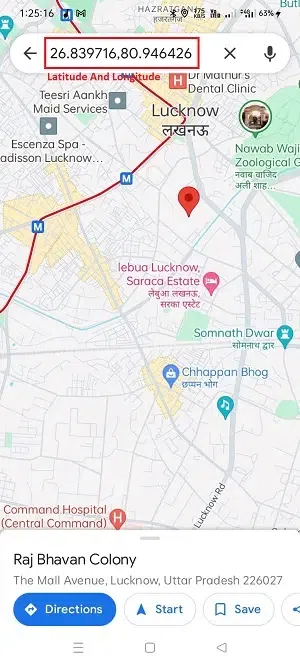
Step 3: Tap and Hold the area
Now, Tap and hold on to the map to drop a pin, Now you can see the coordinates in Search Bar.
How To Get Latitude And Longitude From Google Maps Using PC
Follow the steps given below to find the latitude and longitude from Google Maps on PC.
Step 1: Open Google Maps
Open the Google Maps website on your PC browser.
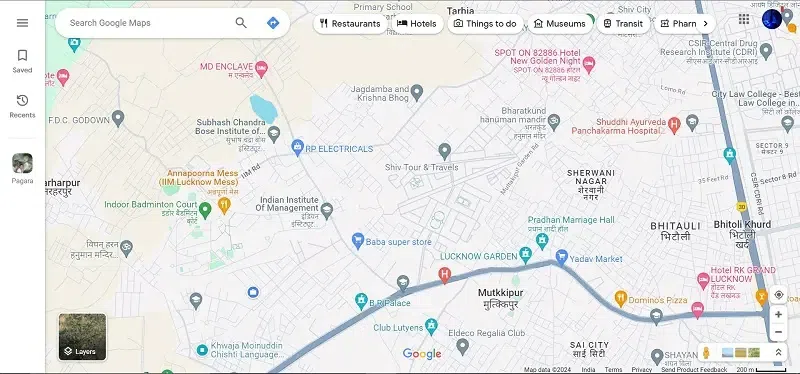
Step 2: Search Location
Use the search bar to find the desired point on the map. and click on search icon.
.webp)
Step 3: Right-click the place
Right-click on the place where you what to know the coordinates. You can see Latitude And Longitude or you can choose "What's here?" which, shows the coordinates in the pop-up windows.
.webp)
Another way to find these coordinates is by simply tapping on the area that you want to know about coordinates. the pop-up windows came up that showed the Latitude And Longitude of that location.
.webp)
How to Find Coordinates on Google Maps
Here are the steps how to find the coordinates on Google Maps:
1. Find Coordinates from Google Earth Using Pc
Step 1: Open Google Earth
Open the Google Earth website on your PC browser.
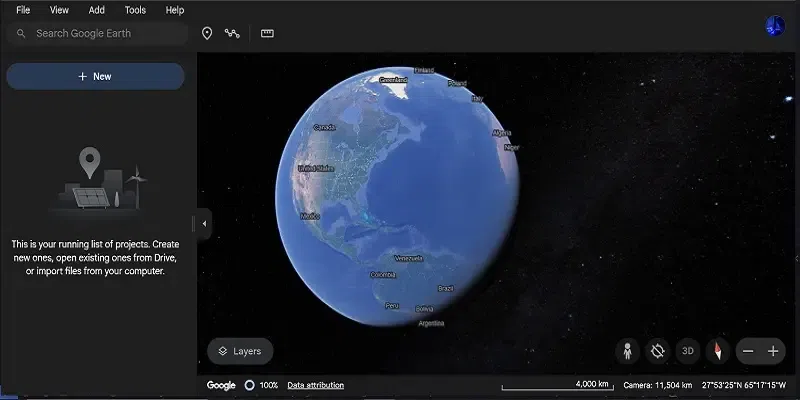
Step 2: Search for the Location
Use the search bar to locate the area you're interested in to get the coordinates within Google Earth.

Step 3: Obtain Coordinates
Now, to obtain coordinates on Google Earth, point the mouse cursor on a particular location and you can see the coordinates in the bottom right side corner.
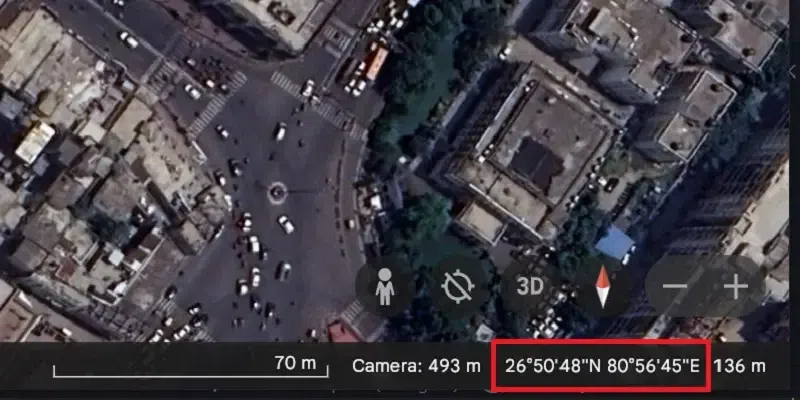
Alternatively, you can simply right-click on the location and copy the coordinates.

How to find Coordinates From Google Maps on Mobile
Now we will use the Google Maps to find the coordinates of your location.
Step 1: Install Google Earth
Install google earth from the play store.
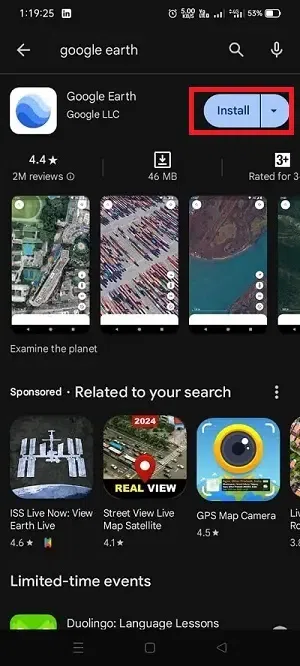
Step 2: Open Google Earth
Now, Open the Google Earth application on your mobile.

Step 3: Search for the location
Use the Search bar and search for the location you want to get coordinates.
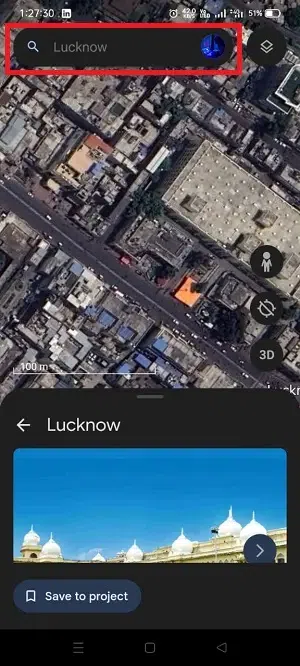
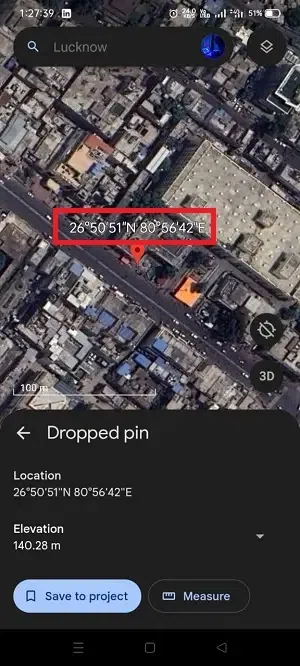
Step 4: Get Coordinates
Long on the Area that you want to get the coordinates.
Google Earth vs Google Maps: What's the Difference
Here is a basic difference provided between Google Earth and Google Maps.
| Factor | Google Maps | Google Earth |
|---|---|---|
| User Interface | It has clean and streamlined interface for navigation. | it has high quality and immersive 3D interface for detailed exploration. |
| Functionality | It is primarily focused on navigation and location services. | It offers a more comprehensive exploration of geographical features, including 3D imagery and historical views. |
| Use Cases | It is ideal for everyday navigation, directions, and local search. | it suited for in-depth geographical exploration, educational purposes, and visualizing terrain and landscapes. |
Also Read:
Conclusion
Knowing how to find latitude and longitude not only from Google Maps but also from Google Earth adds versatility to your location-based activities skill. Understanding the latitude and longitude of my location is crucial for accurate navigation and mapping. With mobile devices, you can easily find the latitude and longitude of my location in mobile using apps like Google Maps or a coordinates finder. If you're viewing a latitude and longitude map or searching for the precise coordinates of my location, these tools ensure you can navigate the world with confidence and precision.
