Setting up a guest WiFi network is a great way to provide internet access to visitors while keeping your main network secure. In just 2 easy steps, you can create a guest WiFi connection that allows guests to use your internet without accessing your devices. This guide will walk you through the simple process of how to set up a guest WiFi network, ensuring both convenience and security for your home or office.
Table of Content
What is a Guest WiFi Network Connection?
The Guest WiFi Connection is the Internet Medium that can be used by the guest visiting your house. Often, guests ask for the username & password of your Router Connection & consume a large number of data. You can prevent it by setting up a guest WiFi Connection on the Router. If you have a Router Connection in your house, the guest WiFi connection can be developed.
The guest WiFi network is completely separate from your main Router connection. With a separate username & password, the guest WiFi Router connection be accessed. In this way, if the user is using something threatful on the internet, it will not impact the Main WiFi Connection & will separate from the Guest WiFi Connection.
Why guest Wi-Fi?
Now, we are going to discuss some of the reasons to develop guest WiFi Connection at Home. Discussing the reasons will clarify the concept more. Because a guest WiFi connection is more beneficial than what you are thinking.
1. Security
The Guest WiFi provides a bit more security to the Main WiFi Connection as it is completely separated. In this case, all the Guest Traffic gets separated from the primary network which reduces the risk of accessing unauthorized connections.
2. Privacy
If the Guests are added with the guest WiFi Connection, they can accidentally or intentionally access shared files, printers, etc. This will increase the security of the shared connection.
3. Bandwidth Management
You can manage the Bandwidth of the guest's WiFi Connection. This will reduce the unwanted data loss by the guest & there will be a data cap present to access the data.
How to Setup Guest WiFi Network?
Here's how you can make a guest network connection on a WiFi Router -
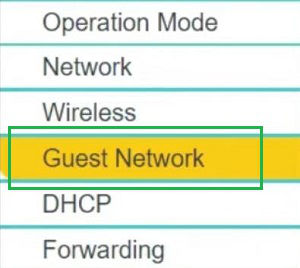
Step 1: At first, you have to enter the Router Admin Panel using the IP Address of the device. Sometimes, the IP Address is mentioned on the Router Itself. Now, click on the Guest Network from the Left Side Panel.
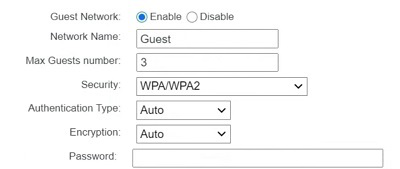
Step 2: It is time to Configure the Guest WiFi Network. First, Enable the Guest Network. And then, the following things need to be addressed properly.
Important Terms
- Network Name: You have to provide a proper name to the Guest WiFi Connection to separate it from the Main Connection.
- Guest Number: Here, you can configure the Number of Guest Devices to be connected to the connection at the same time.
- Security Type: There are two types of Security Present in the Guest WiFi Connection. Among them, you have to go for the WPA Connection only which is an extension version of security.
- Password: Here, you have to create some Strong Passwords that are not easy to break down by any kind of external threats.
Things to Keep in Mind While Setting Up Guest WiFi Connection
Now To set up a guest WiFi Network, you would require some best practices to be executed. You have to follow some tips while making a Guest WiFi connection. Some of the points that you have to remember while developing a Guest WiFi Connection are the following.
1. Give Proper Name
You have to provide an easily identifiable Name of the Guest's WiFi Connection. Make sure, you have not provided any personal information there. Like, your Name or Address House, etc. Guest WiFi Connections are considered the most vulnerable connection ever.
2. Reduce Guest Device Number
While setting up the Guest WiFi, you should not provide a large number of the Guest Device Access. In such cases, more guest Devices can be added without your permission by the guest. This will increase the Network Consumption a more.
3. Enable Network Isolation
If the Router provides the feature, then you have to Isolate the Guest WiFi Network completely from the Main Primary Network. However, if this option is not present, then it is by default enabled.
Conclusion
By following these 2 easy steps, you can quickly set up a guest WiFi network that offers a safe and secure way for guests to connect to the internet. Whether you're hosting friends, family, or clients, a guest WiFi network keeps your main network private while still providing internet access. Be sure to explore your WiFi router guest network setup options for further customization and security settings.