
WhatsApp is one of the world’s most popular messaging apps, but it traditionally allows only one account per phone number. Fortunately, many Android brands now offer built-in features like Dual Apps, App Cloner, or Parallel Apps to let you run two WhatsApp accounts on the same device.
1. Use WhatsApp’s Native Multi-Account Feature (Android)
WhatsApp’s multi account support allows you to add and switch between two accounts in the same app.
Step 1: Open the WhatsApp app on your Android device.
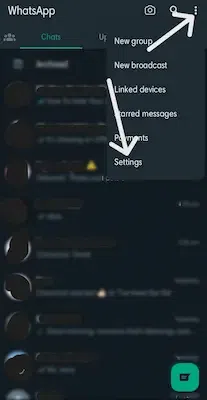
Step 2: Click on the three dots at the top right corner of the screen.
Step 3: Go to Settings.
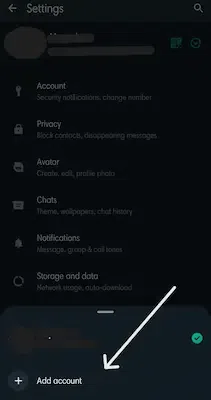
Step 4: Click on the downward arrow icon next to your name.

Step 5: Tap “Add Account”.
Step 6: Tap on Agree and continue.
.webp)
Step 7: Enter the phone number associated with your backup WhatsApp account.
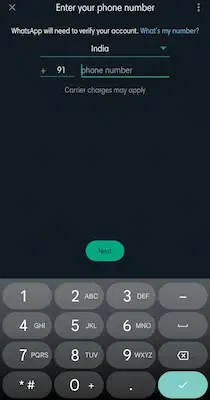
Step 8: Log in to your account by following the onscreen instructions.
Note: You can also log in to your secondary account using a QR code link, skipping the phone number verification on the same device.
2. How to Set Up Dual WhatsApp Accounts on Samsung Phones
Samsung offers a built-in feature called Dual Messenger.
Step 1: Go to the Settings app on your Samsung Galaxy smartphone.
Step 2: Select "Advanced Features" from the menu.

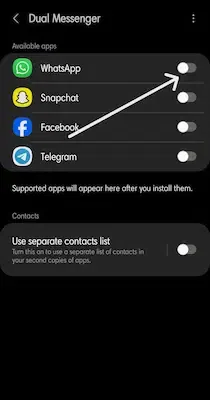
Step 3: Scroll down, and you will see the "Dual Messenger" option listed. Tap on it.
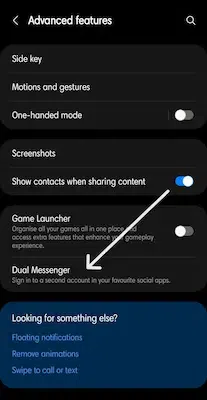
Step 4: Find WhatsApp under “Available Apps.”
You most likely need to tap on the toggle button next to WhatsApp to be able to enable the Dual Messenger function for it.
Step 5: Your phone will ask you for confirmation to install the second WhatsApp account. Click on the Install button.
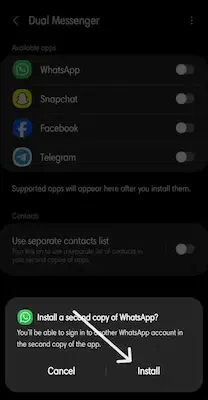
Step 6: Go to the app drawer you'll now see two WhatsApp icons (one with an orange chain symbol).

Step 7: Now you are able to run both apps and sign in using a different phone number.
3. How to Set Up Dual WhatsApp on Xiaomi Phones
The steps are similar to the process above with slight differences:
Step 1: Navigate to Settings > Apps > Dual apps.
Step 2: Tap Create.
Step 3: Choose WhatsApp from the list.
4. How to Use Dual WhatsApp on Oppo, Realme, and OnePlus Devices
These devices include an App Cloner feature.
Step 1: Navigate to Settings > Apps > App cloner.
Step 2: Select WhatsApp.
Step 3: Enable Create app clone.
Step 4: Find the cloned WhatsApp icon in the app drawer and set it up.
5. How to Install Dual WhatsApp on Vivo and iQOO Phones
Certain steps to be followed for installing WhatsApp accounts on Vivo and iQOO phones, include:
Step 1: Navigate to Settings > Apps > App clone.
Step 2: Turn on the toggle for WhatsApp.
Step 3: Look for the second WhatsApp icon on your app drawer and set it up much like your primary account.
6. Set Up Dual WhatsApp via Third-Party Apps
Some phones like Pixel, Motorola, Nothing Phone 1, HMD Global Devices with a near-stock Android experience do not support app cloning natively. In such cases, you must use a third-party cloning app.
Popular App Cloners:
- Parallel Space (LBE Tech)
- Island (Oasis Feng)
Instructions:
- Open the Google Play Store.
- Search for “app clone” or the apps above.
- Check ratings, reviews, and permissions before installing.
- Use the app’s setup process to clone WhatsApp, then configure your second account.
