
The req.params property is an object containing properties mapped to the named route “parameters”. For example, if you have the route /student/:id, then the “id” property is available as req.params.id. This object defaults to {}.
Syntax:
req.paramsParameter: No parameters.
Return Value: Object
The req.params property is essential for accessing route parameters in Express.js.
Steps to Install the express module:
Step 1: You can install this package by using this command.
npm install expressStep 2: After installing the express module, you can check your express version in the command prompt using the command.
npm version expressStep 3: After that, you can just create a folder and add a file, for example, index.js. To run this file you need to run the following command.
node index.jsProject Structure:
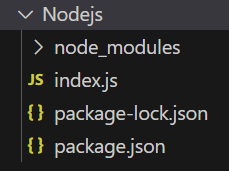
The updated dependencies in package.json file will look like:
"dependencies": {
    "express": "^4.18.2",
}
Example 1: Below is the code of req.params Property implementation.
const express = require('express');
const app = express();
const PORT = 3000;

app.get('/:id', function (req, res) {
    console.log(req.params['id']);
    res.send();
});

app.listen(PORT, function (err) {
    if (err) console.log(err);
    console.log("Server listening on PORT", PORT);
});
Steps to run the program:
Make sure you have installed the express module using the following command:
npm install expressRun the index.js file using the below command:
node index.jsConsole Output:
Server listening on PORT 3000Browser Output: Now open your browser and go to http://localhost:3000/123, now you can see the following output on your console:
Server listening on PORT 3000
123
Example 2: Below is the code of req.params Property implementation.
const express = require('express');
const e = require('express');
const app = express();
const PORT = 3000;

const student = express.Router();
app.use('/student', student);

student.get('/profile/:start/:end', function (req, res) {
    console.log("Starting Page: ", req.params['start']);
    console.log("Ending Page: ", req.params['end']);
    res.send();
})

app.listen(PORT, function (err) {
    if (err) console.log(err);
    console.log("Server listening on PORT", PORT);
});
Steps to run the program: Run the index.js file using the below command:
node index.jsOutput: make a GET request to http://localhost:3000/student/profile/12/17, now you can see the following output on your console:
Server listening on PORT 3000
Starting Page:  12
Ending Page:  17
