
AI voice generation is the technology that allows computers to create human-like speech. In simple terms, it means turning text into a voice — one that sounds natural, emotional, and often indistinguishable from a real person.
There are a few different types of AI voice generation, each with its own purpose:
There are three main types of AI-generated voices:
1. Text-to-Speech (TTS):
Text-to-speech, or TTS, is the most basic form of AI voice generation. You simply type in some text, and the AI reads it out loud.
Early TTS systems sounded robotic, but modern tools now sound smooth, natural, and expressive. Some even let you choose accents, emotions, and pacing.
Where it’s used:
- GPS systems
- Reading tools for the visually impaired
- Audiobooks
- Language learning apps
- Automated phone menus
2. Voice Cloning
Voice cloning means creating a digital copy of someone’s real voice using AI. If you have a short recording of someone talking, some tools can use it to make a voice model that sounds just like them.
This means the cloned voice can say anything you type, even if the real person never spoke those words.
Where it’s used:
- Personal branding (YouTubers, influencers)
- Game characters or virtual avatars
- Voice preservation for medical use
- Storytelling and entertainment
Important: Voice cloning should always be used responsibly. Never copy someone’s voice without their clear permission. It can lead to privacy issues, legal problems, or harm if used to mislead or impersonate someone. Always ask first and use it respectfully.
3. Voice Summarization
Some advanced tools can now summarize long text and then read the summary aloud using AI-generated voices. This is perfect for people who don’t have time to read full articles, emails, or reports.
Where it’s used:
- News briefings and daily updates
- Meeting recaps
- Study guides
- Voice assistants that give quick summaries
How Do These Tools Work?
AI voice generators use smart technology — like deep learning and neural networks — to figure out how people talk. They learn everything: tone, speed, emotion, even natural pauses.
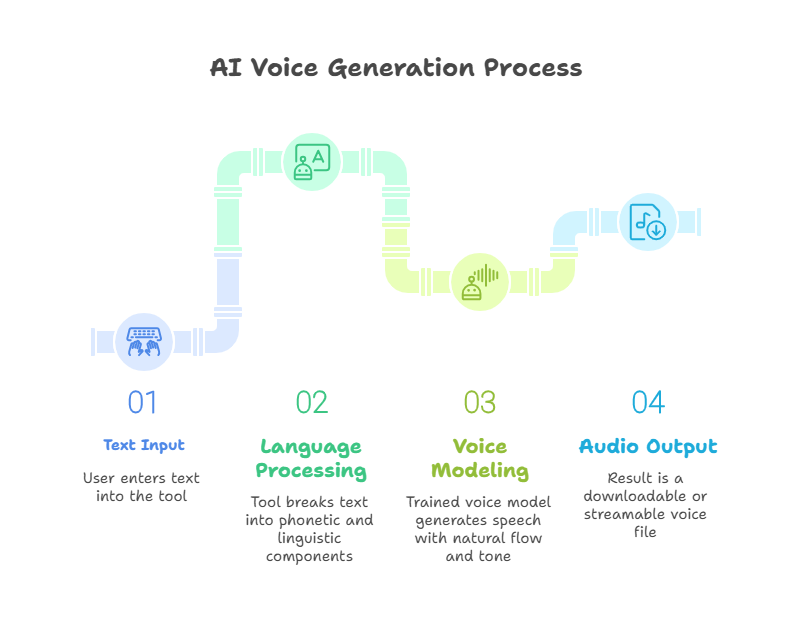
Here’s a simple version of what happens:
- Text Input: You enter text into the tool.
- Language Processing: The tool breaks the text into phonetic and linguistic components.
- Voice Modeling: It applies a trained voice model to generate speech with natural flow and tone.
- Audio Output: The result is a downloadable or streamable voice file.
What’s the Difference Between Text-to-Speech and AI Voice Generation?
- Text-to-Speech (TTS) is the traditional method of converting written text into spoken words.
- It often sounds robotic or flat, with little to no emotion.
- It doesn’t adjust tone, rhythm, or expression.
- Good for simple tasks like screen readers, announcements, or basic alerts.
- Limited customization — you might only be able to change the speed or volume.
- AI Voice Generation is a more advanced and natural approach to creating speech.
- It sounds much more like a real human voice, with smooth flow and natural pauses.
- Can express emotion — happy, sad, excited, calm, and more.
- Offers customization like tone, pitch, speed, and even accent.
- Some tools allow voice cloning, which can copy a specific person’s voice.
- Ideal for storytelling, podcasts, YouTube videos, voiceovers, apps, and virtual assistants.
Popular AI Voice Generation Tools
1. ElevenLabs
- ElevenLabs is known for producing some of the most realistic and expressive AI voices available today. Its standout feature is voice cloning, which can replicate a real person’s voice with just a short audio clip. It also supports emotional speech and multilingual voices, making it perfect for audiobooks, YouTube videos, character dialogue, and storytelling projects where authenticity matters.
2. Resemble.ai
- Resemble.ai combines AI voice generation with advanced customization tools. It allows you to clone voices, edit speech with text, and add real-time emotions like excitement or sadness. It even supports API integration for developers building apps, games, or virtual assistants. Resemble is a great choice for brands or creators who want unique, interactive voice experiences.
3. Speechify
- Speechify is designed for reading on the go. It converts text from PDFs, web pages, emails, and more into clear, natural audio. Originally built to support people with dyslexia or ADHD, it’s now used by students, professionals, and multitaskers alike. With cross-device syncing and adjustable voice settings, Speechify helps you absorb more content without having to sit down and read.
A detailed breakdown of each tool will be provided in the following sections
Where Are AI Voices Being Used?
AI voice tools are now part of everyday content creation and digital experiences. Common use cases include:
- Audiobooks & Podcasts – Quickly turn written content into audio.
- Video Voiceovers – Add narration to YouTube videos, ads, or training videos.
- Virtual Assistants – Powering voices for chatbots, smart devices, and mobile apps.
- Accessibility – Helping visually impaired users by reading out web content or documents.
- Customer Service – Used in IVR systems and automated support calls.
- Gaming – Adding voices to characters or in-game narration without hiring actors.
Benefits of Using AI Voice Tools
- Cost-Effective: Saves money on hiring voice actors for every project.
- Fast Production: Generate hours of audio in minutes.
- Consistency: Maintain the same voice tone across different content.
- Multilingual Support: Reach global audiences by generating voices in many languages.
Things to Consider Before Choosing a Tool
Before picking a voice generation tool, think about:
- Voice Quality: Does it sound natural or robotic?
- Customization Options: Can you change tone, speed, or emotion?
- Licensing: Check if the tool allows commercial use.
- Ease of Use: Is the interface beginner-friendly?
- Integration: Does it offer APIs or plugins for your workflow?
