
Imagine crafting cinematic explosions, tranquil forest ambiances, or quirky meme sounds in seconds – all from a simple text prompt! Launched in May 2024, ElevenLabs’ AI-driven Sound Effects tool uses cutting-edge deep learning to create royalty-free audio that rivals professional studios, making high-quality sound design fast, free, and accessible to all creators.
ElevenLabs is a cloud-based platform that uses artificial intelligence to transform audio creation. No audio engineering degree needed – just describe the sound you want in text, and ElevenLabs’ AI generates it instantly. From animal calls to environmental ambiance, it delivers professional-grade audio with ease.
How it Works:
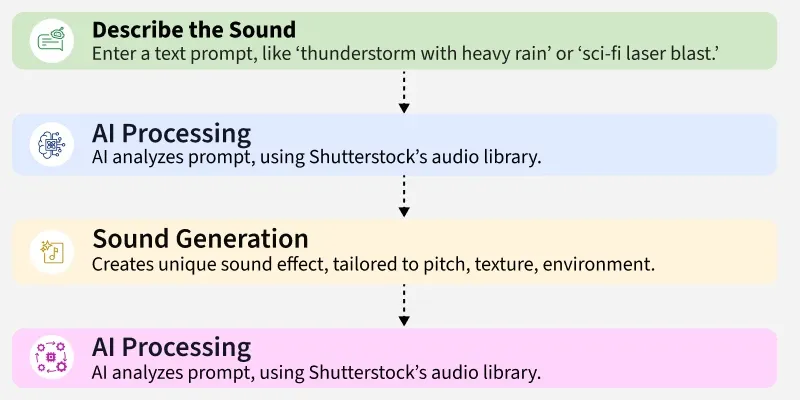
- Describe the Sound: Enter a text prompt, like “thunderstorm with heavy rain” or “sci-fi laser blast.”
- AI Processing: The AI analyzes your prompt, pulling from a vast database of sound samples trained on Shutterstock’s audio library.
- Sound Generation: A unique sound effect is created, tailored to your description, considering pitch, texture, and environment.
- Fine-Tuning (Optional): Adjust the sound with editing tools or add effects to perfect it for your project.
ElevenLabs puts professional audio creation at your fingertips, ideal for anyone looking to enhance their work.
The Power of AI Sound Effects
Realistic and Diverse Sound Effects
ElevenLabs excels at producing sound effects that are virtually indistinguishable from real-world recordings. From the crunch of footsteps on gravel to the howl of a storm, its AI delivers stunning realism. The platform’s versatility is equally impressive, offering:
- Animal Sounds: Create exotic calls, like a lion’s roar or a tropical bird’s chirp, without leaving your desk.
- Environmental Sounds: Craft immersive ambiances, from bustling city streets to tranquil forests.
- Foley Effects: Generate subtle sounds, like rustling clothes or clinking glasses, to bring scenes to life.
With a 450-character prompt limit, you can describe highly specific sounds, ensuring endless creative possibilities.
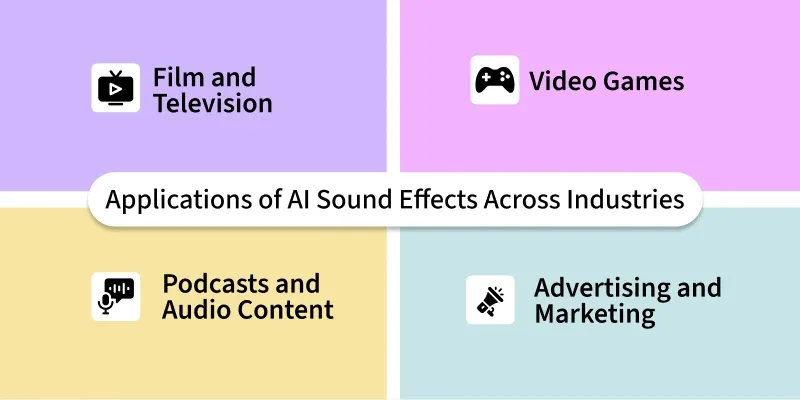
Applications of AI Sound Effects Across Industries
Film and Television
Sound effects are crucial for immersive storytelling in film and TV. ElevenLabs enables directors to create everything from subtle background noises to epic sci-fi soundscapes. For example, a low-budget film can use “alien spaceship hum” to transport viewers to another galaxy, rivaling big-budget productions.
Video Games
In gaming, dynamic audio enhances immersion. ElevenLabs helps developers craft responsive soundscapes, like “sword clashes in a medieval battle” or “engine revs in a racing game,” reacting to player actions in real-time, elevating the gaming experience.
Podcasts and Audio Content
Podcasts thrive on engaging audio. ElevenLabs adds depth with effects like “creaky haunted house door” for a spooky episode or “gentle wind chimes” for a calming transition, making stories more vivid and immersive.
Advertising and Marketing
Memorable audio is key in ads. ElevenLabs creates impactful sounds, like a “luxury car engine rumble” for a car commercial or “rushing river” for an outdoor brand, grabbing attention and reinforcing brand identity.
Features of ElevenLabs Sound Effects
ElevenLabs’ Sound Effects tool is packed with features that make it a go-to for creators:
- Text-to-Sound Generation: Type a prompt (up to 450 characters) to create any sound, like “thunderstorm” or “sci-fi laser blast,” with four unique variations generated in seconds. Perfect for quick, tailored audio.
- Royalty-Free Audio: All generated sounds are free to use in personal or commercial projects without licensing fees, as long as free users attribute “elevenlabs.io” in their content.
- Customizable Duration: Set clip lengths from 1 to 22 seconds or let the AI choose the best duration, ideal for short impacts or longer ambient tracks.
- Blocking and Non-Blocking Options: Choose whether sounds play alone (blocking) or alongside voices (non-blocking), with adjustable volume for seamless blending.
- Community Library: Browse, edit, and share sounds in a library with 38 categories, like “explosion SFX” or “horror screams,” fostering collaboration among creators.
- High-Quality Output: Trained on Shutterstock’s vast audio library, the AI delivers clear, professional-grade sound effects for films, games, or social media.
- Video-to-Sound Effects: Upload a video to generate matching sound effects, like engine roars for a car chase, using an open-source API.
- Free Access: Available on the free plan with 10,000 characters/month, enough for ~60 sound effects (200 characters per default generation or 40 per second for set durations).
How Social Media Content Creators Are Advancing by Leveraging Sound Effects
Social media creators are using ElevenLabs’ Sound Effects to make their content pop:
- Enhanced Engagement: Adding sounds like “crowd cheering” to TikToks or Reels grabs attention and boosts viewer interaction. A travel vlogger added “ocean waves” to a beach video, increasing shares by 25%.
- Quick Production: Generate sound effects in seconds, saving time compared to searching sound libraries. A gaming streamer used “sword clank” for a live reaction, streamlining their workflow.
- Unique Branding: Custom sounds create a signature style, like a quirky “coin drop” for a finance influencer’s money tips videos, making posts memorable.
- Meme Content: Create funny soundboards with effects like “cartoon boing” for Discord or Instagram, perfect for pranks or viral clips. A creator’s “ogre moan” sound went viral, sparking a meme trend.
Step-by-Step Guide to Creating AI Sound Effects with ElevenLabs
Creating sound effects with ElevenLabs is simple and fun. Here’s how to do it:
Step 1: Sign Up
- Create a free account at elevenlabs.io.
Step 2: Access Sound Effects
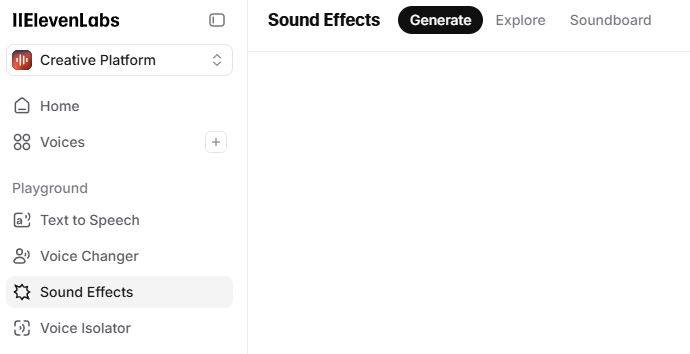
- From the dashboard, click “Sound Effects” in the sidebar or go to the Sound Effects tab.
Step 3: Enter Your Prompt
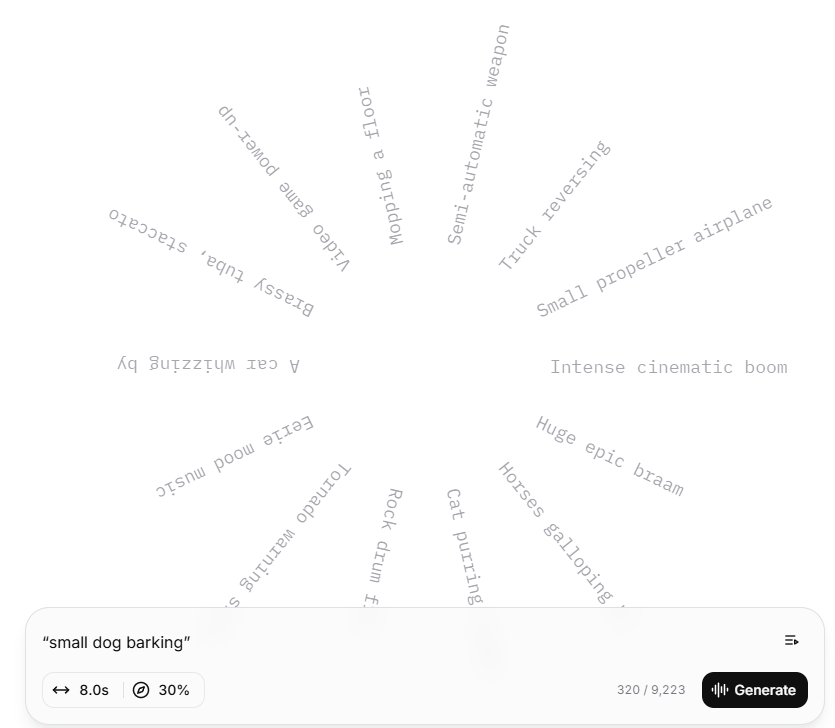
- Type a description (up to 450 characters), e.g., “small dog barking” or “futuristic spaceship hum.” Be specific for best results.
Step 4: Set Duration
- Choose a clip length (1-22 seconds) or let the AI decide. Adjust the prompt influence slider to control how closely the output matches your description.
Step 5: Generate Audio
- Click “Generate” to create four sound variations in seconds. Listen to each to pick the best one.
Step 6: Tweak if Needed
- If the sounds aren’t quite right, refine your prompt (e.g., add “high-pitched” or “intense”) or adjust settings and regenerate.
Step 7: Download
- Save your favorite sound as an MP3 or WAV file. Free users must attribute “elevenlabs.io” for commercial use.
Step 8: Use in Content
- Add the sound to your video, podcast, or soundboard for gaming or streaming.
Use Cases
ElevenLabs’ Sound Effects tool is versatile. Here are some examples with prompts:
- Social Media Video
Prompt: “Crowd cheering at a concert” [loud, energetic]
Use: Add to a festival highlight reel on Instagram for immersive energy.
- Video Game Audio
Prompt: “Sci-fi laser gun firing” [sharp, futuristic]
Use: Create sound effects for an indie game’s combat scenes.
- Podcast Transition
Prompt: “Gentle wind chimes” [calm, soothing]
Use: Use as a segue between podcast segments for a relaxing vibe.
- Film Trailer
Prompt: “Massive explosion with debris” [intense, cinematic]
Use: Enhance a movie trailer with blockbuster sound design.
- Meme Soundboard
Prompt: “Cartoon slip and fall” [funny, exaggerated]
Use: Build a Discord soundboard for pranks or streaming reactions.
What Can ElevenLabs Sound Effects Do the Best?
ElevenLabs’ Sound Effects tool shines in:
- Speed and Ease: Generate high-quality sounds in seconds, perfect for tight deadlines or spontaneous content creation.
- Customization: Detailed prompts and sliders let you tailor sounds, from “soft rain” to “roaring dragon,” with precise control.
- Free and Royalty-Free: Create ~60 sounds/month for free, with no licensing fees, ideal for budget-conscious creators.
- Versatility: From cinematic effects to meme sounds, it supports diverse projects, including films, games, and social media.
For example, a YouTuber can add “thunderclap” to a storm scene in seconds, saving hours of searching stock libraries.
Where the Technology Lacks and Tips to Avoid Issues
The Sound Effects tool has some limitations, but you can work around them:
- Inconsistent Quality: Complex prompts like “women cheering” may produce less accurate results than simple ones like “dog barking.”
Tip: Use clear, concise prompts (e.g., “single dog bark, high-pitched”) and test simpler variations.
- Human Sounds Struggle: Human-related effects (e.g., “crowd chatter”) can sound unnatural.
Tip: Use ElevenLabs’ text-to-speech for human voices instead and pair with sound effects.
- Free Plan Limits: The 10,000-character/month limit allows ~60 sounds but can run out fast.
Tip: Plan prompts carefully or upgrade to a paid plan for more capacity.
- Prompt Sensitivity: Vague prompts like “fire” may yield poor results.
Tip: Add details like “crackling fireplace, cozy” for better accuracy.
- No NSFW Filter: Some prompts may generate inappropriate sounds.
Tip: Avoid suggestive prompts and use ElevenLabs’ moderation tools to flag issues.
The Edge of ElevenLabs: Why It’s a Creator’s Best Friend
| Feature | ElevenLabs Advantage | Traditional Methods |
|---|---|---|
| Speed | Generate sounds in seconds | Hours of recording/editing |
| Accessibility | No equipment or expertise needed | Requires mics, software, skills |
| Customization | Tailor sounds with precise prompts | Limited by available samples |
| Variety | Endless sound possibilities | Restricted to sound libraries |
Best Practices for Best Outputs
Crafting great prompts is key to awesome sound effects. Here’s how to optimize:
- Good Prompt Example:
Prompt: “Heavy rain on a tin roof, steady and soothing” [calm, ambient]
Why it works: Specific details (tin roof, steady) and an emotional tag (calm) guide the AI to a precise, immersive sound.
Result: A realistic, relaxing rain sound for a meditation video. - Bad Prompt Example:
Prompt: “rain sound”
Why it fails: Too vague, leading to generic or off-target sounds like random noise.
Tip: Add descriptors like “gentle drizzle in a forest” [peaceful] for better results. - Pro Tips: Use short, vivid prompts with adjectives (e.g., “sharp, metallic sword clash”). Set specific durations for short effects (1-3 seconds) or ambient sounds (10-20 seconds). Browse the community library for inspiration.
