








Let’s get straight to the point.
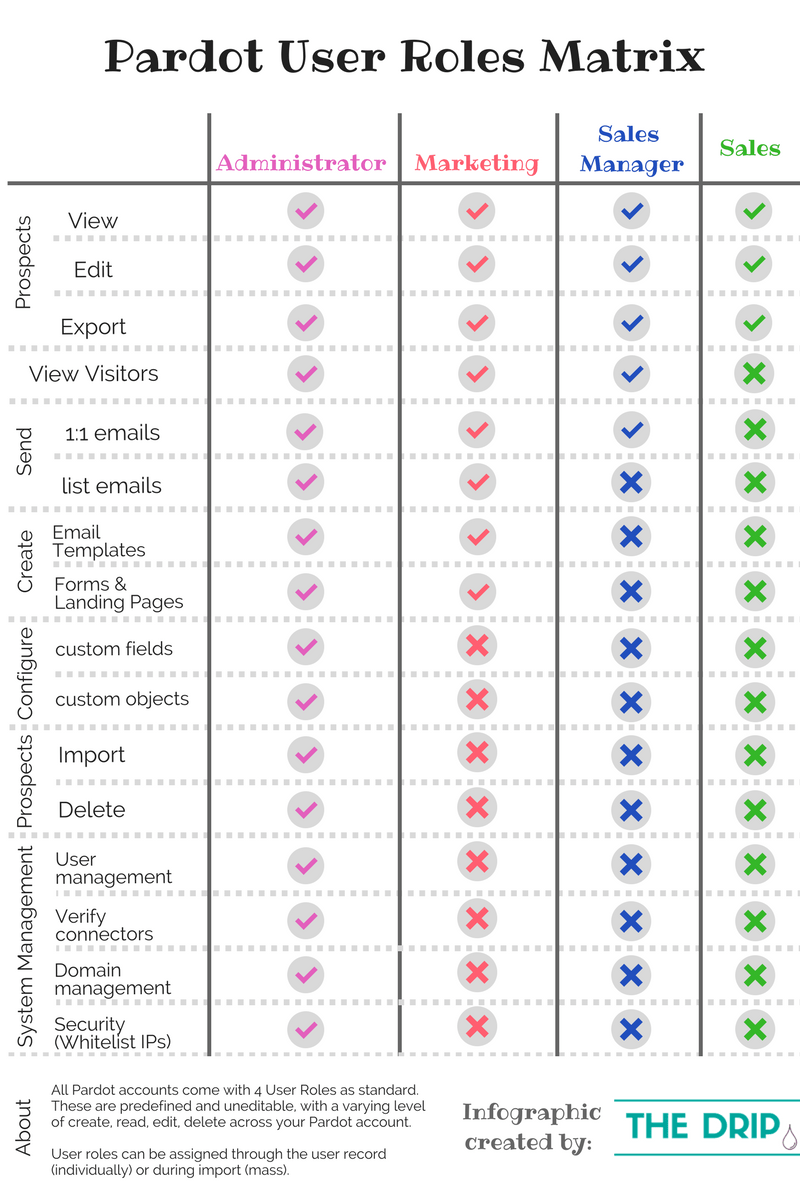
All Pardot accounts come with 4 User Roles as standard:
- Administrator
- Marketing
- Sales Manager
- Sales
These 4 roles are predefined and uneditable, with a varying level of create, read, edit, delete across your Pardot account. User roles can be assigned through the user record (individually) or during import (mass).
Unlike Salesforce’s complex web of Roles, Profiles & Permission Sets, Pardot user roles are much more simple to grasp, and a sigh of relief for any Salesforce Admins out there! Just be aware that Pardot user roles have no relation to Salesforce user permissions.
Now, I’m going to run through each of the user roles and talk about the capabilities and the personas who would typically fill each, presented in the order of most restrictive to most powerful.
Ps. there’s a matrix at the end for whoever reads that far!

Sales
What do we know about sales?
The salesperson has a quota to keep – their overriding motive. They’re the kind of person that can’t sit still for too long – doesn’t welcome new systems or training. They processes information rapidly, and are laser-focused on their own target prospects – the less ‘noise’ the better. The only time they want to look at the ‘bigger picture’ is to see who’s in the lead for closed business on the Sales dashboard*.
*in Salesforce
Pardot can be seen as ‘another system’ that adds to the noise of a salesperson’s already hectic work-life. What they need from Pardot is to see their own assigned prospects that they have to work on nurturing and qualifying (SQL).
This user role is the most basic interface, but ideal for people who don’t need excessive details. They can view, edit and export prospects they are assigned to.
As it’s mostly read-only, this role can also be leveraged to safeguard against people who haven’t been trained – or colleagues who are known troublemakers in the organisation (you know those people..who just do their own thing and disregard the rules?).

Sales Manager
The Sales Manager oversees a team of salespeople, monitoring performance so that the organisation-wide revenue target is achieved.
Living with their forecast as their creed, they are required to be prophets of the pipeline and predict what’s coming down the funnel from Marketing. The Sales-Marketing collaboration has a significant impact, and so they need visibility into the Marketing process when they need it.
The Sales Manager is an advocate of digital transformation and is excited about automation – so they embrace tools like Pardot. They have access to Pardot reports and can view, edit and export prospect to examine the profile of leads Marketing are attracting.

Marketing
‘Marketing’ is a broad label for a role, but people in this user role will tend to be the creative ones. Their motivation is to attract potential customers and retain existing ones, through pairing unique and engaging content via the optimal channels at their disposal.
They have a quota to keep as well, but the analytics they require mostly are at the individual content-level – such as A/B /multivariate tests on forms, landing pages, emails etc. so that they can consistently refine content and improve conversion.
The technical set-up and integrations side is not in their remit, so they don’t need access to these parts.

Administrator
The Administrator role is reserved for the ‘super user’ – the person/people that will be taking responsibility for the account. There’s nothing that an administrator can’t do, and when you look at their responsibilities in keeping the account ship-shape, you’ll see why.
Pardot Admins need to wear many hats (marketing, sales, and technical hats) plus having an eye for strategic decisions because day-to-day they will be:
- Monitoring usage and limits
- Managing prospect data in bulk
- Mapping out automations
- Monitoring connectors and data sync
- Domain management and other technical set-up
…to name the key responsibilities, there’s plenty more! This is why they require a full permission, as you’ll see on the matrix in the next section.
Conclusion
This post has run through the 4 User Roles that are included in all Pardot accounts, regardless of edition.
Now you know what persona the roles are designed for, their motivations, preferences and practical usage of Pardot.
You may be thinking: is that it? Is it really that simple? Yes. These user roles are diverse enough to fit pretty much any user you need to set up – but, if you need to amend the roles for whatever reason, custom user roles are available in Ultimate Edition (or as an add-on in the other editions). We’ll cover this in a future post for sure.
Until next time. Thanks for reading!