Bash on Ubuntu on Windows は Creators Update で改善されている。
日本語が切れない。
日本語が入力できる。
これだけでもすごく有難い。
Bash on Ubuntu on Windows を Ubuntu っぽい配色にする
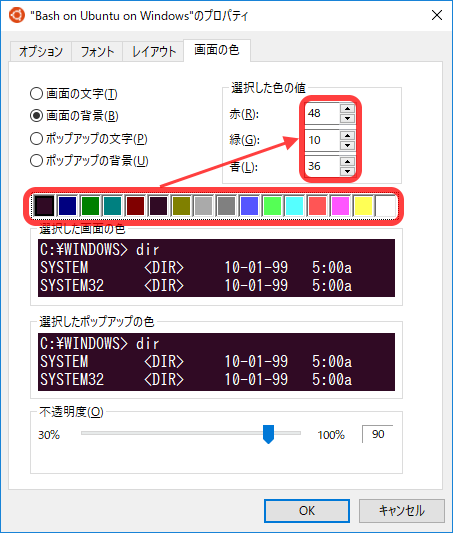
背景色やディレクトリの色を Ubuntu っぽくしてみます。
.bashrc を編集する
force_color_prompt を yes にする (アンコメントする)
# uncomment for a colored prompt, if the terminal has the capability; turned
# off by default to not distract the user: the focus in a terminal window
# should be on the output of commands, not on the prompt
force_color_prompt=yes
.bashrc を保存したら、source .bashrc で設定を読み込む。
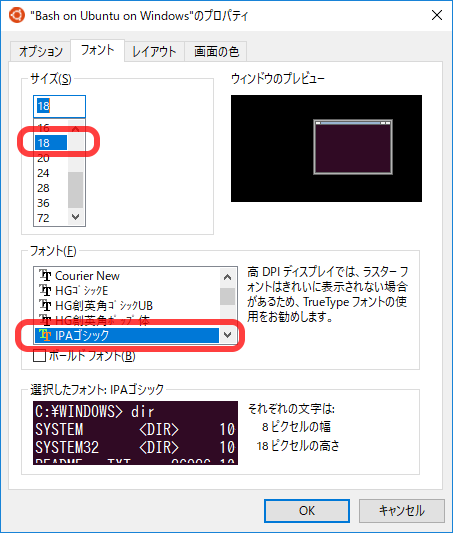
Bash on Ubuntu on Window の左上のアイコンを右クリックして [プロパティ]。
function comma(x: Integer): string;
var
s: string;
a, b, c: Integer;
begin
a := x div100000; { a is the largest three digits }
b := ((x mod1000000) - (x mod1000)) div1000; { b is middle three digits }
c := x div1000; { c is smallest three digits }if (x < 0) or (x > 1000000000) thenbegin
s := '0';
endelseif (a = 0) and (b = 0) thenbegin
s := Format('%d', [x]);
endelseif (a = 0) thenbegin
s := Format('%d,%d', [b, c]);
endelsebegin
s := Format('%d,%d,%d', [a, b, c]);
end;
result := s;
end;