www.flickr.com
Showing posts with label Technology. Show all posts

Nokia X2 White Display FIXED

Monday, April 1, 2013 Posted by Glenn 0 comments

For most of the cellphone technicians, from newbies to pros, nokia phones are easy to fix. Anyway, my aunt always told me to try to fix the cellphone of her daughter (nokia x2) since I am repairing their computer, again.

So I saw her phone, and it only displays a white display, but it turns on, how did I know? Simple, some of the nokia phones vibrate when you turn them on. (oooh turn on huh?! hehe)....

I tried to seek help from forums but most of them suggest that it is a hardware issue, anyway, I asked my cousin if she accidentally dropped her phone, she said yes. XD. So, enough of this talk, and I will share my solution.

If you only accidentally dropped your phone, try this:
1. Turn you cellphone on, you will see of course a white display and it will suddenly vibrate, meaning your phone is totally fine.
2. Tap the back of your phone.
3. Do this for 10 times if it doesn't work. Trust me :) It won't damage your phone as far as I know. ^___^ Anyway, do this at your own risk!!!

additional tags: Nokia x2 fixed white display, nokia x2 displays only white display, white display in nokia x2, how to fix nokia x2, nokia x2 white display problem, nokia x2 lcd display, lcd displays only white in nokia x2.

Sharing is so Easy:
StumpleUpon DiggIt! Del.icio.us Blinklist Yahoo Furl Technorati Simpy Spurl Reddit Google Twitter FaceBook

Labels: ,

ATmega 328p For Arduino Pin Configuration Schematic

Tuesday, October 16, 2012 Posted by Glenn 0 comments

where: 
Port B has pins B0 to B5
Port C has pins C0 to C5
Port D has Pins D0 to D7


If you would like and plan to build a standalone microcontroller circuit, you should check out the schematic of Arduino Programmer. Anyway, I use the arduino duemilanove, so I always check this: http://arduino.cc/en/uploads/Main/arduino-duemilanove-schematic.pdf
In the near future, probably this week, I will be able to finish my POV project with many outputs.


additiona tags: ATmega 328p For Arduino Pin Configuration Schematic; atmega; ATmega328; ATmega328p; ATmega328p pin config; ATmega328 pin configuration; ATmega328 Schematic Diagram; Arduino Duemillanove; Arduino Microcontroller microcontroller; Microcontroller ATmega328p; Microcon ATmega328 pin configuration

Sharing is so Easy:
StumpleUpon DiggIt! Del.icio.us Blinklist Yahoo Furl Technorati Simpy Spurl Reddit Google Twitter FaceBook

Computer POST and beep codes

Friday, October 5, 2012 Posted by Glenn 0 comments


POST ABCs
article from computerhope

The computer power-on self-test (POST) tests the computer to make sure it meets the necessary system requirements and that all hardware is working properly before starting the remainder of the boot process. If the computer passes the POST the computer will have a single beep (with some computer BIOS manufacturers it may beep twice) as the computer starts and the computer will continue to start normally. However, if the computer fails the POST, the computer will either not beep at all or will generate a beep code, which tells the user the source of the problem.
If you're receiving an irregular POST or a beep code not mentioned below follow the POST troubleshooting steps to determine the failing hardware component.

AMI BIOS beep codes
Below are the AMI BIOS Beep codes that can occur. However, because of the wide variety of different computer manufacturers with this BIOS, the beep codes may vary.
Beep CodeDescriptions
1 shortDRAM refresh failure
2 shortParity circuit failure
3 shortBase 64K RAM failure
4 shortSystem timer failure
5 shortProcess failure
6 shortKeyboard controller Gate A20 error
7 shortVirtual mode exception error
8 shortDisplay memory Read/Write test failure
9 shortROM BIOS checksum failure
10 shortCMOS shutdown Read/Write error
11 shortCache Memory error
1 long, 3 shortConventional/Extended memory failure
1 long, 8 shortDisplay/Retrace test failed
AWARD BIOS beep codes
Below are Award BIOS Beep codes that can occur. However, because of the wide variety of different computer manufacturers with this BIOS, the beep codes may vary.
Beep CodeDescription
1 long, 2 shortIndicates a video error has occurred and the BIOS cannot initialize the video screen to display any additional information
Any other beep(s)RAM problem.
If any other correctable hardware issues, the BIOS will display a message.
IBM BIOS beep codes
Below are general IBM BIOS Beep codes that can occur. However, because of the wide variety of models shipping with this BIOS, the beep codes may vary.
Beep CodeDescription
No BeepsNo Power, Loose Card, or Short.
1 Short BeepNormal POST, computer is ok.
2 Short BeepPOST error, review screen for error code.
Continuous BeepNo Power, Loose Card, or Short.
Repeating Short BeepNo Power, Loose Card, or Short.
One Long and one Short BeepMotherboard issue.
One Long and Two Short BeepsVideo (Mono/CGA Display Circuitry) issue.
One Long and Three Short Beeps.Video (EGA) Display Circuitry.
Three Long BeepsKeyboard or Keyboard card error.
One Beep, Blank or Incorrect DisplayVideo Display Circuitry.
Macintosh startup tones
TonesError
Error Tone. (two sets of different tones)Problem with logic board or SCSI bus.
Startup tone, drive spins, no videoProblem with video controller.
Powers on, no tone.Logic board problem.
High Tone, four higher tones.Problem with SIMM.
Phoenix BIOS beep codes
Below are the beep codes for Phoenix BIOS Q3.07 OR 4.X
Beep CodeDescription and what to check
1-1-1-3Verify Real Mode.
1-1-2-1Get CPU type.
1-1-2-3Initialize system hardware.
1-1-3-1Initialize chipset registers with initial POST values.
1-1-3-2Set in POST flag.
1-1-3-3Initialize CPU registers.
1-1-4-1Initialize cache to initial POST values.
1-1-4-3Initialize I/O.
1-2-1-1Initialize Power Management.
1-2-1-2Load alternate registers with initial POST values.
1-2-1-3Jump to UserPatch0.
1-2-2-1Initialize keyboard controller.
1-2-2-3BIOS ROM checksum.
1-2-3-18254 timer initialization.
1-2-3-38237 DMA controller initialization.
1-2-4-1Reset Programmable Interrupt Controller.
1-3-1-1Test DRAM refresh.
1-3-1-3Test 8742 Keyboard Controller.
1-3-2-1Set ES segment to register to 4 GB.
1-3-3-128 Autosize DRAM.
1-3-3-3Clear 512K base RAM.
1-3-4-1Test 512 base address lines.
1-3-4-3Test 512K base memory.
1-4-1-3Test CPU bus-clock frequency.
1-4-2-4Reinitialize the chipset.
1-4-3-1Shadow system BIOS ROM.
1-4-3-2Reinitialize the cache.
1-4-3-3Autosize cache.
1-4-4-1Configure advanced chipset registers.
1-4-4-2Load alternate registers with CMOS values.
2-1-1-1Set Initial CPU speed.
2-1-1-3Initialize interrupt vectors.
2-1-2-1Initialize BIOS interrupts.
2-1-2-3Check ROM copyright notice.
2-1-2-4Initialize manager for PCI Options ROMs.
2-1-3-1Check video configuration against CMOS.
2-1-3-2Initialize PCI bus and devices.
2-1-3-3Initialize all video adapters in system.
2-1-4-1Shadow video BIOS ROM.
2-1-4-3Display copyright notice.
2-2-1-1Display CPU type and speed.
2-2-1-3Test keyboard.
2-2-2-1Set key click if enabled.
2-2-2-356 Enable keyboard.
2-2-3-1Test for unexpected interrupts.
2-2-3-3Display prompt Press F2 to enter SETUP.
2-2-4-1Test RAM between 512 and 640k.
2-3-1-1Test expanded memory.
2-3-1-3Test extended memory address lines.
2-3-2-1Jump to UserPatch1.
2-3-2-3Configure advanced cache registers.
2-3-3-1Enable external and CPU caches.
2-3-3-3Display external cache size.
2-3-4-1Display shadow message.
2-3-4-3Display non-disposable segments.
2-4-1-1Display error messages.
2-4-1-3Check for configuration errors.
2-4-2-1Test real-time clock.
2-4-2-3Check for keyboard errors
2-4-4-1Set up hardware interrupts vectors.
2-4-4-3Test coprocessor if present.
3-1-1-1Disable onboard I/O ports.
3-1-1-3Detect and install external RS232 ports.
3-1-2-1Detect and install external parallel ports.
3-1-2-3Re-initialize onboard I/O ports.
3-1-3-1Initialize BIOS Data Area.
3-1-3-3Initialize Extended BIOS Data Area.
3-1-4-1Initialize floppy controller.
3-2-1-1Initialize hard-disk controller.
3-2-1-2Initialize local-bus hard-disk controller.
3-2-1-3Jump to UserPatch2.
3-2-2-1Disable A20 address line.
3-2-2-3Clear huge ES segment register.
3-2-3-1Search for option ROMs.
3-2-3-3Shadow option ROMs.
3-2-4-1Set up Power Management.
3-2-4-3Enable hardware interrupts.
3-3-1-1Set time of day.
3-3-1-3Check key lock.
3-3-3-1Erase F2 prompt.
3-3-3-3Scan for F2 key stroke.
3-3-4-1Enter SETUP.
3-3-4-3Clear in-POST flag.
3-4-1-1Check for errors
3-4-1-3POST done--prepare to boot operating system.
3-4-2-1One beep.
3-4-2-3Check password (optional).
3-4-3-1Clear global descriptor table.
3-4-4-1Clear parity checkers.
3-4-4-3Clear screen (optional).
3-4-4-4Check virus and backup reminders.
4-1-1-1Try to boot with INT 19.
4-2-1-1Interrupt handler error.
4-2-1-3Unknown interrupt error.
4-2-2-1Pending interrupt error.
4-2-2-3Initialize option ROM error.
4-2-3-1Shutdown error.
4-2-3-3Extended Block Move.
4-2-4-1Shutdown 10 error.
4-3-1-3Initialize the chipset.
4-3-1-4Initialize refresh counter.
4-3-2-1Check for Forced Flash.
4-3-2-2Check HW status of ROM.
4-3-2-3BIOS ROM is OK.
4-3-2-4Do a complete RAM test.
4-3-3-1Do OEM initialization.
4-3-3-2Initialize interrupt controller.
4-3-3-3Read in bootstrap code.
4-3-3-4Initialize all vectors.
4-3-4-1Boot the Flash program.
4-3-4-2Initialize the boot device.
4-3-4-3Boot code was read OK.


additional tags: beep codes, complete list of beep codes, beep codes for pc, pc beep codes, list of pc beep codes, windows beep codes

Sharing is so Easy:
StumpleUpon DiggIt! Del.icio.us Blinklist Yahoo Furl Technorati Simpy Spurl Reddit Google Twitter FaceBook

Labels:

Stepper Motor and 7 Segment Display Control with Parallel Port

Thursday, June 21, 2012 Posted by Glenn 0 comments

Note: since I am a bit busy in my school, I will be posting some logic(advanced) stuffs here on my blogsite by other authors on the web. :) Hopefully, I will be able soon to post my original works here. :)

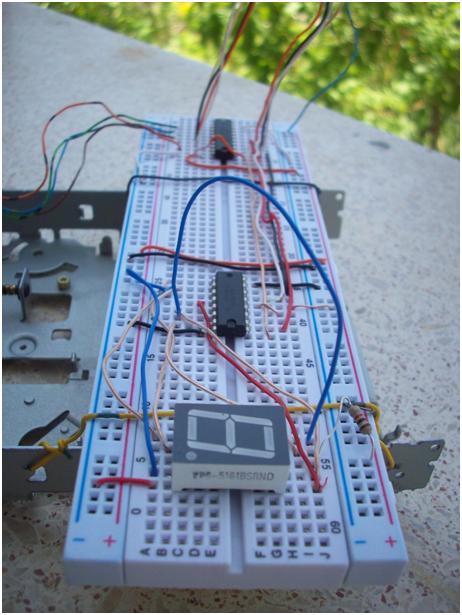
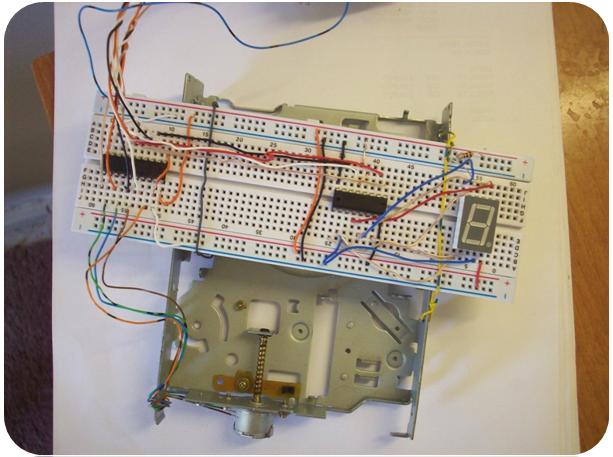
This project is about controlling a stepper motor and seven segment display via the parallel port. I am going to explain how to control a stepper motor and seven segment display. Here also you can find some more information about the parallel port configuration and such. Also I will describe the seven segment display.
pic1.jpg
Figure 1 – Circuit

1. What is a Stepper Motor?

A stepper motor is an electromechanical device which converts electrical pulses into discrete mechanical movements. The shaft or spindle of a stepper motor rotates in discrete step increments when electrical command pulses are applied to it in the proper sequence. The motor's rotation has several direct relationships to these applied input pulses. The sequence of the applied pulses is directly related to the direction of motor shaft's rotation. The speed of the motor shaft's rotation is directly related to the frequency of the input pulses, and the length of rotation is directly related to the number of input pulses applied.

1.1 Stepper Motor Advantages & Disadvantages

Of course stepper motor systems are have some advantages & disadvantages. Here you can realize that it comes with so few disadvantages.

Advantages

  1. The rotation angle of the motor is proportional to the input pulse.
  2. The motor has full torque at standstill (if the windings are energized)
  3. Precise positioning and repeatability of movement since good stepper motors have an accuracy of 3% to 5% of a step, and this error is non-cumulative from one step to the next
  4. Excellent response to starting/stopping/reversing
  5. Very reliable since there are no contact brushes in the motor. Therefore the life of the motor is simply dependent on the life of the bearing
  6. The motor's response to digital input pulses provides open-loop control, making the motor simpler and less costly to control
  7. It is possible to achieve very low speed synchronous rotation with a load that is directly coupled to the shaft
  8. A wide range of rotational speeds can be realized as the speed is proportional to the frequency of the input pulses.

Disadvantages

  1. Resonances can occur if not properly controlled
  2. Not easy to operate at extremely high speeds. For this process you need to use DC motors.

1.2 Stepper motor characteristics

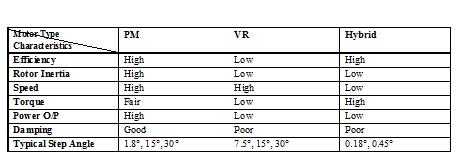
Stepper motors are constant-power devices (power = angular velocity x torque). As motor speed increases, torque decreases. The torque curve may be extended by using current limiting drivers and increasing the driving voltage. Steppers exhibit more vibration than other motor types, as the discrete step tends to snap the rotor from one position to another. This vibration can become very bad at some speeds and can cause the motor to lose torque. The effect can be mitigated by accelerating quickly through the problem speed range, physically damping the system, or using a micro-stepping driver. Motors with greater number of phases also exhibit smoother operation than those with fewer phases. Stepping motors are suitable for translating digital inputs into mechanical motion. In general, there are three types of stepping motor:
  1. VR (Variable Reluctance) stepping motors
  2. Hybrid Stepping motors
  3. PM (Permanent Magnet) Stepping motors
pic2.jpg
Table 1. Stepping Motor Characteristics Comparison
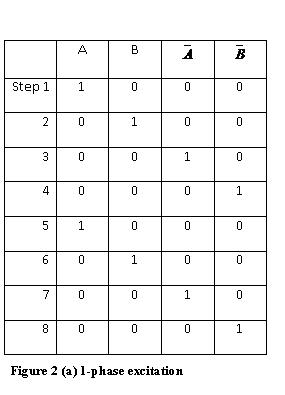
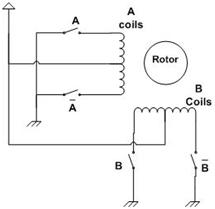
Figure 2 and 3 are used to explain the operation of a simplified stepping motor (90°/step). Here the A coil and Bcoil are perpendicular to each other. If either A or B coil is excited (a condition which is known as single-phase excitation), the rotor can be moved to 0°, 90°, 180°, 270° degree position depending on the current’s ON/OFF conditions in the coils.
pic3.jpg
Figure 2 - Single-phase excitation
pic4.jpg
Figure 3 - Single-phase coil schematic

1.3 Two-phase stepper motors

There are two basic winding arrangements for the electromagnetic coils in a two phase stepper motor: bipolar and unipolar.

Unipolar Motors

A unipolar stepper motor has logically two windings per phase, one for each direction of current. Since in this arrangement a magnetic pole can be reversed without switching the direction of current, the commutation circuit can be made very simple (e.g. a single transistor) for each winding. Typically, given a phase, one end of each winding is made common: giving three leads per phase and six leads for a typical two phase motor. Often, these two phase commons are internally joined, so the motor has only five leads.
pic5.jpg
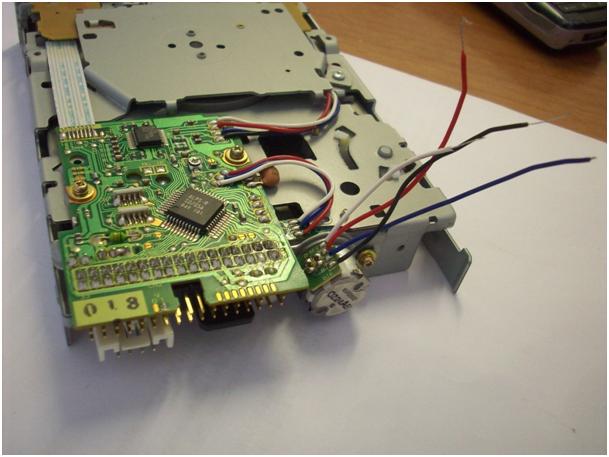
Figure 4 – It is possible to take a stepper motor from an old floppy drive
A microcontroller or stepper motor controller can be used to activate the drive transistors in the right order, and this ease of operation makes unipolar motors popular with hobbyists; they are probably the cheapest way to get precise angular movements. (For the experimenter, one way to distinguish common wire from a coil-end wire is by measuring the resistance. Resistance between common wire and coil-end wire is always half of what it is between coil-end and coil-end wires. This is due to the fact that there is actually twice the length of coil between the ends and only half from center - the common wire - to the end.)
Unipolar stepper motors with six or eight wires may be driven using bipolar drivers by leaving the phase commons disconnected, and driving the two windings of each phase together. It is also possible to use a bipolar driver to drive only one winding of each phase, leaving half of the windings unused.

Bipolar motor

Bipolar motors have logically a single winding per phase. The current in a winding needs to be reversed in order to reverse a magnetic pole, so the driving circuit must be more complicated, typically with an H-bridge arrangement. There are two leads per phase, none are common.
Static stictional effects using an H-bridge have been observed with certain drive topologies. See DuBord phenomenon. Because windings are better utilised, they are more powerful than a unipolar motor of the same weight.

8-lead stepper

An 8 lead stepper is wound like a unipolar stepper, but the leads are not joined to common internally to the motor. This kind of motor can be wired in several configurations:
  • Unipolar.
  • Bipolar with series windings. This gives higher inductance but lower current per winding.
  • Bipolar with parallel windings. This requires higher current but can perform better as the winding inductance is reduced.
  • Bipolar with a single winding per phase. This method will run the motor on only half the available windings, which will reduce the available low speed torque but require less current.
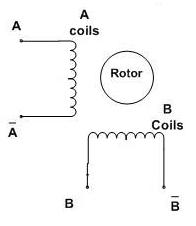
The coil schematic of a bipolar stepper motor is shown below:
pic6.jpg
Figure 5 - Bipolar Stepper motor Coil schematic
Sending 1011 to the AABB pins will rotate the motor to a particular location, by energizing Coil A in a particular direction. Then rotating this sequence to 0111, will energize Coil B in the same direction. Motor will turn by another step. Then, another rotated sequence of 1110 will energize the Coil A with a reversed direction as compared to the previous one, so the motor will continue with another step in the same direction. Then 1101 will energize the Coil B in the reverse direction, and one full rotation will be completed, if the rotor has only two teeth. However, commercial motors have more than two teeth, and they turn by steps of typically 1.8° instead of 90°.

2. What is SN74LS47?

The SN74LS47 are Low Power Schottky BCD to Seven-Segment Decoder /Drivers consisting of NAND gates, input buffers and seven AND-OR-INVERT gates. They offer active LOW, high sink current outputs for driving indicators directly. Seven NAND gates and one driver are connected in pairs to make BCD data and its complement available to the seven decoding AND-OR-INVERT gates. The remaining NAND gate and three input buffers provide lamp test, blanking input / ripple-blanking output and ripple-blanking input. The circuits accept 4-bit binary-coded-decimal (BCD) and, depending on the state of the auxiliary inputs, decodes this data to drive a seven-segment display indicator. The relative positive-logic output levels, as well as conditions required at the auxiliary inputs, are shown in the truth tables. Output configurations of the SN74LS47 are designed to withstand the relatively high voltages required for seven-segment indicators.
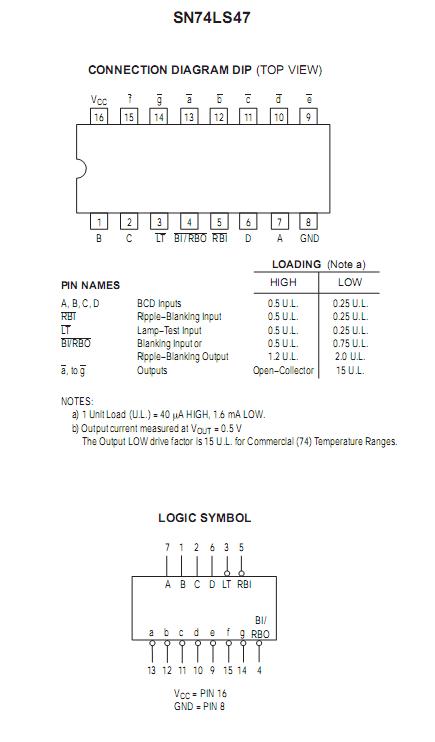
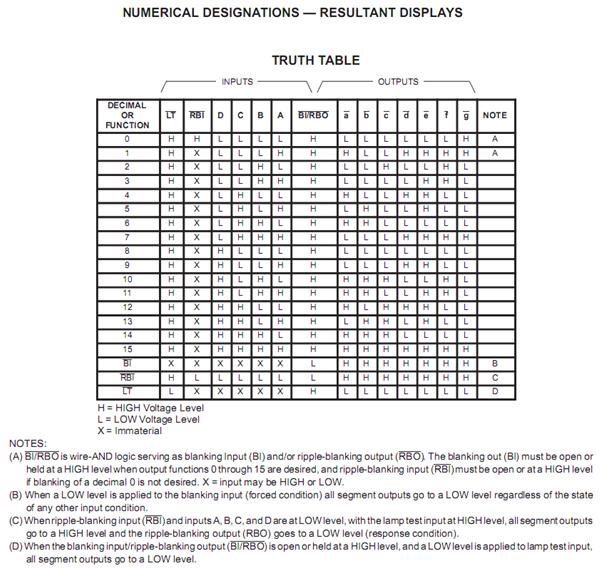
Here in Figure 6 you can see connection diagram of SN74LS47 and pin information. You will find the circuit diagram later on the document. With truth table (Figure 7) you can find out what values are for which letter. Since the SN74LS47 is a BCD converter the table is going to be needed to make work easier.
pic7.jpg
Figure 6 – SN74LS47 Connection Diagram
pic8.jpg
Figure 7 – Truth Table for BCD Conversion

2.1 The BCD Number System

You should now be familiar with the Binary, Decimal and Hexadecimal Number System. If we view single digit values for hex, the numbers 0 - F, they represent the values 0 - 15 in decimal, and occupy a nibble. Often, we wish to use a binary equivalent of the decimal system. This system is called Binary Coded Decimal or BCD which also occupies a nibble. In BCD, the binary patterns 1010 through 1111 do not represent valid BCD numbers, and cannot be used.
Conversion from Decimal to BCD is straightforward. You merely assign each digit of the decimal number to a byte and convert 0 through 9 to 0000 0000 through 0000 1001, but you cannot perform the repeated division by 2 as you did to convert decimal to binary. Let us see how this works. Determine the BCD value for the decimal number 5,319. Since there are four digits in our decimal number, there are four bytes in our BCD number. Since computer storage requires the minimum of 1 byte, you can see that the upper nibble of each BCD number is wasted storage. BCD is still a weighted position number system so you may perform mathematics, but we must use special techniques in order to obtain a correct answer.

3. What is SN74LS244N?

pic9.jpg
Figure 8 - SN74LS244N Connection Diagram
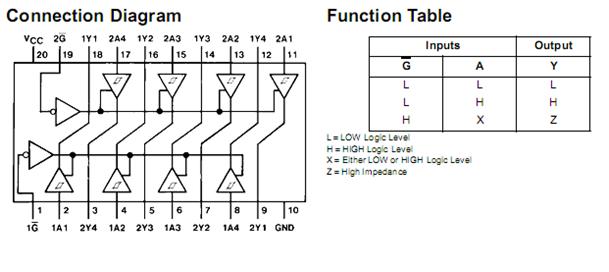
In Figure 8 you can see the logic inside the SN74LS244N and the function table. There is a tricky point here. Let’s think on this way, the SN74LS244N has 2 different sides. After the right connections such as GND and VCC connections, 2 more steps will be needed.
First, to activate the left side of it first pin is needed to connected to GND. Second, to activate the right side nineteenth pin is needed to connect to GND. Then you can you see outputs and inputs together or outputs are not going to be working.

4. Seven Segment LED Display

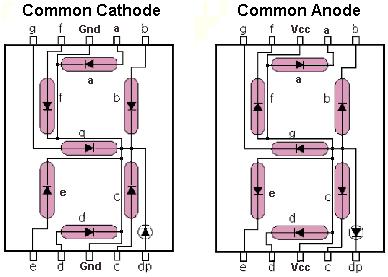
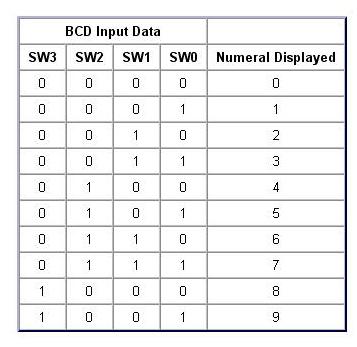
Once seven segment LED displays became readily available, a simple IC known as a "BCD to seven segment decoder" was quickly developed to simplify their use. Binary formatted data presented to this IC's inputs results in the IC's outputs being placed into the correct state to display the equivalent numeral (0 to 9) on a seven-segment display.
Although BCD to seven-segment decoder ICs are available without built in latches, this particular IC includes a built in 4-bit latch which we will make use of in later examples. For now the latch is set to simply allow input data to freely pass through to the decoder.
pic10.jpg
Figure 9 – Common Cathode & Common Anode
pic11.jpg
Figure 10 – BCD Input Data

5. How the Parallel Port Works

Parallel port is a simple and inexpensive tool for building computer controlled devices and projects. The simplicity and ease of programming makes parallel port popular in electronics hobbyist world. The parallel port is often used in Computer controlled robots, Atmel/PIC programmers, home automation, etc.
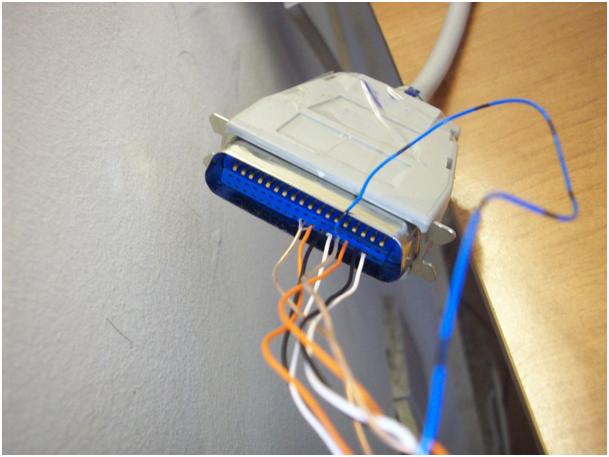
Everybody knows what a parallel port is, where it can be found, and for what it is being used. The primary use of the parallel port is to connect printers to the computer and it is specifically designed for this purpose. Thus it is often called as printer port or Centronics port (this name came from a popular printer manufacturing company 'Centronics' who devised some standards for parallel port). You can see the parallel port connector in the rear panel of your PC. It is a 25 pin female (DB25) connector (to which printer is connected). On almost all the PCs only one parallel port is present, but you can add more by buying and inserting ISA/PCI parallel port cards.
pic12.jpg
Figure 11 – Parallel port connection of this project

5.1 Parallel Port Modes

The IEEE 1284 Standard which has been published in 1994 defines five modes of data transfer for parallel port. They are,
  1. Compatibility Mode
  2. Nibble Mode
  3. Byte Mode
  4. EPP
  5. ECP

5.2 Hardware

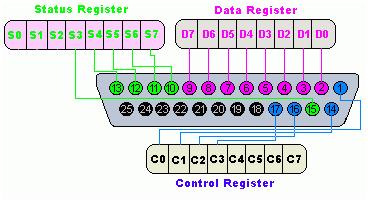
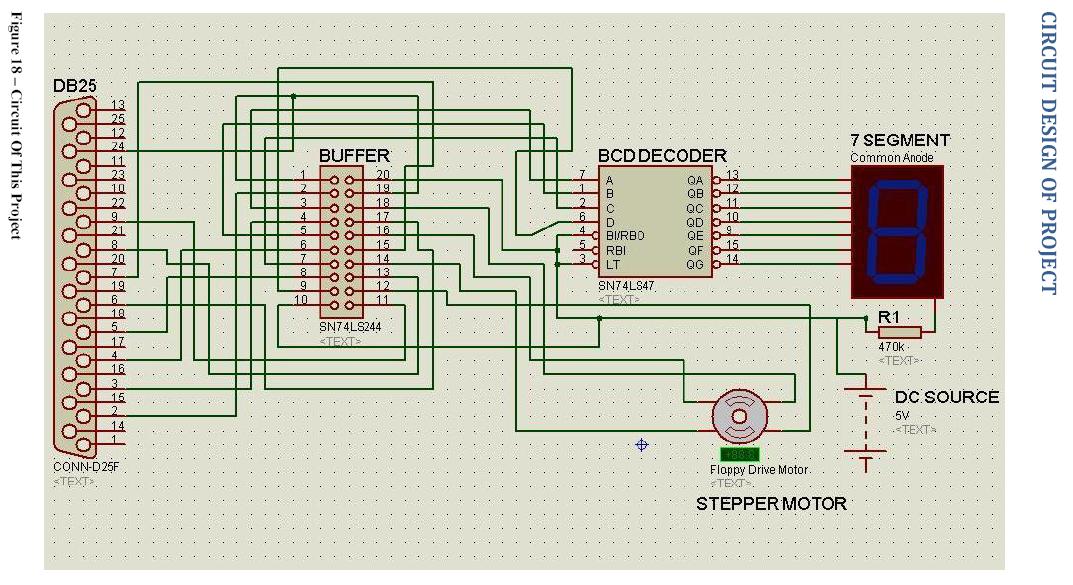
The pin outs of DB25 connector is shown in the picture below. And for this project from D0 to D3 is used for stepper motor pulses and from D4 to D7 is used for 7 segment control. (Look at Figure 11)
pic13.jpg
Figure 12 – DB25 Connector
The lines in DB25 connector are divided in to three groups, they are
  1. Data lines (data bus)
  2. Control lines
  3. Status lines
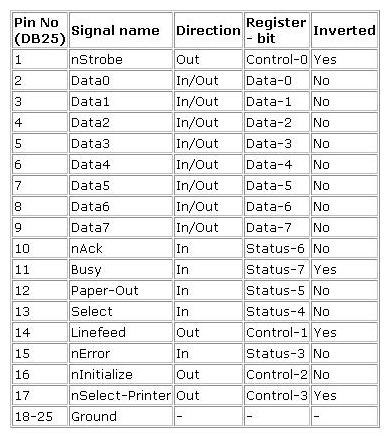
As the name implies, data is transferred over data lines, Control lines are used to control the peripheral and of course, the peripheral returns status signals back computer through Status lines. These lines are connected to Data, Control And Status registers internally . The details of parallel port signal lines are given below.
pic14.jpg
Figure 13 – DB25 Connector Pins

5.3 Parallel Port Registers

As you know, the Data, Control and status lines are connected to there corresponding registers inside the computer. So by manipulating these registers in program, one can easily read or write to parallel port with programming languages like C and BASIC.
The registers found in standard parallel port are,
  1. Data register
  2. Status register
  3. Control register
As there names specifies, Data register is connected to Data lines, Control register is connected to control lines and Status register is connected to Status lines. (Here the word connection does not mean that there is some physical connection between data/control/status lines. The registers are virtually connected to the corresponding lines.). So what ever you write to these registers, will appear in corresponding lines as voltages, Of course, you can measure it with a multimeter. Whatever you give to Parallel port as voltages can be read from these registers (with some restrictions). For example, if we write '1' to Data register, the line Data0 will be driven to +5V. Just like this ,we can programmatically turn on and off any of the data lines and Control lines.
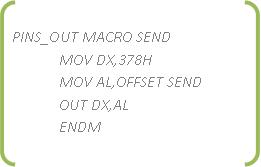
There is a simple code to use LPT1 port:
pic15.jpg
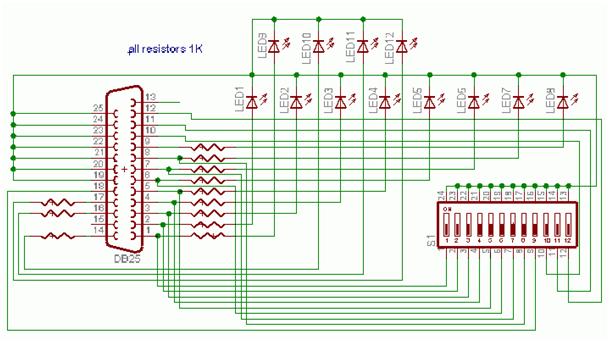
This Macro is sending the value SEND to the LPT1 port with address of 378H. By getting help from this macro you can write an assembly code and making the below circuit you can get a chance to see your parallel port is works.
pic16.jpg
Figure 14 – Simple Circuit to test parallel port

Circuit of Project
circuit_design.jpg

pic17.jpg
Figure 15 – Full Circuit of Project

Project by:
Samet KILICTAS


Software Developer

Turkey Turkey


Sharing is so Easy:
StumpleUpon DiggIt! Del.icio.us Blinklist Yahoo Furl Technorati Simpy Spurl Reddit Google Twitter FaceBook

Labels: ,

SSL Error Certificate on Facebook

Friday, April 6, 2012 Posted by Glenn 0 comments

SSL Error You say? You can see in your address bar the annoying HTTPS:// thing before the facebook. Errr. You have tried everything that different website suggest, yet it still appears on your face. lol.

THIS IS THE $!@#$!@$! ERROR
This can happen not only on facebook, but also on google. :)

There is one thing you can do:

--> SET YOUR DATE AND TIME CORRECTLY!

That's all!
Also, if your date and time do not update automatically and during boot, your pc says press F1 to go to setup and Press F2 to load blahblahblah.


Here's the thing you should do:
REPLACE YOUR CMOS BATTERY LOCATED IN YOUR MOTHERBOARD.
CMOS Battery helps our computer to update its BIOS Settings including Time and Date Settings whenever we turn off our computer :)
Article by glenn.

Additional Tags: CMOS Battery, SSL Error, SSL Error Certificate, Facebook Error, Google Error, Https error


Sharing is so Easy:
StumpleUpon DiggIt! Del.icio.us Blinklist Yahoo Furl Technorati Simpy Spurl Reddit Google Twitter FaceBook

Dual Channel and Single Channel

Wednesday, April 4, 2012 Posted by Glenn 0 comments

Dual Channel Interleaved and Single Channel Asymmetric Mode EXPLAINED!


• Dual channel (Interleaved) mode. This mode offers the highest throughput for real world applications. Dual channel mode is enabled when the installed memory capacities of both DIMM channels are equal. Technology and device width can vary from one channel to the other but the installed memory capacity for each channel must be equal. If different speed DIMMs are used between channels, the slowest memory timing will be used.
• Single channel (Asymmetric) mode. This mode is equivalent to single channel bandwidth operation for real world applications. This mode is used when only a single DIMM is installed or the memory capacities are unequal. Technology and device width can vary from one channel to the other. If different speed DIMMs are used between channels, the slowest memory timing will be used.

The following graphics illustrate the memory channel and DIMM configuration.

Note: The DIMM0 sockets of both channels are blue. The DIMM1 sockets of both channels are black.

• Dual Channel (Interleaved) Mode Configurations

This graphic shows a dual channel configuration using two DIMMs. In this example, the DIMM0 (blue) sockets of both channels are populated with identical DIMMs.

Dual Channel (Interleaved) Mode Configuration with Two DIMMs 


This graphic shows a dual channel configuration using three DIMMs. In this example, the combined capacity of the two DIMMs in Channel A equal the capacity of the single DIMM in the DIMM0 (blue) socket of Channel B.

Dual Channel (Interleaved) Mode Configuration with Three DIMMs


This graphic shows a dual channel configuration using four DIMMs. In this example, the combined capacity of the two DIMMs in Channel A equal the combined capacity of the two DIMMs in Channel B. Also, the DIMMs are matched between DIMM0 and DIMM1 of both channels.

Dual Channel (Interleaved) Mode Configuration with Four DIMMs


• Single Channel (Asymmetric) Mode Configurations

This graphic shows a single channel configuration using one DIMM. In this example, only the DIMM0 (blue) socket of Channel A is populated. Channel B is not populated.

Single Channel (Asymmetric) Mode Configuration with One DIMM


This graphic shows a single channel configuration using three DIMMs. In this example, the combined capacity of the two DIMMs in Channel A does not equal the capacity of the single DIMM in the DIMM0 (blue) socket of Channel B.

Single Channel (Asymmetric) Mode Configuration with Three DIMMs


source

Sharing is so Easy:
StumpleUpon DiggIt! Del.icio.us Blinklist Yahoo Furl Technorati Simpy Spurl Reddit Google Twitter FaceBook

Samsung External DVDRW Comparison

Saturday, March 17, 2012 Posted by Glenn 1 comments

Article by: Glenn Posadas
Today, I was making a comparison between two dvd drives. Knowing that the two of your DVDRW internal drives are malfunctioning is indeed irritating, and your best hope is to buy an external dvdrw. And since we have two notebooks here(a laptop without internal dvdrw), I really need to buy one. I've got some bucks from my last photoshoot, so $$$ won't be much pain in the ass. xD.

So, here it goes.
I saw that in the pricelist(2012) of PC Gilmore Computer Center Asus, Samsung DVDRW SE-208AB Slim External costs PHP 1,530.00 while the Samsung DVDRW SE-S084C External Tray Type worth PHP 1,800.00

by the way, this time I will trust samsung brand. I hate SAMSUNG HARD DISKS. Really, they're always output S.M.A.R.T error during boot.


Samsung DVDRW SE-208AB Slim External
vs
Samsung DVDRW SE-S084C External Tray Type


Let's go first to Samsung SE-208AB Slim External:
Galleries: CLICK TO ENLARGE


Specifications
General Feature

Drive Type:
DVD Writer

Enclosure Type:
External

Drive Height:
Slim (12.7mm)

Loading Type:
Tray

Interface:
USB 2.0

Drive Mounting:
Horizontal

Buffer Memory:
1.0MB

Supported Disc Formats:
DVD-R, DVD-RW, DVD+R, DVD+RW, DVD-ROM, DVD-Video, DVD+R DL, DVD-R DL, DVD-RAM, CD-ROM, CD-R, CD-RW, CD-DA, CD+E (G), CD-MIDI, CD-TEXT, CD-ROM XA, Mixed Mode CD, CD-I, CD-I Bridge (Photo-CD, Video-CD), Multisession CD (Photo-CD, CD-EXTRA, Portfolio)

Data Transfer Rate:
DVD+R
Write : 8X (10.8MB/sec)
Read : 8X (10.8MB/sec)

DVD+R Dual Layer
Write : 6X (8.1MB/sec)
Read : 6X (8.1MB/sec)

DVD-R
Write : 8X (10.8MB/sec)
Read : 8X (10.8MB/sec)

DVD-R Dual Layer
Write : 6X (8.1MB/sec)
Read : 6X (8.1MB/sec)


And finally, the Samsung DVDRW SE-S084C External Tray Type:
Gallery:


Specifications
General Feature

Drive Type:
DVD Writer

Enclosure Type:
External

Drive Height:
Slim (12.7mm)

Loading Type:
Tray

Interface:
USB 2.0

Drive Mounting:
Horizontal

Buffer Memory:
2.0MB

Supported Disc Formats:
DVD-RAM, DVD+R, DVD+R dual Layer, DVD+RW, DVD-R, DVD-R dual Layer, DVD-RW, DVD-ROM, DVD-Video, CD-R, CD-RW, CD-ROM, CD-ROM / XA, CD-Audio, Video-CD, Photo CD, CD-I (FMV), CD-Text

Data Transfer Rate:
DVD+R
Write : 8X (10.8MB/sec)
Read : 8X (10.8MB/sec)

DVD+R Dual Layer
Write : 6X (8.1MB/sec)
Read : 8X (10.8MB/sec)

DVD-R
Write : 8X (10.8MB/sec)
Read : 8X (10.8MB/sec)

DVD-R Dual Layer
Write : 6X (8.1MB/sec)
Read : 8X (10.8MB/sec)


SUMMARY:
My verdict? I'll go to SE-208AB. 170php is quite a big thing for me. haha! And besides, it has different colors. Speed of the two optical drives are quite similar. But you guys must choose the SE-S084C because it has a higher buff memory. Buff Memory is important because the higher the buff memory, the lower the rate of the error in writing in full speed.

-glenn.


Additional Tags: compare se-s084c and se-208ab, samsung external drives, samsung SE-S084C VS SE-208AB, Samsung DVDRW drives, eternal DVD Reviews

Sharing is so Easy:
StumpleUpon DiggIt! Del.icio.us Blinklist Yahoo Furl Technorati Simpy Spurl Reddit Google Twitter FaceBook

Labels: ,

The truth about internet speed

Thursday, March 15, 2012 Posted by Glenn 1 comments

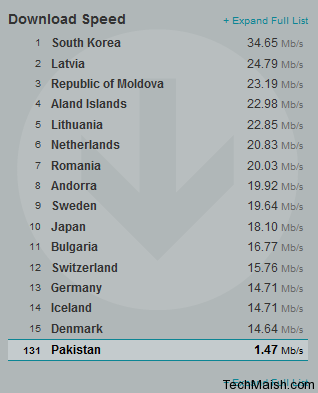
Yesterday, I saw a post on 9gag.com about a grand mom who has an internet speed of 40Gbit/s. Wow. That's fascinating. So I did a research about the internet speed. I found an article from techmaish.com. HERE:

DSL/ADSL


Maximum Speed = 25-30Mbit

Wired Ethernet

Maximum Speed 1000Mbits

Satalite Internet

Maximum Download Rate = 1 Gbps

Average Download Rate = 1Mbps

Average Upload Rate = 256kbps

According to SpeedTest.net

maximum internet speed Maximum Internet Speed Available in the World


Another clue that i found on the web about maximum internet speed is that: (from amit agarwal)

Scientists have set a new world record for data transmission by transferring a data rate of 2.56 Terabit per second over a glass fibre link of 160 km length.

2,560,000,000,000 bits are equivalent to the contents of 60 DVDs.

By comparison, the fastest high-speed links currently carry data at a maximum 40 Gbit/s, or around 50 times slower.

The research was carried out at Fraunhofer Institute which also developed computers with Emotion sense.


It means maximum internet speed is 40 Gbit/s

Still it is not clear that what is the maximum internet speed available in the world. Only government agencies and military can answer this question, because they uses internet for defense purposes.

If any one can better answer this question, then feel free to share a solid proof with us so that we can know about maximum download and upload speed currently available in the world.

Sharing is so Easy:
StumpleUpon DiggIt! Del.icio.us Blinklist Yahoo Furl Technorati Simpy Spurl Reddit Google Twitter FaceBook

Labels: , ,

DOTA Maphack for 1.26a patch

Sunday, July 10, 2011 Posted by Glenn 1 comments

sample photo of Maphack for 1.24a

(click to see larger view)


Note: This works ONLY with Garena ( it does not work with battlenet ). Use original Garena and avoid using it with other Garena cracks (like protection removers, dll unloaders, cracked versions etc) or it will get detected.

Click here to download GARENA MAPHACK for 1.24a patch


that's all.
-glenn

Sharing is so Easy:
StumpleUpon DiggIt! Del.icio.us Blinklist Yahoo Furl Technorati Simpy Spurl Reddit Google Twitter FaceBook

Labels: ,

Activate Windows 7 for FREE

Saturday, May 14, 2011 Posted by Glenn 3 comments

so you have "something-days" remaining before your windows 7 die. :)
check this images out. click them to view larger.

.................BEFORE.............................................AFTER..............................


click here to download the file.
kindly report to the website author if any links are broken.
If your operating system is WINDOWS XP, click here.

Instructions:

First of all, if you have previously installed any of loader or crack, than start from the first point othervise start with 3rd:
#
1. right click .exe, select run as administrator
#
2. uninstall all cracks and remove OEM info,wait, reboot
#
3. right click .exe, select run as administrator
#
4. on the list find your name of motherboard (in my case ASUS)
#
5.clik on the icon (installing OEM info)
#
6.click on install7Loader
#
7. restart (in my case it was automatic)
#
8. right click .exe, select run as administrator
#
9. click on 7 Activation report


NOTE: TURN OFF INTERNET CONNECTION BEFORE APPLYING THE CRACK AND
DO NOT UPDATE VIA INTERNET...

program by: by orbit30 & hazar v1.2
Article: glenn

Sharing is so Easy:
StumpleUpon DiggIt! Del.icio.us Blinklist Yahoo Furl Technorati Simpy Spurl Reddit Google Twitter FaceBook

Labels: ,

Remove Genuine Microsoft Software in one Click!

Posted by Glenn 0 comments

Remove windows genuine advantage in one Click!

Click the image to view it larger.

download this file and double click it if your operating system is: WINDOWS XP. click here

After solving the problem, kindly restart your computer and Change the UPDATE settings of your computer. Set it to download updates but let me know when to install updates


(please report if the link is broken)

If your Operating System is: WINDOWS 7, then click here to solve your problem.


cheers,
glenn


Sharing is so Easy:
StumpleUpon DiggIt! Del.icio.us Blinklist Yahoo Furl Technorati Simpy Spurl Reddit Google Twitter FaceBook

Garena Free Maphack For Real

Sunday, May 1, 2011 Posted by Glenn 0 comments

Here is the URL: http://www.mediafire.com/?se6rs1fwy4lj6j9

please spread and please open the READ THIS text file and follow the instructions
no virus, just map hack application

glenn ^_^

Sharing is so Easy:
StumpleUpon DiggIt! Del.icio.us Blinklist Yahoo Furl Technorati Simpy Spurl Reddit Google Twitter FaceBook

Labels: ,

Unidentified Network appears every Windows 7 restart

Tuesday, April 26, 2011 Posted by Glenn 2 comments

so, this problem irritates you? haha! Me too. Yesterday, I changed the Operating System of my desktop from Windows xp to Windows 7. I noticed the everytime my computer reboots, there's internet signal in my router but then I couldn't surf the net. It was too infuriating because I had to DISABLE and then ENABLE the network in order to access the internet.

The solution is so easy, in just two steps, you'll be able to kick the problem's ass . Check it out:

FIRST STEP:

click start -> type msconfig in the search box -> press ENTER.

The System Configuration box will now appear.

SECOND STEP:


click services -> find the ##Id_String1.6844FF ... (and so on) -> Uncheck the box of that service and click apply then OK.

note: the manufacturer of that service is Apple Computer, Inc.


VOILA! Now, please reboot/restart your computer. If we solved the problem, kindly share this post or click the like button above. :)

cheers,

glenn


Sharing is so Easy:
StumpleUpon DiggIt! Del.icio.us Blinklist Yahoo Furl Technorati Simpy Spurl Reddit Google Twitter FaceBook

Would Jesus see movies?

Sunday, April 17, 2011 Posted by Glenn 0 comments

Would Jesus see movies?
By Pastor Emil L. Galang and the KKB Core Leaders


from KKB Website


Sex, violence, words too crass to be seen in print, Quentin Tarantino and Da Vinci Code. Perhaps they made it to your pastor’s top r eason s why seeing movies should be met by disciplinary action. But is it really so bad to see movies?


Evil places


Some believe that movie houses are intrinsically imbued with evil power, causing the Holy Spirit to instantly depart from Christians once they set foot on cinemas. This view is not true as it clandestinely campaigns the devil as being more sovereign than God over believers. The Spirit’s residence in the Christian is based on God’s grace that guides the believer into holiness.


Christian maturity


And as temples of the Spirit, we should bear in mind that God must have involvement in all we do. The center of all our activities should serve to not dishonor Him (1 Corinthians 10:31). The Bible tells us that we should fill our minds with things that are good and praiseworthy, things that are true, noble, right, pure, lovely and honorable (Philippians 4:8). The danger in seeing movies lies in the depth of impact its scenes may communicate to us. The element of one’s personal Christian maturity plays a very big role here.


Christians tread maturity on different paces. Some grow faster than others. A Christian who is not yet mature in the area of sexuality might easily get visually adulterous (Matthew 5:28) on any scene with Megan Fox in it. Some might get easily swayed by plots and messages that challenge Christian beliefs and values. A good example is Da Vinci Code, which theological assertions might confuse the gullible.


One of the best things Christians can do is to have an honest personal evaluation as to whether or not seeing a particular movie would be detrimental for them. Movies that would stir us to pursue godlessness should, needless to say, be avoided. This would require us to obtain adequate information on the movies we plan to see (without stumbling upon plot spoilers, of course!).


Obviously bad movies


Now, there are movies which determination of whether or not Christians should see can be handled by sheer common sense. Bruno, American Pie, Death Note and Harry Potter should not send us fasting just to hear from God if it’s ok to see them. There is already enough common knowledge about the negativity of their plot available on the internet.


The challenge


Movies—like many art forms—are culturally inevitable. As long as we live, we shall be presented with entertainment materials that do not preach Jesus, but are not necessarily evil. There is no point in absolutely refusing to get some entertainment from movies. In fact, some films can be useful for sermon illustrations as they may aid in connecting even with non-Christian church guests.


The challenge for Christians is to live in a movie-going world without compromising their faith. If we isolate ourselves from the world, who else will be its salt and light? That’s why Jesus prayed “…not that thou shouldest take them out of the world, but that thou shouldest keep them from the evil.” (John 17:15)


We must also keep in mind that filmmaking is a money-making industry that is now dominated by producers who are openly non-Christian in their worldview. So if a film is backed by those who clearly oppose Christianity, we must refrain from financially patronizing it.


The movie we consume can end up consuming us instead. So let us not be ignorant of the schemes of the enemy (2 Corinthians 2:11). Let us resolve not to defile ourselves by taking in trashy media. We must spend more time consuming our time for media, literature and other entertainment activities that would not cause us to be drawn away from the things of God.


Researcher: Lovely Nazareno, KKB CAM


Pastor Emil L. Galang has been faithfully serving the Lord since KKB's growing up years during the early 90's. Under the leadership of KKB Chairman Joel Villanueva and the JIL Church Executive Management Board, he is now the Executive Director of KKB Movement. As such, he leads its supreme decision-making body known as the KKB Core Leadership. He writes KKBmovement.org’s “Hot Topic” column with the KKB Core Leaders. Pastor Emil is happily married to Weng, and super-dad to Josiah Charles and Ruth Beatrice.

Sharing is so Easy:
StumpleUpon DiggIt! Del.icio.us Blinklist Yahoo Furl Technorati Simpy Spurl Reddit Google Twitter FaceBook