Showing posts with label java. Show all posts

Tuesday, April 26, 2016

Deploy and configure a local Docker caching proxy

Recently I was looking into caching for Docker layers downloading for the Fabric8 development environment, to allow me to trash the vms where my Docker daemon was running and still avoiding me to re-download basic images each single time I recreate my vm.

As usual, I tried to hit Google first, and was pointed to these couple of pages:

http://unpoucode.blogspot.it/2014/11/use-proxy-for-speeding-up-docker-images.html

and

https://blog.docker.com/2015/10/registry-proxy-cache-docker-open-source/

Since I use quite often Jerome Petazzoni’s approach for a transparent Squid + iptables to cache and sniff simple http traffic (usually http invocation from java programs), I’ve found that the first solution based made sense, so I have tried that first.

It turned out that the second link was what I was looking for; but I have still spent some good learning hours with the no longer working suggestions from the first one, learning the hard way that Squid doesn’t play that nice with Amazon’s Cloudfront CDN, used by Docker Hub. But I have to admit that it’s been fun.
Now I know how to forward calls to Squid to hit an intermediate interceptors that mangles with query params, headers and everything else.
I couldn’t find a working combination for Cloudfront but I am now probably able to reproduce the infamous Cats Proxy Prank. =)

Anyhow, as I was saying, what I was really looking for is that second link that shows you how to setup an intermediate Docker proxy, that your Docker daemon will try to hit, before defaulting to the usual Docker Hub public servers.

Almost everything that I needed was in that page, but I have found the information to be a little more cryptic that needed.

The main reason for that is because that example assumes I need security (TLS), which is not really my case since the proxy is completely local.

Additionally, it shows how to configure you Docker Registry using YAML configuration. Again, not really complex, but indeed more than needed.

Yes, because what you really need to bring up the simplest local (not secured) Docker proxy is this oneliner:

docker run -p 5000:5000 -d --restart=always --name registry   \
  -e REGISTRY_PROXY_REMOTEURL=http://registry-1.docker.io \
  registry:2

The interesting part here is that registry image, supports a smart alternative way to forward configuration to it, that saves you from passing it a YAML confguration file.

The idea, described here, is that if you follow a naming convention for the environment variables, that reflects the hierarchy of the YAML tree, you can turn something like:

...
proxy:
  remoteurl: http://registry-1.docker.io
...

That you should write in a .yaml file and pass to the process in this way:

docker run -d -p 5000:5000 --restart=always --name registry \
  -v `pwd`/config.yml:/etc/docker/registry/config.yml \
  registry:2

Into the much more conventient -e REGISTRY_PROXY_REMOTEURL=http://registry-1.docker.io runtime environment variable!

Let’s improve the example a little, so that we also pass our Docker proxy a non-volatile storage location for the cached layers, so that we are not losing them between invocations:

docker run -p 5000:5000 -d --restart=always --name registry   \
  -e REGISTRY_PROXY_REMOTEURL=http://registry-1.docker.io \
  -v /opt/shared/docker_registry_cache:/var/lib/registry \
  registry:2

Now we have everything we needed to save a good share of bandwidth, each time we need to get some Docker image that had already passed through our local proxy.

The only remaining bit is to tell our Docker daemon to be aware of the new proxy:

# update your docker daemon config, according to your distro
# content of my `/etc/sysconfig/docker` in Fedora 23
OPTIONS=" --registry-mirror=http://localhost:5000"

Reload (or restart) your Docker daemon and you are done! Just be aware that if you restart the daemon you might need also to re-start the Registry container, if you ware working on a single node.

An interesting discovery, it’s been learning that Docker daemon doesn’t break if it cannot find the specified registry-mirror. So you can add the configuration and forget about it, knowing that your interaction with Docker Hub will just benefit of possible hits your caching proxy, assuming it’s running.

You can see it working with the following tests:

docker logs -f registry

will log all the outgoing download requests, and once the set of requrests that compose a single pull image operation will be completed, you will also be able to check that the image is now completely served by your proxy with this invocation:

curl http://localhost:5000/v2/_catalog
# sample output
{"repositories":["drifting/true"]}

The article would be finished, but since I feel bad to show how to disable security on the internet, here’s also a very short and fully working and tested example of how to implement the same with TLS enabled:

# generate a self signed certificate; accept default for every value a part from Common Name where you have to put your box hostname
mkdir -p certs && openssl req  -newkey rsa:4096 -nodes -sha256 -keyout certs/domain.key  -x509 -days 365 -out certs/domain.crt

# copy to the locally trusted ones, steps for Fedora/Centos/RHEL
sudo cp certs/domain.crt /etc/pki/ca-trust/source/anchors/

# load the newly added certificate
sudo update-ca-trust enable

# run the registy using those keys that you have generated, mounting the files inside the container
docker run -p 5000:5000 --restart=always --name registry \
  -v `pwd`/certs:/certs \
  -e REGISTRY_HTTP_TLS_CERTIFICATE=/certs/domain.crt \
  -e REGISTRY_HTTP_TLS_KEY=/certs/domain.key \
  -e REGISTRY_PROXY_REMOTEURL=https://registry-1.docker.io \
  registry:2

# now you just need to remember that you are working in https, so you need to use that protocol in your docker daemon configuration, instead of plain http; also use that when you interact with the API in curl

Monday, October 19, 2015

Debugging tip: How to simulate a slow hardisk

As a Software Engineer there are times when you’d like to have a slower system.

It doesn’t happen really often actually: usually it’s when someone reports a bug on your software that you have never seen before and that you can not reproduce.

The majority of time, the reason of those ghost bugs are race conditions.

Race conditions, are issues you might face with multithreaded programming. Imagine that your software does multiple things at the same time. Despite most of the time those things happen in the expected and intuitive order, sometimes, they don’t; leading to unexpected state of your program.

They are indeed a bug. It’s dev’s fault. But the dev doesn’t have much way to protect himself from them. There are programming styles and technologies that push you to avoid the risk altogether, but I think that in general, they are a condition that each developer has to be familiar with.

So why a slower system helps?

Because most of the times, race conditions are masked by the fact the operations still happen “reasonably quickly”. This ambiguos “reasonably quickly” is the main issue. There is no clear limit or number that tells you how quickly. You just have higher chances to see them if things are slow enough to show they are not happening in the correct order or they are not waiting for the correct checkpoints.

In my experience with java applications, the main performance related aspect, while reproducing race condition is disk access speed. More thatn cpu speed or the amount of RAM, I have noticed that disk speed is the biggest differentiation between similar systems.

In this post I will show how to simulate a slow hardisk on Linux to increase your chances to reproduce race conditions.

The solution will be based on nbd and trickle and it will use the network layer to regulate the i/o throughput for your virtual hardisk.

I’d like to start adding that this isn’t anything new and that I’m not suggesting any particularly revolutionary approach. There are many blogpost out there that describe how to achieve this. But for multiple reasons, none of those that I have read worked out of the box on my Fedora 22 or Centos 6 installations.
That is the main reason that pushed me to give back to the internet, adding what might be, just another page on the argument.

Let’s start with the idea of using nbd or Network Block Device to simulate our hardisk.

As far as I understand there aren’t official ways, exposed by the linux Kernel to regulate the I/O speeds of generic block devices.

Over the internet you may find many suggestions, spanning from disabling read and write cache to geneate real load that could make your system busy.

QoS can be enforced on the network layer though. So the idea is to emulate a block device via network.

Despite this might sound very complicated (and maybe it is), the problem has been already been solved by the Linux Kernel with the nbd module.

Since on my Fedora 22 that module is not enabled automatically by default, we have to install it first, and then enable it:

# install nbd module
sudo yum install nbd

# load nbd module
sudo modprobe nbd

# check nbd module is really loaded
lsmod | grep nbd
nbd                    20480  0

Now that nbd is installed and the module loaded we create a configuration file for its daemon:

# run this command as root
"cat > /etc/nbd-server/config" <<EOF
[generic]
[test]
    exportname = /home/pantinor/test_nbd
    copyonwrite = false
EOF

Where exportname is a path to a file that will represent your slow virtual hardisk.

You can create the file with this command:

# create an empty file, and reserve it 1GB of space
dd if=/dev/zero of=/home/pantinor/test_nbd bs=1G count=1

Now that config and the destination files are in place, you can start the nbd-server using daemon:

# start ndb-server daemon
sudo systemctl start nbd-server.service

# monitor the daaemon start up with:
journalctl -f --unit nbd-server.service

At this point you have a server network process, listening on port 10809 that any client over your network can connect to , to mount it as a network block device.

We can mount it with this this command:

# "test" corresponds to the configuration section in daemon  config file
sudo nbd-client -N test  127.0.0.1 10809  /dev/nbd0
# my Centos 6 version of nbd-client needs a slightly different synatx:
#    sudo nbd-client -N test  127.0.0.1   /dev/nbd0

Now we have created a virtual block device, called /dev/nbd0. Now we can format it like it was a normal one:

# format device
sudo mkfs /dev/nbd0 

# create folder for mounting
sudo mkdir /mnt/nbd

# mount device, sync option is important to not allow the kernel to cheat!
sudo mount -o sync /dev/nbd0 /mnt/nbd

# add write permissions to everyone
sudo chmod a+rwx /mnt/nbd

Not that we have passed to mount command the flag -o sync. This command has an important function: to disable an enhancement in the linux Kernel that delays the completion of write operations to the devices. Without that all the write operations will look like instantaneous, and the kernel will actually complete the write requests in background. With this flag instead, all the operation will wait until the operation has really completed.

You can check that now you are able to read and write on the mount point /mnt/nbd.

Let’s now temporarily unmount and disconnect from nbd-server:

sudo umount /mnt/nbd

sudo nbd-client -d /dev/nbd0

And let’s introduce trickle.

Trickle is a software you can use to wrap other processes and to limit their networking bandwidth.

You can use it to limit any other program. A simple test you can perform with it is to use it with curl:

# download a sample file and limits download speed to 50 KB/s
trickle -d 50 -u 50  curl -O  http://download.thinkbroadband.com/5MB.zip

Now, as you can expect, we just need to join trickle and nbd-server behavior, to obtain the desired behavior.

Let’s start stopping current nbd-server daemon to free up its default port:

sudo systemctl stop nbd-server.service

And let’s start it via trickle:

# start nbd-server limiting its network throughput
trickle -d 20 -u 20 -v nbd-server -d

-d attaches the server process to the console, so the console will be blocked and it will be freed only one you close the process or when a client disconnects.
Ignore the error message: trickle: Could not reach trickled, working independently: No such file or directory

Now you can re-issue the commands to connect to nbd-server and re mount it:

sudo nbd-client -N test  127.0.0.1 10809  /dev/nbd0

sudo mount -o sync /dev/nbd0 /mnt/nbd

And you are done! Now you have a slow hardisk mounted on /dev/nbd0.

You can verify the slow behavior in this way:

sudo dd if=/dev/nbd0 of=/dev/null bs=65536 skip=100 count=10
10+0 records in
10+0 records out
655360 bytes (655 kB) copied, 18.8038 s, 34.9 kB/s

# when run against an nbd-server that doesn't use trickle the output is:
# 655360 bytes (655 kB) copied, 0.000723881 s, 905 MB/s

Now that you have a slow partition, you can just put the files of your sw there to simulate a slow i/o.

All the above steps can be converted to helper scripts that will make the process much simpler like those described here: http://philtortoise.blogspot.it/2013/09/simulating-slow-drive.html.

Monday, October 5, 2015

JBoss Fuse - Turn your static config into dynamic templates with MVEL

Recently I have rediscovered a JBoss Fuse functionality that I had forgotten about and I’ve thought that other people out there may benefit of this reminder.

This post will be focused on JBoss Fuse and Fabric8 but it might interest also all those developers that are looking for minimally invasive ways to add some degree of dynamic support to their static configuration files.

The idea of dynamic configuration in OSGi and in Fabric8

OSGi framework is more often remembered for its class-loading behavior. But a part of that, it also defines other concepts and functionality that the framework has to implement.
One of the is ConfigAdmin.

ConfigAdmin is a service to define an externalized set of properties files that are logically bounded to your deployment units.

The lifecycle of this external properties files is linked with OSGi bundle lifecycle: if you modify an external property file, your bundle will be notified.
Depending on how you coded your bundle you can decide to react to the notification and, programmatically or via different helper frameworks like Blueprint, you can invoke code that uses the new configuration.

This mechanism is handy and powerful, and all developers using OSGi are familiar with it.

Fabric8 builds on the idea of ConfigAdmin, and extends it.

With its provisioning capabilities, Fabric8 defines the concept of a Profile that encapsulates deployment units and configuration. It adds some layer of functionality on top of plain OSGi and it allows to manage any kind of deployment unit, not only OSGi bundles, as well as any kind of configuration or static file.

If you check the official documentation you will find the list of “extensions” that Fabric8 layer offers and you will learn that they are divided mainly in 2 groups: Url Handlers and Property Resolvers.

I suggest everyone that is interested in this technology to dig through the documentation; but to offer a brief summary and a short example, imagine that your Fabric profiles have the capability to resolve some values at runtime using specific placeholders.

ex.

# sample url handler usage, ResourceName is a filename relative to the namespace of the containing Profile:
profile:ResourceName

# sample property handler, the value is read at deploy time, from the Apache Zookeeper distributed registry that is published when you run JBoss Fuse
${zk:/fabric/registry/containers/config/ContainerName/Property}

There are multiple handlers available out of the box, covering what the developers thought were the most common use cases: Zookeeper, Profiles, Blueprint, Spring, System Properties, Managed Ports, etc.

And you might also think to extend the mechanism defining your own extension: for example you might want to react to performance metrics you are storing on some system, you can write an extension, with it’s syntax convention, that injects values taken from your system.

The limit of all this power: static configuration files

The capabilities I have introduced above are exciting and powerful but they have an implicit limit: they are available only to .properties files or to files that Fabric is aware of.

This means that those functionality are available if you have to manage Fabric Profiles, OSGi properties or other specific technology that interact with them like Camel, but they are not enabled for anything that is Fabric-Unaware.

Imagine you have your custom code that reads an .xml configuration file. And imagine that your code doesn’t reference any Fabric object or service.
Your code will process that .xml file as-is. There won’t be any magic replacement of tokens or paths, because despite you are running inside Fabric, you are NOT using any directly supported technology and you are NOT notifying Fabric, that you might want its services.

To solve this problem you have 3 options:

  1. You write an extension to Fabric to handle and recognise your static resources and delegates the dynamic replacement to the framework code.
  2. You alter the code contained in your deployment unit, and instead of consuming directly the static resources you ask to Fabric services to interpolate them for you
  3. *You use mvel: url handler (and avoid touching any other code!)

What is MVEL ?

MVEL is actually a programming language: https://en.wikipedia.org/wiki/MVEL .
In particular it’s also scripting language that you can run directly from source skipping the compilation step.
It actually has multiple specific characteristics that might make it interesting to be embedded within another application and be used to define new behaviors at runtime. For all these reasons, for example, it’s also one of the supported languages for JBoss Drools project, that works with Business Rules you might want to define or modify at runtime.

Why it can be useful to us? Mainly for 2 reasons:

  1. it works well as a templating language
  2. Fabric8 has already a mvel: url handler that implicitly, acts also as a resource handler!

Templating language

Templating languages are those family of languages (often Domain Specific Languages) where you can altern static portion of text that is read as-is and dynamic instructions that will be processed at parsing time. I’m probably saying in a more complicated way the same idea I have already introduced above: you can have tokens in your text that will be translated following a specific convention.

This sounds exactly like the capabilities provided by the handlers we have introduced above. With an important difference: while those were context specific handler, MVEL is a general purpose technology. So don’t expect it to know anything about Zookeeper or Fabric profiles, but expect it to be able to support generic programming language concepts like loops, code invocation, reflection and so on.

Fabric supports it!

A reference to the support in Fabric can be find here: http://fabric8.io/gitbook/urlHandlers.html

But let me add a snippet of the original code that implements the functionality, since this is the part where you might found this approach interesting even outside the context of JBoss Fuse:

https://github.com/fabric8io/fabric8/blob/1.x/fabric/fabric-core/src/main/java/io/fabric8/service/MvelUrlHandler.java#L115-L126

public InputStream getInputStream() throws IOException {
  assertValid();
  String path = url.getPath();
  URL url = new URL(path);
  CompiledTemplate compiledTemplate = TemplateCompiler.compileTemplate(url.openStream());
  Map<String, Object> data = new HashMap<String, Object>();
  Profile overlayProfile = fabricService.get().getCurrentContainer().getOverlayProfile();
  data.put(“profile”, Profiles.getEffectiveProfile(fabricService.get(), overlayProfile));
  data.put(“runtime”, runtimeProperties.get());
  String content = TemplateRuntime.execute(compiledTemplate, data).toString();
  return new ByteArrayInputStream(content.getBytes());
}

What’s happening here?

First, since it’s not showed in the snippet, remember that this is a url handler. This means that the behavior get’s triggered for files that are referred to via a specific uri. In this case it’s mvel:. For example a valid path might be mvel:jetty.xml.

The other interesting and relatively simple thing to notice is the interaction with MVEL interpreter.
Like most of the templating technologies, even the simplest ones you can implement yourself you usually have:

  • an engine/complier, here it’s TemplateCompiler
  • a variable that contains your template, here it’s url
  • a variable that represent your context, that is the set of variables you want to expose to the engine, here data

Put them all together, asking the engine to do it’s job, here with TemplateRuntime.execute(...) and what you get in output is a static String. No longer the templating instructions, but all the logic your template was defining has been applied, and eventually, augmented with some of the additional input values taken from the context.

An example

I hope my explanation it’s been simple enough, but probably an example is the best way to express the concept.

Let’s use jetty.xml, contained in JBoss Fuse default.profile, that is a static resource that JBoss Fuse doesn’t handle as any special file, so it doesn’t offer any replacement functionality to it.

I will show both aspects of MVEL integration here: reading some value from the context variables and show how programmatic logic (just the sum of 2 integers here) can be used:

<Property name="jetty.port" default="@{  Integer.valueOf( profile.configurations['org.ops4j.pax.web']['org.osgi.service.http.port'] ) + 10  }"/>

We are modifying the default value for Jetty port, taking its initial value from the “profile” context variable, that is a Fabric aware object that has access to the rest of the configuration:

profile.configurations['org.ops4j.pax.web']['org.osgi.service.http.port']

we explicitly cast it from String to Integer:

Integer.valueOf( ... )

and we add a static value of 10 to the returned value:

.. + 10

Let’s save the file, stop our fuse instance. Restart it and re-create a test Fabric:

# in Fuse CLI shell
shutdown -f

# in bash shell
rm -rf data instances

bin/fuse

# in Fuse CLI shell
fabric:create --wait-for-provisioning

Just wait and monitor logs and… Uh-oh. An error! What’s happening?

This is the error:

2015-10-05 12:00:10,005 | ERROR | pool-7-thread-1  | Activator                        | 102 - org.ops4j.pax.web.pax-web-runtime - 3.2.5 | Unable to start pax web server: Exception while starting Jetty
java.lang.RuntimeException: Exception while starting Jetty
at org.ops4j.pax.web.service.jetty.internal.JettyServerImpl.start(JettyServerImpl.java:143)[103:org.ops4j.pax.web.pax-web-jetty:3.2.5]
…
Caused by: java.lang.reflect.InvocationTargetException
at sun.reflect.NativeConstructorAccessorImpl.newInstance0(Native Method)[:1.7.0_76]
at sun.reflect.NativeConstructorAccessorImpl.newInstance(NativeConstructorAccessorImpl.java:57)[:1.7.0_76]
at sun.reflect.DelegatingConstructorAccessorImpl.newInstance(DelegatingConstructorAccessorImpl.java:45)[:1.7.0_76]
at java.lang.reflect.Constructor.newInstance(Constructor.java:526)[:1.7.0_76]
at org.eclipse.jetty.xml.XmlConfiguration$JettyXmlConfiguration.set(XmlConfiguration.java:572)[96:org.eclipse.jetty.aggregate.jetty-all-server:8.1.17.v20150415]
at org.eclipse.jetty.xml.XmlConfiguration$JettyXmlConfiguration.configure(XmlConfiguration.java:396)[96:org.eclipse.jetty.aggregate.jetty-all-server:8.1.17.v20150415]
…
Caused by: java.lang.NumberFormatException: For input string: “@{profile.configurations[’org.ops4j.pax.web'][‘org.osgi.service.http.port’] + 1}”
at java.lang.NumberFormatException.forInputString(NumberFormatException.java:65)[:1.7.0_76]
at java.lang.Integer.parseInt(Integer.java:492)[:1.7.0_76]
at java.lang.Integer.<init>(Integer.java:677)[:1.7.0_76]
… 29 more

If you notice, the error message says that our template snippet cannot be converted to a Number.

Why our template snippet is displayed in first instance? The templating engine should have done its part of the job and give us back a static String without any reference to templating directives!

I have showed you this error on purpose, to insist on a concept I have described above but that might get uncaught on first instance.

MVEL support in Fabric, is implemented as an url handler.

So far we have just modified the content of a static resource file, but we haven’t given any hint to Fabric that we’d like to handle that file as a mvel template.

How to do that?

It’s just a matter of using the correct uri to refer to that same file.

So, modify the file default.profile/org.ops4j.pax.web.properties that is the place in the default Fabric Profile where you define which static file contains Jetty configuration:

# change it from org.ops4j.pax.web.config.url=profile:jetty.xml to
org.ops4j.pax.web.config.url=mvel:profile:jetty.xml

Now, stop the instance again, remove the Fabric configuration files, recreate a Fabric and notice how you Jetty instance is running correctly.

We can check it in this way:

JBossFuse:karaf@root> config:list | grep org.osgi.service.http.port
   org.osgi.service.http.port = 8181

While from your browser you can verify, that Hawtio, JBoss Fuse web console that is deployed on top Jetty, is accessible to port 8191: http://localhost:8191/hawtio

Monday, May 5, 2014

Continuous Integration with JBoss Fuse, Jenkins and Nexus

Recently I was putting together a quickstart Maven project to show a possible approach to the organization of a JBoss Fuse project.

The project is available on Github here: https://github.com/paoloantinori/fuse_ci

And it’s an slight evolution of what I have learnt working with my friend James Rawlings

The project proposes a way to organize your codebase in a Maven Multimodule project.
The project is in continuous evolution, thanks to feedback and suggestions I receive; but it’s key point is to show a way to organize all the artifacts, scripts and configuration that compose your project.

In the ci folder you will find subfolders like features or karaf_scripts with files you probably end up creating in every project and with inline comments to help you with tweaking and customization according to your specific needs.
The project makes also use of Fabric8 to handle the creation of a managed set of OSGi containers and to benefit of all its features to organize workflows, configuration and versioning of your deployments.
In this blogpost I will show you how to deploy that sample project in a very typical development setup that includes JBoss Fuse, Maven, Git, Nexus and Jenkins.
The reason why I decided to cover this topic is because I find that many times I meet good developers that tell me that even if they are aware of the added value of a continuous integration infrastructure, have no time to dedicate to the activity. With no extra time they focus only to development.

I don’t want you to evangelize around this topic or try to tell you what they should do. I like to trust them and believe they know their project priorities and that they accepted the trade-off among available time, backlog and the added overall benefits of each activity. Likewise I like to believe that we all agree that for large and long projects, CI best practices are definitely a must-do and that no one has to argue about their value.

With all this in mind, I want to show a possible setup and workflow, to show how quickly it is to invest one hour of your time for benefits that are going to last longer.

I will not cover step by step instructions. But to prove you that all this is working I have created a bash script, that uses Docker, and that will demonstrate how things can be easy enough to get scripted and, more important, that they really work!

If you want to jump straight to the end, the script is available here:
https://github.com/paoloantinori/fuse_ci/blob/master/ci/deploy_scripts/remote_nexus.sh

It uses some Docker images I have created and published as trusted builds on Docker Index:
https://index.docker.io/u/pantinor/fuse/
https://index.docker.io/u/pantinor/centos-jenkins/
https://index.docker.io/u/pantinor/centos-nexus/

They are a convenient and reusable way to ship executables and since they show the steps performed; they may also be seen as a way to document the installation and configuration procedure.
As mentioned above, you don’t necessarily need them. You can manually install and configure the services yourself. They are just an verified and open way to save you some time or to show you the way I did it.


Let’s start describing the component of our sample Continuous Integration setup:

1) JBoss Fuse 6.1
It’s the runtime we are going to deploy onto. It lives in a dedicated box. It interacts with Nexus as the source of the artifacts we produce and publish.

2) Nexus
It’s the software we use to store the binaries we produce from our code base. It is accessed by JBoss Fuse, that downloads artifacts from it but it is also accessed from Jenkins, that publishes binaries on it, as the last step of a successful build job.

3) Jenkins
It’s our build jobs invoker. It publishes its outputs to Nexus and it builds its output if the code it checked out with Git builds successfully.

4) Git Server
It’s the remote code repository holder. It’s accessed by Jenkins to download the most recent version of the code we want to build and it’s populated by all the developers when they share their code and when they want to build on the Continous Integration server. In our case, git server is just a filesystem accessed via ssh.
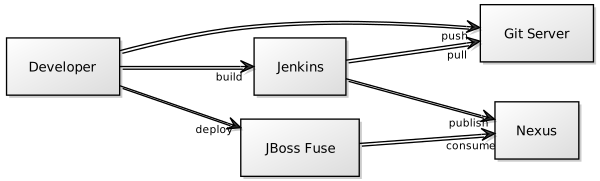
Interaction Diagram
http://yuml.me/edit/7e75fab5

git


First thing to do is to setup git to act as our source code management (SCM).
As you may guess we might have used every other similar software to do the job, from SVN to Mercurial, but I prefer git since it’s one of the most popular choices and also because it’s an officially supported tool to interact directly with Fabric8 configuration
We don’t have great requirements for git. We just need a filesystem to store our shared code and a transport service that allows to access that code.
To keep things simple I have decided to use SSH as the transport protocol.
This means that on the box that is going to store the code we need just sshd daemon started, some valid user, and a folder they can access.
Something like:

yum install -y sshd git
service sshd start
adduser fuse
mkdir -p /home/fuse/fuse_scripts.git
chmod a+rwx /home/fuse/fuse_scripts.git # or a better stratey based on guid
 
While the only git specific step is to initialize the git repository with

git init --bare /home/fuse/fuse_scripts.git

Nexus


Nexus OSS is a repository manager that can be used to store Maven artifacts.
It’s implemented as a java web application. For this reason installing Nexus is particularly simple.
Thanks to the embedded instance of Jetty that empowers it, it’s just a matter of extracting the distribution archive and starting a binary:

wget http://www.sonatype.org/downloads/nexus-latest-bundle.tar.gz /tmp/nexus-latest-bundle.tar.gz
tar -xzvf /tmp/nexus-latest-bundle.tar.gz -C /opt/nexus
/opt/nexus/nexus-*/bin/nexus 
 
Once started Nexus will be available by default at this endpoint:
http://your_ip/8081/nexus
with admin as user and admin123 as password.


Jenkins


Jenkins is the job scheduler we are going to use to build our project. We want to configure Jenkins in such a way that it will be able to connect directly to our git repo to download the project source.
To do this we need an additional plugin, Git Plugin.
We obviously also need java and maven installed on the box.
Being Jenkins configuration composed of various steps involving the interaction with multiple administrative pages, I will only give some hints on the important steps you are required to perform. For this reason I strongly suggest you to check my fully automated script that does everything in total automation.
Just like Nexus, Jenkins is implemented as a java web application.
Since I like to use RHEL compatible distribution like Centos or Fedora, I install Jenkins in a simplified way. Instead of manually extracting the archive like we did for Nexus, I just define the a new yum repo, and let yum handle the installation and configuration as a service for me:

wget http://pkg.jenkins-ci.org/redhat/jenkins.repo -O /etc/yum.repos.d/jenkins.repo
rpm --import http://pkg.jenkins-ci.org/redhat/jenkins-ci.org.key
yum install jenkins
service jenkins start
 
Once Jenkins is started you will find it’s web interface available here:
http://your_ip:8080/

By default it’s configured in single user mode, and that’s enough for our demo.
You may want to verify the http://your_ip:8080/configure to check if values for JDK, Maven and git look good. They are usually automatically picked up if you have those software already installed before Jenkins.

Then you are required to install Git Plugin:
http://your_ip:8080/pluginManager

Once you have everything configured, and after a restart of Jenkins instance, we will be able to see a new option in the form that allows us to create a Maven build job.
Under the section: Source Code Management there is now the option git. It’s just a matter of providing the coordinates of your SSH server, for example:

ssh://fuse@172.17.0.5/home/fuse/fuse_scripts.git


And in the section Build , under Goals and options, we need to explicitly tell Maven we want to invoke the deploy phase, providing the ip address of the Nexus insance:

clean deploy -DskipTests -Dip.nexus=172.17.0.3

The last configuration step, is to specify a different maven settings file, in the advanced maven properties , that is stored together with the source code:
https://github.com/paoloantinori/fuse_ci/blob/master/my_settings.xml

And that contains user and password to present to Nexus, when pushing artifacts there.

The configuration is done but we need an additional step to have Jenkins working with Git.
Since we are using SSH as our transport protocol, we are going to be asked, when connecting to the SSH server for the first time, to confirm that the server we are connecting to is safe and that its fingerprint is the one the we were expecting. This challenge operation will block the build job, since a batch job and there will not be anyone confirming SSH credentials.
To avoid all this, a trick is to connect to the Jenkins box via SSH, become the user that is used to run Jenkins process, jenkins in my case, and from there, manually connect to the ssh git server, to perform the identification operation interactively, so that it will no longer required in future:

ssh fuse@IP_GIT_SERVER
The authenticity of host '[172.17.0.2]:22 ([172.17.0.2]:22)' can't be established.
DSA key fingerprint is db:43:17:6b:11:be:0d:12:76:96:5c:8f:52:f9:8b:96.
Are you sure you want to continue connecting (yes/no)? 
 
The alternate approach I use my Jenkins docker image is to totally disable SSH fingerprint identification, an approach that maybe too insecure for you:

mkdir -p /var/lib/jenkins/.ssh ;  
printf "Host * \nUserKnownHostsFile /dev/null \nStrictHostKeyChecking no" >> /var/lib/jenkins/.ssh/config ; 
chown -R jenkins:jenkins /var/lib/jenkins/.ssh
 
If everything has been configured correctly, Jenkins will be able to automatically download our project, build it and publish it to Nexus.

But…

Before doing that we need a developer to push our code to git, otherwise there will not be any source file to build yet!
To to that, you just need to clone my repo, configure an additional remote repo (our private git server) and push:

git clone git@github.com:paoloantinori/fuse_ci.git
git remote add upstream ssh://fuse@$IP_GIT/home/fuse/fuse_scripts.git
git push upstream master
 
At this point you can trigger the build job on Jenkins. If it’s the first time you run it Maven will download all the dependencies, so it may take a while.
if everything is successful you will receive the confirmation that your artifacts have been published to Nexus.

JBoss Fuse


Now that our Nexus server is populated with the maven artifacts built from our code base, we just need to tell our Fuse instance to use Nexus as a Maven remote repository.
Teaches us how to do it:
In a karaf shell we need to change the value of a property,

fabric:profile-edit  --pid io.fabric8.agent/org.ops4j.pax.url.mvn.repositories=\"http://172.17.0.3:8081/nexus/content/repositories/snapshots/@snapshots@id=sample-snapshots\" default

And we can now verify that the integration is completed with this command:

cat  mvn:sample/karaf_scripts/1.0.0-SNAPSHOT/karaf/create_containers
 
If everything is fine, you are going to see an output similar to this:

# create broker profile
fabric:mq-create --profile $BROKER_PROFILE_NAME $BROKER_PROFILE_NAME
# create applicative profiles
fabric:profile-create --parents feature-camel MyProfile

# create broker
fabric:container-create-child --jvm-opts "$BROKER_01_JVM" --resolver localip --profile $BROKER_PROFILE_NAME root broker

# create worker
fabric:container-create-child --jvm-opts "$CONTAINER_01_JVM" --resolver localip root worker1
# assign profiles
fabric:container-add-profile worker1 MyProfile
 
Meaning that addressing a karaf script providing Maven coordinates worked well, and that now you can use shell:source, osgi:install or any other command you want that requires artifacts published on Nexus.

Conclusion


As mentioned multiple times, this is just a possible workflow and example of interaction between those platforms.
Your team may follow different procedures or using different instruments.
Maybe you are already implementing more advanced flows based on the new Fabric8 Maven Plugin.
In any case I invite everyone interested in the topic to post a comment or some link to different approach and help everyone sharing our experience.

Wednesday, March 12, 2014

Integration testing with Maven and Docker

Docker is one of the new hot things out there. With a different set of technologies and ideas compared to traditional virtual machines, it implements something similar and at the same time different, with the idea of containers: almost all VMs power but much faster and with very interesting additional goodies.

In this article I assume you already know something about Docker and know how to interact with it. If it's not the case I can suggest you these links to start with:

http://www.docker.io/gettingstarted
http://coreos.com/docs/launching-containers/building/getting-started-with-docker/
http://robknight.org.uk/blog/2013/05/drupal-on-docker/

My personal contribution to the topic is to show you a possible workflow that allows you to start and stop Docker containers from within a Maven job.

The reason why I have investigated in this functionality is to help with tests and integration tests in Java projects built with Maven. The problem is well known: your code interacts with external systems and services. Depending on what you are really writing this could mean Databases, Message Brokers, Web Services and so on.

The usual strategies to test these interactions are:

  • In memory servers; implemented in java that are usually very fast but too often their limit is that they are not the real thing
  • A layer of stubbed services, that you implement to offers the interfaces that you need.
  • Real external processes, sometimes remote, to test real interactions.

Those strategies work but they often require a lot of effort to be put in place. And the most complete one, that is the one that uses proper external services, poses problems for what concerns isolation:
imagine that you are interacting with a database and that you perform read/write operations just while someone else was accessing the same resources. Again, you may find the correct workflows that invovle creating separate schemas and so on, but, again, this is extra work and very often a not very straight forward activity.

Wouldn't it be great if we could have the same opportunities that these external systems offers, but in totaly isolation? And what do you think if I also add speed to the offer?

Docker is a tool that offers us this opportunity.

You can start a set of Docker container with all the services that you need, at the beginning of the testing suite, and tear it down at the end of it. And your Maven job can be the only consumer of these services, with all the isolation that it needs. And you can all of this easily scripted with the help of Dockerfiles, that are, at the end, not much more than a sequential set of command line invocations.

Let see how to enable all of this.

The first prerequisite is obviously to have Docker installed on your system. As you may already know Docker technology depends on the capabilities of the Linux Kernel, so you have to be on Linux OR you need the help of a traditional VM to host the Docker server process.

This is the official documentation guide that shows you how to install under different Linux distros:

http://docs.docker.io/en/latest/installation/

While instead this is a very quick guide to show how to install if you are on MacOSX:

http://blog.javabien.net/2014/03/03/setup-docker-on-osx-the-no-brainer-way/

Once you are ready and you have Docker installed, you need to apply a specific configuration.

Docker, in recents versions, exposes its remote API, by default, only over Unix Sockets. Despite we could interact with them with the right code, I find much easier to interact with the API over HTTP. To obtain this, you have to pass a specific flag to the Docker daemon to tell it to listen also on HTTP.

I am using Fedora, and the configuration file to modify is /usr/lib/systemd/system/docker.service.

[Unit]
Description=Docker Application Container Engine
Documentation=http://docs.docker.io
After=network.target

[Service]
ExecStart=/usr/bin/docker -d -H tcp://127.0.0.1:4243 -H unix:///var/run/docker.sock
Restart=on-failure

[Install]
WantedBy=multi-user.target

The only modification compared to the defaults it's been adding -H tcp://127.0.0.1:4243.

Now, after I have reloaded systemd scripts and restarted the service I have a Docker daemon that exposes me a nice REST API I can poke with curl.

sudo systemctl daemon-reload
sudo systemctl restart docker
curl http://127.0.0.1:4243/images/json # returns a json in output

You probably also want this configuration to survive future Docker rpm updates. To achieve that you have to copy the file you have just modified to a location that survives rpm updates. The correct way to achieve this in systemd is with:

sudo cp /usr/lib/systemd/system/docker.service /etc/systemd/system

See systemd FAQ for more details.

If you are using Ubuntu you have to configure a different file. Look at this page: http://blog.trifork.com/2013/12/24/docker-from-a-distance-the-remote-api/

Now we have all we need to interact easily with Docker.

You may at this point expect me to describe you how to use the Maven Docker plugin. Unluckily that's not the case. There is no such plugin yet, or at least I am not aware of it. I am considering writing one but for the moment being I have solved my problems quickly with the help of GMaven plugin, a little bit of Groovy code and the help of the java library Rest-assured.

Here is the code to startup Docker containers

import com.jayway.restassured.RestAssured
import static com.jayway.restassured.RestAssured.*
import static com.jayway.restassured.matcher.RestAssuredMatchers.*
import com.jayway.restassured.path.json.JsonPath
import com.jayway.restassured.response.Response

RestAssured.baseURI = "http://127.0.0.1"
RestAssured.port = 4243

// here you can specify advance docker params, but the mandatory one is the name of the Image you want to use
def dockerImageConf = '{"Image":"${docker.image}"}'
def dockerImageName = JsonPath.from(dockerImageConf).get("Image")

log.info "Creating new Docker container from image $dockerImageName"
def response =  with().body(dockerImageConf).post("/containers/create")

if( 404 == response.statusCode ) {
    log.info "Docker image not found in local repo. Trying to dowload image '$dockerImageName' from remote repos"
    response = with().parameter("fromImage", dockerImageName).post("/images/create")
    def message = response.asString()
    //odd: rest api always returns 200 and doesn't return proper json. I have to grep
    if( message.contains("HTTP code: 404") ) fail("Image $dockerImageName NOT FOUND remotely. Abort. $message}")
    log.info "Image downloaded"
    
    // retry to create the container
    response = with().body(dockerImageConf).post("/containers/create")
    if( 404 == response.statusCode ) fail("Unable to create container with conf $dockerImageConf: ${response.asString()}")
}

def containerId = response.jsonPath().get("Id")

log.info "Container created with id $containerId"

// set the containerId to be retrieved later during the stop phase
project.properties.setProperty("containerId", "$containerId")

log.info "Starting container $containerId"
with().post("/containers/$containerId/start").asString()

def ip = with().get("/containers/$containerId/json").path("NetworkSettings.IPAddress")

log.info "Container started with ip: $ip" 

System.setProperty("MONGODB_HOSTNAME", "$ip")
System.setProperty("MONGODB_PORT", "27017")

And this is the one to stop them

import com.jayway.restassured.RestAssured
import static com.jayway.restassured.RestAssured.*
import static com.jayway.restassured.matcher.RestAssuredMatchers.*

RestAssured.baseURI = "http://127.0.0.1"
RestAssured.port = 4243

def containerId = project.properties.getProperty('containerId')
log.info "Stopping Docker container $containerId"
with().post("/containers/$containerId/stop")
log.info "Docker container stopped"
if( true == ${docker.remove.container} ){
    with().delete("/containers/$containerId")
    log.info "Docker container deleted"
}

Rest-assured fluent API should suggest what is happening, and the inline comment should clarify it but let me add a couple of comments. The code to start a container is my implementation of the functionality of docker run as described in the official API documentation here:

http://docs.docker.io/en/latest/reference/api/docker_remote_api_v1.9/#inside-docker-run

The specific problem I had to solve was how to propagate the id of my Docker container from a Maven Phase to another one.
I have achieved the functionality thanks to the line:

// set the containerId to be retrieved later during the stop phase
project.properties.setProperty("containerId", "$containerId")

I have also exposed a couple of Maven properties that can be useful to interact with the API:

  • docker.image - The name of the image you want to spin
  • docker.remove.container - If set to false, tells Maven to not remove the stopped container from filesystem (useful to inspect your docker container after the job has finished)

Ex.

    mvn verify -Ddocker.image=pantinor/fuse -Ddocker.remove.container=false

You may find here a full working example. I have been told that sometimes my syntax colorizer script eats some keyword or change the case of words, so if you want to copy and paste it may be a better idea cropping from Github.

This is a portion of the output while running the Maven build with the command mvn verify :

...
[INFO] --- gmaven-plugin:1.4:execute (start-docker-images) @ gmaven-docker ---
[INFO] Creating new Docker container from image {"Image":"pantinor/centos-mongodb"}
log4j:WARN No appenders could be found for logger (org.apache.http.impl.conn.BasicClientConnectionManager).
log4j:WARN Please initialize the log4j system properly.
[INFO] Container created with id 5283d970dc16bd7d64ec08744b5ecec09b57d9a81162826e847666b8fb421dbc
[INFO] Starting container 5283d970dc16bd7d64ec08744b5ecec09b57d9a81162826e847666b8fb421dbc
[INFO] Container started with ip: 172.17.0.2

...

[INFO] --- gmaven-plugin:1.4:execute (stop-docker-images) @ gmaven-docker ---
[INFO] Stopping Docker container 5283d970dc16bd7d64ec08744b5ecec09b57d9a81162826e847666b8fb421dbc
[INFO] Docker container stopped
[INFO] Docker container deleted

...

If you have any question or suggestion please feel free to let me know!

Full Maven `pom.xml` available also here:

https://raw.githubusercontent.com/paoloantinori/gmaven_docker/master/pom.xml


    4.0.0
    gmaven-docker
    paolo.test
    1.0.0-SNAPSHOT
    Sample Maven Docker integration
    See companion blogpost here: http://giallone.blogspot.co.uk/2014/03/integration-testing-with-maven-and.html
    
        pantinor/centos-mongodb
        true


                org.codehaus.gmaven
                gmaven-plugin
                1.4
                
                    2.0


                        start-docker-images
                        test
                        
                            execute


                        stop-docker-images
                        post-integration-test
                        
                            execute


            com.jayway.restassured
            rest-assured
            1.8.1
            test


Wednesday, February 13, 2013

Post a file to a web page as part of a Maven build process

In a previous post Rest Invocation with Maven I've seen how to invoke a REST service from a Maven Pom file, using the Maven Groovy plugin.

In this post I will show how to upload a file to a webpage, still using some Groovy code.

We will do this in 2 different ways: using plain Apache Http Client and using Rest-assured, the library already described here in this previous post, Rest Assured or Rest-very-Easy

Apache Http Client

Groovy Script
import org.apache.http.impl.client.DefaultHttpClient
import org.apache.http.client.methods.HttpPost
import org.apache.http.entity.mime.MultipartEntity
import org.apache.http.entity.mime.content.FileBody
import org.apache.http.auth.AuthScope
import org.apache.http.auth.UsernamePasswordCredentials

def name = "${input_file}"
log.info( "Archive file: $name" )

def f = new File(name)

// The execution:
DefaultHttpClient httpclient = new DefaultHttpClient()
httpclient.getCredentialsProvider().setCredentials(
     new AuthScope(AuthScope.ANY_HOST, AuthScope.ANY_PORT), 
     new UsernamePasswordCredentials( "${username}", 
          "${password}" )
)

def post = new HttpPost("${form_endpoint}")
def entity = new MultipartEntity()
def fileBody = new FileBody(f)
entity.addPart("file", fileBody)
post.setEntity(entity)

def response = httpclient.execute(post)
def status = response.getStatusLine()
if( !(status ==~ /.*OK.*/) )
     fail("Unable to deploy. Return status code: $status" )
else
     log.info("Deployment Successful: Result status code $status")
Maven configuration
    
      deploy
      
        
          org.apache.httpcomponents
          httpmime
          4.2.1
        
        
          org.apache.httpcomponents
          httpcore
          4.2.1
        
        
          org.apache.httpcomponents
          httpclient
          4.2.1


            org.codehaus.groovy.maven
            gmaven-plugin
            1.0
            
              
                initialize
                
                  execute


Rest-assured

The solution based on HttpClient works fine but it's a little clumsy. We have already agreed that having a script embedded in a pom.xml file is handy but not as clean as writing a full featured Maven Plugin. But even without a complete Maven Plugin we can improve the readability of the script thanks to Rest-assured and the fluent style that allows us to write a much cleared script.

And at the same time we can reduce the number of the direct dependencies in our pom.xml, since we are delegating the rest-assured itself to declare what it needs, that by the way, is again Apache Http Client, since Rest-assured is based on it.

Notice that my script distinguish between .zip and non zip input files, but this distinction it's only dued to the fact that my endpoint was "confused" when I was passing an .zip file without specifying any mimetype. The default mimetype for rest-assured, when you use an overloaded version of .multipart() is application/octet-stream

Groovy Script
import static com.jayway.restassured.RestAssured.*;

def name = "${input_file}"

log.info("Uploading Archive file: $name")

//we have to determine the mimetype to correctly support both zip and xml

def mimeType = name.endsWith("zip") ? "application/zip" : "application/xml"

def f = new File(name)

def response =  with()
   .auth().basic("${username}", "${password}")
   .multiPart("file", f, mimeType)
   .post("${form_endpoint")

def status = response.getStatusLine()
if( !(status ==~ /.*OK.*/) )
     fail("Unable to deploy. Return status code: $status" )
else
     log.info("Deployment Successful: Result status code $status")
Maven configuration
    
      deploy
      
        
          com.jayway.restassured
          rest-assured
          1.4


            org.codehaus.groovy.maven
            gmaven-plugin
            1.0
            
              
                initialize
                
                  execute


Saturday, January 26, 2013

Java - Handmade Classloader Isolation

In a recent project we had a typical libraries conflict problem.

One component that we could control wanted a specific version of an Apache Commons library, while another component was expecting a different one.

Due to external constraints we could not specify any class loading isolation at the Container level. It wasn't an option for us.

What we decided to do instead has been to use the two different classes definition at the same time.

To obtain this we had to let one class be loaded by the current thread class loader and to load manually the second one; in this way the two classes still have the same fully qualified name.

The only restriction to this approach is the we had to interact with the manually loaded class only via reflection, since the current context, that is using a different class loader, has a different definition of a class and we would be able to cast or assign a instance of the class loaded with a classloader to a variable defined in the context of the other.

Our implementation is in effect a Classloader itself:

DirectoryBasedParentLastURLClassLoader extends ClassLoader

The characteristic of this Classloader is that we are passing it a file system folder path:

public DirectoryBasedParentLastURLClassLoader(String jarDir)

Our implementation scans the filesystem path to produce URLs and uses this information to pass them to a wrapped instance of a URLClassLoader that we are encapsulating with our CustomClassloader:

public DirectoryBasedParentLastURLClassLoader(String jarDir) {
    super(Thread.currentThread().getContextClassLoader());

    // search for JAR files in the given directory
    FileFilter jarFilter = new FileFilter() {
        public boolean accept(File pathname) {
            return pathname.getName().endsWith(".jar");
        }
    };

    // create URL for each JAR file found
    File[] jarFiles = new File(jarDir).listFiles(jarFilter);
    URL[] urls;

    if (null != jarFiles) {
        urls = new URL[jarFiles.length];

        for (int i = 0; i < jarFiles.length; i++) {
            try {
                urls[i] = jarFiles[i].toURI().toURL();
            } catch (MalformedURLException e) {
                throw new RuntimeException(
                        "Could not get URL for JAR file: " + jarFiles[i], e);
            }
        }

    } else {
        // no JAR files found
        urls = new URL[0];
    }

    childClassLoader = new ChildURLClassLoader(urls, this.getParent());
}

With this setup we can override the behaviour of the main classloading functionality, giving priority to the loading from our folder and falling back to the parent classloader only if we could find the requested class:

@Override
protected synchronized Class loadClass(String name, boolean resolve)
        throws ClassNotFoundException {
    try {
        // first try to find a class inside the child classloader
        return childClassLoader.findClass(name);
    } catch (ClassNotFoundException e) {
        // didn't find it, try the parent
        return super.loadClass(name, resolve);
    }
}

With our CustomClassloader in place we can use it in this way:

//instantiate our custom classloader
DirectoryBasedParentLastURLClassLoader classLoader = new DirectoryBasedParentLastURLClassLoader(
        ClassLoaderTest.JARS_DIR    );
//manually load a specific class
Class classManuallyLoaded = classLoader
        .loadClass("paolo.test.custom_classloader.support.MyBean");
//request a class via reflection
Object myBeanInstanceFromReflection = classManuallyLoaded.newInstance();
//keep using the class via reflection
Method methodToString = classManuallyLoaded.getMethod("toString");
assertEquals("v1", methodToString.invoke(myBeanInstanceFromReflection));

This idea for this post and part of its code come from this interesting discussion on Stackoverflow

A fully working Maven project is available on GitHub with a bunch of unit tests to verify the right behaviour.

Tuesday, January 15, 2013

Java: Rest-assured (or Rest-Very-Easy)


Recently I had to write some Java code to consume REST services over HTTP.

I've decided to use the Client libraries of RestEasy, the framework I use most of the time to expose REST services in Java, since it also implements the official JAX-RS specification.

I am very satisfied with the annotation driven approach that the specification defines and it makes exposing REST services a very pleasant task.

But unluckily I cannot say that I like the client API the same way.

If you are lucky enough to be able to build a proxy client based on the interface implemented by the service, well, that's not bad:

import org.jboss.resteasy.client.ProxyFactory;
...
// this initialization only needs to be done once per VM
RegisterBuiltin.register(ResteasyProviderFactory.getInstance());


SimpleClient client = ProxyFactory.create(MyRestServiceInterface.class, "http://localhost:8081");
client.myBusinessMethod("hello world");
Having a Proxy client similar to a  JAX-WS one is good, I do agree. But most of the time, when we are consuming REST web service we do not have a Java interface to import.
All those Twitter, Google or whatever public rest services available out there are just HTTP endpoints.

The way to go with RestEasy in these cases is to rely on the RestEasy Manual ClientRequest API:

ClientRequest request = new ClientRequest("http://localhost:8080/some/path");
request.header("custom-header", "value");

// We're posting XML and a JAXB object
request.body("application/xml", someJaxb);

// we're expecting a String back
ClientResponse<String> response = request.post(String.class);

if (response.getStatus() == 200) // OK!
{
   String str = response.getEntity();
}
That is in my opinion a very verbose way to fetch what is most of the time, just a bunch of strings from the web. And it gets even worse if you need to include Authentication informations:

// Configure HttpClient to authenticate preemptively
// by prepopulating the authentication data cache.
 
// 1. Create AuthCache instance
AuthCache authCache = new BasicAuthCache();
 
// 2. Generate BASIC scheme object and add it to the local auth cache
BasicScheme basicAuth = new BasicScheme();
authCache.put("com.bluemonkeydiamond.sippycups", basicAuth);
 
// 3. Add AuthCache to the execution context
BasicHttpContext localContext = new BasicHttpContext();
localContext.setAttribute(ClientContext.AUTH_CACHE, authCache);
 
// 4. Create client executor and proxy
httpClient = new DefaultHttpClient();
ApacheHttpClient4Executor executor = new ApacheHttpClient4Executor(httpClient, localContext);
client = ProxyFactory.create(BookStoreService.class, url, executor);

I have found that Rest-assured  provide a much nicer API to write client invocations.
Officially the aim of the project is to create a testing and validating framework; and most of the tutorials out there are covering those aspects, like the recent Heiko Rupp's one: http://pilhuhn.blogspot.nl/2013/01/testing-rest-apis-with-rest-assured.html

I suggest  yout, instead, to use it as a development tool to experiment and write REST invocation very rapidly.

What is important to know about rest-assured:

  •  it implements a Domain Specific Language thanks to fluid API
  •  it is a single Maven dependency
  •  it almost completely expose a shared style for both xml and json response objects
  •  it relies on Apache Commons Client

So, I'll show you a bunch of real world use cases and I will leave you with some good link if you want to know more.

As most of the DSL on Java, it works better if you import statically the most
important objects:
import static   com.jayway.restassured.RestAssured.*;
import static   com.jayway.restassured.matcher.RestAssuredMatchers.*;
Base usage:
get("http://api.twitter.com/1/users/show.xml").asString();

That returns:

  Sorry, that page does not exist

Uh oh, some error. Yeah, we need to pass some parameter:
with()
    .parameter("screen_name", "resteasy")
.get("http://api.twitter.com/1/users/show.xml").asString();

That returns:

  27016395
  Resteasy
  resteasy
  
  http://a0.twimg.com/sticky/default_profile_images/default_profile_0_normal.png
  https://si0.twimg.com/sticky/default_profile_images/default_profile_0_normal.png
  
  jboss.org/resteasy

JBoss/Red Hat REST project
  false
  244
  C0DEED
  333333
  0084B4
  DDEEF6
  C0DEED
  1
  Fri Mar 27 14:39:52 +0000 2009
  0
  
  
  http://a0.twimg.com/images/themes/theme1/bg.png
  https://si0.twimg.com/images/themes/theme1/bg.png
  false
  true
  false
  false
  8
  en
  false
  false
  21
  true
  true
...

Much better! Now, let's say that we want only a token of this big String XML:
with()
    .parameter("screen_name", "resteasy")
.get("http://api.twitter.com/1/users/show.xml")
    .path("user.profile_image_url")

And here's our output:
http://a0.twimg.com/sticky/default_profile_images/default_profile_0_normal.png

What if it was a JSON response?
with()
    .parameter("screen_name", "resteasy")
.get("http://api.twitter.com/1/users/show.json")

And here's our output:
{"id":27016395,"id_str":"27016395","name":"Resteasy","screen_name":"resteasy","location":"","url":null,"description":"jboss.org\/resteasy\n\nJBoss\/Red Hat REST project","protected":false,"followers_count":244,"friends_count":1,"listed_count":21,"created_at":"Fri Mar 27 14:39:52 +0000 2009","favourites_count":0,"utc_offset":null,"time_zone":null,"geo_enabled":false,"verified":false,"statuses_count":8,"lang":"en","status":{"created_at":"Tue Mar 23 14:48:51 +0000 2010","id":10928528312,"id_str":"10928528312","text":"Doing free webinar tomorrow on REST, JAX-RS, RESTEasy, and REST-*.  Only 40 min, so its brief.  http:\/\/tinyurl.com\/yz6xwek","source":"web","truncated":false,"in_reply_to_status_id":null,"in_reply_to_status_id_str":null,"in_reply_to_user_id":null,"in_reply_to_user_id_str":null,"in_reply_to_screen_name":null,"geo":null,"coordinates":null,"place":null,"contributors":null,"retweet_count":0,"favorited":false,"retweeted":false},"contributors_enabled":false,"is_translator":false,"profile_background_color":"C0DEED","profile_background_image_url":"http:\/\/a0.twimg.com\/images\/themes\/theme1\/bg.png","profile_background_image_url_https":"https:\/\/si0.twimg.com\/images\/themes\/theme1\/bg.png","profile_background_tile":false,"profile_image_url":"http:\/\/a0.twimg.com\/sticky\/default_profile_images\/default_profile_0_normal.png","profile_image_url_https":"https:\/\/si0.twimg.com\/sticky\/default_profile_images\/default_profile_0_normal.png","profile_link_color":"0084B4","profile_sidebar_border_color":"C0DEED","profile_sidebar_fill_color":"DDEEF6","profile_text_color":"333333","profile_use_background_image":true,"default_profile":true,"default_profile_image":true,"following":null,"follow_request_sent":null,"notifications":null}

And the same interface undestands JSON object navigation. Note that the navigation expression does not include "user" since it was not there in the full json response:
with()
    .parameter("screen_name", "resteasy")
.get("http://api.twitter.com/1/users/show.json")
    .path("profile_image_url")

And here's our output:
http://a0.twimg.com/sticky/default_profile_images/default_profile_0_normal.png

Now an example of Path Parameters:
with()
    .parameter("key", "HomoSapiens")
.get("http://eol.org/api/search/{key}").asString()

Information about the http request:
get("http://api.twitter.com/1/users/show.xml").statusCode();
get("http://api.twitter.com/1/users/show.xml").statusLine();

An example of Basic Authentication:
with()
  .auth().basic("paolo", "xxxx")
.get("http://localhost:8080/b/secured/hello")
  .statusLine()

An example of Multipart Form Upload
with()
    .multiPart("file", "test.txt", fileContent.getBytes())
.post("/upload")

Maven dependency:

 com.jayway.restassured
 rest-assured
 1.4
 test


And a Groovy snippet that can be pasted and executed directly in groovyConsole thanks to Grapes fetches the dependencies and add them automatically to the classpath, that shows you JAXB support:
@Grapes([  
    @Grab("com.jayway.restassured:rest-assured:1.7.2")
])
import static   com.jayway.restassured.RestAssured.*
import static   com.jayway.restassured.matcher.RestAssuredMatchers.*
import  javax.xml.bind.annotation.*


@XmlRootElement(name = "user")
@XmlAccessorType( XmlAccessType.FIELD )
    class TwitterUser {
        String id;
        String name;
        String description;
        String location;

        @Override
        String toString() {
            return "Id: $id, Name: $name, Description: $description, Location: $location"
        }

    }

println with().parameter("screen_name", "resteasy").get("http://api.twitter.com/1/users/show.xml").as(TwitterUser.class)

//


This is just a brief list of the features of the library, just you an idea of how easy it is to work with it. For a further examples I suggest you to read the official pages here:

https://code.google.com/p/rest-assured/wiki/Usage

Or another good tutorial here with a sample application to play with:

http://www.hascode.com/2011/10/testing-restful-web-services-made-easy-using-the-rest-assured-framework

Friday, November 9, 2012

REST Invocation With Maven

Recently I had to invoke some REST service in one of my Maven builds.

I had never did it before but I was expecting to find some ready to use component that could allow me to do all the things that I needed directly from configuration but it wasn't the case.

I did the typical search to see what was available and I have found some good tip here and there.

But the conclusion is that there is not a ready "off the shelf" component.

The 2 most practical options seem to be:

- use an Ant GET Task
- embed Groovy code in you r script

Since the first option work only with the verb GET I decided to use the Groovy approach.

Let's say that we want to invoke a service via POST like this:

 
pantinor@pantinor maven_rest$
    curl -d appid=YahooDemo -d query=madonna -d \ 
    context="renaissance favored the Virgin Mary for inspiration" \ 
    http://search.yahooapis.com/ContentAnalysisService/V1/termExtraction


Produces this output:

virgin mary
renaissance
inspiration


An example taken from http://developer.yahoo.com/search/content/V1/termExtraction.html


This is one way to do that in Maven

Add some useful dependency

        
            org.codehaus.groovy.modules.http-builder
            http-builder
            0.5.1
        
 
Specify the Groovy plugin
   
    org.codehaus.groovy.maven
    gmaven-plugin
    1.0
    
     
      generate-resources
      
       execute


       ...


Add add the proper Groovy code

import groovyx.net.http.RESTClient
import groovy.util.slurpersupport.GPathResult
import static groovyx.net.http.ContentType.URLENC
import static groovyx.net.http.ContentType.XML

yahoo = new RESTClient('http://search.yahooapis.com/ContentAnalysisService/V1/termExtraction')

def response = yahoo.post(
    contentType: XML,
    requestContentType: URLENC,
    body: [appid:"YahooDemo", query:"madonna", context:"renaissance favored the Virgin Mary for inspiration"] 
)
log.info "yahoo response data: ${response.data}"

This is the full pom.xml file


 4.0.0
 test
 maven-rest
 1.0.0

 Maven Rest Example


            org.codehaus.groovy.modules.http-builder
            http-builder
            0.5.1


    org.codehaus.groovy.maven
    gmaven-plugin
    1.0
    
     
      generate-resources
      
       execute


        <![CDATA[
import groovyx.net.http.RESTClient
import groovy.util.slurpersupport.GPathResult
import static groovyx.net.http.ContentType.URLENC
import static groovyx.net.http.ContentType.XML

yahoo = new RESTClient('http://search.yahooapis.com/ContentAnalysisService/V1/termExtraction')

def response = yahoo.post(
    contentType: XML,
    requestContentType: URLENC,
    body: [appid:"YahooDemo", query:"madonna", context:"renaissance favored the Virgin Mary for inspiration"] 
)
log.info "yahoo response data: ${response.data}"
        ]]>


That will produce the following output:

pantinor@pantinor maven_rest$ 
    mvn install | grep -i "yahoo"
    [INFO]  yahoo response data: virgin maryrenaissanceinspiration

Tuesday, August 7, 2012

JVM Performance Tuning Video

http://www.infoq.com/presentations/Extreme-Performance-Java#


I'd like to suggest to anyone that has to deal with Java and JEE development this video of Charlie Hunt, Architect of Performance Engineering at Salesforce.com , that give you some explanation and tips about Java memory management mechanism and tools to analyse the related data.

Wednesday, December 14, 2011

Java in the Cloud

I actually hate the Cloud buzzword. But a word is needed to describe the whole world of ideas and problems that developing and deploying towards a SOA over the internet is needed.

This webinar http://www.infoq.com/presentations/Grails-in-the-Cloud helps to understand all this universe. It does it with the Grails excuse, but it is much more generic, and for this reason, useful.

The first useful concept it explains is the definition of PaaS and in which way it decouples from the generic infrastructure (virtualization) cloud.

I like to define the PaaS concept as a 2nd level virtualization. You are yes working in a virtual environment, but you are further from the virtual machine. You are just required to be aware to services exposed to you: a database, a web container or whatever. You are not responsible to install an operating system in a virtual machine, and on top of that install you typical services. They are already there for you. You can consider yourself nearer to you business problem.

And on the other side, the fact that you are no longer the one responsible of setting up all the services will benefit of all those people that are actually good at doing this task. In fact a good idea that they had is at the moment present in Cloudbees: a multi stages development environment that offers you both a production context and a development context, with the possibility to promote stuff from development to production. It is an implementation of "Continuous Deployment".