


问题:如何把豆包的双语实时字幕抓取下来?这是豆包的双语实时字幕,目前没有下载字幕的功能,我如何下载?我会写程序,请用python语言帮我解决这个问题。
如何导出或者下载字幕
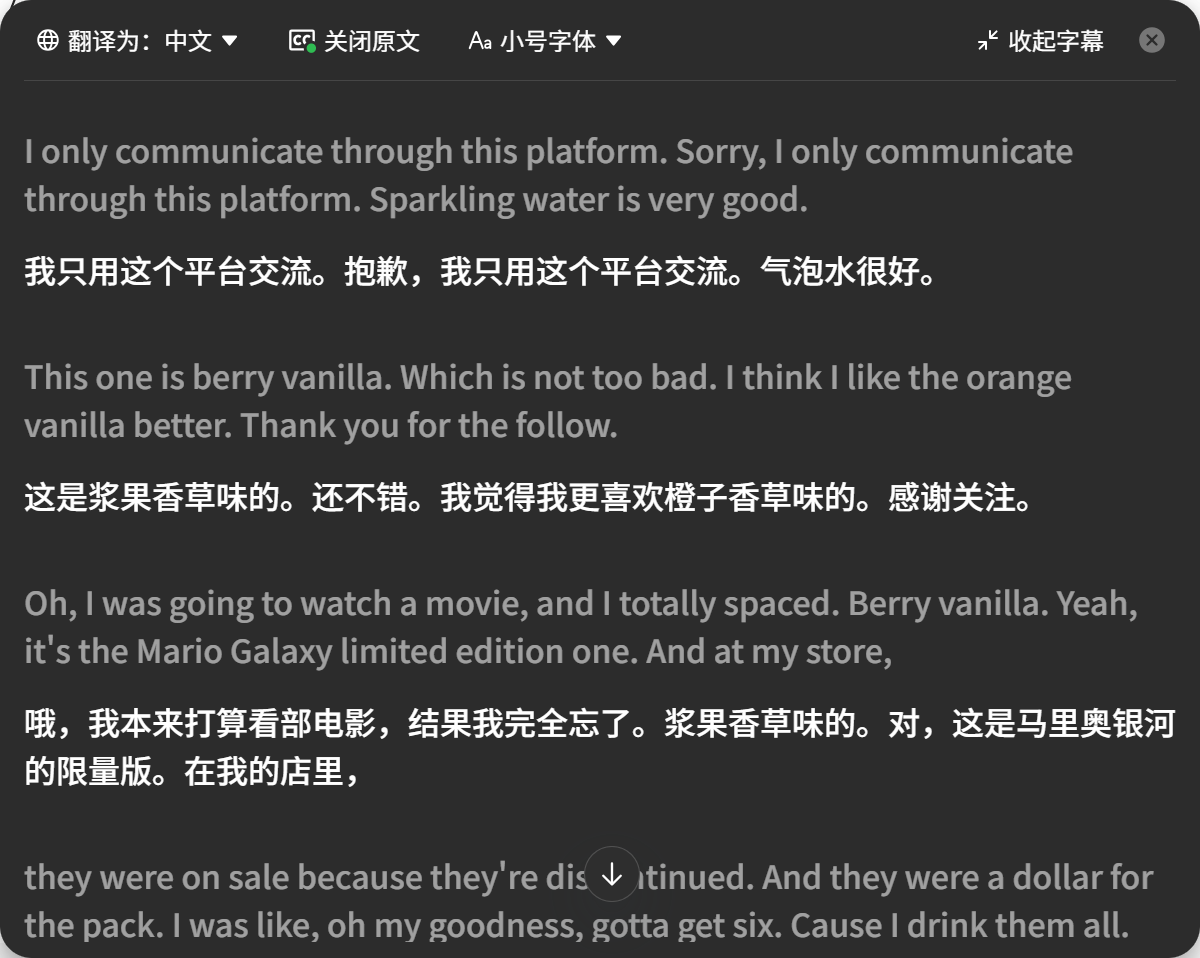
实现的效果:
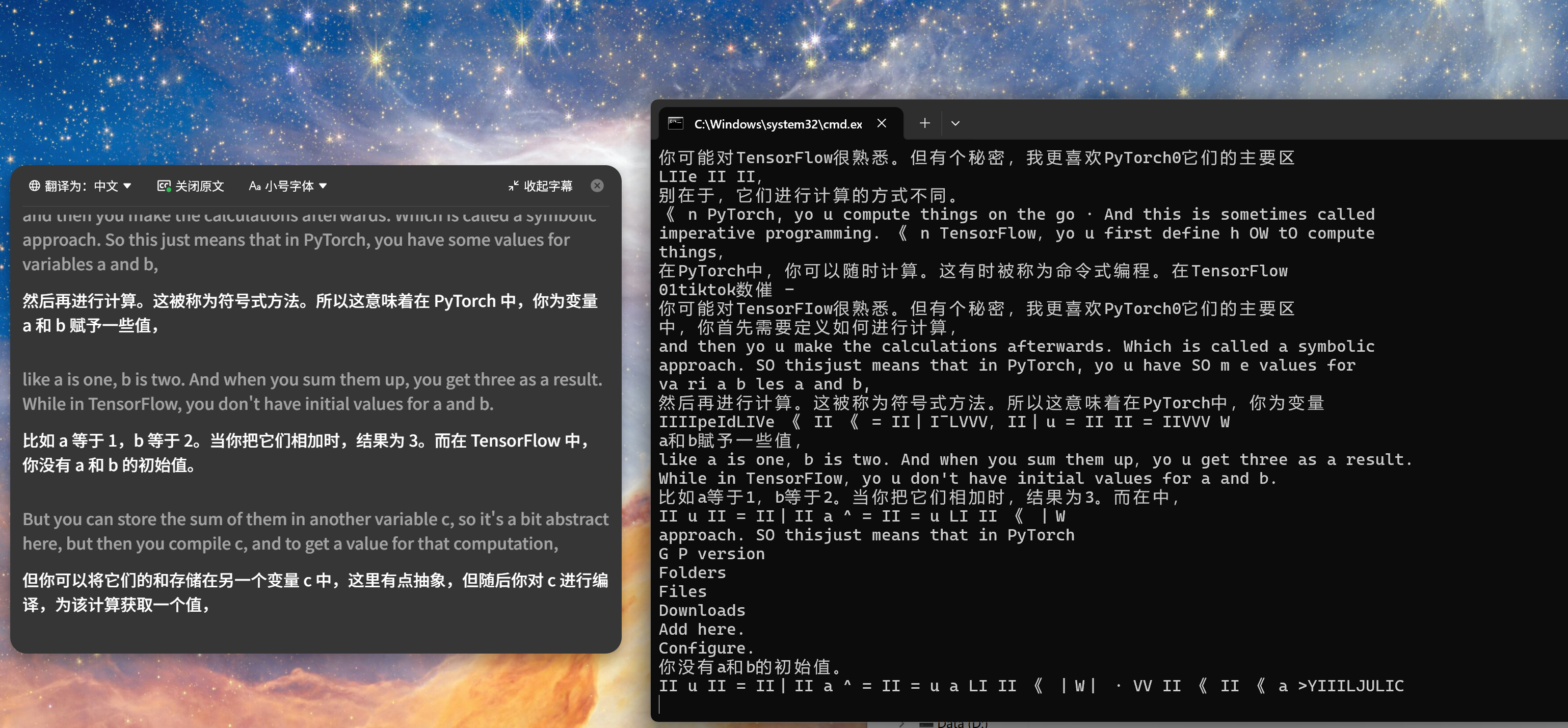
capture-doubao-subtitles.ps1
param(
    [int]$X = 20,
    [int]$Y = 145,
    [int]$Width = 1180,
    [int]$Height = 815,
    [double]$IntervalSeconds = 1.0,
    [string]$OutputPath = "C:\Users\dannel\Documents\Codex\2026-06-08\new-chat\outputs\doubao-subtitles.txt",
    [string]$DebugImagePath = "C:\Users\dannel\Documents\Codex\2026-06-08\new-chat\work\last-subtitle-capture.png",
    [switch]$KeepDuplicateScreens,
    [switch]$Once
)

Add-Type -AssemblyName System.Drawing
Add-Type -AssemblyName System.Windows.Forms
Add-Type -AssemblyName System.Runtime.WindowsRuntime

$null = [Windows.Globalization.Language, Windows.Foundation, ContentType = WindowsRuntime]
$null = [Windows.Media.Ocr.OcrEngine, Windows.Foundation, ContentType = WindowsRuntime]
$null = [Windows.Storage.StorageFile, Windows.Storage, ContentType = WindowsRuntime]
$null = [Windows.Graphics.Imaging.BitmapDecoder, Windows.Graphics, ContentType = WindowsRuntime]

$asTaskMethods = [System.WindowsRuntimeSystemExtensions].GetMethods() | Where-Object { $_.Name -eq "AsTask" }

function Await-WinRtOperation {
    param(
        [Parameter(Mandatory = $true)] $Operation,
        [Parameter(Mandatory = $true)] [Type] $ResultType
    )

    $method = $asTaskMethods |
        Where-Object {
            $_.IsGenericMethodDefinition -and
            $_.GetParameters().Count -eq 1 -and
            $_.GetParameters()[0].ParameterType.Name -eq 'IAsyncOperation`1'
        } |
        Select-Object -First 1

    if ($null -eq $method) {
        throw "Cannot find WindowsRuntimeSystemExtensions.AsTask for IAsyncOperation."
    }

    $task = $method.MakeGenericMethod($ResultType).Invoke($null, @($Operation))
    $task.Wait()
    return $task.Result
}

function Capture-Region {
    param(
        [int]$Left,
        [int]$Top,
        [int]$CaptureWidth,
        [int]$CaptureHeight,
        [string]$Path
    )

    $bitmap = New-Object System.Drawing.Bitmap $CaptureWidth, $CaptureHeight
    $graphics = [System.Drawing.Graphics]::FromImage($bitmap)
    try {
        $graphics.CopyFromScreen($Left, $Top, 0, 0, $bitmap.Size)
        $bitmap.Save($Path, [System.Drawing.Imaging.ImageFormat]::Png)
    }
    finally {
        $graphics.Dispose()
        $bitmap.Dispose()
    }
}

function Read-OcrText {
    param([string]$Path)

    $file = Await-WinRtOperation ([Windows.Storage.StorageFile]::GetFileFromPathAsync($Path)) ([Windows.Storage.StorageFile])
    $stream = Await-WinRtOperation ($file.OpenReadAsync()) ([Windows.Storage.Streams.IRandomAccessStreamWithContentType])
    try {
        $decoder = Await-WinRtOperation ([Windows.Graphics.Imaging.BitmapDecoder]::CreateAsync($stream)) ([Windows.Graphics.Imaging.BitmapDecoder])
        $softwareBitmap = Await-WinRtOperation ($decoder.GetSoftwareBitmapAsync()) ([Windows.Graphics.Imaging.SoftwareBitmap])

        $language = New-Object Windows.Globalization.Language "zh-Hans-CN"
        $engine = [Windows.Media.Ocr.OcrEngine]::TryCreateFromLanguage($language)
        if ($null -eq $engine) {
            $engine = [Windows.Media.Ocr.OcrEngine]::TryCreateFromUserProfileLanguages()
        }
        if ($null -eq $engine) {
            throw "Windows OCR engine is not available."
        }

        $result = Await-WinRtOperation ($engine.RecognizeAsync($softwareBitmap)) ([Windows.Media.Ocr.OcrResult])
        return ($result.Lines | ForEach-Object { $_.Text }) -join "`n"
    }
    finally {
        if ($stream) {
            $stream.Dispose()
        }
    }
}

function Remove-ToolbarText {
    param([string]$Text)

    $keptLines = foreach ($line in ($Text -split "`r?`n")) {
        $trimmed = $line.Trim()
        $compact = $trimmed -replace "\s+", ""

        if ([string]::IsNullOrWhiteSpace($trimmed)) {
            continue
        }
        if ($compact -match "^(翻译为[::]?中文|关闭原文|Aa.*字号|收起字幕|展开字幕)$") {
            continue
        }
        if ($compact.Length -le 1 -and $compact -match "^[^\p{L}\p{N}]$") {
            continue
        }

        $trimmed
    }

    return ($keptLines -join "`n").Trim()
}

function Format-SubtitleText {
    param([string]$Text)

    $cjk = "[\u3400-\u9FFF\uF900-\uFAFF]"
    $cjkOrAscii = "[\u3400-\u9FFF\uF900-\uFAFF0-9A-Za-z%]"
    $cjkPunctuation = "[\u3001\u3002\uff0c\uff1a\uff1b\uff01\uff1f\uff09\uff1d]"
    $openingPunctuation = "[\uff08]"

    $formattedLines = foreach ($line in ($Text -split "`r?`n")) {
        $value = $line.Trim()
        if ([string]::IsNullOrWhiteSpace($value)) {
            continue
        }

        $value = $value -replace "(?<=$cjkOrAscii)\s+(?=$cjk)", ""
        $value = $value -replace "(?<=$cjk)\s+(?=$cjkOrAscii)", ""
        $value = $value -replace "\s+($cjkPunctuation)", '$1'
        $value = $value -replace "($cjkPunctuation)\s+(?=$cjkOrAscii)", '$1'
        $value = $value -replace "($openingPunctuation)\s+", '$1'
        $value
    }

    return ($formattedLines -join "`n").Trim()
}

function Normalize-SubtitleLine {
    param([string]$Line)

    return ($Line.ToLowerInvariant() -replace "[^\p{L}\p{N}]+", "").Trim()
}

function Get-NewSubtitleLines {
    param(
        [string]$Text,
        [hashtable]$SeenLines
    )

    $newLines = New-Object System.Collections.Generic.List[string]

    foreach ($line in ($Text -split "`r?`n")) {
        $trimmed = $line.Trim()
        if ([string]::IsNullOrWhiteSpace($trimmed)) {
            continue
        }

        $key = Normalize-SubtitleLine $trimmed
        if ($key.Length -lt 4) {
            continue
        }

        if (-not $SeenLines.ContainsKey($key)) {
            $SeenLines[$key] = $true
            $newLines.Add($trimmed)
        }
    }

    return ($newLines -join "`n").Trim()
}

New-Item -ItemType Directory -Force -Path (Split-Path -Parent $OutputPath) | Out-Null
New-Item -ItemType Directory -Force -Path (Split-Path -Parent $DebugImagePath) | Out-Null

$lastText = ""
$seenLines = @{}

Write-Output "Saving subtitles to: $OutputPath"
Write-Output "Press Ctrl+C to stop."

while ($true) {
    Capture-Region -Left $X -Top $Y -CaptureWidth $Width -CaptureHeight $Height -Path $DebugImagePath
    $text = Format-SubtitleText (Remove-ToolbarText (Read-OcrText -Path $DebugImagePath))

    $textToSave = $text
    if (-not $KeepDuplicateScreens) {
        $textToSave = Get-NewSubtitleLines -Text $text -SeenLines $seenLines
    }

    if (-not [string]::IsNullOrWhiteSpace($textToSave) -and ($KeepDuplicateScreens -or $text -ne $lastText)) {
        Add-Content -Path $OutputPath -Encoding UTF8 -Value $textToSave
        Add-Content -Path $OutputPath -Encoding UTF8 -Value ""
        Write-Output $textToSave
        $lastText = $text
    }

    if ($Once) {
        break
    }

    Start-Sleep -Milliseconds ([int]($IntervalSeconds * 1000))
}
format-doubao-subtitles.ps1
param(
    [string]$InputPath = "C:\Users\dannel\Documents\Codex\2026-06-08\new-chat\outputs\doubao-subtitles.txt",
    [string]$OutputPath = "C:\Users\dannel\Documents\Codex\2026-06-08\new-chat\outputs\doubao-subtitles-formatted.txt"
)

function Format-SubtitleText {
    param([string]$Text)

    $cjk = "[\u3400-\u9FFF\uF900-\uFAFF]"
    $cjkOrAscii = "[\u3400-\u9FFF\uF900-\uFAFF0-9A-Za-z%]"
    $cjkPunctuation = "[\u3001\u3002\uff0c\uff1a\uff1b\uff01\uff1f\uff09\uff1d]"
    $openingPunctuation = "[\uff08]"

    $formattedLines = foreach ($line in ($Text -split "`r?`n")) {
        $value = $line.Trim()
        if ([string]::IsNullOrWhiteSpace($value)) {
            continue
        }
        if ($value -match "^\[\d{4}-\d{2}-\d{2} \d{2}:\d{2}:\d{2}\]$") {
            continue
        }

        $value = $value -replace "(?<=$cjkOrAscii)\s+(?=$cjk)", ""
        $value = $value -replace "(?<=$cjk)\s+(?=$cjkOrAscii)", ""
        $value = $value -replace "\s+($cjkPunctuation)", '$1'
        $value = $value -replace "($cjkPunctuation)\s+(?=$cjkOrAscii)", '$1'
        $value = $value -replace "($openingPunctuation)\s+", '$1'
        $value
    }

    return ($formattedLines -join "`n").Trim()
}

$text = Get-Content -Path $InputPath -Raw
Format-SubtitleText $text | Set-Content -Path $OutputPath -Encoding UTF8
Write-Output $OutputPath
start-doubao-subtitle-capture.cmd
@echo off
powershell -ExecutionPolicy Bypass -File "%~dp0capture-doubao-subtitles.ps1" -X 20 -Y 145 -Width 1180 -Height 815 -IntervalSeconds 1
pause
实现的效果并不是太完美,感兴趣的coder可以一起完善。





 扫一扫
扫一扫


 4068
4068

 被折叠的 条评论
为什么被折叠?
被折叠的 条评论
为什么被折叠?
 到【灌水乐园】发言





