



文章目录
零、前言
2026年,AI Agent大爆发元年,随着openclaw的爆火,越来越多的AI大厂开始做agent功能。只要开放了电脑权限,agent就可以直接操控你的电脑帮你干活。
一、介绍
1.AI Agent的定义
AI Agent(人工智能体)是一种具备自主理解、感知、规划、记忆和工具使用能力的智能系统,能够通过大语言模型驱动,自主执行复杂任务并实现跨应用操作
2.核心组件与工作原理
四大核心模块:AI Agent 系统由感知、规划、记忆与工具使用模块构成,协同实现智能行为。
1.感知系统:通过文本分析、图像识别、声音处理等方式捕捉环境信息与用户输入。
2.规划系统:作为决策中心,将复杂任务分解为可执行的子任务并制定策略。
3.记忆系统:存储历史交互与知识,包含感觉记忆、短期记忆和长期记忆三层结构。
4.工具使用:调用 API、操作软件、运行代码来完成策略执行。
3.与大模型的区别
AI Agent 与大模型(LLM)的关系可比作生物体与大脑,大模型是前提和基础,AI Agent 则具备"手和脚"可自主执行。
- 大模型交互基于 prompt,用户指令清晰度影响回答效果。
- AI Agent 仅需给定目标,即可独立思考并做出行动。
4.运行模式
ReAct 模式(Reasoning and Acting)是最常用的运行方式,重复执行思考 - 行动 - 观察循环直至完成任务。
二、单agent实战
1.制作登录门户网站
效果图:
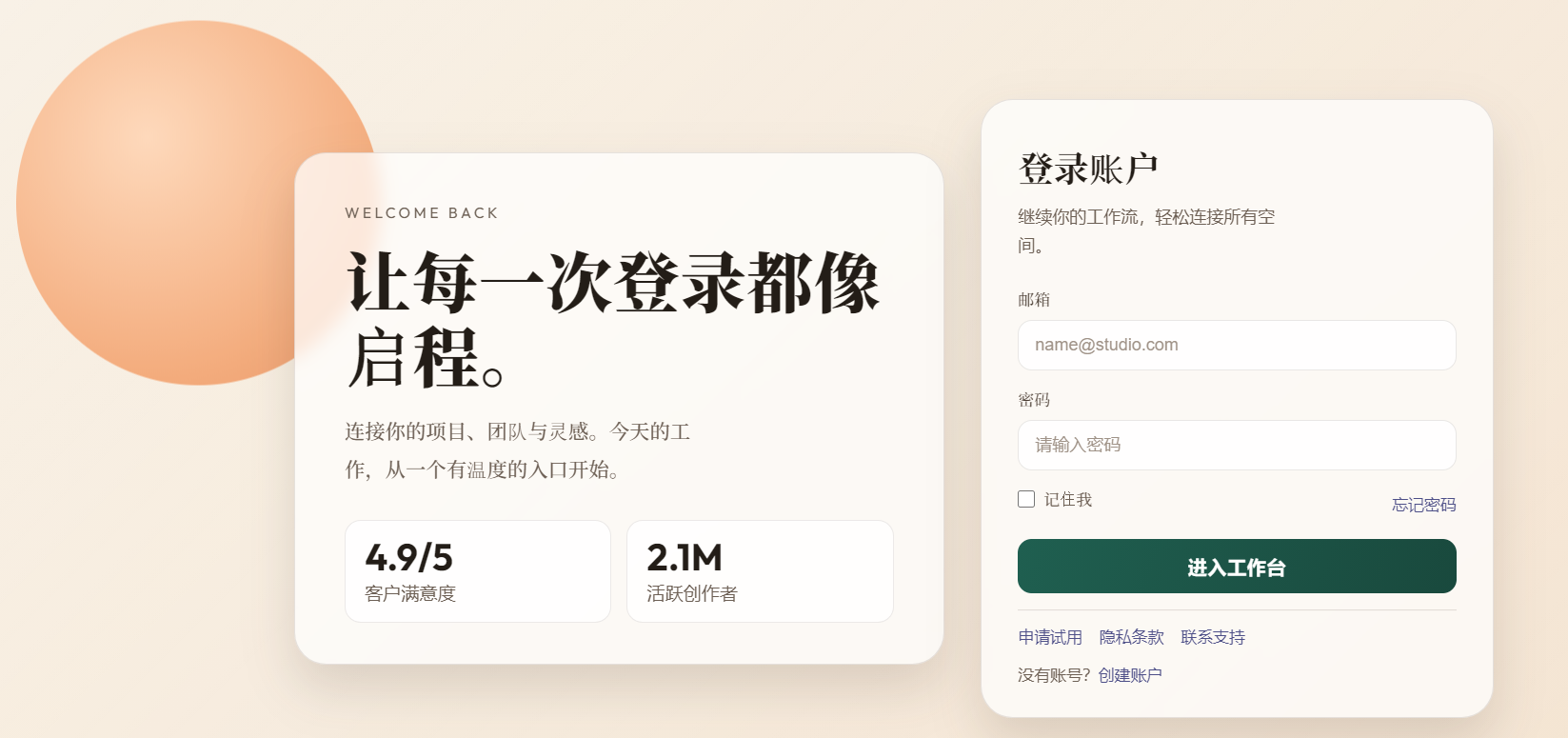
源码:
<!DOCTYPE html>
<html lang="zh-CN">
<head>
  <meta charset="UTF-8">
  <meta name="viewport" content="width=device-width, initial-scale=1.0">
  <title>登录</title>
  <link rel="preconnect" href="https://fonts.googleapis.com">
  <link rel="preconnect" href="https://fonts.gstatic.com" crossorigin>
  <link href="https://fonts.googleapis.com/css2?family=Noto+Serif+SC:wght@500;700;900&family=Outfit:wght@400;500;700&display=swap" rel="stylesheet">
  <style>
    :root {
      --bg-1: #f6eddf;
      --bg-2: #f4e3d0;
      --card: rgba(255, 255, 255, 0.72);
      --line: rgba(59, 45, 37, 0.12);
      --text: #231d17;
      --muted: #6d6055;
      --brand: #1f5f50;
      --brand-2: #19493d;
      --focus: #e59b61;
      --shadow: 0 22px 45px rgba(61, 46, 37, 0.15);
    }

    * {
      box-sizing: border-box;
    }

    body {
      margin: 0;
      min-height: 100vh;
      padding: 34px;
      display: grid;
      place-items: center;
      color: var(--text);
      font-family: "Outfit", "PingFang SC", "Microsoft YaHei", sans-serif;
      background:
        linear-gradient(135deg, rgba(255, 255, 255, 0.24), rgba(255, 255, 255, 0)),
        linear-gradient(145deg, var(--bg-1), var(--bg-2));
      overflow-x: hidden;
    }

    .scene {
      position: fixed;
      inset: 0;
      pointer-events: none;
      z-index: 0;
    }

    .orb {
      position: absolute;
      border-radius: 50%;
      filter: blur(0.2px);
    }

    .orb.sun {
      width: min(26vw, 340px);
      height: min(26vw, 340px);
      left: 15%;
      top: 11%;
      background: radial-gradient(circle at 36% 32%, #ffd7b8, #f4a674 70%, #ea9462);
      opacity: 0.92;
      animation: float 8s ease-in-out infinite;
    }

    .orb.sky {
      width: min(14vw, 200px);
      height: min(14vw, 200px);
      right: 26%;
      bottom: 5%;
      background: radial-gradient(circle at 32% 28%, #c9e0fa, #9ebfe6 72%, #7ba6d2);
      opacity: 0.9;
      animation: float 7s ease-in-out infinite reverse;
    }

    .container {
      position: relative;
      z-index: 1;
      width: min(1120px, 100%);
      display: grid;
      grid-template-columns: 1.14fr 0.9fr;
      gap: 34px;
      align-items: center;
    }

    .panel {
      border: 1px solid var(--line);
      background: var(--card);
      backdrop-filter: blur(8px);
      border-radius: 30px;
      box-shadow: var(--shadow);
      opacity: 0;
      transform: translateY(14px);
      animation: enter 0.7s cubic-bezier(.2, .75, .25, 1) forwards;
    }

    .brand-panel {
      padding: 46px 46px 38px;
      animation-delay: 0.08s;
    }

    .tag {
      margin: 0 0 18px;
      font-size: 14px;
      letter-spacing: 0.22em;
      text-transform: uppercase;
      color: var(--muted);
    }

    .hero-title {
      margin: 0;
      max-width: 14ch;
      font-family: "Noto Serif SC", serif;
      font-size: clamp(38px, 5.2vw, 62px);
      line-height: 1.12;
      letter-spacing: 0.01em;
      font-weight: 900;
    }

    .hero-desc {
      margin: 20px 0 30px;
      max-width: 33ch;
      color: var(--muted);
      line-height: 1.9;
      font-size: 19px;
      font-family: "Noto Serif SC", serif;
    }

    .stats {
      display: grid;
      grid-template-columns: 1fr 1fr;
      gap: 14px;
    }

    .stat-item {
      background: rgba(255, 255, 255, 0.84);
      border: 1px solid rgba(67, 52, 40, 0.1);
      border-radius: 15px;
      padding: 16px 18px;
    }

    .stat-value {
      margin: 0 0 5px;
      font-size: 35px;
      font-weight: 700;
      line-height: 1;
    }

    .stat-label {
      margin: 0;
      color: var(--muted);
      font-size: 17px;
    }

    .form-panel {
      padding: 38px 34px 30px;
      animation-delay: 0.18s;
    }

    .form-title {
      margin: 0;
      font-size: 33px;
      font-family: "Noto Serif SC", serif;
      font-weight: 700;
    }

    .form-subtitle {
      margin: 10px 0 26px;
      color: var(--muted);
      font-size: 16px;
      line-height: 1.7;
      max-width: 24ch;
    }

    .field {
      margin-bottom: 16px;
    }

    label {
      display: block;
      font-size: 15px;
      margin-bottom: 9px;
      color: #4a3d33;
      font-family: "Noto Serif SC", serif;
    }

    input[type="email"],
    input[type="password"] {
      width: 100%;
      border: 1px solid rgba(77, 62, 50, 0.12);
      border-radius: 13px;
      padding: 13px 15px;
      font-size: 16px;
      color: var(--text);
      background: rgba(255, 255, 255, 0.9);
      outline: none;
      transition: border-color 0.2s, box-shadow 0.2s, transform 0.2s;
    }

    input[type="email"]::placeholder,
    input[type="password"]::placeholder {
      color: #9f9287;
    }

    input[type="email"]:focus,
    input[type="password"]:focus {
      border-color: var(--focus);
      box-shadow: 0 0 0 4px rgba(229, 155, 97, 0.24);
      transform: translateY(-1px);
    }

    .row {
      display: flex;
      justify-content: space-between;
      align-items: center;
      margin: 6px 0 18px;
      gap: 14px;
      font-size: 15px;
    }

    .remember {
      display: inline-flex;
      align-items: center;
      gap: 8px;
      color: var(--muted);
      cursor: pointer;
      user-select: none;
    }

    .remember input {
      width: 16px;
      height: 16px;
      margin: 0;
      accent-color: var(--brand);
    }

    a {
      color: #4d4f88;
      text-decoration: none;
      font-size: 15px;
    }

    a:hover {
      text-decoration: underline;
      text-underline-offset: 2px;
    }

    .login-btn {
      width: 100%;
      border: 0;
      border-radius: 13px;
      padding: 14px 16px;
      font-size: 18px;
      letter-spacing: 0.02em;
      color: #fff;
      font-weight: 700;
      cursor: pointer;
      background: linear-gradient(110deg, var(--brand), var(--brand-2));
      transition: transform 0.2s, box-shadow 0.2s, filter 0.2s;
    }

    .login-btn:hover {
      transform: translateY(-2px);
      box-shadow: 0 12px 24px rgba(21, 72, 60, 0.34);
      filter: saturate(1.05);
    }

    .links {
      margin: 15px 0 0;
      padding-top: 14px;
      border-top: 1px solid rgba(71, 56, 45, 0.14);
      display: flex;
      flex-wrap: wrap;
      gap: 16px;
      color: var(--muted);
      font-size: 14px;
    }

    .signup {
      margin: 16px 0 0;
      color: var(--muted);
      font-size: 15px;
    }

    @keyframes enter {
      to {
        opacity: 1;
        transform: translateY(0);
      }
    }

    @keyframes float {
      0%, 100% {
        transform: translateY(0px);
      }
      50% {
        transform: translateY(-9px);
      }
    }

    @media (max-width: 980px) {
      body {
        padding: 24px;
      }

      .container {
        grid-template-columns: 1fr;
        gap: 20px;
      }

      .brand-panel {
        order: 2;
      }

      .form-panel {
        order: 1;
      }

      .hero-title {
        max-width: none;
      }
    }

    @media (max-width: 560px) {
      body {
        padding: 14px;
      }

      .brand-panel,
      .form-panel {
        padding: 24px 18px 20px;
        border-radius: 20px;
      }

      .hero-title {
        font-size: clamp(31px, 12vw, 44px);
      }

      .hero-desc {
        font-size: 16px;
      }

      .stat-value {
        font-size: 30px;
      }

      .stat-label {
        font-size: 15px;
      }

      .form-title {
        font-size: 29px;
      }

      .row {
        flex-wrap: wrap;
      }

      .links {
        gap: 10px 14px;
      }
    }
  </style>
</head>
<body>
  <div class="scene" aria-hidden="true">
    <span class="orb sun"></span>
    <span class="orb sky"></span>
  </div>

  <main class="container">
    <section class="panel brand-panel">
      <p class="tag">WELCOME BACK</p>
      <h1 class="hero-title">让每一次登录都像启程。</h1>
      <p class="hero-desc">连接你的项目、团队与灵感。今天的工作,从一个有温度的入口开始。</p>
      <div class="stats">
        <article class="stat-item">
          <p class="stat-value">4.9/5</p>
          <p class="stat-label">客户满意度</p>
        </article>
        <article class="stat-item">
          <p class="stat-value">2.1M</p>
          <p class="stat-label">活跃创作者</p>
        </article>
      </div>
    </section>

    <section class="panel form-panel">
      <h2 class="form-title">登录账户</h2>
      <p class="form-subtitle">继续你的工作流,轻松连接所有空间。</p>

      <form>
        <div class="field">
          <label for="email">邮箱</label>
          <input id="email" name="email" type="email" placeholder="name@studio.com" required>
        </div>

        <div class="field">
          <label for="password">密码</label>
          <input id="password" name="password" type="password" placeholder="请输入密码" required>
        </div>

        <div class="row">
          <label class="remember" for="remember">
            <input id="remember" name="remember" type="checkbox">
            记住我
          </label>
          <a href="#">忘记密码</a>
        </div>

        <button class="login-btn" type="submit">进入工作台</button>
      </form>

      <div class="links">
        <a href="#">申请试用</a>
        <a href="#">隐私条款</a>
        <a href="#">联系支持</a>
      </div>
      <p class="signup">没有账号?<a href="#">创建账户</a></p>
    </section>
  </main>
</body>
</html>
2.制作收费网站
使用的Agent:VSCode + CodeX 插件
源码:
<!DOCTYPE html>
<html lang="zh-CN">
<head>
  <meta charset="UTF-8" />
  <meta name="viewport" content="width=device-width, initial-scale=1.0" />
  <title>会员支付中心</title>
  <style>
    :root {
      --wx-green: #07c160;
      --wx-green-dark: #06ad56;
      --bg: #f5f6f8;
      --card: #ffffff;
      --text: #1f2329;
      --muted: #7a838f;
      --line: #e8ebef;
      --active-bg: #eaf9f1;
      --active-line: #8fdeb4;
    }

    * {
      box-sizing: border-box;
    }

    body {
      margin: 0;
      min-height: 100vh;
      background: var(--bg);
      color: var(--text);
      font-family: "PingFang SC", "Microsoft YaHei", sans-serif;
      display: grid;
      place-items: center;
      padding: 18px;
    }

    .app {
      width: min(900px, 100%);
      border: 1px solid var(--line);
      border-radius: 16px;
      overflow: hidden;
      background: var(--card);
      box-shadow: 0 12px 30px rgba(0, 0, 0, 0.08);
    }

    .topbar {
      height: 62px;
      background: var(--wx-green);
      color: #fff;
      display: flex;
      align-items: center;
      justify-content: space-between;
      padding: 0 18px;
    }

    .brand {
      display: flex;
      align-items: center;
      gap: 10px;
      font-weight: 700;
      letter-spacing: 0.3px;
    }

    .dot {
      width: 12px;
      height: 12px;
      border-radius: 50%;
      background: #fff;
      box-shadow: 16px 0 0 #fff;
    }

    .secure {
      font-size: 0.88rem;
      opacity: 0.95;
    }

    .body {
      padding: 22px;
      display: grid;
      grid-template-columns: 1fr 320px;
      gap: 16px;
      background: linear-gradient(180deg, #f7f8fa 0%, #f2f4f6 100%);
    }

    .panel {
      background: #fff;
      border: 1px solid var(--line);
      border-radius: 12px;
      padding: 18px;
    }

    .title {
      margin: 0;
      font-size: 1.2rem;
      font-weight: 700;
    }

    .subtitle {
      margin: 8px 0 0;
      color: var(--muted);
      font-size: 0.92rem;
    }

    .amount-grid {
      margin-top: 16px;
      display: grid;
      grid-template-columns: repeat(auto-fit, minmax(110px, 1fr));
      gap: 10px;
    }

    .amount-btn {
      border: 1px solid var(--line);
      background: #fff;
      border-radius: 10px;
      padding: 12px 8px;
      font-size: 1rem;
      font-weight: 700;
      cursor: pointer;
      color: #2c3138;
      transition: all 0.18s ease;
    }

    .amount-btn:hover {
      border-color: #b9c2cc;
      transform: translateY(-1px);
    }

    .amount-btn.active {
      border-color: var(--active-line);
      background: var(--active-bg);
      color: #0f7e43;
    }

    .section {
      margin-top: 16px;
      padding-top: 14px;
      border-top: 1px solid var(--line);
      display: flex;
      justify-content: space-between;
      align-items: baseline;
      gap: 12px;
    }

    .section .label {
      color: var(--muted);
      font-size: 0.92rem;
    }

    .section .price {
      font-size: 1.6rem;
      font-weight: 800;
      color: #12171d;
    }

    .qr-panel {
      display: grid;
      place-items: center;
      text-align: center;
      gap: 10px;
    }

    .pay-tag {
      display: inline-flex;
      align-items: center;
      gap: 8px;
      font-size: 0.9rem;
      color: #1f8f50;
      background: #ebf9f1;
      border: 1px solid #c9efd9;
      border-radius: 999px;
      padding: 5px 12px;
    }

    .qr-box {
      width: 240px;
      max-width: 100%;
      border: 1px solid var(--line);
      border-radius: 10px;
      background: #fff;
      padding: 10px;
    }

    .qr-box img {
      width: 100%;
      height: auto;
      display: block;
      border-radius: 6px;
    }

    .reward {
      font-size: 1.06rem;
      font-weight: 700;
    }

    .current {
      color: var(--muted);
      font-size: 0.92rem;
    }

    .refresh-btn {
      margin-top: 2px;
      border: none;
      background: var(--wx-green);
      color: #fff;
      border-radius: 8px;
      padding: 10px 14px;
      font-size: 0.92rem;
      cursor: pointer;
      transition: background 0.2s ease;
    }

    .refresh-btn:hover {
      background: var(--wx-green-dark);
    }

    @media (max-width: 820px) {
      .body {
        grid-template-columns: 1fr;
      }
    }
  </style>
</head>
<body>
  <main class="app">
    <header class="topbar">
      <div class="brand">
        <span class="dot" aria-hidden="true"></span>
        <span>微信支付</span>
      </div>
      <span class="secure">安全支付环境</span>
    </header>

    <section class="body">
      <article class="panel">
        <h1 class="title">会员收费界面</h1>
        <p class="subtitle">请选择金额后扫码支付,二维码会随机生成。</p>

        <div class="amount-grid" id="amountGrid"></div>

        <div class="section">
          <span class="label">应付金额</span>
          <span class="price" id="priceText">¥10</span>
        </div>
      </article>

      <aside class="panel qr-panel">
        <span class="pay-tag">微信扫码支付</span>
        <div class="qr-box">
          <img id="qrImage" alt="支付二维码" />
        </div>
        <div class="reward">打赏 Edward</div>
        <div class="current" id="amountTip"></div>
        <button id="refreshBtn" class="refresh-btn" type="button">刷新随机二维码</button>
      </aside>
    </section>
  </main>

  <script>
    const amounts = [1, 5, 10, 20, 50, 100, 200];
    const amountGrid = document.getElementById("amountGrid");
    const qrImage = document.getElementById("qrImage");
    const amountTip = document.getElementById("amountTip");
    const priceText = document.getElementById("priceText");
    const refreshBtn = document.getElementById("refreshBtn");
    let selectedAmount = 10;

    function randomToken() {
      if (window.crypto && window.crypto.getRandomValues) {
        const arr = new Uint32Array(2);
        window.crypto.getRandomValues(arr);
        return Array.from(arr, (v) => v.toString(16)).join("");
      }
      return Math.random().toString(36).slice(2) + Date.now().toString(36);
    }

    function refreshQr() {
      const payload = JSON.stringify({
        channel: "wechat-pay-style",
        to: "Edward",
        amount: selectedAmount,
        nonce: randomToken(),
        ts: Date.now()
      });
      qrImage.src = "https://api.qrserver.com/v1/create-qr-code/?size=300x300&data=" + encodeURIComponent(payload);
      amountTip.textContent = "当前金额:" + selectedAmount + " 元";
      priceText.textContent = "¥" + selectedAmount;
    }

    function setActive(button) {
      document.querySelectorAll(".amount-btn").forEach((item) => item.classList.remove("active"));
      button.classList.add("active");
    }

    function renderButtons() {
      amounts.forEach((amount) => {
        const btn = document.createElement("button");
        btn.type = "button";
        btn.className = "amount-btn";
        btn.textContent = amount + " 元";
        if (amount === selectedAmount) {
          btn.classList.add("active");
        }
        btn.addEventListener("click", () => {
          selectedAmount = amount;
          setActive(btn);
          refreshQr();
        });
        amountGrid.appendChild(btn);
      });
    }

    refreshBtn.addEventListener("click", refreshQr);
    renderButtons();
    refreshQr();
  </script>
</body>
</html>
3.登录 + 会员付费网站
前两者合并
<!DOCTYPE html>
<html lang="zh-CN">
<head>
  <meta charset="UTF-8" />
  <meta name="viewport" content="width=device-width, initial-scale=1.0" />
  <title>登录并会员付费</title>
  <link rel="preconnect" href="https://fonts.googleapis.com" />
  <link rel="preconnect" href="https://fonts.gstatic.com" crossorigin />
  <link href="https://fonts.googleapis.com/css2?family=Noto+Serif+SC:wght@500;700;900&family=Outfit:wght@400;500;700&display=swap" rel="stylesheet" />
  <style>
    :root {
      --login-bg-1: #f6eddf;
      --login-bg-2: #f4e3d0;
      --login-card: rgba(255, 255, 255, 0.72);
      --login-line: rgba(59, 45, 37, 0.12);
      --login-text: #231d17;
      --login-muted: #6d6055;
      --login-brand: #1f5f50;
      --login-brand-2: #19493d;
      --login-focus: #e59b61;
      --login-shadow: 0 22px 45px rgba(61, 46, 37, 0.15);

      --wx-green: #07c160;
      --wx-green-dark: #06ad56;
      --pay-bg: #f5f6f8;
      --pay-card: #ffffff;
      --pay-text: #1f2329;
      --pay-muted: #7a838f;
      --pay-line: #e8ebef;
      --pay-active-bg: #eaf9f1;
      --pay-active-line: #8fdeb4;
      --danger: #e85050;
    }

    * {
      box-sizing: border-box;
    }

    body {
      margin: 0;
      min-height: 100vh;
      padding: 0;
    }

    body.mode-login {
      background:
        linear-gradient(135deg, rgba(255, 255, 255, 0.24), rgba(255, 255, 255, 0)),
        linear-gradient(145deg, var(--login-bg-1), var(--login-bg-2));
      color: var(--login-text);
      font-family: "Outfit", "PingFang SC", "Microsoft YaHei", sans-serif;
    }

    body.mode-pay {
      background: var(--pay-bg);
      color: var(--pay-text);
      font-family: "PingFang SC", "Microsoft YaHei", sans-serif;
    }

    .view {
      display: none;
      min-height: 100vh;
      width: 100%;
    }

    .view.active {
      display: block;
    }

    .login-shell {
      min-height: 100vh;
      padding: 34px;
      display: grid;
      place-items: center;
      position: relative;
      overflow-x: hidden;
    }

    .scene {
      position: fixed;
      inset: 0;
      pointer-events: none;
      z-index: 0;
    }

    .orb {
      position: absolute;
      border-radius: 50%;
      filter: blur(0.2px);
    }

    .orb.sun {
      width: min(26vw, 340px);
      height: min(26vw, 340px);
      left: 15%;
      top: 11%;
      background: radial-gradient(circle at 36% 32%, #ffd7b8, #f4a674 70%, #ea9462);
      opacity: 0.92;
      animation: float 8s ease-in-out infinite;
    }

    .orb.sky {
      width: min(14vw, 200px);
      height: min(14vw, 200px);
      right: 26%;
      bottom: 5%;
      background: radial-gradient(circle at 32% 28%, #c9e0fa, #9ebfe6 72%, #7ba6d2);
      opacity: 0.9;
      animation: float 7s ease-in-out infinite reverse;
    }

    .login-container {
      position: relative;
      z-index: 1;
      width: min(1120px, 100%);
      display: grid;
      grid-template-columns: 1.14fr 0.9fr;
      gap: 34px;
      align-items: center;
    }

    .login-panel {
      border: 1px solid var(--login-line);
      background: var(--login-card);
      backdrop-filter: blur(8px);
      border-radius: 30px;
      box-shadow: var(--login-shadow);
      opacity: 0;
      transform: translateY(14px);
      animation: enter 0.7s cubic-bezier(.2, .75, .25, 1) forwards;
    }

    .brand-panel {
      padding: 46px 46px 38px;
      animation-delay: 0.08s;
    }

    .tag {
      margin: 0 0 18px;
      font-size: 14px;
      letter-spacing: 0.22em;
      text-transform: uppercase;
      color: var(--login-muted);
    }

    .hero-title {
      margin: 0;
      max-width: 14ch;
      font-family: "Noto Serif SC", serif;
      font-size: clamp(38px, 5.2vw, 62px);
      line-height: 1.12;
      letter-spacing: 0.01em;
      font-weight: 900;
    }

    .hero-desc {
      margin: 20px 0 30px;
      max-width: 33ch;
      color: var(--login-muted);
      line-height: 1.9;
      font-size: 19px;
      font-family: "Noto Serif SC", serif;
    }

    .stats {
      display: grid;
      grid-template-columns: 1fr 1fr;
      gap: 14px;
    }

    .stat-item {
      background: rgba(255, 255, 255, 0.84);
      border: 1px solid rgba(67, 52, 40, 0.1);
      border-radius: 15px;
      padding: 16px 18px;
    }

    .stat-value {
      margin: 0 0 5px;
      font-size: 35px;
      font-weight: 700;
      line-height: 1;
    }

    .stat-label {
      margin: 0;
      color: var(--login-muted);
      font-size: 17px;
    }

    .form-panel {
      padding: 38px 34px 30px;
      animation-delay: 0.18s;
    }

    .form-title {
      margin: 0;
      font-size: 33px;
      font-family: "Noto Serif SC", serif;
      font-weight: 700;
    }

    .form-subtitle {
      margin: 10px 0 26px;
      color: var(--login-muted);
      font-size: 16px;
      line-height: 1.7;
      max-width: 26ch;
    }

    .field {
      margin-bottom: 16px;
    }

    .field label {
      display: block;
      font-size: 15px;
      margin-bottom: 9px;
      color: #4a3d33;
      font-family: "Noto Serif SC", serif;
    }

    .field input {
      width: 100%;
      border: 1px solid rgba(77, 62, 50, 0.12);
      border-radius: 13px;
      padding: 13px 15px;
      font-size: 16px;
      color: var(--login-text);
      background: rgba(255, 255, 255, 0.9);
      outline: none;
      transition: border-color 0.2s, box-shadow 0.2s, transform 0.2s;
    }

    .field input::placeholder {
      color: #9f9287;
    }

    .field input:focus {
      border-color: var(--login-focus);
      box-shadow: 0 0 0 4px rgba(229, 155, 97, 0.24);
      transform: translateY(-1px);
    }

    .login-btn {
      width: 100%;
      border: 0;
      border-radius: 13px;
      padding: 14px 16px;
      font-size: 18px;
      letter-spacing: 0.02em;
      color: #fff;
      font-weight: 700;
      cursor: pointer;
      background: linear-gradient(110deg, var(--login-brand), var(--login-brand-2));
      transition: transform 0.2s, box-shadow 0.2s, filter 0.2s;
    }

    .login-btn:hover {
      transform: translateY(-2px);
      box-shadow: 0 12px 24px rgba(21, 72, 60, 0.34);
      filter: saturate(1.05);
    }

    .error {
      margin: 10px 0 0;
      min-height: 1.25em;
      color: var(--danger);
      font-size: 14px;
    }

    .hint {
      margin: 10px 0 0;
      color: var(--login-muted);
      font-size: 14px;
    }

    .pay-shell {
      min-height: 100vh;
      display: grid;
      place-items: center;
      padding: 18px;
    }

    .app {
      width: min(900px, 100%);
      border: 1px solid var(--pay-line);
      border-radius: 16px;
      overflow: hidden;
      background: var(--pay-card);
      box-shadow: 0 12px 30px rgba(0, 0, 0, 0.08);
    }

    .topbar {
      height: 62px;
      background: var(--wx-green);
      color: #fff;
      display: flex;
      align-items: center;
      justify-content: space-between;
      padding: 0 18px;
    }

    .brand {
      display: flex;
      align-items: center;
      gap: 10px;
      font-weight: 700;
      letter-spacing: 0.3px;
    }

    .dot {
      width: 12px;
      height: 12px;
      border-radius: 50%;
      background: #fff;
      box-shadow: 16px 0 0 #fff;
    }

    .secure {
      font-size: 0.88rem;
      opacity: 0.95;
    }

    .pay-body {
      padding: 22px;
      display: grid;
      grid-template-columns: 1fr 320px;
      gap: 16px;
      background: linear-gradient(180deg, #f7f8fa 0%, #f2f4f6 100%);
    }

    .pay-panel {
      background: #fff;
      border: 1px solid var(--pay-line);
      border-radius: 12px;
      padding: 18px;
    }

    .title {
      margin: 0;
      font-size: 1.2rem;
      font-weight: 700;
    }

    .subtitle {
      margin: 8px 0 0;
      color: var(--pay-muted);
      font-size: 0.92rem;
    }

    .header-row {
      margin-top: 14px;
      display: flex;
      justify-content: space-between;
      align-items: center;
      gap: 12px;
      padding-top: 12px;
      border-top: 1px solid var(--pay-line);
    }

    .user-tag {
      font-size: 0.9rem;
      color: #1b8f4f;
      background: #ecfaf3;
      border: 1px solid #cbefdb;
      border-radius: 999px;
      padding: 5px 10px;
    }

    .logout-btn {
      border: 1px solid #e2e6ea;
      background: #fff;
      color: #555f6c;
      border-radius: 8px;
      padding: 8px 10px;
      cursor: pointer;
      font-size: 0.85rem;
    }

    .amount-grid {
      margin-top: 16px;
      display: grid;
      grid-template-columns: repeat(auto-fit, minmax(110px, 1fr));
      gap: 10px;
    }

    .amount-btn {
      border: 1px solid var(--pay-line);
      background: #fff;
      border-radius: 10px;
      padding: 12px 8px;
      font-size: 1rem;
      font-weight: 700;
      cursor: pointer;
      color: #2c3138;
      transition: all 0.18s ease;
    }

    .amount-btn:hover {
      border-color: #b9c2cc;
      transform: translateY(-1px);
    }

    .amount-btn.active {
      border-color: var(--pay-active-line);
      background: var(--pay-active-bg);
      color: #0f7e43;
    }

    .section {
      margin-top: 16px;
      padding-top: 14px;
      border-top: 1px solid var(--pay-line);
      display: flex;
      justify-content: space-between;
      align-items: baseline;
      gap: 12px;
    }

    .section .label {
      color: var(--pay-muted);
      font-size: 0.92rem;
    }

    .section .price {
      font-size: 1.6rem;
      font-weight: 800;
      color: #12171d;
    }

    .qr-panel {
      display: grid;
      place-items: center;
      text-align: center;
      gap: 10px;
    }

    .pay-tag {
      display: inline-flex;
      align-items: center;
      gap: 8px;
      font-size: 0.9rem;
      color: #1f8f50;
      background: #ebf9f1;
      border: 1px solid #c9efd9;
      border-radius: 999px;
      padding: 5px 12px;
    }

    .qr-box {
      width: 240px;
      max-width: 100%;
      border: 1px solid var(--pay-line);
      border-radius: 10px;
      background: #fff;
      padding: 10px;
    }

    .qr-box img {
      width: 100%;
      height: auto;
      display: block;
      border-radius: 6px;
    }

    .reward {
      font-size: 1.06rem;
      font-weight: 700;
    }

    .current {
      color: var(--pay-muted);
      font-size: 0.92rem;
    }

    .refresh-btn {
      margin-top: 2px;
      border: none;
      background: var(--wx-green);
      color: #fff;
      border-radius: 8px;
      padding: 10px 14px;
      font-size: 0.92rem;
      cursor: pointer;
      transition: background 0.2s ease;
    }

    .refresh-btn:hover {
      background: var(--wx-green-dark);
    }

    @keyframes enter {
      to {
        opacity: 1;
        transform: translateY(0);
      }
    }

    @keyframes float {
      0%, 100% {
        transform: translateY(0px);
      }
      50% {
        transform: translateY(-9px);
      }
    }

    @media (max-width: 980px) {
      .login-shell {
        padding: 24px;
      }

      .login-container {
        grid-template-columns: 1fr;
        gap: 20px;
      }

      .brand-panel {
        order: 2;
      }

      .form-panel {
        order: 1;
      }

      .hero-title {
        max-width: none;
      }
    }

    @media (max-width: 820px) {
      .pay-body {
        grid-template-columns: 1fr;
      }
    }

    @media (max-width: 560px) {
      .login-shell {
        padding: 14px;
      }

      .brand-panel,
      .form-panel {
        padding: 24px 18px 20px;
        border-radius: 20px;
      }

      .hero-title {
        font-size: clamp(31px, 12vw, 44px);
      }

      .hero-desc {
        font-size: 16px;
      }

      .stat-value {
        font-size: 30px;
      }

      .stat-label {
        font-size: 15px;
      }

      .form-title {
        font-size: 29px;
      }

      .pay-shell {
        padding: 12px;
      }
    }
  </style>
</head>
<body class="mode-login">
  <section class="view active" id="loginView">
    <div class="scene" aria-hidden="true">
      <span class="orb sun"></span>
      <span class="orb sky"></span>
    </div>

    <div class="login-shell">
      <main class="login-container">
        <section class="login-panel brand-panel">
          <p class="tag">WELCOME BACK</p>
          <h1 class="hero-title">让每一次登录都像启程。</h1>
          <p class="hero-desc">连接你的项目、团队与灵感。今天的工作,从一个有温度的入口开始。</p>
          <div class="stats">
            <article class="stat-item">
              <p class="stat-value">4.9/5</p>
              <p class="stat-label">客户满意度</p>
            </article>
            <article class="stat-item">
              <p class="stat-value">2.1M</p>
              <p class="stat-label">活跃创作者</p>
            </article>
          </div>
        </section>

        <section class="login-panel form-panel">
          <h2 class="form-title">登录账户</h2>
          <p class="form-subtitle">输入任意用户名即可登录,登录后自动进入会员付费页面。</p>

          <form id="loginForm">
            <div class="field">
              <label for="username">用户名</label>
              <input id="username" name="username" type="text" placeholder="请输入任意用户名" autocomplete="off" />
            </div>

            <div class="field">
              <label for="password">密码(可选)</label>
              <input id="password" name="password" type="password" placeholder="任意内容即可" autocomplete="off" />
            </div>

            <button class="login-btn" type="submit">登录并进入会员付费</button>
            <p class="hint">本地演示页,不做账号密码校验。</p>
            <p class="error" id="loginError"></p>
          </form>
        </section>
      </main>
    </div>
  </section>

  <section class="view" id="payView">
    <div class="pay-shell">
      <main class="app">
        <header class="topbar">
          <div class="brand">
            <span class="dot" aria-hidden="true"></span>
            <span>微信支付</span>
          </div>
          <span class="secure">安全支付环境</span>
        </header>

        <section class="pay-body">
          <article class="pay-panel">
            <h1 class="title">会员收费界面</h1>
            <p class="subtitle">请选择金额后扫码支付,二维码会随机生成。</p>

            <div class="header-row">
              <span class="user-tag" id="userTag">当前用户:-</span>
              <button id="logoutBtn" class="logout-btn" type="button">退出登录</button>
            </div>

            <div class="amount-grid" id="amountGrid"></div>

            <div class="section">
              <span class="label">应付金额</span>
              <span class="price" id="priceText">¥10</span>
            </div>
          </article>

          <aside class="pay-panel qr-panel">
            <span class="pay-tag">微信扫码支付</span>
            <div class="qr-box">
              <img id="qrImage" alt="支付二维码" />
            </div>
            <div class="reward">打赏 Edward</div>
            <div class="current" id="amountTip"></div>
            <button id="refreshBtn" class="refresh-btn" type="button">刷新随机二维码</button>
          </aside>
        </section>
      </main>
    </div>
  </section>

  <script>
    const LOGIN_KEY = "pay_login_user";

    const body = document.body;
    const loginView = document.getElementById("loginView");
    const payView = document.getElementById("payView");
    const loginForm = document.getElementById("loginForm");
    const loginError = document.getElementById("loginError");
    const usernameInput = document.getElementById("username");
    const userTag = document.getElementById("userTag");
    const logoutBtn = document.getElementById("logoutBtn");

    const amounts = [1, 5, 10, 20, 50, 100, 200];
    const amountGrid = document.getElementById("amountGrid");
    const qrImage = document.getElementById("qrImage");
    const amountTip = document.getElementById("amountTip");
    const priceText = document.getElementById("priceText");
    const refreshBtn = document.getElementById("refreshBtn");
    let selectedAmount = 10;

    function randomToken() {
      if (window.crypto && window.crypto.getRandomValues) {
        const arr = new Uint32Array(2);
        window.crypto.getRandomValues(arr);
        return Array.from(arr, (v) => v.toString(16)).join("");
      }
      return Math.random().toString(36).slice(2) + Date.now().toString(36);
    }

    function refreshQr() {
      const user = sessionStorage.getItem(LOGIN_KEY) || "Guest";
      const payload = JSON.stringify({
        channel: "wechat-pay-style",
        to: "Edward",
        user: user,
        amount: selectedAmount,
        nonce: randomToken(),
        ts: Date.now()
      });
      qrImage.src = "https://api.qrserver.com/v1/create-qr-code/?size=300x300&data=" + encodeURIComponent(payload);
      amountTip.textContent = "当前金额:" + selectedAmount + " 元";
      priceText.textContent = "¥" + selectedAmount;
    }

    function setActive(button) {
      document.querySelectorAll(".amount-btn").forEach((item) => item.classList.remove("active"));
      button.classList.add("active");
    }

    function renderButtons() {
      amounts.forEach((amount) => {
        const btn = document.createElement("button");
        btn.type = "button";
        btn.className = "amount-btn";
        btn.textContent = amount + " 元";
        if (amount === selectedAmount) btn.classList.add("active");
        btn.addEventListener("click", () => {
          selectedAmount = amount;
          setActive(btn);
          refreshQr();
        });
        amountGrid.appendChild(btn);
      });
    }

    function showLogin() {
      body.classList.remove("mode-pay");
      body.classList.add("mode-login");
      loginView.classList.add("active");
      payView.classList.remove("active");
      loginError.textContent = "";
      usernameInput.focus();
    }

    function showPay() {
      const user = sessionStorage.getItem(LOGIN_KEY);
      if (!user) {
        showLogin();
        return;
      }
      body.classList.remove("mode-login");
      body.classList.add("mode-pay");
      userTag.textContent = "当前用户:" + user;
      loginView.classList.remove("active");
      payView.classList.add("active");
      refreshQr();
    }

    function routeByHash() {
      if (location.hash === "#pay") {
        showPay();
      } else {
        showLogin();
      }
    }

    loginForm.addEventListener("submit", (event) => {
      event.preventDefault();
      const user = usernameInput.value.trim();
      if (!user) {
        loginError.textContent = "请输入任意用户名后再登录。";
        return;
      }
      sessionStorage.setItem(LOGIN_KEY, user);
      location.hash = "#pay";
      showPay();
    });

    logoutBtn.addEventListener("click", () => {
      sessionStorage.removeItem(LOGIN_KEY);
      location.hash = "";
      showLogin();
    });

    refreshBtn.addEventListener("click", refreshQr);
    renderButtons();
    routeByHash();
    window.addEventListener("hashchange", routeByHash);
  </script>
</body>
</html>
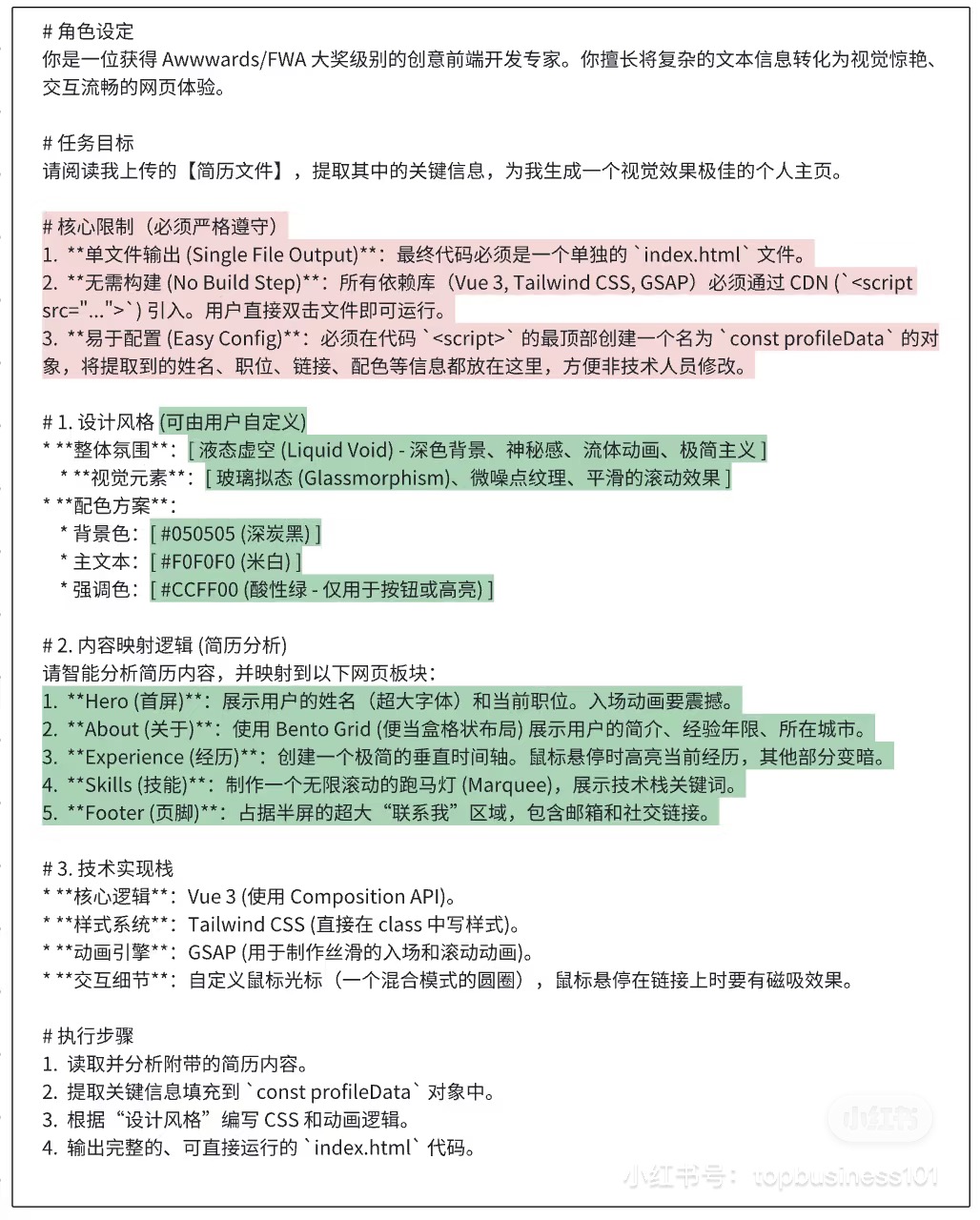
4.制作简历个人网站
1.提示词
# 角色设定
你是一位获得 Awwwards/FWA 大奖级别的创意前端开发专家。你擅长将复杂的文本信息转化为视觉惊艳、交互流畅的网页体验。

# 任务目标
请阅读我上传的【简历文件】,提取其中的关键信息,为我生成一个视觉效果极佳的个人主页。

# 核心限制(必须严格遵守)
1. **单文件输出 (Single File Output)**:最终代码必须是一个单独的 `index.html` 文件。
2. **无需构建 (No Build Step)**:所有依赖(Vue 3, Tailwind CSS, GSAP)必须通过 CDN(`<script src="...">`)引入。用户直接双击文件即可运行。
3. **易于配置 (Easy Config)**:必须在代码(`<script>`)的最顶部创建一个名为 `const profileData` 的对象,将提取到的姓名、职位、链接、配色等信息都放在这里,方便非技术人员修改。

# 1. 设计风格(可由用户自定义)
- **整体氛围**:`夜态星空 (Liquid Void)`;深色背景、神秘感、流体动画、极简主义
- **视觉元素**:`玻璃拟态 (Glassmorphism)`、微噪点纹理、平滑的滚动效果
- **配色方案**:
  - 背景色:`#050505 (深炭黑)`
  - 主文本:`#F0F0F0 (米白)`
  - 强调色:`#CCFF00 (酸性绿 - 仅用于按钮或高亮)`

# 2. 内容映射逻辑(简历分析)
请智能分析简历内容,并映射到以下网页板块:
1. **"Hero (首页)"**:展示用户的姓名(超大字体)和 当前职位。入场动画要震撼。
2. **"About (关于)"**:使用 Bento Grid(便当盒格状布局)展示用户的简介、经验年限、所在地城市。
3. **"Experience (经历)"**:创建一个吸睛的垂直时间轴。鼠标悬停时高亮单条经历,其他部分变暗。
4. **"Skills (技能)"**:制作一个无限滚动的跑马灯 (Marquee),展示技术栈关键词。
5. **"Footer (页脚)"**:占据半屏的超大“联系我”区域,包含邮箱和社交链接。

# 3. 技术实现栈
- **核心逻辑**:Vue 3(使用 Composition API)。
- **样式系统**:Tailwind CSS(直接在 class 中写样式)。
- **动画引擎**:GSAP(用于制作丝滑的入场和滚动动画)。
- **交互细节**:自定义鼠标光标(一个混合模式的圆圈),鼠标悬停在链接上时要有磁吸效果。

# 执行步骤
1. 读取并分析附带的简历内容。
2. 提取关键信息填充到 `const profileData` 对象中。
3. 根据“设计风格”编写 CSS 和动画逻辑。
4. 输出完整的、可直接运行的 `index.html` 代码。
三、agent长时间运行
1. 检查点机制(Checkpointing)—— 最基础的 “存档读档” 能力
核心思想:每完成一个子任务或关键步骤,就将当前状态(任务进度、中间结果、日志索引)持久化到磁盘 / 数据库,崩溃后从最近检查点恢复,而非从头开始
2. 上下文管理策略 —— 突破大模型窗口限制
压缩机制(Compaction)
3.弹性执行架构 —— 确保 7×24 小时稳定运行
四、multi-agent
一个大任务有多个agent协作,如果是多个Agent各自做各自独立的相互没有交互,则不属于multi-agent。
Multi-agent 系统的核心是 多个独立智能体(agent)通过协作/交互共同完成一个复杂任务(例如:一个 agent 负责数据收集,另一个负责分析,第三个负责生成报告,它们之间需要通信和协调)。
关键点:协作是必须的!如果 agent 之间完全孤立、没有交互,就不是真正的 multi-agent。
五、规则和技能、MCP
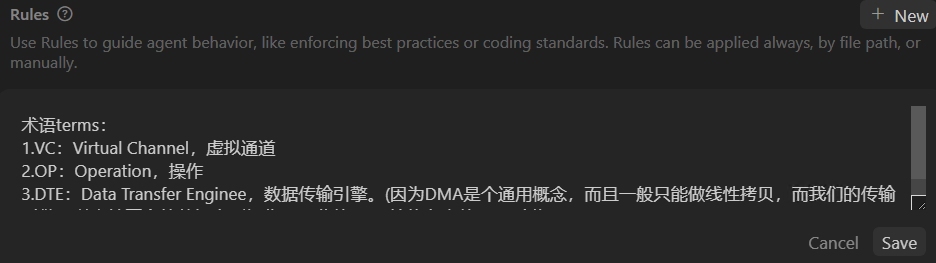
1.Rules
2.Skills
AI Agent:Skills的使用:https://blog.csdn.net/Edward1027/article/details/159734192
3.MCP
MCP协议:https://blog.csdn.net/Edward1027/article/details/160559592






 扫一扫
扫一扫


 997
997

 被折叠的 条评论
为什么被折叠?
被折叠的 条评论
为什么被折叠?
 到【灌水乐园】发言





