


很多小白包括我自己在学习spring框架的时候都会被眼花缭乱的注解给晕住,所以在这里结合自己的学习及实践来出一期spring注解讲解系列。
这一期我们来讲解@Bean注解,spring框架的核心就是IOC容器,而IOC容器管理的一个对象就称为一个Bean,所以你可以将Bean理解为一件衣服而IOC就是衣橱,一般你会将新买的衣服都存在衣橱中,需要的时候就从衣橱中拿出来,这个放入的过程就是【注册】,取出的过程就是【注入】。
一般来说@Bean是作用在方法中的,这个方法必须有返回值,它是将方法的返回对象注册到IOC容器中,注意这里是返回对象进行注册。
@Bean的使用方式
一般@Bean是在配置类中使用的,如下图:
@Configuration
@ComponentScan({"com.hello","com.service"})
@Import(AppConfig.class)
public class MyConfig {

    @Bean(name = "student")
    public Student Student(){
        Student student = new Student();
        return student;
    }
}
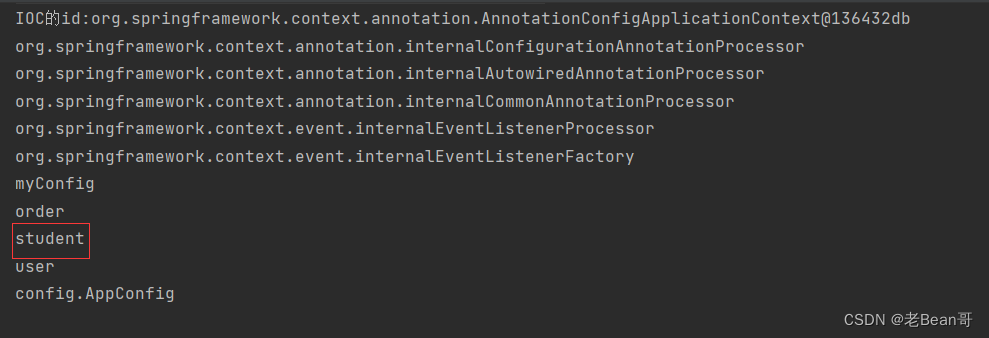
此时如果加载配置类就可以看到这个@Bean注解被注册到IOC容器了,如下图所示,加载MyConfig.class这个配置类。
import org.springframework.context.annotation.AnnotationConfigApplicationContext;
public class Test {
    @org.junit.Test
    public void test(){
        //1.将Student的bean注册到Ioc容器
        AnnotationConfigApplicationContext ioc1 = new AnnotationConfigApplicationContext(MyConfig.class);
        //2.获取Ioc的Id
        String id = ioc1.getId();
        System.out.println("IOC的id:"+id);
        //3.从IOC容器中获取所有bean的name
        String[] beanDefinitionNames = ioc1.getBeanDefinitionNames();
        for (String beanName: beanDefinitionNames){
            System.out.println(beanName);
        }
    }
}
结果显示IOC容器中存在student
但是在使用过程中发现这样创建一个student的@bean貌似又麻烦又不方便维护还得专门写一个方法,因此在实际过程中针对pojo这样的实体类我们一般通过@component注解来标识就行,然后在配置类上扫描一下就可以【@ComponentScan】
@Component
public class Student {
}
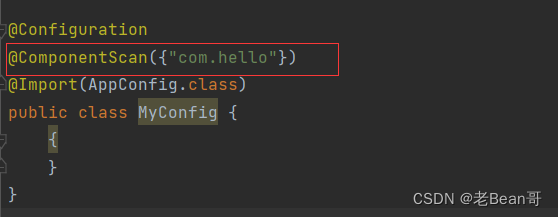
所以上述方案也可以注入,这样似乎显的@Bean很鸡肋。其实@Bean还有一个更重要的作用就是
引入第三方@Bean这也是@Bean的主要用处,什么意思?
类似@Component , @Repository , @ Controller , @Service 这些注册Bean的注解存在局限性,只能局限作用于自己编写的类,如果是一个jar包第三方库要加入IOC容器的话,这些注解就手无缚鸡之力了。比如JDBC需要数据源Druid,但是我们无法将创建Druid的对象给注入到IOC容器中,我们总不能直接在源码上加入一些@Component吧,所以怎么办?
这时候@Bean发挥它的作用了,我们前面提到了被@Bean修饰的方法是将该方法的返回值对象作为Bean注册到IOC容器中。那么我们如果定义一个方法在方法中对数据源进行配置new DataSource()然后set上url、root、driveName、password等信息然后返回这个对象,当前一定要在方法上加上@Bean注解,那么这个配置好的数据源对象就被注册到IOC容器中了,后续JDBC配置时便可以注入这个对象,具体案例如下:
package config;

import com.alibaba.druid.pool.DruidDataSource;
import org.springframework.beans.factory.annotation.Value;
import org.springframework.context.annotation.*;

import javax.sql.DataSource;
@Configuration
@ComponentScan({"com.hello"})
public class MyConfig {
    @Value("${jdbc.url}")
    String url;
    @Value("${jdbc.driverClassName}")
    String driverClassName;
    @Value("${jdbc.username}")
    String username;
    @Value("${jdbc.password}")
    String password;
    @Bean
    public DataSource dataSource() {
        DruidDataSource dataSource = new DruidDataSource();
        dataSource.setUrl("jdbc:mysql://127.0.0.1:3306/lxs");
        dataSource.setDriverClassName("com.mysql.jdbc.Driver");
        dataSource.setUsername("root");
        dataSource.setPassword("123");
        return dataSource;
    }
}
此时将第三方的Bean注入了
@Bean的相关参数
name: 指定Bean的名称。默认情况下,Bean的名称是方法的名称。如果指定了这个参数,Bean将使用指定的名称进行注册。
@Bean(name = "myBean")
public MyBean createBean() {
    return new MyBean();
}
initMethoid方法和destoryMethod方法:
@Component
public class StudentTwo {
   public void init(){
       System.out.println("初始化方法");
   }
   public void destroy(){
       System.out.println("销毁方法");
   }
}
在Bean对象中定义一个init()方法和destory()方法,注册bean时指定初始化方法和销毁方法
@Configuration
public class AppConfig {

    @Bean(initMethod = "init",destroyMethod = "destroy")
    public StudentTwo getStudentTwo(){
        StudentTwo studentTwo = new StudentTwo();
        return studentTwo;
    }

}
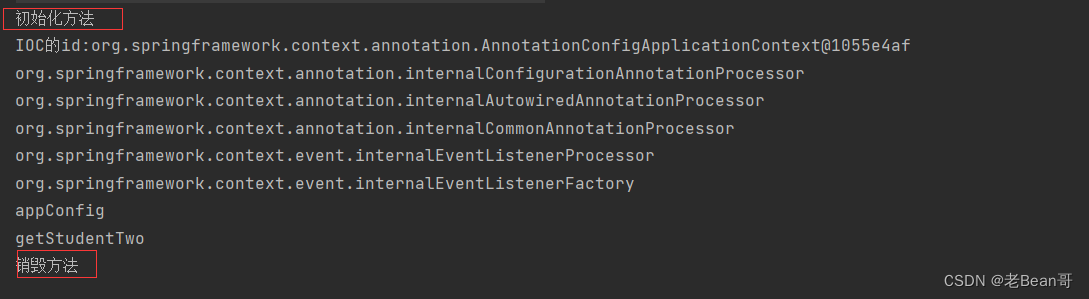
当ioc初始化时会执行init()方法,当ioc容器关闭时会执行销毁方法。
public class Test {
    @org.junit.Test
    public void test(){
        //1.将Student的bean注册到Ioc容器
        AnnotationConfigApplicationContext ioc1 = new AnnotationConfigApplicationContext(AppConfig.class);
        //2.获取Ioc的Id
        String id = ioc1.getId();
        System.out.println("IOC的id:"+id);
        //3.从IOC容器中获取所有bean的name
        String[] beanDefinitionNames = ioc1.getBeanDefinitionNames();
        for (String beanName: beanDefinitionNames){
            System.out.println(beanName);
        }
        ioc1.close();
    }
}
运行结果如下:





 扫一扫
扫一扫


 790
790

 被折叠的 条评论
为什么被折叠?
被折叠的 条评论
为什么被折叠?
 到【灌水乐园】发言





