


 在CentOS7系统中尝试挂载SMB共享文件夹时遇到了多种错误,包括Permissiondenied,Input/outputerror和Notadirectory。通过检查smb.conf配置文件,重启SMB服务,以及正确指定挂载路径和参数,最终成功挂载了名为temp的共享文件夹。
“mount error(13): Permission denied”
环境:CentOS7
挂载报错:
[root@chenshuyi ~]# mount -t cifs //127.0.0.1/printers /tmp/samba
Password for root@//127.0.0.1/printers:
mount error(13): Permission denied
Refer to the mount.cifs(8) manual page (e.g. man mount.cifs)
据说使格式错
[root@chenshuyi ~]# mount -t cifs //127.0.0.1/printers /tmp/samba -o username=smb1,password=123
mount error(5): Input/output error
Refer to the mount.cifs(8) manual page (e.g. man mount.cifs)
“mount error(5): Input/output error”
- 查看共享状态
[root@chenshuyi ~]# smbclient -L //127.0.0.1
Enter MYGROUP\root's password:
Anonymous login successful

        Sharename       Type      Comment
        ---------       ----      -------
        IPC$            IPC       IPC Service (Samba Server Version 4.10.16)
Reconnecting with SMB1 for workgroup listing.
Anonymous login successful

        Server               Comment
        ---------            -------

        Workgroup            Master
        ---------            -------
        MYGROUP              CHENSHUYI
- 无共享文件(更改smb.conf文件)
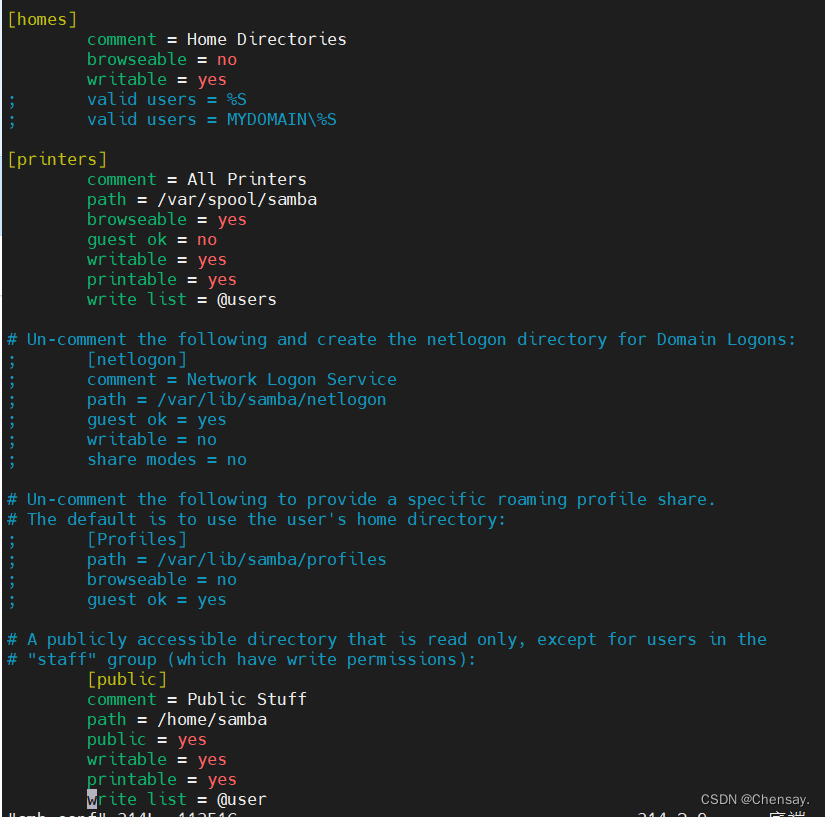
- 重启服务,查看文件共享
[root@chenshuyi samba]# smbclient -L //127.0.0.1
Enter MYGROUP\root's password:
Anonymous login successful

        Sharename       Type      Comment
        ---------       ----      -------
        public          Printer   Public Stuff
        IPC$            IPC       IPC Service (Samba Server Version 4.10.16)
Reconnecting with SMB1 for workgroup listing.
Anonymous login successful

        Server               Comment
        ---------            -------

        Workgroup            Master
        ---------            -------
        MYGROUP
- 重新挂载
[root@chenshuyi samba]# mount -t cifs //127.0.0.1/public /tmp/samba -o username=smb1,password=123
mount error(20): Not a directory
Refer to the mount.cifs(8) manual page (e.g. man mount.cifs)
又报错"mount error(20): Not a directory"
- 重新打开samba的主配置文件,共享文件这一块,其他的都注释掉,就剩眼见的。
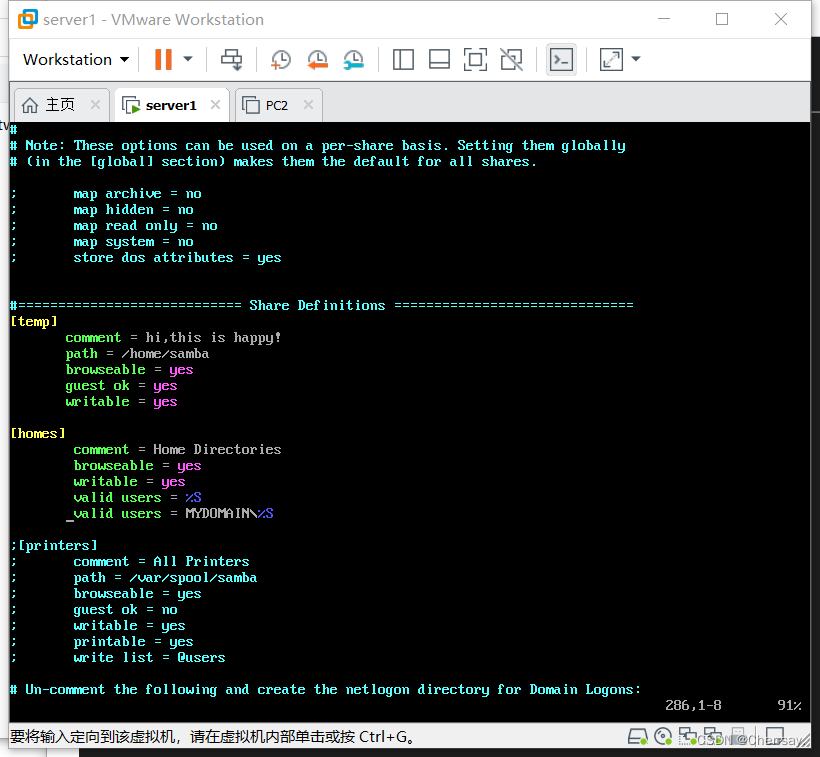
- 重启服务,重新挂载
[root@chenshuyi home]# mount -t cifs //127.0.0.1/temp /tmp/samba -o username=smb1,password=123
[root@chenshuyi home]# df -h
文件系统                 容量  已用  可用 已用% 挂载点
devtmpfs                 475M     0  475M    0% /dev
tmpfs                    487M     0  487M    0% /dev/shm
tmpfs                    487M  7.7M  479M    2% /run
tmpfs                    487M     0  487M    0% /sys/fs/cgroup
/dev/mapper/centos-root   17G  1.6G   16G   10% /
/dev/sr0                 4.5G  4.5G     0  100% /mnt
/dev/sda1               1014M  137M  878M   14% /boot
tmpfs                     98M     0   98M    0% /run/user/0
//127.0.0.1/temp          17G  1.6G   16G   10% /tmp/samba
[root@chenshuyi home]# smbclient //127.0.0.1/temp
Enter MYGROUP\root's password:
Anonymous login successful
Try "help" to get a list of possible commands.
smb: \>






 扫一扫
扫一扫


 3217
3217

 被折叠的 条评论
为什么被折叠?
被折叠的 条评论
为什么被折叠?
 到【灌水乐园】发言





