


 本文介绍了一种利用Redis实现用户登录限频的方法,通过设置特定的键值对,限制用户在一定时间内登录的次数,有效防止暴力破解。文章详细解释了如何在SpringBoot环境中配置Redis,并展示了具体的代码实现。
前言
有很多的登录页面中会限定用户的一定时间内的登录次数,这篇文章就是模仿着实现这个功能。
涉及知识
Redis :主要是靠着Redis来实现这个功能
redis中有一个重要的方法是设定其中key的保存时长,可百度redis expire
springboot2.0 连接Redis并使用RedisTemplate
参考:
idea整合springboot+redis.
StringRedisTemplate常用操作
逻辑思维
-
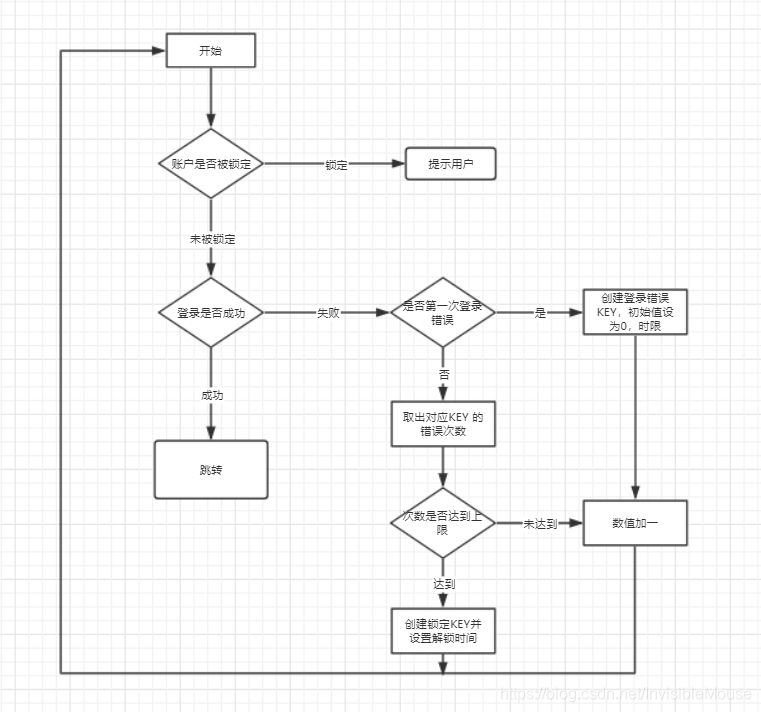
先判断用户是否已经被锁定(输入超过指定次数),若锁定,提示用户;若没被锁定跳至2。
-
判断账号密码是否正确,若正确,成功进入下一页面;若不正确,跳至3
-
判断用户是否是第一次出错,若是第一次出错,在Redis中新建一个Key来保存用户输出过信息,并初始化key;若不是第一次出错,则取出key的value,跳至4
-
判断value是否达到(指定次数 - 1),若达到,在Redis中新建一个key来保存用户被锁定;若未达到,则将其值加一,提示用户。
流程图
代码实现
登录页面
<!DOCTYPE html>
<html lang="en" xmlns:th="http://www.w3.org/1999/xhtml">
<head>
    <meta charset="UTF-8">
    <title>登录</title>
</head>
<body>
    <h1>LOGIN</h1>

    <form action="" th:action="@{/login}" method="post">
        <input type="hidden" value="1" name="id">
        用户名: <input type="text" name="username">
        密码:<input type="password" name="password">
        <input type="submit" value="提交">
    </form>

    <h2>结果</h2>
    <div th:unless="${#strings.isEmpty(message)}">
        <div class="header">提示:</div>
        <p th:text="${message}">恭喜,操作成功!</p>
    </div>
</body>
</html>
服务接口层
package com.mouse.study.service;
/*
 *created by mouse on 2020/3/5
 */

import entity.User;

import java.util.Map;

public interface UserService {

    /*
     * @description: 检测查询的账户是否以备锁定
     * @param username: 用户名
     * @return boolean: true代表已经被锁定,false:代表未被锁定
     * @author: mouse
     * @date 2020/3/5
    */
    Map<String,Object> AccountIsLocked(String username);

    /*
     * @description: 判断账号、密码是否正确
     * @param username 账号
     * @param password 密码
     * @return boolean :true =》正确,false =》错误
     * @author: mouse
     * @date 2020/3/5
    */
    boolean CheckRight(String username,String password);


    /*
     * @description: 判断用户是否输入信息错误过,并更新Redis中的信息
     * @param username :用户名
     * @return java.lang.String : 返回给用户的提示信息
     * @author: mouse
     * @date 2020/3/5
    */
    String checkErrorKey(String username);
}
接口实现
package com.mouse.study.service;
/*
 *created by mouse on 2020/3/5
 */

import entity.User;
import org.springframework.beans.factory.annotation.Autowired;
import org.springframework.data.redis.core.RedisTemplate;
import org.springframework.stereotype.Service;

import java.util.HashMap;
import java.util.Map;
import java.util.concurrent.TimeUnit;

@Service
public class UserServiceImpl implements UserService {

    @Autowired
    private RedisTemplate<String,String> strRedisTemplate;

    //  一共允许用户错误的最大次数
    private final int MAX_NUM = 5;
    //  错误设定时间
    private int ERROR_TIME = 1;
    //  锁定时间
    private int LOCKED_TIME = 5;


    @Override
    public Map<String,Object> AccountIsLocked(String username) {
        String lockedKey = User.getLockKey(username);   //  生成锁定key
        Map<String,Object> map = new HashMap<>();
        if (strRedisTemplate.hasKey(lockedKey)){
            //  redis中有该Key,表示被锁定
            map.put("Flag", true);
            map.put("leftTime", strRedisTemplate.getExpire(lockedKey, TimeUnit.MINUTES));
        }else {
            map.put("Flag", false);
            map.put("leftTime", "1");   //  无所谓
        }

        return map;
    }

    @Override
    public boolean CheckRight(String username, String password) {
        if (username.equals("hurui") && password.equals("hurui")) {
            //  正确
            return true;
        }
        return false;
    }

    @Override
    public String checkErrorKey(String username) {
        String errorKey = User.getErrorKey(username);   //  生成错误key
        //  查看Redis中是否有此key
        if (strRedisTemplate.hasKey(errorKey)) {//  有此key,用户非第一次输入错误
            //  取出key对应的value值
            Long num = Long.parseLong( strRedisTemplate.opsForValue().get(errorKey));
            if (num < MAX_NUM - 1) {//  未达到最大错误次数
                //  更新错误次数
                strRedisTemplate.boundValueOps(errorKey).increment(1);
                //  返回提示信息
                return strRedisTemplate.getExpire(errorKey) + "秒内,您还剩下" + (MAX_NUM - num -1) + "次机会";
            }else {//  达到最大错误次数
                //  锁定账户
                String lockKey = User.getLockKey(username);
                strRedisTemplate.opsForValue().set(lockKey, "locked", LOCKED_TIME, TimeUnit.MINUTES);
                //  返回提示信息
                return "您的错误已达到五次,请"+ strRedisTemplate.getExpire(lockKey,TimeUnit.MINUTES) +"分钟后重试";
            }
        }else {//  没有此key,用户第一次输入错误
            //  创建错误key
            strRedisTemplate.opsForValue().set(errorKey, "1", ERROR_TIME, TimeUnit.MINUTES);
            return "60秒内,您还剩下4次机会";
        }
    }
}
控制层
package com.mouse.study.controller;

import com.mouse.study.service.UserService;
import org.springframework.beans.factory.annotation.Autowired;
import org.springframework.stereotype.Controller;
import org.springframework.web.bind.annotation.GetMapping;
import org.springframework.web.bind.annotation.PostMapping;
import org.springframework.web.bind.annotation.RequestParam;
import org.springframework.web.servlet.mvc.support.RedirectAttributes;

import java.util.Map;

/*
 *   @ Author     :  mouse
 *   @ Date       :  Created in 19:02 2020/3/5
 *   @ Description:
 */
@Controller
public class UserLoginController {

    @Autowired
    private UserService userService;


    @GetMapping("/login")
    public String toLogin(){
        return "login";
    }

    @PostMapping("/login")
    public String CheckedInfo(@RequestParam String username,
                              @RequestParam String password,
                              RedirectAttributes attributes){
        System.out.println(username+":"+password);
        // String username = user.getUserName();
        Map<String,Object> map = userService.AccountIsLocked(username);
        if ((boolean)map.get("Flag")) {
            //  被锁定
            attributes.addFlashAttribute("message", username+"账户已经被锁定,在"+ map.get("leftTime") +"分钟将被解锁");
            System.out.println(username+"账户已经被锁定,在"+ map.get("leftTime") +"分钟将被解锁");
        }
        //  未被锁定


        //  先判断验证码是否正确


        //  检验登录是否正确
        if (userService.CheckRight(username,password)){
            //  账号密码正确
            return "success";   //  去到正确登录页面
        }else{
            //  账号密码不正确
            String result = userService.checkErrorKey(username);
            attributes.addFlashAttribute("message", result);
            System.out.println(result);
        }
        return "redirect:/login";
    }

}
总结
一个对redis学习的小案例,简单但是实用。





 扫一扫
扫一扫


 376
376

 被折叠的 条评论
为什么被折叠?
被折叠的 条评论
为什么被折叠?
 到【灌水乐园】发言





