






 本文介绍了在使用SpringBoot 2.1.4版本进行单元测试时遇到的`Failed to load ApplicationContext`错误。作者通过排除法定位到问题并非@ContextConfiguration注解配置引起,而是由于Hibernate的dialect配置缺失。在application.yml中添加`spring.datasource.jpa.database-platform: org.hibernate.dialect.MySQL5InnoDBDialect`后解决了该问题。然而,随后在测试另一方法时遇到了`Table 'selling.hibernate_sequence' doesn't exist`的错误,暗示自增主键配置可能存在问题。
springboot使用2.1.4版本:
import lombok.extern.slf4j.Slf4j;
import org.junit.Test;
import org.junit.runner.RunWith;
import org.slf4j.Logger;
import org.slf4j.LoggerFactory;
import org.springframework.boot.test.context.SpringBootTest;
import org.springframework.test.context.ContextConfiguration;
import org.springframework.test.context.junit4.SpringRunner;

@RunWith(SpringRunner.class)
@SpringBootTest
@Slf4j
//@ContextConfiguration(value = {"classpath*:application.yml","classpath*:logback-spring.xml"})
public class LoggerTest {

    private final Logger logger = LoggerFactory.getLogger(LoggerTest.class);

    @Test
    public void test(){
        String name="zhangsan";
        String password = "123";
        logger.debug("ggggg");
        logger.error("ddddd");
        logger.info("ffff");
        logger.info("name: {},password: {}",name,password);
    }

}
在进行单元测试时,springboot启动总是报错:
Failed to load ApplicationContext
于是各种查找资料,基本上都说是因为需要添加该注解:
(1)@ContextConfiguration(locations= {"classpath*:application.yml","classpath*:logback-spring.xml"})
(2)或者是该注解中的配置文件添加不全
(3)或者是该注解配置文件的路径错误。
我的配置文件路径如下:
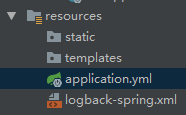
只有这二者,路径也没错,可是就是一直在抛红报错。
后来我想了想,可能还有其他原因,于是注释该注解,重新测试,发现报错虽然还是Failed to load ApplicationContext,但是后面的coused by报错信息如下:
Caused by: org.hibernate.service.spi.ServiceException: Unable to create requested service [org.hibernate.engine.jdbc.env.spi.JdbcEnvironment]
........
Caused by: org.hibernate.HibernateException: Access to DialectResolutionInfo cannot be null when 'hibernate.dialect' not set
看报错信息应该是和配置文件的hibernate.dialect配置有关,于是尝试修改配置文件:
在spring.datasource.jpa添加database-platform: org.hibernate.dialect.MySQL5InnoDBDialect
spring:
  datasource:
    driver-class-name: com.mysql.cj.jdbc.Driver
    username: root
    password: root
    url: jdbc:mysql://127.0.0.1:3306/selling?characterEncoding=utf-8&useSSL=false
  jpa:
    show-sql: true
    database-platform: org.hibernate.dialect.H2Dialect
  jackson:
    default-property-inclusion: non_null
  redis:
    host: 127.0.0.1
    port: 6379
再次运行,成功!
测试另外一个方法时,报错:
Table 'selling.hibernate_sequence' doesn't exist
该类主键设置为自增长,加上以下策略:
@Id
@GeneratedValue(strategy = GenerationType.IDENTITY)
private Integer categoryId;





 扫一扫
扫一扫


 441
441

 被折叠的 条评论
为什么被折叠?
被折叠的 条评论
为什么被折叠?
 到【灌水乐园】发言





