



配置模板缓存
在开发学习环境下,可以在application.properties中添加一行
spring.thymeleaf.cache=false
这样关闭了模板缓存,在开发中,可以直接看到结果,但在实际的环境下,还是开启为好。
视图层
视图层的两部分代码,一个是在核心包下的controller中,一个是在资源包下的templates中。
网页请求与返回
    @RequestMapping("/http")
    public void http(HttpServletRequest request, HttpServletResponse response) {
        System.out.println(request.getMethod());
        System.out.println(request.getServletPath());
        Enumeration<String> enumeration = request.getHeaderNames();
        while(enumeration.hasMoreElements()) {
            String name = enumeration.nextElement();
            String value = request.getHeader(name);
            System.out.println(name + " : " + value);
        }
        System.out.println(request.getParameter("code"));

        // 设置返回体
        response.setContentType("text/http;charset=utf-8");
        try (
            PrintWriter writer = response.getWriter();
            ) {
            writer.write("<h1>牛客论坛</h1>");
        } catch (IOException e) {
            throw new RuntimeException(e);
        }
    }
网页只做简单处理,并不是一个真正的网页没有bodyhead等部分,因为这一步比较底层,使用writer一行一行写网页。
结果就是这样的。
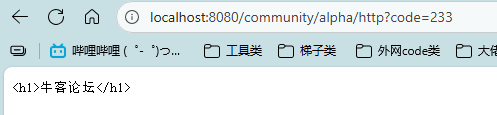
在http后面加一个?就是传入的参数
System.out.println(request.getParameter("code"));
在mapping中加入method限制请求类型为get
给传入的参数,加入注解RequestParam,表示该参数并非必须,并且带有默认值
/students?current=1&limit=20
    // /students?current=1&limit=20
    @RequestMapping(path = "/students", method = RequestMethod.GET)
    @ResponseBody
    public String getStudents(
            @RequestParam(name="current",required=false,defaultValue="1") int current,
            @RequestParam(name="limit",required=false,defaultValue="10") int limit) {
        System.out.println(current);
        System.out.println(limit);
        return "Some Students";
    }
这边就是路径变量
比如 /student/233这样,标记@PathVariable(“id”) int id即可。现版本注解好像会提示冗余,所以直接像代码中这样即可。
    // /student/123
    @RequestMapping(path = "/student/{id}", method = RequestMethod.GET)
    @ResponseBody
    public String getStudent(
            @PathVariable int id) {
        System.out.println(id);
        return "One Student";
    }
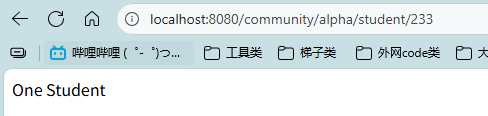
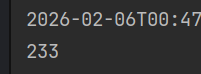
Post请求
先写个简单的静态网页,在resources目录下的static下创建目录html
新建一个student.html
<!DOCTYPE html>
<html lang="en">
<head>
    <meta charset="UTF-8">
    <title>增加学生</title>
</head>
<body>

    <form method="post" action="/community/alpha/student">
        <p>
            姓名 : <input type="text" name="name">
        </p>
        <p>
            年龄 : <input type="text" name="age">
        </p>
        <p>
            <input type="submit" value="保存">
        </p>
    </form>

</body>
</html>
这时候已经可以直接去访问看一眼了
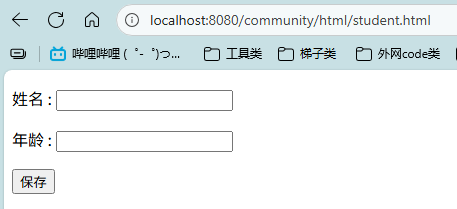
不过现在还没有对应的controller,也就是对应的路径
之前的student/id那个和这里的是不一样的
    @RequestMapping(path = "/student", method = RequestMethod.POST)
    @ResponseBody
    public String saveStudent(String name, int age) {
        System.out.println(name);
        System.out.println(age);
        return "success";
    }
只需要和html中的参数名一致,就可以自动传过来了。
响应html
    // 响应html数据
    @RequestMapping(path = "/teacher", method = RequestMethod.GET)
    public ModelAndView getTeacher() {
        ModelAndView mav = new ModelAndView();
        mav.addObject("name","张三");
        mav.addObject("age", "15");
        mav.setViewName("/demo/view");
        return mav;
    }
在resources下的templates下创建demo目录,在创建view.html
<!DOCTYPE html>
<html lang="en" xmlns:th="http://www.thymeleaf.org">
<head>
    <meta charset="UTF-8">
    <title>Teacher</title>
</head>
<body>
  <p th:text="${name}"></p>
  <p th:text="${age}"></p>
</body>
</html>
第二行就是声明使用thymeleaf的模版语法,body内就是使用thymeleaf的modalandview内的object
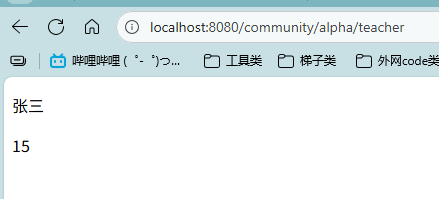
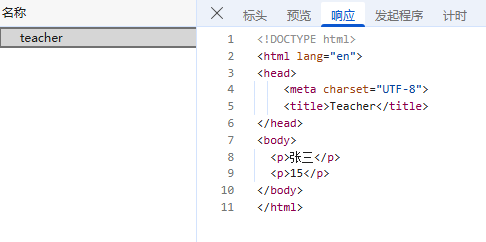
可以看到,响应了完整的网页,并且,可以看到源码里的th不见了,被替换成了对应的内容
这是thymeleaf模版引擎做的内容。
    @RequestMapping(path = "/school", method = RequestMethod.GET)
    public String getSchool(Model model) {
        model.addAttribute("name","某大学");
        model.addAttribute("age","123");
        return "/demo/view";
    }
这是另一种响应html的方法,方法中带有model时,会在调用前自动实例化一个model,并给方法传入一个引用,最后return的就是一个view的路径。
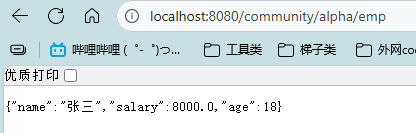
响应JSON数据
    // 响应json数据(异步请求)
    @RequestMapping(path = "/emp", method = RequestMethod.GET)
    @ResponseBody
    public Map<String, Object> getEmp() {
        Map<String, Object> emp = new HashMap<>();
        emp.put("name","张三");
        emp.put("age", 18);
        emp.put("salary", 8000.00);
        return emp;
    }
    @RequestMapping(path = "/emps", method = RequestMethod.GET)
    @ResponseBody
    public List<Map<String, Object>> getEmps() {
        List<Map<String, Object>> list = new ArrayList<>();
        Map<String, Object> emp = new HashMap<>();
        emp.put("name","张三");
        emp.put("age", 18);
        emp.put("salary", 8000.00);
        list.add(emp);

        emp = new HashMap<>();
        emp.put("name","李四");
        emp.put("age", 20);
        emp.put("salary", 10000.00);
        list.add(emp);

        emp = new HashMap<>();
        emp.put("name","王五");
        emp.put("age", 25);
        emp.put("salary", 15000.00);
        list.add(emp);

        return list;
    }






 扫一扫
扫一扫


 被折叠的 条评论
为什么被折叠?
被折叠的 条评论
为什么被折叠?
 到【灌水乐园】发言





