


 本文详细介绍了在遇到node.js安装grunt问题时的解决步骤,包括创建软链接、安装grunt-cli、配置环境变量及验证安装。同时,提供了安装Head插件的全过程,涉及上传解压、配置elasticsearch.yml、修改Gruntfile.js、安装grunt并最终启动插件。
head插件安装
2018年10月19日
0:24
安装node.js时grunt出现问题


在网上搜索到的解决方法,对我来说没有用
在bin目录使用下面两条命令:注意是usr
在/usr/local/bin中创建该文件的链接
ln -s /home/software/node-v6.11.4-linux-x64/bin/node /usr/bin/node
ln -s /home/software/node-v6.11.4-linux-x64/bin/node /usr/bin/npm
但是还是出现了问题:找不到
![计算机生成了可选文字:[root@localhostbin]#npminstallmodule.js:471row9rr;一ggrunt-cliErrOr:atatatatatatCannotfindmodule'/home/software/node-v6.11.4-Iinux-x64/bin/instaIIFunction.ModuIe.resolveF主tename(moduI9.js:469:15)Function.ModuIe.load(moduI9.js:417:25)0du19.runMain(moduI9.js:634:13)run(bootstrapnode.js:383:7)startup(bootstrapnode.js:149:男bootstrapnode.js:496:3](https://i-blog.csdnimg.cn/blog_migrate/a7270163458c0169cbd4288d3b207240.png)
最后 还是加上./即可 : ./npm install -g grunt-cli
![计算机生成了可选文字:[root@localhostbin]#./npminstall一ggrunt-cli/home/software/node-v6.11.4-Iinux-x64/bin/grunt一>/home/software/node-v6.11.4-1inux-x64/Iib/nodemodules/grunt-cli/bin/grunt/home/software/node-v6。11。4-1inux-x64/Iibgrunt-cli@l.3.1grunt-known-options@l。1.1inte09t@1。1.liftoff@2.5.extend@3..2findup-sync@2.@.@detect-file@l.@.@is-glob@3.l.Ois-extgIob@2。1.1micromatch@3。1.1@arr-diff@4..](https://i-blog.csdnimg.cn/blog_migrate/ee2489290fb28f444e3ca5fd169bb80a.png)
验证安装版本是否成功
#node[空格]-v
#npm[空格]-v
#grunt[空格]-version
2、安装head插件
第一步:上传解压elasticsearch-head-master.zip
然后修改es文件elasticsearch.yml,在最后添加如下
http.cors.enabled:[空格]true
http.cors.allow-origin:[空格]"*"
完成后重启es
第二步:修改head配置文件Gruntfile.js,找到connect属性,修改hostname 为当前es节点的ip地址
![计算机生成了可选文字:[root@localhostnode一v6.11.4一Iinux一x64]#cd/home/software/[root@localhostsoftware]#cdelasticsearch-head-master/[root@localhostelasticsearch-head-masterl#vimGruntfile.1s](https://i-blog.csdnimg.cn/blog_migrate/df4302f9e3bc4e13cff624db96ad8452.png)
![计算机生成了可选文字:connect:S9rV9r:添加甲optlons:0S:base:keepalive:《192.158.111.129《grunt。loadNpmTasks{grunt。loadNpmTasks{grunt。loadNpmTasks{grunt。loadNpmTasks{grunt。loadNpmTasks{grunt。loadNpmTasks{//Defaulttask(s).INSERTgrunt-contribgrunt-contribgrunt-contrib一at[0《grunt-contribgrunt-contrib一[Dp疒grunt-contrib一]35m1n《93,4192](https://i-blog.csdnimg.cn/blog_migrate/c3c8e47964c5ed7172f66b10af11622c.png)
第三步、配置node的环境变量,使命令可以在任何位置执行
![计算机生成了可选文字:[root@localhostelasticsearch-head-master]#vim/etc/profile[root@localhostelasticsearch-head-master]#S0urc9/etc/profile](https://i-blog.csdnimg.cn/blog_migrate/bf96331e5732e2bf25a400f81b6c8bda.png)

让配置文件生效:source /etc/profile
第四步:进入head根目录执行命令
#grunt server
报下面的错
![计算机生成了可选文字:[root@localhostelasticsearch-head-master]#gruntS9rv9rgrunt-cli:Thegruntcommandtineinterface(VI.3.1)Fatal9rror:Unabletofind10Ca1grunt.Ifyoureseeingthismessage,grunthasntbeeninstalled10Ca11〗yourproject.FormoreinformationaboutinstallingandconfigurirpleaseS99theGettingStartedguide:https://gruntjs。com/getting-started](https://i-blog.csdnimg.cn/blog_migrate/1076d417986272b8eb5411a2dee95051.png)
提示unable to file local grunt,原因是因为当前工程(head工程中没有 grunt的本地文件)
在head插件根目录执行
#npm[空格]instal[空格]-g[空格]grunt (需要下载)
![计算机生成了可选文字:[root@localhostelasticsearch-head-master]#../node-v6.11.4-Unux-x64/bin/npminstall一ggrunt/home/software/node-v6.11.4-Iinux-x64/bin/grunt一>/home/oftware/node-v6.11.4-1inux-x64/Iib/nodemodules/grunt/bin/grunt/home/software/node-v6。11。4-1inux-x64/Iibgrunt@l.O.3coffeescript@l。1@.dateformat@l..12在汶个巨景下行](https://i-blog.csdnimg.cn/blog_migrate/165508bc67ad4770cb5606e17280fa99.png)
解释:全局安装grunt
#npm[]install[]grunt
![计算机生成了可选文字:[root@localhostelasticsearch-head-master]#gruntS9rv9rgrunt-cli:Thegruntcommandtineinterface(VI.2.Fatal9rror:Unabletofind10Ca1grunt.Ifyoureseeingthismessage,grunthasntbeeninstalled10Ca11ytoyourproject.Formoreinformationaboutinstallingandconfiguringgrunt,pleaseS99theGettingStartedguide:http://gruntjs。com/getting-started[root@localhostelasticsearch-head-master]#../node-v6.11.4-Iinux-x64/bin/npminstallgruntdep09atedcoffee-script@1.10.O:CoffeeScript0nNPMhasmovedto"coffeescript"()ohyphen)p09f0g10b31coffee-script@1.10.Oshouldbeinstalledwith一gelasticsearch-head@O.O.O/home/software/elasticsearch-head-mastergrunt@l.@.lcoffee-script@l。1@.dateformat@l..12get-stdin@4.@.1meow@3。7.camelcase-keys@2。1.camelcase@2。1.1decamelize@l.2.](https://i-blog.csdnimg.cn/blog_migrate/0190ab5366ee7a8ed1ada82e5a06b974.png)
执行下面命令

如果出现
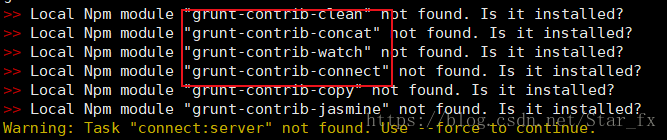
挨个执行
#npm[]install[]缺少的插件名称
例如 #npm[]install[]grunt-contrib-connect
其中最后两个module不影响启动和使用可以不装
最后一步启动成功:
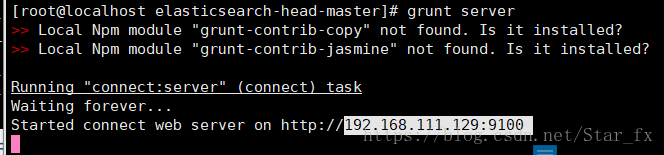
出现这个表示启动成功
![计算机生成了可选文字:[root@localhostelasticsearch-head-master]#gruntS9rv9rLocalNpmmodule"grunt-contrib-copy"notfound.Isitinstalled?LocalNpmmodule"grunt-contrib-jasmine"notfound.Isitinstalled?taskRunningWaitingStarted0(connect)connectwebS9rv9r0nhttp://](https://i-blog.csdnimg.cn/blog_migrate/79209c3adc89418ba6b21341450b575b.png)
启动ES:在es的bin目录下执行:./elasticsearch
进入es用户:[root@localhost config]# su es(并不是就是在config中,在bin也行)
(elasticsearch.yml)文件在/home/software/elasticsearch-5.5.2/config中

启动成功






 扫一扫
扫一扫


 1118
1118

 被折叠的 条评论
为什么被折叠?
被折叠的 条评论
为什么被折叠?
 到【灌水乐园】发言





