





 本文介绍如何仅使用CSS实现鼠标悬停时图片上出现遮罩并展示文字的效果。通过设置:hover伪类,调整透明度及背景颜色,使得图片在悬停状态下呈现出不同的视觉效果。
鼠标hover 以后。图片上面出现一个遮罩, 透明度变化, 显示设置好的文字的文字,完全使用css 实现,下图是效果
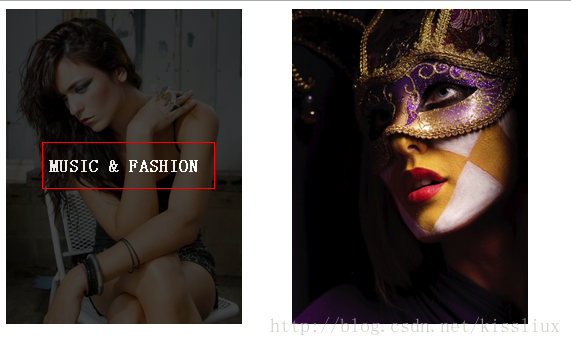
关键代码
.featured-image:hover {
	opacity: 0.9;
	color: #fff;
	background: rgba(0,0,0,0.8);
}
看源码吧
<!doctype html>
<html>
<head>
<meta charset="utf-8">
<title>无标题文档</title>
<style>

#content article {
	float: left;
	margin-right: 4%;
	max-width: 236px;
	position: relative;
	width: 22%;
	margin-bottom: 3.5%;
}
#content article:nth-child(4n+4) {
	margin-right: 0;
}
.post-format-content {
	position: relative;
	background: #111;
}
.post-thumbnail {
	max-width: 100%;
	height: auto;
	overflow: hidden;
}
.content-wrap {
	padding: 0;
	position: absolute;
	text-align: center;
	width: 100%;
	top: 0;
	bottom: 0;
	display: table-cell;
	vertical-align: middle;
	overflow: hidden;
}
.content-wrap h1.entry-title {
	display: table;
	font-size: 110%;
	height: 100%;
	text-transform: uppercase;
	width: 100%;
	margin:0;
}
.edit-link {
	z-index: 2;
}
.featured-image {
	display: table-cell;
	position: relative;
	transition: opacity .25s ease-in-out, background .25s ease-in-out;
	-moz-transition: opacity .25s ease-in-out, background .25s ease-in-out;
	-webkit-transition: opacity .25s ease-in-out, background .25s ease-in-out;
	vertical-align: middle;
	z-index: 1;
	color: #fff;
	text-decoration: none;
	opacity: 0;
	padding: 10%;
}
.featured-image:hover {
	opacity: 0.9;
	color: #fff;
	background: rgba(0,0,0,0.8);
}
.post-thumbnail img {
	display: block;
}
img {
	max-width: 100%;
	height: auto;
}

</style>
</head>

<body>
<div id="content">

<article  class="post-152 post type-post status-publish format-standard hentry category-people category-photos">
  <div class="post-format-content">
    <div class="post-thumbnail"> <img width="480" height="640" src="assets/img/1.jpg" class="attachment-thumbnail wp-post-image" alt="105694702"> </div>
    <div class="content-wrap">
      <h1 class="entry-title"><a href="" class="featured-image" rel="bookmark">Music & Fashion</a></h1>
    </div>
  </div>
</article>
<article  class="post-152 post type-post status-publish format-standard hentry category-people category-photos">
  <div class="post-format-content">
    <div class="post-thumbnail"> <img width="480" height="640" src="assets/img/2.jpg" class="attachment-thumbnail wp-post-image" alt="105694702"> </div>
    <div class="content-wrap">
      <h1 class="entry-title"><a href="" class="featured-image" title="amp; Fashion" rel="bookmark">Music & Fashion</a></h1>
    </div>
  </div>
</article>
</div>
</body>
</html>





 扫一扫
扫一扫


 被折叠的 条评论
为什么被折叠?
被折叠的 条评论
为什么被折叠?
 到【灌水乐园】发言





