



 本文详细介绍了如何在Linux ARM平台上交叉编译H323plus,涉及SDL、ptlib、x264、ffmpeg等组件的编译步骤,以及在编译过程中遇到的问题和解决方案,包括ffmpeg版本选择、openssl升级、动态库链接等问题。
下载路径:
https://www.h323plus.org/source/
解压后ptlib、h323plus文件夹要命名成:ptlib、h323plus

一、编译SDL(ptlib依赖这个)
下载源码得下载SDL1.2,要不链接提示找不到-lSDL
CC=arm-hisiv500-linux-gcc ./configure --host=arm-hisiv500-linux --disable-pulseaudio --disable-esd --prefix=/install/SDL
make ;make install
二、编译ptlib
export OPENSSL_CFLAGS=-I/install/openssl/include/
export OPENSSL_LIBS=-L/install/openssl/lib/
export SDL_CFLAGS=-I/install/SDL/include/SDL/
export LDFLAGS=-L/install/SDL/lib/
CC=arm-hisiv500-linux-gcc ./configure --host=arm-hisiv500-linux --disable-resolver --prefix=/install/ptlib
make ;make install
报错:res_nsearch 函数没有定义
解决方案:configure 添加–disable-resolver,禁止了该功能
三、编译x264(ffmpeg依赖这个)
cd x264-snapshot-20140101-2245/
export CC=arm-hisiv500-linux-gcc
./configure --host=arm-hisiv500-linux --disable-asm --enable-static --enable-shared --prefix=/install/x264
make ;make install
四、编译ffmpeg(h323视频插件库依赖ffmpeg)
链接X264
export CFLAGS=-I/install/x264/include/
export LIBS=-L/install/x264/lib/
./configure --cross-prefix=/opt/hisi-linux/x86-arm/arm-hisiv500-linux/target/bin/arm-hisiv500-linux- --arch=arm --target-os=linux --enable-gpl --enable-shared --enable-libx264 --enable-decoder=h264 --enable-parser=h264 --extra-cflags=-I/install/x264/include/ --extra-ldflags=-L/install/x264/lib/ --prefix=/install/ffmpeg
make ;make install
注意:ffmpeg不可用用最新的,必须要用旧版本,因为h323plus用的0.4.6的ffmpeg,
新版本会发现很多函数和类型定义找不到
五、编译h323plus
export CPPFLAGS=-I/install/ffmpeg/include/
export LIBS=-L/install/ffmpeg/lib/
export PTLIBDIR=/ptlib
export OPENH323DIR=/h323plus
export OPENSSL_CFLAGS=-I/install/openssl/include/
export OPENSSL_LIBS=-L/install/openssl/lib/
export PTLIB_CFLAGS=-I/install/ptlib/include/
export PTLIB_LIBS=-L/install/ptlib/lib/
export X264_CFLAGS=-I/install/x264/include/
export X264_LIBS=-L/install/x264/lib/
./configure --host=arm-hisiv500-linux --enable-libavcodec --enable-h264 --prefix=/install/h323plus/ X264_LIBS=-L/install/x264/lib X264_CFLAGS=-I/install/x264/include/ LIBAVCODEC_LIBS=-L/install/ffmpeg/lib LIBAVCODEC_CFLAGS=-I/install/ffmpeg/include/ --with-libavcodec-source-dir=/ffmpeg-0.5.15/libavcodec/
make;make install
(1)错误:configure: error: cannot check for file existence when cross compiling
3916行:
修改前:
as_fn_error ?"cannotcheckforfileexistencewhencrosscompiling""? "cannot check for file existence when cross compiling" "?"cannotcheckforfileexistencewhencrosscompiling""LINENO" 5
修改后:
asfnerror?"cannotcheckforfileexistencewhencrosscompiling""as_fn_error ? "cannot check for file existence when cross compiling" "asfnerror?"cannotcheckforfileexistencewhencrosscompiling""LINENO" 5
(2)错误:提示找不到ffmpeg版本,以及不支持H264编码
分析:通过查看config.log,发现ffmpeg相关功能,发现链接so的路径不对,所以强制修改一下configure即可
解决:修改h323plus/plugins/configure文件,在lavcodec相关代码处,添加下面信息即可
old: LIBS="-lavcodec $LIBS"
new:LIBS="-lavcodec $LIBS -L/install/x264/lib/ -lx264 -lavformat -lavutil"
然后就可以找到H264,并且可以编译成功,
编译过程中有些so编译不通过,可以make -n 看一下命令,找一下原因
(3)编译simph323报错,从错误日志看,就是没有链接ssl、crypto
手动编译:
arm-hisiv500-linux-g++ -o obj_linux_arm/simph323 -I/install/openssl/include/ -L/install/SDL/lib/ -I/install/SDL/include/SDL -L/install/ptlib/lib -L/h323plus//lib ./obj_linux_arm/main.o -lh323_linux_arm_ -lpt -lpthread -lrt -L/install/openssl/lib/ -lssl -lcrypto -lSDL -ldl
报错:

原因:openssl太老了,要更新
编译openssl
CC=arm-hisiv500-linux-gcc ./config no-async no-asm -shared --prefix=/install/openssl
make;make install
Makefile 搜索-m64选项并删除,共两处。
编译报错:
./libcrypto.so: warning: gethostbyname is obsolescent, use getnameinfo() instead.
./libcrypto.so: undefined reference to getcontext' ./libcrypto.so: undefined reference tosetcontext’
./libcrypto.so: undefined reference to `makecontext’
添加 no-async,就不报错了
【参数说明】
no-asm: 在交叉编译过程中不使用汇编代码代码加速编译过程.原因是它的汇编代码是对arm格式不支持的。
shared: 生成动态连接库。
no-async: 交叉编译工具链没有提供GNU C的ucontext库
–prefix=: 安装路径,编译完成install后将有bin,lib,include等文件夹
–cross-compile-prefix=: 交叉编译工具
重新编译:h323plus 和 ptlib,因为ptlib 连接了openssl,h323plus连接了ptlib,
重新再simph323编译即可
六、运行simph323
交叉编译生成的ffmpeg、sdl、openssl、x264so都得放到/mnt/lib/
插件库放在/mnt/plugins/
Ffmpeg bin文件放在/mnt/ffmpeg/bin/
并声明变量:
export PWLIBPLUGINDIR=/mnt/plugins/
export PKG_CONFIG_PATH=/mnt/plugins/pkgconfig
export PATH=/mnt/ffmpeg/bin:$PATH
错误 1、:H264插件库找不到
分析:主要方式就是追踪代码,通过LoadPluginDirectory(pluginmgr.cxx)函数,开始追踪,主要方式添加日志,最后定位到OnLoadPlugin(h323pluginmgr.cxx)
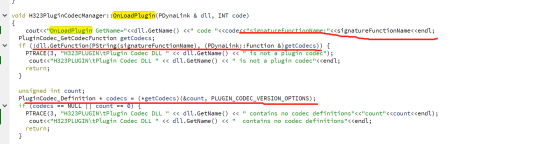
通过日志,定位signatureFunctionName 值就是OpalCodecPlugin_GetCodecs,所以需要到H264代码中定位该函数,最后查到PLUGIN_CODEC_GET_CODEC_FN (h264-x264.cxx)
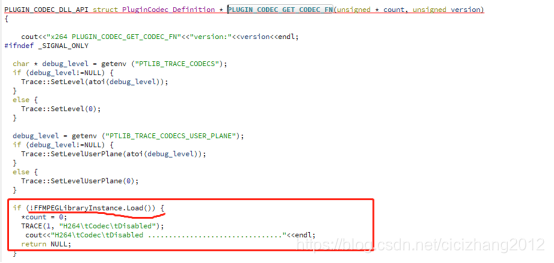
从截图中发现了,对ffmpeg一些so的校验,继续追踪代码dyna.cxx,修改查找ffmpeg so的路径和so名称,终于H264插件so识别了。
错误2:ERROR: H.264 plugin couldn’t find GPL process executable: h264_video_pwplugin_helper
原因:h264_video_pwplugin_helper放在/mnt/plugins/中但是依然找不到
解决方法:找到代码h264pipe_unix.cxx,修改了查找h264_video_pwplugin_helper代码,重新编译H264插件代码就可以了
错误3、ERROR: H.264 plugin failure on initialization - plugin disabled
原因:
原因:h264_video_pwplugin_helper 会创建俩个fifo和视频编码进程通信,然后通过跟踪代码,发现x264loader_unix.cxx中load libx264.so失败,才导致fifo读写失败,然后查看查看/mnt/lib/目录下x264的库,发现名称不是libx264.so,建立软连接即可,同时我还修改x264loader_unix.cxx load库的代码
错误4:x264 [error]: not compiled with 30 bit depth support
原因:连接了libx264.so.161版本, not compiled with 30 bit depth support是161函数的打印,但我编译的时候连接的libx264.so.140版本的x264,真是奇怪,重新编译x264和ffmpeg
解决:清除掉相关同类型代码,每个源码只留一份使用的,如下:
然后重新编译x264,ffmpeg,在终端ffmpeg 执行测试即可
七、总结
编译中遇到问题:
(1)ffmpeg版本问题,因为h323plus中默认用的0.4.6版本,最新ffmpeg版本都不符合要求,通过多次下载和测试,发现ffmpeg-0.5.15合适
(2)openssl版本问题,因为h323plus版本比较新,所以编译发现报错openssl相关的函数没有定义,则重新下载新的openssl,并编译
然后发现原先编译h323 so一些openssl函数定义没有,因为原先连接老的openssl的库,所以要重新编译h323
(4)编译simple,发现编译不连接ssl 、crypto,手动编译是可以通过
(5)simple启动后,找不到h264的插件,原因是:ffmpeg库定位不对,所以总是出错
强制修改了一下代码,修改了路径就可以了
ffmpeg so放在/mnt/lib/
插件库 放在/mnt/plugins/
原先虽然已经做过一次编译,但是这次编译依然遇到很多问题,嗯嗯,这次要好好记录一下,避免下次再出同样的问题,头大…





 扫一扫
扫一扫


 1472
1472

 被折叠的 条评论
为什么被折叠?
被折叠的 条评论
为什么被折叠?
 到【灌水乐园】发言





