



本文简要介绍如何利用Java API和一些第三方类库,来处理如下5种类型的文件:
- 属性文件:属性文件是常见的配置文件,用于在不改变代码的情况下改变程序的行为。
- CSV:CSV是Comma-Separated Values的缩写,表示逗号分隔值,是一种非常常见的文件类型。大部分日志文件都是CSV, CSV也经常用于交换表格类型的数据,待会我们会看到,CSV看上去很简单,但处理的复杂性经常被低估。
- Excel:在编程中,经常需要将表格类型的数据导出为Excel格式,以方便用户查看,也经常需要接受Excel类型的文件作为输入以批量导入数据。
- HTML:所有网页都是HTML格式,我们经常需要分析HTML网页,以从中提取感兴趣的信息。
- 压缩文件:压缩文件有多种格式,也有很多压缩工具,大部分情况下,我们可以借助工具而不需要自己写程序处理压缩文件,但某些情况下,需要自己编程压缩文件或解压缩文件。
1、属性文件
属性文件一般很简单,一行表示一个属性,属性就是键值对,键和值用等号(=)或冒号(:)分隔,一般用于配置程序的一些参数。在需要连接数据库的程序中,经常使用配置文件配置数据库信息。比如,设有文件config.properties,内容大概如下所示:
db.host = 192.168.10.100
db.port : 3306
db.username = zhangsan
db.password = mima1234
处理这种文件使用字符流是比较容易的,但Java中有一个专门的类java.util.Properties,它的使用也很简单,有如下主要方法:
public synchronized void load(InputStream inStream)
public String getProperty(String key)
public String getProperty(String key, String defaultValue)
load用于从流中加载属性,getProperty用于获取属性值,可以提供一个默认值,如果没有找到配置的值,则返回默认值。对于上面的配置文件,可以使用类似下面的代码进行读取:
Properties prop = new Properties();
prop.load(new FileInputStream("config.properties"));
String host = prop.getProperty("db.host");
int port = Integer.valueOf(prop.getProperty("db.port", "3306"));
使用类Properties处理属性文件的好处是:
- 可以自动处理空格,分隔符=前后的空格会被自动忽略。
- 可以自动忽略空行。
- 可以添加注释,以字符#或!开头的行会被视为注释,进行忽略。
使用Properties也有限制,它不能直接处理中文,在配置文件中,所有非ASCII字符需要使用Unicode编码。比如,不能在配置文件中直接这么写:
name=老马
“老马”需要替换为Unicode编码,如下所示:
name=\u8001\u9A6C
在Java IDE(如Eclipse)中,如果使用属性文件编辑器,它会自动替换中文为Unicode编码;如果使用其他编辑器,可以先写成中文,然后使用JDK提供的命令native2ascii转换为Unicode编码。用法如下例所示:
native2ascii -encoding UTF-8 native.properties ascii.properties
native.properties是输入,其中包含中文;ascii.properties是输出,中文替换为了Unicode编码;-encoding指定输入文件的编码,这里指定为了UTF-8。
2、CSV文件
CSV是Comma-Separated Values的缩写,表示逗号分隔值。一般而言,一行表示一条记录,一条记录包含多个字段,字段之间用逗号分隔。不过,一般而言,分隔符不一定是逗号,可能是其他字符,如tab符’\t’、冒号’:‘、分号’; '等。程序中的各种日志文件通常是CSV文件,在导入导出表格类型的数据时,CSV也是经常用的一种格式。
CSV格式看上去很简单。
张三,18,80.9
李四,17,67.5
使用之前介绍的字符流,看上去就可以很容易处理CSV文件,按行读取,对每一行,使用String.split进行分隔即可。但其实CSV有一些复杂的地方,最重要的是:
- 字段内容中包含分隔符怎么办?
- 字段内容中包含换行符怎么办?
对于这些问题,CSV有一个参考标准:RFC-4180(https://tools.ietf.org/html/rfc4180),但实践中不同程序往往有其他处理方式,所幸的是,处理方式大体类似,大概有以下两种处理方式。
- 使用引用符号比如",在字段内容两边加上",如果内容中包含"本身,则使用两个"。
- 使用转义字符,常用的是\,如果内容中包含\,则使用两个\。
比如,如果字段内容有两行,内容为:
 hello, world \ abc
 "老马"
使用第一种方式,内容会变为:
"hello, world \ abc
""老马"""
使用第二种方式,内容会变为:
hello\, world \\ abc\n"老马"
CSV还有其他一些细节,不同程序的处理方式也不一样,比如:
- 怎么表示null值
- 空行和字段之间的空格怎么处理
- 怎么表示注释
对于以上这些复杂问题,使用简单的字符流就难以处理了。有一个第三方类库:Apache Commons CSV,对处理CSV提供了良好的支持,它的官网地址是http://commons.apache.org/proper/commons-csv/index.html。
<!-- Source: https://mvnrepository.com/artifact/org.apache.commons/commons-csv -->
<dependency>
    <groupId>org.apache.commons</groupId>
    <artifactId>commons-csv</artifactId>
    <version>1.9.0</version>
    <scope>compile</scope>
</dependency>
本文使用其1.9.0版本,简要介绍其用法。Apache Commons CSV中有一个重要的类CSVFormat,它表示CSV格式,它有很多方法以定义具体的CSV格式,如:
//定义分隔符
public CSVFormat withDelimiter(final char delimiter)
//定义引号符
public CSVFormat withQuote(final char quoteChar)
//定义转义符
public CSVFormat withEscape(final char escape)
//定义值为null的对象对应的字符串值
public CSVFormat withNullString(final String nullString)
//定义记录之间的分隔符
public CSVFormat withRecordSeparator(final char recordSeparator)
//定义是否忽略字段之间的空白
public CSVFormat withIgnoreSurroundingSpaces(
    final boolean ignoreSurroundingSpaces)
比如,如果CSV格式使用分号;作为分隔符,使用"作为引号符,使用N/A表示null对象,忽略字段之间的空白,那么CSVFormat可以如下创建:
CSVFormat format = CSVFormat.newFormat('; ')
        .withQuote('"').withNullString("N/A")
          .withIgnoreSurroundingSpaces(true);
除了自定义CSVFormat, CSVFormat类中也定义了一些预定义的格式,如CSVFormat. DEFAULT,CSVFormat.RFC4180。
CSVFormat有一个方法,可以分析字符流:
public CSVParser parse(final Reader in) throws IOException
返回值类型为CSVParser,它有如下方法获取记录信息:
public Iterator<CSVRecord> iterator()
public List<CSVRecord> getRecords() throws IOException
public long getRecordNumber()
CSVRecord表示一条记录,它有如下方法获取每个字段的信息:
//根据字段列索引获取值,索引从0开始
public String get(final int i)
//根据列名获取值
public String get(final String name)
//字段个数
public int size()
//字段的迭代器
public Iterator<String> iterator()
分析CSV文件的基本代码如下所示:
public static void main(String[] args) {
    CSVFormat format = CSVFormat.newFormat(';')
            .withQuote('"')
            .withNullString("N/A")
            .withIgnoreSurroundingSpaces(true);
    try (Reader reader = new FileReader("./data/student.csv")) {
        for(CSVRecord record : format.parse(reader)) {
            int fieldNum = record.size();
            for (int i = 0; i < fieldNum; i++) {
                System.out.print(record.get(i) + " ");
            }
            System.out.println();
        }
    } catch (IOException e) {
        e.printStackTrace();
    }
}
除了分析CSV文件,Apache Commons CSV也可以写CSV文件,有一个CSVPrinter,它有很多打印方法,比如:
//输出一条记录,参数可变,每个参数是一个字段值
public void printRecord(final Object... values) throws IOException
//输出一条记录
public void printRecord(final Iterable<? > values) throws IOException
代码示例:
CSVPrinter out = new CSVPrinter(new FileWriter("student.csv"),
        CSVFormat.DEFAULT);
out.printRecord("老马", 18, "看电影,看书,听音乐");
out.printRecord("小马", 16, "乐高;赛车;");
out.close();
输出文件student.csv中的内容为:
"老马",18, "看电影,看书,听音乐"
"小马",16,乐高;赛车;
3、Excel
Excel主要有两种格式,扩展名分别为.xls和.xlsx。.xlsx是Office 2007以后的Excel文件的默认扩展名。Java中处理Excel文件及其他微软文档广泛使用POI类库,其官网是http://poi.apache.org/。本节使用其3.15版本,简要介绍其用法。使用POI处理Excel文件,有如下主要类。
- Workbook:表示一个Excel文件对象,它是一个接口,有两个主要类HSSFWork-book和ⅩSSFWorkbook,前者对应.xls格式,后者对应.xlsx格式。
- Sheet:表示一个工作表。
- Row:表示一行。
- Cell:表示一个单元格。
比如,保存学生列表到student.xls,代码可以为:
public static void saveAsExcel(List<Student> list) throws IOException {
    Workbook wb = new HSSFWorkbook();
    Sheet sheet = wb.createSheet();
    for(int i = 0; i < list.size(); i++) {
        Student student = list.get(i);
        Row row = sheet.createRow(i);
        row.createCell(0).setCellValue(student.getName());
        row.createCell(1).setCellValue(student.getAge());
        row.createCell(2).setCellValue(student.getScore());
    }
    OutputStream out = new FileOutputStream("student.xls");
    wb.write(out);
    out.close();
    wb.close();
}
如果要保存为.xlsx格式,只需要替换第一行为:
Workbook wb = new XSSFWorkbook();
使用POI也可以方便的解析Excel文件,使用WorkbookFactory的create方法即可,如下所示:
public static List<Student> readAsExcel() throws Exception   {
   Workbook wb = WorkbookFactory.create(new File("student.xls"));
   List<Student> list = new ArrayList<Student>();
   for(Sheet sheet : wb){
       for(Row row : sheet){
           String name = row.getCell(0).getStringCellValue();
           int age = (int)row.getCell(1).getNumericCellValue();
           double score = row.getCell(2).getNumericCellValue();
           list.add(new Student(name, age, score));
       }
   }
   wb.close();
   return list;
}
以上只是介绍了基本用法,如果需要更多信息,如配置单元格的格式、颜色、字体,可参看http://poi.apache.org/spreadsheet/quick-guide.html。
4、HTML
HTML是网页的格式,如果不熟悉,可以参看http://www.w3school.com.cn/html/html_intro.asp。在日常工作中,可能需要分析HTML页面,抽取其中感兴趣的信息。有很多HTML分析器,我们简要介绍一种:jsoup,其官网地址为https://jsoup.org/。
我们通过一个简单例子来看jsoup的使用,我们要分析的网页地址是http://www.cnblogs.com/swiftma/p/5631311.html。浏览器中看起来的样子(部分截图)如图所示。

将网页保存下来,其HTML代码(部分截图)看上去如图所示。
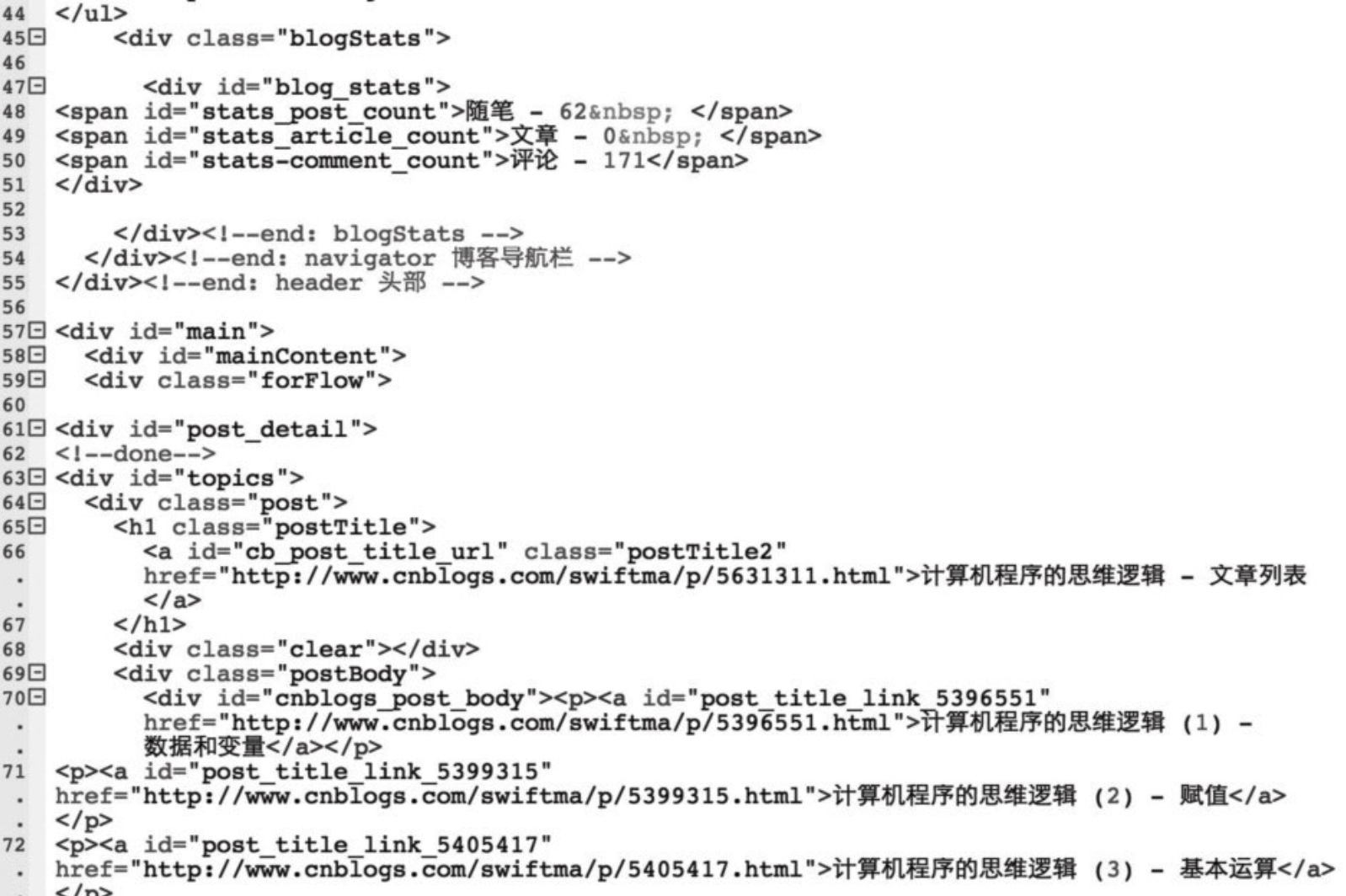
假定我们要抽取网页主题内容中每篇文章的标题和链接,怎么实现呢?jsoup支持使用CSS选择器语法查找元素,如果不了解CSS选择器,可参看http://www.w3school.com.cn/cssref/css_selectors.asp。
定位文章列表的CSS选择器可以是:
#cnblogs_post_body p a
我们来看代码(假定文件为articles.html):
Document doc = Jsoup.parse(new File("articles.html"), "UTF-8");
Elements elements = doc.select("#cnblogs_post_body p a");
for(Element e : elements){
  String title = e.text();
  String href = e.attr("href");
  System.out.println(title+", "+href);
}
输出为(部分):
计算机程序的思维逻辑 (1) - 数据和变量, http://www.cnblogs.com/swiftma/p/5396551.html
计算机程序的思维逻辑 (2) - 赋值, http://www.cnblogs.com/swiftma/p/5399315.html
jsoup也可以直接连接URL进行分析,比如,上面代码的第一行可以替换为:
String url = "http://www.cnblogs.com/swiftma/p/5631311.html";
Document doc = Jsoup.connect(url).get();
5、压缩文件
压缩文件有多种格式,Java SDK支持两种:gzip和zip,gzip只能压缩一个文件,而zip文件中可以包含多个文件。下面介绍Java API中的基本用法,如果需要更多格式,可以考虑Apache Commons Compress,网址为http://commons.apache.org/proper/commons-compress/。
先来看gzip,有两个主要的类:
java.util.zip.GZIPOutputStream
java.util.zip.GZIPInputStream
它们分别是OutputStream和InputStream的子类,都是装饰类,GZIPOutputStream加到已有的流上,就可以实现压缩,而GZIPInputStream加到已有的流上,就可以实现解压缩。比如,压缩一个文件的代码可以为:
public static void gzip(String fileName) throws IOException {
    InputStream in = null;
    String gzipFileName = fileName + ".gz";
    OutputStream out = null;
    try {
        in = new BufferedInputStream(new FileInputStream(fileName));
        out = new GZIPOutputStream(new BufferedOutputStream(
                new FileOutputStream(gzipFileName)));
        copy(in, out);
    } finally {
        if(out ! = null) {
            out.close();
        }
        if(in ! = null) {
            in.close();
        }
    }
}
调用的copy方法是我们在上一章介绍的。解压缩文件的代码可以为:
public static void gunzip(String gzipFileName, String unzipFileName)
        throws IOException {
    InputStream in = null;
    OutputStream out = null;
    try {
        in = new GZIPInputStream(new BufferedInputStream(
                new FileInputStream(gzipFileName)));
        out = new BufferedOutputStream(new FileOutputStream(
                unzipFileName));
        copy(in, out);
    } finally {
        if(out ! = null) {
            out.close();
        }
		if(in ! = null) {
		    in.close();
		}
	}
}
zip文件支持一个压缩文件中包含多个文件,Java API中主要的类是:
java.util.zip.ZipOutputStream
java.util.zip.ZipInputStream
它们也分别是OutputStream和InputStream的子类,也都是装饰类,但不能像GZIP-OutputStream/GZIPInputStream那样简单使用。
ZipOutputStream可以写入多个文件,它有一个重要方法:
public void putNextEntry(ZipEntry e) throws IOException
在写入每一个文件前,必须要先调用该方法,表示准备写入一个压缩条目ZipEntry,每个压缩条目有个名称,这个名称是压缩文件的相对路径,如果名称以字符’/'结尾,表示目录,它的构造方法是:
public ZipEntry(String name)
我们看一段代码,压缩一个文件或一个目录:
public static void zip(File inFile, File zipFile) throws IOException {
    ZipOutputStream out = new ZipOutputStream(new BufferedOutputStream(
            new FileOutputStream(zipFile)));
    try {
        if(! inFile.exists()) {
            throw new FileNotFoundException(inFile.getAbsolutePath());
        }
        inFile = inFile.getCanonicalFile();
        String rootPath = inFile.getParent();
        if(! rootPath.endsWith(File.separator)) {
            rootPath += File.separator;
        }
        addFileToZipOut(inFile, out, rootPath);
    } finally {
        out.close();
    }
}
参数inFile表示输入,可以是普通文件或目录,zipFile表示输出,rootPath表示父目录,用于计算每个文件的相对路径,主要调用了addFileToZipOut将文件加入到ZipOutput-Stream中,代码为:
private static void addFileToZipOut(File file, ZipOutputStream out,
        String rootPath) throws IOException {
    String relativePath = file.getCanonicalPath().substring(
                rootPath.length());
        if(file.isFile()) {
            out.putNextEntry(new ZipEntry(relativePath));
            InputStream in = new BufferedInputStream(new FileInputStream(file));
            try {
                copy(in, out);
            } finally {
                in.close();
            }
        } else {
            out.putNextEntry(new ZipEntry(relativePath + File.separator));
            for(File f : file.listFiles()) {
                addFileToZipOut(f, out, rootPath);
            }
        }
    }
它同样调用了copy方法将文件内容写入ZipOutputStream,对于目录,进行递归调用。ZipInputStream用于解压zip文件,它有一个对应的方法,获取压缩条目:
public ZipEntry getNextEntry() throws IOException
如果返回值为null,表示没有条目了。使用ZipInputStream解压文件,可以使用类似如下代码:
public static void unzip(File zipFile, String destDir) throws IOException {
    ZipInputStream zin = new ZipInputStream(new BufferedInputStream(
            new FileInputStream(zipFile)));
    if(! destDir.endsWith(File.separator)) {
        destDir += File.separator;
    }
    try {
        ZipEntry entry = zin.getNextEntry();
        while(entry ! = null) {
            extractZipEntry(entry, zin, destDir);
            entry = zin.getNextEntry();
        }
    } finally {
        zin.close();
    }
}
调用extractZipEntry处理每个压缩条目,代码为:
private static void extractZipEntry(ZipEntry entry, ZipInputStream zin,
     String destDir) throws IOException {
 if(! entry.isDirectory()) {
     File parent = new File(destDir + entry.getName()).getParentFile();
     if(! parent.exists()) {
         parent.mkdirs();
     }
       OutputStream entryOut = new BufferedOutputStream(
               new FileOutputStream(destDir + entry.getName()));
       try {
           copy(zin, entryOut);
       } finally {
           entryOut.close();
       }
   } else {
       new File(destDir + entry.getName()).mkdirs();
   }
}





 扫一扫
扫一扫


 1087
1087

 被折叠的 条评论
为什么被折叠?
被折叠的 条评论
为什么被折叠?
 到【灌水乐园】发言





