


 本文推荐一款基于.Net开发的高性能敏感词工具箱。它采用.Net Core3.1开发,支持跨平台,功能强大,能秒级检测亿级文章。具备敏感词检测、通配符检测等功能,还可进行拼音、繁简等转换。性能比C#自带正则高,数据量越大优势越明显。
今天给大家推荐一款高性能敏感词检测开源库。
项目简介
这是一款基于.Net开发的、高性能敏感词工具箱,支持繁简互换、全角半角互换,拼音模糊搜索等功能。功能强大、高性能,秒级检测亿级别的文章。
技术架构
1、跨平台:采用.Net Core3.1开发,支持跨平台。可以部署在Docker, Windows, Linux, Mac。
项目结构
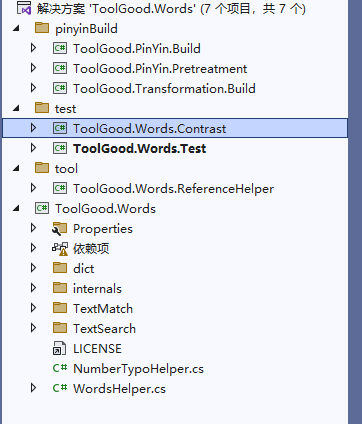
使用方法
敏感词检测
过滤敏感词,可以设置跳字长度,默认全角转半角、忽略大小写、跳词、重复词、黑名单。返回结果包含:关键字、关键字起始位置、结束位置、关键字序号等信息。
    string s = "中国|国人|zg人";
    string test = "我是中国人";

    StringSearch iwords = new StringSearch();
    iwords.SetKeywords(s.Split('|'));

    var b = iwords.ContainsAny(test);
    Assert.AreEqual(true, b);

    var f = iwords.FindFirst(test);
    Assert.AreEqual("中国", f);

    var all = iwords.FindAll(test);
    Assert.AreEqual("中国", all[0]);
    Assert.AreEqual("国人", all[1]);
    Assert.AreEqual(2, all.Count);

    var str = iwords.Replace(test, '*');
    Assert.AreEqual("我是***", str);
敏感词通配符检测
支持正则表达式类型:.?[]|,通过正则表达式可以进行模糊匹配,提升检测精准度。
    string s = ".[中美]国|国人|zg人";
    string test = "我是中国人";

    WordsMatch wordsSearch = new WordsMatch();
    wordsSearch.SetKeywords(s.Split('|'));

    var b = wordsSearch.ContainsAny(test);
    Assert.AreEqual(true, b);

    var f = wordsSearch.FindFirst(test);
    Assert.AreEqual("是中国", f.Keyword);

    var alls = wordsSearch.FindAll(test);
    Assert.AreEqual("是中国", alls[0].Keyword);
    Assert.AreEqual(".[中美]国", alls[0].MatchKeyword);
    Assert.AreEqual(1, alls[0].Start);
    Assert.AreEqual(3, alls[0].End);
    Assert.AreEqual(0, alls[0].Index);//返回索引Index,默认从0开始
    Assert.AreEqual("国人", alls[1].Keyword);
    Assert.AreEqual(2, alls.Count);

    var t = wordsSearch.Replace(test, '*');
    Assert.AreEqual("我****", t);
拼音转换、繁简转换、数字转大小写操作
此工具箱,集成了繁体简体互转、拼音转换、首字母提取、数字转大小写,使用例子如下:
// 转成简体
    WordsHelper.ToSimplifiedChinese("我愛中國");
    WordsHelper.ToSimplifiedChinese("我愛中國",1);// 港澳繁体 转 简体
    WordsHelper.ToSimplifiedChinese("我愛中國",2);// 台湾正体 转 简体
    // 转成繁体
    WordsHelper.ToTraditionalChinese("我爱中国");
    WordsHelper.ToTraditionalChinese("我爱中国",1);// 简体 转 港澳繁体
    WordsHelper.ToTraditionalChinese("我爱中国",2);// 简体 转 台湾正体
    // 转成全角
    WordsHelper.ToSBC("abcABC123");
    // 转成半角
    WordsHelper.ToDBC("abcABC123");
    // 数字转成中文大写
    WordsHelper.ToChineseRMB(12345678901.12);
    // 中文转成数字
    WordsHelper.ToNumber("壹佰贰拾叁亿肆仟伍佰陆拾柒万捌仟玖佰零壹元壹角贰分");
    // 获取全拼
    WordsHelper.GetPinyin("我爱中国");//WoAiZhongGuo
    WordsHelper.GetPinyin("我爱中国",",");//Wo,Ai,Zhong,Guo
    WordsHelper.GetPinyin("我爱中国",true);//WǒÀiZhōngGuó

    // 获取首字母
    WordsHelper.GetFirstPinyin("我爱中国");//WAZG
    // 获取全部拼音
    WordsHelper.GetAllPinyin('传');//Chuan,Zhuan
    // 获取姓名
    WordsHelper.GetPinyinForName("单一一")//ShanYiYi
    WordsHelper.GetPinyinForName("单一一",",")//Shan,Yi,Yi
    WordsHelper.GetPinyinForName("单一一",true)//ShànYīYī
**性能对比
**
下面我们用户1000字字符串,进行10万次性能对比,看看对比结果,测试代码如下:
            ReadBadWord();
            var text = File.ReadAllText("Talk.txt");

            Console.Write("-------------------- FindFirst OR ContainsAny 100000次 --------------------
");
            Run("TrieFilter", () => { tf1.HasBadWord(text); });
            Run("FastFilter", () => { ff.HasBadWord(text); });
            Run("StringSearch(ContainsAny)", () => { stringSearch.ContainsAny(text); });
            Run("StringSearchEx(ContainsAny)--- WordsSearchEx(ContainsAny)代码相同", () => { stringSearchEx.ContainsAny(text); });
            Run("StringSearchEx2(ContainsAny)--- WordsSearchEx2(ContainsAny)代码相同", () => { stringSearchEx2.ContainsAny(text); });
            Run("StringSearchEx3(ContainsAny)--- WordsSearchEx3(ContainsAny)代码相同", () => { stringSearchEx3.ContainsAny(text); });
            Run("IllegalWordsSearch(ContainsAny)", () => { illegalWordsSearch.ContainsAny(text); });


            Run("StringSearch(FindFirst)", () => { stringSearch.FindFirst(text); });
            Run("StringSearchEx(FindFirst)", () => { stringSearchEx.FindFirst(text); });
            Run("StringSearchEx2(FindFirst)", () => { stringSearchEx2.FindFirst(text); });
            Run("StringSearchEx3(FindFirst)", () => { stringSearchEx3.FindFirst(text); });
            Run("WordsSearch(FindFirst)", () => { wordsSearch.FindFirst(text); });
            Run("WordsSearchEx(FindFirst)", () => { wordsSearchEx.FindFirst(text); });
            Run("WordsSearchEx2(FindFirst)", () => { wordsSearchEx2.FindFirst(text); });
            Run("WordsSearchEx3(FindFirst)", () => { wordsSearchEx3.FindFirst(text); });
            Run("IllegalWordsSearch(FindFirst)", () => { illegalWordsSearch.FindFirst(text); });


            Console.Write("-------------------- Find All 100000次 --------------------
");
            Run("TrieFilter(FindAll)", () => { tf1.FindAll(text); });
            Run("FastFilter(FindAll)", () => { ff.FindAll(text); });
            Run("StringSearch(FindAll)", () => { stringSearch.FindAll(text); });
            Run("StringSearchEx(FindAll)", () => { stringSearchEx.FindAll(text); });
            Run("StringSearchEx2(FindAll)", () => { stringSearchEx2.FindAll(text); });
            Run("StringSearchEx3(FindAll)", () => { stringSearchEx3.FindAll(text); });


            Run("WordsSearch(FindAll)", () => { wordsSearch.FindAll(text); });
            Run("WordsSearchEx(FindAll)", () => { wordsSearchEx.FindAll(text); });
            Run("WordsSearchEx2(FindAll)", () => { wordsSearchEx2.FindAll(text); });
            Run("WordsSearchEx3(FindAll)", () => { wordsSearchEx3.FindAll(text); });
            Run("IllegalWordsSearch(FindAll)", () => { illegalWordsSearch.FindAll(text); });


            Console.Write("-------------------- Replace  100000次 --------------------
");
            Run("TrieFilter(Replace)", () => { tf1.Replace(text); });
            Run("FastFilter(Replace)", () => { ff.Replace(text); });
            Run("StringSearch(Replace)", () => { stringSearch.Replace(text); });
            Run("WordsSearch(Replace)", () => { wordsSearch.Replace(text); });
            Run("StringSearchEx(Replace)--- WordsSearchEx(Replace)代码相同", () => { stringSearchEx.Replace(text); });
            Run("StringSearchEx2(Replace)--- WordsSearchEx2(Replace)代码相同", () => { stringSearchEx2.Replace(text); });
            Run("StringSearchEx3(Replace)--- WordsSearchEx3(Replace)代码相同", () => { stringSearchEx3.Replace(text); });
            Run("IllegalWordsSearch(Replace)", () => { illegalWordsSearch.Replace(text); });


            Console.Write("-------------------- Regex  100次 --------------------
");
            Run(100, "Regex.IsMatch", () => { re.IsMatch(text); });
            Run(100, "Regex.Match", () => { re.Match(text); });
            Run(100, "Regex.Matches", () => { re.Matches(text); });


            Console.Write("-------------------- Regex used Trie tree  100次 --------------------
");
            Run(100, "Regex.IsMatch", () => { re2.IsMatch(text); });
            Run(100, "Regex.Match", () => { re2.Match(text); });
            Run(100, "Regex.Matches", () => { re2.Matches(text); });
执行10万次性能对比,结果如下:
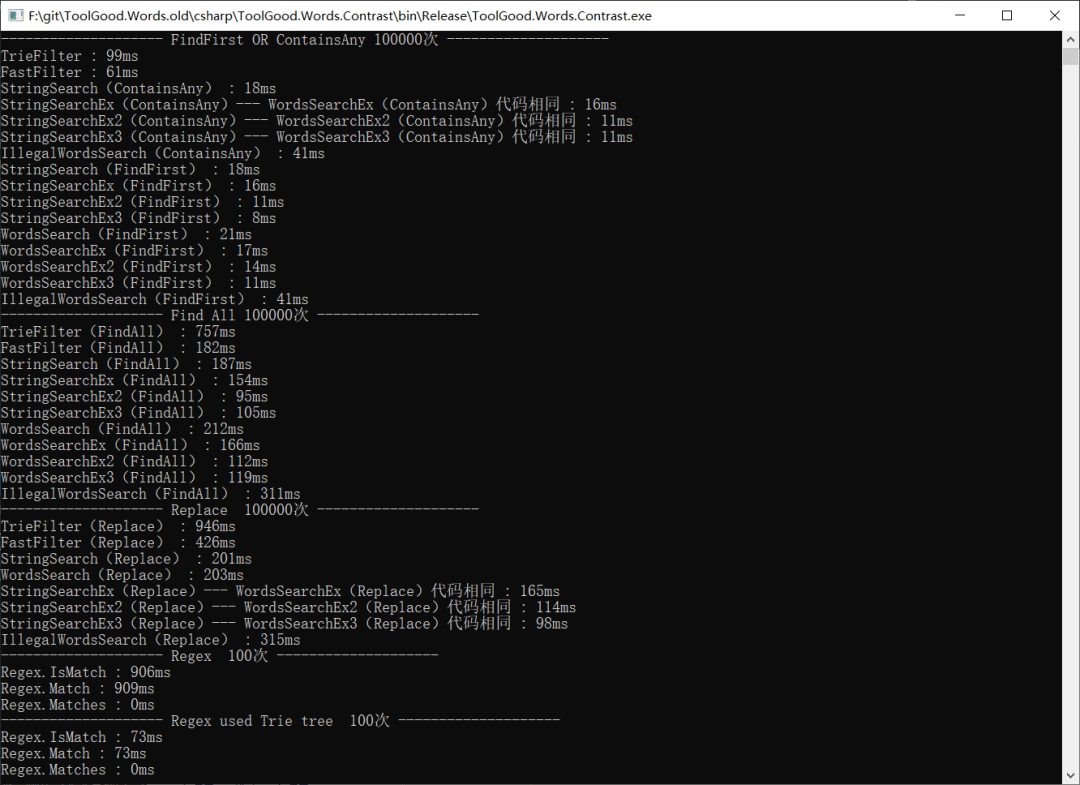
从测试结果看,此工具比C#自带的正则效率高8.8倍,如果数量量越大性能优势越明显。
项目地址:https://github.com/toolgood/ToolGood.Words
- End -
推荐阅读
专注分享编程知识、热门有用有趣的开源项目






 扫一扫
扫一扫


 1852
1852

 被折叠的 条评论
为什么被折叠?
被折叠的 条评论
为什么被折叠?
 到【灌水乐园】发言





