


使用演示:
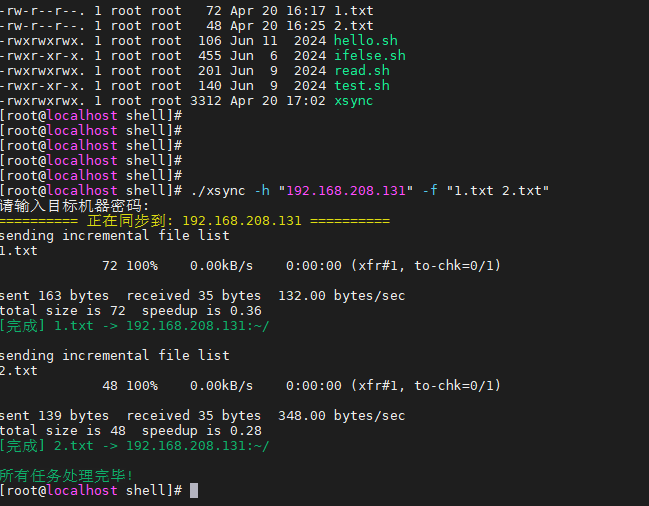
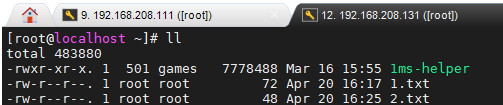
已上传gitee https://gitee.com/leyuTV/shell-xsync.git
vim xsync

# 复制下面脚本,并保存

# 把Windows格式的换行符,替换成 Linux 格式的换行符
sed -i 's/\r$//' xsync

# 可读可写可执行
chmod -R 777 xsync
#!/bin/bash
# ==========================================
# 脚本名称: xsync (安全交互版)
# 功能: 分发文件到集群所有节点的家目录( ~ )
# 用法: ./xsync -h "ip1 ip2" -f "file1 file2"
# 作者:ldj
# 时间:2024-10-15
# ==========================================
RED='\033[0;31m'
GREEN='\033[0;32m'
YELLOW='\033[1;33m'
NC='\033[0m'
# ==========================================
# 第一步:检查并安装依赖
# ==========================================
check_dependencies() {
# 1. 检查 sshpass
if ! command -v sshpass &> /dev/null; then
echo -e "${YELLOW}[系统] 未安装 sshpass,正在尝试自动安装...${NC}"
if [ "$(id -u)" -ne 0 ]; then
echo -e "${RED}[错误] 安装软件需要 root 权限,请使用 sudo 或 root 用户运行。${NC}"
exit 1
fi
yum install -y sshpass > /dev/null 2>&1
if [ $? -ne 0 ]; then
echo -e "${RED}[错误] 安装失败,请手动执行: yum install -y sshpass${NC}"
exit 1
fi
echo -e "${GREEN}[系统] sshpass 安装成功!${NC}"
fi
# 2. 检查 rsync
if ! command -v rsync &> /dev/null; then
echo -e "${YELLOW}[系统] 未安装 rsync,正在尝试自动安装...${NC}"
if [ "$(id -u)" -ne 0 ]; then
echo -e "${RED}[错误] 安装软件需要 root 权限。${NC}"
exit 1
fi
yum install -y rsync > /dev/null 2>&1
echo -e "${GREEN}[系统] rsync 安装成功!${NC}"
fi
}
# 执行依赖检查
check_dependencies
# ==========================================
# 第二步:参数解析
# ==========================================
hosts=""
files=""
while getopts "h:f:" opt; do
case $opt in
h) hosts="$OPTARG" ;;
f) files="$OPTARG" ;;
?)
echo "用法: $0 -h 'IP列表' -f '文件列表'"
exit 1
;;
esac
done
if [ -z "$hosts" ] || [ -z "$files" ]; then
echo -e "${RED}错误: 缺少必要参数!${NC}"
echo "用法: $0 -h 'IP' -f '文件'"
exit 1
fi
host_arr=($hosts)
file_arr=($files)
# ==========================================
# 第三步:安全地获取密码
# ==========================================
# -s 选项表示静默模式,输入时不会显示字符
read -s -p "请输入目标机器密码: " SSH_PASS
echo "" # 换行,美观一点
if [ -z "$SSH_PASS" ]; then
echo -e "${RED}错误: 密码不能为空!${NC}"
exit 1
fi
# ==========================================
# 第四步:开始分发
# ==========================================
for host in "${host_arr[@]}"; do
echo -e "${YELLOW}========== 正在同步到: $host ==========${NC}"
for file in "${file_arr[@]}"; do
if [ ! -e "$file" ]; then
echo -e "${RED}[跳过] 本地文件不存在: $file${NC}"
continue
fi
remote_target="~/"
# 使用刚才输入的 $SSH_PASS 变量
rsync -avP -e "sshpass -p $SSH_PASS ssh -o StrictHostKeyChecking=no" "$file" "$host:$remote_target"
if [ $? -eq 0 ]; then
echo -e "${GREEN}[完成] $file -> $host:${remote_target}${NC}"
else
echo -e "${RED}[失败] $file -> $host${NC}"
fi
echo ""
done
done
echo -e "${GREEN}所有任务处理完毕!${NC}"





 扫一扫
扫一扫


 2478
2478

 被折叠的 条评论
为什么被折叠?
被折叠的 条评论
为什么被折叠?
 到【灌水乐园】发言





