





 本文详细介绍了如何在CentOS Linux环境下通过RPM包安装Oracle 19C数据库,包括安装前的环境准备、依赖包安装、数据库实例与数据库的创建过程,以及配置监听和实现自动启动的方法。
Oracle19C安装 单实例 -- rpm方式
- 环境
| IP | OS | Oracle |
| 192.168.56.101 | CentOS Linux release 7.7.1908 | 19.3 |
- 安装准备
- 关闭防火墙,关闭selinux
- rpm包下载,并上传到/softwares/
https://www.oracle.com/database/technologies/oracle19c-linux-downloads.html
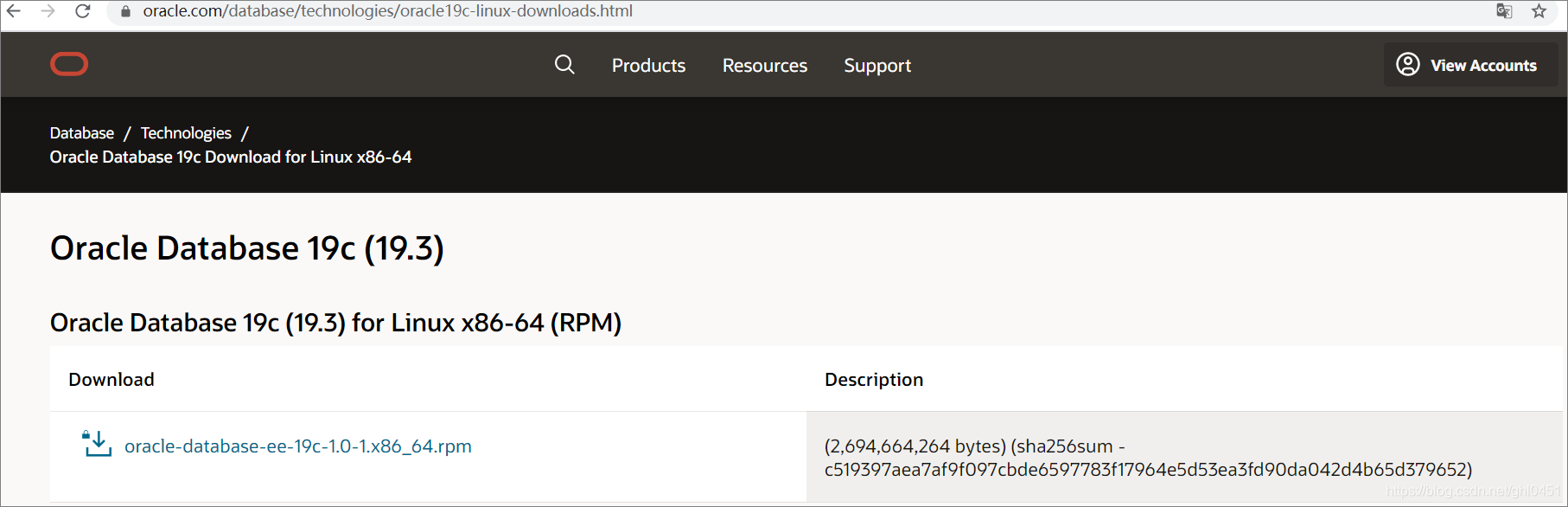
3. 配置yum
wget http://yum.oracle.com/public-yum-ol7.repo -O /etc/yum.repos.d/public-yum-ol7.repo
wget http://public-yum.oracle.com/RPM-GPG-KEY-oracle-ol7 -O /etc/pki/rpm-gpg/RPM-GPG-KEY-oracle
rpm --import /etc/pki/rpm-gpg/RPM-GPG-KEY-oracle- 开始安装
安装oracle-database-preinstall-19c
yum install oracle-database-preinstall-19c.x86_64 -y[root@ghlhost rpm-gpg]# yum install oracle-database-preinstall-19c.x86_64
Loaded plugins: fastestmirror, langpacks
Loading mirror speeds from cached hostfile
* base: mirrors.cqu.edu.cn
* extras: mirror.bit.edu.cn
* updates: mirrors.cqu.edu.cn
Resolving Dependencies
--> Running transaction check
---> Package oracle-database-preinstall-19c.x86_64 0:1.0-2.el7 will be installed
--> Processing Dependency: compat-libcap1 for package: oracle-database-preinstall-19c-1.0-2.el7.x86_64
--> Processing Dependency: ksh for package: oracle-database-preinstall-19c-1.0-2.el7.x86_64
--> Processing Dependency: libaio-devel for package: oracle-database-preinstall-19c-1.0-2.el7.x86_64
--> Processing Dependency: libstdc++-devel for package: oracle-database-preinstall-19c-1.0-2.el7.x86_64
--> Running transaction check
---> Package compat-libcap1.x86_64 0:1.10-7.el7 will be installed
---> Package ksh.x86_64 0:20120801-142.0.1.el7 will be installed
---> Package libaio-devel.x86_64 0:0.3.109-13.el7 will be installed
---> Package libstdc++-devel.x86_64 0:4.8.5-39.0.5.el7 will be installed
--> Processing Dependency: libstdc++(x86-64) = 4.8.5-39.0.5.el7 for package: libstdc++-devel-4.8.5-39.0.5.el7.x86_64
--> Running transaction check
---> Package libstdc++.x86_64 0:4.8.5-39.el7 will be updated
---> Package libstdc++.x86_64 0:4.8.5-39.0.5.el7 will be an update
--> Finished Dependency Resolution
Dependencies Resolved
=================================================================================================================================================================================================================
Package Arch Version Repository Size
=================================================================================================================================================================================================================
Installing:
oracle-database-preinstall-19c x86_64 1.0-2.el7 ol7_latest 19 k
Installing for dependencies:
compat-libcap1 x86_64 1.10-7.el7 base 19 k
ksh x86_64 20120801-142.0.1.el7 ol7_latest 882 k
libaio-devel x86_64 0.3.109-13.el7 base 13 k
libstdc++-devel x86_64 4.8.5-39.0.5.el7 ol7_latest 1.5 M
Updating for dependencies:
libstdc++ x86_64 4.8.5-39.0.5.el7 ol7_latest 306 k
Transaction Summary
=================================================================================================================================================================================================================
Install 1 Package (+4 Dependent packages)
Upgrade ( 1 Dependent package)
Total size: 2.7 M
Is this ok [y/d/N]: y
Downloading packages:
Running transaction check
Running transaction test
Transaction test succeeded
Running transaction
Updating : libstdc++-4.8.5-39.0.5.el7.x86_64 1/7
Installing : libstdc++-devel-4.8.5-39.0.5.el7.x86_64 2/7
Installing : libaio-devel-0.3.109-13.el7.x86_64 3/7
Installing : compat-libcap1-1.10-7.el7.x86_64 4/7
Installing : ksh-20120801-142.0.1.el7.x86_64 5/7
Installing : oracle-database-preinstall-19c-1.0-2.el7.x86_64 6/7
Cleanup : libstdc++-4.8.5-39.el7.x86_64 7/7
Verifying : libstdc++-devel-4.8.5-39.0.5.el7.x86_64 1/7
Verifying : ksh-20120801-142.0.1.el7.x86_64 2/7
Verifying : compat-libcap1-1.10-7.el7.x86_64 3/7
Verifying : libaio-devel-0.3.109-13.el7.x86_64 4/7
Verifying : libstdc++-4.8.5-39.0.5.el7.x86_64 5/7
Verifying : oracle-database-preinstall-19c-1.0-2.el7.x86_64 6/7
Verifying : libstdc++-4.8.5-39.el7.x86_64 7/7
Installed:
oracle-database-preinstall-19c.x86_64 0:1.0-2.el7
Dependency Installed:
compat-libcap1.x86_64 0:1.10-7.el7 ksh.x86_64 0:20120801-142.0.1.el7 libaio-devel.x86_64 0:0.3.109-13.el7 libstdc++-devel.x86_64 0:4.8.5-39.0.5.el7
Dependency Updated:
libstdc++.x86_64 0:4.8.5-39.0.5.el7
Complete!
[root@ghlhost rpm-gpg]#这时候查看oracle用户已经被创建成功了(当然也可以自己先创建好)
[root@ghlhost rpm-gpg]# id oracle
uid=54321(oracle) gid=54321(oinstall) groups=54321(oinstall),54322(dba),54323(oper),54324(backupdba),54325(dgdba),54326(kmdba),54330(racdba)
修改oracle用户密码
[root@ghlhost rpm-gpg]# passwd oracle
Changing password for user oracle.
New password:
BAD PASSWORD: The password fails the dictionary check - it is too simplistic/systematic
Retype new password:
passwd: all authentication tokens updated successfully.
[root@ghlhost /]#
rpm安装Oracle(Oracle home installation)
rpm -ivh oracle-database-ee-19c-1.0-1.x86_64.rpm[root@ghlhost softwares]# rpm -ivh oracle-database-ee-19c-1.0-1.x86_64.rpm
Preparing... ################################# [100%]
Updating / installing...
1:oracle-database-ee-19c-1.0-1 ################################# [100%]
[INFO] Executing post installation scripts...
[INFO] Oracle home installed successfully and ready to be configured.
To configure a sample Oracle Database you can execute the following service configuration script as root: /etc/init.d/oracledb_ORCLCDB-19c configure
[root@ghlhost softwares]#在虚拟机环境(4G内存,虚拟磁盘在机械硬盘)大概用时 8分钟。
创建实例和数据库
如果要修改要创建数据库的sid, cbd, pdb信息,则需要修改/etc/init.d/oracledb_ORCLCDB-19c,如果保持默认就可以则跳过此步骤
创建文件
[root@ghlhost sysconfig]# cat /etc/sysconfig/oracledb_HPCDW-19c.conf
#This is a configuration file to setup the Oracle Database.
#It is used when running '/etc/init.d/oracledb_ORCLCDB configure'.
#Please use this file to modify the default listener port and the
#Oracle data location.

# LISTENER_PORT: Database listener
LISTENER_PORT=1521

# ORACLE_DATA_LOCATION: Database oradata location
ORACLE_DATA_LOCATION=/opt/oracle/oradata

# EM_EXPRESS_PORT: Oracle EM Express listener
EM_EXPRESS_PORT=5500
[root@ghlhost sysconfig]#
复制并修改文件
[root@ghlhost init.d]# cp oracledb_ORCLCDB-19c oracledb_HPCDW-19c
[root@ghlhost init.d]# vi oracledb_HPCDW-19c
[root@ghlhost init.d]# cat oracledb_HPCDW-19c | more
#!/bin/bash
#
# chkconfig: 2345 80 05
# Description: This script is responsible for taking care of configuring the Oracle Database and its associated services.
#
# processname: oracledb_ORCLCDB-19c
# Red Hat or SuSE config: /etc/sysconfig/oracledb_ORCLCDB-19c
#

# Set path if path not set
case $PATH in
	"") PATH=/bin:/usr/bin:/sbin:/etc
		 export PATH ;;
esac

# Check if the root user is running this script
if [ $(id -u) != "0" ]
then
	echo "You must be root user to run the configurations script. Login as root user and try again."
	exit 1
fi

# Setting the required environment variables
export ORACLE_HOME=/opt/oracle/product/19c/dbhome_1

export ORACLE_VERSION=19c
export ORACLE_SID=HPCDW
export TEMPLATE_NAME=General_Purpose.dbc
export CHARSET=AL32UTF8
export PDB_NAME=ORCLPDB1
export LISTENER_NAME=LISTENER
export NUMBER_OF_PDBS=1
export CREATE_AS_CDB=false

# General exports and vars
export PATH=$ORACLE_HOME/bin:$PATH
LSNR=$ORACLE_HOME/bin/lsnrctl
SQLPLUS=$ORACLE_HOME/bin/sqlplus
DBCA=$ORACLE_HOME/bin/dbca
NETCA=$ORACLE_HOME/bin/netca
ORACLE_O
export ORACLE_SID=HPCDW
export CREATE_AS_CDB=false
创建实例和数据库
[root@ghlhost init.d]# /etc/init.d/oracledb_HPCDW-19c configure
Configuring Oracle Database HPCDW.
Prepare for db operation
10% complete
Copying database files
40% complete
Creating and starting Oracle instance
42% complete
46% complete
50% complete
54% complete
60% complete
Completing Database Creation
66% complete
70% complete
Executing Post Configuration Actions
100% complete
Database creation complete. For details check the logfiles at:
 /opt/oracle/cfgtoollogs/dbca/HPCDW.
Database Information:
Global Database Name:HPCDW
System Identifier(SID):HPCDW
Look at the log file "/opt/oracle/cfgtoollogs/dbca/HPCDW/HPCDW.log" for further details.

Database configuration completed successfully. The passwords were auto generated, you must change them by connecting to the database using 'sqlplus / as sysdba' as the oracle user.
[root@ghlhost init.d]#
大概用时30分钟
给oracle用户配置环境变量,并使之生效
export ORACLE_HOME=/opt/oracle/product/19c/dbhome_1
export ORACLE_SID=HPCDW
export LANG=en_US.UTF-8
export PATH=.:${PATH}:$ORACLE_HOME/bin
export LD_LIBRARY_PATH=$ORACLE_HOME/lib:${LD_LIBRARY_PATH}
修改账号密码
[oracle@ghlhost ~]$ sqlplus / as sysdba

SQL*Plus: Release 19.0.0.0.0 - Production on Mon Aug 24 12:53:11 2020
Version 19.3.0.0.0

Copyright (c) 1982, 2019, Oracle.  All rights reserved.


Connected to:
Oracle Database 19c Enterprise Edition Release 19.0.0.0.0 - Production
Version 19.3.0.0.0

SQL> select 1 from dual;

	 1
----------
	 1

SQL> alter user sys identified by *******;

User altered.

SQL>
alter user sys identified by *******;这里请替换成自己的密码。
配置监听
[oracle@ghlhost admin]$ cat listener.ora
# listener.ora Network Configuration File: /opt/oracle/product/19c/dbhome_1/network/admin/listener.ora
# Generated by Oracle configuration tools.

LISTENER =
  (DESCRIPTION_LIST =
    (DESCRIPTION =
      (ADDRESS = (PROTOCOL = TCP)(HOST = ghlhost)(PORT = 1521))
      (ADDRESS = (PROTOCOL = IPC)(KEY = EXTPROC1521))
    )
  )

SID_LIST_LISTENER =
  (SID_LIST =
    (SID_DESC =
      (GLOBAL_DBNAME = HPCDW)
      (ORACLE_HOME = /opt/oracle/product/19c/dbhome_1)
      (SID_NAME = HPCDWCDB)
    )
    (SID_DESC =
      (GLOBAL_DBNAME = HPCDW)
      (SID_NAME = HPCDWCDB)
    )
  )
[oracle@ghlhost admin]$
配置数据库随操作系统启动而自动启动
使用systemd 来进行 oracle数据库的启动和关闭操作. 使用的脚本为 lsnrctl和dbstart
修改/etc/oratab
[root@ghlhost ~]# cat /etc/oratab
#


# This file is used by ORACLE utilities.  It is created by root.sh
# and updated by either Database Configuration Assistant while creating
# a database or ASM Configuration Assistant while creating ASM instance.

# A colon, ':', is used as the field terminator.  A new line terminates
# the entry.  Lines beginning with a pound sign, '#', are comments.
#
# Entries are of the form:
#   $ORACLE_SID:$ORACLE_HOME:<N|Y>:
#
# The first and second fields are the system identifier and home
# directory of the database respectively.  The third field indicates
# to the dbstart utility that the database should , "Y", or should not,
# "N", be brought up at system boot time.
#
# Multiple entries with the same $ORACLE_SID are not allowed.
#
#
HPCDW:/opt/oracle/product/19c/dbhome_1:Y
[root@ghlhost ~]# HPCDW:/opt/oracle/product/19c/dbhome_1:Y
创建一个脚本用于执行启动Oracle监听和数据库
[root@ghlhost bin]# vi oracle.sh
[root@ghlhost bin]# chmod 777 oracle.sh
[root@ghlhost bin]# pwd
/usr/bin
[root@ghlhost bin]# ll oracle.sh
-rwxrwxrwx 1 root root 175 Aug 24 13:02 oracle.sh
[root@ghlhost bin]# cat oracle.sh
#! /bin/bash
#  script  For oracle19c.service
/opt/oracle/product/19c/dbhome_1/bin/lsnrctl start
/opt/oracle/product/19c/dbhome_1/bin/dbstart /opt/oracle/product/19c/dbhome_1
[root@ghlhost bin]#
配置oracle19c服务
[root@ghlhost bin]# cat /etc/systemd/system/oracle19c.service
[Unit]
Description=Oracle19c
After=syslog.target network.target
[Service]
LimitMEMLOCK=infinity
LimitNOFILE=65535
Type=oneshot
RemainAfterExit=yes
User=oracle
Environment="ORACLE_HOME=/opt/oracle/product/19c/dbhome_1"
ExecStart=/usr/bin/oracle.sh
[Install]
WantedBy=multi-user.target
[root@ghlhost bin]#
设置开机自动启动
[root@ghlhost bin]# systemctl enable oracle19c
Created symlink from /etc/systemd/system/multi-user.target.wants/oracle19c.service to /etc/systemd/system/oracle19c.service.
[root@ghlhost bin]#
重启才做系统测试
[oracle@ghlhost ~]$ sqlplus sys/ghl0451 as sysdba

SQL*Plus: Release 19.0.0.0.0 - Production on Mon Aug 24 13:09:35 2020
Version 19.3.0.0.0

Copyright (c) 1982, 2019, Oracle.  All rights reserved.


Connected to:
Oracle Database 19c Enterprise Edition Release 19.0.0.0.0 - Production
Version 19.3.0.0.0

SQL> select sysdate from dual;

SYSDATE
---------
24-AUG-20

SQL>
数据库正常随系统启动。





 扫一扫
扫一扫


 3408
3408

 被折叠的 条评论
为什么被折叠?
被折叠的 条评论
为什么被折叠?
 到【灌水乐园】发言





