


 本文介绍如何使用AndroidWebView加载html代码,并在html内引用apk内的图片、字体库等资源文件,包括assets文件、res/drawable文件夹及sd卡中的文件路径配置。
本文介绍如何用android WebView加载html代码,并在html内引用apk里的资源文件,例如图片、字体库等。
先说一般情况,文件夹有html、ttf字库、图片
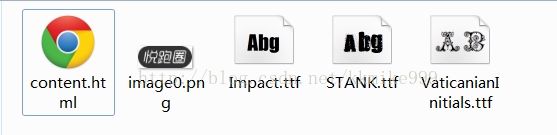
html代码如下:
<!doctype html>
<html>
<head>
    <meta charset="utf-8">
    <style>
		.text { font-family: STANK; font-size:60px;}

		@font-face {
           font-family: STANK;
           src:url(STANK.ttf);
		}

    </style>
</head>

<body style="background-color: white;">

<p class="text">font</p>

<img width="108" src="image0.png"/>

</body>
</html>
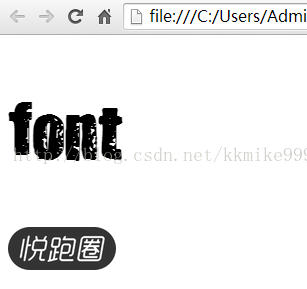
打开这个content.html,有如下效果:
那么,加载到webView的html代码,应该如何引用 assets文件、res/drawable、sd卡里面文件呢?
webView加载html代码,有两个方法:
1.webView.loadData(String data, String mimeType, String encoding)

2. webView.loadDataWithBaseURL(String baseUrl, String data, String mimeType, String encoding, String failUrl);
经过试验,只能用loadDataWithBaseURL。参数里面有baseUrl,这个是指定html文件目录的。例如,content.html在 assets/html/content.html,那么
baseUrl = file:///android_asset/html/如果content.html在 /sdcard/html/content.html,那么
baseUrl = file:///sdcard/html/
注意:保证"file:"后面要有三个'/'
实战:
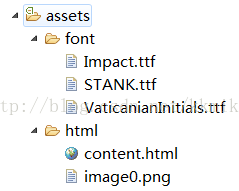
1.现在,assets目录结构是这样:
java代码:
webView.loadDataWithBaseURL("file:///android_asset/", html, "text/html", "UTF-8", null);html代码:
<!doctype html>
<html>
<head>
    <meta charset="utf-8">
    <style>
		.text { font-family: Impact; font-size:60px;}

		@font-face {
           font-family: Impact;
		   src:url( ../font/Impact.ttf );
		}
    </style>
</head>

<body style="background-color: white;">

<p class="text">font</p>

<img width="108" src="image0.png"/>

</body>
</html>
如果图片在/sdcard/html/image0.png,ttf文件在/sdcard/html/font/Impact.ttf ,则
<img width="108" src="file:///sdcard/html/image0.png"/>@font-face {
font-family: Impact;
src:url( file:///sdcard/html/font/Impact.ttf );
}如果图片在res/drawable-xhdpi 或其他drawable文件夹,则
<img width="108" src="file:///android_res/drawable/image0.png"/>
2.当html文件在/sdcard/html/content.html
java代码:
webView.loadDataWithBaseURL(“file:///sdcard/html/”, html, "text/html", "UTF-8", null);html代码:
<!doctype html>
<html>
<head>
    <meta charset="utf-8">
    <style>
		.text { font-family: Impact; font-size:60px;}

		@font-face {
           font-family: Impact;
		   src:url( font/Impact.ttf );
		}
    </style>
</head>

<body style="background-color: white;">

<p class="text">font</p>

<img width="108" src="image0.png"/>

</body>
</html>
如果图片是在assets/html/image0.png,则
<img width="108" src="file:///android_asset/html/image0.png"/>如果图片在res/drawable/下,同理。
=================================================================
demo下载
http://download.csdn.net/detail/kkmike999/8502163





 扫一扫
扫一扫


&spm=1001.2101.3001.5002&articleId=44263545&d=1&t=3&u=601da14e573144d588219deea0533be3)
 1323
1323

 被折叠的 条评论
为什么被折叠?
被折叠的 条评论
为什么被折叠?
 到【灌水乐园】发言





