



 本文介绍了Accordion控件的重要属性及其使用方法。Accordion控件允许创建多个面板,并一次仅展示一个面板的内容,非常适合网页上的内容折叠与展示。文章还提供了示例代码及CSS样式设置。
(1)Accordion 控件重要属性介绍 a )RequireOpenedPane:当单击控件的 Pane 中的 header 时,是否关闭打开的 Pane。当值为 True 时,则不关闭该 Pane;当值为 False 时,则关闭该 Pane。 b )SuppressHeaderPostBacks:当在客户端单击控件的 Pane 中的 header 中的元素时,是否阻止其进行回传。当值为 True 时,则阻止其回传;当值为 False 时,则不阻止其回传。 c )FadeTransitions:当值为 True 时,则使用淡入淡出的转化效果;当值为 False 时,则使用标准的转化效果。 d )TransitionDuration:设定转换的时间(或速度)。数值越小,转换越快;数值越大,转换越慢。 e )FramesPerSecond:每秒的帧数。 f )SelectedIndex:设定页面初始导入时显示的 Pane。值为0,为第一个;值为1,为第二个。 g )HeaderCssClass:设定 Pane 中 header 的 css 样式。 h )ContentCssClass:设定 Pane 中 Content 的 css 样式。
(2)Accordion控件的使用
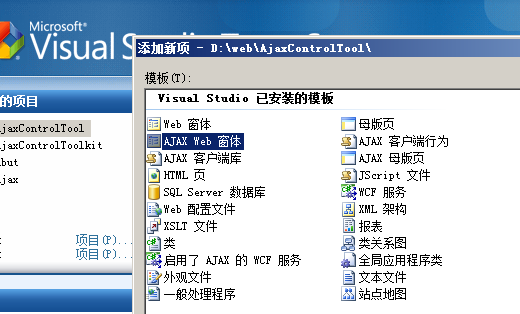
a、在vs2008中新建web站点,在站点中添加新项--“Ajax web 窗体”,将其命名为Accordion.aspx,图示如下:
b、在Accordion.aspx页面上拖放一个Accordion控件,在源代码页面就会添加下面两句话:
//用于注册该控件包
<%@ Register assembly="AjaxControlToolkit" namespace="AjaxControlToolkit" tagprefix="cc1" %>//Accordion控件
 <cc1:Accordion ID="Accordion1" runat="server">

    </cc1:Accordion>
c、在 Accordion 中添加 Pane。在 Accordion 中先添加一个 Panes 标记。然后可以拖放一个 AccordionPane 到 Panes 中或者直接在 Panes 中添加 AccordionPane。得如下代码:
 <Panes>

       <cc1:AccordionPane ID="AccordionPane1" runat="server">

            <Header>1. Accordion</Header>

                <Content>

                    The Accordion is a web control that allows you to provide multiple panes and display them one at a time.

                    It is like having several

                    where only one can be expanded at a time.  The Accordion is implemented as a web control that contains

                    AccordionPane web controls. Each AccordionPane control has a template for its Header and its Content.

                    We keep track of the selected pane so it stays visible across postbacks.

                </Content>

            </cc1:AccordionPane>

            <cc1:AccordionPane ID="AccordionPane2" runat="server">

            <Header>1. Accordion</Header>

                <Content>

                    The Accordion is a web control that allows you to provide multiple panes and display them one at a time.

                    It is like having several

                    where only one can be expanded at a time.  The Accordion is implemented as a web control that contains

                    AccordionPane web controls. Each AccordionPane control has a template for its Header and its Content.

                    We keep track of the selected pane so it stays visible across postbacks.

                </Content>

            </cc1:AccordionPane>

</Panes>d、在 Accordion 中添加 css 样式,设定一些属性值。最终代码如下:
<div id="container">

    <cc1:Accordion ID="Accordion1" runat="server"  SelectedIndex="0"

            HeaderCssClass="accordionHeader" HeaderSelectedCssClass="accordionHeaderSelected"

            ContentCssClass="accordionContent" FadeTransitions="false" FramesPerSecond="40"

            TransitionDuration="250" AutoSize="None" RequireOpenedPane="false" SuppressHeaderPostbacks="true">

       <Panes>

       <cc1:AccordionPane ID="AccordionPane1" runat="server">

            <Header>1. Accordion</Header>

                <Content>

                    The Accordion is a web control that allows you to provide multiple panes and display them one at a time.

                    It is like having several

                    where only one can be expanded at a time.  The Accordion is implemented as a web control that contains

                    AccordionPane web controls. Each AccordionPane control has a template for its Header and its Content.

                    We keep track of the selected pane so it stays visible across postbacks.

                </Content>

            </cc1:AccordionPane>

            <cc1:AccordionPane ID="AccordionPane2" runat="server">

            <Header>1. Accordion</Header>

                <Content>

                    The Accordion is a web control that allows you to provide multiple panes and display them one at a time.

                    It is like having several

                    where only one can be expanded at a time.  The Accordion is implemented as a web control that contains

                    AccordionPane web controls. Each AccordionPane control has a template for its Header and its Content.

                    We keep track of the selected pane so it stays visible across postbacks.

                </Content>

            </cc1:AccordionPane>

       </Panes>

    </cc1:Accordion>

    </div>
e、附上css样式表
 <style>

 .accordionHeader

{

    border: 1px solid #2F4F4F;

    color: white;

    background-color: #2E4d7B;

	font-family: Arial, Sans-Serif;

	font-size: 12px;

	font-weight: bold;

    padding: 5px;

    margin-top: 5px;

    cursor: pointer;

}

.accordionContent

{

    background-color: #D3DEEF;

    border: 1px dashed #2F4F4F;

    border-top: none;

    padding: 5px;

    padding-top: 10px;

}

.accordionHeaderSelected

{

    border: 1px solid #2F4F4F;

    color: white;

    background-color: #5078B3;

	font-family: Arial, Sans-Serif;

	font-size: 12px;

	font-weight: bold;

    padding: 5px;

    margin-top: 5px;

    cursor: pointer;

}

body

{ font-size:12px;}

#container

{

	 width:400px;}

    </style>
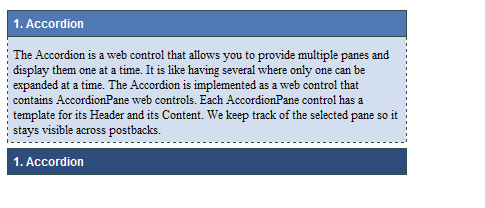
f、最终效果图如下:





 扫一扫
扫一扫


 被折叠的 条评论
为什么被折叠?
被折叠的 条评论
为什么被折叠?
 到【灌水乐园】发言





