


 本文介绍了myBatis的注解开发,强调了#{}与${}的区别,其中#{}对应PreparedStatement防止SQL注入,${}则无预编译存在安全隐患。重点解析了resultMap的使用,当数据库字段与类字段不匹配时,推荐使用resultMap解决。此外,详细讲解了myBatis中多对一关系的两种处理方式:按查询嵌套和按结果嵌套处理,提供了具体的配置和思路。
注解开发
注解开发不需要使用mapper.xml文件进行映射 直接绑定类
<mappers>
    <mapper class="com.luerdao.dao.UserMapper"></mapper>
</mappers>
@Select("select * from user")
List<User> getAllUser();
@Select("select * from user where id =#{id}")
User selectUserByID(int id);
@Insert("insert into user(id,name,pwd) values(#{id},#{name},#{pwd})")
int addUser(User user);
@Delete("delete from user where id = #{id}")
int deleteUser(@Param("id")int id);
@Param注解用于给方法参数起一个名字。以下是总结的使用原则:
- 在方法只接受一个参数的情况下,可以不使用@Param。
- 在方法接受多个参数的情况下,建议一定要使用@Param注解给参数命名。
- 如果参数是 JavaBean , 则不能使用@Param。
- 不使用@Param注解时,参数只能有一个,并且是Javabean。
关于#与$的区别
#{}相当于JDBC中的PrepareStatement
${} 则是没有进行预编译的 有注入问题
resultMap
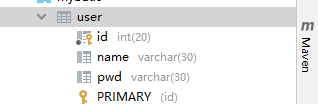
数据库中的字段名
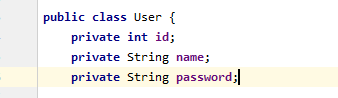
类中的字段名
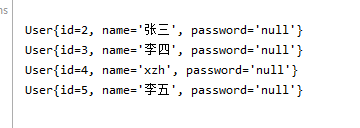
查询出来的结果(pwd和类中字段不对应)
解决方案
一:起别名

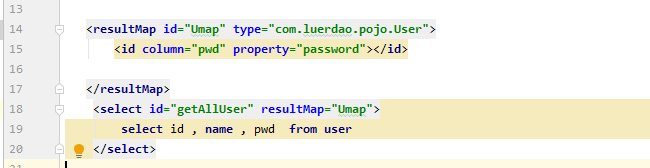
二:使用resulMap(推荐使用)
将数据库中的column:pwd对应到类中的属性名property:password
多对一处理
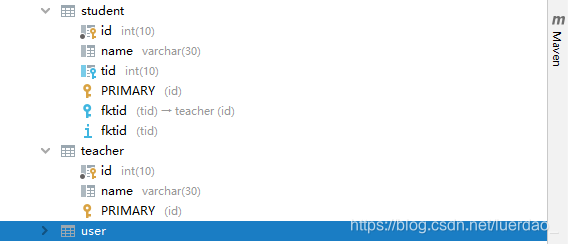
类
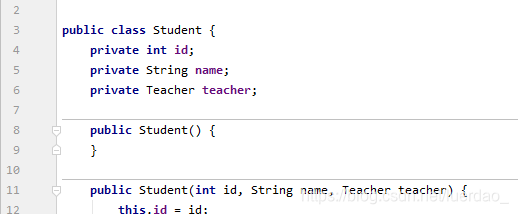
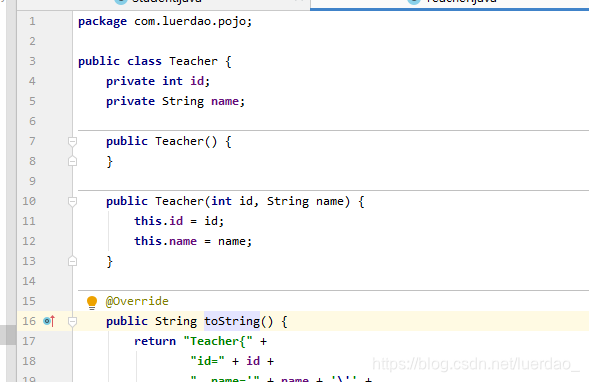
多个学生关联到一个老师
这时直接查询的话 select *from student
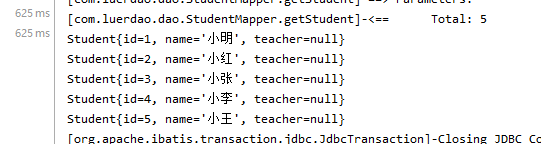
查询不出来teacher 因为teacher在另一张表中
方式一:按查询嵌套处理
需求:获取所有学生及对应老师的信息
思路:
      1. 获取所有学生的信息
         根据获取的学生信息的老师ID->获取该老师的信息
                   3. 思考问题,这样学生的结果集中应该包含老师,该如何处理呢,数据库中我们一般使用关联查询?
                4. 做一个结果集映射:StudentTeacher
                5. StudentTeacher结果集的类型为 Student
                6. 学生中老师的属性为teacher,对应数据库中为tid。
                   多个 [1,...)学生关联一个老师=> 一对一,一对多
                7. 查看官网找到:**association – 一个复杂类型的关联;使用它来处理关联查询**
<select id="getStudent" resultMap="STMap">
    select *from student
</select>

<resultMap id="STMap" type="Student">
    <association property="teacher" column="tid" javaType="Teacher" select="selectT"></association>
</resultMap>

<select id="selectT" resultType="Teacher">
    select *from teacher where id =#{tid}
</select>
association property=“teacher” column="tid"中的tid传递给下面的select id=“selectT” 查询中,如果是只有一个值得话#{}名字可以随便填,建议与上面对应
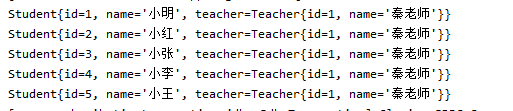
总结:思路就是先把学生表查询出来,然后再通过查询出来的学生表中的tid去老师表中查询对应的老师,通过resultMap来实现
方式二:按结果嵌套处理
<select id="getStudent2" resultMap="STMap2">
     select s.id, s.name , t.name tname
        from student s,teacher t
        where s.tid = t.id
</select>

<resultMap id="STMap2" type="Student">
    <result property="id" column="id"/>
    <result property="name" column="name"/>
    <association property="teacher" javaType="Teacher">
        <result property="name" column="tname"></result>
    </association>
</resultMap>

总结:此方法很好理解,按照数据库的查询语法来写,查询出结果后我们通过结果集的映射来将Teacher表中的属性给映射到tname上
property填属性名,Type,javaType填类名,resultMap随便取名字,column数据库字段名
一对多
和多对一差不多 都是两种处理办法,按查询或者按结果处理,这里就不再赘述直接放测试用例
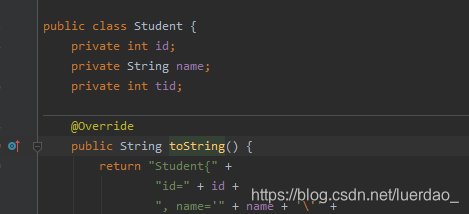
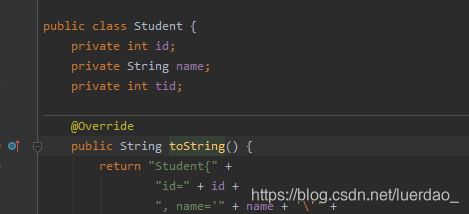
按结果处理
<select id="getTeacher" resultMap="TSMap">
    select t.id tid,t.name tname,s.id sid,s.name sname
    from teacher t ,student s
    where s.tid =t.id and t.id=#{id}
</select>
<resultMap id="TSMap" type="Teacher">
    <result property="id" column="tid"/>
    <result property="name" column="tname"/>
    <collection property="students" ofType="Student">
        <result property="name" column="sname"></result>
        <result property="name" column="sname" />
        <result property="tid" column="tid" />
    </collection>
</resultMap>
按查询处理
<select id="getTeacher2" resultMap="TSMap2">
    select *from teacher where id=#{id}
</select>
<resultMap id="TSMap2" type="Teacher">
    <result column="id" property="id"></result>
    <collection property="students" ofType="Students" column="id" select="selectStudentById"></collection>
</resultMap>

<select id="selectStudentById" resultType="Student">
    select * from student where tid=#{id}
</select>





 扫一扫
扫一扫


 950
950

 被折叠的 条评论
为什么被折叠?
被折叠的 条评论
为什么被折叠?
 到【灌水乐园】发言





