



前言
目前上期技术CTP系统提供的API版本是C++版本,本文主要介绍Windows 64位平台下利用Swig工具将CTP C++接口trader API转换为Python可调用的接口文件。
1. 准备工作
- 从simnow官网PC标签页下载
CTP API点击下载,注意非交易时间段网站不能访问。这里用的CTP版本是v6.7.8_20240918(写这篇文章时官网目前最新的CTP版本),64位的API文件包解压后清单如下:
error.dtd
error.xml
ThostFtdcMdApi.h
ThostFtdcTraderApi.h
ThostFtdcUserApiDataType.h
ThostFtdcUserApiStruct.h
thostmduserapi_se.dll
thostmduserapi_se.lib
thosttraderapi_se.dllthosttraderapi_se.lib
- 安装Swig软件,本文中所用的Swig是
swigwin-4.3.0版本,点击下载。更多Swig版本下载地址 - 安装Python,注意要安装64位版本,将环境变量配置好。本文所用的是
3.12.9版本,如果自用用到别的版本,下面步骤一致。 - 安装Visual Studio,本文所用的是Visual Studio 2022。
2. 通过Swig得到python接口文件
在刚刚下载解压得到的API文件夹20240918_traderapi64_se_windows内,新建文件thosttraderapi.i,内容如下
%module(directors="1") thosttraderapi
%{
#include "ThostFtdcTraderApi.h"
#include <codecvt>
#include <locale>
#include <vector>
#include <string>
using namespace std;
#ifdef _MSC_VER
const static locale g_loc("zh-CN");
#else
const static locale g_loc("zh_CN.GB18030");
#endif
%}

%typemap(out) char[ANY], char[] {
    const std::string &gb2312($1);
    std::vector<wchar_t> wstr(gb2312.size());
    wchar_t* wstrEnd = nullptr;
    const char* gbEnd = nullptr;
    mbstate_t state = {};
    int res = use_facet<codecvt<wchar_t, char, mbstate_t> >
        (g_loc).in(state,
            gb2312.data(), gb2312.data() + gb2312.size(), gbEnd,
            wstr.data(), wstr.data() + wstr.size(), wstrEnd);

    if (codecvt_base::ok == res)
    {
        wstring_convert<codecvt_utf8<wchar_t>> cutf8;
        std::string result = cutf8.to_bytes(wstring(wstr.data(), wstrEnd));
        resultobj = SWIG_FromCharPtrAndSize(result.c_str(), result.size());
    }
    else
    {
        std::string result;
        resultobj = SWIG_FromCharPtrAndSize(result.c_str(), result.size());
    }
}
%feature("director") CThostFtdcTraderSpi;
%ignore THOST_FTDC_VTC_BankBankToFuture;
%ignore THOST_FTDC_VTC_BankFutureToBank;
%ignore THOST_FTDC_VTC_FutureBankToFuture;
%ignore THOST_FTDC_VTC_FutureFutureToBank;
%ignore THOST_FTDC_FTC_BankLaunchBankToBroker;
%ignore THOST_FTDC_FTC_BrokerLaunchBankToBroker;
%ignore THOST_FTDC_FTC_BankLaunchBrokerToBank;
%ignore THOST_FTDC_FTC_BrokerLaunchBrokerToBank;
%feature("director") CThostFtdcTraderSpi;
%include "ThostFtdcUserApiDataType.h"
%include "ThostFtdcUserApiStruct.h"
%include "ThostFtdcTraderApi.h"
上述代码中使用了C++11中自带的字节编码转换库,主要适用于字节编码转换,因为CTP的中文是GB2312编码,转换为UTF-8编码,适合python输出。Linux下g++需要5.0以上版本,否则会报找不到函数。
这是一个接口文件,用于告诉swig为哪些类和方法创建接口。***.i文件的具体解释参考这篇文章《用Swig封装C/C++》。
打开Windows cmd工具,cd到当前目录20240918_traderapi64_se_windows下。 在cmd中运行命令
swig -threads -c++ -python thosttraderapi.i如果你使用的低版本swig例如4.0.0,可能是下述命令,新版本的swig已经不再支持-py3参数
swig -threads -py3 -c++ -python thosttraderapi.i
更多swig命令用法请在这里查看swig文档地址
等到运行完成后,可以看到当前目录下生成了
thosttraderapi_wrap.h
thosttraderapi_wrap.cxx
thosttradeapi.py
.h和.cxx文件是用于包装原来C++接口的文件,下面要用。
.py文件是python调用方法的接口文件。
常见问题:
默认运行 swig -threads -c++ -python thosttraderapi.i 后可能会出现以下警告:
ThostFtdcTraderApi.h(30) : Warning 514: Director base class CThostFtdcTraderSpi has no virtual destructor.
问题原因:
这个警告是由 SWIG 生成的,提示 CThostFtdcTraderSpi 类没有虚拟析构函数(virtual destructor)。在 C++ 中,如果一个类被设计为基类并可能被继承,通常需要将析构函数声明为虚拟的,以确保派生类对象在销毁时能够正确调用基类的析构函数。SWIG 在生成代码时会检查基类是否有虚拟析构函数,如果没有,就会发出警告。
解决方法
直接忽略警告或者使用 SWIG 的 %ignore
根据网上结果,许多开发者在封装 CTP API 时也遇到了类似的警告,但最终程序仍然可以正常运行。
或者修改 SWIG 的接口文件(thosttraderapi.i),在接口文件中使用%ignore 来处理警告。
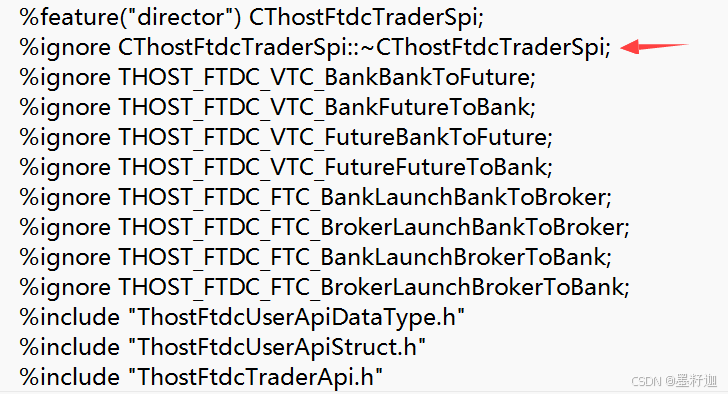
例如,在 thosttraderapi.i 文件中添加以下内容:
%ignore CThostFtdcTraderSpi::~CThostFtdcTraderSpi;
添加完如下图所示
3. 通过C++得到Python可调用的pyd动态库
在Visual Studio中建立一个C++工程,建工程的步骤可参考CTP Windows版C++工程建立和编译(traderapi)-CSDN博客这篇文章,需要注意几点:1)工程选择dll类型,2)运行库选多线程(/MT)。然后将如下文件拷贝到工程文件夹下:
ThostFtdcTraderApi.h
ThostFtdcUserApiDataType.h
ThostFtdcUserApiStruct.h
thosttraderapi_se.lib
thosttraderapi_wrap.cxx
thosttraderapi_wrap.h
在c++工程中添加现有项,将这些文件全部添加到工程中去。下面还要做几步:
- 将你安装的Python下include文件夹的路径添加至C++附加包含目录。我的路径是D:\ProgramFiles\miniconda3\envs\python312\include;,注意结尾后面有个英文分号,C++附加包含目录在工程 - 属性 - 配置属性 - C/C++ - 常规 - 附加包含目录。
- 将你安装的Python中python312.lib添加至工程附加依赖项中。我的lib路径是D:\ProgramFiles\miniconda3\envs\python312\libs\python312.lib;,注意结尾后面有个英文分号,附加依赖项在工程 - 属性 - 配置属性 - 链接器 - 输入。
全部完成之后,选择Release版本,生成解决方案,在工程目录下x64\Release中可见thosttraderapi_wrap.dll动态库文件,说明编译成功,将其重命名为_thosttraderapi.pyd,这样CTP Python版API文件就编译成功了。
4. Python Demo
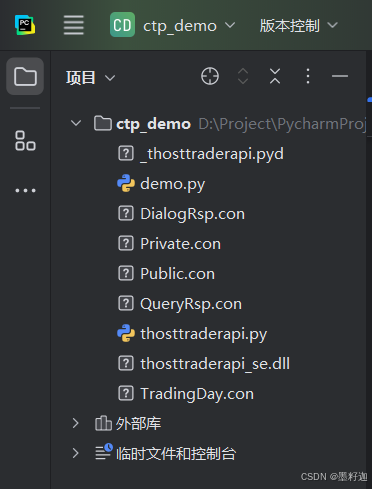
新建文件demo.py,注意文件同目录底下要有如下三个文件:
thosttradeapi.py
thosttraderapi.dll
_thosttradeapi.pyd
工程目录如下所示
本demo实现登录成功后报单,收报单回报的功能。完整的demo代码如下(注意将账户信息、合约信息改成实际的信息):
#!/usr/bin/env python
# -*- coding: utf-8 -*-

import thosttraderapi as api

# Addr
# FrontAddr = "tcp://182.254.243.31:30001"
FrontAddr="tcp://182.254.243.31:40001" # 7x24
# LoginInfo
BROKERID = "9999"
USERID = "123456"
PASSWORD = "123456"
# OrderInfo
INSTRUMENTID = "MA605"
PRICE = 2263
VOLUME = 1
DIRECTION = api.THOST_FTDC_D_Sell
# DIRECTION=api.THOST_FTDC_D_Buy
# open
OFFSET = "0"


# close
# OFFSET="1"

def ReqorderfieldInsert(tradeapi):
    print("ReqOrderInsert Start")
    orderfield = api.CThostFtdcInputOrderField()
    orderfield.BrokerID = BROKERID
    orderfield.InstrumentID = INSTRUMENTID
    orderfield.UserID = USERID
    orderfield.InvestorID = USERID
    orderfield.Direction = DIRECTION
    orderfield.LimitPrice = PRICE
    orderfield.VolumeTotalOriginal = VOLUME
    orderfield.OrderPriceType = api.THOST_FTDC_OPT_LimitPrice
    orderfield.ContingentCondition = api.THOST_FTDC_CC_Immediately
    orderfield.TimeCondition = api.THOST_FTDC_TC_GFD
    orderfield.VolumeCondition = api.THOST_FTDC_VC_AV
    orderfield.CombHedgeFlag = "1"
    orderfield.CombOffsetFlag = OFFSET
    orderfield.GTDDate = ""
    orderfield.OrderRef = "1"
    orderfield.MinVolume = 0
    orderfield.ForceCloseReason = api.THOST_FTDC_FCC_NotForceClose
    orderfield.IsAutoSuspend = 0
    tradeapi.ReqOrderInsert(orderfield, 0)
    print("ReqOrderInsert End")


class CTradeSpi(api.CThostFtdcTraderSpi):
    tapi = ''

    def __init__(self, tapi):
        api.CThostFtdcTraderSpi.__init__(self)
        self.tapi = tapi

    def OnFrontConnected(self) -> None:
        print("OnFrontConnected")
        loginfield = api.CThostFtdcReqUserLoginField()
        loginfield.BrokerID = BROKERID
        loginfield.UserID = USERID
        loginfield.Password = PASSWORD
        loginfield.UserProductInfo = ""
        self.tapi.ReqUserLogin(loginfield, 0)
        print("Send login ok")

    def OnRspUserLogin(self, pRspUserLogin: 'CThostFtdcRspUserLoginField', pRspInfo: 'CThostFtdcRspInfoField',
                       nRequestID: 'int', bIsLast: 'bool') -> None:
        print("OnRspUserLogin")
        print("TradingDay=", pRspUserLogin.TradingDay)
        print("SessionID=", pRspUserLogin.SessionID)
        print("ErrorID=", pRspInfo.ErrorID)
        print("ErrorMsg=", pRspInfo.ErrorMsg)

        qryinfofield = api.CThostFtdcQrySettlementInfoField()
        qryinfofield.BrokerID = BROKERID
        qryinfofield.InvestorID = USERID
        qryinfofield.TradingDay = pRspUserLogin.TradingDay
        self.tapi.ReqQrySettlementInfo(qryinfofield, 0)
        print("Send ReqQrySettlementInfo ok")

    def OnRspQrySettlementInfo(self, pSettlementInfo: 'CThostFtdcSettlementInfoField',
                               pRspInfo: 'CThostFtdcRspInfoField', nRequestID: 'int', bIsLast: 'bool') -> None:
        print("OnRspQrySettlementInfo")
        if pSettlementInfo is not None:
            print("content:", pSettlementInfo.Content)
        else:
            print("content null")
        if bIsLast:
            pSettlementInfoConfirm = api.CThostFtdcSettlementInfoConfirmField()
            pSettlementInfoConfirm.BrokerID = BROKERID
            pSettlementInfoConfirm.InvestorID = USERID
            self.tapi.ReqSettlementInfoConfirm(pSettlementInfoConfirm, 0)
            print("send ReqSettlementInfoConfirm ok")

    def OnRspSettlementInfoConfirm(self, pSettlementInfoConfirm: 'CThostFtdcSettlementInfoConfirmField',
                                   pRspInfo: 'CThostFtdcRspInfoField', nRequestID: 'int', bIsLast: 'bool') -> None:
        print("OnRspSettlementInfoConfirm")
        print("ErrorID=", pRspInfo.ErrorID)
        print("ErrorMsg=", pRspInfo.ErrorMsg)
        ReqorderfieldInsert(self.tapi)
        print("send ReqorderfieldInsert ok")

    def OnRtnOrder(self, pOrder: 'CThostFtdcOrderField') -> None:
        print("OnRtnOrder")
        print("OrderStatus=", pOrder.OrderStatus)
        print("StatusMsg=", pOrder.StatusMsg)
        print("LimitPrice=", pOrder.LimitPrice)

    def OnRspOrderInsert(self, pInputOrder: 'CThostFtdcInputOrderField', pRspInfo: 'CThostFtdcRspInfoField',
                         nRequestID: 'int', bIsLast: 'bool') -> None:
        print("OnRspOrderInsert")
        print("ErrorID=", pRspInfo.ErrorID)
        print("ErrorMsg=", pRspInfo.ErrorMsg)


def main():
    tradeapi = api.CThostFtdcTraderApi.CreateFtdcTraderApi()
    version = api.CThostFtdcTraderApi.GetApiVersion()
    print("version=", version)
    tradespi = CTradeSpi(tradeapi)
    tradeapi.RegisterSpi(tradespi)
    tradeapi.SubscribePrivateTopic(api.THOST_TERT_QUICK)
    tradeapi.SubscribePublicTopic(api.THOST_TERT_QUICK)
    tradeapi.RegisterFront(FrontAddr)
    tradeapi.Init()
    tradeapi.Join()


if __name__ == '__main__':
    main()
运行效果
version= v6.7.8_20240918 14:34:34.8082
OnFrontConnected
Send login ok
OnRspUserLogin
TradingDay= 20260112
SessionID= 157158283
ErrorID= 0
ErrorMsg= 正确
Send ReqQrySettlementInfo ok
OnRspQrySettlementInfo
content null
send ReqSettlementInfoConfirm ok
OnRspSettlementInfoConfirm
ErrorID= 0
ErrorMsg= 正确
ReqOrderInsert Start
ReqOrderInsert End
send ReqorderfieldInsert ok
OnRtnOrder
OrderStatus= a
StatusMsg= 报单已提交
LimitPrice= 2263.0
OnRtnOrder
OrderStatus= a
StatusMsg= 报单已提交
LimitPrice= 2263.0
OnRtnOrder
OrderStatus= 0
StatusMsg= 全部成交报单已提交
LimitPrice= 2263.0
5. 常见问题
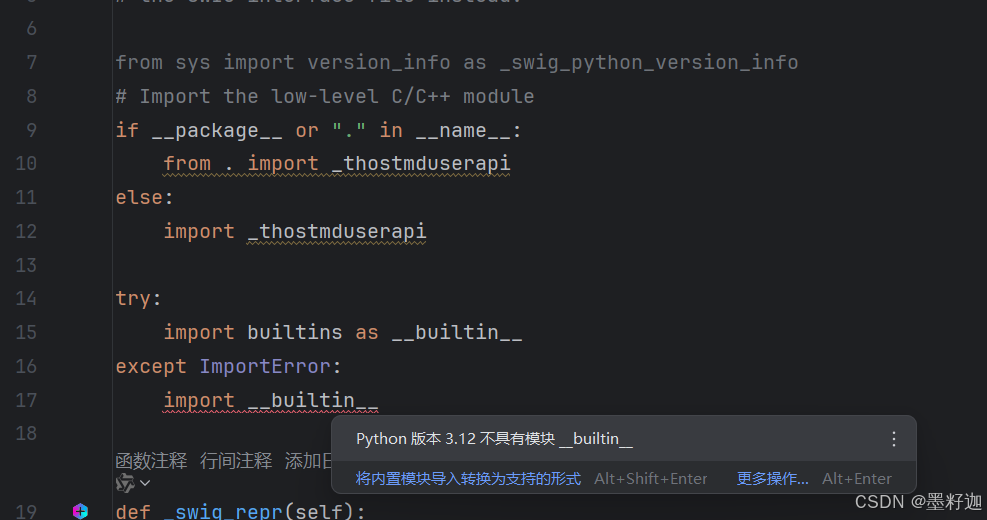
5.0 thosttraderapi.py和thostmduserapi.py报错 import __builtin__
thosttraderapi.py和thostmduserapi.py代码开头报如下错误:
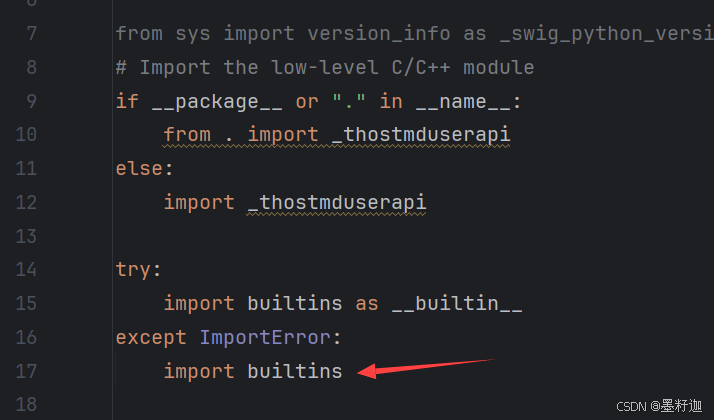
解决方法:
感谢网友 weixin_41707895 整理
5.1 invalid conversion from ‘const char**’ to ‘char**’ [-fpermissive]
解决方法:将i文件中,if (iconv(cd, (const char **)in, &inlen, &out, &outlen) != static_cast<size_t>(-1)) 中的(const char **)删掉
5.2 ‘strcpy’: This function or variable may be unsafe. Consider using strcpy_s instead.
解决方法:项目属性->配置属性->C/C+±>预处理器->预处理器定义中添加:_CRT_SECURE_NO_WARNINGS
5.3 fatal error LNK1112: 模块计算机类型“X86”与目标计算机类型“x64”冲突
解决方法:选择编译64位库时,vs中需要如下设置:解决方案属性->配置属性->将平台选为X64->配置管理器->选择X64平台 右键项目清理即可
5.4 对象或库文件“EDLib.lib”是使用比创建其他对象所用编译器旧的编译器创建的;请重新生成旧的对象和库
解决方法:项目属性->配置属性->高级->全程序优化改为无全程序优化
5.5 节数超过对象文件格式限制: 请使用 /bigobj 进行编译
解决方法:项目属性->配置属性->C/C+±>命令行->其它选项中键入/bigobj
5.6 无法解析的外部符号 __imp_sprintf_s
解决方法:项目属性->配置属性->链接器->附加依赖项中添加legacy_stdio_definitions.lib
7.编译好的文件参考:
 https://github.com/Lumosylva/20240918_traderapi64_se_windows
网速不好可访问下方国内地址:
声明:
本API仅是个人爱好编译,仅为用户提供交易工具参考,对此API引起的你的任何损失不负责任,你应自行对交易工具负责,本API不对用户的交易结果承担任何责任,在任何情况下,不对因技术问题导致的用户损失承担责任。
下篇文章:
CTP Python API 利用Swig 封装Windows版(mduserapi)-CSDN博客
————————————————
感谢景色大佬,参考文章:
CTP Python API及Demo(利用Swig 封装)Windows版(traderapi)_porder: tdapi.cthostftdcorderfield-CSDN博客





 扫一扫
扫一扫


&spm=1001.2101.3001.5002&articleId=145290497&d=1&t=3&u=8ecfade8ce7a45f68d49be5710411596)
 4220
4220

 被折叠的 条评论
为什么被折叠?
被折叠的 条评论
为什么被折叠?
 到【灌水乐园】发言





