



 本文介绍了如何查看Eclipse版本号及其对应的JDK需求,并提供了从2006年起各版本的简要介绍及下载地址。
1)找到eclipse安装目录。
2)进入readme文件夹,打开readme_eclipse.html。
3)readme_eclipse.html呈现的第二行即数字版本号,如:
<h1>Eclipse Project Release Notes</h1>
<p>Release 4.5.0<br/>
Last revised June 3, 2015</p>
2.eclipse版本对应的jdk需求:
Installing Eclipse is relatively easy, but does involve a few steps and software from at least two different sources. Eclipse is a Java-based application and, as such, requires a Java runtime environment (JRE) in order to run.
Eclipse 4.6 (Neon)
Eclipse 4.6 (Neon)is scheduled for release on June 22, 2016.
Consider using the Installer. Please see 6 Steps to Install Eclipse.
A Java 8 JRE/JDK is required to run all Neon packages based on Eclipse 4.6. The reasoning behind requiring Java 8 are discussed here.
Eclipse 4.5 (Mars)
Eclipse 4.5 (Mars) was released on June 24, 2015.
Consider using the new Installer! Please see 6 Steps to Install Eclipse.
A Java 7 JRE/JDK is required for all Mars package downloads based on Eclipse 4.5. Information concerning tested configurations for Eclipse 4.5 is providedhere.
Eclipse 4.4 (Luna)
Eclipse 4.4 (Luna) was released on June 25, 2014.
A Java 7 JRE/JDK is required for most of the Luna package downloads based on Eclipse 4.4. Information concerning tested configurations for Eclipse 4.4 is provided here.
Eclipse 4.3 (Kepler)
Eclipse 4.3 (Kepler) was released in June 2013.
A Java 6 JRE/JDK is recommended for Eclipse 4.3. More information concerning tested configurations for Eclipse 4.3 is provided here.
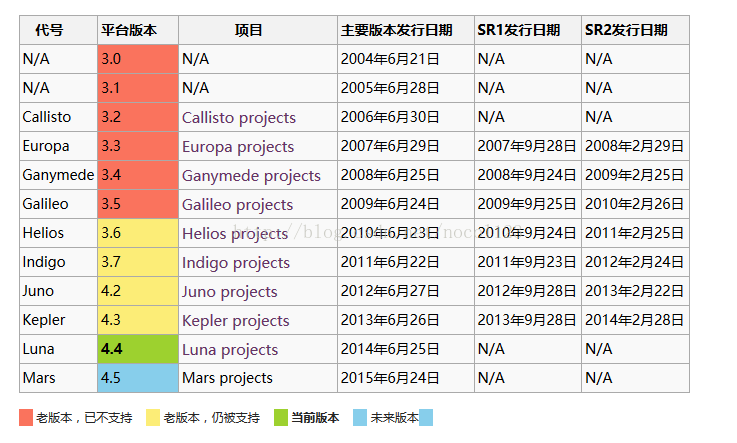
从2006年起,Eclipse基金会每年都会安排同步发布(simultaneous release)。
同步发布主要在6月进行,并且会在接下来的9月及2月释放出SR1及SR2版本。
4.附eclipse各版本下载地址:
http://archive.eclipse.org/eclipse/downloads/index.php





 扫一扫
扫一扫


 398
398

 被折叠的 条评论
为什么被折叠?
被折叠的 条评论
为什么被折叠?
 到【灌水乐园】发言





