



 本文详细介绍了ASP.NET中的RadioButtonList控件,探讨了如何将数据绑定到该控件,以及实现单选按钮功能的方法。
Default.aspx
<html xmlns="http://www.w3.org/1999/xhtml" >
<head runat="server">
    <title>无标题页</title>
</head>
<body>
    <form id="form1" runat="server">
    <div>


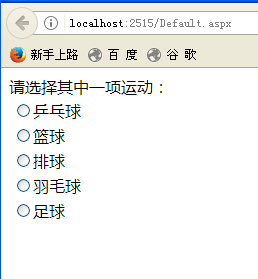
    请选择其中一项运动:<asp:RadioButtonList ID="RadioButtonList1" runat="server" Width="180px">
    </asp:RadioButtonList></div>
    </form>
</body>
</html>
绑定数据到ListBox控件
 public partial class _Default : System.Web.UI.Page
    {
        protected void Page_Load(object sender, EventArgs e)
        {
            if (!Page.IsPostBack)
            {
                //数据生成
                DataSet ds = new DataSet();
                ds.Tables.Add("stu");
                ds.Tables["stu"].Columns.Add("stuNo", typeof(int));
                ds.Tables["stu"].Columns.Add("stuName", typeof(string));
                ds.Tables["stu"].Columns.Add("stuScore", typeof(int));
                ds.Tables["stu"].Rows.Add(new object[] { 1, "乒乓球", 100 });
                ds.Tables["stu"].Rows.Add(new object[] { 2, "篮球", 100 });
                ds.Tables["stu"].Rows.Add(new object[] { 3, "排球", 100 });
                ds.Tables["stu"].Rows.Add(new object[] { 4, "羽毛球", 100 });
                ds.Tables["stu"].Rows.Add(new object[] { 5, "足球", 100 });
                //绑定数据到ListBox控件
                this.RadioButtonList1.DataSource = ds.Tables["stu"];
                this.RadioButtonList1.DataValueField = "stuNo";
                this.RadioButtonList1.DataTextField = "stuName";
                this.RadioButtonList1.DataBind();
            }

        }
    }
结果:





 扫一扫
扫一扫


&spm=1001.2101.3001.5002&articleId=84949879&d=1&t=3&u=310524998a60474d87e06626cfb8e31a)
 2366
2366

 被折叠的 条评论
为什么被折叠?
被折叠的 条评论
为什么被折叠?
 到【灌水乐园】发言





