



配置DSVPN防火墙到防火墙的Hub and Spoke网,并支持Spoke之间的通信
文章目录
前言
DSVPN简介
动态智能VPN(Dynamic Smart Virtual Private Network),是一种在HUB-SPOKE组网方式下为公网地址动态变化的分支之间建立VPN隧道的解决方案。
背景
越来越多的企业希望建立Hub-Spoke方式的DSVPN网络将企业总部(Hub)与地理位置不同的多个分支(Spoke)相连,从而加强企业的通信安全、降低通信成本。当企业总部采用静态的公网地址接入Internet,分支机构采用动态的公网地址接入Internet时,使用传统的IPSec、GRE over IPSec等技术构建VPN网络将存在一个问题,即分支之间无法直接通信(源分支无法获取目的分支公网地址,也就无法在分支之间直接建立隧道),所有分支之间的通信数据只能由总部中转。
————————————————————————————————————————————
实验目的
某大型企业有总部(Hub)和多个分支(Spoke1、Spoke2……,举例中仅使用两个分支),分布在不同地域,总部和分支的子网环境会经常出现变动。分支采用动态地址接入公网。企业现网网络规划使用OSPF路由协议。
现在用户希望能够实现分支之间的VPN互联,同时对总部和分支机构以及分支机构间传输的数据进行加密保护。
在HUB,spoke1,spoke2防火墙实现NHRP映射
一、实验拓扑
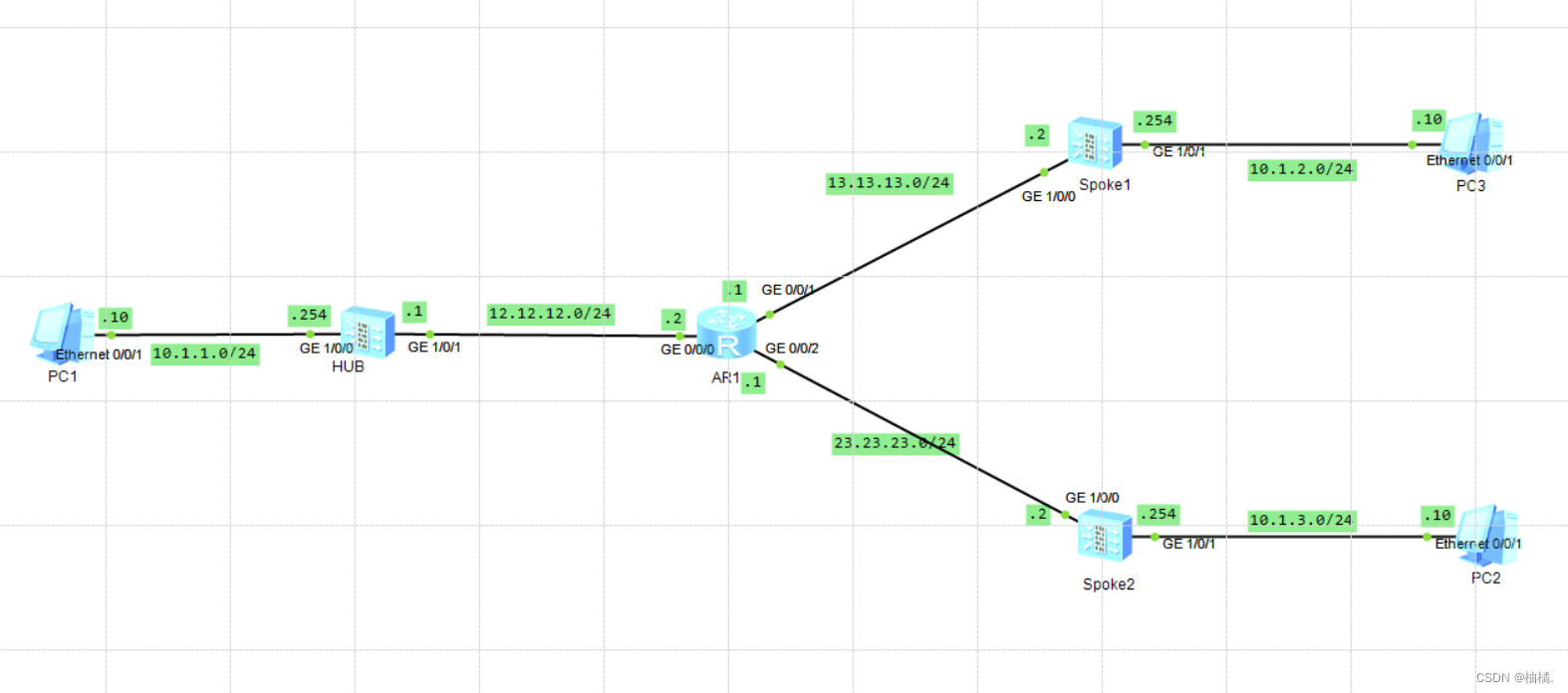
二、实验步骤:
1.AR1
The device is running!

<Huawei>
<Huawei>
<Huawei>system-view
Enter system view, return user view with Ctrl+Z.
[Huawei]undo in e
Info: Information center is disabled.
[Huawei]sysname AR1
#配置基本接口
[AR1]interface GigabitEthernet 0/0/0
[AR1-GigabitEthernet0/0/0]ip address 12.12.12.2  24
[AR1-GigabitEthernet0/0/0]quit
##
[AR1]interface GigabitEthernet 0/0/1
[AR1-GigabitEthernet0/0/1]ip address 13.13.13.1  24
[AR1-GigabitEthernet0/0/1]quit
#
[AR1]interface GigabitEthernet 0/0/2
[AR1-GigabitEthernet0/0/2]ip address 23.23.23.1  24
[AR1-GigabitEthernet0/0/2]quit
[AR1]
2.配置HUB防火墙:
代码如下(示例):
<USG6000V1>system-view
Enter system view, return user view with Ctrl+Z.
[USG6000V1]sysname HUB
[HUB]undo  info  e
#配置接口
[HUB]interface GigabitEthernet 1/0/0
[HUB-GigabitEthernet1/0/0]ip  address 10.1.1.254 24
[HUB-GigabitEthernet1/0/0]quit
#
[HUB]interface GigabitEthernet 1/0/1
[HUB-GigabitEthernet1/0/1]ip  address 12.12.12.1 24
[HUB-GigabitEthernet1/0/1]quit

#配置安全端口
[HUB]firewall zone trust
[HUB-zone-trust]add interface g1/0/0
[HUB-zone-trust]firewall zone untrust
[HUB-zone-untrust]add interface g1/0/1
[HUB-zone-untrust]quit
[HUB]
#
[HUB]security-policy      //配置安全策略
[HUB-policy-security]default action permit        //默认动作是允许放行
Warning:Setting the default packet filtering to permit poses security risks. You
 are advised to configure the security policy based on the actual data flows. Ar
e you sure you want to continue?[Y/N]y
[HUB-policy-security]quit
[HUB]
#配置下一跳接口
[HUB]ip  route-static  0.0.0.0  0.0.0.0  12.12.12.2
#
[HUB]interface GigabitEthernet 1/0/1
[HUB-GigabitEthernet1/0/1]service-manage ping  permit  //开启ping
[HUB-GigabitEthernet1/0/1]quit
[HUB]
#
[HUB]ospf 1 router-id 12.12.12.1
[HUB-ospf-1]area 0
[HUB-ospf-1-area-0.0.0.0]network 10.1.1.0 0.0.0.255
[HUB-ospf-1-area-0.0.0.0]quit
[HUB-ospf-1]quit

#创建隧道Tunnel接口
[HUB]interface Tunnel0
[HUB-Tunnel0]tunnel-protocol  gre p2mp
Warning: After this tunnel encapsulation protocol was configured, the MTU and ot
her parameter settings of the tunnel were deleted.
[HUB-Tunnel0]source GigabitEthernet 1/0/1
[HUB-Tunnel0]ip  address 172.16.1.1  24
[HUB-Tunnel0]nhrp entry multicast dynamic
[HUB-Tunnel0]nhrp redirect
[HUB-Tunnel0]nhrp authentication hash sha2-256 Test1234
[HUB-Tunnel0]nhrp network-id 1000
[HUB-Tunnel0]quit
[HUB]
#加入安全端口
[HUB]firewall zone dmz
[HUB-zone-dmz]add interface Tunnel0
[HUB-zone-dmz]quit
[HUB]

#创建BGP
[HUB]bgp 100
[HUB-bgp]router-id 12.12.12.1
[HUB-bgp]peer 172.16.1.2  as-number  200
[HUB-bgp]peer 172.16.1.3  as-number  300
[HUB-bgp]import-route  ospf  1                               //引入ospf
[HUB-bgp]aggregate 10.1.0.0 16 detail-suppressed
[HUB-bgp]ike proposal 10                           //Hub配置IKE Proposal
[HUB-ike-proposal-10]quit
#
## 在HUB上配置IKE对等体,并根据默认配置,配置预共享密钥和对端ID
[HUB]ike peer spoke
[HUB-ike-peer-spoke]undo version 2
[HUB-ike-peer-spoke]ike-proposal 10
[HUB-ike-peer-spoke]pre-shared-key huawei@123
[HUB-ike-peer-spoke]quit
[HUB]
#
[HUB]ipsec proposal ldh
[HUB-ipsec-proposal-ldh]quit
[HUB]
#
[HUB]ipsec profile spoke
[HUB-ipsec-profile-spoke]ike-peer spoke
[HUB-ipsec-profile-spoke]proposal ldh
[HUB-ipsec-profile-spoke]interface tunnel0
[HUB-Tunnel0]ipsec profile spoke
[HUB-Tunnel0]quit
[HUB]
3.Spoke1配置:
<USG6000V1>system-view
Enter system view, return user view with Ctrl+Z.
[USG6000V1]sysname  Sopke1
May 23 2023 18:26:25 Sopke1 DS/4/DATASYNC_CFGCHANGE:OID 1.3.6.1.4.1.2011.5.25.19
1.3.1 configurations have been changed. The current change number is 1, the chan
ge loop count is 0, and the maximum number of records is 4095.
[Sopke1]undo in e
Info: Saving log files...
Info: Information center is disabled.
[Sopke1]
##配置sopke1防火墙,基本接口
[Sopke1]interface GigabitEthernet 1/0/0
[Sopke1-GigabitEthernet1/0/0]ip  address  13.13.13.2  24
[Sopke1-GigabitEthernet1/0/0]quit
[Sopke1]interface GigabitEthernet 1/0/1
[Sopke1-GigabitEthernet1/0/1]ip   address  10.1.2.254   24
[Sopke1-GigabitEthernet1/0/1]quit
[Sopke1]
#
#配置安全端口
[Sopke1]firewall zone trust
[Sopke1-zone-trust]add interface g1/0/1
[Sopke1-zone-trust]firewall zone untrust
[Sopke1-zone-untrust]add interface g1/0/0
[Sopke1-zone-untrust]quit
[Sopke1]
#
[Sopke1]security-policy     //配置安全策略
[Sopke1-policy-security]default action permit     //默认动作是允许放行
Warning:Setting the default packet filtering to permit poses security risks. You
 are advised to configure the security policy based on the actual data flows. Ar
e you sure you want to continue?[Y/N]y
[Sopke1-policy-security]quit
[Sopke1]
##
###配置防火墙下一跳接口
[Sopke1]ip  route-static 0.0.0.0  0.0.0.0  13.13.13.1
[Sopke1]
#
####配置OSPF协议
[Sopke1]ospf  1  router-id  13.13.13.2
[Sopke1-ospf-1]area  0
[Sopke1-ospf-1-area-0.0.0.0]network  10.1.2.0  0.0.0.255
[Sopke1-ospf-1-area-0.0.0.0]quit
[Sopke1-ospf-1]quit
[Sopke1]
#
###配置Tunnel0隧道接口
[Sopke1]interface Tunnel0
[Sopke1-Tunnel0]tunnel-protocol gre p2mp
Warning: After this tunnel encapsulation protocol was configured, the MTU and ot
her parameter settings of the tunnel were deleted.
[Sopke1-Tunnel0]source GigabitEthernet1/0/0
[Sopke1-Tunnel0]ip add 172.16.1.2 24
[Sopke1-Tunnel0]nhrp entry 172.16.1.1 12.12.12.1 register
[Sopke1-Tunnel0]nhrp network-id 1000
[Sopke1-Tunnel0]nhrp shortcut
[Sopke1-Tunnel0]nhrp authentication hash sha2-256 Test1234
#加入安全策略接口
[Sopke1-Tunnel0]firewall zone dmz
[Sopke1-zone-dmz]add interface Tunnel0
[Sopke1-zone-dmz]quit
[Sopke1]
#
#####创建BGP
[Sopke1]bgp 200
[Sopke1-bgp]router-id 13.13.13.2
[Sopke1-bgp]peer 172.16.1.1 as-number 100
[Sopke1-bgp]import-route ospf 1   //引入ospf
[Sopke1-bgp]quit
[Sopke1]
##
###
[Sopke1]ike proposal 10
[Sopke1-ike-proposal-10]quit
[Sopke1]
#
### 在Sopke1上配置IKE对等体,并根据默认配置,配置预共享密钥和对端ID
[Sopke1]ike peer hub
[Sopke1-ike-peer-hub]undo version 2
[Sopke1-ike-peer-hub]ike-proposal 10
[Sopke1-ike-peer-hub]pre-shared-key huawei@123
[Sopke1-ike-peer-hub]quit
[Sopke1]
##
#
[Sopke1]ipsec proposal ldh
[Sopke1-ipsec-proposal-ldh]quit
[Sopke1]
##
[Sopke1]ipsec profile hub
[Sopke1-ipsec-profile-hub]ike-peer hub
[Sopke1-ipsec-profile-hub]proposal ldh
[Sopke1-ipsec-profile-hub]interface tunnel0
[Sopke1-Tunnel0]ipsec profile hub
[Sopke1-Tunnel0]quit
[Sopke1]
4.Spoke2配置:
<USG6000V1>system-view
Enter system view, return user view with Ctrl+Z.
[USG6000V1]sysname  Sopke2
May 23 2023 18:26:25 Sopke1 DS/4/DATASYNC_CFGCHANGE:OID 1.3.6.1.4.1.2011.5.25.19
1.3.1 configurations have been changed. The current change number is 1, the chan
ge loop count is 0, and the maximum number of records is 4095.
[Sopke2]undo in e
Info: Saving log files...
Info: Information center is disabled.
[Sopke2]
##配置sopke2防火墙,基本接口
[Spoke2]interface GigabitEthernet 0/0/0
[Spoke2-GigabitEthernet0/0/0]interface GigabitEthernet 1/0/0
[Spoke2-GigabitEthernet1/0/0]ip   address  23.23.23.2  24
[Spoke2-GigabitEthernet1/0/0]quit
[Spoke2]interface GigabitEthernet 1/0/1
[Spoke2-GigabitEthernet1/0/1]ip   address  10.1.3.254  24
[Spoke2-GigabitEthernet1/0/1]quit
[Spoke2]
##
###配置安全端口
[Spoke2]firewall zone trust
[Spoke2-zone-trust]add interface g1/0/1
[Spoke2-zone-trust]firewall zone untrust
[Spoke2-zone-untrust]add interface g1/0/0
[Spoke2-zone-untrust]quit
[Spoke2]
#
##
[Spoke2]security-policy      //配置安全策略
[Spoke2-policy-security]default action permit      //默认动作是允许放行
Warning:Setting the default packet filtering to permit poses security risks. You
 are advised to configure the security policy based on the actual data flows. Ar
e you sure you want to continue?[Y/N]y
[Spoke2-policy-security]quit
[Spoke2]
#
#配置防火墙接口下一跳
[Spoke2]ip  route-static  0.0.0.0 0.0.0.0  23.23.23.1
[Spoke2]
##
#
#配置OSPF协议
[Spoke2]ospf 1 router-id  23.23.23.2
[Spoke2-ospf-1]area  0
[Spoke2-ospf-1-area-0.0.0.0]network  10.1.3.0  0.0.0.255
[Spoke2-ospf-1-area-0.0.0.0]quit
[Spoke2-ospf-1]quit
[Spoke2]
#
###创建Tunnel0隧道接口
[Spoke2]interface Tunnel0
[Spoke2-Tunnel0]ip address 172.16.1.3 24
[Spoke2-Tunnel0]tunnel-protocol gre p2mp
Warning: After this tunnel encapsulation protocol was configured, the MTU and ot
her parameter settings of the tunnel were deleted.
[Spoke2-Tunnel0]source GigabitEthernet 1/0/0
[Spoke2-Tunnel0]nhrp entry 172.16.1.1 12.12.12.1 register
[Spoke2-Tunnel0]nhrp shortcut
[Spoke2-Tunnel0]nhrp authentication hash sha2-256 Test1234
[Spoke2-Tunnel0]nhrp network-id 1000
[Spoke2-Tunnel0]
#配置安全端口
[Spoke2-Tunnel0]firewall zone dmz
[Spoke2-zone-dmz]add interface Tunnel0
[Spoke2-zone-dmz]quit
[Spoke2]
#
###创建BGP
[Spoke2]bgp 300
[Spoke2-bgp]router-id 23.23.23.2
[Spoke2-bgp]peer 172.16.1.1 as-number 100
[Spoke2-bgp]import-route ospf 1               //引入ospf
[Spoke2-bgp]quit
[Spoke2]
##
#### 在Sopke2上配置IKE对等体,并根据默认配置,配置预共享密钥和对端ID
[Spoke2]ike proposal 10
[Spoke2-ike-proposal-10]quit
[Spoke2]ike peer hub
[Spoke2-ike-peer-hub]pre-shared-key huawei@123
[Spoke2-ike-peer-hub]ike-proposal 10
[Spoke2-ike-peer-hub]undo version 2
[Spoke2-ike-peer-hub]quit
#
[Spoke2]ipsec proposal ldh
[Spoke2-ipsec-proposal-ldh]quit
##
[Spoke2]ipsec profile hub
[Spoke2-ipsec-profile-hub]ike-peer hub
[Spoke2-ipsec-profile-hub]proposal ldh
[Spoke2-ipsec-profile-hub]interface tunnel0
[Spoke2-Tunnel0]ipsec profile hub
[Spoke2-Tunnel0]quit
[Spoke2]
三、 总结测试
1、在HUB,spoke1,spoke2防火墙查看
查看NHRP映射表
display nhrp peer all
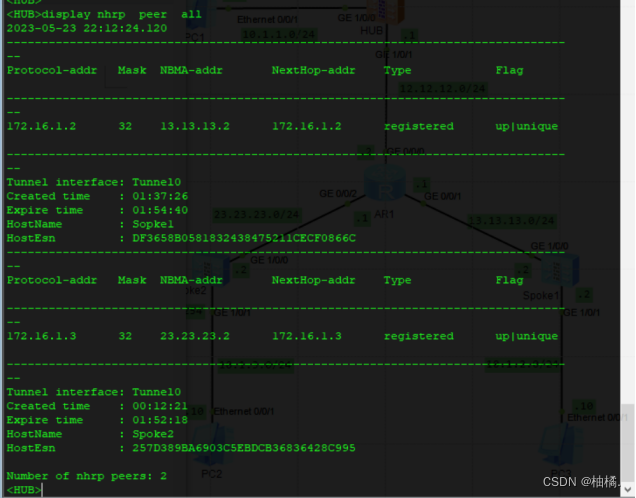
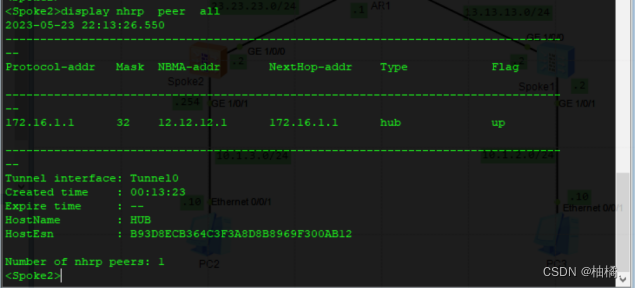
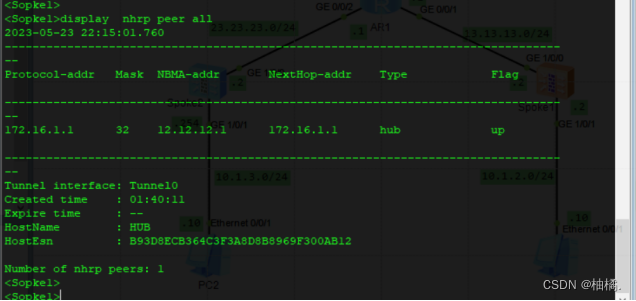
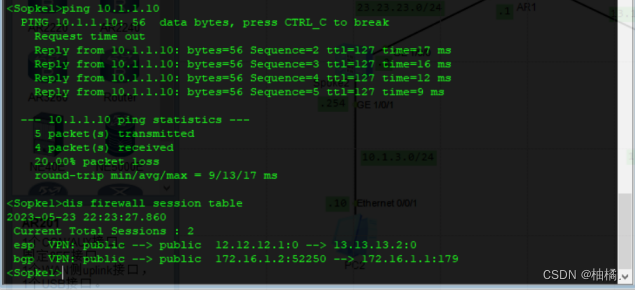
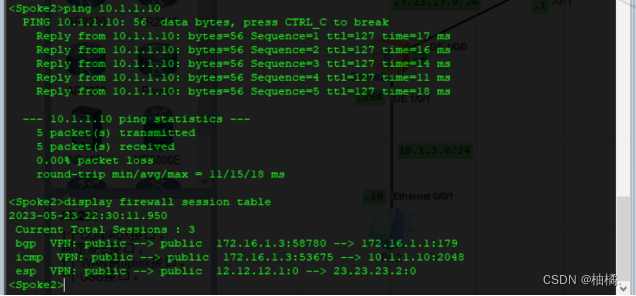
2、spoke1,spoke12分别
ping 10.1.1.10 -t
查看防火墙流量
display firewall session table
防火墙外接口上抓包查看
3、spoke1
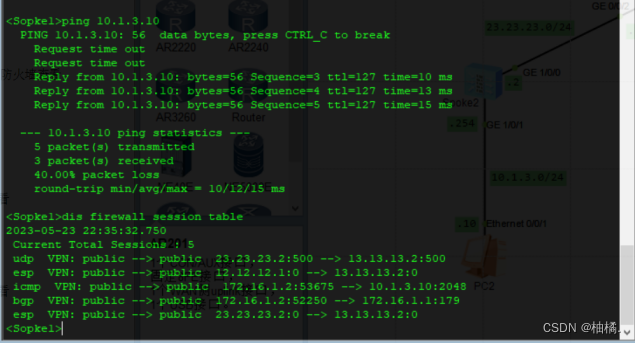
ping 10.1.3.10 -t
查看防火墙流量
dis firewall session table
防火墙外接口上抓包查看
简单的IPSec防火墙到防火墙的Hub and Spoke网,并支持Spoke之间的通信实验就配置完成了,如有错误,欢迎指出!!!





 扫一扫
扫一扫


 被折叠的 条评论
为什么被折叠?
被折叠的 条评论
为什么被折叠?
 到【灌水乐园】发言





