





 本文详细介绍了在Online Judge(OJ)中,如何使用Java进行输入操作,包括java.util.Scanner的键盘输入和文件读取,以及使用缓冲区的BufferedReader和最快读法StringTokenizer/StreamTokenizer。提供了多种输入场景的示例,如多行整数、自定义分隔符等,并讨论了不同读取方法的效率。
Java的输入输出主要是使用Scanner 类来实现的,这包括从键盘读取输入,从文件读取输入,向屏幕输出和写入文件。另外,为了提高速度,我们还会使用带缓冲区的读和写。
I. java.util.Scanner
1. 读取键盘输入:
首先必须引入这个包:import java.util.Scanner
然后使用 Scanner sc = new Scanner(System.in) 生成Scanner对象。System.in 在这里代指标准输入流,默认定义为键盘输入。也可以传入一个字符串,作为需要Scanner处理的对象。
import java.io.IOException;
import java.util.Scanner;

public class ScannerExample{
    public static void main(String[] args) throws IOException{
        Scanner sc = new Scanner(System.in);  // 声称Scanner对象
        System.out.println("Enter username");

        String userName = sc.nextLine();  // 读取整行作为输入,以回车键作为结束符
        System.out.println("Username is: " + userName);  // 输出读取的输入
    }
}
在OJ中,常指定主类为public Main 形式,如PTA, 牛客网等:你需要把上面的"public class ScannerExample" 换为 "public class Main"。另外, OJ还有固定的几种输入,比如
a > 多行输入,每行是一个数字(整数或者浮点数):
Input 输入数据有多组,每组占一行,由一个整数组成。
Sample Input
56
67
100
123
import java.io.IOException;
import java.util.Scanner;

public class Main {
    public static void main(String[] args) throws IOException {
        Scanner sc = new Scanner(System.in);
        while (sc.hasNext()) { //判断是否结束
            int score = sc.nextInt();
            System.out.println(score);
        }

    }
}
b> 多行输入,每行是不定数个给定类型的数字
示例: https://ac.nowcoder.com/acm/contest/320/G
输入数据有多组, 每行表示一组输入数据。每行不定有n个整数,空格隔开。(1 <= n <= 100)。
1 2 3
4 5
0 0 0 0 0
因为每行数字个数是不定的,所以只能使用while循环。我们可以先用Scanner读取输入的一行,然后再用另一个Scanner 把每一行分解到每行数字。
import java.io.IOException;
import java.util.Scanner;

public class Main {
   public static void main(String[] args) throws IOException {
        int sum;
        Scanner sc = new Scanner(System.in);

        while (sc.hasNextLine()){
            sum = 0;
            String Line = sc.nextLine();
            Scanner sc2 = new Scanner (Line);
            while (sc2.hasNextInt()){
                int currElement = sc2.nextInt();
                sum = sum + currElement;
            }
            System.out.println(sum);
        }

    }
}
c > 多行输入,单独数字的一行,或某行某数字决定了下面将有几行。
示例: http://acm.hdu.edu.cn/showproblem.php?pid=2017
输入数据有多行,第一行是一个整数n,表示测试实例的个数,后面跟着n行,每行包括一个由字母和数字组成的字符串。
Sample Input
2
asdfasdf123123asdfasdf
asdf111111111asdfasdfasdf
import java.io.IOException;
import java.util.Scanner;


public class Main {

    public static void main(String[] args) throws IOException {
        Scanner sc = new Scanner(System.in);
        int n = sc.nextInt();
        for (int i = 0; i < n; i++) {
            String str = sc.next();
            System.out.print(str+'\n');
        }
    }
}
也可以使用 n = integer.parseInt(sc.nextLine()) (替换 int n = sc.nextInt())
d > 指定分隔符的数字,字符串识别
示例:http://acm.hdu.edu.cn/showproblem.php?pid=2005
输入数据有多组,每组占一行,数据格式为YYYY/MM/DD组成,具体参见sample input ,另外,可以向你确保所有的输入数据是合法的。
1985/1/20
2006/3/12
import java.io.IOException;
import java.util.Scanner;


public class ScannerExampleParseDate {
    public static void main(String[] args) throws IOException {
        Scanner sc = new Scanner(System.in);
        int[] dd = {0, 31, 28, 31, 30, 31, 30, 31, 31, 30, 31, 30, 31};
        while (sc.hasNext()) {
            int days = 0;
            String str = sc.nextLine();
            String[] date = str.split("/");
            int y = Integer.parseInt(date[0]);
            int m = Integer.parseInt(date[1]);
            int d = Integer.parseInt(date[2]);
            if ((y % 400 == 0 || (y % 4 == 0 && y % 100 != 0)) && m > 2) days++;
            days += d;
            for (int i = 0; i < m; i++) {
                days += dd[i];
            }
            System.out.println(days);
        }
    }
}
e> 多行输入,行内数据类型不全相同,但位置相同
示例:http://acm.hdu.edu.cn/showproblem.php?pid=1170
输入:Input contains multiple test cases. The first line of the input is a single integer T (0<T<1000) which is the number of test cases. T test cases follow. Each test case contains a char C (+,-,*, /) and two integers A and B(0<A,B<10000).Of course, we all know that A and B are operands and C is an operator.
Sample Input
4
+ 1 2
- 1 2
* 1 2
/ 1 2
import java.io.IOException;
import java.util.Scanner;

public class ScannerExampleVariesTypeInOneLine {
    public static void main(String[] args) throws IOException {
        Scanner sc =new Scanner(System.in);
        int n = sc.nextInt();
        for(int i=0;i<n;i++){
            String op = sc.next();
            int a = sc.nextInt();
            int b = sc.nextInt();
            if(op.charAt(0)=='+'){
                System.out.println(a+b);
            }else if(op.charAt(0)=='-'){
                System.out.println(a-b);
            }else if(op.charAt(0)=='*'){
                System.out.println(a*b);
            }else if(op.charAt(0)=='/'){
                if(a % b == 0) System.out.println(a / b);
                else System.out.format("%.2f", (a / (1.0*b))).println();
            }
        }
    }

}
f> 创建数组或者动态扩增ArrayList来存储读入的数据
当给定大小时,可以直接创建数组
int n = sc.nextInt();
int[] arr = new int[n];//动态创建大小为n的数组
for(int i = 0; i < n; i++){
    arr[i] = sc.nextInt();
}
当给定的大小不定时,使用ArrayList动态扩增
List<String> strList = new ArrayList<String>();//Java 7中可以List<String> strList = new ArrayList<>();
while(sc.hasNextLine()){
    strList.add(sc.nextLine());
}

//遍历输出列表中的内容
for (int i = 0; i < strList.size(); i++) {
    String str = strList.get(i);
    System.out.println(str);
}
//或者
for(String e: strList){
    System.out.println(e);
}
2. 读取文件
Scanner 类同样可以读取文件,只是这时候需要传入一个文件对象即可。基本格式为:
import java.io.File
import java.util.Scanner
import java.io.IOException

省略其他代码

File infile = new File(src/resource/test.txt);
Scanner sc = new Scanner(infile);


省略其他代码
示例中使用的是在java 工程中的相对路径:
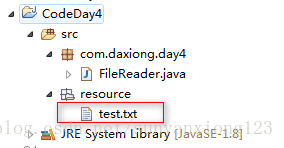
我们也可以使用绝对路径:
File infile = new File("C:\project\infile.txt");读取文件如果有固定格式,那么按照给定格式解析即可。否则应该一次一行的读取,使用nextLine()方法。
示例:从一个文件中读取数据,需要将奇数行、偶数行的数据分别存放到不同的数组中,而且,奇数行获取偶数行中每个数据中间空格数不同。
数据格式:
23 23 32 32 43 21 23 3 43
2 43 23 1 2 3
9 8 1 2 3
3 4 88 99 99
import java.io.File;
import java.util.Scanner;

// 相对文件读取处理
public class FileReader {

    public static void main(String[] args) throws Exception {
        fileReader("src/resource/test.txt");
    }

    public static void fileReader(String fileName) throws Exception {

        File file = new File(fileName);
        Scanner sc = new Scanner(file);

        int rows = 1; // 记录行数

        String[] odd = new String[40]; // 奇数行数据
        String[] even = new String[40]; // 偶数行数据
        while (sc.hasNextLine()) {
            if ((rows % 2) == 1) { // 奇数行
                odd = sc.nextLine()***.split("\\s{1,}")***;  // split("\\2{1,}");不论字符中间有多少个空格都当作一个空格处理
                System.out.println("奇数行:" + rows);
                for (int i = 0; i < odd.length; i++) {
                    System.out.println(odd[i]);
                }
            } else if ((rows % 2) == 0) { // 偶数行
                even = sc.nextLine().***split("\\s{1,}***");
                System.out.println("偶数行:" + rows);
                for (int i = 0; i < even.length; i++) {
                    System.out.println(even[i]);
                }
            }
            rows++;
        }
        sc.close();
    }

}
II. 使用缓冲区读: BufferedReader/ BufferedWriter
import java.io.BufferedReader;
import java.io.Reader;

public class Main {
    public static void main(String[] args) throws Exception {
        char c ;
        BufferedReader bd = new BufferedReader(new InputStreamReader(System.in));

        //read(),读入一个字符
        System.out.println("input a char,end with 'e'");
        do {
            c = (char)bd.read() ;
            System.out.println(c);
        }while(c != 'e') ;

        //readLine(),读入每行的文本数据(包括空格)
        String str=null ;
        System.out.println("string end with 'end'");
        do {
            str = bd.readLine() ;
            System.out.println(str);
        }while(!str.equals("end")) ;
    }
}
III 最快的读法: java.util.StringTokenizer / java.io.StreamTokenizer
StringTokenizer st = new StringTokenizer("this is in china") ;//默认是空格为分割符
        while(st.hasMoreTokens()) {
            System.out.println(st.nextToken());
        }
        StringTokenizer st1 = new StringTokenizer("this is my ida,and this is also yours"," ,") ;   //自定义分割符
    while(st1.hasMoreTokens()) {
            System.out.println(st1.nextToken());
        }
StreamTokenizer st = new StreamTokenizer(new BufferedReader
                (new InputStreamReader(System.in))) ;
        st.nextToken() ;//获得令牌
        String str = st.sval ;//取出令牌,sval为该类的静态常量
        //表示一个文本,以制表符,换行符,空格为分割符
        st.nextToken() ;
        int a = (int) st.nval ;//nval为该类的静态常量,表示读取的是个数字
        System.out.println(str);
        System.out.println(a);
参考资料:
2. https://www.cnblogs.com/zhrb/p/6347738.html
3. https://www.acwing.com/blog/content/279/ (三种读取方法的时间比较)
4. https://blog.csdn.net/shijiebei2009/article/details/17305223
5. https://www.jianshu.com/p/fa235c29fbea
6. https://blog.csdn.net/sunyanxiong123/article/details/75212717





 扫一扫
扫一扫


&spm=1001.2101.3001.5002&articleId=111501515&d=1&t=3&u=5a811ba3af0a49c894b7d10a8e5f188d)
 1096
1096

 被折叠的 条评论
为什么被折叠?
被折叠的 条评论
为什么被折叠?
 到【灌水乐园】发言





