


 本文介绍了如何在Vue 2.6.11项目中结合jQuery 1.12.4实现高度自适应的滚动列表。通过创建组件并将其放置在页面容器内,可以达到在大屏页面上适配滚动的效果。
vue版本为"^2.6.11",jquery版本为"^1.12.4"
下面的代码是一个组件,需要在你用到的页面新建一个容器把这个组件放进去,适用于大屏页面需要高度自适应的滚动列表
实现效果如下图:
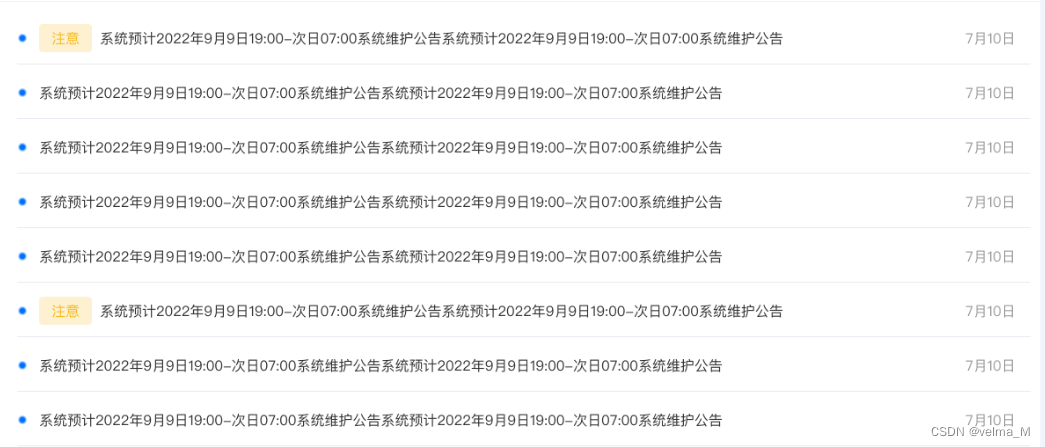
实现代码如下:
<template>
    <div class="announcement">
        <div class='announcement-table-list-content'>
            <ul class="table-list">
                <li v-for="(item, key) in scrollListData" :key="key">
                <div class="flex">
                    <div class="dot"></div>
                    <span v-if="item.isAttention" class="tag">注意</span>
                    <div class="text">{{ item.text }}</div>
                </div>
                <span class="date">{{ item.date }}</span>
                </li>
            </ul>
        </div>
    </div>
</template>
<script>
import $ from "jquery";
export default {
  data() {
    return {
        scrollListData: [
            {
                isAttention: true,
                text: '系统预计2022年9月9日19:00-次日07:00系统维护公告系统预计2022年9月9日19:00-次日07:00系统维护公告',
                date: '7月10日',
            },
            {
                isAttention: false,
                text: '系统预计2022年9月9日19:00-次日07:00系统维护公告系统预计2022年9月9日19:00-次日07:00系统维护公告',
                date: '7月10日',
            },
            {
                isAttention: false,
                text: '系统预计2022年9月9日19:00-次日07:00系统维护公告系统预计2022年9月9日19:00-次日07:00系统维护公告',
                date: '7月10日',
            },
            {
                isAttention: false,
                text: '系统预计2022年9月9日19:00-次日07:00系统维护公告系统预计2022年9月9日19:00-次日07:00系统维护公告',
                date: '7月10日',
            },
            {
                isAttention: false,
                text: '系统预计2022年9月9日19:00-次日07:00系统维护公告系统预计2022年9月9日19:00-次日07:00系统维护公告',
                date: '7月10日',
            },
            {
                isAttention: true,
                text: '系统预计2022年9月9日19:00-次日07:00系统维护公告系统预计2022年9月9日19:00-次日07:00系统维护公告',
                date: '7月10日',
            },
            {
                isAttention: true,
                text: '系统预计2022年9月9日19:00-次日07:00系统维护公告系统预计2022年9月9日19:00-次日07:00系统维护公告',
                date: '7月10日',
            },
            {
                isAttention: false,
                text: '系统预计2022年9月9日19:00-次日07:00系统维护公告系统预计2022年9月9日19:00-次日07:00系统维护公告',
                date: '7月10日',
            },
            {
                isAttention: false,
                text: '系统预计2022年9月9日19:00-次日07:00系统维护公告系统预计2022年9月9日19:00-次日07:00系统维护公告',
                date: '7月10日',
            },
        ],
        analysisInterval: null,
        ceilHeight: 0,
        scrollNum: 7, //展示列表的行数
    };
  },
  mounted() {
    this.$nextTick(()=> {
        // 页面高度变化的时候列表也跟随变化
        window.addEventListener("resize", this.resize);
        this.playList();
    })
  },
  methods: {
    playList() {
    let box = document.getElementsByClassName('announcement-table-list-content')[0]
    // 计算每行的高度
    this.ceilHeight = Math.floor(box.clientHeight/this.scrollNum)+'px'
    clearInterval(this.analysisInterval)
    // 设置每行的高度
    $('.announcement-table-list-content li').css('height',this.ceilHeight)
      let _this = this;
      let className = ".announcement-table-list-content";
      this.play();
      $(className).hover(
        function () {
          clearInterval(_this.analysisInterval);
        },
        function () {
          _this.play();
        }
      );
    },
    play() {
        let _this = this;
        let className =
            ".announcement-table-list-content .table-list";
        let child_className = className + " " + "li:first";
            if (this.scrollListData.length > this.scrollNum) {
                this.analysisInterval = setInterval(function () {
                    $(className).animate(
                    {
                        top: '-'+_this.ceilHeight,
                    },
                    500,
                    function () {
                        $(this).append($(child_className));
                        $(this).css("top", "0");
                    }
                    );
                }, 4000);
            }
    },
    resize() {
        let box = document.getElementsByClassName('announcement-table-list-content')[0]
        this.ceilHeight = Math.floor(box.clientHeight/this.scrollNum)+'px'
        this.playList();
    },
  },
  destroyed() {
    // 页面销毁的时候清除定时器
    clearInterval(this.analysisInterval);
    this.analysisInterval = null
    window.removeEventListener("resize", this.resize);
  }
}
</script>
<style lang="scss" scoped>
.announcement {
    width: 100%;
    height: 90%;
    padding: 1%;
    .announcement-table-list-content {
        width: 100%;
        height: 100%;
        overflow: hidden;
        position: relative;
        .table-list {
            width: 100%;
            padding: 0;
            position: absolute;

        }
    }
    li {
        display: flex;
        align-items: center;
        justify-content: space-between;
        border-bottom: 1px solid #E6E9F0;
        font-size: 16px;
        // height: 40px;
        .flex {
            display: flex;
            align-items: center;
        }
        .dot {
            display: inline-block;
            width: 5px;
            height: 5px;
            border-radius: 5px;
            background: #0071FF;
            margin-right: 5px;
        }
        .text {
            color: #333333;
        }
        .tag {
            border-radius: 4px;
            background: #F7BA1E33;
            color: #F7BA1E;
            padding: 2px 4px;
            margin-right: 5px;
        }
        .date {
            color: #999999;
        }
    }
}
</style>





 扫一扫
扫一扫


 2014
2014

 被折叠的 条评论
为什么被折叠?
被折叠的 条评论
为什么被折叠?
 到【灌水乐园】发言





