


 该博客介绍了在Java中使用jeasyOpc库连接到MatrikonOPC Simulation服务器进行OPC数据读取的示例代码。文章提到了可能出现的错误,如32位与64位不兼容问题,以及必须读取服务端存在的数据。博主展示了如何创建OPC组和项,进行同步读取,并提供了完整的代码实现。
1.jeasyOpc使用jdk为32位,不是会报错
java.lang.UnsatisfiedLinkError: sJCustomOpc.dll: Can’t load IA 32-bit .dll on a AMD 64-bit platform
2.读取的item必须是在服务端存在的数据 ,读取不存在item会报错
Property file javafish.clients.opc.lang.Translate doesn’t exist. System terminated.
3.group 可以随便写
4.可用MatrikonOPC模拟数据
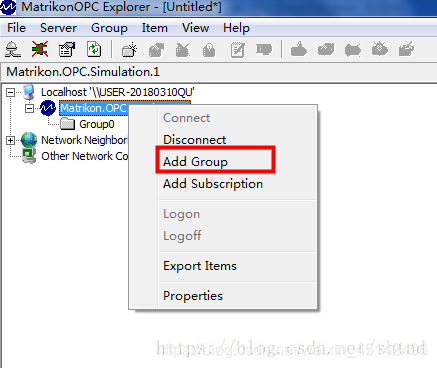
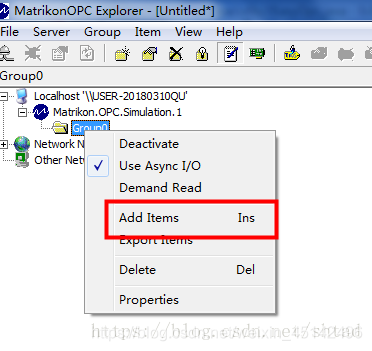
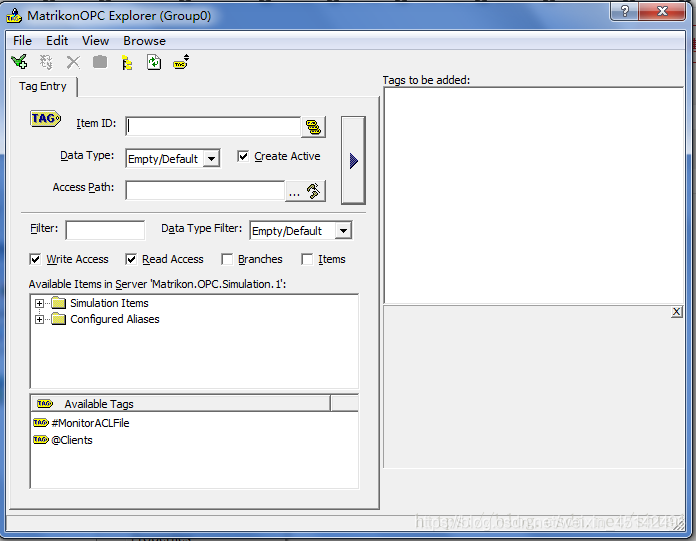
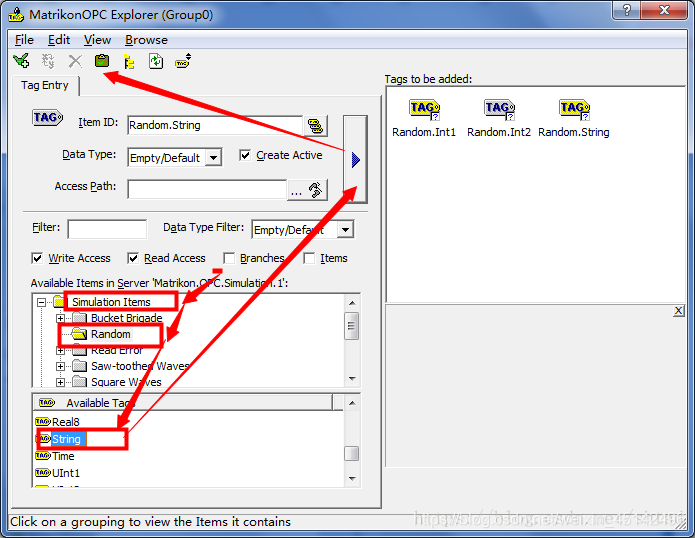

5.demo
package com.sht.utils;

import java.util.ArrayList;

import javafish.clients.opc.JOpc;
import javafish.clients.opc.component.OpcGroup;
import javafish.clients.opc.component.OpcItem;
import javafish.clients.opc.exception.ConnectivityException;

public class JEasyOpc {
    public ArrayList<OpcItem> readOpc(String[] array) {
        JOpc.coInitialize();
        JOpc jopc = new JOpc("localhost", "Matrikon.OPC.Simulation.1", "JOPC");
        try {

            jopc.connect();
            System.out.println("OJBC连接成功");
        } catch (ConnectivityException e) {
            e.printStackTrace();
        }
        OpcGroup group = new OpcGroup("Group1", true, 500, 0.0f);
        System.out.println("OpcGroup:" + group.toString());
        ArrayList<OpcItem> arrayList = new ArrayList<>();

        for (String string : array) {
            System.out.println(string);
            OpcItem item = new OpcItem(string, true, "");
            group.addItem(item);
            arrayList.add(item);
        }
        jopc.addGroup(group);


        try {
            jopc.registerGroup(group);
        } catch (Exception e) {
            e.printStackTrace();
        }
        try {
            for (OpcItem opcItem : arrayList) {
                jopc.registerItem(group, opcItem);
            }

        } catch (Exception e) {
            e.printStackTrace();
        }


        ArrayList<OpcItem> arrayList1 = new ArrayList<>();
        try {
            for (OpcItem opcItem : arrayList) {

                OpcItem responseItem = jopc.synchReadItem(group, opcItem);
                arrayList1.add(responseItem);
            }
        } catch (Exception e1) {
            e1.printStackTrace();
        }
        try {
            for (OpcItem opcItem : arrayList) {
                jopc.unregisterItem(group, opcItem);
            }

        } catch (Exception e) {
            e.printStackTrace();
        }
        try {
            jopc.unregisterGroup(group);
        } catch (Exception e) {
            e.printStackTrace();
        }
        JOpc.coUninitialize();
        return arrayList1;
    }

    public ArrayList<OpcItem> call() {

        Excel_reader test = new Excel_reader();
        ArrayList<String> xlsx_reader;
        ArrayList<OpcItem> runRead = new ArrayList<>();

        try {
            //xlsx_reader = test.xlsx_reader("lib/opc.xlsx", 1);
            //String[] array = xlsx_reader.toArray(new String[xlsx_reader.size()]);
            System.out.println("读取excel文档");

            //模拟数据
            String[] array = new String[3];
            array[0] = "Random.String";
            array[1] = "Random.Int1";
            array[2] = "Random.Int2";
            //模拟数据
            ArrayList<OpcItem> opcItemList = readOpc(array);
            System.out.println("读取opc数据");
            return opcItemList;
        } catch (Exception e) {
            e.printStackTrace();
        }
        return runRead;

    }

    public static void main(String[] args) {
        JEasyOpc opcReadClient2 = new JEasyOpc();
        ArrayList<OpcItem> call = opcReadClient2.call();
        System.out.println(call);

    }
}





 扫一扫
扫一扫


 3327
3327

 被折叠的 条评论
为什么被折叠?
被折叠的 条评论
为什么被折叠?
 到【灌水乐园】发言





