



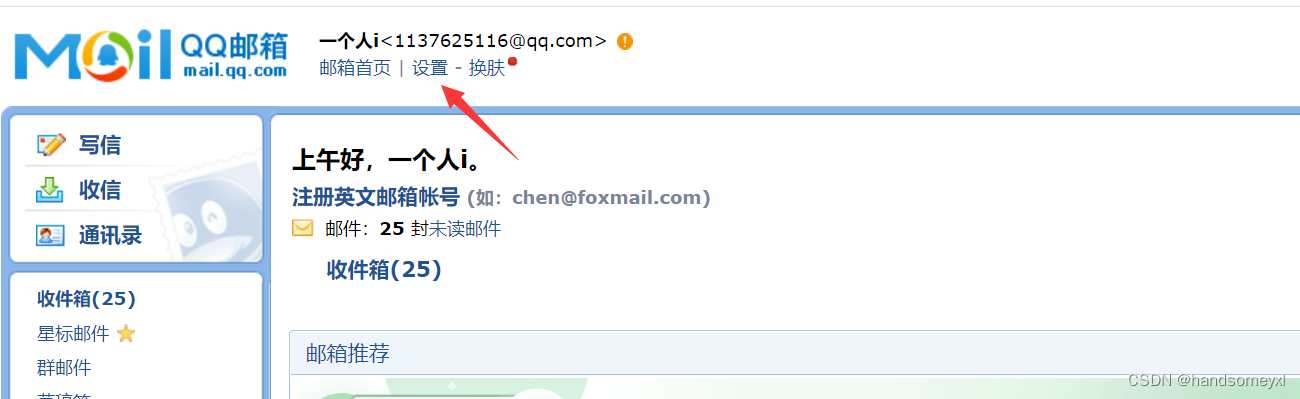
1.登录qq邮箱
1)点击设置
2)点击账户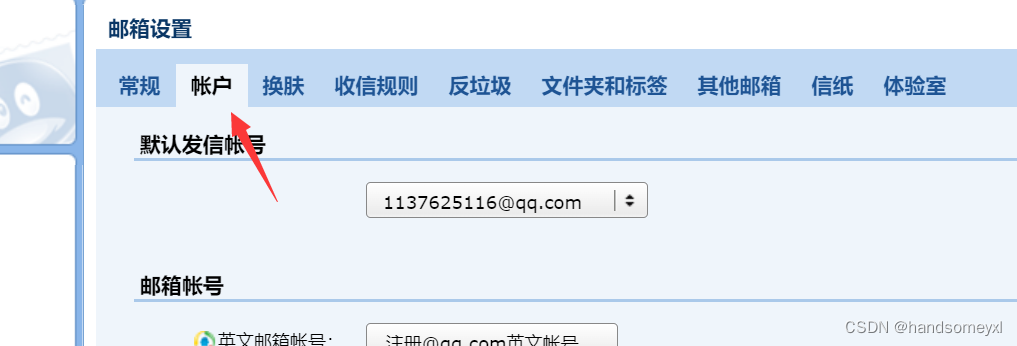
3)开启第一个服务,我已经开过了
4)开启验证(让你发送指定内容到某个号码),完成后点击我已发送,就会出现授权码,授权码很重要保留好
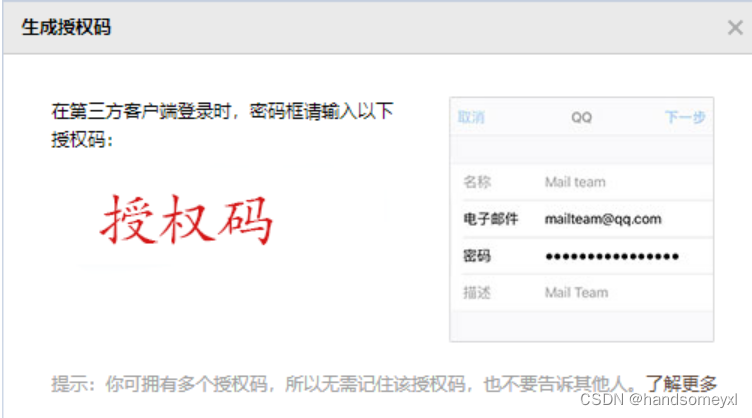
2.java操作来发送qq邮件
1)引入依赖
        <dependency>
            <groupId>javax.mail</groupId>
            <artifactId>mail</artifactId>
            <version>1.4.7</version>
        </dependency>
2)相关代码
public class QQSMSUtils {
    public static void main(String[] args) throws Exception {
        testMail();
    }

        private static void testMail () throws Exception {
            // 给用户发送邮件的邮箱
            final String from = "1137625116@qq.com";
            // 邮箱的用户名
            final String username = "1137625116@qq.com";
            // 邮箱授权码,刚刚保存的授权码,不是qq密码
            final String password = "oiknpwwrimuahghf";
            // 发送邮件的服务器地址,QQ服务器
            final String host = "smtp.qq.com";
            // 接收人邮箱
            final String to = "2864254910@qq.com";
            // 邮件主题
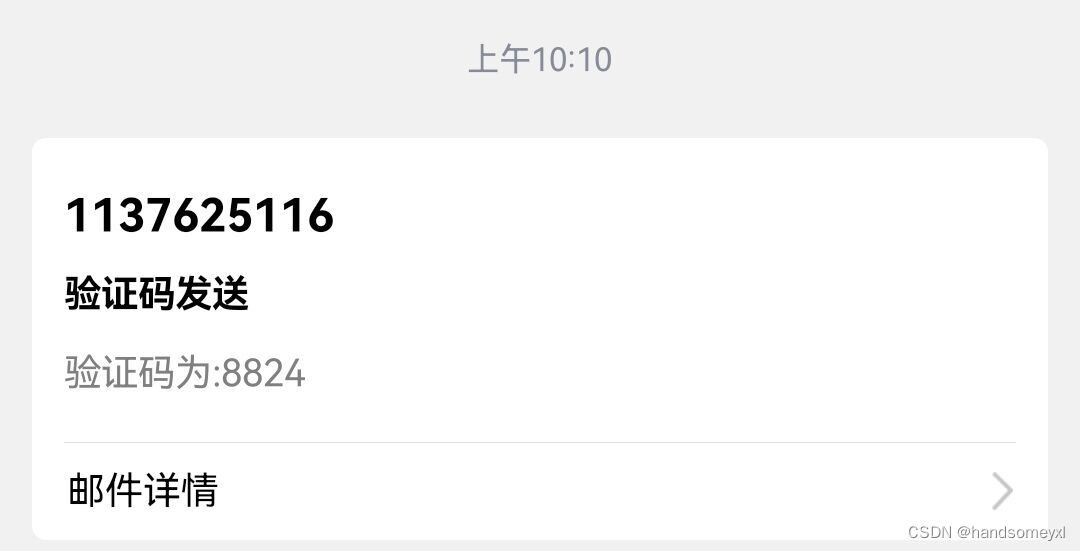
            final String title = "验证码发送";

            // 使用QQ邮箱时配置
            Properties prop = new Properties();
            prop.setProperty("mail.host", "smtp.qq.com");    // 设置QQ邮件服务器
            prop.setProperty("mail.transport.protocol", "smtp");      // 邮件发送协议
            prop.setProperty("mail.smtp.auth", "true");      // 需要验证用户名和密码
            // 关于QQ邮箱,还要设置SSL加密,其他邮箱不需要
//            MailSSLSocketFactory sf = new MailSSLSocketFactory();
//            sf.setTrustAllHosts(true);
//            prop.put("mail.smtp.ssl.enable", "true");
//            prop.put("mail.smtp.ssl.socketFactory", sf);

            // 创建定义整个邮件程序所需的环境信息的 Session 对象,QQ才有,其他邮箱就不用了
            Session session = Session.getDefaultInstance(prop, new Authenticator() {
                @Override
                protected PasswordAuthentication getPasswordAuthentication() {
                    // 发件人邮箱用户名,授权码
                    return new PasswordAuthentication(username, password);
                }
            });

            // 开启 Session 的 debug 模式,这样就可以查看程序发送 Email 的运行状态
            session.setDebug(true);

            // 通过 session 得到 transport 对象
            Transport ts = session.getTransport();

            // 使用邮箱的用户名和授权码连上邮箱服务器
            ts.connect(host, username, password);

            // 创建邮件,写邮件
            MimeMessage message = new MimeMessage(session);
            message.setFrom(new InternetAddress(from)); // 指明邮件的发件人
            message.setRecipient(Message.RecipientType.TO, new InternetAddress(to));   // 指明邮件的收件人
            message.setSubject(title);     // 邮件主题
            message.setContent("验证码为:8824", "text/html;charset=utf-8");    // 邮件内容

            // 发送邮件
            ts.sendMessage(message, message.getAllRecipients());
            System.out.println("验证码发送成功");
            // 释放资源
            ts.close();


        }
    }
关于QQ邮箱,还要设置SSL加密,其他邮箱不需要这段内容我注释掉了,不然报错
3)点击运行,发送成功,控制台输出
DEBUG: setDebug: JavaMail version 1.4.7
DEBUG: getProvider() returning javax.mail.Provider[TRANSPORT,smtp,com.sun.mail.smtp.SMTPTransport,Oracle]
DEBUG SMTP: useEhlo true, useAuth true
DEBUG SMTP: trying to connect to host "smtp.qq.com", port 25, isSSL false
220 newxmesmtplogicsvrsza5.qq.com XMail Esmtp QQ Mail Server.
DEBUG SMTP: connected to host "smtp.qq.com", port: 25

EHLO LAPTOP-30D75SC0
250-newxmesmtplogicsvrsza5.qq.com
250-PIPELINING
250-SIZE 73400320
250-STARTTLS
250-AUTH LOGIN PLAIN XOAUTH XOAUTH2
250-AUTH=LOGIN
250-MAILCOMPRESS
250 8BITMIME
DEBUG SMTP: Found extension "PIPELINING", arg ""
DEBUG SMTP: Found extension "SIZE", arg "73400320"
DEBUG SMTP: Found extension "STARTTLS", arg ""
DEBUG SMTP: Found extension "AUTH", arg "LOGIN PLAIN XOAUTH XOAUTH2"
DEBUG SMTP: Found extension "AUTH=LOGIN", arg ""
DEBUG SMTP: Found extension "MAILCOMPRESS", arg ""
DEBUG SMTP: Found extension "8BITMIME", arg ""
DEBUG SMTP: Attempt to authenticate using mechanisms: LOGIN PLAIN DIGEST-MD5 NTLM
DEBUG SMTP: AUTH LOGIN command trace suppressed
DEBUG SMTP: AUTH LOGIN succeeded
DEBUG SMTP: use8bit false
MAIL FROM:<1137625116@qq.com>
250 OK
RCPT TO:<2869254910@qq.com>
250 OK
DEBUG SMTP: Verified Addresses
DEBUG SMTP:   2869254910@qq.com
DATA
354 End data with <CR><LF>.<CR><LF>.
From: 1137625116@qq.com
To: 2869254910@qq.com
Message-ID: <483422889.0.1664244602665.JavaMail.Lenovo@smtp.qq.com>
Subject: =?UTF-8?B?6aqM6K+B56CB5Y+R6YCB?=
MIME-Version: 1.0
Content-Type: text/html;charset=utf-8
Content-Transfer-Encoding: base64

6aqM6K+B56CB5Li6Ojg4MjQ=
.
250 OK: queued as.
验证码发送成功
QUIT
221 Bye.

Process finished with exit code 0
4)邮箱消息
希望文章对你有帮助,有问题私信一起交流!





 扫一扫
扫一扫


 1603
1603

 被折叠的 条评论
为什么被折叠?
被折叠的 条评论
为什么被折叠?
 到【灌水乐园】发言





