


初探Apache Camel
Apache Camel 是基于EIP(Enterprise Integration Patterns)的一款开源框架。适用于异构系统间的集成和处理数据。
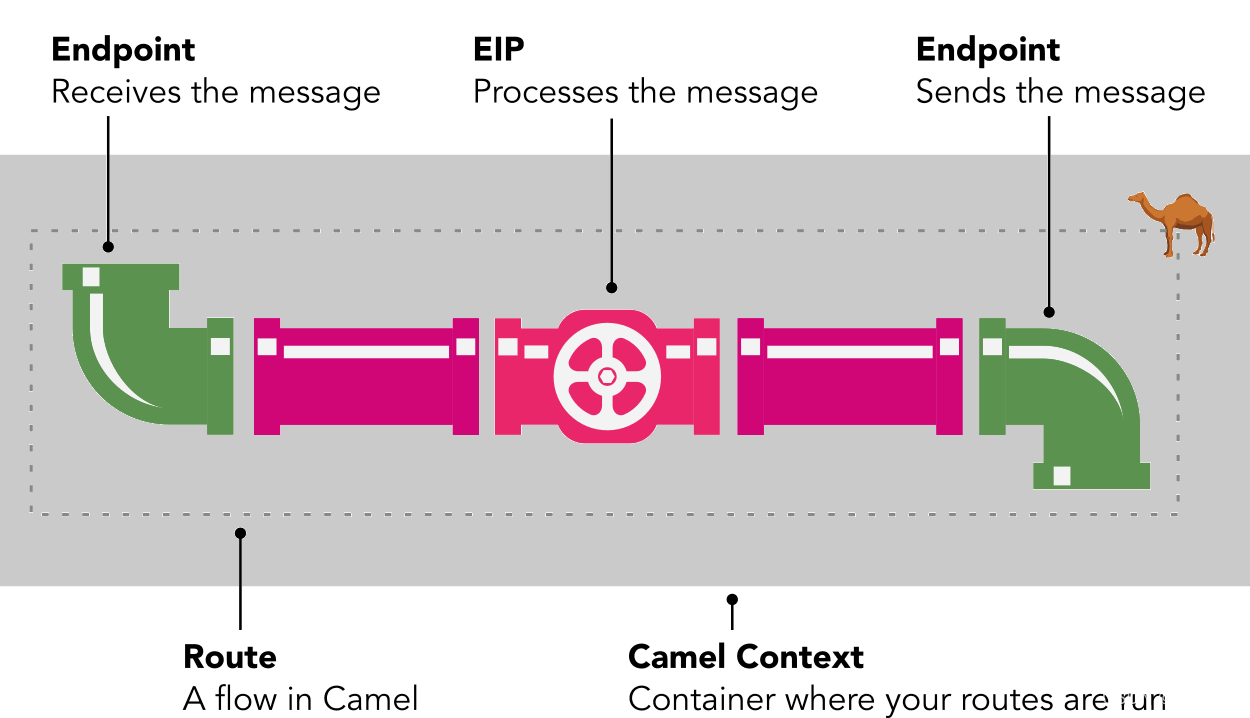
核心
- Camel Context: Camel 上下文
- 为了运行和管理你的路由,Camel 有一个名为 Camel Context 的容器。您的路线在此引擎内运行。 你几乎可以把它想象成一个迷你应用服务器。
- 当 Camel启动时,它会读取您的路由定义(在 Java 或 XML 中),创建路由,将它们添加到 Camel 上下文,并启动 Camel 上下文。
- 当 Camel终止时,它会关闭您的路由,并关闭 Camel 上下文。
- Endpoint:用于收发消息的终端。
- Endpoint是Camel与其他系统进行通信的设定点。
- 使用URI来识别endpoint位置
- Exchange:消息之间通信的抽象的会话。
- Properties:Exchange对象贯穿整个路由执行过程中的控制端点、处理器甚至还有表达式、路由条件判断。为了让这些元素能够共享一些开发人员自定义的参数配置信息,Exchange以K-V结构提供了这样的参数配置信息存储方式。
- Message IN/OUT:当Endpoint和Processor、Processor和Processor间的Message在Exchange中传递时,Exchange会自动将上一个元素的输出作为这个元素的输入使用。
- Processor:消息处理器。
- org.apache.camel.Processor 是一个消息接受者和消息通信的处理器。
- Routing:路由规则。
- Routing用于处理Endpoint和Processor之间、Processor和Processor之间的路由跳转。
- components:组件库,也可视作endpoint工厂
-你可以在这里查看所有组件
如何创建Camel程序
-
java整合Apache Camel
-
`public class Test2 {
public static void main(String[] args) {
final CamelContext camelContext = new DefaultCamelContext();
try {
camelContext.addRoutes(new RouteBuilder() {
@Override
public void configure() throws Exception {
from(“timer:initial//start?period=10000&repeatCount=7”)
.routeId(“timer–test”)
.to(“log:executed”);
}
});
} catch (Exception e) {
e.printStackTrace();
}
camelContext.setTracing(true);
camelContext.start();try {
Thread.sleep(60000);
} catch (InterruptedException e) {
e.printStackTrace();
}
camelContext.stop();
}
}` -
-
spring boot整合Apache Camel
- 添加maven配置
<dependency> <groupId>org.apache.camel.springboot</groupId> <artifactId>camel-spring-boot-starter</artifactId> <version>3.15.0</version> </dependency>
Camel自动配置会为您创建一个SpringCamelContext并负责该上下文的正确初始化和关闭。
Camel自动配置还从Spring上下文中收集所有RouteBuilder实例,并将它们自动注入到提供的CamelContext中。
- 设置自己的路由
- `package com.shuinfo.cameltest.route;
- 添加maven配置
import com.shuinfo.cameltest.process.Process1;
import org.apache.camel.builder.RouteBuilder;
import org.apache.commons.lang3.RandomUtils;
import org.springframework.beans.factory.annotation.Autowired;
import org.springframework.stereotype.Component;
@Component
public class MyCamelRoute3 extends RouteBuilder {
String say(){
    int i = RandomUtils.nextInt(1, 4);
    if (i == 1) {
        return "foo";
    }
    if (i == 2) {
        return "aaa";
    }
    if (i == 3) {
        return "bbb";
    }
    return "other";
}

@Override
public void configure() throws Exception {

    from("timer:hello?period=10000").routeId("hello")
            .transform().method("myCamelRoute3", "say")
            .choice()
            .when(simple("${body} contains 'foo'"))
            .to("log:foo")
            .when(simple("${body} contains 'aaa'"))
            .to("log:aaa")
            .otherwise()
            .to("log:other")
            .end();
}
}
`
使用实例
从文件夹1移动文件到文件夹2,并将文件内容记录日志







 扫一扫
扫一扫


 335
335

 被折叠的 条评论
为什么被折叠?
被折叠的 条评论
为什么被折叠?
 到【灌水乐园】发言





