On an undocumented network, the fastest way to learn what is connected to a switch is to ask the switch. CDP and LLDP are the two protocols that answer. Each device announces itself to its directly connected neighbors, so from one switch you can read the hostname, the port, the platform, and often the IP address of everything one hop away, without touching a cable or opening a diagram.
The two protocols do the same job from opposite philosophies. CDP is Cisco’s own, runs by default, and only talks to other Cisco gear. LLDP is the open IEEE standard that works across vendors but stays off until you switch it on. This guide explains what each one reveals, how to read the output, how they differ, and where you should turn discovery off. The timers and output here were captured on two Cisco IOS 15.2 switches in June 2026.
What CDP tells you about your neighbors
CDP, the Cisco Discovery Protocol, is a Layer 2 protocol that runs by default on Cisco routers and switches. Every device sends a small advertisement out each interface every 60 seconds describing itself: its hostname, the local and remote port, what kind of device it is, its hardware platform, its IOS version, and its management IP. A neighbor stores that information for a holdtime of 180 seconds, so if three advertisements in a row go missing the entry ages out. The key insight is that this happens with no configuration at all. Connect two Cisco switches and each one already knows the other.
Because it is Cisco-proprietary, CDP only ever shows you Cisco devices. That is both its strength, since it carries Cisco-specific detail like the native VLAN and VTP domain, and its limit, since a Juniper or Aruba switch is invisible to it. If you want a refresher on the device types it reports, the network devices overview covers what a router, switch, and host each are.
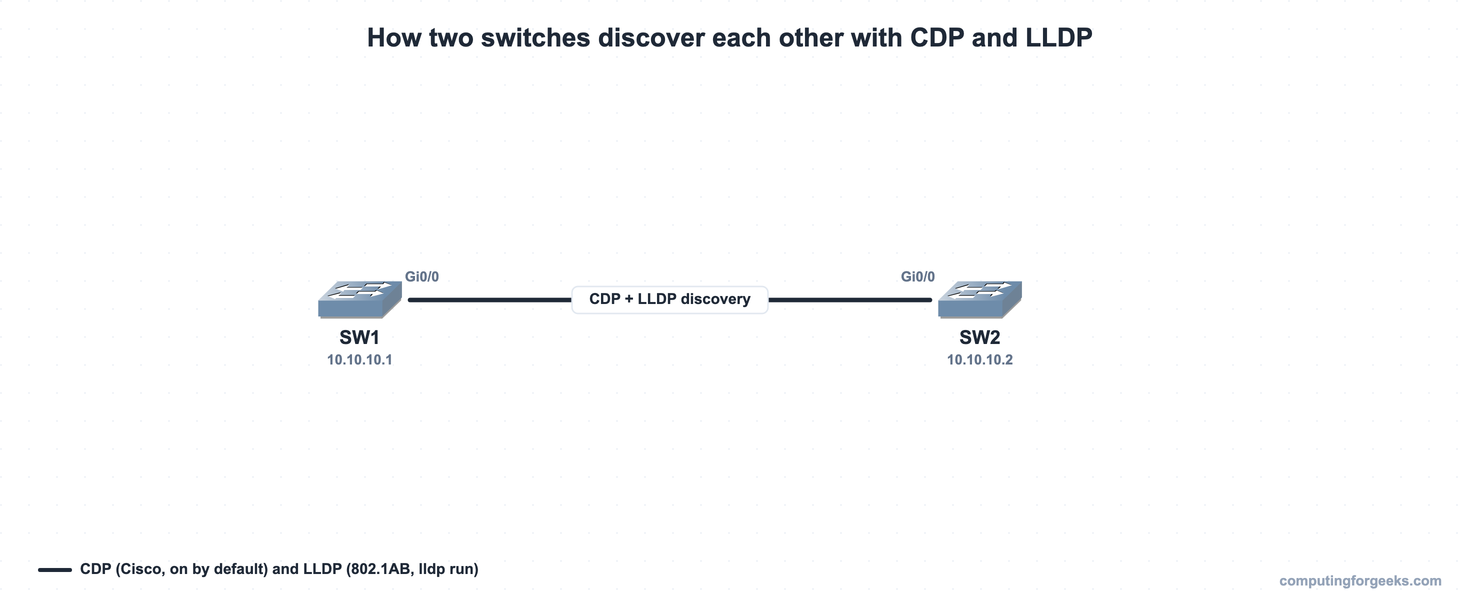
The lab is two switches, SW1 and SW2, joined on Gi0/0. The same topology, running in GNS3, produced every capture in this guide:
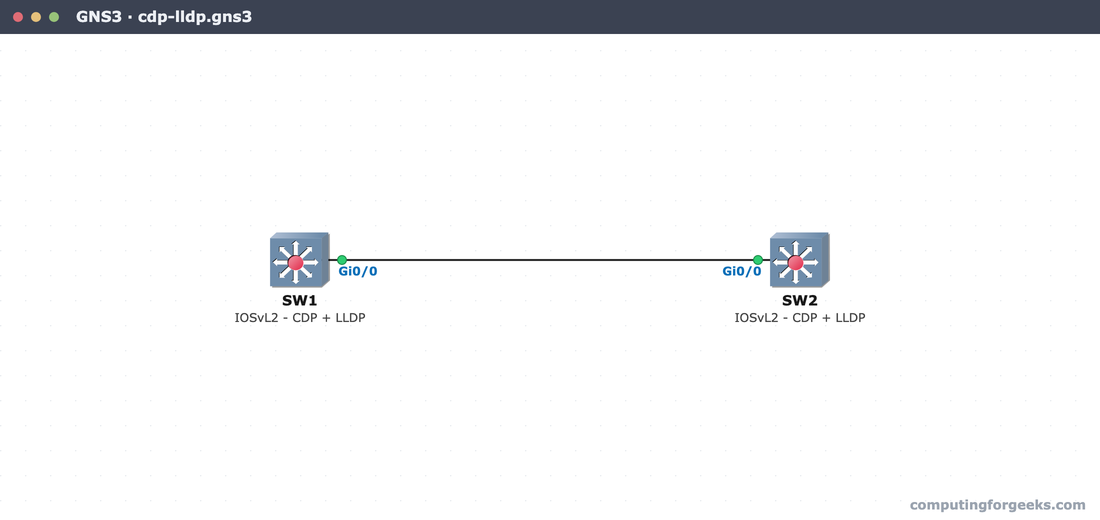
Both switches have CDP on by default and a management IP on a Vlan1 interface, so the detailed output later has an address to show. This is the same Layer 2 link that the MAC address table is built on; discovery just adds a description of who is on the other end.
Reading the CDP tables
Start with the summary. show cdp neighbors lists every directly connected Cisco device, one line each:
show cdp neighborsSW1 sees exactly one neighbor, SW2, reached through Gi0/0:
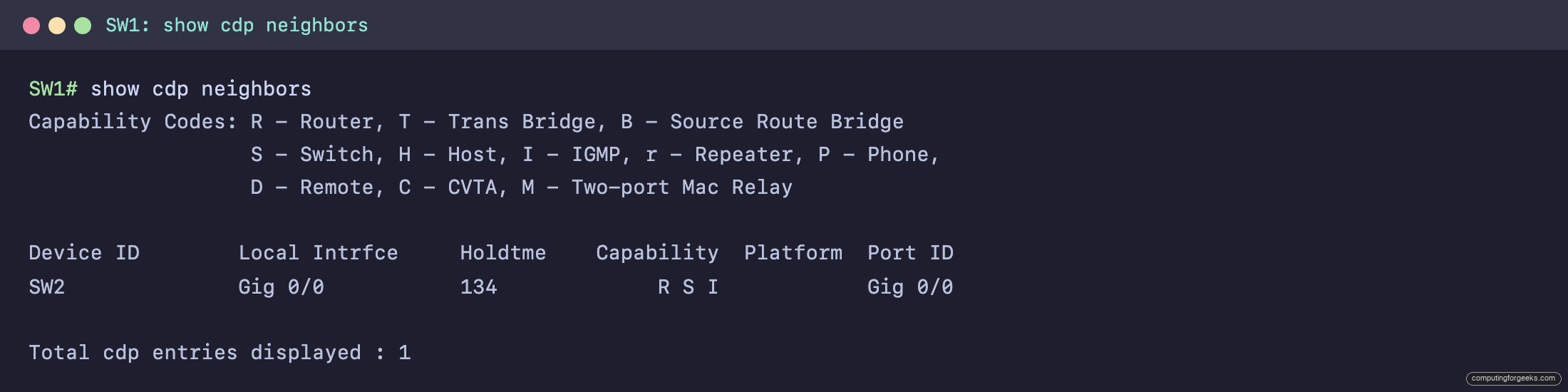
The columns are worth learning. Device ID is the neighbor’s hostname. Local Intrfce is your port, and Port ID is the neighbor’s port, so you can trace a cable in both directions. Holdtme counts down from 180. Capability uses the codes printed in the legend at the top: R for router, S for switch, I for IGMP, so the R S I here is a multilayer switch. Platform is the hardware model; on these lab IOSvL2 images it shows a generic Cisco or stays blank, while on real gear it reads something like WS-C2960.
The summary tells you what is connected where. For the details that matter while troubleshooting, add the keyword detail:
show cdp neighbors detailNow each neighbor gets a full block:
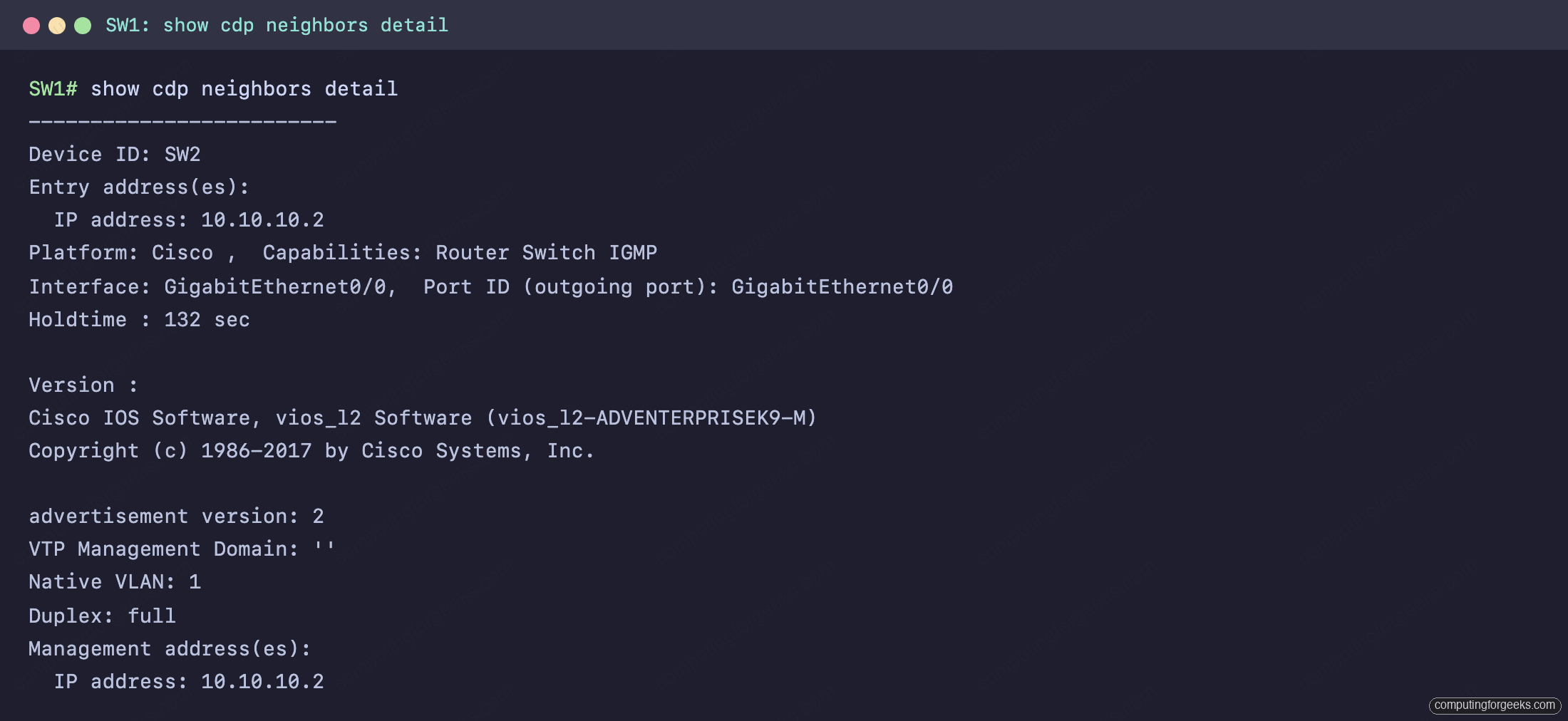
This is where CDP earns its place. What you are actually reading is the neighbor telling you its management IP (10.10.10.2), its full IOS version, its VTP domain, the native VLAN on the link (VLAN 1), and the duplex. That native VLAN field is the same one a trunk depends on, which is why CDP is the protocol that flags a native VLAN mismatch. If you are building an 802.1Q trunk, CDP is what warns you when the two ends disagree.
Why LLDP exists
CDP works beautifully right up to the moment you add a switch from another vendor. Because it is Cisco-only, it cannot describe a mixed network, and most real networks are mixed. That is the problem LLDP solves. LLDP, the Link Layer Discovery Protocol, is the IEEE 802.1AB standard: the same idea as CDP, but published openly so that Cisco, Juniper, Aruba, and anyone else can speak it.
The trade-off is that Cisco leaves LLDP off by default. You turn it on globally with one command, which fits naturally into a switch’s base configuration:
configure terminal
lldp run
end
Run it on both ends of a link. Until you do, show lldp neighbors stays empty even though the link is up and CDP is already showing the neighbor. LLDP advertises every 30 seconds with a 120-second holdtime, so it reacts a little faster than CDP when a neighbor disappears.
Reading the LLDP tables
The LLDP commands mirror the CDP ones. show lldp neighbors gives the summary, and adding detail gives the full record:
show lldp neighbors
show lldp neighbors detail
The summary shows SW2 with capability R, and the detail block adds its system name, description, capabilities, and management address:
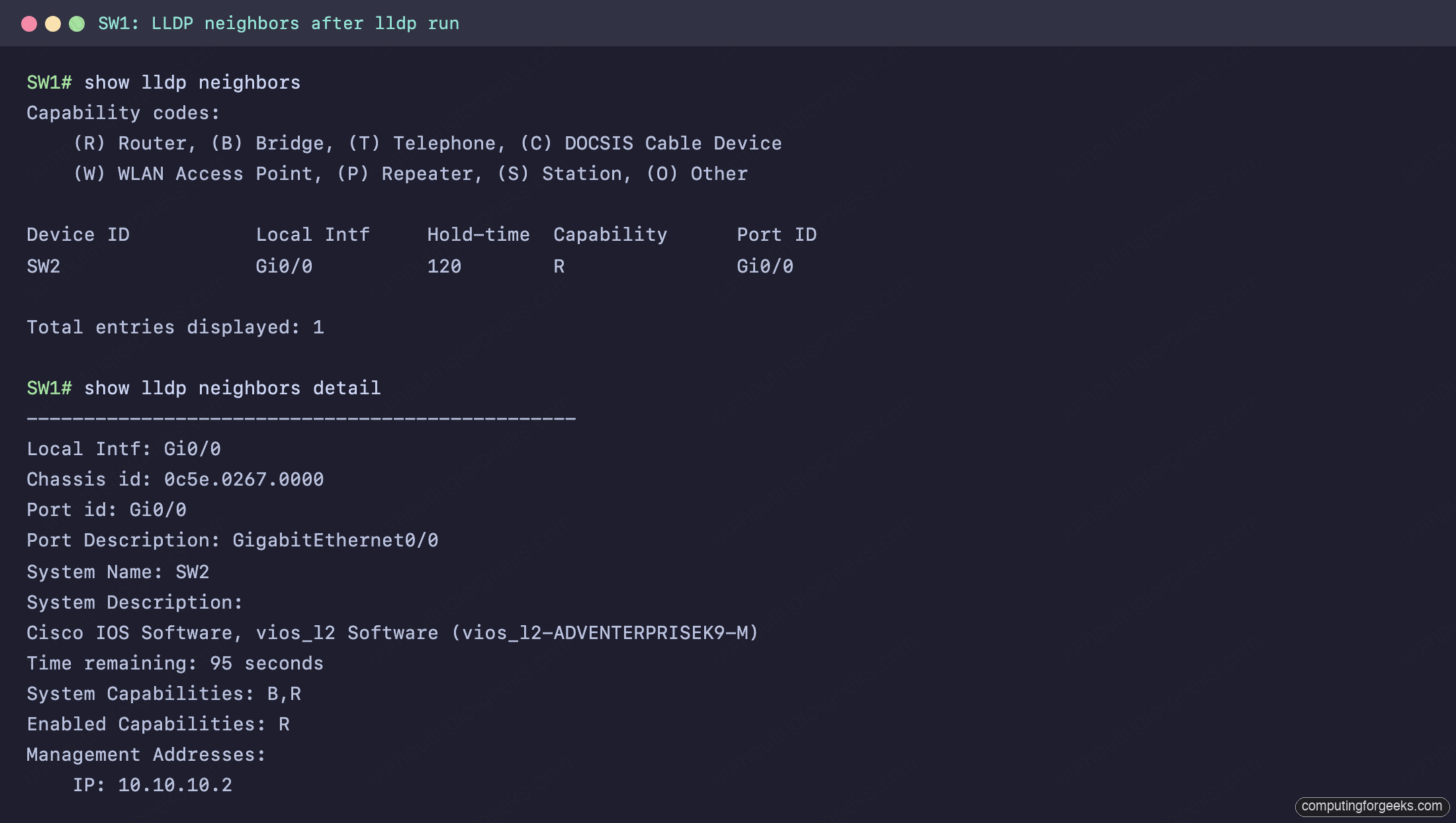
Notice that LLDP uses its own capability letters, listed in its own legend: here SW2 advertises B and R (bridge and router) and has R enabled. The summary column shows only the enabled capability (R), while the detail block separates what is advertised (B,R) from what is enabled (R). The detail block also carries a chassis ID and a system description string. On a real multi-vendor link, that system description is how you identify a non-Cisco neighbor that CDP could never have shown you at all.
CDP and LLDP compared
Side by side, the two protocols line up cleanly:
| Property | CDP | LLDP |
|---|---|---|
| Origin | Cisco-proprietary | IEEE 802.1AB (open standard) |
| Default state | Enabled | Disabled (needs lldp run) |
| Works with other vendors | No | Yes |
| Advertisement interval | 60 seconds | 30 seconds |
| Holdtime | 180 seconds | 120 seconds |
| Enable command | on by default (cdp run) | lldp run |
The timers are visible globally with show cdp and show lldp:
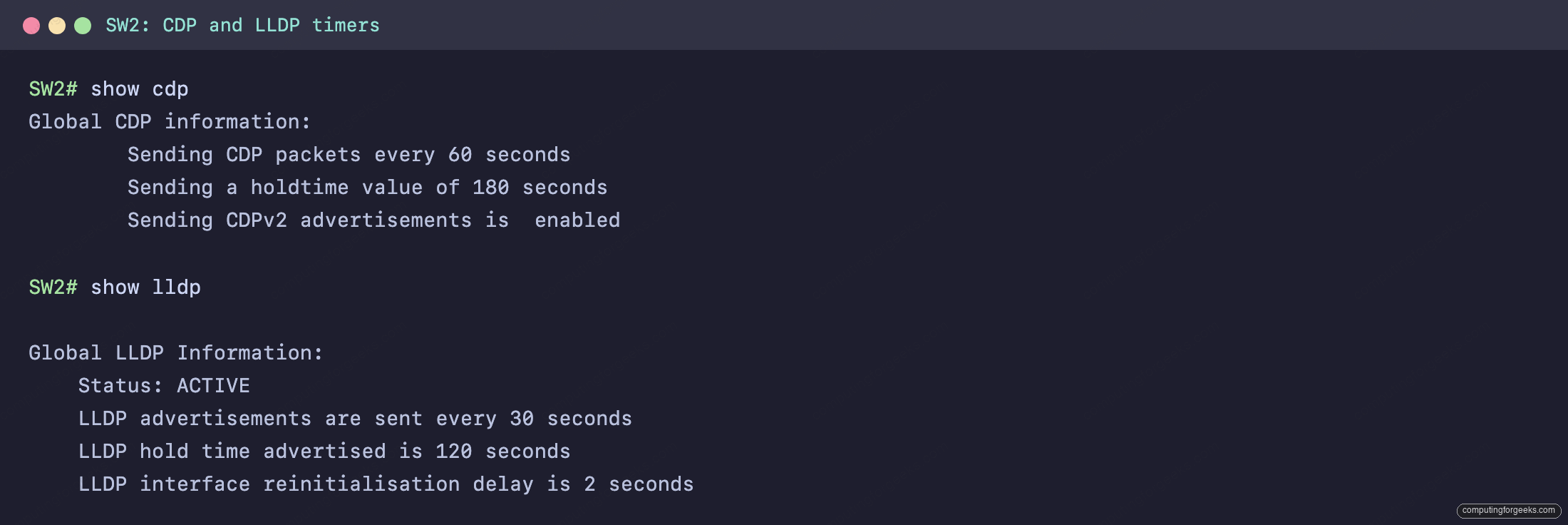
The practical rule is simple. On an all-Cisco network, CDP is already on and tells you more. The moment another vendor sits in the path, enable LLDP so the whole topology is visible. Plenty of networks run both at once, and the two do not conflict.
Turning discovery off where it should not run
Discovery is a convenience for you and a gift to an attacker. Every advertisement broadcasts the device model, IOS version, port, native VLAN, and management IP to whatever is on the wire. On an uplink between your own switches that is fine. On a port facing a user, a guest, or a customer, it is information you should not hand out. The same caution applies when you are chasing a problem with interface counters: discovery is for trusted links, not edge ports.
Turn CDP off on a single interface without disabling it across the switch:
interface GigabitEthernet0/1
 no cdp enable
LLDP is controlled per direction, so you can stop advertising while still listening, or both:
interface GigabitEthernet0/1
 no lldp transmit
 no lldp receive
One caution before you reach for no cdp run: do not disable CDP globally if you run Cisco IP phones. What is actually happening there is the phone uses CDP to learn which voice VLAN to tag its traffic into, so a blanket disable breaks voice. Switch discovery off on the ports that face untrusted devices, not on the whole switch.
Practice CDP and LLDP
This topic sits in the Network Access section of the CCNA 200-301 study roadmap. The two-switch lab, paste-ready for GNS3, Cisco Packet Tracer, or real gear, is in the companion repo: c4geeks/ccna-labs. Build SW1 and SW2, connect Gi0/0 to Gi0/0, paste the configs, and the neighbor tables fill in on their own.
Check that the defaults, timers, and commands have stuck with the quiz:
Then drill the facts with the flashcards, or take the deck into Anki:
Common misconceptions about CDP and LLDP
A few ideas trip people up, and clearing them is the fastest way to actually understand these protocols:
- Discovery does not give you connectivity. CDP and LLDP are pure information. They never forward user traffic or change how a link behaves. A neighbor can sit in the table while the VLANs on the link are completely misconfigured.
- LLDP does not replace CDP. On a Cisco switch the two coexist happily. Running both is normal, and is exactly what you want on a network that mixes Cisco with other vendors.
- A neighbor in the table does not prove the link is healthy. An entry lingers for the holdtime after the neighbor goes down, up to 180 seconds for CDP. A stale entry is not live confirmation.
- Discovery is not harmless. It advertises precisely the details an attacker wants. Treat it as something to scope to trusted links and disable toward anything you do not control.
Keep that mental model and the two protocols become what they are meant to be: a fast, honest map of what is one hop away, switched on for the links where you want a map and switched off on the ones where you do not.