You run two cables between a pair of switches for redundancy, plug them both in, and Spanning Tree blocks one. So you paid for a link that sits idle until the other one dies. EtherChannel is the fix: it bundles the two physical links into one logical link, so both forward at the same time and you get the extra bandwidth plus the redundancy, with no port left blocking.
This walks through bundling two links into a Port-channel with LACP on a pair of Cisco switches, verifying the bundle, and the one mistake that quietly stops it from forming. It is the practical counterpart to Spanning Tree: where STP blocks a redundant link, EtherChannel puts it to work.
Ran this on two Cisco IOS 15.2 switches in GNS3 in June 2026; the bundle came up clean.
What EtherChannel actually is
An EtherChannel groups two to eight physical links into a single logical interface called a Port-channel. The switch, and Spanning Tree along with it, treats that Port-channel as one link. That is the key: because STP sees one link instead of several, there is no loop to break, so every member forwards. If a member fails, the channel stays up on whatever links remain, and traffic just redistributes.
The gotcha worth saying up front: a Port-channel is one logical link for STP, but it is still several physical wires underneath, and the switch spreads traffic across them per conversation, not per packet. That detail decides how much speed you actually get, and it is covered at the end.
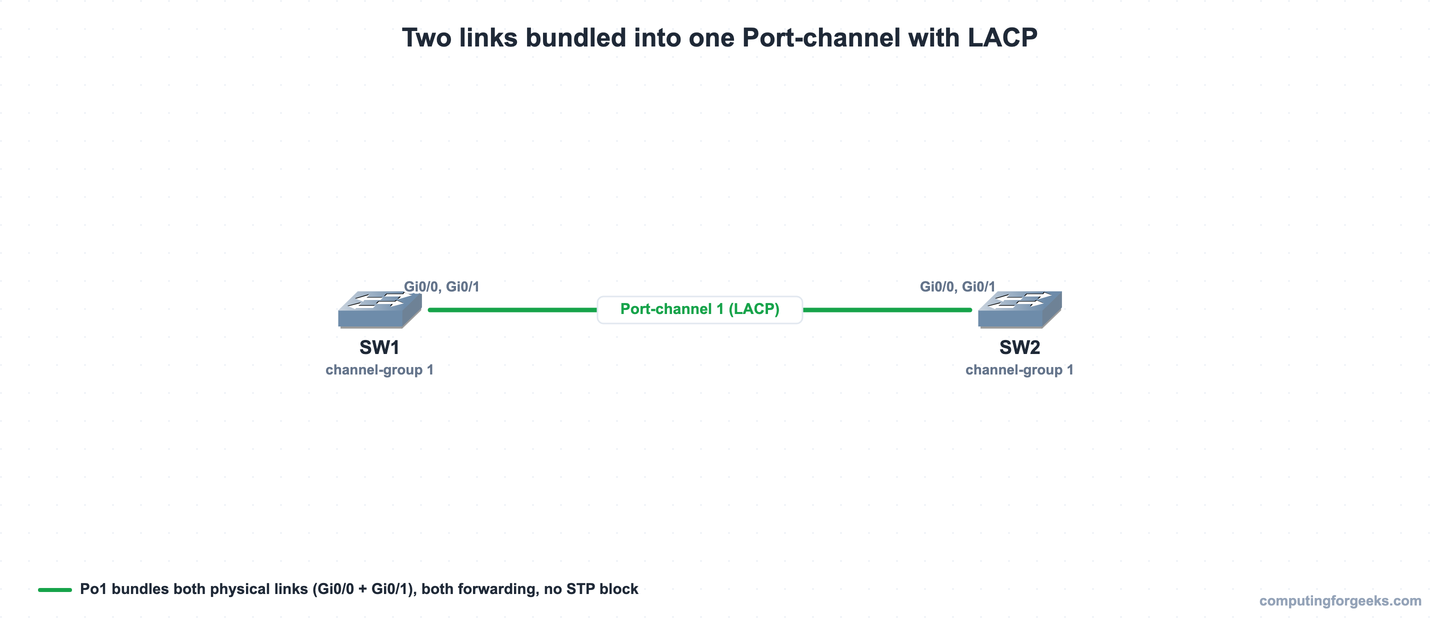
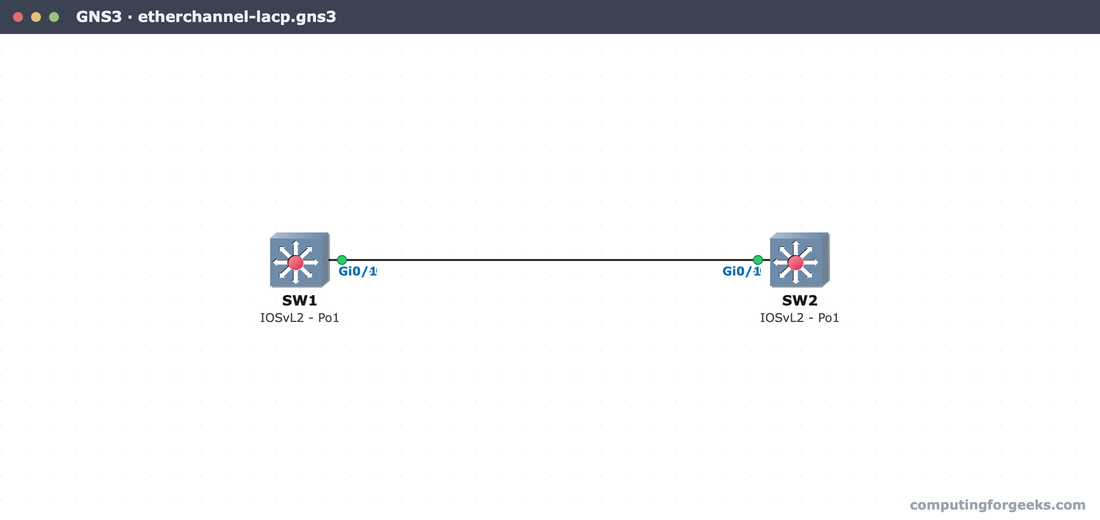
The lab is two switches, SW1 and SW2, with two links between them (Gi0/0 to Gi0/0 and Gi0/1 to Gi0/1). Both pairs go into one Port-channel.
1. Bundle the links with LACP
LACP is the open standard (IEEE 802.3ad), so reach for it over Cisco’s PAgP unless you have a reason not to. Put both interfaces in the same channel-group in LACP active mode. Doing it as an interface range keeps the two members identical, which matters more than it looks:
configure terminal
interface range GigabitEthernet0/0 - 1
 channel-group 1 mode active
end
That single command creates interface Port-channel 1 automatically. Run the same thing on SW2. active means this side starts the LACP negotiation; as long as the other end is active or passive, the channel forms. This is the exact lab, built on two IOSvL2 switches in GNS3:
From here on, configure the Port-channel interface, not the members. Anything you set on Port-channel 1 (a trunk config, an allowed VLAN list) propagates to both physical ports and keeps them in sync.
2. Verify the bundle
One command tells you whether it worked. show etherchannel summary lists the channel, the protocol, and the state of each member:
show etherchannel summaryOn SW1 the channel is up with both ports bundled:
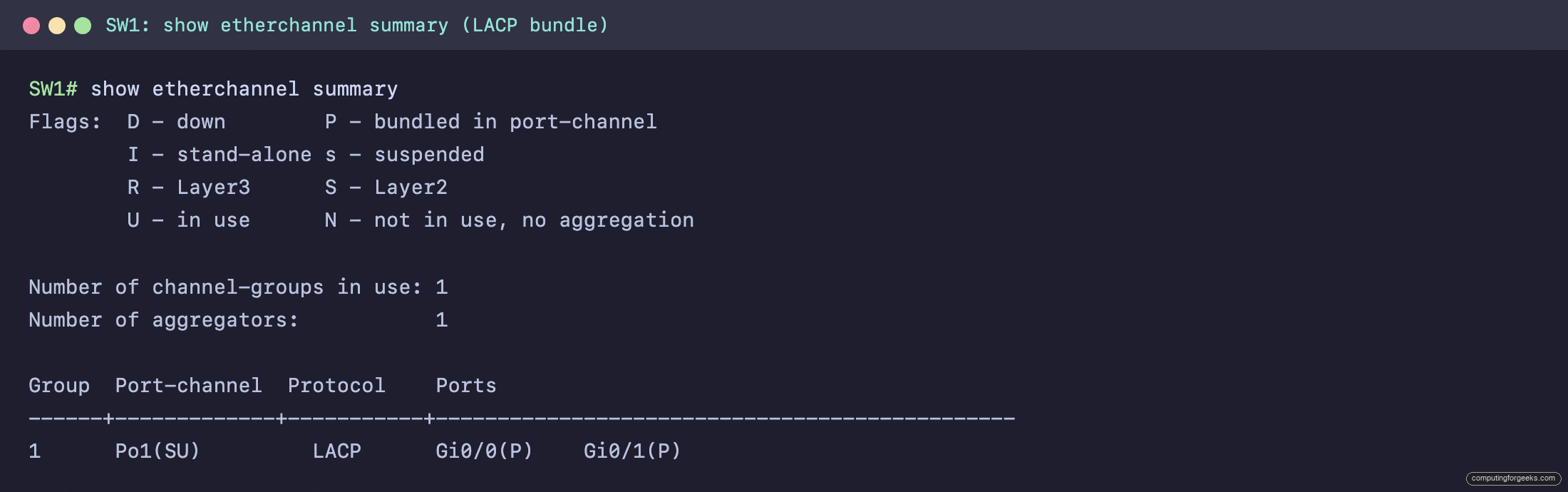
Read the flags. Po1(SU) means a Layer 2 (Switched) channel that is in Use. The Protocol column reads LACP. Each member shows Gi0/0(P) and Gi0/1(P), where P is “bundled in the port-channel”. If a member showed (s) it would be suspended (a settings mismatch), and (D) would be down. Two ports, both (P), is the result you want.
3. Check the partner and spanning tree
Two more commands confirm the far end is really part of the deal and that STP now sees one link. show lacp neighbor shows the partner switch, and show spanning-tree shows how STP views the bundle:
show lacp neighbor
show spanning-tree vlan 1
The neighbor table lists SW2 as the partner on both member ports, and spanning tree lists a single interface:
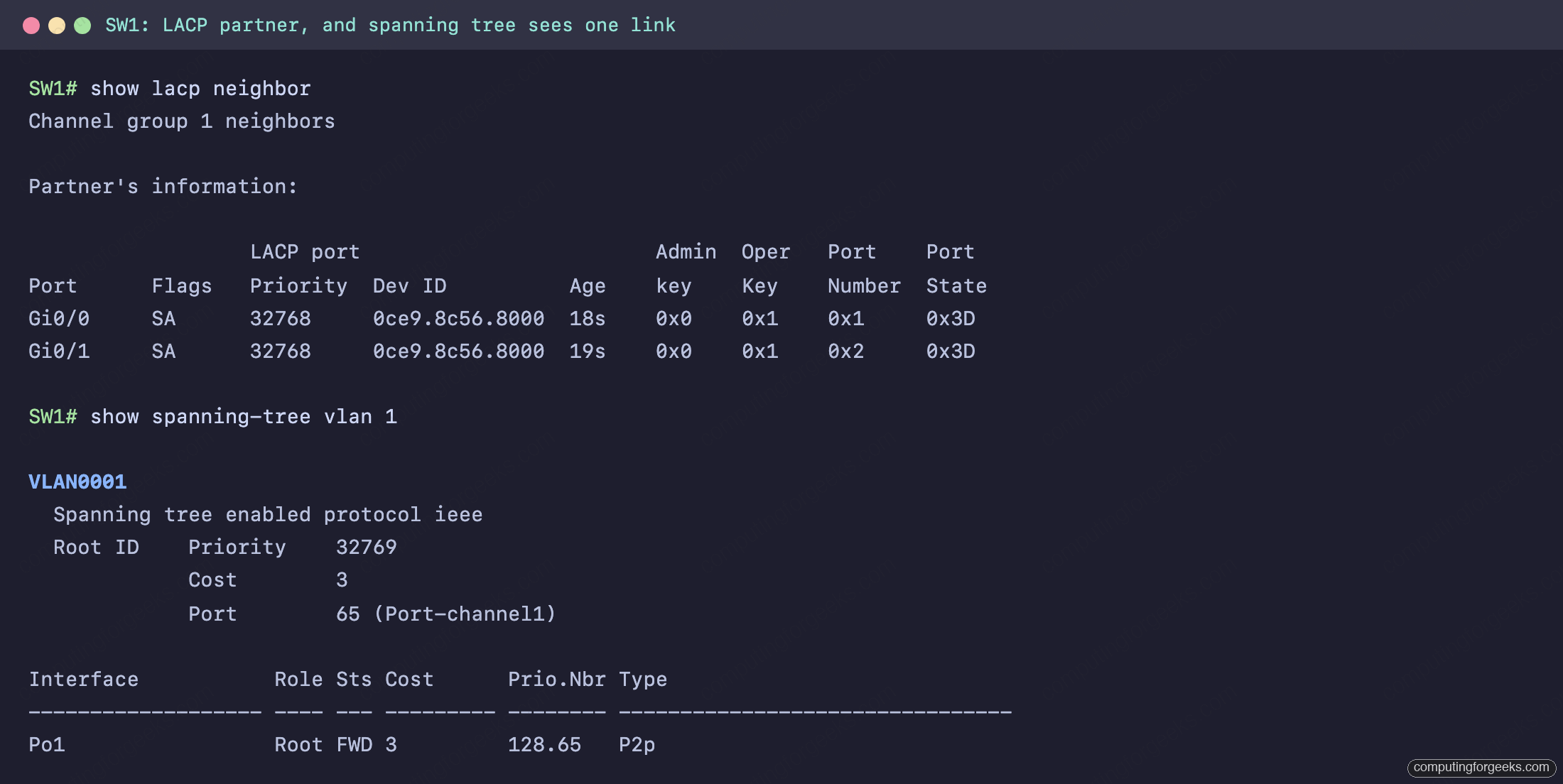
This is the payoff. Spanning tree shows Po1 as one interface in the forwarding state, not Gi0/0 and Gi0/1 with one of them blocked. Compare that to two ordinary links between switches, where STP would block one. The bundle’s path cost is also lower (3 here versus 4 for a single gigabit link), because the channel has more bandwidth, so STP even prefers it.
4. LACP, PAgP, and static modes
There are three ways to form a channel, and the modes have to be compatible on both ends. This trips people up, because two “passive” or two “auto” ends just sit there doing nothing:
| Protocol | Modes | Forms a channel with |
|---|---|---|
| LACP (open standard) | active, passive | active/active or active/passive |
| PAgP (Cisco only) | desirable, auto | desirable/desirable or desirable/auto |
| Static | on | on/on only |
Passive/passive never forms (nobody starts), auto/auto never forms, and you cannot mix on with active or LACP with PAgP. When in doubt, set both ends to LACP active and move on.
The other thing that stops a bundle is mismatched members. Every port in the channel must agree on speed, duplex, switchport mode (access or trunk), allowed VLANs, and native VLAN. Mismatch one and that port goes suspended while the rest may still bundle. Skip the per-member edits, configure the Port-channel, and you sidestep the whole class of problem. To the rest of the switch, including the MAC address table, the bundle is simply one port.
Practice EtherChannel
This topic is in the Network Access section of the CCNA 200-301 study roadmap. The two-switch lab is paste-ready for GNS3, Cisco Packet Tracer, or real gear in the companion repo: c4geeks/ccna-labs. Wire the two links, paste the config on both switches, and watch Po1 come up.
Test the modes, flags, and load-balancing facts with the quiz:
Then lock in the modes and verification commands with the flashcards, or load the deck into Anki:
How traffic spreads across the bundle
Here is the part that surprises people the first time they test it. A two-link EtherChannel does not make a single transfer twice as fast. The switch picks a member link for each conversation using a hash of certain fields (source and destination MAC, IP, or port, depending on the port-channel load-balance setting). Every frame in one flow lands on the same link, so one big file copy rides a single member and tops out at that link’s speed.
Where the bundle pays off is many flows at once: a hundred users hashed across two links get roughly double the aggregate throughput of one link. So a 2 by 1 Gbps channel is 2 Gbps of total capacity spread across conversations, not a 2 Gbps pipe for any single one. If one link runs hot while another sits idle, the load-balance hash is the knob to change. Plan the bundle around the number of flows you actually have, and EtherChannel does exactly what you want: more capacity, and a link that keeps working when a cable does not.