Two offices in different cities need to act like one network, and a worker at home needs to reach the servers back at the building. The only path between them is the public internet, where anyone along the way can read what crosses the wire. A virtual private network, or VPN, is how you carry private traffic over that public path without exposing it.
This guide explains remote access vs site-to-site VPN: what each kind connects, how the encrypted tunnel is built, the IPsec pieces that protect it, and when to use one over the other. Both solve the same core problem, confidentiality and integrity over an untrusted network, but they serve very different jobs.
Current as of June 2026 and aligned with the current CCNA 200-301 (v1.1) VPN topics.
Why a VPN instead of a private line
Before VPNs, you linked two sites with a leased line or an MPLS circuit rented from a carrier. That path was private, and private meant secure, but it was also expensive and slow to provision. The internet is the opposite: cheap, quick to turn up, and reachable from anywhere, but completely public.
A VPN gives you both. It rides the cheap public internet, then wraps your traffic so the link behaves as if it were private. Encryption keeps the contents confidential, an integrity check proves the packet was not altered in flight, and authentication confirms the far end is who it claims to be. Those are the same goals the rest of network security exists to protect, applied to traffic in motion across someone else’s wires.
Site-to-site VPN: connecting whole networks
A site-to-site VPN joins two entire networks. A gateway at each site, a router or a firewall, builds a tunnel to the other, and every host behind those gateways can reach the far side as though the two LANs were one. The hosts run no special software and know nothing about the tunnel. Traffic bound for the remote network is encrypted by the local gateway, carried across the internet, and decrypted by the gateway at the other end.
This is the classic way to link a branch office to headquarters, or an office to a data center. It is always on: the tunnel comes up and stays up, so the link is ready whenever traffic needs it. On a modern WAN, this internet-plus-VPN approach has largely replaced the dedicated circuit for branch connectivity. Which traffic actually enters the tunnel is decided by a policy on the gateway, often written as an access control list that matches the source and destination networks. Anything that matches is protected, everything else takes the normal path.
The shape is two gateways with a tunnel strung between them across the public internet:
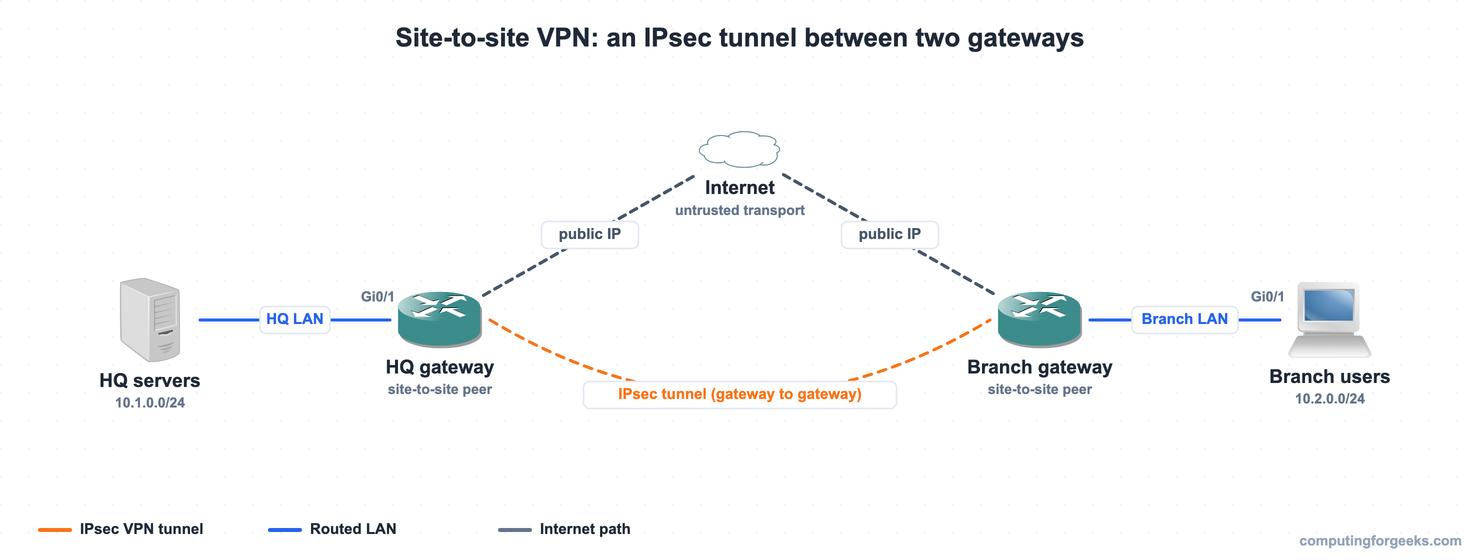
Only the two gateways terminate the tunnel. The HQ servers and the branch users send ordinary packets, and the encryption happens entirely at the edge, which is what makes a site-to-site VPN transparent to everything behind it.
Remote-access VPN: connecting a single user
A remote-access VPN is built for one device at a time. A laptop, phone, or tablet runs VPN client software, Cisco’s is the Secure Client (formerly AnyConnect), and the user starts the tunnel on demand when they need the corporate network. The tunnel terminates on a headend, usually a firewall such as a Cisco ASA or Firepower, or a router. Once connected, the device is given an address on the inside network and reaches internal resources as if it were plugged into the office.
Unlike a site-to-site tunnel, this one is not always on. It exists only while the user is connected, and there is a separate tunnel for every connected user. This is the work-from-home and travelling-staff case: someone on hotel Wi-Fi or a home connection reaching internal applications.
Two transports are common. Many remote-access VPNs run over SSL/TLS, the same protocol that secures websites, which slips through firewalls easily and can sometimes run from a browser with no installed client. Others use IPsec. Either way, the user is authenticated before the tunnel is allowed, frequently against a central server, which is exactly where RADIUS or TACACS+ comes in.
Here a single remote worker builds a tunnel to the headend, with the corporate LAN sitting behind it:
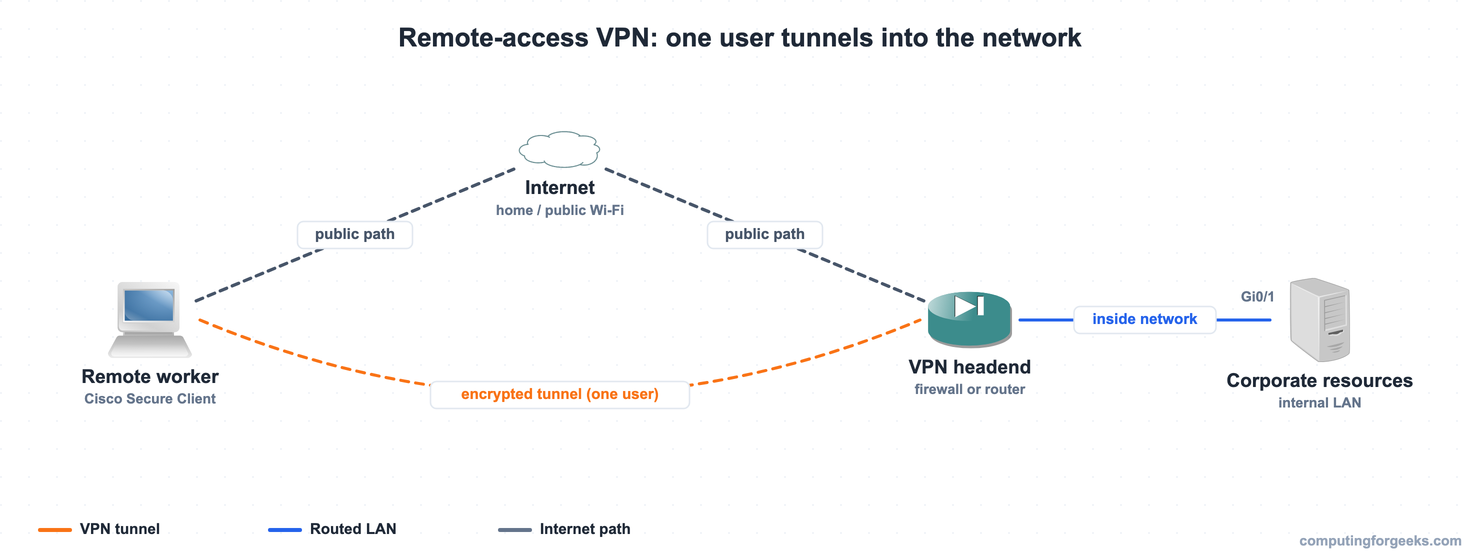
Every connected user gets their own tunnel to that headend. Add a hundred remote workers and you have a hundred tunnels, all terminating on the same device.
IPsec, the building blocks
Most VPN tunnels, every site-to-site one and many remote-access ones, are built with IPsec, a framework of protocols that secure IP traffic. At CCNA level the goal is to describe what its parts do, not configure them. Three names carry the weight.
| Component | What it does |
|---|---|
| IKE (Internet Key Exchange) | Authenticates the two peers and negotiates the keys and ciphers. It runs in two phases: phase 1 builds a secure management channel between the peers, and phase 2 builds the tunnel that actually protects the data. |
| ESP (Encapsulating Security Payload) | The workhorse. It encrypts the data for confidentiality and adds an integrity and authentication check, so a tampered or forged packet is detected and dropped. |
| AH (Authentication Header) | Provides integrity and authentication only, with no encryption. It is rarely used on its own because it leaves the data readable. |
For a VPN, IPsec usually runs in tunnel mode, which wraps the entire original packet inside a new one so the inner addresses are hidden in transit. The SSL/TLS option mentioned earlier is the main alternative for remote access, and it leans on certificates rather than the IKE exchange to set the tunnel up.
Remote access vs site-to-site VPN at a glance
The two are easy to keep straight once you line them up against each other:
| Aspect | Site-to-site VPN | Remote-access VPN |
|---|---|---|
| What connects | Two whole networks, gateway to gateway | One device to a network |
| Where the tunnel ends | A router or firewall at each site | The user’s device and a VPN headend |
| Client software | None, transparent to the hosts | Yes, a VPN client (or a browser for SSL) |
| When it is up | Always on, persistent | On demand, while the user is connected |
| Typical transport | IPsec | SSL/TLS or IPsec |
| Tunnels needed | One per pair of sites | One per connected user |
| Who it serves | Branch offices, data centers | Remote and travelling workers |
| Typical use | Link a branch LAN to headquarters | A laptop reaching internal apps from home |
Practice VPN concepts
Run the questions to lock in what each VPN type connects, the role of IPsec, IKE, and ESP, and which one fits a given scenario, then use the flashcards for quick recall.
Flip through the deck until the site-to-site versus remote-access split and the IPsec pieces are automatic, or load the Anki pack to review them anywhere:
Choosing between the two
The choice comes down to what you are connecting. To join two networks that should always be reachable to each other, a branch to headquarters or an office to a data center, you want a site-to-site VPN: a permanent tunnel between gateways, invisible to the hosts. To give individual people a way in from wherever they happen to be, you want a remote-access VPN: an on-demand tunnel per user, built by client software. Plenty of networks run both at once, a site-to-site mesh between offices and a remote-access headend for staff working outside them. Both rest on the same idea, a protected tunnel across an untrusted internet, and both sit in the security half of the CCNA 200-301 study roadmap, beside the access-layer defenses and authentication that surround them.