Tweencel for Aseprite
Tweencel - Advanced Tweening and Animation Control for Aseprite
Tweencel is an Aseprite extension inspired by Godot’s tweening system, bringing a familiar and powerful workflow into pixel art animation.
It lets you create smooth transitions between frames with advanced controls for precision. Adjusting position, rotation, scale, or even color (HSLA).
While tools like Tween Machine and others also explore tweening in Aseprite, Tweencel was built to capture the flexibility of Godot’s approach, making your animations more fluid and dynamic.
Key Features:
Easing Options
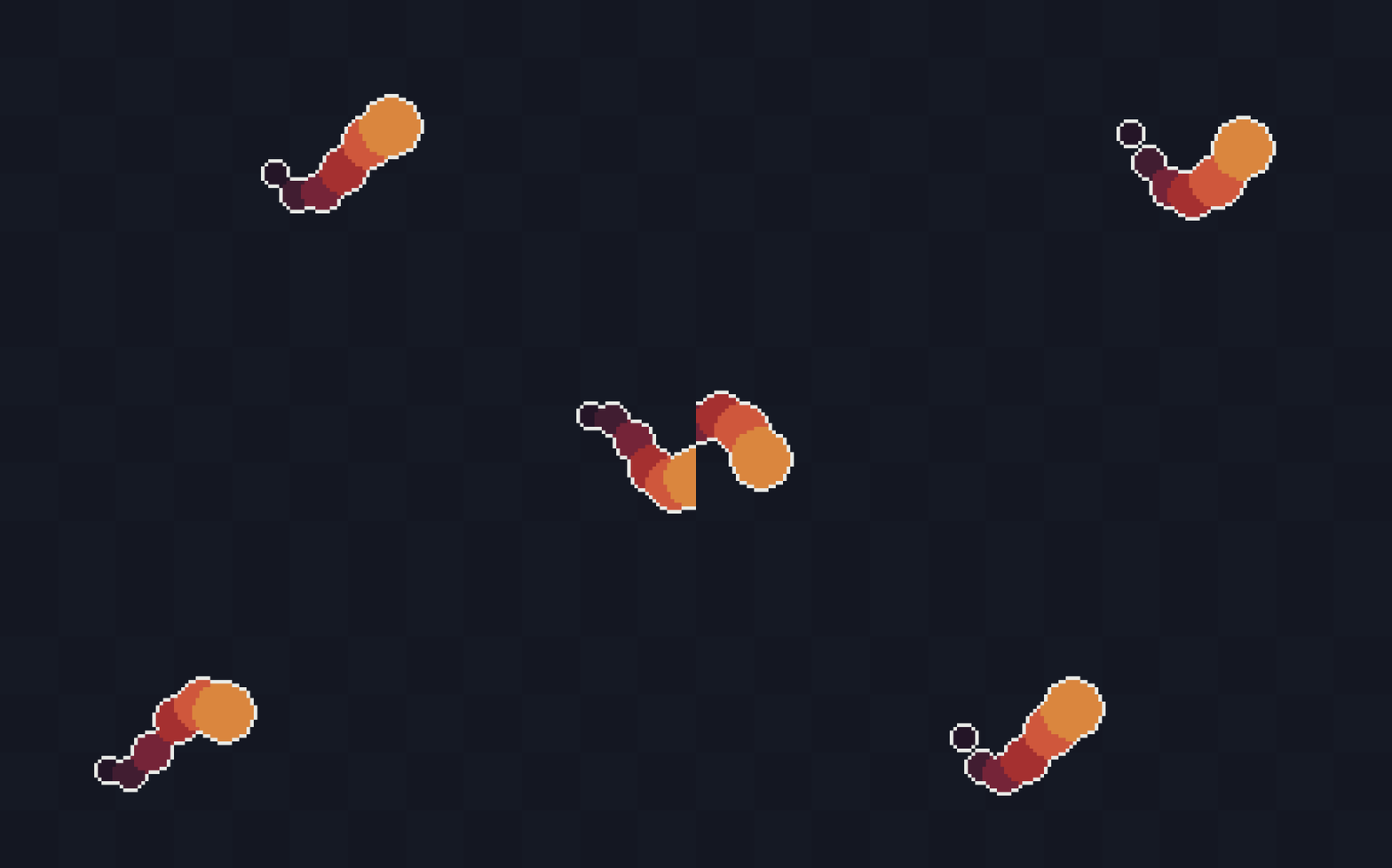
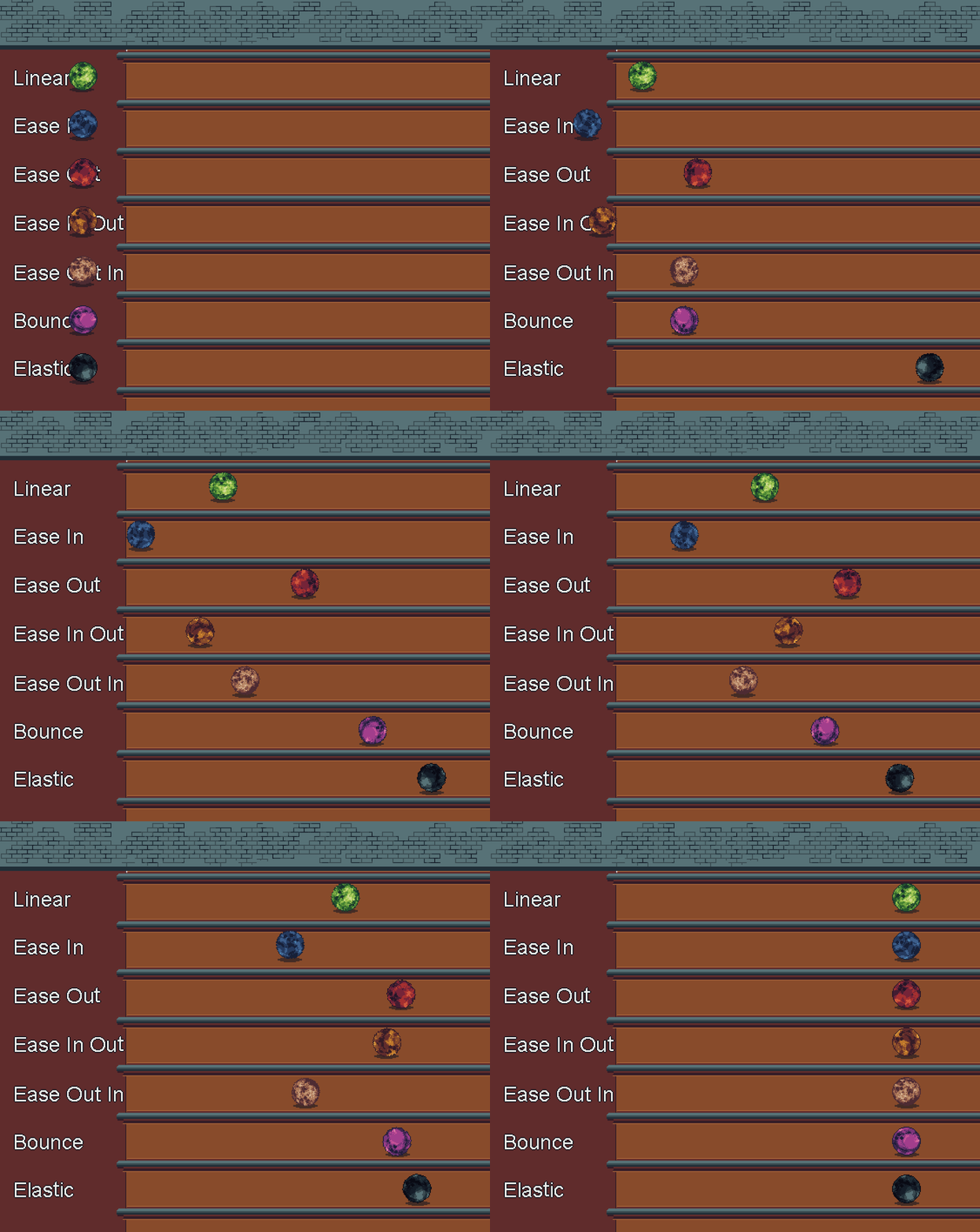
Choose from various easing functions like Linear, Ease In/Out, Bounce, Elastic, or custom swaying to control how the animations transition between frames.
Transform Tween
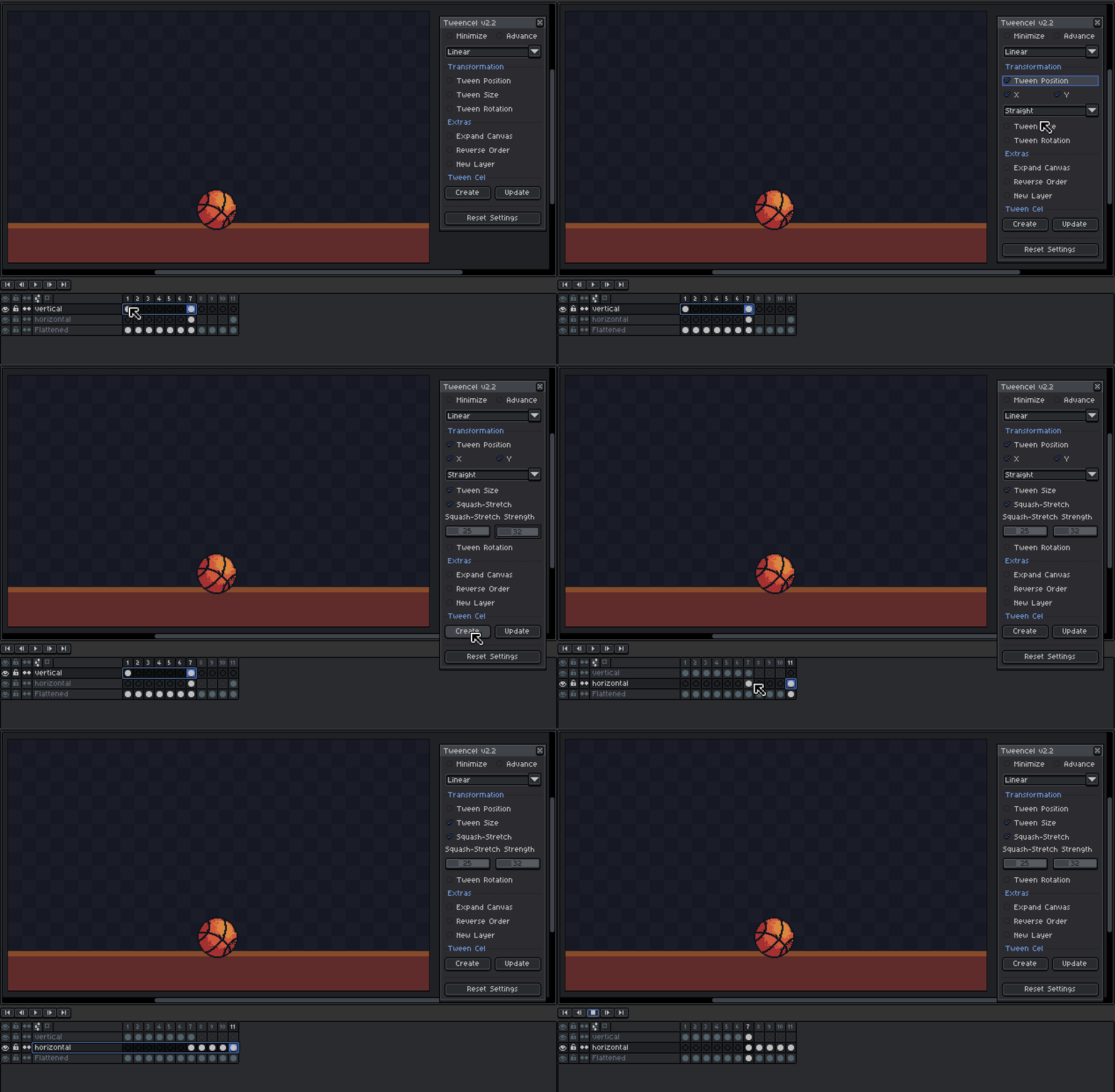
- Tween Position: Interpolates the position of your sprite between frames.
- Tween Size: Gradually adjusts the size of your sprite.
- Tween Rotation: Smoothly transitions the rotation of your sprite.
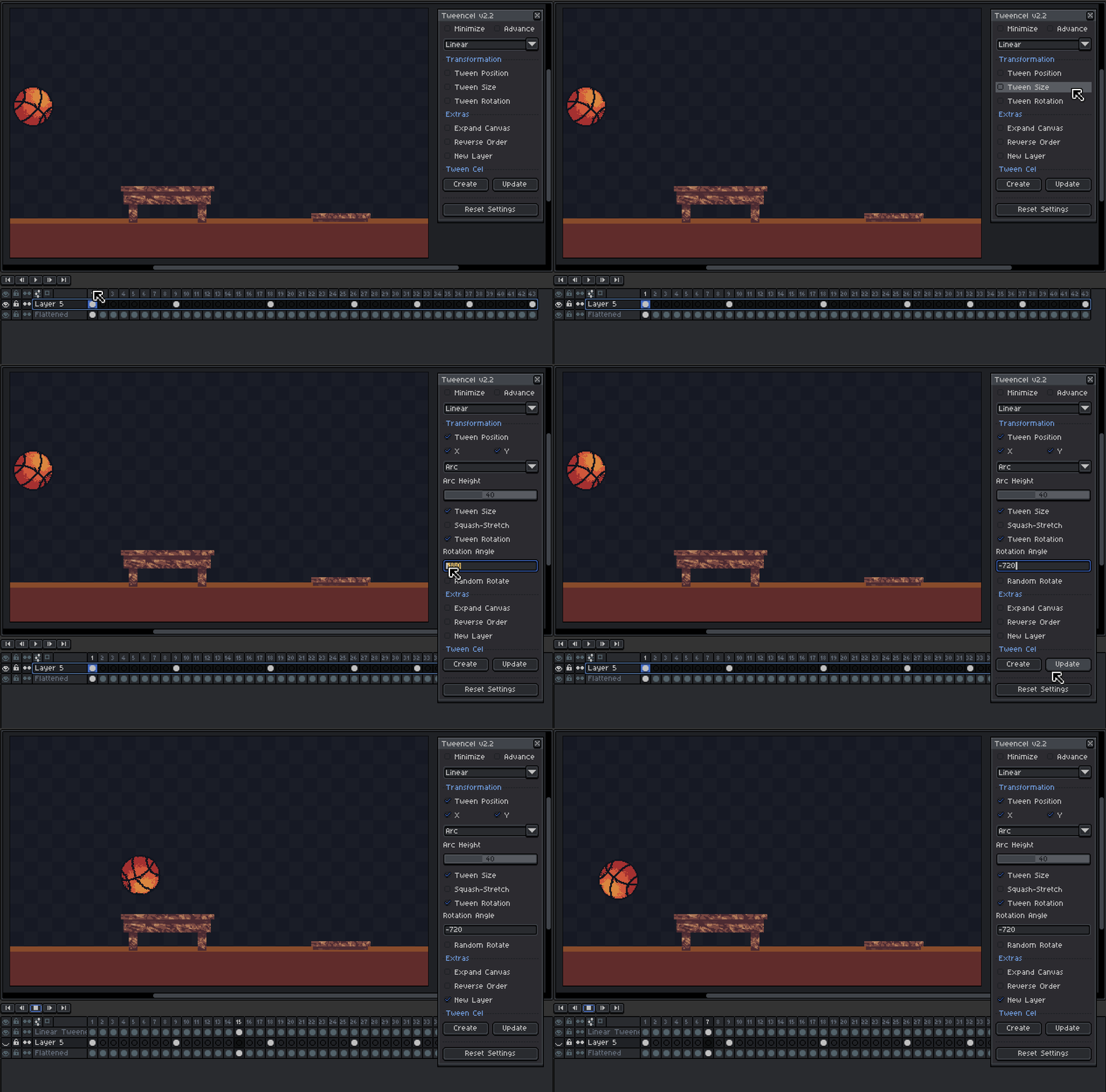
Note: Rotating big images takes few seconds to process, so just wait for it to load.
Motion Path Options
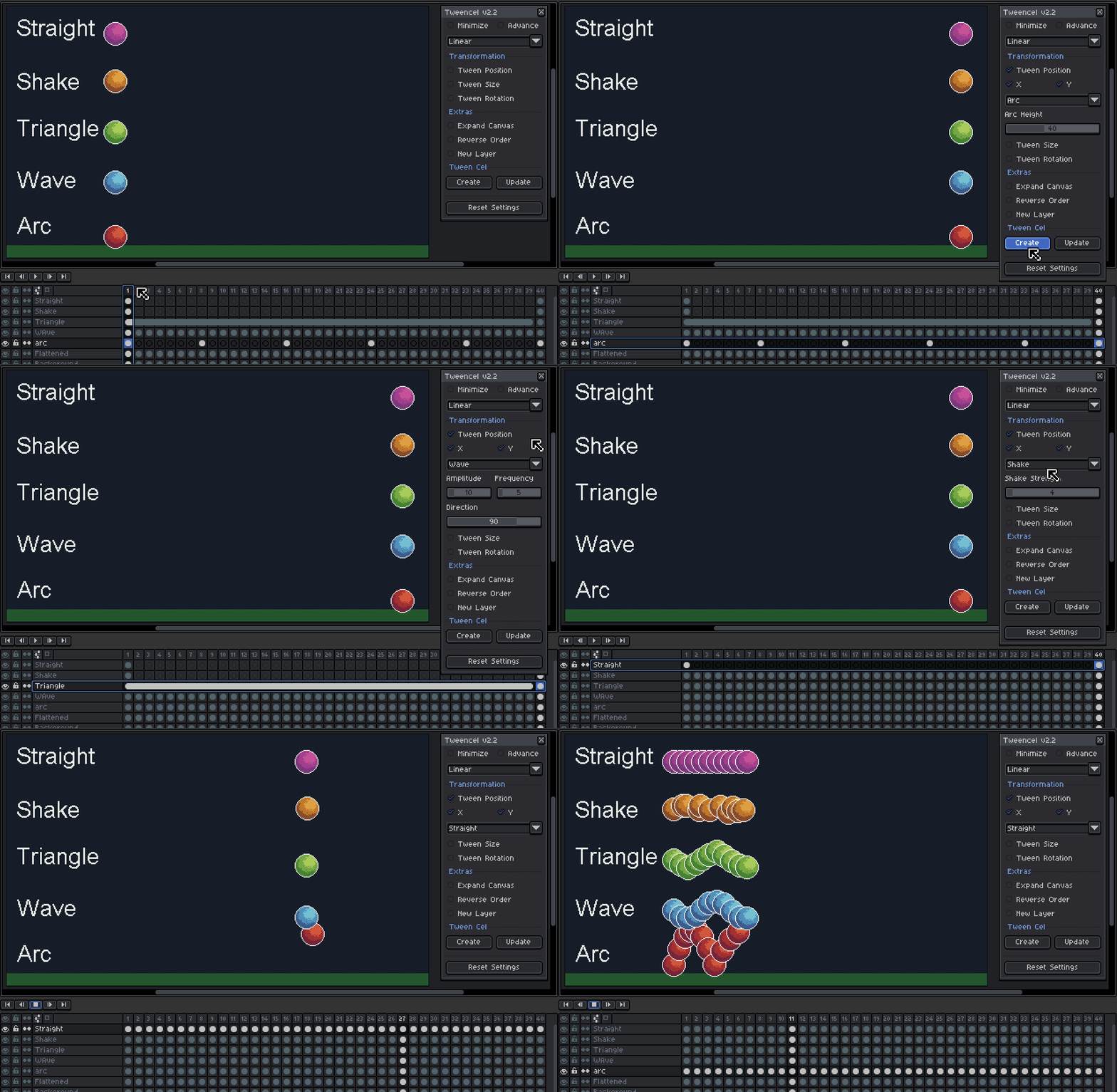
Choose how your sprite moves between frames, beyond just straight lines:
- Straight - Basic linear interpolation.
- Arc - Adds a jumping arc or bounce feel to the motion.
- Wave - Wavy sinusoidal movement in any direction.
- Triangle (Zigzag) - Sharp snappy zigzag patterns using triangle waves.
- Shake - Random jitter for camera shake or chaotic motion.
Squash & Stretch Support
Add cartoony energy and elasticity to your tweens. Enable squash and stretch to exaggerate motion dynamically, automatically adapting to the direction of movement:
- Horizontal motion - wider and flatter stretch
- Vertical motion - taller and thinner squash
This adds personality and physics-inspired realism to your sprite animations.
Color Tween
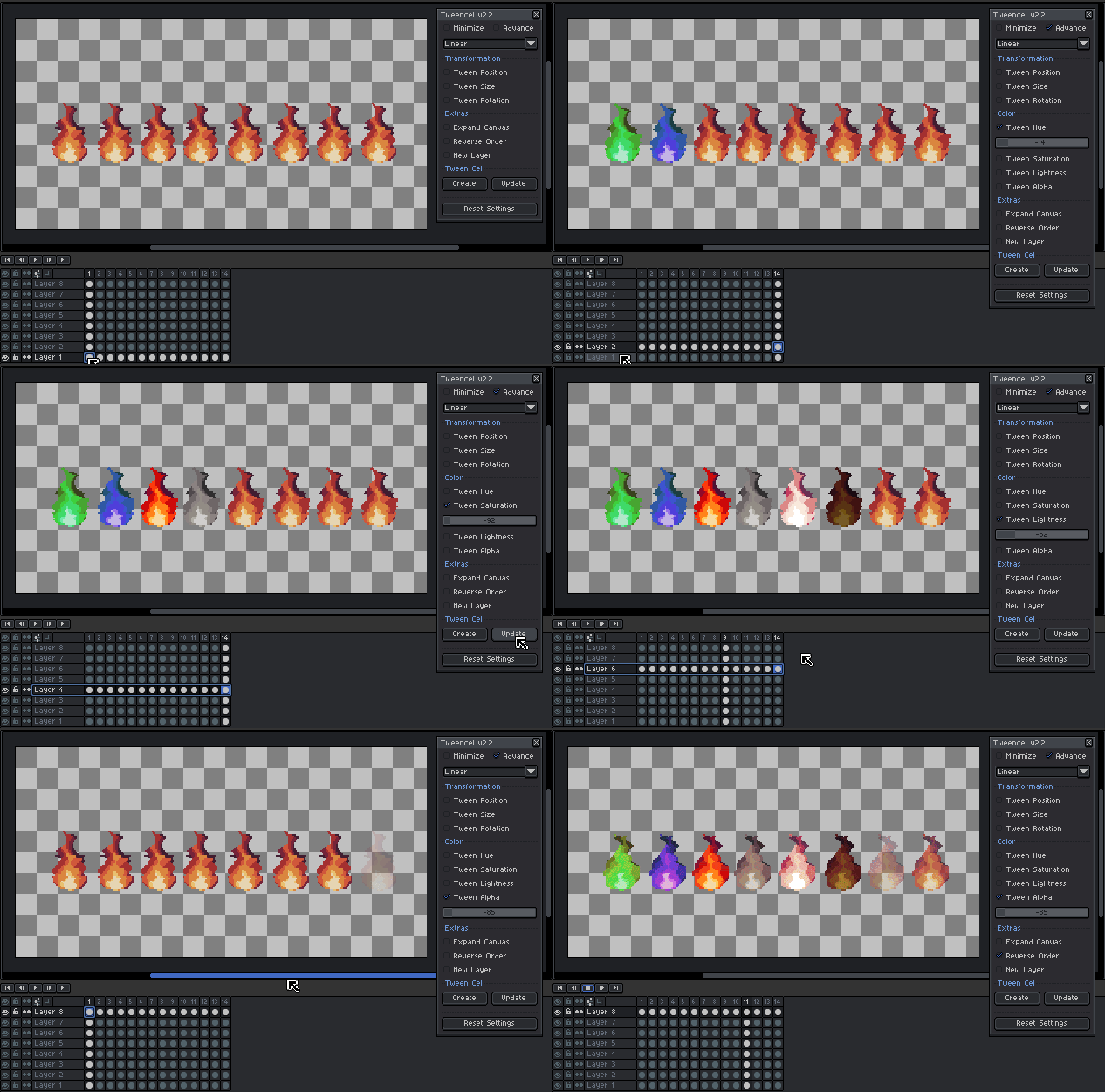
Use the slider to directly adjust the image, just like how you use Hue/Saturation in the default settings.
- Tween Hue: Adjusts the hue values of the sprite for color shifts.
- Tween Saturation: Gradually increases or decreases color intensity.
- Tween Lightness: Controls brightness transitions.
- Tween Alpha: Tweens the sprite's transparency.
Extra Settings
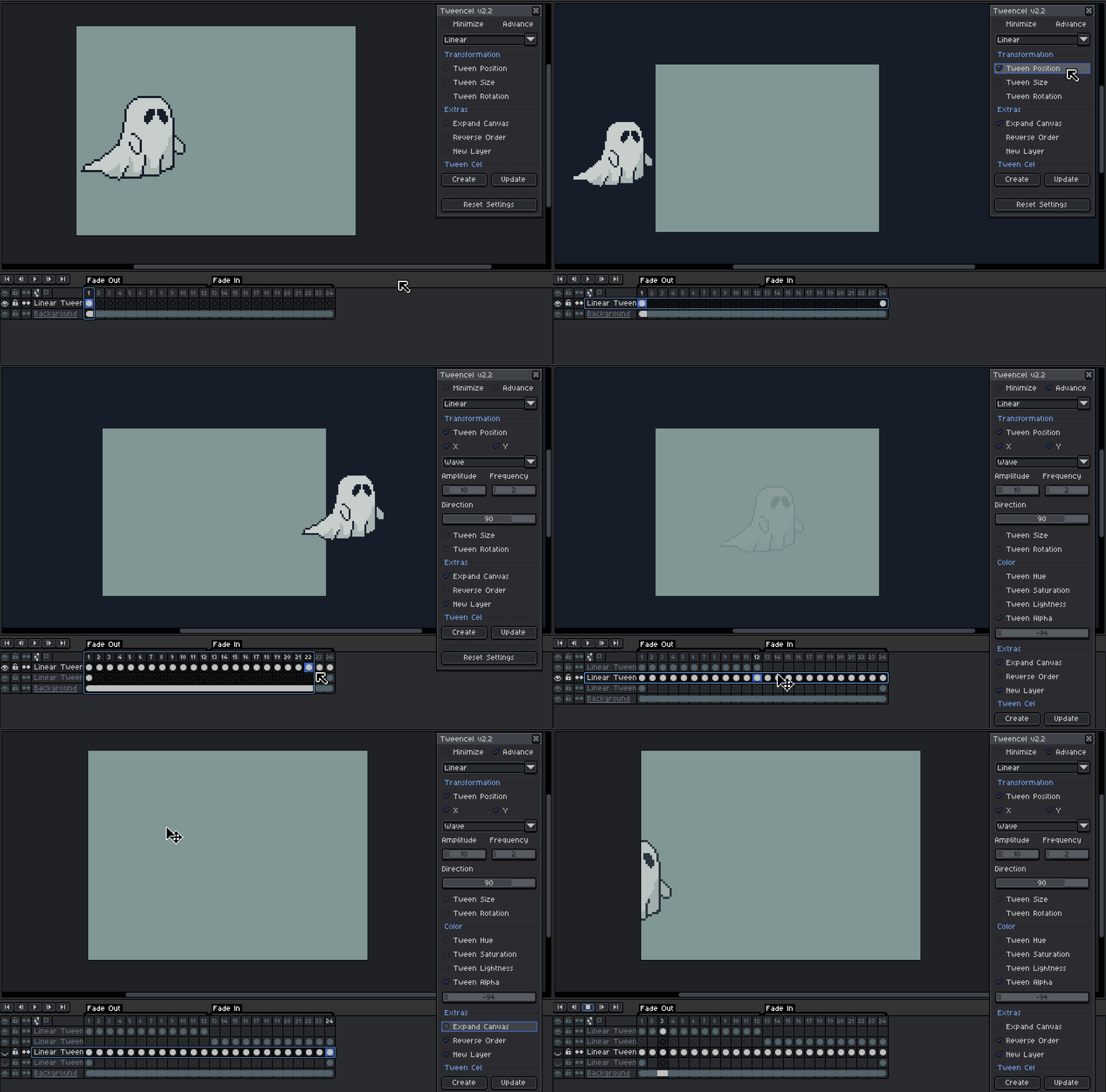
- Expand Canvas: Expand canvas to give you more space to do tweening off original canvas size
- Reverse Order: Reverses the tweening sequence, letting you create effects in reverse.
- New Layer: Places the generated tween cels in a new layer, keeping your original layer untouch.
Create and Update Tween Buttons
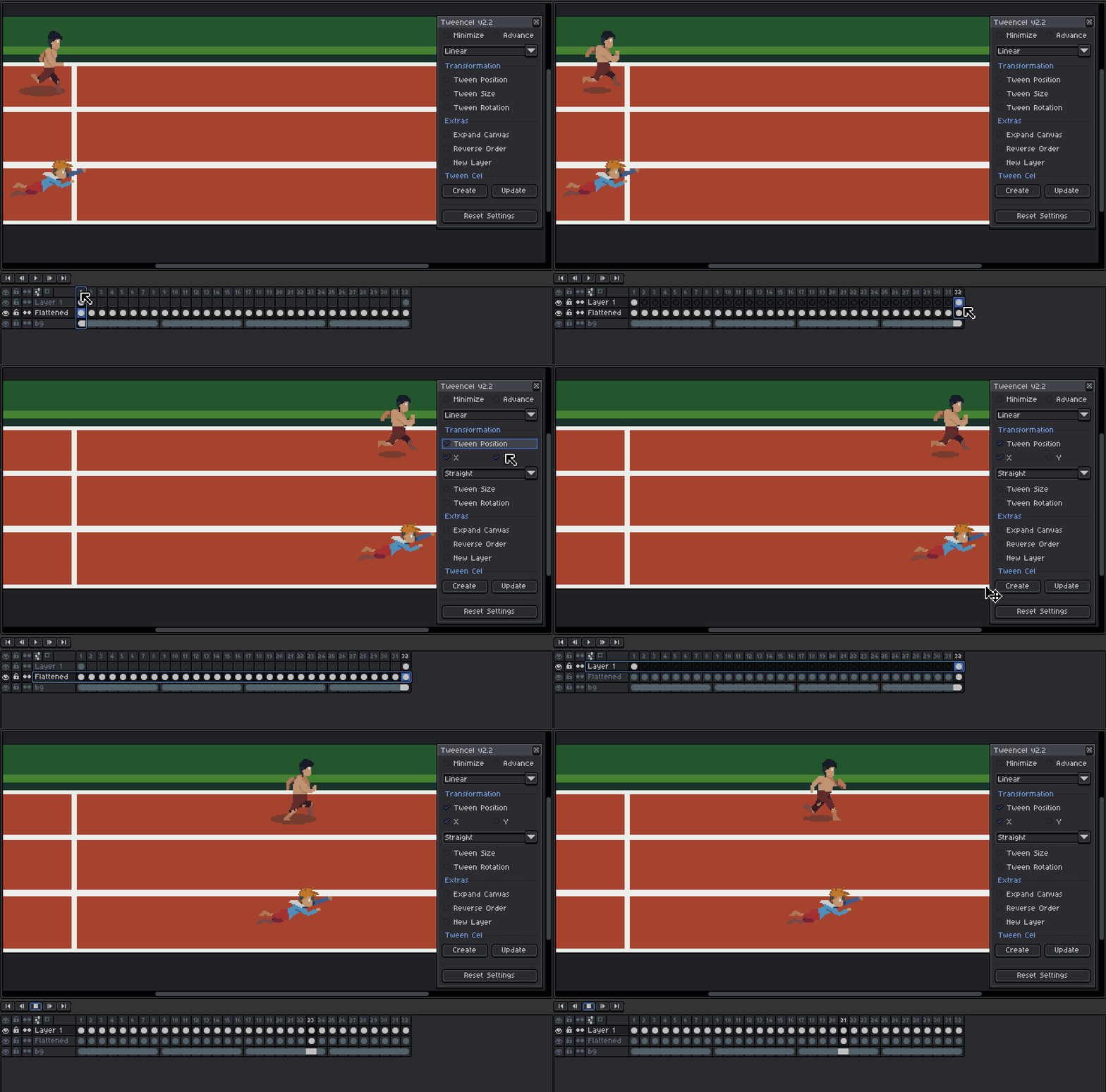
- Create Tween Cel: Generates intermediate frames between 2 selected cels based on your tweening settings.
- Update Tween Cel: Modifies existing cels or tweens or updates their properties without starting over.
How to Use:
- Open Tweencel - Navigate to Edit>Tweencel in the top menu
- Choose from one of the easing options
- Select Your Cels:
- You can select a specific range of cels.
- Alternatively, select an entire layer to include all its cels.
- Prepare the First and Last Frames:
- Ensure there is an image in both the first and last frames of your selection.
- These two cels will act as the start and end points for your animation.
- Apply Tween:
- Create Tween Cel Button:
Tweencel will automatically generate the in-between frames based on your selected tween option. - Update Tween Cel Button:
Allows you to modify an existing range of tweened cels without starting from scratch. This is perfect for making adjustments to your animation after it has been created.
- Create Tween Cel Button:
Feedback & Support
Please do me a favor and leave a rating/follow if you find my projects interesting and want to see more content like this. Thanks a lot!

See Also
Art Assets
Tweencel License Agreement
By downloading or using the Tweencel extension, you agree to the following terms:
- Personal and Professional Use: You may use Tweencel freely for personal, professional, and commercial projects.
- Restrictions:
- You may not re-sell, copy, transfer, or distribute this extension, in whole or in part, without explicit written permission from the creator.
- You may not modify and re-distribute the extension or claim ownership of the extension or any of its parts.
- Liability: The creator of Tweencel is not liable for any damages or data loss resulting from the use of this extension. Use it at your own risk. By using the script included with this file, you understand that you are using it AS IS with no guarantees. Although the extension is not intended to cause harm, no warranty is provided. Please remember to save your work regularly.
- Attribution: If you share content created using Tweencel, attribution is appreciated but not required.
- Modifications: You are free to modify the extension for personal use only. Sharing or distributing modified versions is prohibited.
- License Revisions: Devkidd reserves the right to revise this license as needed. Revisions apply to new downloads or updates only and do not retroactively alter terms for previous users.
Simple Usage License / Rights © Devkidd 2024-2025. All Rights Reserved.
Purchase
In order to download this tool you must purchase it at or above the minimum price of $3.75 USD. You will get access to the following files:
Development log
- Update Tweencel v2.2.2 - Fix Color Tweening for Aseprite v1.3.15Dec 08, 2025
- Update Tweencel v2.2.1 - Fix Rotation TweeningJul 12, 2025
- Update Tweencel v2.2 - Bug Fixes & ImprovementsJul 10, 2025
- Update Tweencel v2.1 - Minor Bug FixJan 16, 2025
- Update Tweencel v2.0 - ImprovementJan 10, 2025


Comments
Log in with itch.io to leave a comment.
Okay, so I am trying it for the first time. Is it normal behavior that when I click "Create Twincel", it doesn’t do anything? But when I click Update after that, it functions properly as intended. In the instructions, you said that for the first time you only have to click "Create Twincels" and whenever you update it, you click Update.
Hi khatri3d ! That’s actually not the expected behavior. The Create and Update buttons have different purposes:
So ideally, Create should already work on the first click.
I’ve tested it on my end and it’s working correctly (Aseprite v1.3.16.1 with Tweencel v2.2.2), so this might be a version issue or something specific in your setup.
If you can, could you share a quick screenshot or short video of what you’re doing? That would really help me understand what’s going wrong and give you a proper fix.
Okay, so I have uploaded a YouTube video. The only thing which is different is the Aseprite version. I am using the latest version which Steam gave me. You are using version v1.3.16.1 . As you can see in this demonstration, after clicking Create, it doesn’t do anything. But then I repeat the selection with Update. Then it starts working.
Ahh I see what’s happening now, thanks for the video, that helped a lot!
The behavior you’re getting is actually expected based on your setup. The Create button only works when you have exactly 2 cels selected with no existing cels in between them. Its purpose is to generate new in-between frames from those two endpoints.
In your case, you’re selecting a range that already has cels in between, so Create won’t do anything there. That’s why Update works instead, because it’s designed to modify an already existing generated range.
So the correct workflow is:
I might improve this behavior or add a warning in a future update.
Ah right! Thank you for clearing up the confusion. Very fast reply! I also have a suggestion. On your YouTube channel, you should upload a beginner-friendly quick 5–10 minute tutorial. I am a beginner. The first place I looked was on YouTube, but I couldn’t find any basic demonstration video.
Can you adjust the speed of animation? For example I used tween position and I want to make it either slower or faster without changing animation fps
Hi Golios, yes, that’s possible without changing the animation FPS 😊
The speed of the tween depends on how many frames you have between the two cels.
So you can control the speed by adjusting the number of frames used for the tween.
I’ve attached a quick demo GIF to show how it works
Doesn't seem to work at all with animated sprites.
Hey ddcd, thanks for trying it out!
It should work with animated sprites 😊 Just make sure to click the ‘Update’ button when working with animations.
Also check that:
I’m currently using aseprite version 1.3.16.1 and it’s working on my end.
To better understand the issue, could you share what aseprite version you’re using and maybe a screenshot of your setup? I’ll be happy to help.
I’ve also attached a quick demo GIF so you can see it working.
Love this for developing my game, is there a way to tween multiple layers at the same time? I have my sprite parts in groups and I have to perform the action over and over again for each of the 19 layers.
Hi m0bywik, glad you’re finding it useful for your game! 😊 I’ll work on adding support for multiple layers in the next update. Thanks so much!
Of course!! You are truly doing the lords work, keep it up!
Do you have plan to make extension which is allow export to mp4?
hi Azvorx4, no plan at the moment.
Testing this with a simple sliding door. On frame 1 the door is closed. On frame 12, the door is offset 45 pixels to the right. Frames 2 through 11 are empty. I select the 12 frames, and create a straight tween. The result is that it creates frames 2 through 11 in which the image moves 2 pixels per frame, which is obviously not enough. I'm not sure what I'm missing.
Hi werzaque, thanks for the detailed explanation. The setup you described is actually correct. It should read the cel in Frame 1, read the cel in Frame 12 (offset 45px), and generate proper in-between frames that smoothly interpolate the movement.
Since I’m currently away from my computer, I can’t test this exact case right now, but based on recent reports from other users, this behavior may be related to Aseprite version changes.
Tweencel was developed and tested on Aseprite v1.3.14-beta1, and some changes introduced in v1.3.15 may affect how cel positions are read by scripts. If you’re on 1.3.15 or higher, this could explain why the interpolation is incorrect.
When I get back to my machine, I’ll test your exact scenario and update Tweencel if needed.
In the meantime, could you let me know which version of Aseprite you’re using? That will help me confirm whether it’s a version-related issue.
Thanks again for reporting this, your feedback is a huge help.
Hi Werzaque, I tested your exact setup on my end using both Aseprite v1.3.15.5 and Aseprite v1.3.14-beta1 to confirm, and Tweencel is generating the correct in-between frames.
Here’s the setup I used:
The tween interpolated the movement correctly from Frame 1 to Frame 12.
I also recorded a GIF demo to show how it looks on my end. https://postimg.cc/3ycWCZG5
Since things are working correctly here, your setup might be behaving differently for a reason I can’t see yet.
Could you share a short GIF of how you’re doing it on your side? And also let me know which Aseprite version you’re using?
Seeing your exact steps will help me understand what’s causing the different result.
Thanks again for reporting this, I appreciate your help in improving the tool!
Thanks for the reply. Hmmm... can't see to view your GIF. But in any case, I got it to work when I kept the selection marquee turned on (instead of pressing Esc to deselect after copying it to frame 12) and in that case it did work.
EDIT: I'm trying again today and it works now exactly as advertised and I can't seem to reproduce my earlier problem... Will report again if I bump into it, but maybe I didn't reboot Aseprite after loading your script. Not sure if that makes sense but...
Hi, I have a problem with all the color tweens ( Hue,Saturation etc), it doesn't seem to create the inbetweens, here's an example I recorded : https://postimg.cc/RJRcYybY
Hi Chroniker99, thanks a lot for sharing the report and the video! 🙏
This might be related to how Aseprite handles color data between frames.
I’ve tested Tweencel on Aseprite v1.3.14-beta1, so knowing your version will help me check if it’s a compatibility issue. Could you let me know which version you’re using? I’ll try to reproduce it on my end and see what’s causing it.
My version is the v2.2.1, I tried with the V2.2 and V2.1 they had the same issue
Sorry, i mean what version of Aseprite you're using.
My Aesprite version is v1.3.15.4-X64
I just installed the latest Aseprite update (v1.3.15.4) and was able to reproduce the issue , it seems there’s a compatibility problem with the color tweening. Rest assured, I’ll release an update soon to fix it. 👍
Hi Chroniker99, thank you for your patience and understanding. I wanted to let you know that I’ve created and uploaded a new patch update for Tweencel (v2.2.2) to address the color tweening issue on the latest version of Aseprite (v1.3.15).
You can now download the updated version, and it should work smoothly with the new Aseprite release.
Thanks again for your support!
alpha tweening not working. it doesnt create the inbetweens and when tweaking the bar its laggish and stuck. also if you crank it up or down it deforms the layer
Hi Nohazure, thanks for the feedback! 🙏
The lag or “stuck” feeling when adjusting the alpha bar happens because the slider directly updates and applies the image alpha in real time. I recommend clicking along the slider instead of dragging it to quickly jump to your desired value.
Also, unchecking “Tween Alpha” will undo the alpha changes on the currently selected cel image.
When you select an entire layer, the alpha update is applied to all cels in that layer.
So if you only want to fade a specific cel, make sure to select that cel only before changing its alpha.
🔹 To fade out:
🔹 To fade in:
edit: added GIF link for the demo. seems like gif no longer works in the comments
Hi Nohazure, I just installed the latest Aseprite update (v1.3.15.4) today and was able to reproduce the issue, it seems there’s a compatibility problem with the color tweening. Rest assured, I’ll release an update soon to fix it. 👍
Hey! Thank you for the response.
I couldnt answer before, but thanks a lot for the notice!
I assumed it was something related with recent updates.
Thank u!
Hi Nohazure, thank you for your patience and understanding. I wanted to let you know that I’ve created and uploaded a new patch update for Tweencel (v2.2.2) to address the color tweening issue on the latest version of Aseprite (v1.3.15).
You can now download the updated version, and it should work smoothly with the new Aseprite release.
Thanks again for your support!
Does not work as intended
I used it as described to try and make an ibetween for my Tween animation and it generated images that were just roatated and deformed jumping out of the canvas. Tried lowering the Squish? Still did it. Gave it more frames to see if that was issue; nope it just multiplied its broken frame
Hi kumniver, thanks for trying it out and for sharing your experience 🙏 I understand how frustrating it can feel when the result doesn’t match the examples.
Could you share a short video or GIF of what’s happening on your end? That way I can properly assess the situation and see what might be causing it.
Hey
is there anyway you can put an HSV bar option too?.. RIght now we only have the HSL option
Hey! Thanks for the suggestion. I’ll look into adding an HSV bar option alongside HSL in a future update.
Thank you.
Great work on the tools btw…
does someone have a alt download link? itch isnt letting me download it
Hi Erans, were you able to download it? Please try again or maybe use a different browser. Thank you.