
【lwIP】Tips #2 | How to Decrypt TLS 1.3 Traffic with Wireshark | mbedTLS 3.x/4.x

Japanese version available here: 日本語版
This series covers real-world bugs, vulnerabilities, debugging techniques, and development know-how for lwIP — the TCP/IP stack widely used in embedded systems.
▶ English article index: lwIP Troubleshooting Notes
■ When This Helps
You captured the traffic in Wireshark, but the contents are invisible. You switched to TLS 1.3, and now the key log that used to work no longer decrypts anything. Sound familiar?
This article helps in situations like these:
A TLS 1.3 connection shows only `Application Data` in Wireshark, and you can't see the contents
You want to investigate the cause of MQTT over TLS 1.3 communication failures
A TLS 1.3 handshake fails partway through, but you can't tell which message caused it
You expect a certificate error to disconnect the session, but you no longer see a plaintext Alert (reason code) like you did with TLS 1.2
You realize the TLS 1.2 `CLIENT_RANDOM` format can't decrypt TLS 1.3 traffic
You don't know how to output a key log from mbedTLS 3.x or 4.x
You want to speed up development and debugging of TLS 1.3 applications
This article explains how to decrypt TLS 1.3 traffic with Wireshark in an lwIP + mbedTLS 3.x/4.x environment.
Note: TLS 1.2 uses different secret types and a different export procedure than TLS 1.3, and is covered in a separate article (Tips #1). wolfSSL and OpenSSL are out of scope for this article.
■ Target Environment
mbedTLS version: 3.1.x and later / 4.x
lwIP version: 2.x
TLS version: 1.3
This article mainly targets mbedTLS 3.1.x–3.6.x, which are the versions most commonly used in current embedded SDKs. The same code works as-is for mbedTLS 4.0.x.
■ What You'll Learn
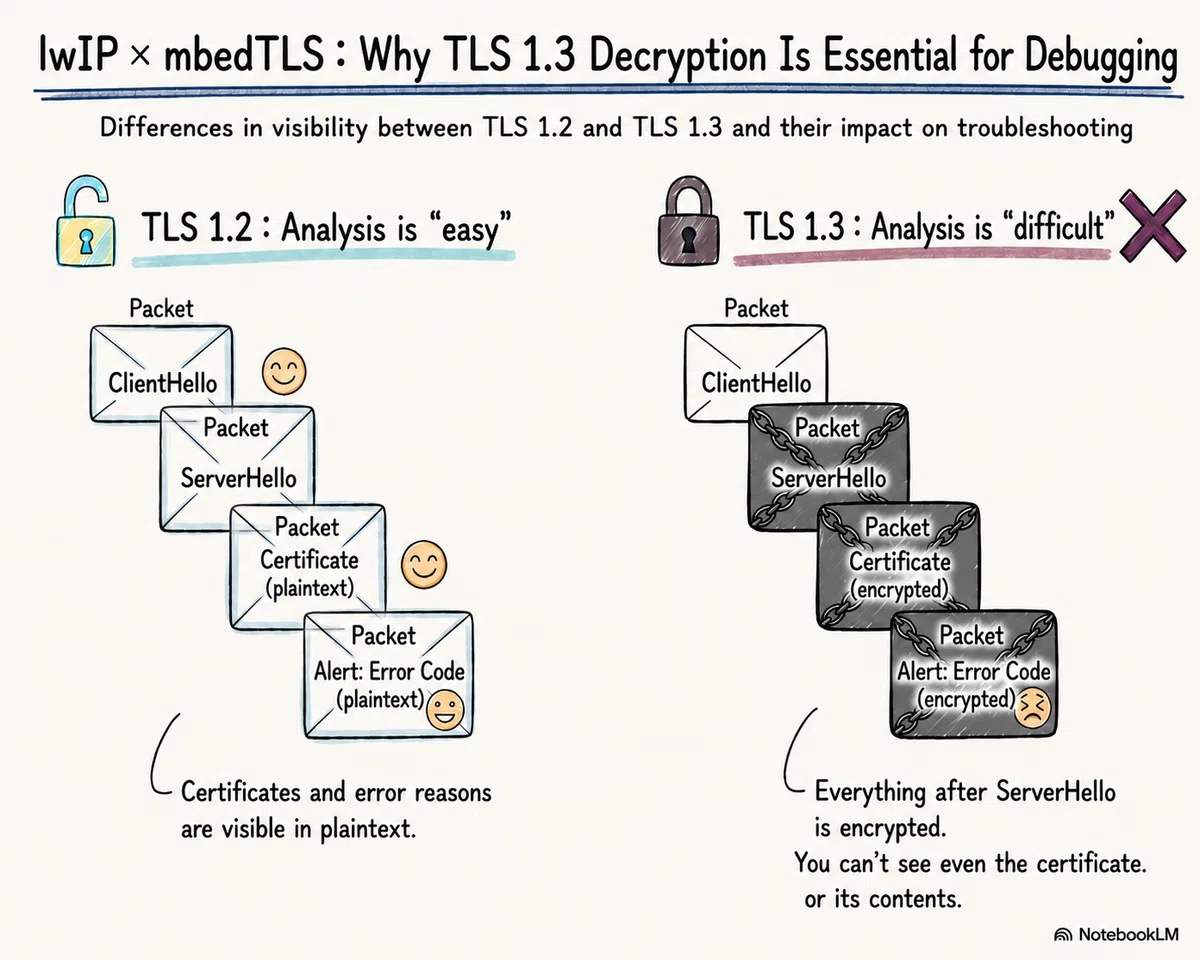
Which parts of the TLS 1.3 handshake are encrypted compared to TLS 1.2, and what that means for what you can (and can't) see in Wireshark — and why a decryption setup matters even more than before
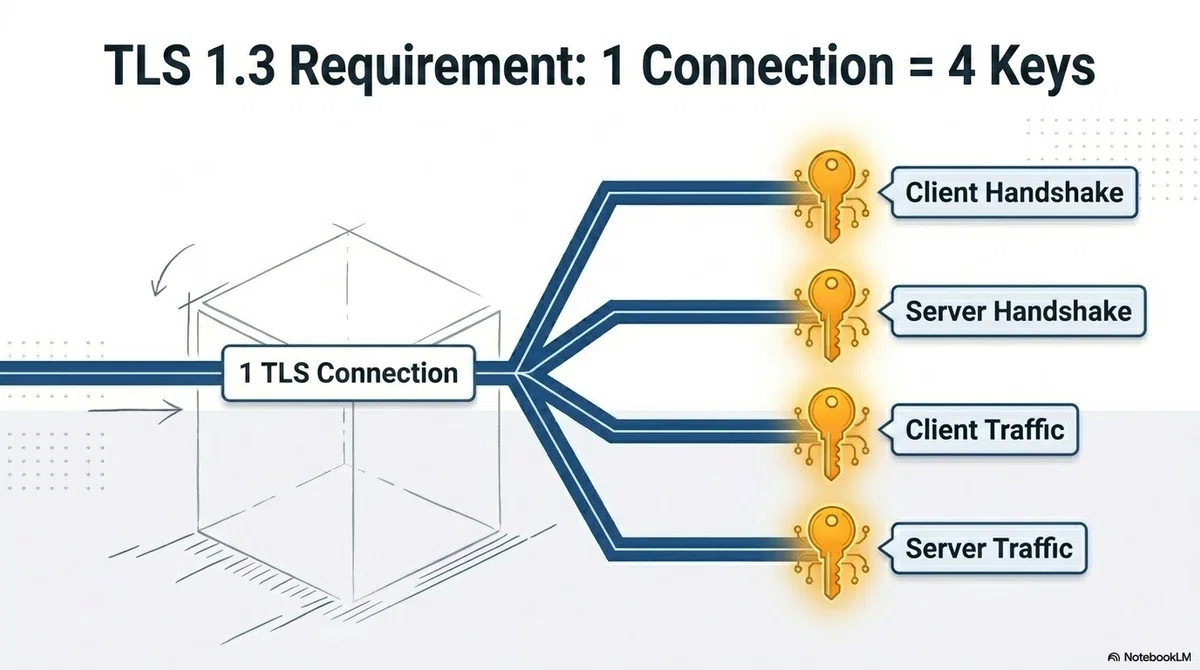
Why the TLS 1.3 secret structure is fundamentally different from TLS 1.2, and why the NSS Key Log format needs 4 lines per connection
How to implement a callback that outputs TLS 1.3 key logs on mbedTLS 3.1.x–3.6.x and 4.0.x
How to verify decryption in Wireshark, and a troubleshooting checklist for when it doesn't work
■ TLS 1.3 Encrypts the Handshake Itself
With TLS 1.2, most of the handshake was sent in plaintext. Just by capturing with Wireshark, without any decryption, you could read things like:
TLSv1.2 Record Layer: Handshake Protocol: Server Hello
TLSv1.2 Record Layer: Handshake Protocol: Certificate      ← certificate contents visible in plaintext
TLSv1.2 Record Layer: Handshake Protocol: Server Key Exchange
TLSv1.2 Record Layer: Alert (Level: Fatal, Description: Unknown CA)  ← reason code visible in plaintext on verification failure
The server certificate's contents (issuer, validity period, SAN)
The negotiated cipher suite and key-exchange parameters
The reason code of an Alert when the handshake fails (`unknown_ca`, `bad_certificate`, etc.)
In other words, with TLS 1.2 you could often tell "where and why the handshake failed" without decryption at all. A key log was mainly needed when you wanted to see the contents of the application data.
TLS 1.3 breaks this assumption. Per RFC 8446, every handshake message after the ServerHello is encrypted. Capturing the same connection now looks like this:
TLSv1.3 Record Layer: Handshake Protocol: Client Hello     ← visible in plaintext up to here
TLSv1.3 Record Layer: Handshake Protocol: Server Hello     ← and here
TLSv1.3 Record Layer: Change Cipher Spec                   ← a dummy record kept for backward compatibility
TLSv1.3 Record Layer: Application Data
TLSv1.3 Record Layer: Application Data
What's shown as `Application Data` here is actually the encrypted EncryptedExtensions, Certificate, CertificateVerify, and Finished messages. Even the server certificate is no longer visible in plaintext.
Even more importantly, Alerts on handshake failures — such as certificate validation errors — are also encrypted. A client only sends an Alert after the handshake keys have been established, so unlike TLS 1.2, you can no longer read a plaintext "Description: Unknown CA". All you see is an unidentifiable encrypted record.
To summarize how the role of key-log-based decryption changes:
TLS 1.2: a way to see the contents of application data
TLS 1.3: that, plus an essential tool for troubleshooting the handshake itself — certificates, extensions, failure reasons, and more
"The handshake fails partway through, but I can't tell why from the packets" — this situation has become much more common with the move to TLS 1.3, and having a decryption setup matters even more than it did with TLS 1.2.
■ How TLS 1.3 Decryption Works in Wireshark
Right after capturing, TLS 1.3 traffic looks like this in Wireshark:
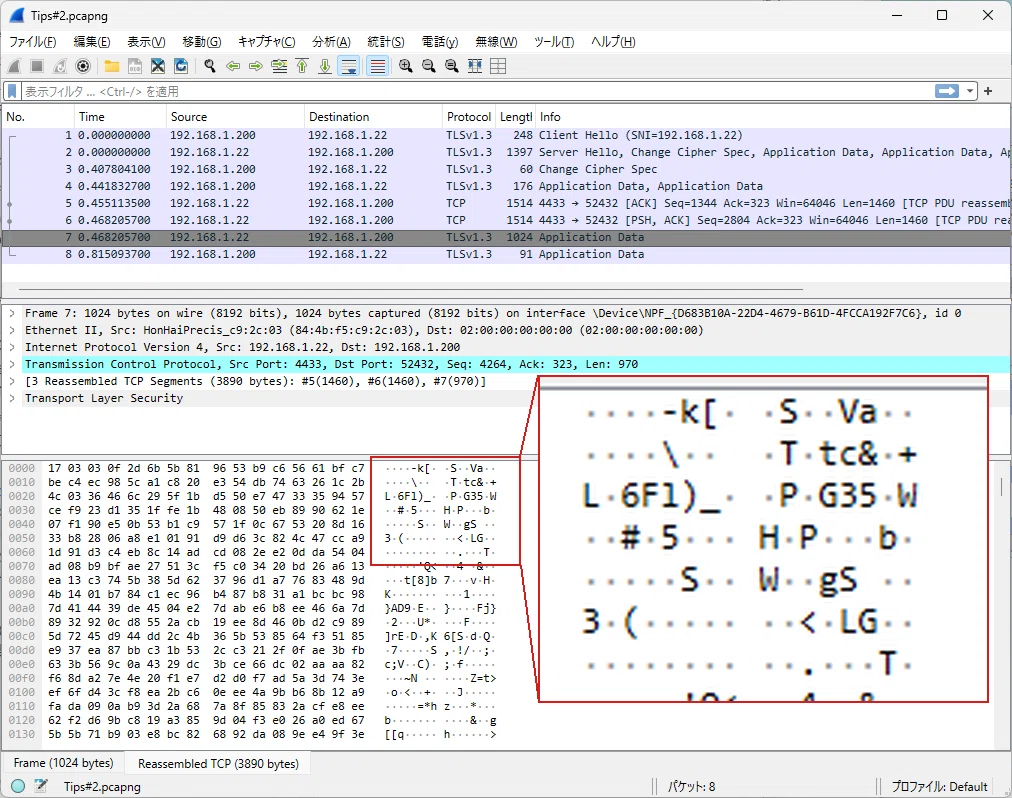
As described above, not just the application data but most of the handshake is now this "unreadable encrypted record" too.
Once you configure Wireshark with a key log file in NSS Key Log format, the contents of the encrypted traffic — including the handshake messages — become readable as plaintext.
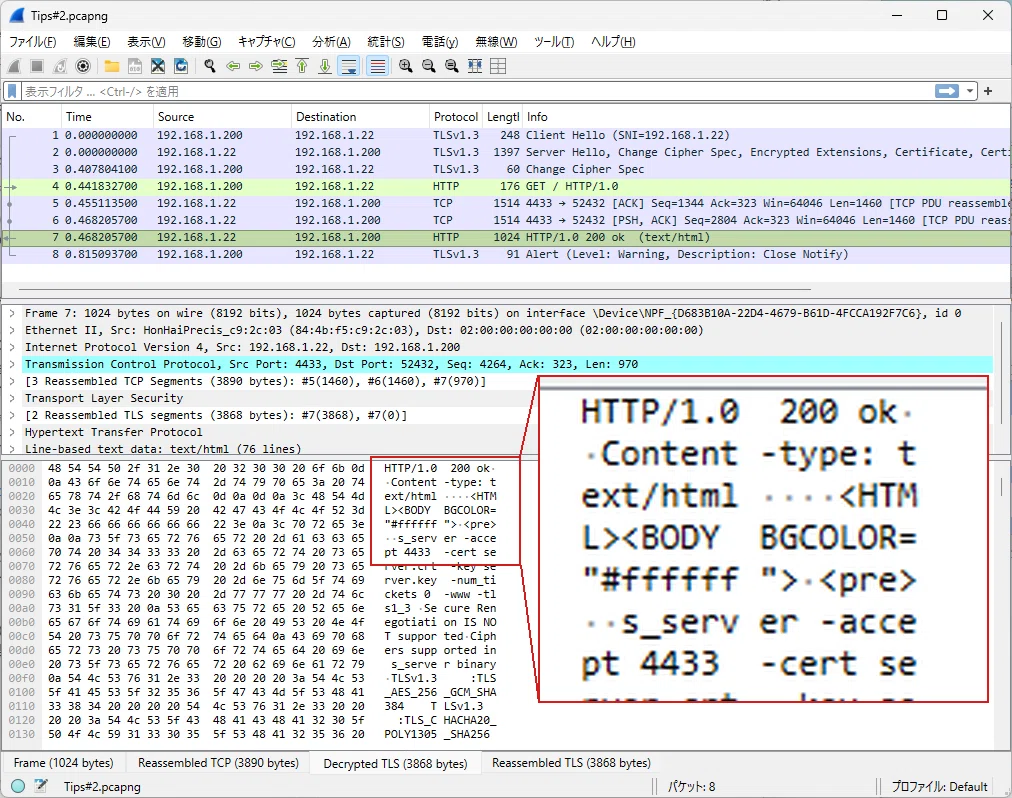
For TLS 1.2, the key log is one line per connection:
CLIENT_RANDOM <ClientRandom 32-byte hex> <MasterSecret 48-byte hex>For TLS 1.3, the key derivation scheme is fundamentally different, and a separate secret is generated for each phase. Wireshark needs at least 4 lines of key log to decrypt:
CLIENT_HANDSHAKE_TRAFFIC_SECRET <ClientRandom 32-byte hex> <secret, length depends on hash>
SERVER_HANDSHAKE_TRAFFIC_SECRET <ClientRandom 32-byte hex> <secret, length depends on hash>
CLIENT_TRAFFIC_SECRET_0         <ClientRandom 32-byte hex> <secret, length depends on hash>
SERVER_TRAFFIC_SECRET_0         <ClientRandom 32-byte hex> <secret, length depends on hash>
The length of each secret depends on the hash function of the negotiated cipher suite: 32 bytes for SHA-256-based suites such as TLS_AES_128_GCM_SHA256, or 48 bytes for SHA-384-based suites such as TLS_AES_256_GCM_SHA384.
The TLS 1.2 `CLIENT_RANDOM` format alone cannot decrypt TLS 1.3 traffic.
■ Easy with PC Browsers or curl
Decrypting TLS 1.3 traffic in Wireshark uses the same standard approach as TLS 1.2: the `SSLKEYLOGFILE` environment variable.
If you're using Chrome or Firefox on Windows or Linux, simply set the `SSLKEYLOGFILE` environment variable before launching the browser, and the key log is written to that file automatically.
Windows example (Command Prompt):
set SSLKEYLOGFILE=C:\keylog.txt
start chrome
Linux example:
export SSLKEYLOGFILE=/tmp/keylog.txt
google-chrome &
Then open Wireshark's preferences (Edit → Preferences → Protocols → TLS) and set `(Pre)-Master-Secret log filename` to that file. Packets that previously showed as `Application Data` will now be decrypted.
Chrome and Firefox have `SSLKEYLOGFILE` detection built into their TLS libraries, so simply setting the environment variable is enough for them to write the key log automatically.
curl (OpenSSL build) supports the same environment variable.
Windows example (Command Prompt):
set SSLKEYLOGFILE=C:\keylog.txt
curl https://example.com
⚠️ Note: The curl bundled with Windows may not work
The `curl.exe` shipped with Windows 10/11 is built against Schannel (Windows' own TLS backend), not OpenSSL. Schannel does not support `SSLKEYLOGFILE`, so the key log will not be written even if the variable is set.
If it doesn't work, download the OpenSSL build of curl from the curl official site (curl.se/windows).
■ Not So Easy in Embedded Systems
When implementing TLS communication with lwIP + mbedTLS on an embedded device, the `SSLKEYLOGFILE` environment variable is not available.
To output a TLS 1.3 key log from mbedTLS, you need to implement a callback function that is invoked the moment each secret is determined during the handshake, and add code to send it to something like a serial UART. The implementation differs depending on the mbedTLS version.
■ About the Paid Section
With TLS 1.3, without a decryption setup, it's hard to identify not just the application data but even "why the handshake failed" in the first place. If you're moving your embedded TLS stack to 1.3, key log output should be considered essential debugging equipment.
The paid section walks through a concrete implementation for decrypting lwIP + mbedTLS 3.x/4.x TLS 1.3 traffic.
For background on lwIP as a whole — how vendor SDKs differ, and why lwIP bug information matters — see the index article:
【lwIP】Common Bugs, Vulnerabilities and Fixes | Embedded Engineer's Field Notes
■ Implementation Steps
The implementation differs slightly depending on the mbedTLS version.
ここから先は
¥ 800
この記事が気に入ったらチップで応援してみませんか?
