
【lwIP】Bug #2 | SYN Scans Disconnect Established Connections | The TCP_LISTEN_BACKLOG Pitfall

Japanese version available here: 日本語版
This series covers real-world bugs, vulnerabilities, reproduction steps, minimal fixes, and debugging know-how for lwIP — the TCP/IP stack widely used in embedded systems.
▶ English article index: lwIP Troubleshooting Notes
■ Have You Seen These Symptoms?
Running a port scan causes established TCP connections to be suddenly dropped
Connections are cut off mid-communication, requiring a reconnect
The device behaves strangely after a port scan or network diagnostic tool runs
This behavior can be triggered by a known lwIP bug — even by a simple SYN scan.
■ Affected Versions and Configurations
lwIP version: lwIP 2.0.3 (or earlier)
Affected configuration: TCP server started with `TCP_LISTEN_BACKLOG = 0`
Note: In 2.1.0 and later, `TCP_LISTEN_BACKLOG = 0` can still cause new connections to be silently dropped (described below)
■ What You'll Learn
Step-by-step reproduction
How to reproduce with the hping3 command and the required TCP packet conditions
Alternative reproduction method using a Python script
Internal behavior traced through the source code
How SYN_RCVD PCBs linger for 20 seconds and exhaust the pool
The problem with `TCP_LISTEN_BACKLOG = 0`
Why `tcp_kill_prio()` mistakenly drops ESTABLISHED connections
How to avoid it
Minimal configuration change and fix patch
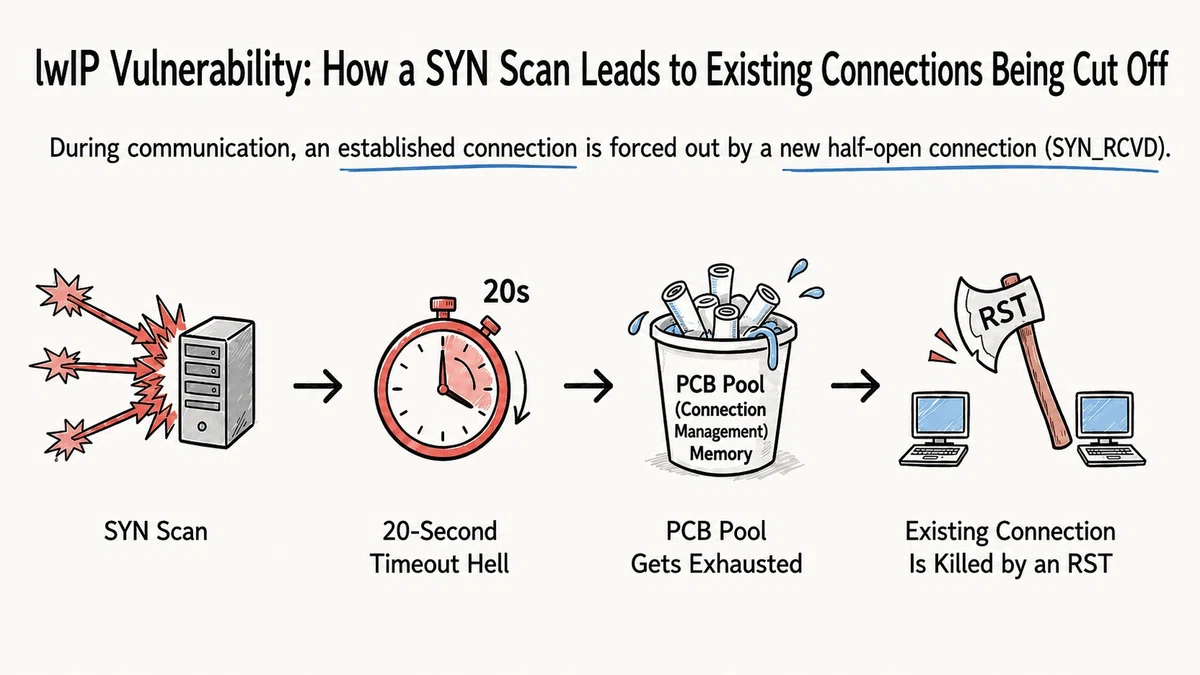
■ Problem Overview
`tcp_alloc()` in lwIP 2.0.3 and earlier has a design flaw: when the PCB pool is exhausted, it forcibly terminates ESTABLISHED (active) connections.
When a SYN scan floods the device with half-open connections, the pool fills with SYN_RCVD PCBs, and legitimate in-progress connections get collaterally terminated.
Three factors combine to cause this:
Backlog limiting is disabled by default (`TCP_LISTEN_BACKLOG = 0`)
Without backlog limiting, every SYN is accepted and consumes a PCB, exhausting the pool
When the PCB pool is exhausted, `tcp_kill_prio()` deletes ESTABLISHED connections (in 2.0.3 and earlier)
■ Reproduction Steps
Important (please review before proceeding): The following steps must be performed only in a test environment and isolated network that you manage. Unauthorized packet transmission to devices or networks managed by a third party may violate unauthorized access laws, regardless of whether any damage occurs. Ensure you have management authority over the target device and act only within the scope of what is permitted.
Prerequisites
A target device running lwIP 2.0.3 (or earlier) connected to the network
The target is LISTENing on at least one TCP port (e.g., an HTTP server on port 80)
`lwipopts.h` has no `TCP_LISTEN_BACKLOG` setting (default state)
An environment capable of sending SYN scans at high speed (e.g., hping3)
Steps
Step 1: Verify the target is running normally
ping <target IP address>Confirm that ping responses are received.
Step 2: Keep an existing TCP connection open
From a separate terminal, open a connection via HTTP or similar and keep it alive. This existing connection is used to observe the impact.
Step 3: Send continuous SYNs from a fixed unused source IP
What is hping3: A command-line tool for crafting and sending arbitrary TCP/IP packets. Primarily used on Linux. Unlike standard ping, it can generate TCP, UDP, and ICMP packets with fully customizable flags and source IPs. Available as a package on most Linux distributions (`sudo apt install hping3`).
# Use an RFC 2544 benchmark-reserved address as the source IP
hping3 -S --fast -p 80 -c 100 -a 198.18.0.1 <target IP address>
`-S`: SYN flag only (does not complete the 3-way handshake)
`-p 80`: Target port number (adjust to match the port the server is LISTENing on)
`--fast`: Send every 100 ms
`-c 100`: Send 100 packets
`-a 198.18.0.1`: Set the source IP to an address in the 198.18.0.0/15 range, which RFC 2544 treats as reserved for benchmark testing purposes → not intended for use as a real source address to external networks, reducing the risk of accidental transmission → no RST is returned → SYN_RCVD PCBs linger for 20 seconds, filling the pool
Why use 198.18.0.0/15 as the source IP: 198.18.0.0/15 is an address range that RFC 2544 treats as reserved for benchmark testing purposes. It is not intended for use as a real source address to external networks, so we use it here to reduce the risk of accidental transmission. Using `--rand-source` with random IPs is also possible but may violate acceptable-use policies or security policies.
Step 4: Observe the disconnection of the established connection
In lwIP 2.0.3 and earlier, once the PCB pool fills with SYN_RCVD entries, the existing ESTABLISHED connection is forcibly terminated with RST. Confirm that the connection maintained in Step 2 is dropped.
Step 5: Verify recovery
After stopping the attack, the SYN_RCVD PCBs time out after 20 seconds and are freed, so the device recovers naturally. However, the connection from Step 2 that was dropped must be reconnected manually.
If hping3 is not available, an alternative reproduction method using a Python script with Scapy is provided in the paid section (after the fix methods).
■ Reproduction, Root Cause, and Fix
This section has covered the affected conditions, problem overview, and reproduction steps.
Next, as an introduction to the source code analysis, we briefly cover the minimum needed to understand the overall picture of the problem.
Detailed code tracing, fix methods, verification after applying the fix, and official fix status are covered in the paid section below.
For readers dealing with the same issue, or manufacturers who need to patch already-shipped products, the paid section provides concrete, immediately usable information.
For broader context — how lwIP fits into the embedded ecosystem, how it varies across vendor SDKs, and why tracking these known bugs matters, see the introduction article:
【lwIP】Common Bugs, Vulnerabilities and Fixes | Embedded Engineer's Field Notes
■ Source Code Analysis
We trace through the lwIP 2.0.3 source code to explain exactly what is happening.
【Analysis 1】Full Call Stack Diagram
The complete chain of function calls from receiving a SYN packet to creating a PCB:
[Ethernet frame received]
ethernetif_input()
└─ tcpip_input()                       ← posted to message queue
    └─ [TCPIP thread processes]
        └─ ip4_input() → tcp_input()   ← tcp.c: searches existing PCBs by 4-tuple
            ├─ [no existing PCB → find LISTEN PCB by dest port → match]
            └─ tcp_listen_input()      ← tcp_in.c
                │
                ├─ [TCP_LISTEN_BACKLOG == 0]
                │       backlog check code is not compiled in
                │       → no limit on number of SYNs
                │
                ├─ tcp_alloc(pcb->prio)         ← allocate new PCB
                │   └─ memp_malloc(MEMP_TCP_PCB) ← consume one pool slot
                │       [if full → try tcp_kill_timewait/kill_state/kill_prio]
                │
                ├─ npcb->state = SYN_RCVD       ← set state to SYN_RCVD
                ├─ npcb->tmr   = tcp_ticks      ← start timeout timer
                ├─ TCP_REG_ACTIVE(npcb)          ← add to tcp_active_pcbs list
                ├─ tcp_enqueue_flags(npcb, TCP_SYN | TCP_ACK)
                └─ tcp_output(npcb)              ← attempt to send SYN-ACK
                    [SYN-ACK goes to non-existent source IP → no RST returns]
【Analysis 2】Processing a Received SYN Packet
When a SYN arrives, lwIP calls `tcp_listen_input()` in `tcp_in.c`:
// tcp_in.c (excerpt)
} else if (flags & TCP_SYN) {
#if TCP_LISTEN_BACKLOG
    if (pcb->accepts_pending >= pcb->backlog) {
        // backlog exceeded → ignore this SYN (no PCB created)
        return;
    }
#endif /* TCP_LISTEN_BACKLOG */
    npcb = tcp_alloc(pcb->prio);   // allocate one PCB
    // ...
    npcb->state = SYN_RCVD;        // set state to SYN_RCVD
    // ...
    rc = tcp_enqueue_flags(npcb, TCP_SYN | TCP_ACK);  // queue SYN-ACK
    tcp_output(npcb);              // send
}
Key point:
ここから先は
¥ 1,000
この記事が気に入ったらチップで応援してみませんか?
