
猫認識・Webカメラを使ったリアルタイム処理(Windows。Ollamaを使ったツールの参考コード)

前回のWebカメラを使ったリアルタイム処理を
今回は猫を認識するように
Geminiの力を借りて自分用にコード変更してみました。
動作の保証はできませんが、参考としてコードも掲載しておきます。
実際、処理が途中止まったり、猫の誤認識もします。
使い方
前回と基本同じため、省略します。
コードとモデルを読み変えて前回までの記事をご参照ください。
今回のコードは、最下段にある参考コードです。
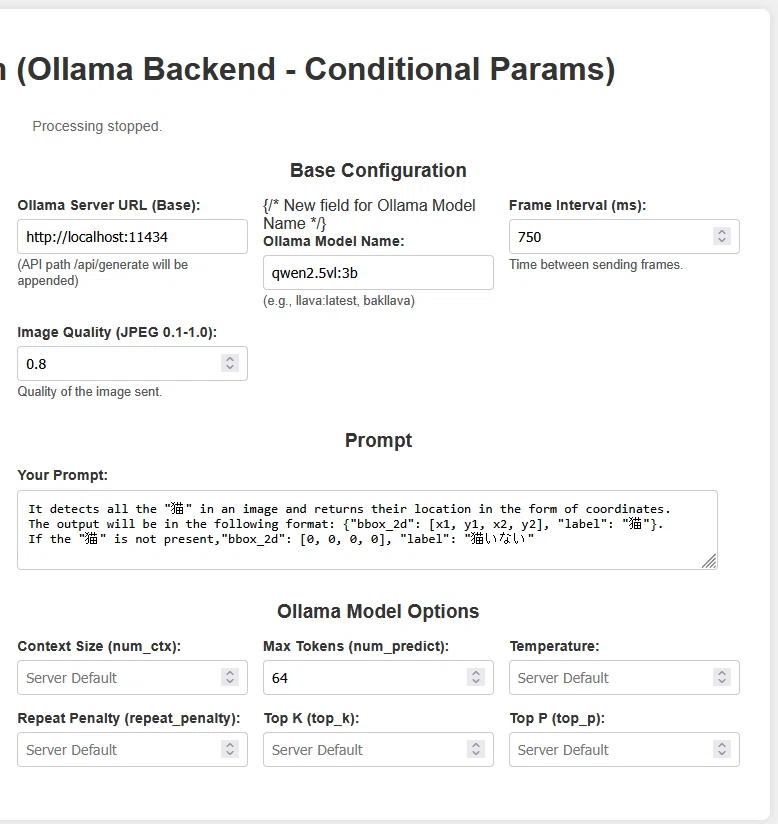
今回のマルチモーダルモデルは、「qwen2.5vl:3b」を使用します。
補足
プロンプトで、猫がいたらボックス座標を出してと指示しています。
format: {"bbox_2d": [x1, y1, x2, y2], "label": "猫"}.
ただ、これだけだと猫の誤認識することが多かったので、
以下追加しました。誤認識が少し改善しました。
猫がいない場合には、bbox_2d": [0, 0, 0, 0], "label": "猫いない
It detects all the "猫" in an image and returns their location in the form of coordinates.The output will be in the following format: {"bbox_2d": [x1, y1, x2, y2], "label": "猫"}.If the "猫" is not present,"bbox_2d": [0, 0, 0, 0], "label": "猫いない"猫だけ日本語にしていますが、catの方が誤認識が減ると思われます。
ただ、vlmならではの猫認識ができるか確認したかったので、
日本語で猫にしています。(以下にある実施例③がその結果です)
Frame intervalを750にしています。
私の端末だと750未満にすると、途中処理が止まることが多かったです。
途中で止まってもそのままにしていたら、処理は再開されました。
実施例
NVIDIA GeForce RTX 4070 Ti SUPER
動画ファイルがアップできないので、gif変換しています。
実際の速度と若干違うかもしれません。



まだまだ猫を誤認識することが多いですが、
猫認識できて満足にゃ~
参考コード(index_ollama_test.html)
<!DOCTYPE html>
<html lang="en">
<head>
<meta charset="UTF-8">
<meta name="viewport" content="width=device-width, initial-scale=1.0">
<title>SmolVLM Realtime Webcam (Ollama Backend - Conditional Params)</title>
<style>
body {
font-family: sans-serif;
display: flex;
flex-direction: column;
align-items: center;
margin-top: 20px;
background-color: #f0f0f0;
color: #333;
}
#container {
display: flex;
flex-direction: column;
align-items: center;
background-color: white;
padding: 20px;
border-radius: 8px;
box-shadow: 0 0 10px rgba(0,0,0,0.1);
max-width: 1400px;
width: 95%;
margin: auto;
}
#mainLayout {
display: flex;
flex-direction: row;
width: 100%;
gap: 20px;
align-items: flex-start;
}
#leftColumn {
flex: 1.5;
display: flex;
flex-direction: column;
align-items: center;
gap: 15px;
}
#rightColumn {
flex: 2;
display: flex;
flex-direction: column;
gap: 15px;
max-height: calc(100vh - 120px);
overflow-y: auto;
padding-right: 10px;
padding-left: 10px;
}
video { display:none; }
canvas {
border: 1px solid #ccc;
border-radius: 4px;
max-width: 100%;
height: auto;
display: block;
}
textarea {
width: calc(100% - 22px);
min-height: 80px;
padding: 10px;
border: 1px solid #ccc;
border-radius: 4px;
font-size: 1em;
box-sizing: border-box;
}
button {
padding: 10px 20px;
font-size: 1em;
color: white;
background-color: #007bff;
border: none;
border-radius: 4px;
cursor: pointer;
}
button:hover { background-color: #0056b3; }
#answerContainer {
width: 100%;
display: flex;
flex-direction: column;
align-items: center;
}
#answerContainer h2 {
margin-bottom: 5px;
}
#answer {
padding:10px;
border:1px solid #ddd;
background-color:#f9f9f9;
min-height: 100px;
width: calc(100% - 22px);
max-width: 640px;
border-radius: 4px;
white-space: pre-wrap;
word-wrap: break-word;
box-sizing: border-box;
overflow-y: auto;
max-height: 300px;
}
#status { font-size: 0.9em; color: #666; margin-bottom: 10px; text-align: center; width: 100%;}
.config-grid {
display: grid;
grid-template-columns: repeat(auto-fit, minmax(200px, 1fr));
gap: 15px;
width: 100%;
}
.config-item { display: flex; flex-direction: column; }
.config-item label { margin-bottom: 5px; font-weight: bold; font-size: 0.9em; }
.config-item input[type="text"], .config-item input[type="number"] {
padding: 8px;
border: 1px solid #ccc;
border-radius: 4px;
font-size: 0.9em;
width: 100%;
box-sizing: border-box;
}
.config-item small { font-size: 0.8em; color: #555; margin-top: 3px;}
h1, h2 { text-align: center; width: 100%; margin-bottom: 15px; }
h2 { margin-top: 15px; font-size: 1.2em; }
#controls {
display: flex;
gap: 10px;
justify-content: center;
width: 100%;
}
@media (max-width: 900px) {
#mainLayout {
flex-direction: column;
}
#rightColumn {
max-height: none;
overflow-y: visible;
width: 100%;
}
#leftColumn {
flex: none;
width: 100%;
}
#answer {
max-width: 100%;
}
}
</style>
</head>
<body>
<div id="container">
<h1>SmolVLM Realtime Webcam (Ollama Backend - Conditional Params)</h1>
<p id="status">Initializing...</p>
<div id="mainLayout">
<div id="leftColumn">
<canvas id="canvasElement" width="640" height="480"></canvas>
<div id="controls">
<button id="startButton">Start</button>
<button id="stopButton" style="display:none;">Stop</button>
</div>
<div id="answerContainer">
<h2>Answer:</h2>
<div id="answer">Waiting for server response...</div>
</div>
</div>
<div id="rightColumn">
<section>
<h2>Base Configuration</h2>
<div class="config-grid">
<div class="config-item">
<label for="serverUrlInput">Ollama Server URL (Base):</label>
<input type="text" id="serverUrlInput" value="http://localhost:11434">
<small>(API path /api/generate will be appended)</small>
</div>
<div class="config-item"> {/* New field for Ollama Model Name */}
<label for="ollamaModelNameInput">Ollama Model Name:</label>
<input type="text" id="ollamaModelNameInput" value="qwen2.5vl:3b">
<small>(e.g., llava:latest, bakllava)</small>
</div>
<div class="config-item">
<label for="frameIntervalInput">Frame Interval (ms):</label>
<input type="number" id="frameIntervalInput" value="750" min="500">
<small>Time between sending frames.</small>
</div>
<div class="config-item">
<label for="imageQualityInput">Image Quality (JPEG 0.1-1.0):</label>
<input type="number" id="imageQualityInput" value="0.8" step="0.01" min="0.1" max="1.0">
<small>Quality of the image sent.</small>
</div>
</div>
</section>
<section>
<h2>Prompt</h2>
<div class="config-item" style="width:100%;">
<label for="promptInput">Your Prompt:</label>
<textarea id="promptInput">It detects all the "猫" in an image and returns their location in the form of coordinates.
The output will be in the following format: {"bbox_2d": [x1, y1, x2, y2], "label": "猫"}.
If the "猫" is not present,"bbox_2d": [0, 0, 0, 0], "label": "猫いない"</textarea>
</div>
</section>
<section>
<h2>Ollama Model Options</h2>
<div class="config-grid">
<div class="config-item">
<label for="numCtxInput">Context Size (num_ctx):</label>
<input type="number" id="numCtxInput" value="" placeholder="Server Default" min="0">
</div>
<div class="config-item">
<label for="numPredictInput">Max Tokens (num_predict):</label>
<input type="number" id="numPredictInput" value="64" min="64">
</div>
<div class="config-item">
<label for="temperatureInput">Temperature:</label>
<input type="number" id="temperatureInput" value="" placeholder="Server Default" step="0.05" min="0">
</div>
<div class="config-item">
<label for="repeatPenaltyInput">Repeat Penalty (repeat_penalty):</label>
<input type="number" id="repeatPenaltyInput" value="" placeholder="Server Default" step="0.1" min="0">
</div>
<div class="config-item">
<label for="topKInput">Top K (top_k):</label>
<input type="number" id="topKInput" value="" placeholder="Server Default" min="0">
</div>
<div class="config-item">
<label for="topPInput">Top P (top_p):</label>
<input type="number" id="topPInput" value="" placeholder="Server Default" step="0.05" min="0" max="1">
</div>
</div>
</section>
</div>
</div>
<video id="videoElement" width="640" height="480" autoplay playsinline></video>
</div>
<script>
// ... (APPオブジェクトの定義や他の関数は前回と同じ) ...
const APP = {
videoElement: document.getElementById('videoElement'),
canvasElement: document.getElementById('canvasElement'),
ctx: document.getElementById('canvasElement').getContext('2d'),
promptInput: document.getElementById('promptInput'),
answerElement: document.getElementById('answer'),
statusElement: document.getElementById('status'),
startButton: document.getElementById('startButton'),
stopButton: document.getElementById('stopButton'),
serverUrlInput: document.getElementById('serverUrlInput'),
ollamaModelNameInput: document.getElementById('ollamaModelNameInput'),
frameIntervalInput: document.getElementById('frameIntervalInput'),
imageQualityInput: document.getElementById('imageQualityInput'),
numCtxInput: document.getElementById('numCtxInput'),
numPredictInput: document.getElementById('numPredictInput'),
temperatureInput: document.getElementById('temperatureInput'),
repeatPenaltyInput: document.getElementById('repeatPenaltyInput'),
topKInput: document.getElementById('topKInput'),
topPInput: document.getElementById('topPInput'),
isProcessing: false,
cameraStream: null,
intervalId: null,
abortController: null,
latestDetections: null,
baseServerUrl: 'http://localhost:11434',
ollamaModelName: 'llava:latest',
frameInterval: 500,
imageQuality: 0.8,
ollamaOptions: {}
};
APP.init = async function() {
APP.statusElement.textContent = 'Requesting camera access...';
APP.loadConfigFromUI();
APP.latestDetections = null;
try {
APP.cameraStream = await navigator.mediaDevices.getUserMedia({ video: true, audio: false });
APP.videoElement.srcObject = APP.cameraStream;
APP.videoElement.onloadedmetadata = () => {
APP.canvasElement.width = APP.videoElement.videoWidth;
APP.canvasElement.height = APP.videoElement.videoHeight;
console.log(`Canvas initialized to: ${APP.canvasElement.width}x${APP.canvasElement.height}`); // 追加ログ
APP.statusElement.textContent = 'Camera access granted. Ready to start.';
APP.startButton.disabled = false;
};
} catch (err) {
console.error("Error accessing camera: ", err);
APP.statusElement.textContent = `Error accessing camera: ${err.name} - ${err.message}.`;
alert(`Error accessing camera: ${err.name}. Please grant permission.`);
}
};
APP.loadConfigFromUI = function() {
APP.baseServerUrl = APP.serverUrlInput.value.trim() || 'http://localhost:11434';
APP.ollamaModelName = APP.ollamaModelNameInput.value.trim() || 'llava:latest';
APP.frameInterval = parseInt(APP.frameIntervalInput.value, 10) || 500;
APP.imageQuality = parseFloat(APP.imageQualityInput.value) || 0.8;
APP.ollamaOptions = {};
const numPredictStr = APP.numPredictInput.value.trim();
if (numPredictStr !== "") {
const numPredict = parseInt(numPredictStr, 10);
if (!isNaN(numPredict)) APP.ollamaOptions.num_predict = numPredict;
} else { APP.ollamaOptions.num_predict = 512; }
const temperatureStr = APP.temperatureInput.value.trim();
if (temperatureStr !== "") {
const temperature = parseFloat(temperatureStr);
if (!isNaN(temperature)) APP.ollamaOptions.temperature = temperature;
}
const topPStr = APP.topPInput.value.trim();
if (topPStr !== "") {
const topP = parseFloat(topPStr);
if (!isNaN(topP)) APP.ollamaOptions.top_p = topP;
}
const topKStr = APP.topKInput.value.trim();
if (topKStr !== "") {
const topK = parseInt(topKStr, 10);
if (!isNaN(topK) && topK >= 0) APP.ollamaOptions.top_k = topK;
}
const numCtxStr = APP.numCtxInput.value.trim();
if (numCtxStr !== "") {
const numCtx = parseInt(numCtxStr, 10);
if (!isNaN(numCtx) && numCtx > 0) APP.ollamaOptions.num_ctx = numCtx;
}
const repeatPenaltyStr = APP.repeatPenaltyInput.value.trim();
if (repeatPenaltyStr !== "") {
const repeatPenalty = parseFloat(repeatPenaltyStr);
if (!isNaN(repeatPenalty)) APP.ollamaOptions.repeat_penalty = repeatPenalty;
}
// console.log("Config loaded, Ollama options:", JSON.stringify(APP.ollamaOptions)); // デバッグ時はコメントアウト解除
};
APP.setUIEnabledState = function(enabled) {
const inputs = [
APP.serverUrlInput, APP.ollamaModelNameInput, APP.frameIntervalInput,
APP.imageQualityInput, APP.promptInput,
APP.numCtxInput, APP.numPredictInput, APP.temperatureInput,
APP.repeatPenaltyInput, APP.topKInput, APP.topPInput
];
inputs.forEach(input => input.disabled = !enabled);
};
APP.captureImageAndGetDataURL = function() {
if (!APP.cameraStream || !APP.videoElement.videoWidth || APP.videoElement.paused || APP.videoElement.ended) {
// console.warn("Video stream not ready or active for capture."); // 頻繁に出るのでコメントアウト推奨
// APP.statusElement.textContent = "Video stream not ready for capture.";
return null;
}
if (APP.canvasElement.width !== APP.videoElement.videoWidth || APP.canvasElement.height !== APP.videoElement.videoHeight) {
APP.canvasElement.width = APP.videoElement.videoWidth;
APP.canvasElement.height = APP.videoElement.videoHeight;
console.log(`Canvas resized to: ${APP.canvasElement.width}x${APP.canvasElement.height}`); // 追加ログ
}
APP.ctx.drawImage(APP.videoElement, 0, 0, APP.canvasElement.width, APP.canvasElement.height);
APP.drawDetections();
const dataUrl = APP.canvasElement.toDataURL('image/jpeg', APP.imageQuality);
return dataUrl.split(',')[1];
}
APP.drawDetections = function() {
// console.log("drawDetections called. latestDetections:", JSON.stringify(APP.latestDetections)); // ログ追加 (デバッグ時)
if (!APP.latestDetections || APP.latestDetections.length === 0) {
// console.log("No detections to draw or latestDetections is empty."); // ログ追加 (デバッグ時)
return;
}
const canvasWidth = APP.canvasElement.width;
const canvasHeight = APP.canvasElement.height;
// console.log(`Drawing on canvas: ${canvasWidth}x${canvasHeight}`); // ログ追加 (デバッグ時)
const detections = Array.isArray(APP.latestDetections) ? APP.latestDetections : [APP.latestDetections];
detections.forEach((detection, index) => {
// console.log(`Processing detection #${index}:`, JSON.stringify(detection)); // ログ追加 (デバッグ時)
if (detection && detection.bbox_2d && Array.isArray(detection.bbox_2d) && detection.bbox_2d.length === 4 && typeof detection.label === 'string') {
const bbox = detection.bbox_2d;
const label = detection.label;
const x1 = bbox[0];
const y1 = bbox[1];
const x2 = bbox[2];
const y2 = bbox[3];
const rectWidth = x2 - x1;
const rectHeight = y2 - y1;
// console.log(`Attempting to draw: x1=${x1}, y1=${y1}, w=${rectWidth}, h=${rectHeight}, label=${label}`); // ログ追加 (デバッグ時)
if (rectWidth <= 0 || rectHeight <= 0) {
console.warn("Invalid rect dimensions (width or height <= 0):", detection);
return; // 無効な矩形はスキップ
}
// 座標がキャンバス範囲内かどうかの簡易チェック (完全に範囲外なら描画されない)
// if (x2 < 0 || y2 < 0 || x1 > canvasWidth || y1 > canvasHeight) {
// console.warn("Rectangle completely out of canvas bounds:", detection);
// return;
// }
APP.ctx.strokeStyle = 'red'; // 色を赤に変更して目立たせる
APP.ctx.lineWidth = 3;
APP.ctx.strokeRect(x1, y1, rectWidth, rectHeight);
// console.log(`strokeRect called for label: ${label}`); // ログ追加 (デバッグ時)
APP.ctx.fillStyle = 'red'; // 色を赤に変更
APP.ctx.font = '18px Arial';
APP.ctx.textBaseline = 'bottom';
let textX = x1 + 5;
let textY;
if (y1 > 20) {
textY = y1 - 5;
} else {
textY = y1 + 20;
if (textY > y1 + rectHeight - 5) { textY = y1 + rectHeight - 5; }
if (textY > canvasHeight - 5) { textY = canvasHeight -5; }
}
const textMetrics = APP.ctx.measureText(label);
if (textX + textMetrics.width > canvasWidth - 5) {
textX = canvasWidth - textMetrics.width - 5;
}
if (textX < 5) textX = 5;
APP.ctx.fillText(label, textX, textY);
// console.log(`fillText called for label: ${label} at ${textX}, ${textY}`); // ログ追加 (デバッグ時)
} else {
console.warn("Skipping detection due to invalid format in drawDetections:", JSON.stringify(detection));
}
});
};
APP.sendDataToServer = async function() {
if (!APP.isProcessing) return;
const userPrompt = APP.promptInput.value;
const imageBase64 = APP.captureImageAndGetDataURL();
if (!imageBase64) return;
// num_predict を確実に設定するようにする (例: 256, 512 など、十分な長さを確保)
// UIから取得する際に、空ならデフォルト値を設定するロジックは既にありますが、
// ここで明示的に増やすか、UIのデフォルト値を大きくすることを推奨します。
// 例: APP.ollamaOptions.num_predict = 512; (UIで設定した値より優先する場合)
// もしくは、APP.loadConfigFromUI() で numPredictInput のデフォルトを大きくする。
// 今回は、UIで設定されていることを前提とします。
const requestUrl = `${APP.baseServerUrl}/api/generate`;
const requestBody = {
model: APP.ollamaModelName,
prompt: userPrompt,
images: [imageBase64],
options: {
...APP.ollamaOptions, // 他のオプションを維持
// num_predict: 512, // ここで明示的に大きな値を設定することも検討
},
stream: false
};
console.log("Sending request to Ollama. Body:", JSON.stringify(requestBody)); // 送信するリクエストボディも確認
try {
const signal = APP.abortController ? APP.abortController.signal : undefined;
if (signal && signal.aborted) return;
const response = await fetch(requestUrl, {
method: 'POST',
headers: { 'Content-Type': 'application/json' },
body: JSON.stringify(requestBody),
signal: signal
});
if (!response.ok) {
const errorData = await response.text();
let detail = errorData;
try {
const errJson = JSON.parse(errorData);
if (errJson.error) detail = errJson.error;
} catch (e) { /* ignore */ }
throw new Error(`Ollama API error: ${response.status} - ${detail}`);
}
const data = await response.json(); // Ollamaからのレスポンス全体 (JSONオブジェクト)
console.log("Raw response object from Ollama:", JSON.stringify(data));
if (data.response && typeof data.response === 'string') {
APP.answerElement.textContent = data.response; // 生の応答文字列を表示
// data.response (文字列) からJSON部分を抽出する
const jsonRegex = /```json\s*([\s\S]*?)\s*```/; // ```json ... ``` を抽出する正規表現
const match = data.response.match(jsonRegex);
if (match && match[1]) {
const jsonString = match[1];
console.log("Extracted JSON string:", jsonString);
try {
const jsonData = JSON.parse(jsonString); // 抽出した文字列をJSONとしてパース
console.log("Parsed jsonData from extracted string:", JSON.stringify(jsonData));
if (Array.isArray(jsonData)) {
APP.latestDetections = jsonData.filter(item => item.bbox_2d && Array.isArray(item.bbox_2d) && item.bbox_2d.length === 4 && item.label);
} else if (jsonData && jsonData.bbox_2d && Array.isArray(jsonData.bbox_2d) && jsonData.bbox_2d.length === 4 && jsonData.label) {
APP.latestDetections = [jsonData];
} else {
APP.latestDetections = null;
console.warn("Extracted JSON does not match expected detection format:", JSON.stringify(jsonData));
}
console.log("APP.latestDetections set to:", JSON.stringify(APP.latestDetections));
} catch (e) {
APP.latestDetections = null;
console.error("Failed to parse extracted JSON string:", e);
console.error("Extracted string content was:", jsonString);
}
} else {
APP.latestDetections = null;
console.warn("Could not find JSON block (```json ... ```) in Ollama's response string.");
console.warn("Ollama's data.response content was:", data.response);
if (data.done_reason === "length") {
console.warn("Ollama response might be truncated due to 'length' limit. Consider increasing 'num_predict'.");
APP.answerElement.textContent += "\n\n[WARNING] Response might be truncated. Increase 'Max Tokens (num_predict)' in Ollama Model Options.";
}
}
} else if (data.error) {
APP.answerElement.textContent = `Ollama error: ${data.error}`;
APP.latestDetections = null;
} else {
APP.answerElement.textContent = "Unexpected response format from Ollama server (no 'response' string or 'error' field).";
APP.latestDetections = null;
console.warn("Unexpected Ollama response format:", data);
}
} catch (error) {
// ... (エラー処理は前回と同様) ...
if (APP.isProcessing) {
if (error.name === 'AbortError') {
// console.log('Fetch aborted');
} else {
console.error('Error sending data to Ollama:', error);
APP.answerElement.textContent = `Error: ${error.message}`;
APP.latestDetections = null;
}
}
}
}
APP.startProcessing = function() {
if (!APP.cameraStream) {
alert('Camera not available. Cannot start.');
return;
}
if (!APP.ollamaModelNameInput.value.trim()) {
alert('Please enter an Ollama Model Name.');
return;
}
APP.isProcessing = true;
APP.abortController = new AbortController();
APP.latestDetections = null;
APP.startButton.style.display = 'none';
APP.stopButton.style.display = 'inline-block';
APP.statusElement.textContent = 'Processing started...';
APP.answerElement.textContent = 'Waiting for first response...';
APP.setUIEnabledState(false);
APP.loadConfigFromUI();
APP.sendDataToServer();
if (APP.intervalId) clearInterval(APP.intervalId);
APP.intervalId = setInterval(APP.sendDataToServer, APP.frameInterval);
};
APP.stopProcessing = function() {
APP.isProcessing = false;
if (APP.intervalId) {
clearInterval(APP.intervalId);
APP.intervalId = null;
}
if (APP.abortController) {
APP.abortController.abort();
APP.abortController = null;
}
APP.startButton.style.display = 'inline-block';
APP.stopButton.style.display = 'none';
APP.statusElement.textContent = 'Processing stopped.';
APP.setUIEnabledState(true);
};
APP.startButton.addEventListener('click', APP.startProcessing);
APP.stopButton.addEventListener('click', APP.stopProcessing);
window.addEventListener('DOMContentLoaded', APP.init);
window.addEventListener('beforeunload', () => {
if (APP.isProcessing) {
APP.stopProcessing();
}
if (APP.cameraStream) {
APP.cameraStream.getTracks().forEach(track => track.stop());
}
});
</script>
</body>
</html>