
【第548回】 Marketing Cloud Next : ショッピングカート放棄によるトリガー

Marketing Cloud Next Growth & Advanced Editions の Summer '26 新機能リリースでは、小売業向けの マーケティングトリガー(Marketing Triggers)機能が追加されました。

Marketing Triggers には現在 6 種類のトリガーが用意されていますが、本記事では、その中の ショッピングカート放棄(Abandoned Shopping Cart)トリガーを利用し、Data Cloud の Web SDK を使用したイベント収集から、Marketing Cloud Next によるメール送信までの一連の手順を解説します。
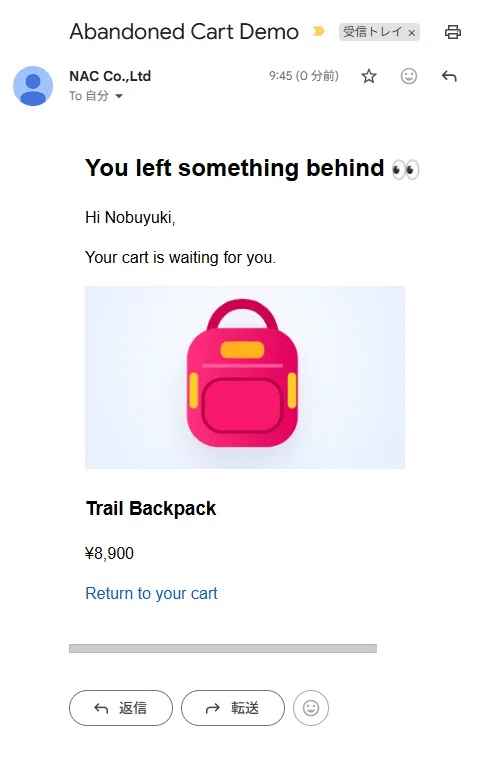
注意:本番組織の Sandbox や SDO では、Marketing Features > トリガー が表示されない場合があります。作業を始める前にこの機能が利用可能であることを確認してください。
重要:また、トリガーの実装方法は Website ごとに設定内容が異なりますので、本記事の内容はあくまで一例としてご参照ください。本番サイトでは、極力同じ実装をしないことをオススメします。
設定手順
1. Cloudpagesを作成(空ページ作成)
私は Marketing Cloud Engagement ユーザーなので、Cloudpages をよく使ってデモページを作成します。今回も Cloudpages を利用します。
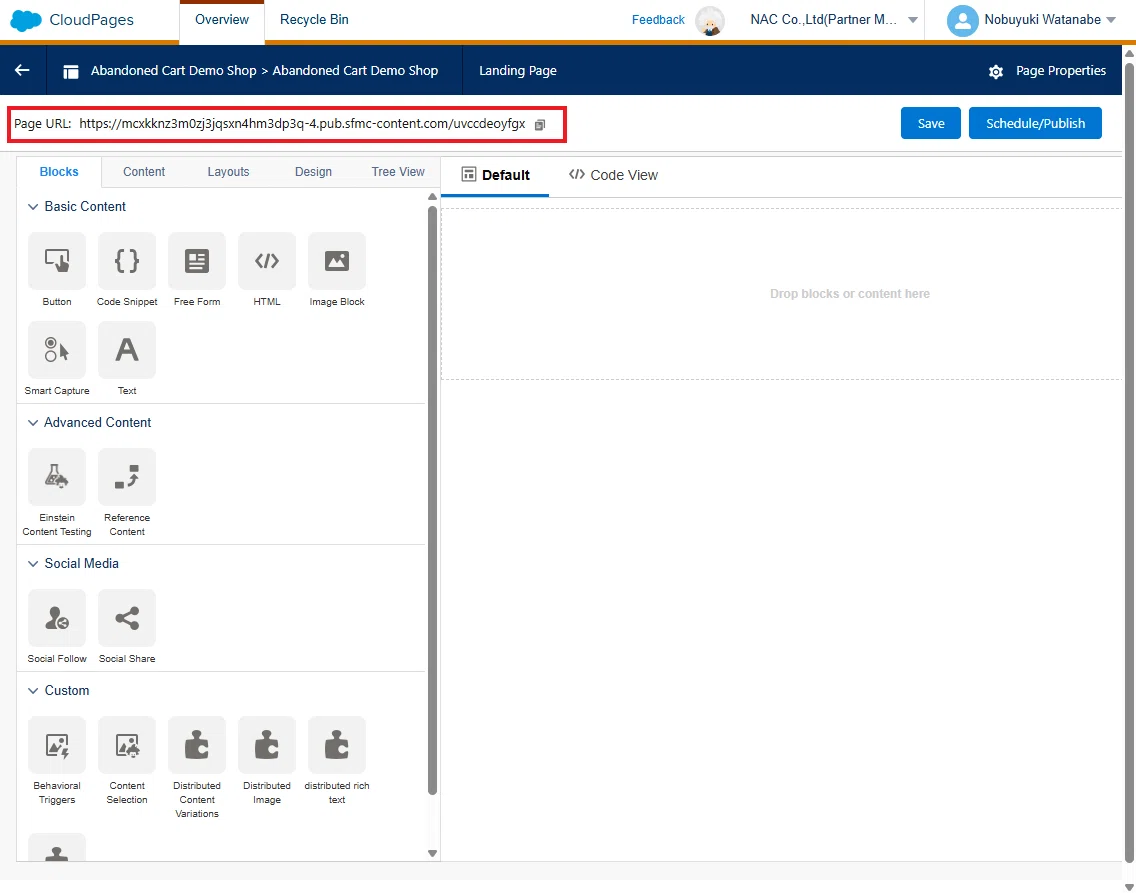
まず、Coudapges のサイトのページ URL を仮で発行しておきます。
https://mcxkknz3m0zj3jqsxn4hm3dp3q-4.pub.sfmc-content.com/bard2ndo4nr
2. Website Connection の作成
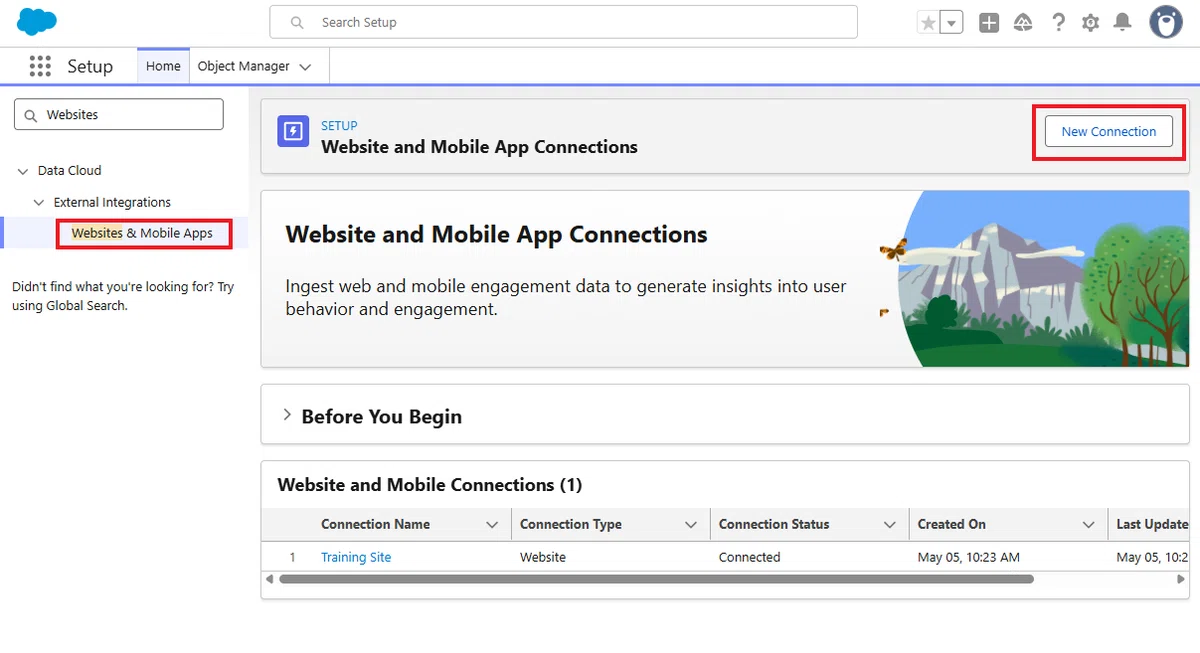
設定 から「Websites & Mobile Apps」を検索し、「新しい接続」をクリックします。
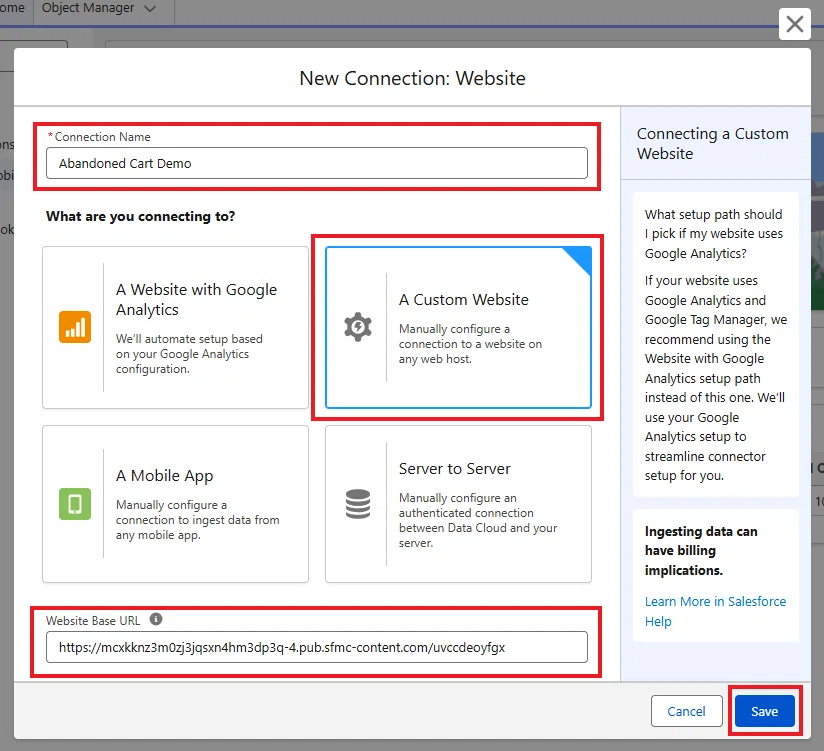
次の内容で、Website Connection を作成します。
Connection Name:Abandoned Cart Demo
Connection Type:A Custom Website
Website Base URL:下に記載されている Cloudpages の公開済み URL
https://mcxkknz3m0zj3jqsxn4hm3dp3q-4.pub.sfmc-content.com/bard2ndo4nr
そして、今回は、以下の Schema を使います。
{
"records": [
{
"masterLabel": "Cart",
"developerName": "cart",
"category": "Engagement",
"externalDataTranFields": [
{
"masterLabel": "category",
"developerName": "category",
"dataType": "Text",
"isDataRequired": true
},
{
"masterLabel": "dateTime",
"developerName": "dateTime",
"dataType": "DateTime",
"isDataRequired": true
},
{
"masterLabel": "deviceId",
"developerName": "deviceId",
"dataType": "Text",
"isDataRequired": true
},
{
"masterLabel": "eventId",
"developerName": "eventId",
"dataType": "Text",
"isDataRequired": true,
"primaryIndexOrder": 1
},
{
"masterLabel": "eventType",
"developerName": "eventType",
"dataType": "Text",
"isDataRequired": true
},
{
"masterLabel": "sessionId",
"developerName": "sessionId",
"dataType": "Text",
"isDataRequired": true
},
{
"masterLabel": "interactionName",
"developerName": "interactionName",
"dataType": "Text",
"isDataRequired": true
},
{
"masterLabel": "pageView",
"developerName": "pageView",
"dataType": "Number",
"isDataRequired": false
},
{
"masterLabel": "sourceChannel",
"developerName": "sourceChannel",
"dataType": "Text",
"isDataRequired": false
},
{
"masterLabel": "sourceLocale",
"developerName": "sourceLocale",
"dataType": "Text",
"isDataRequired": false
},
{
"masterLabel": "sourcePageType",
"developerName": "sourcePageType",
"dataType": "Text",
"isDataRequired": false
},
{
"masterLabel": "sourceUrl",
"developerName": "sourceUrl",
"dataType": "Text",
"isDataRequired": false
},
{
"masterLabel": "sourceUrlReferrer",
"developerName": "sourceUrlReferrer",
"dataType": "Text",
"isDataRequired": false
}
]
},
{
"masterLabel": "Cart Item",
"developerName": "cartItem",
"category": "Engagement",
"externalDataTranFields": [
{
"masterLabel": "category",
"developerName": "category",
"dataType": "Text",
"isDataRequired": true
},
{
"masterLabel": "dateTime",
"developerName": "dateTime",
"dataType": "DateTime",
"isDataRequired": true
},
{
"masterLabel": "deviceId",
"developerName": "deviceId",
"dataType": "Text",
"isDataRequired": true
},
{
"masterLabel": "eventId",
"developerName": "eventId",
"dataType": "Text",
"isDataRequired": true,
"primaryIndexOrder": 1
},
{
"masterLabel": "eventType",
"developerName": "eventType",
"dataType": "Text",
"isDataRequired": true
},
{
"masterLabel": "sessionId",
"developerName": "sessionId",
"dataType": "Text",
"isDataRequired": true
},
{
"masterLabel": "cartEventId",
"developerName": "cartEventId",
"dataType": "Text",
"isDataRequired": true
},
{
"masterLabel": "catalogObjectId",
"developerName": "catalogObjectId",
"dataType": "Text",
"isDataRequired": true
},
{
"masterLabel": "catalogObjectType",
"developerName": "catalogObjectType",
"dataType": "Text",
"isDataRequired": true
},
{
"masterLabel": "currency",
"developerName": "currency",
"dataType": "Text",
"isDataRequired": false
},
{
"masterLabel": "price",
"developerName": "price",
"dataType": "Number",
"isDataRequired": false
},
{
"masterLabel": "quantity",
"developerName": "quantity",
"dataType": "Number",
"isDataRequired": true
},
{
"masterLabel": "Shopping Cart ID",
"developerName": "attributeShoppingCartId",
"dataType": "Text",
"isDataRequired": false
},
{
"masterLabel": "Engagement Channel Action",
"developerName": "attributeEngagementChannelAction",
"dataType": "Text",
"isDataRequired": false
},
{
"masterLabel": "Adjusted Total Product Amount",
"developerName": "attributeAdjustedTotalProductAmount",
"dataType": "Number",
"isDataRequired": false
},
{
"masterLabel": "Total Product Amount",
"developerName": "attributeTotalProductAmount",
"dataType": "Number",
"isDataRequired": false
},
{
"masterLabel": "Total Product Quantity",
"developerName": "attributeTotalProductQuantity",
"dataType": "Number",
"isDataRequired": false
},
{
"masterLabel": "Product Image URL",
"developerName": "attributeProductImageUrl",
"dataType": "Text",
"isDataRequired": false
},
{
"masterLabel": "Product View URL",
"developerName": "attributeProductViewUrl",
"dataType": "Text",
"isDataRequired": false
},
{
"masterLabel": "Device Locale",
"developerName": "attributeDeviceLocale",
"dataType": "Text",
"isDataRequired": false
}
]
},
{
"masterLabel": "Order",
"developerName": "order",
"category": "Engagement",
"externalDataTranFields": [
{
"masterLabel": "category",
"developerName": "category",
"dataType": "Text",
"isDataRequired": true
},
{
"masterLabel": "dateTime",
"developerName": "dateTime",
"dataType": "DateTime",
"isDataRequired": true
},
{
"masterLabel": "deviceId",
"developerName": "deviceId",
"dataType": "Text",
"isDataRequired": true
},
{
"masterLabel": "eventId",
"developerName": "eventId",
"dataType": "Text",
"isDataRequired": true,
"primaryIndexOrder": 1
},
{
"masterLabel": "eventType",
"developerName": "eventType",
"dataType": "Text",
"isDataRequired": true
},
{
"masterLabel": "sessionId",
"developerName": "sessionId",
"dataType": "Text",
"isDataRequired": true
},
{
"masterLabel": "interactionName",
"developerName": "interactionName",
"dataType": "Text",
"isDataRequired": true
},
{
"masterLabel": "orderCurrency",
"developerName": "orderCurrency",
"dataType": "Text",
"isDataRequired": false
},
{
"masterLabel": "orderId",
"developerName": "orderId",
"dataType": "Text",
"isDataRequired": true
},
{
"masterLabel": "orderTotalValue",
"developerName": "orderTotalValue",
"dataType": "Number",
"isDataRequired": false
},
{
"masterLabel": "pageView",
"developerName": "pageView",
"dataType": "Number",
"isDataRequired": false
},
{
"masterLabel": "sourceChannel",
"developerName": "sourceChannel",
"dataType": "Text",
"isDataRequired": false
},
{
"masterLabel": "sourceLocale",
"developerName": "sourceLocale",
"dataType": "Text",
"isDataRequired": false
},
{
"masterLabel": "sourcePageType",
"developerName": "sourcePageType",
"dataType": "Text",
"isDataRequired": false
},
{
"masterLabel": "sourceUrl",
"developerName": "sourceUrl",
"dataType": "Text",
"isDataRequired": false
},
{
"masterLabel": "sourceUrlReferrer",
"developerName": "sourceUrlReferrer",
"dataType": "Text",
"isDataRequired": false
},
{
"masterLabel": "Shopping Cart ID",
"developerName": "attributeShoppingCartId",
"dataType": "Text",
"isDataRequired": false
},
{
"masterLabel": "Engagement Channel Action",
"developerName": "attributeEngagementChannelAction",
"dataType": "Text",
"isDataRequired": false
}
]
},
{
"masterLabel": "Order Item",
"developerName": "orderItem",
"category": "Engagement",
"externalDataTranFields": [
{
"masterLabel": "category",
"developerName": "category",
"dataType": "Text",
"isDataRequired": true
},
{
"masterLabel": "dateTime",
"developerName": "dateTime",
"dataType": "DateTime",
"isDataRequired": true
},
{
"masterLabel": "deviceId",
"developerName": "deviceId",
"dataType": "Text",
"isDataRequired": true
},
{
"masterLabel": "eventId",
"developerName": "eventId",
"dataType": "Text",
"isDataRequired": true,
"primaryIndexOrder": 1
},
{
"masterLabel": "eventType",
"developerName": "eventType",
"dataType": "Text",
"isDataRequired": true
},
{
"masterLabel": "sessionId",
"developerName": "sessionId",
"dataType": "Text",
"isDataRequired": true
},
{
"masterLabel": "orderEventId",
"developerName": "orderEventId",
"dataType": "Text",
"isDataRequired": true
},
{
"masterLabel": "catalogObjectId",
"developerName": "catalogObjectId",
"dataType": "Text",
"isDataRequired": true
},
{
"masterLabel": "catalogObjectType",
"developerName": "catalogObjectType",
"dataType": "Text",
"isDataRequired": true
},
{
"masterLabel": "currency",
"developerName": "currency",
"dataType": "Text",
"isDataRequired": false
},
{
"masterLabel": "price",
"developerName": "price",
"dataType": "Number",
"isDataRequired": false
},
{
"masterLabel": "quantity",
"developerName": "quantity",
"dataType": "Number",
"isDataRequired": true
}
]
},
{
"masterLabel": "Consent",
"developerName": "consentLog",
"category": "Engagement",
"externalDataTranFields": [
{
"masterLabel": "category",
"developerName": "category",
"dataType": "Text",
"isDataRequired": true
},
{
"masterLabel": "dateTime",
"developerName": "dateTime",
"dataType": "DateTime",
"isDataRequired": true
},
{
"masterLabel": "deviceId",
"developerName": "deviceId",
"dataType": "Text",
"isDataRequired": true
},
{
"masterLabel": "eventId",
"developerName": "eventId",
"dataType": "Text",
"isDataRequired": true,
"primaryIndexOrder": 1
},
{
"masterLabel": "eventType",
"developerName": "eventType",
"dataType": "Text",
"isDataRequired": true
},
{
"masterLabel": "sessionId",
"developerName": "sessionId",
"dataType": "Text",
"isDataRequired": true
},
{
"masterLabel": "provider",
"developerName": "provider",
"dataType": "Text",
"isDataRequired": false
},
{
"masterLabel": "purpose",
"developerName": "purpose",
"dataType": "Text",
"isDataRequired": false
},
{
"masterLabel": "status",
"developerName": "status",
"dataType": "Text",
"isDataRequired": true
}
]
},
{
"masterLabel": "Identity",
"developerName": "identity",
"category": "Profile",
"externalDataTranFields": [
{
"masterLabel": "category",
"developerName": "category",
"dataType": "Text",
"isDataRequired": true
},
{
"masterLabel": "dateTime",
"developerName": "dateTime",
"dataType": "DateTime",
"isDataRequired": true
},
{
"masterLabel": "deviceId",
"developerName": "deviceId",
"dataType": "Text",
"isDataRequired": true,
"primaryIndexOrder": 1
},
{
"masterLabel": "eventId",
"developerName": "eventId",
"dataType": "Text",
"isDataRequired": true
},
{
"masterLabel": "eventType",
"developerName": "eventType",
"dataType": "Text",
"isDataRequired": true
},
{
"masterLabel": "sessionId",
"developerName": "sessionId",
"dataType": "Text",
"isDataRequired": true
},
{
"masterLabel": "firstName",
"developerName": "firstName",
"dataType": "Text",
"isDataRequired": false
},
{
"masterLabel": "lastName",
"developerName": "lastName",
"dataType": "Text",
"isDataRequired": false
},
{
"masterLabel": "isAnonymous",
"developerName": "isAnonymous",
"dataType": "Number",
"isDataRequired": true
},
{
"masterLabel": "pageView",
"developerName": "pageView",
"dataType": "Number",
"isDataRequired": false
},
{
"masterLabel": "sourceChannel",
"developerName": "sourceChannel",
"dataType": "Text",
"isDataRequired": false
},
{
"masterLabel": "sourceLocale",
"developerName": "sourceLocale",
"dataType": "Text",
"isDataRequired": false
},
{
"masterLabel": "sourcePageType",
"developerName": "sourcePageType",
"dataType": "Text",
"isDataRequired": false
},
{
"masterLabel": "sourceUrl",
"developerName": "sourceUrl",
"dataType": "Text",
"isDataRequired": false
},
{
"masterLabel": "sourceUrlReferrer",
"developerName": "sourceUrlReferrer",
"dataType": "Text",
"isDataRequired": false
}
]
},
{
"masterLabel": "Contact Point Email",
"developerName": "contactPointEmail",
"category": "Profile",
"externalDataTranFields": [
{
"masterLabel": "category",
"developerName": "category",
"dataType": "Text",
"isDataRequired": true
},
{
"masterLabel": "dateTime",
"developerName": "dateTime",
"dataType": "DateTime",
"isDataRequired": true
},
{
"masterLabel": "deviceId",
"developerName": "deviceId",
"dataType": "Text",
"isDataRequired": true,
"primaryIndexOrder": 1
},
{
"masterLabel": "eventId",
"developerName": "eventId",
"dataType": "Text",
"isDataRequired": true
},
{
"masterLabel": "eventType",
"developerName": "eventType",
"dataType": "Text",
"isDataRequired": true
},
{
"masterLabel": "sessionId",
"developerName": "sessionId",
"dataType": "Text",
"isDataRequired": true
},
{
"masterLabel": "email",
"developerName": "email",
"dataType": "Text",
"isDataRequired": true
},
{
"masterLabel": "pageView",
"developerName": "pageView",
"dataType": "Number",
"isDataRequired": false
},
{
"masterLabel": "sourceChannel",
"developerName": "sourceChannel",
"dataType": "Text",
"isDataRequired": false
},
{
"masterLabel": "sourceLocale",
"developerName": "sourceLocale",
"dataType": "Text",
"isDataRequired": false
},
{
"masterLabel": "sourcePageType",
"developerName": "sourcePageType",
"dataType": "Text",
"isDataRequired": false
},
{
"masterLabel": "sourceUrl",
"developerName": "sourceUrl",
"dataType": "Text",
"isDataRequired": false
},
{
"masterLabel": "sourceUrlReferrer",
"developerName": "sourceUrlReferrer",
"dataType": "Text",
"isDataRequired": false
}
]
},
{
"masterLabel": "Party Identification",
"developerName": "partyIdentification",
"category": "Profile",
"externalDataTranFields": [
{
"masterLabel": "category",
"developerName": "category",
"dataType": "Text",
"isDataRequired": true
},
{
"masterLabel": "dateTime",
"developerName": "dateTime",
"dataType": "DateTime",
"isDataRequired": true
},
{
"masterLabel": "deviceId",
"developerName": "deviceId",
"dataType": "Text",
"isDataRequired": true,
"primaryIndexOrder": 1
},
{
"masterLabel": "eventId",
"developerName": "eventId",
"dataType": "Text",
"isDataRequired": true
},
{
"masterLabel": "eventType",
"developerName": "eventType",
"dataType": "Text",
"isDataRequired": true
},
{
"masterLabel": "sessionId",
"developerName": "sessionId",
"dataType": "Text",
"isDataRequired": true
},
{
"masterLabel": "Identification Name",
"developerName": "IDName",
"dataType": "Text",
"isDataRequired": true
},
{
"masterLabel": "Identification Type",
"developerName": "IDType",
"dataType": "Text",
"isDataRequired": true
},
{
"masterLabel": "User ID",
"developerName": "userId",
"dataType": "Text",
"isDataRequired": true
},
{
"masterLabel": "pageView",
"developerName": "pageView",
"dataType": "Number",
"isDataRequired": false
},
{
"masterLabel": "sourceChannel",
"developerName": "sourceChannel",
"dataType": "Text",
"isDataRequired": false
},
{
"masterLabel": "sourceLocale",
"developerName": "sourceLocale",
"dataType": "Text",
"isDataRequired": false
},
{
"masterLabel": "sourcePageType",
"developerName": "sourcePageType",
"dataType": "Text",
"isDataRequired": false
},
{
"masterLabel": "sourceUrl",
"developerName": "sourceUrl",
"dataType": "Text",
"isDataRequired": false
},
{
"masterLabel": "sourceUrlReferrer",
"developerName": "sourceUrlReferrer",
"dataType": "Text",
"isDataRequired": false
}
]
}
]
}Tips:Schema とは、Data Cloud へ送信するデータの設計図です。Web から送信するデータの項目や構造をあらかじめ定義します。
ダウンロードした Schema を、以下よりアップロードします。
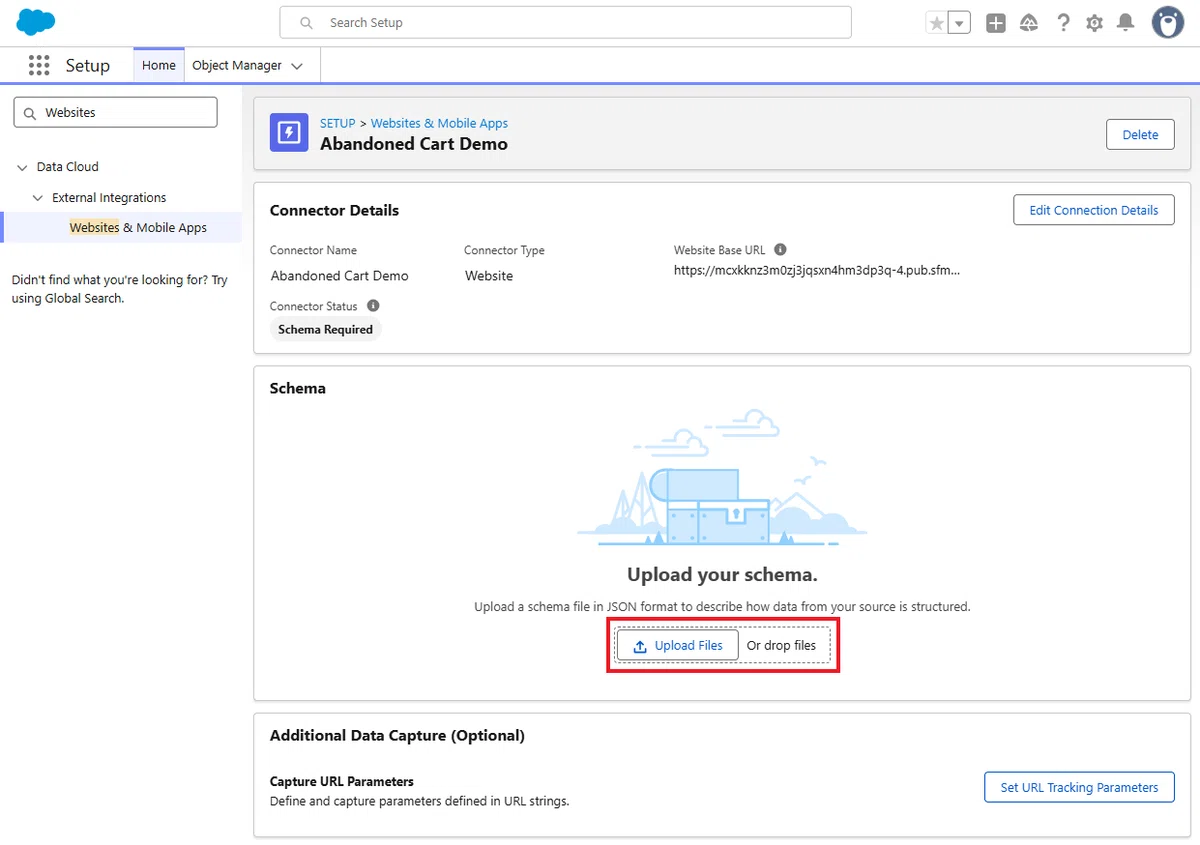
そのまま保存します。

登録されました。
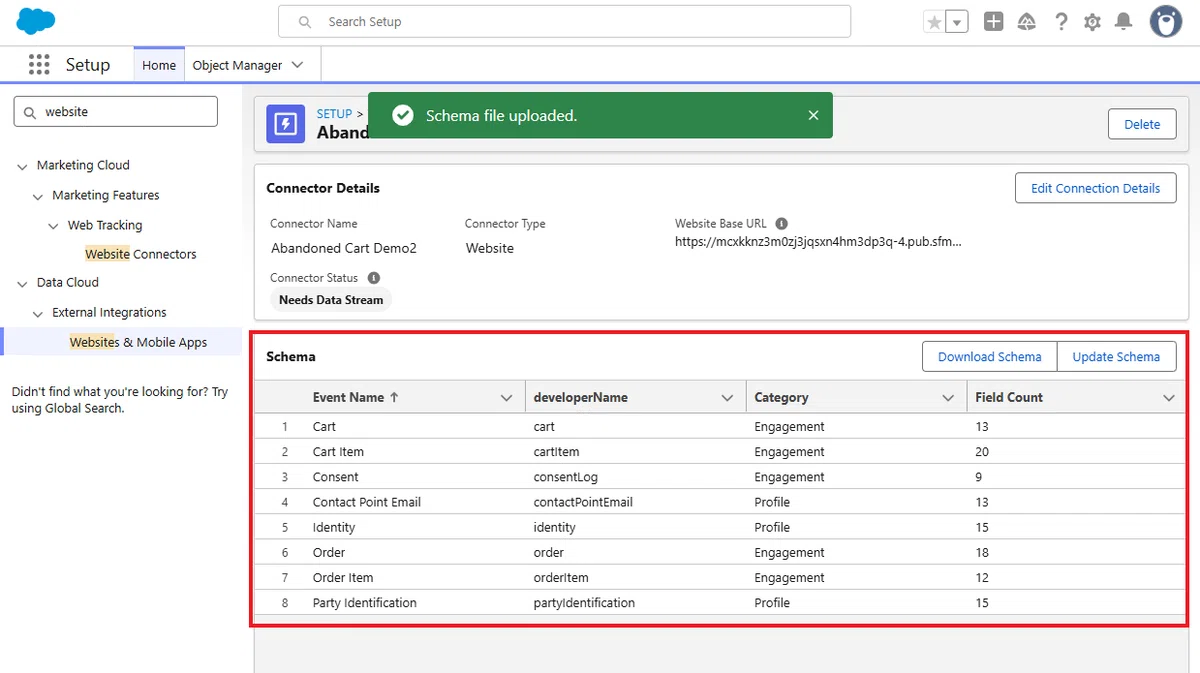
続いて、データストリームへ移動してください。
3. Data Stream の作成
データストリームタブから、右上の「新規」をクリックします。

接続元として Website を選択します。

Website で、先ほど作成した Website Connection を選択し、使用するイベントとして、すべてを選択してください。
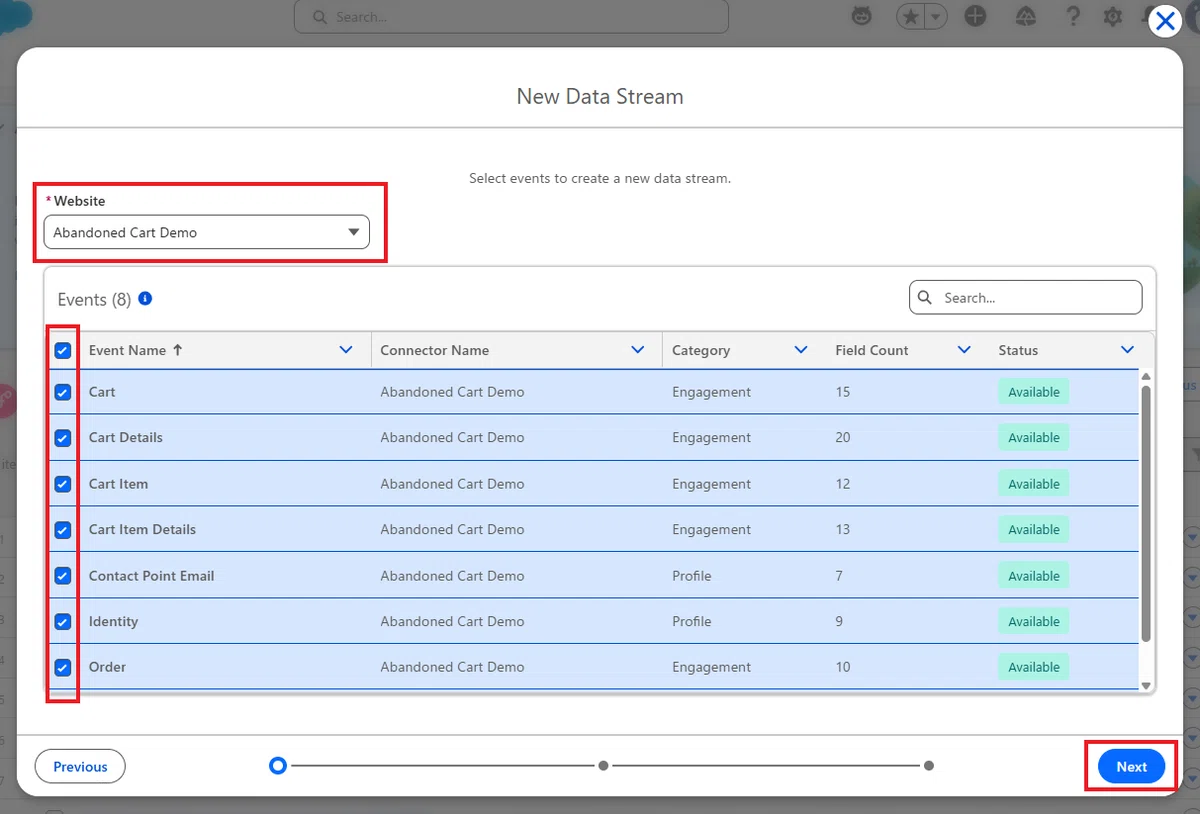
次の画面もそのまま先に進めます。
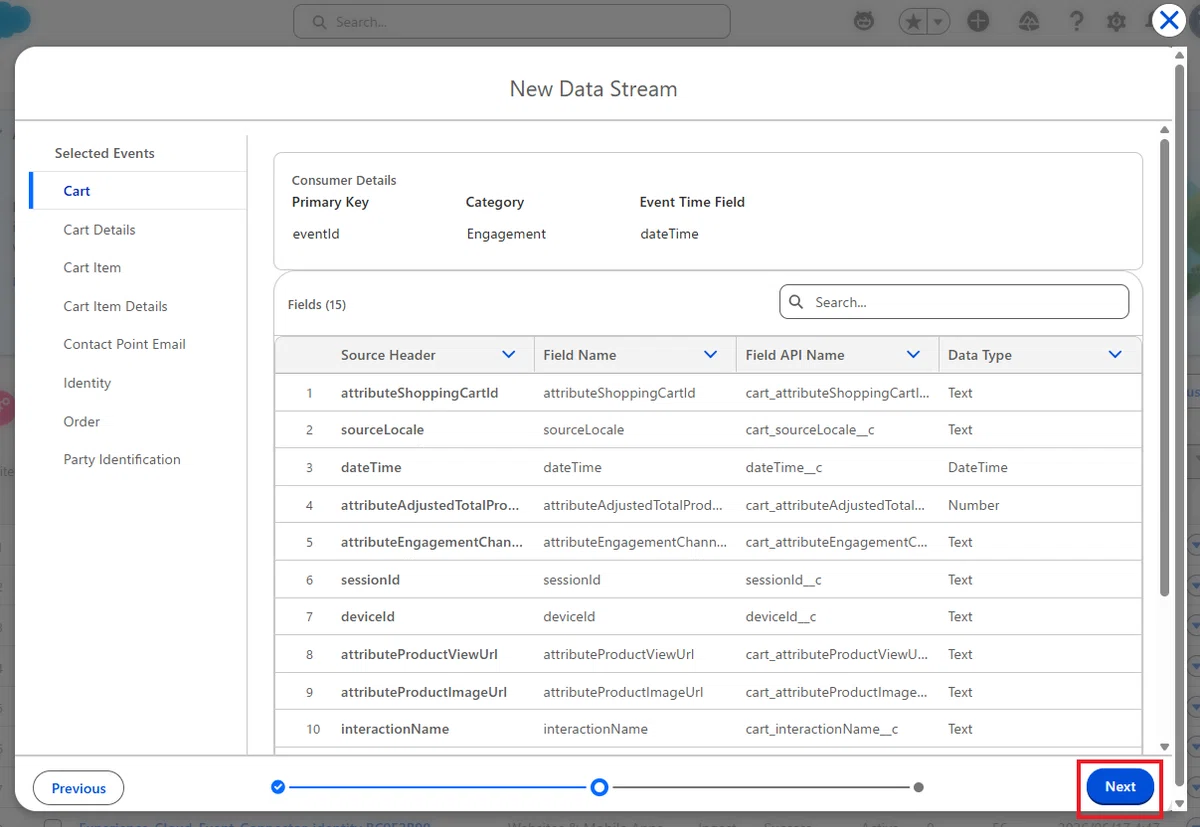
「プロファイル」データは、更新モードを「Partial」のまま(※ 送られてきた項目だけを上書き更新するモード)でリリースしてください。

注意:基本的に、同じブラウザであれば、同じアノニマス ID が上書きの形で引き続き利用されます。注意点としては、複数の Website Connector を設定すると別ソースの扱いとなります。そのため、同じブラウザで操作したときに同じアノニマス ID が別ソースで 2 レコード作成される状態になるため、二重送信が発生する場合があります。
すると、データストリームが作成されました。これらが Website からデータを取り込むための入り口となります。
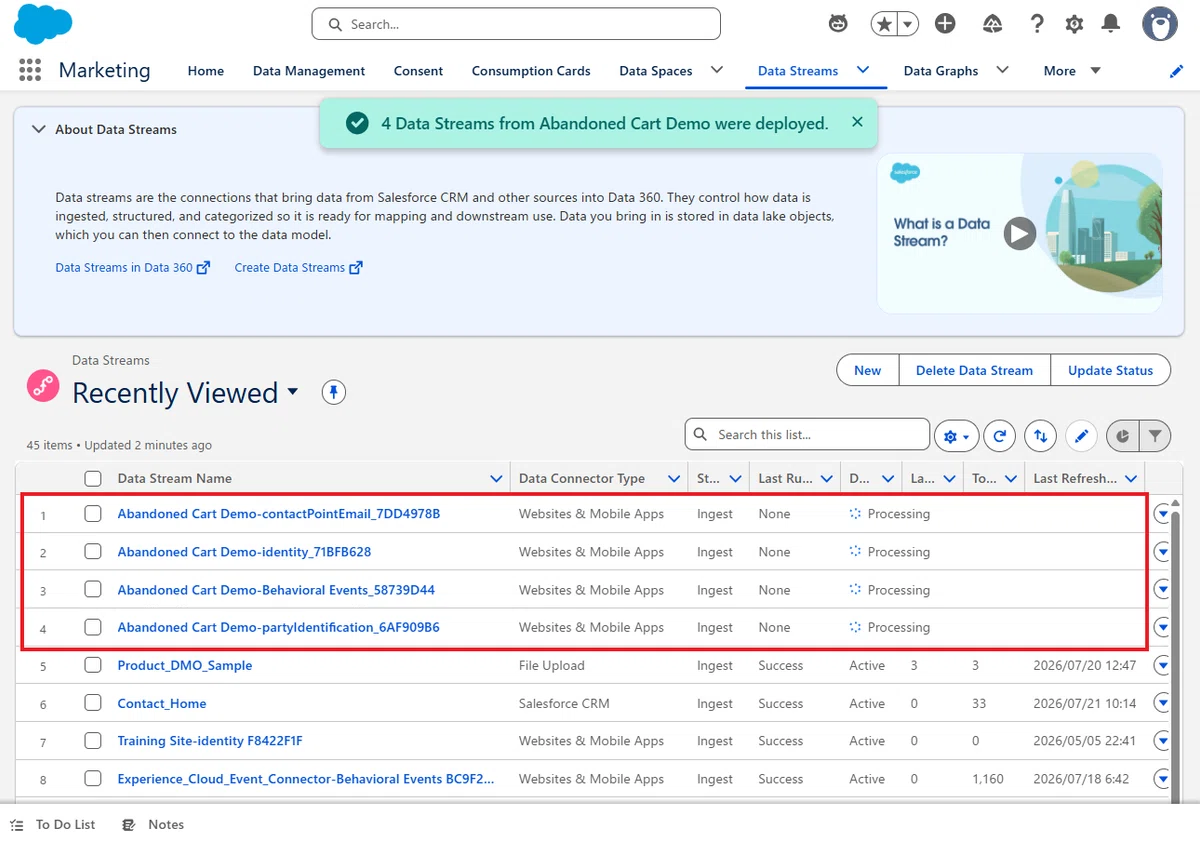
Tips:プロファイルのイベントはオブジェクトごとに個別のデータストリームが作成されますが、Cart や Order などのエンゲージメントのイベントは Behavioral Events という 1 つのデータストリームに集約されます。
4. データマッピングの作成
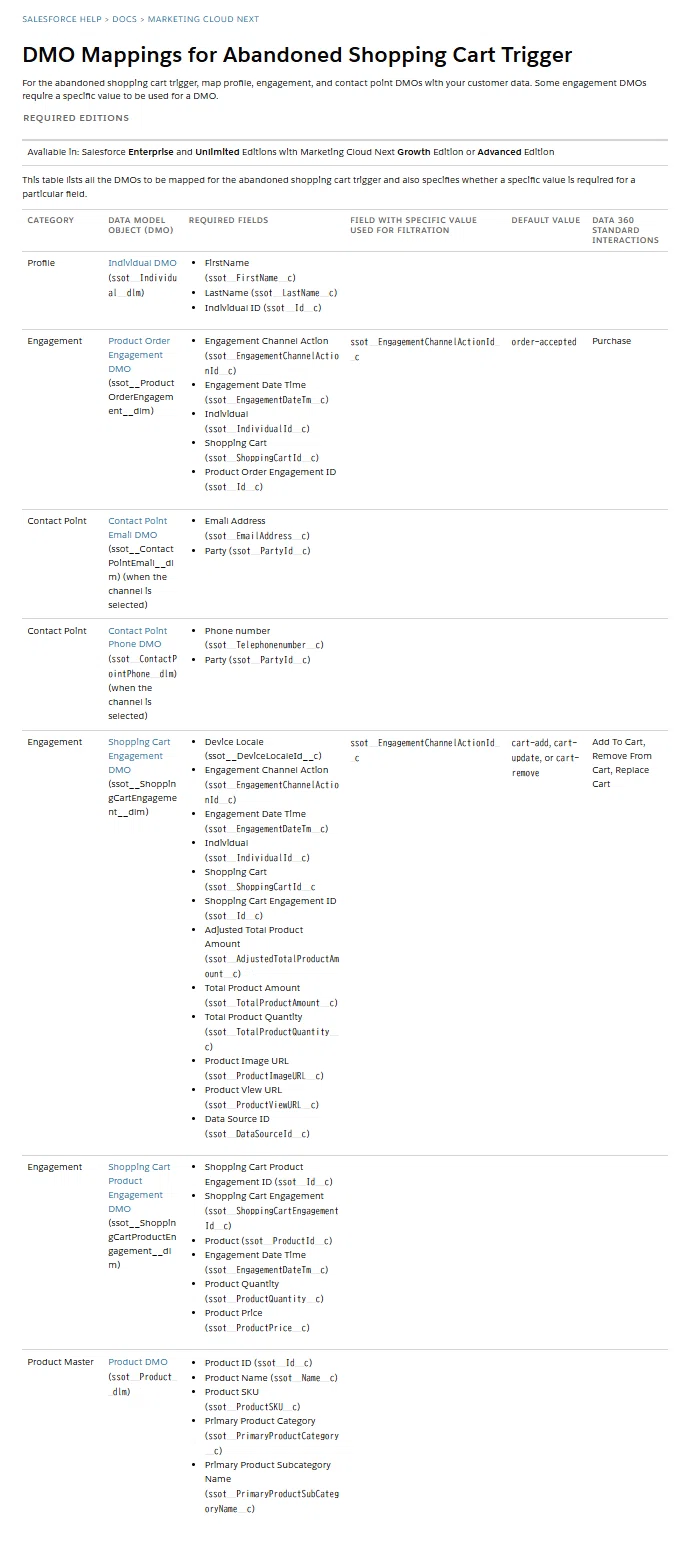
データストリームが作成できたら、それに対応するデータレイクオブジェクトも自動的に作成されています。Marketing Cloud Next でそのデータを利用するには、データレイクオブジェクト(DLO)と 標準のデータモデルオブジェクト(DMO)を正しくマッピングする必要があります。
こちらのヘルプドキュメントに、今回の対応表が掲載されています。
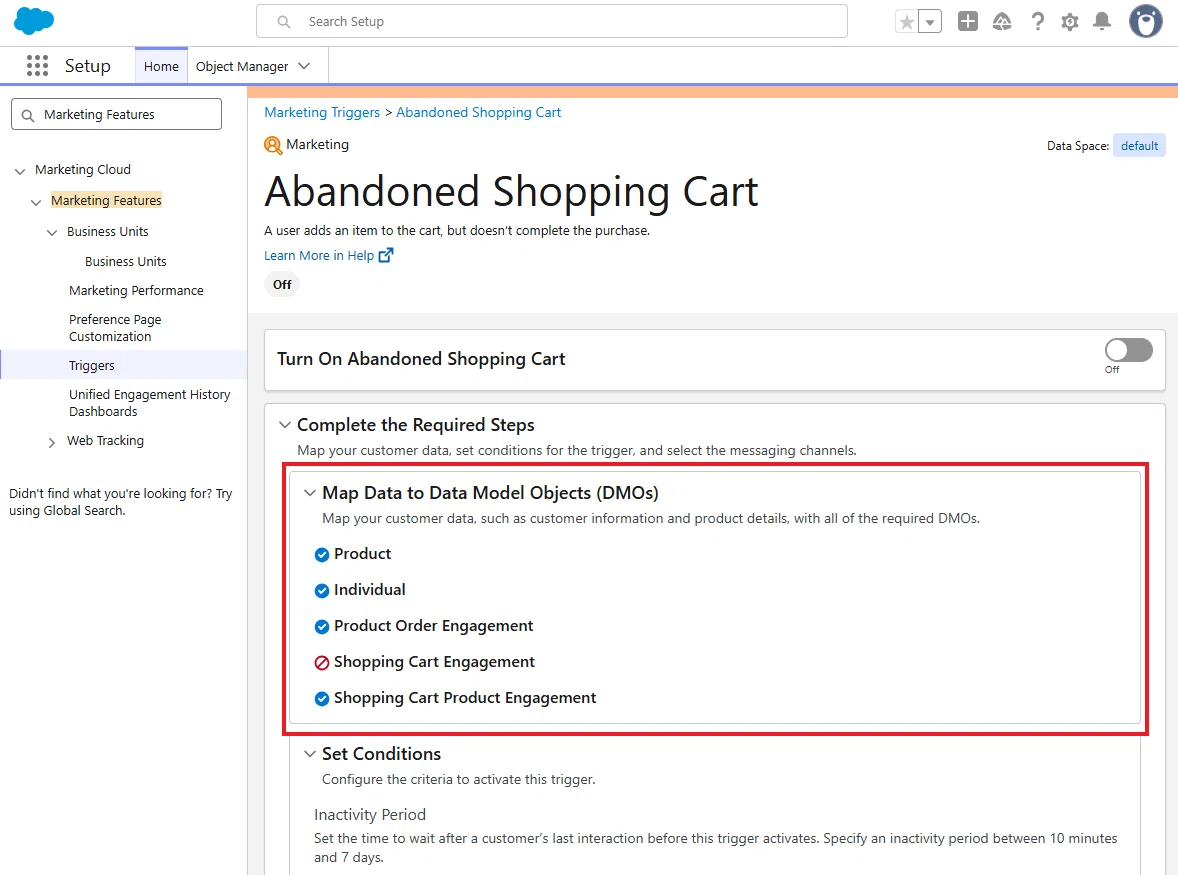
Tips:設定の Marketing Features >トリガー の管理画面では、DMO へ正しくマッピングできているかのチェックが行われています。すべての DMO でエラーが無くなるまで処理してください。
① Behavioral Events データ
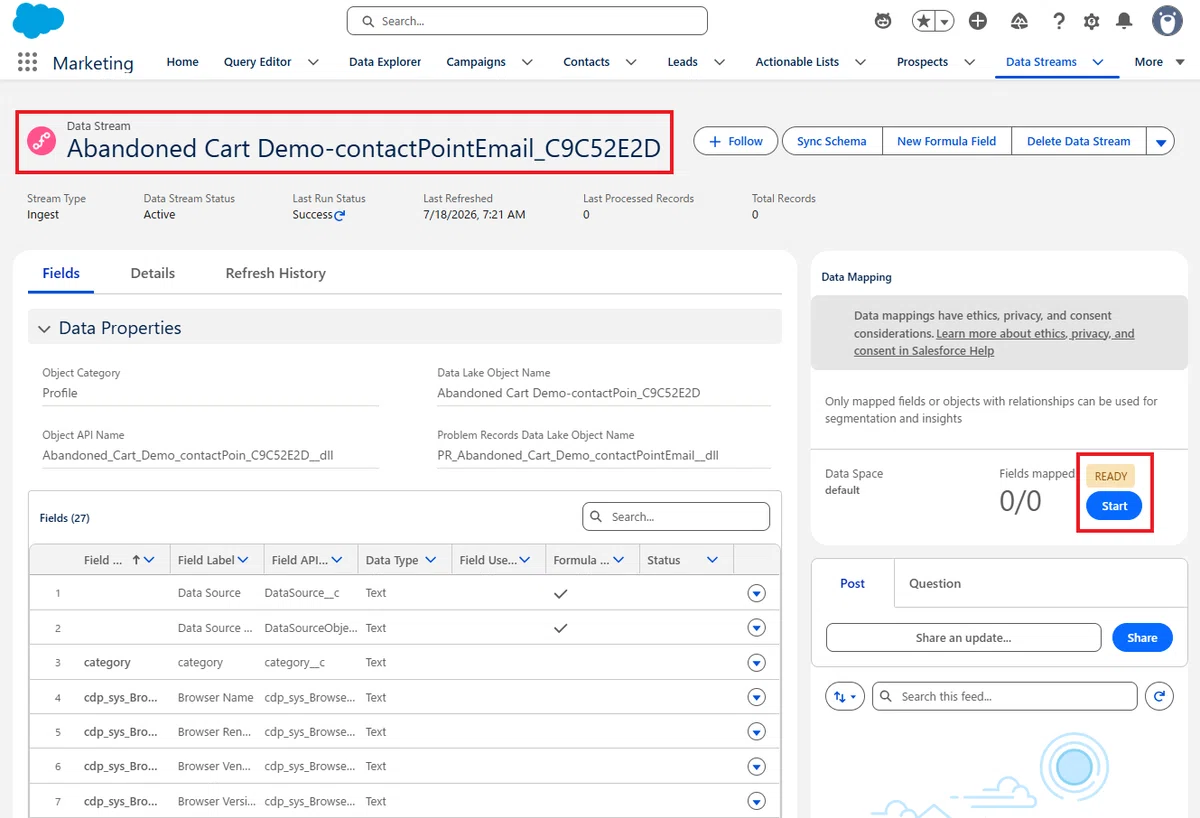
まず、作成された Behavioral Events のデータストリームを開いて、DLO と DMO のマッピングを開始します。

追加する DMO
マッピングキャンバスの DMO 側(画面右側)で、次の DMO を追加してください。
Product Order Engagement
Shopping Cart Engagement
Shopping Cart Product Engagement
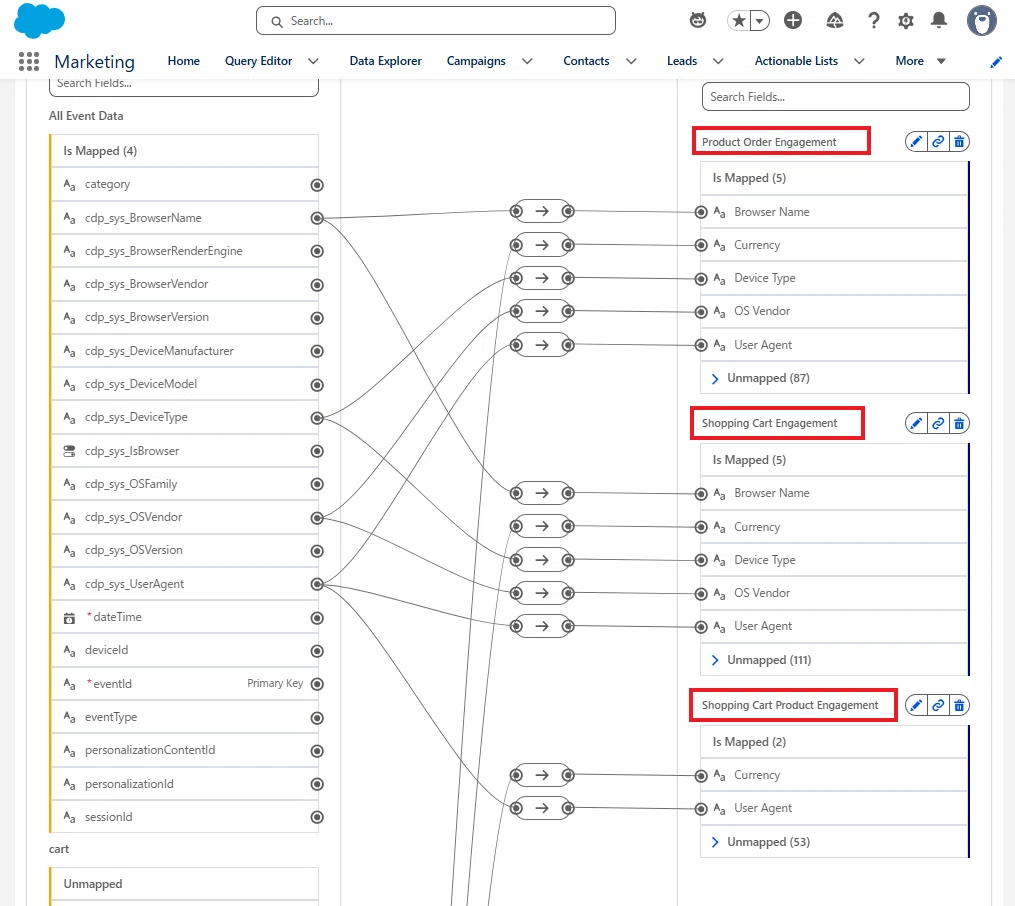
今回のマッピング対象
1. All Event Data
eventId (Primary key)
→ Product Order Engagement:Product Order Engagement ID (Primary key)
→ Shopping Cart Product Engagement:Shopping Cart Product Engagement ID (Primary key)
dateTime
→ Product Order Engagement:Engagement Date Time
→ Shopping Cart Engagement:Engagement Date Time
→ Shopping Cart Product Engagement:Engagement Date TimedeviceId
→ Product Order Engagement:Individual
→ Shopping Cart Engagement:Individual
→ Shopping Cart Product Engagement:IndividualTips:まず、プライマリーキー項目となっている dateTime と eventId をマッピングすると、設定画面の保存ができるようになります。
2. cartItem → Shopping Cart Engagement
cartItem.attributeAdjustedTotalProductAmount
→ Shopping Cart Engagement:Adjusted Total Product Amount

cartItem.attributeDeviceLocale
→ Shopping Cart Engagement:Device Locale

cartItem.attributeEngagementChannelAction
→ Shopping Cart Engagement:Engagement Channel Action

eventType
→ Shopping Cart Engagement:Engagement Type

cartItem.attributeProductImageUrl
→ Shopping Cart Engagement:Product Image URL

cartItem.attributeProductViewUrl
→ Shopping Cart Engagement:Product View URL

cartItem.attributeShoppingCartId
→ Shopping Cart Engagement:Shopping Cart

cartItem.cartEventId
→ Shopping Cart Engagement:Shopping Cart Engagement ID (Primary key)

cartItem.attributeTotalProductAmount
→ Shopping Cart Engagement:Total Product Amount

cartItem.attributeTotalProductQuantity
→ Shopping Cart Engagement:Total Product QuantityTips:公式ヘルプドキュメントでは、Shopping Cart Engagement の「Data Source ID」をマッピングするように指示されていますが、そちらは裏側で自動的にマッピングされているものになるので、設定を無視できます。
3. cartItem → Shopping Cart Product Engagement
cartItem.currency
→ Shopping Cart Product Engagement:Currency

eventType
→ Shopping Cart Product Engagement:Engagement Type

cartItem.catalogObjectId
→ Shopping Cart Product Engagement:Product

cartItem.catalogObjectType
→ Shopping Cart Product Engagement:Product Category

cartItem.price
→ Shopping Cart Product Engagement:Product Price

cartItem.quantity
→ Shopping Cart Product Engagement:Product Quantity

cartItem.cartEventId
→ Shopping Cart Product Engagement:Shopping Cart Engagement
4. order → Product Order Engagement
order.orderCurrency
→ Product Order Engagement:Currency

order.attributeEngagementChannelAction
→ Product Order Engagement:Engagement Channel Action

eventType
→ Product Order Engagement:Engagement Type

order.orderId
→ Product Order Engagement:Order Transaction Id

order.attributeShoppingCartId
→ Product Order Engagement:Shopping Cart
② Identity
Identity データストリームでは、Web SDK が発行する deviceId を Individual として取り込みます。
この deviceId は、匿名ユーザーを識別するための ID であり、後ほど Party Identification データストリームによりメールアドレスなどの既知情報と関連付けられます。
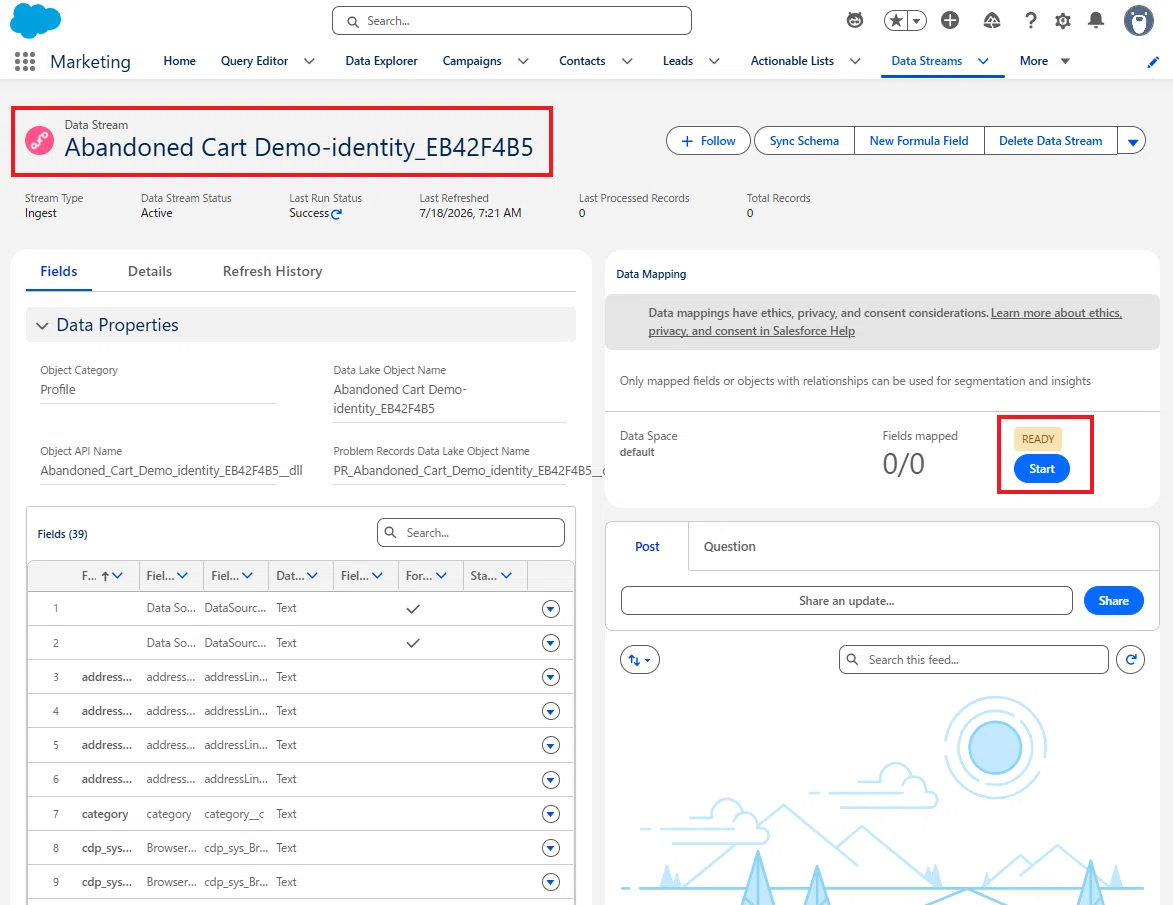
Individual DMO を呼び出し、公式ヘルプドキュメント に従って、以下をマッピングしてください。
identity.deviceId(Primary Key)
→ Individual:Individual ID(Primary Key)

identity.firstName
→ Individual:First Name

identity.lastName
→ Individual:Last Name

identity.isAnonymous
→ Individual:Is Anonymous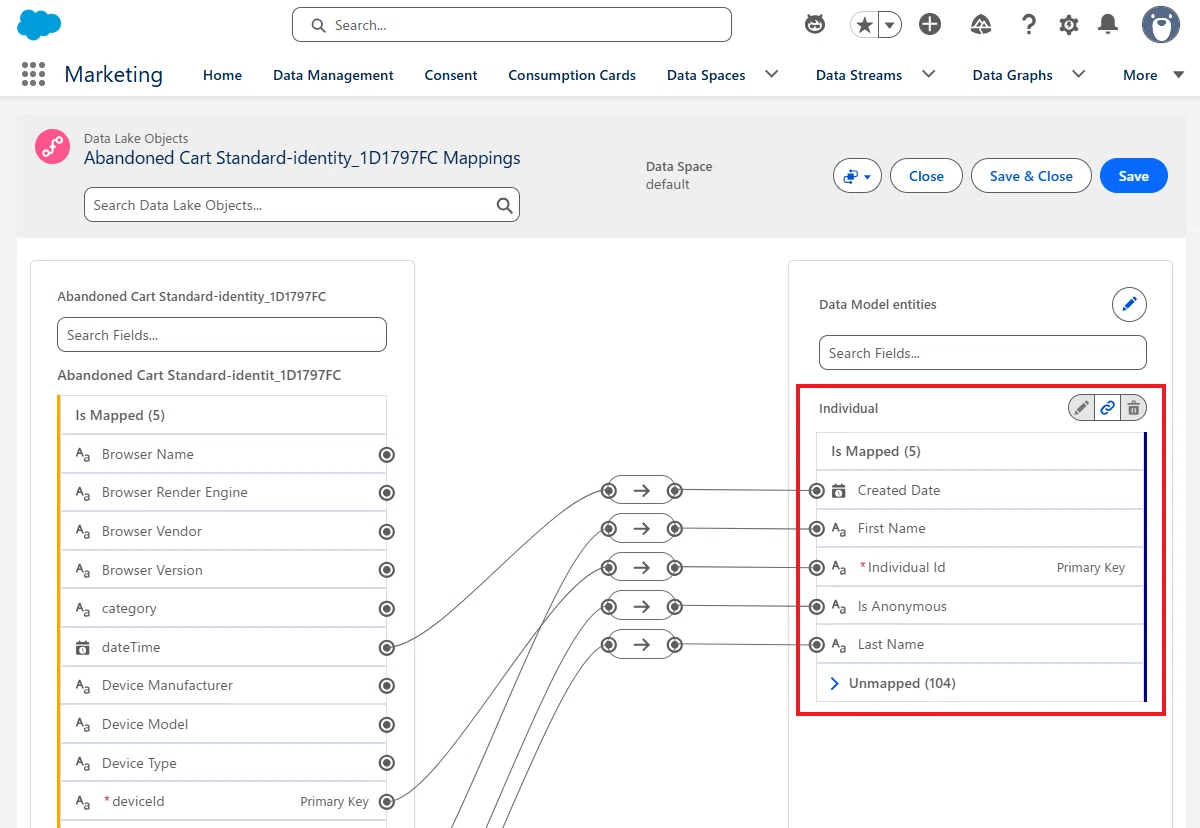
③ Party Identification
Party Identification データストリームは、匿名ユーザー(deviceId)と既知ユーザー(メールアドレスや会員 ID)を関連付けるための重要な役割を持っています。今回のトリガーの必須表に、直接掲載されていませんが、メールアドレスと匿名の Web 行動を関連付けるため、標準マッピングとして設定します。
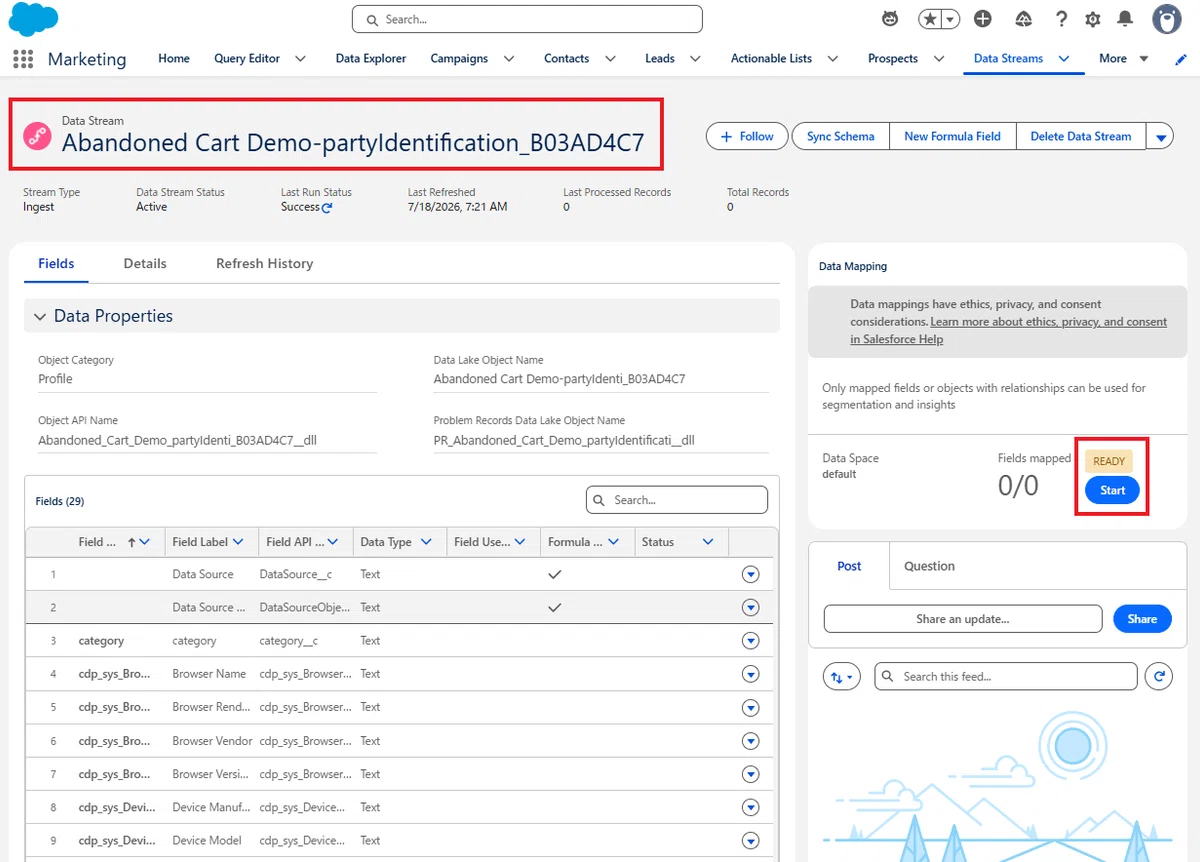
Party Identification DMO を呼び出し、以下をマッピングしてください。
deviceId(Primary Key)
→ Party Identification:Party Identification Id(Primary Key)
→ Party Identification:Party

IDName
→ Party Identification:Identification Name

IDType
→ Party Identification:Party Identification Type

userId
→ Party Identification:Identification Number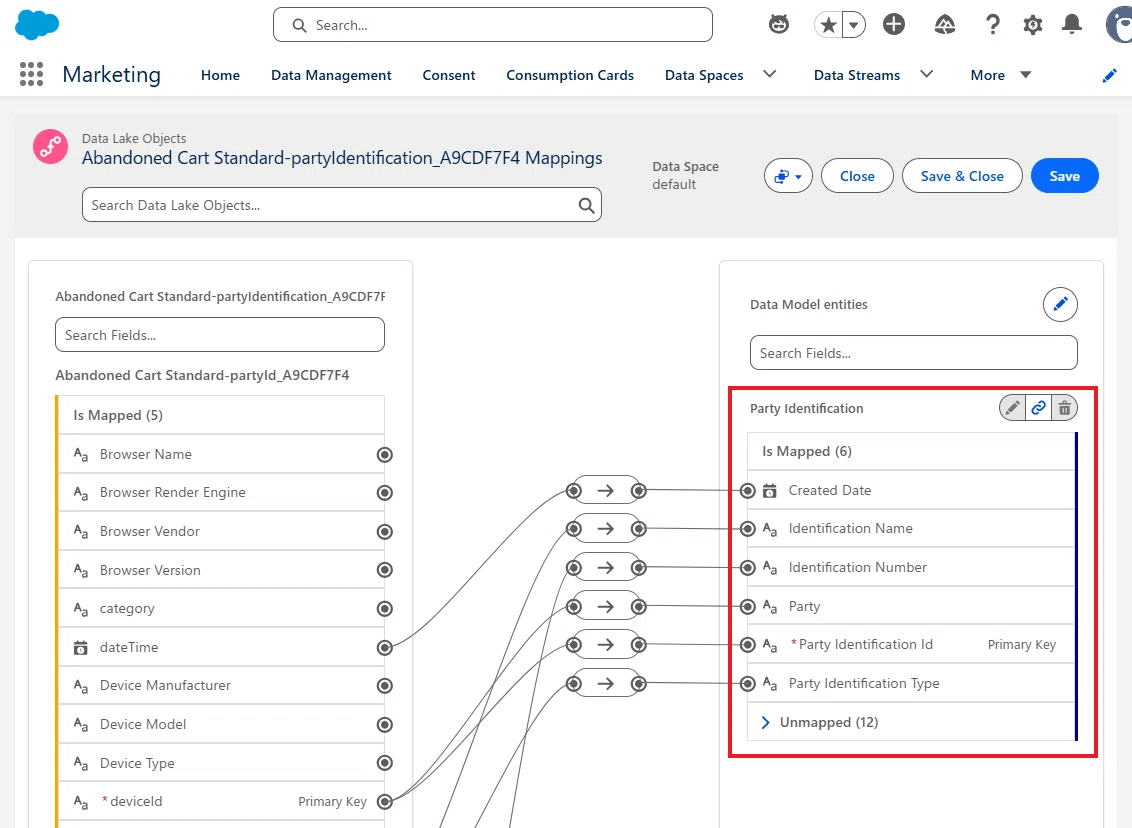
Salesforce の標準 Website Connector マッピングでも、deviceId を Party とParty Identification ID の両方へ接続しています。
④ Contact Point Email
Contact Point Email データストリームでは、訪問者のメールアドレスをContact Point Email DMO へ取り込みます。
Contact Point Email DMO を呼び出し、公式ヘルプドキュメント に従って、以下をマッピングしてください。
deviceId(Primary Key)
→ Contact Point Email:Contact Point Email Id(Primary Key)
→ Contact Point Email:Party

email
→ Contact Point Email:Email Address

dateTime
→ Contact Point Email:Last Modified Date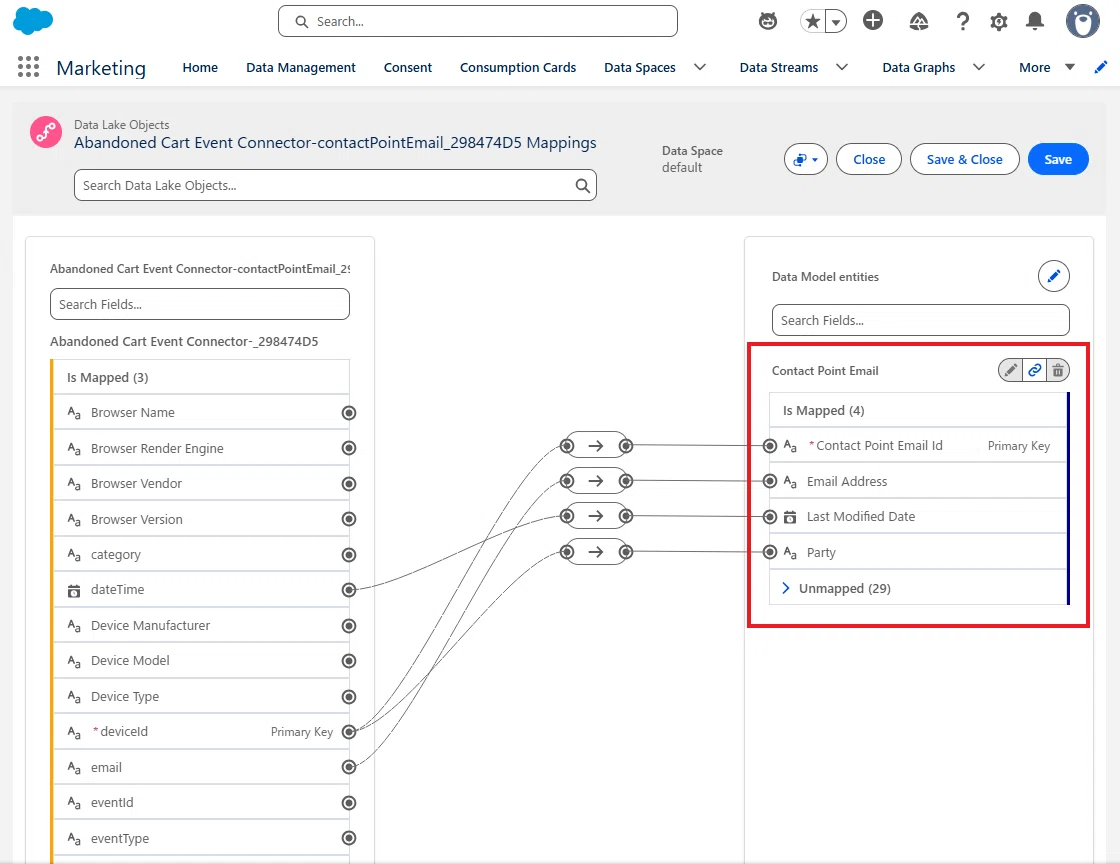
⑤ Product
Abandoned Shopping Cart Trigger では、Shopping Cart Engagement やProduct Order Engagement だけでなく、Product DMO も利用されます。
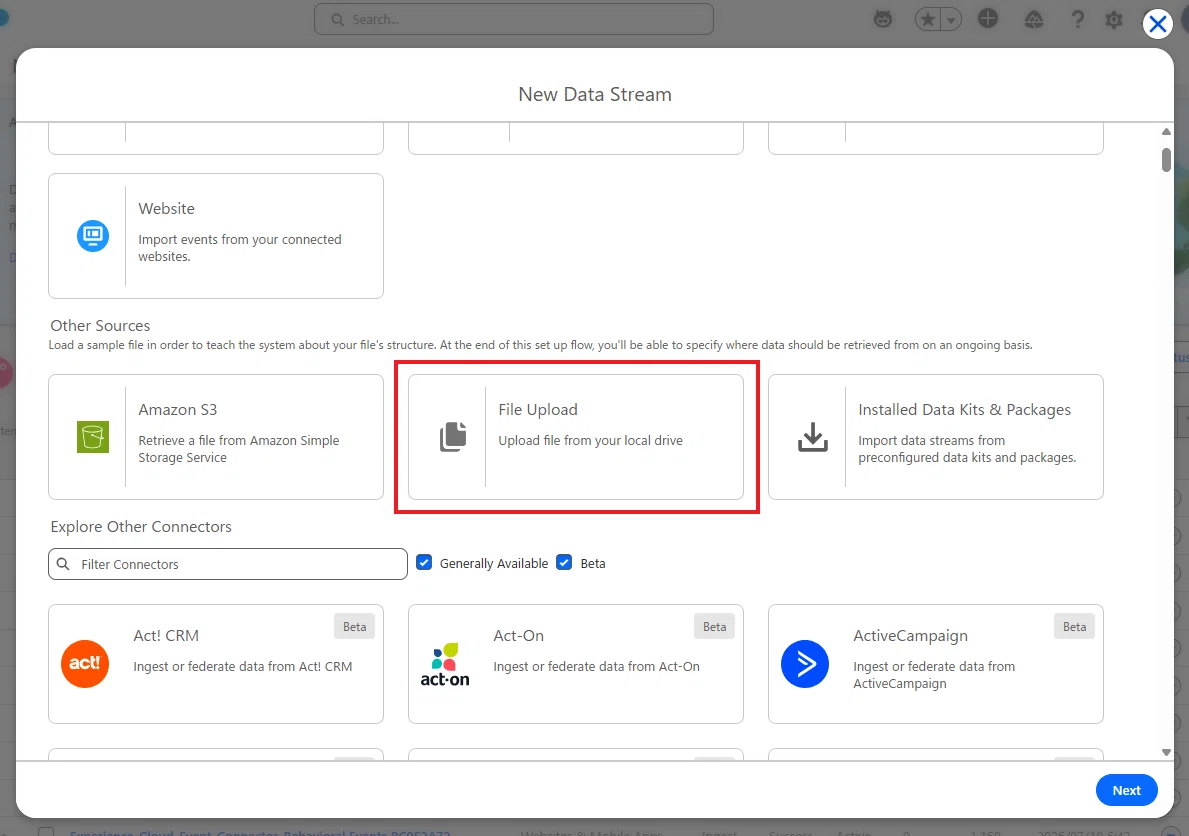
今回の Cloudpages からの送信では、商品マスターを送信しているわけではないので、今回は手動で Product DMO を用意します。
以下の CSV をダウンロードし、ファイルアップロード機能を使って、Product DMO へ取り込んでください。
Product DMO へのマッピングは、以下のように行います。
Product ID(Primary Key)
→ Product:Product Id(Primary Key)

Product Name
→ Product:Product Name

Product SKU
→ Product:Product SKU

Primary Product Category
→ Product:Primary Product Category

Primary Product Subcategory Name
→ Product:Primary Product Sub Category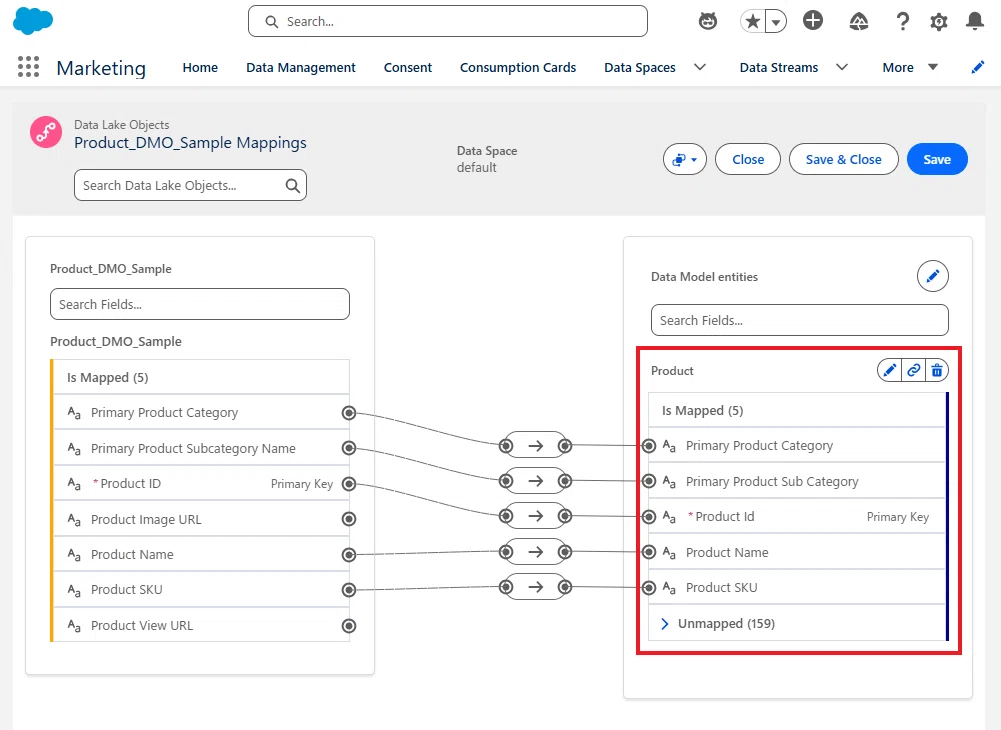
以上で、Webサイトから送信されるデータを Data Cloud へ受け取る準備が整いました。次は Cloudpages へ Web SDK を組み込み、実際にカート情報を送信していきます。
5. Cloudpages の作成
Website Connection を作成すると、その接続専用の Web SDK が発行されます。この SDK を Web サイトへ組み込むことで、プロフィール情報やカート情報、注文情報などを Data Cloud へ送信できるようになります。
今回は Cloudpages 上にシンプルな EC サイトを作成し、次の流れを実装します。
ユーザーがプロフィール情報を入力してサインイン
商品をカートへ追加
注文を完了
これらの操作に応じて、次のイベントを Data Cloud へ送信します。
Anonymous Identity
Identity
Contact Point Email
Party Identification
Add To Cart
Purchase
Web SDK を Integration Guide のセクションから取得してください。
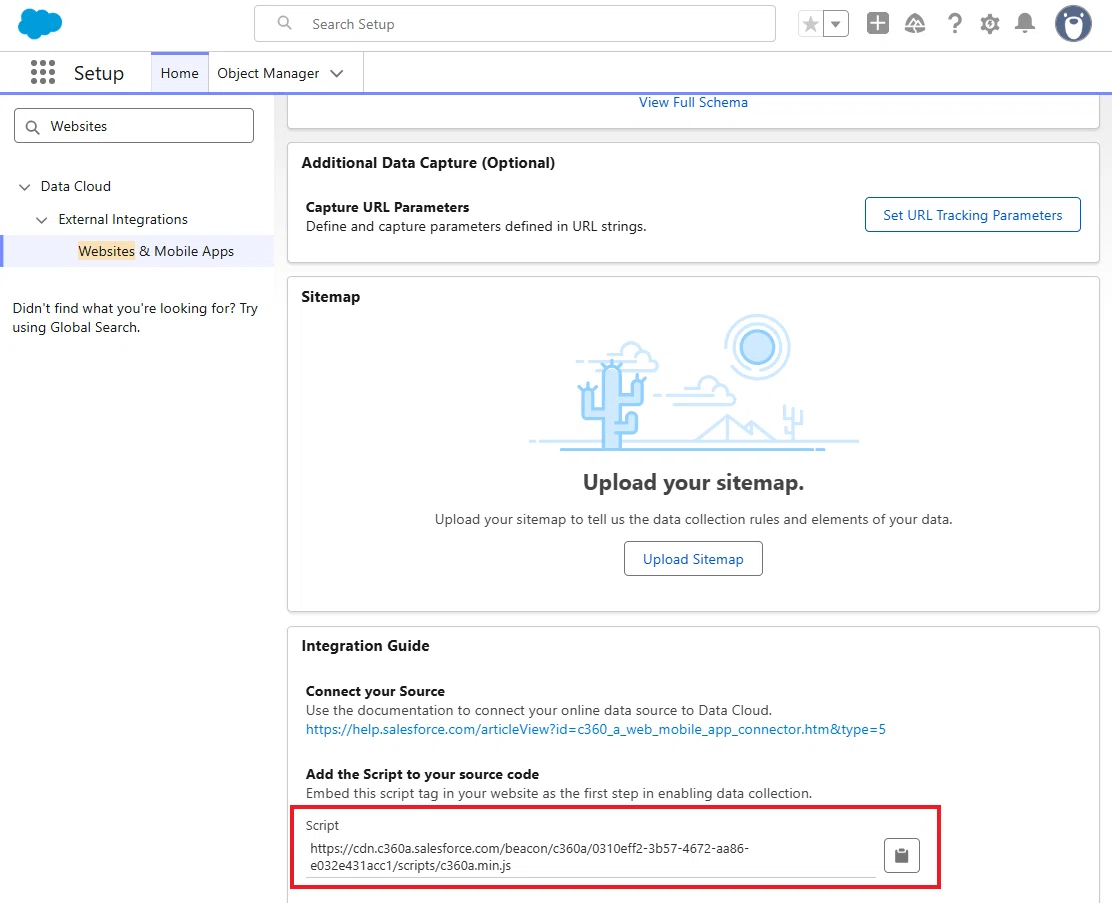
<script src="https://cdn.c360a.salesforce.com/beacon/xxxxxxxx/scripts/c360a.min.js"></script>Cloudpages の HTML 全体は、以下からコピペしてください。
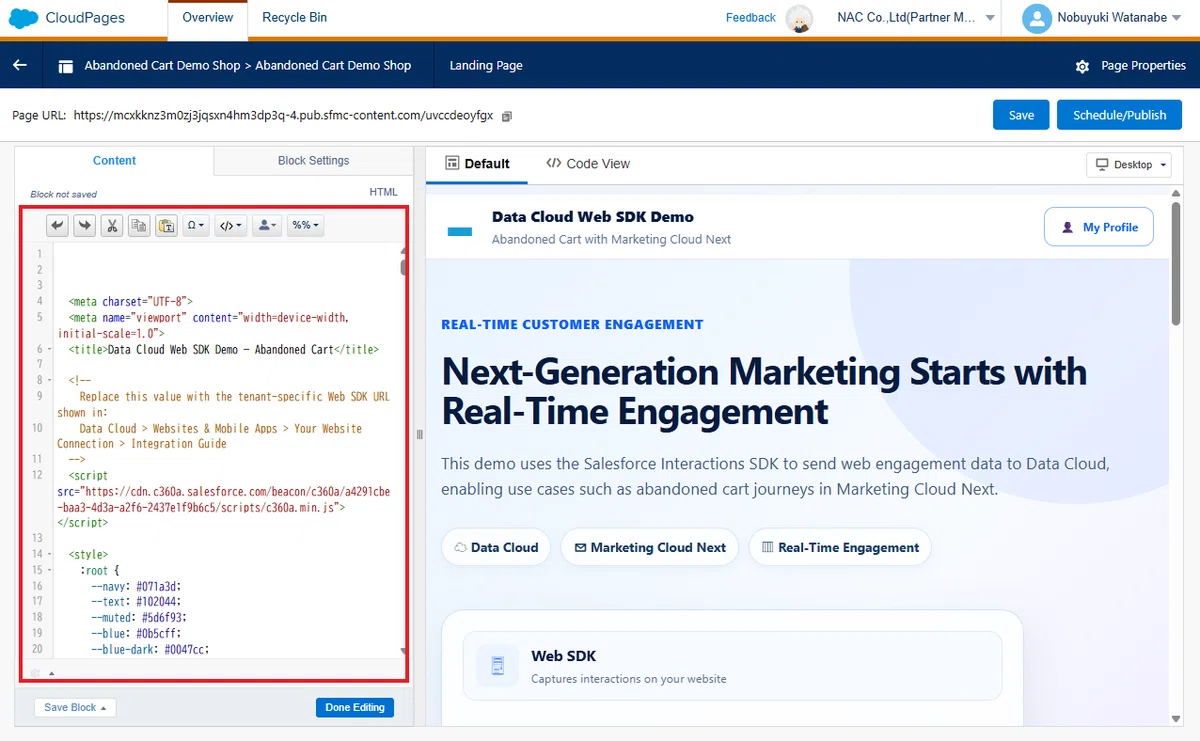
<meta charset="UTF-8">
<meta name="viewport" content="width=device-width, initial-scale=1.0">
<title>Data Cloud Web SDK Demo — Standard Abandoned Cart Final</title>
<!--
Replace this value with the tenant-specific Web SDK URL shown in:
Data Cloud > Websites & Mobile Apps > Your Website Connection > Integration Guide
-->
<script src="REPLACE_WITH_YOUR_TENANT_SPECIFIC_WEB_SDK_URL"></script>
<style>
:root {
--navy: #071a3d;
--text: #102044;
--muted: #5d6f93;
--blue: #0b5cff;
--blue-dark: #0047cc;
--blue-soft: #edf5ff;
--purple: #7f5af0;
--green: #168651;
--green-soft: #eaf8f0;
--red: #ba0517;
--red-soft: #fff0f1;
--amber: #9b5c00;
--amber-soft: #fff6e7;
--surface: #ffffff;
--surface-soft: #f7faff;
--border: #d9e4f2;
--shadow: 0 16px 44px rgba(20, 52, 95, 0.10);
--shadow-soft: 0 8px 24px rgba(20, 52, 95, 0.07);
--radius-xl: 24px;
--radius-lg: 18px;
--radius-md: 12px;
--max-width: 1180px;
}
* {
box-sizing: border-box;
}
html {
scroll-behavior: smooth;
}
body {
margin: 0;
min-width: 320px;
color: var(--text);
background:
radial-gradient(circle at 10% 12%, rgba(11, 92, 255, 0.06), transparent 28%),
radial-gradient(circle at 92% 16%, rgba(127, 90, 240, 0.07), transparent 24%),
#f6f9fe;
font-family:
Inter, ui-sans-serif, -apple-system, BlinkMacSystemFont, "Segoe UI",
Roboto, Helvetica, Arial, sans-serif;
line-height: 1.55;
-webkit-font-smoothing: antialiased;
}
button,
input {
font: inherit;
}
button {
cursor: pointer;
}
button:disabled {
cursor: not-allowed;
opacity: 0.55;
}
.shell {
width: min(var(--max-width), calc(100% - 32px));
margin: 0 auto;
}
/* Header */
.topbar {
position: sticky;
top: 0;
z-index: 30;
background: rgba(255, 255, 255, 0.93);
border-bottom: 1px solid rgba(217, 228, 242, 0.9);
backdrop-filter: blur(14px);
}
.topbar-inner {
min-height: 68px;
display: flex;
align-items: center;
justify-content: space-between;
gap: 20px;
}
.brand {
display: flex;
align-items: center;
gap: 12px;
min-width: 0;
}
.brand-mark {
width: 42px;
height: 31px;
flex: 0 0 auto;
}
.brand-copy {
min-width: 0;
}
.brand-title {
display: block;
font-size: 1rem;
font-weight: 800;
color: var(--navy);
white-space: nowrap;
}
.brand-subtitle {
display: block;
margin-top: 1px;
color: var(--muted);
font-size: 0.82rem;
white-space: nowrap;
overflow: hidden;
text-overflow: ellipsis;
}
.header-button {
display: inline-flex;
align-items: center;
justify-content: center;
gap: 8px;
min-height: 42px;
padding: 0 16px;
color: var(--blue);
background: #fff;
border: 1px solid #91b8ff;
border-radius: 11px;
font-weight: 750;
transition: 0.2s ease;
white-space: nowrap;
}
.header-button:hover {
background: var(--blue-soft);
border-color: var(--blue);
transform: translateY(-1px);
}
/* Hero */
.hero {
position: relative;
overflow: hidden;
padding: 58px 0 52px;
background:
linear-gradient(135deg, #eaf4ff 0%, #f8fbff 55%, #efeaff 100%);
border-bottom: 1px solid var(--border);
}
.hero::before,
.hero::after {
content: "";
position: absolute;
border-radius: 50%;
pointer-events: none;
}
.hero::before {
width: 480px;
height: 480px;
right: -140px;
top: -220px;
background: rgba(11, 92, 255, 0.07);
}
.hero::after {
width: 340px;
height: 340px;
left: 42%;
bottom: -270px;
background: rgba(127, 90, 240, 0.09);
}
.hero-grid {
position: relative;
z-index: 1;
display: grid;
grid-template-columns: minmax(0, 1.45fr) minmax(320px, 0.75fr);
gap: 46px;
align-items: center;
}
.eyebrow {
display: inline-flex;
align-items: center;
gap: 8px;
margin: 0 0 16px;
color: var(--blue);
font-size: 0.88rem;
font-weight: 800;
letter-spacing: 0.04em;
text-transform: uppercase;
}
h1 {
margin: 0;
max-width: 780px;
color: var(--navy);
font-size: clamp(2.2rem, 5vw, 4.15rem);
line-height: 1.06;
letter-spacing: -0.035em;
}
.hero-copy {
max-width: 720px;
margin: 22px 0 0;
color: #40577f;
font-size: 1.08rem;
}
.pill-row {
display: flex;
flex-wrap: wrap;
gap: 10px;
margin-top: 28px;
}
.pill {
display: inline-flex;
align-items: center;
gap: 8px;
padding: 9px 13px;
color: #183864;
background: rgba(255, 255, 255, 0.8);
border: 1px solid #d8e7fb;
border-radius: 999px;
box-shadow: 0 4px 12px rgba(37, 72, 120, 0.05);
font-size: 0.86rem;
font-weight: 750;
}
.flow-card {
padding: 22px;
background: rgba(255, 255, 255, 0.82);
border: 1px solid rgba(211, 225, 244, 0.95);
border-radius: var(--radius-xl);
box-shadow: var(--shadow);
backdrop-filter: blur(10px);
}
.flow-step {
display: grid;
grid-template-columns: 46px 1fr;
gap: 13px;
align-items: center;
padding: 13px;
background: rgba(247, 250, 255, 0.96);
border: 1px solid #e3ebf7;
border-radius: 14px;
}
.flow-step + .flow-step {
margin-top: 28px;
}
.flow-step + .flow-step::before {
content: "↓";
position: absolute;
transform: translate(11px, -30px);
color: var(--blue);
font-size: 1.2rem;
font-weight: 900;
}
.flow-icon {
display: grid;
place-items: center;
width: 46px;
height: 46px;
color: var(--blue);
background: var(--blue-soft);
border-radius: 13px;
font-size: 1.35rem;
}
.flow-step:nth-child(2) .flow-icon {
color: var(--purple);
background: #f2edff;
}
.flow-step:nth-child(3) .flow-icon {
color: #df2a77;
background: #fff0f6;
}
.flow-step strong {
display: block;
color: var(--navy);
font-size: 0.98rem;
}
.flow-step span {
display: block;
margin-top: 2px;
color: var(--muted);
font-size: 0.78rem;
}
/* Main */
main {
padding: 30px 0 58px;
}
.card {
background: var(--surface);
border: 1px solid var(--border);
border-radius: var(--radius-lg);
box-shadow: var(--shadow-soft);
}
.profile-card {
display: grid;
grid-template-columns: minmax(230px, 0.8fr) minmax(0, 1.8fr);
gap: 28px;
align-items: center;
padding: 22px;
}
.profile-intro {
display: grid;
grid-template-columns: 74px 1fr;
gap: 16px;
align-items: center;
}
.profile-avatar {
display: grid;
place-items: center;
width: 74px;
height: 74px;
color: #fff;
background: linear-gradient(145deg, #21a4ff, #8b5cf6);
border-radius: 50%;
box-shadow: 0 10px 24px rgba(78, 114, 255, 0.22);
font-size: 2rem;
}
.section-title {
margin: 0;
color: var(--navy);
font-size: 1.28rem;
line-height: 1.2;
}
.section-copy {
margin: 7px 0 0;
color: var(--muted);
font-size: 0.9rem;
}
.profile-form {
display: grid;
grid-template-columns: minmax(120px, 0.8fr) minmax(120px, 0.8fr) minmax(200px, 1.2fr) auto;
gap: 12px;
align-items: end;
}
.field {
min-width: 0;
}
.field label {
display: block;
margin-bottom: 6px;
color: var(--navy);
font-size: 0.78rem;
font-weight: 800;
}
.field input {
width: 100%;
min-height: 45px;
padding: 0 13px;
color: var(--text);
background: #fff;
border: 1px solid #cbd8ea;
border-radius: 10px;
outline: none;
transition: 0.2s ease;
}
.field input::placeholder {
color: #8b9bb8;
}
.field input:focus {
border-color: var(--blue);
box-shadow: 0 0 0 3px rgba(11, 92, 255, 0.12);
}
.primary-button,
.secondary-button,
.ghost-button,
.danger-button {
display: inline-flex;
align-items: center;
justify-content: center;
gap: 8px;
min-height: 45px;
padding: 0 16px;
border-radius: 10px;
font-weight: 800;
transition: 0.2s ease;
white-space: nowrap;
}
.primary-button {
color: #fff;
background: linear-gradient(135deg, #0968ff, #0053e6);
border: 0;
box-shadow: 0 8px 18px rgba(0, 83, 230, 0.23);
}
.primary-button:hover:not(:disabled) {
transform: translateY(-1px);
box-shadow: 0 10px 22px rgba(0, 83, 230, 0.28);
}
.secondary-button {
color: var(--blue);
background: #fff;
border: 1px solid #8eb8ff;
}
.secondary-button:hover:not(:disabled) {
background: var(--blue-soft);
}
.ghost-button {
color: #40577f;
background: #f3f7fc;
border: 1px solid #d9e4f2;
}
.danger-button {
color: var(--red);
background: var(--red-soft);
border: 1px solid #f0b9c0;
}
.profile-state {
display: none;
margin-top: 13px;
padding: 10px 13px;
color: var(--green);
background: var(--green-soft);
border-radius: 10px;
font-size: 0.86rem;
font-weight: 700;
}
.profile-state.show {
display: block;
}
.message {
display: none;
margin-top: 14px;
padding: 11px 13px;
border-radius: 10px;
font-size: 0.86rem;
font-weight: 750;
}
.message.show {
display: block;
}
.message.success {
color: var(--green);
background: var(--green-soft);
}
.message.error {
color: var(--red);
background: var(--red-soft);
}
.message.warning {
color: var(--amber);
background: var(--amber-soft);
}
.section-header {
display: flex;
align-items: center;
justify-content: space-between;
gap: 18px;
margin: 34px 0 16px;
}
.section-heading {
display: flex;
align-items: center;
gap: 12px;
}
.heading-icon {
display: grid;
place-items: center;
width: 44px;
height: 44px;
color: var(--blue);
background: var(--blue-soft);
border-radius: 13px;
font-size: 1.35rem;
}
.cart-status {
display: inline-flex;
align-items: center;
gap: 8px;
padding: 9px 13px;
color: var(--green);
background: var(--green-soft);
border-radius: 999px;
font-size: 0.82rem;
font-weight: 800;
}
.cart-status::before {
content: "";
width: 8px;
height: 8px;
background: currentColor;
border-radius: 50%;
}
/* Products */
.product-grid {
display: grid;
grid-template-columns: repeat(3, minmax(0, 1fr));
gap: 18px;
}
.product-card {
min-width: 0;
overflow: hidden;
background: #fff;
border: 1px solid var(--border);
border-radius: var(--radius-lg);
box-shadow: var(--shadow-soft);
transition: transform 0.2s ease, box-shadow 0.2s ease;
}
.product-card:hover {
transform: translateY(-3px);
box-shadow: var(--shadow);
}
.product-visual {
display: grid;
place-items: center;
min-height: 215px;
padding: 22px;
overflow: hidden;
background:
radial-gradient(circle at 50% 42%, #ffffff 0%, #edf4ff 62%, #e5eefb 100%);
border-bottom: 1px solid #e7edf6;
}
.product-visual svg {
width: min(78%, 230px);
height: 170px;
filter: drop-shadow(0 18px 16px rgba(45, 64, 102, 0.14));
}
.product-body {
padding: 18px;
}
.product-title-row {
display: flex;
justify-content: space-between;
align-items: start;
gap: 10px;
}
.product-title {
margin: 0;
color: var(--navy);
font-size: 1.1rem;
line-height: 1.3;
}
.sku {
flex: 0 0 auto;
padding: 5px 8px;
color: #53698e;
background: #edf2fa;
border-radius: 8px;
font-size: 0.7rem;
font-weight: 700;
}
.product-description {
min-height: 46px;
margin: 9px 0 16px;
color: var(--muted);
font-size: 0.88rem;
}
.product-price {
display: block;
margin-bottom: 14px;
color: var(--navy);
font-size: 1.5rem;
font-weight: 900;
letter-spacing: -0.02em;
}
.product-card .primary-button {
width: 100%;
}
/* Cart */
.cart-card {
margin-top: 20px;
padding: 20px;
}
.cart-top {
display: flex;
align-items: center;
justify-content: space-between;
gap: 18px;
}
.cart-title-wrap {
display: flex;
align-items: center;
gap: 14px;
}
.cart-icon {
display: grid;
place-items: center;
width: 54px;
height: 54px;
color: var(--blue);
background: var(--blue-soft);
border-radius: 16px;
font-size: 1.55rem;
}
.cart-list {
display: grid;
gap: 10px;
margin-top: 18px;
}
.cart-empty {
padding: 20px;
color: var(--muted);
text-align: center;
border: 1px dashed #cbd8ea;
border-radius: 12px;
background: #fbfdff;
}
.cart-item {
display: grid;
grid-template-columns: 1fr auto;
gap: 16px;
align-items: center;
padding: 13px 14px;
background: #f8fbff;
border: 1px solid #e7eef8;
border-radius: 12px;
}
.cart-item strong,
.cart-item span {
display: block;
}
.cart-item span {
margin-top: 2px;
color: var(--muted);
font-size: 0.82rem;
}
.cart-summary {
display: none;
justify-content: flex-end;
gap: 18px;
align-items: center;
margin-top: 16px;
padding-top: 15px;
border-top: 1px solid var(--border);
}
.cart-summary.show {
display: flex;
}
.cart-total {
color: var(--navy);
font-size: 1.08rem;
font-weight: 900;
}
.cart-actions {
display: flex;
gap: 10px;
}
.cart-item-actions {
display: flex;
align-items: center;
justify-content: flex-end;
gap: 8px;
flex-wrap: wrap;
}
.cart-item-actions button {
min-height: 36px;
padding: 0 11px;
border-radius: 9px;
font-size: 0.78rem;
}
.cart-line-total {
min-width: 100px;
text-align: right;
}
/* Logs */
.bottom-grid {
display: grid;
grid-template-columns: minmax(0, 1.45fr) minmax(300px, 0.85fr);
gap: 18px;
margin-top: 22px;
}
.log-card,
.info-card {
padding: 18px;
}
.card-heading-row {
display: flex;
align-items: center;
justify-content: space-between;
gap: 12px;
margin-bottom: 14px;
}
.mini-heading {
display: flex;
align-items: center;
gap: 11px;
}
.mini-icon {
display: grid;
place-items: center;
width: 40px;
height: 40px;
color: var(--blue);
background: var(--blue-soft);
border-radius: 12px;
}
.log {
min-height: 290px;
max-height: 360px;
margin: 0;
padding: 16px;
overflow: auto;
color: #d9e7ff;
background: linear-gradient(145deg, #08162c, #101f38);
border: 1px solid #1b3153;
border-radius: 13px;
font: 0.79rem/1.62 Consolas, "SFMono-Regular", Menlo, monospace;
white-space: pre-wrap;
overflow-wrap: anywhere;
}
.steps {
display: grid;
gap: 13px;
margin-top: 16px;
}
.step {
display: grid;
grid-template-columns: 26px 1fr;
gap: 10px;
color: #40577f;
font-size: 0.87rem;
}
.step-number {
display: grid;
place-items: center;
width: 26px;
height: 26px;
color: #fff;
background: var(--blue);
border-radius: 50%;
font-size: 0.76rem;
font-weight: 900;
}
.info-note {
margin-top: 18px;
padding: 13px;
color: #18519a;
background: #edf6ff;
border: 1px solid #cce3ff;
border-radius: 12px;
font-size: 0.82rem;
}
.sdk-bar {
display: flex;
align-items: center;
justify-content: space-between;
gap: 14px;
margin-top: 18px;
padding: 12px 15px;
background: #fff;
border: 1px solid var(--border);
border-radius: 13px;
box-shadow: var(--shadow-soft);
}
.sdk-status {
display: inline-flex;
align-items: center;
gap: 9px;
color: var(--muted);
font-size: 0.84rem;
font-weight: 800;
}
.sdk-status::before {
content: "";
width: 9px;
height: 9px;
background: #8a99b2;
border-radius: 50%;
}
.sdk-status.ready {
color: var(--green);
}
.sdk-status.ready::before {
background: var(--green);
}
.sdk-status.error {
color: var(--red);
}
.sdk-status.error::before {
background: var(--red);
}
.footer {
padding: 22px 0;
color: var(--muted);
background: #fff;
border-top: 1px solid var(--border);
font-size: 0.8rem;
}
.footer-inner {
display: flex;
align-items: center;
justify-content: space-between;
gap: 18px;
}
.footer-links {
display: flex;
flex-wrap: wrap;
gap: 16px;
}
/* Responsive */
@media (max-width: 1020px) {
.hero-grid,
.bottom-grid {
grid-template-columns: 1fr;
}
.flow-card {
max-width: 620px;
}
.profile-card {
grid-template-columns: 1fr;
}
.profile-form {
grid-template-columns: repeat(2, minmax(0, 1fr));
}
.profile-form .primary-button {
width: 100%;
}
}
@media (max-width: 820px) {
.product-grid {
grid-template-columns: 1fr;
}
.product-card {
display: grid;
grid-template-columns: 220px 1fr;
}
.product-visual {
min-height: 100%;
border-right: 1px solid #e7edf6;
border-bottom: 0;
}
.product-description {
min-height: 0;
}
}
@media (max-width: 650px) {
.shell {
width: min(100% - 22px, var(--max-width));
}
.topbar-inner {
min-height: 62px;
}
.brand-subtitle {
display: none;
}
.hero {
padding: 42px 0;
}
.hero-grid {
gap: 28px;
}
.profile-card {
padding: 18px;
}
.profile-intro {
grid-template-columns: 58px 1fr;
}
.profile-avatar {
width: 58px;
height: 58px;
font-size: 1.5rem;
}
.profile-form {
grid-template-columns: 1fr;
}
.product-card {
display: block;
}
.product-visual {
min-height: 205px;
border-right: 0;
border-bottom: 1px solid #e7edf6;
}
.section-header,
.cart-top,
.footer-inner {
align-items: flex-start;
flex-direction: column;
}
.cart-actions {
width: 100%;
flex-direction: column;
}
.cart-actions button {
width: 100%;
}
.cart-summary {
align-items: stretch;
flex-direction: column;
}
.header-button {
padding: 0 12px;
}
}
</style>
<header class="topbar">
<div class="shell topbar-inner">
<div class="brand">
<svg class="brand-mark" viewBox="0 0 64 44" aria-hidden="true">
<circle cx="22" cy="24" r="14" fill="#159EDA"></circle>
<circle cx="36" cy="18" r="16" fill="#0B86C8"></circle>
<circle cx="48" cy="27" r="12" fill="#18A6DE"></circle>
<circle cx="11" cy="29" r="9" fill="#159EDA"></circle>
<rect x="11" y="24" width="39" height="14" rx="7" fill="#159EDA"></rect>
</svg>
<div class="brand-copy">
<span class="brand-title">Data Cloud Web SDK Demo</span>
<span class="brand-subtitle">Standard Abandoned Cart Final with Marketing Cloud Next</span>
</div>
</div>
<button id="profileShortcut" class="header-button" type="button">
<span aria-hidden="true">👤</span>
<span>My Profile</span>
</button>
</div>
</header>
<section class="hero">
<div class="shell hero-grid">
<div>
<p class="eyebrow">Real-Time Customer Engagement</p>
<h1>Next-Generation Marketing Starts with Real-Time Engagement</h1>
<p class="hero-copy">
This demo uses the Salesforce Interactions SDK to send web engagement
data to Data Cloud, enabling use cases such as abandoned cart journeys
in Marketing Cloud Next.
</p>
<div class="pill-row">
<span class="pill">☁ Data Cloud</span>
<span class="pill">✉ Marketing Cloud Next</span>
<span class="pill">▥ Real-Time Engagement</span>
</div>
</div>
<aside class="flow-card" aria-label="Data flow">
<div class="flow-step">
<div class="flow-icon">🖥</div>
<div>
<strong>Web SDK</strong>
<span>Captures interactions on your website</span>
</div>
</div>
<div class="flow-step">
<div class="flow-icon">☁</div>
<div>
<strong>Data Cloud</strong>
<span>Unifies engagement and profile data</span>
</div>
</div>
<div class="flow-step">
<div class="flow-icon">✉</div>
<div>
<strong>Marketing Cloud Next</strong>
<span>Activates personalized customer journeys</span>
</div>
</div>
</aside>
</div>
</section>
<main class="shell">
<section id="profileSection" class="card profile-card">
<div>
<div class="profile-intro">
<div class="profile-avatar" aria-hidden="true">👤</div>
<div>
<h2 class="section-title">Your Profile</h2>
<p class="section-copy">
Sign in to become a known customer and link your web behavior
with your profile in Data Cloud.
</p>
</div>
</div>
<div id="profileState" class="profile-state" role="status"></div>
</div>
<div>
<div class="profile-form">
<div class="field">
<label for="firstName">First Name</label>
<input id="firstName" type="text" placeholder="e.g. John" autocomplete="given-name">
</div>
<div class="field">
<label for="lastName">Last Name</label>
<input id="lastName" type="text" placeholder="e.g. Smith" autocomplete="family-name">
</div>
<div class="field">
<label for="email">Email Address</label>
<input id="email" type="email" placeholder="e.g. john@company.com" autocomplete="email">
</div>
<button id="signInButton" class="primary-button" type="button">
<span aria-hidden="true">👤</span>
<span>Sign In</span>
</button>
</div>
<div id="message" class="message" role="status" aria-live="polite"></div>
</div>
</section>
<div class="sdk-bar">
<span id="sdkStatus" class="sdk-status">Initializing Web SDK</span>
<span id="sdkDetail" class="section-copy" style="margin:0;">Waiting for initialization.</span>
</div>
<div class="section-header">
<div class="section-heading">
<div class="heading-icon" aria-hidden="true">🛒</div>
<div>
<h2 class="section-title">Featured Products</h2>
<p class="section-copy">Add products to generate cart engagement events.</p>
</div>
</div>
<div id="cartStatus" class="cart-status">Your cart is empty</div>
</div>
<section id="productGrid" class="product-grid" aria-label="Featured products"></section>
<section class="card cart-card">
<div class="cart-top">
<div class="cart-title-wrap">
<div class="cart-icon" aria-hidden="true">🛒</div>
<div>
<h2 class="section-title">Shopping Cart</h2>
<p class="section-copy">Products you have added</p>
</div>
</div>
<button id="checkoutButton" class="primary-button" type="button" disabled="">
<span aria-hidden="true">🔒</span>
<span>Checkout</span>
</button>
</div>
<div id="cartList" class="cart-list"></div>
<div id="cartSummary" class="cart-summary">
<div class="cart-total">Total: <span id="cartTotal">¥0</span></div>
<div class="cart-actions">
<button id="clearCartButton" class="danger-button" type="button">
Clear Cart
</button>
</div>
</div>
</section>
<section class="bottom-grid">
<div class="card log-card">
<div class="card-heading-row">
<div class="mini-heading">
<div class="mini-icon" aria-hidden="true">📋</div>
<div>
<h2 class="section-title">Event Log</h2>
<p class="section-copy">View SDK events and processing results in real time.</p>
</div>
</div>
<button id="clearLogButton" class="secondary-button" type="button">
Clear Log
</button>
</div>
<pre id="eventLog" class="log">Page loaded.</pre>
</div>
<aside class="card info-card">
<div class="mini-heading">
<div class="mini-icon" aria-hidden="true">💡</div>
<div>
<h2 class="section-title">How It Works</h2>
<p class="section-copy">
This sample sends the following data through the Salesforce Interactions SDK.
</p>
</div>
</div>
<div class="steps">
<div class="step">
<span class="step-number">1</span>
<span>Anonymous Identity is generated automatically by the SDK when it assigns a new anonymous ID.</span>
</div>
<div class="step">
<span class="step-number">2</span>
<span>Known Identity, Contact Point Email, and Party Identification when you sign in.</span>
</div>
<div class="step">
<span class="step-number">3</span>
<span>Standard Cart and Cart Item events. Custom trigger-required attributes are sent only through lineItem.attributes.</span>
</div>
<div class="step">
<span class="step-number">4</span>
<span>Standard Product Order and Order Item events with the same Shopping Cart ID when checkout is completed.</span>
</div>
</div>
<div class="info-note">
Use the ingested data in Marketing Cloud Next to build abandoned cart
journeys and personalized customer experiences.
</div>
</aside>
</section>
</main>
<footer class="footer">
<div class="shell footer-inner">
<span>Powered by Nobuyuki Watanabe</span>
<div class="footer-links">
<span>Data Cloud</span>
<span>Marketing Cloud Next</span>
<span>Salesforce Interactions SDK</span>
</div>
</div>
</footer>
<script>
(() => {
"use strict";
/*
* CloudPages — Standard Abandoned Cart Final
*
* Before publishing:
* 1. Replace the SDK URL in the <head> with the tenant-specific URL.
* 2. Confirm that the standard cart, cartItem, order, and orderItem events
* are included in the Website Data Stream.
* 3. Extend only the standard cartItem and order schema objects with the custom
* attributes used below. Cart parent attributes are not used.
* 4. Do not create cartDetails or cartItemDetails events.
*
* Standard relationship generated by the SDK:
* cart.eventId = cartItem.cartEventId
* order.eventId = orderItem.orderEventId
*
* Cart identity design used in this final version:
* - cart.eventId / cartItem.cartEventId identify one cart interaction.
* - cartItem.attributes.shoppingCartId identifies the continuing shopping cart.
* - cart.interactionName identifies the cart action, such as AddToCart or RemoveFromCart.
* - No cartDetails or cartItemDetails custom events are sent.
*/
const CURRENCY = "JPY";
const CART_STORAGE_KEY = "dcAbandonedCartV5Id";
const products = [
{
id: "SKU-1001",
name: "Cloud Runner",
category: "Shoes",
description: "Ultra-light running shoes for your next adventure.",
price: 12800,
imageUrl: "https://image.s12.sfmc-content.com/lib/fe3311727364047e721170/m/1/SKU-1001.png",
productUrl: `${window.location.origin}${window.location.pathname}?product=SKU-1001`,
visual: `
<svg viewBox="0 0 260 180" role="img" aria-label="Purple running shoe">
<defs>
<linearGradient id="shoeBody" x1="0" x2="1">
<stop offset="0" stop-color="#8064d9"/>
<stop offset="1" stop-color="#b9a3ff"/>
</linearGradient>
<linearGradient id="shoeSole" x1="0" x2="1">
<stop offset="0" stop-color="#6f50be"/>
<stop offset="1" stop-color="#ffffff"/>
</linearGradient>
</defs>
<path d="M39 112c23-8 39-28 54-57 4-7 14-8 20-2l34 35c12 12 28 19 47 21l20 2c11 1 20 10 20 22v8H58c-23 0-38-9-42-20-2-5 7-7 23-9z" fill="url(#shoeBody)"/>
<path d="M49 128h181v15c0 10-8 18-18 18H66c-25 0-45-8-51-20-4-8 8-13 34-13z" fill="url(#shoeSole)"/>
<path d="M103 75l28 31M118 68l29 31M135 68l24 24" stroke="#fff" stroke-width="5" stroke-linecap="round" opacity=".9"/>
<path d="M76 104c16 2 28 7 42 17" stroke="#4b318a" stroke-width="8" stroke-linecap="round" opacity=".55"/>
</svg>
`
},
{
id: "SKU-1002",
name: "Trail Backpack",
category: "Bags",
description: "Durable and spacious for every journey.",
price: 8900,
imageUrl: "https://image.s12.sfmc-content.com/lib/fe3311727364047e721170/m/1/SKU-1002.png",
productUrl: `${window.location.origin}${window.location.pathname}?product=SKU-1002`,
visual: `
<svg viewBox="0 0 220 190" role="img" aria-label="Pink backpack">
<defs>
<linearGradient id="bagBody" x1="0" x2="1">
<stop offset="0" stop-color="#ff2f7d"/>
<stop offset="1" stop-color="#e1005d"/>
</linearGradient>
</defs>
<path d="M73 49c2-29 20-41 38-41s36 12 38 41" fill="none" stroke="#cf0051" stroke-width="12" stroke-linecap="round"/>
<rect x="45" y="37" width="132" height="142" rx="37" fill="url(#bagBody)"/>
<rect x="64" y="98" width="94" height="63" rx="23" fill="#f8176d" stroke="#b80048" stroke-width="4"/>
<rect x="85" y="53" width="52" height="20" rx="8" fill="#ffb31a"/>
<path d="M63 82h96" stroke="#ff76a9" stroke-width="4" opacity=".75"/>
<rect x="48" y="90" width="10" height="43" rx="5" fill="#ffcf22"/>
<rect x="165" y="90" width="10" height="43" rx="5" fill="#ffcf22"/>
</svg>
`
},
{
id: "SKU-1003",
name: "Adventure Bottle",
category: "Accessories",
description: "Keep your drink at the perfect temperature.",
price: 3200,
imageUrl: "https://image.s12.sfmc-content.com/lib/fe3311727364047e721170/m/1/SKU-1003.png",
productUrl: `${window.location.origin}${window.location.pathname}?product=SKU-1003`,
visual: `
<svg viewBox="0 0 190 190" role="img" aria-label="Pink reusable bottle">
<defs>
<linearGradient id="cupBody" x1="0" x2="1">
<stop offset="0" stop-color="#e9e1f4"/>
<stop offset="1" stop-color="#ffffff"/>
</linearGradient>
</defs>
<path d="M104 21V6h31v12h-17v23" fill="none" stroke="#e60057" stroke-width="11" stroke-linecap="round" stroke-linejoin="round"/>
<path d="M54 47h84l-9 123H63z" fill="url(#cupBody)" stroke="#d8cfeb" stroke-width="3"/>
<rect x="47" y="45" width="98" height="25" rx="8" fill="#f02c74"/>
<rect x="58" y="35" width="77" height="18" rx="8" fill="#f6f3fa"/>
<path d="M67 94h57" stroke="#dccfec" stroke-width="3" opacity=".7"/>
</svg>
`
}
];
const state = {
cart: new Map(),
profile: null,
sdkReady: false,
cartId: getOrCreateCartId()
};
const els = {
productGrid: document.getElementById("productGrid"),
cartList: document.getElementById("cartList"),
cartStatus: document.getElementById("cartStatus"),
cartSummary: document.getElementById("cartSummary"),
cartTotal: document.getElementById("cartTotal"),
checkoutButton: document.getElementById("checkoutButton"),
clearCartButton: document.getElementById("clearCartButton"),
clearLogButton: document.getElementById("clearLogButton"),
eventLog: document.getElementById("eventLog"),
signInButton: document.getElementById("signInButton"),
message: document.getElementById("message"),
profileState: document.getElementById("profileState"),
profileShortcut: document.getElementById("profileShortcut"),
sdkStatus: document.getElementById("sdkStatus"),
sdkDetail: document.getElementById("sdkDetail")
};
function createId(prefix) {
if (window.crypto && typeof window.crypto.randomUUID === "function") {
return `${prefix}-${window.crypto.randomUUID()}`;
}
return `${prefix}-${Date.now()}-${Math.random().toString(16).slice(2)}`;
}
function getOrCreateCartId() {
try {
const existing = sessionStorage.getItem(CART_STORAGE_KEY);
if (existing) return existing;
const newId = createId("CART");
sessionStorage.setItem(CART_STORAGE_KEY, newId);
return newId;
} catch (error) {
return createId("CART");
}
}
function rotateCartId() {
state.cartId = createId("CART");
try {
sessionStorage.setItem(CART_STORAGE_KEY, state.cartId);
} catch (error) {
// Continue with the in-memory ID when storage is unavailable.
}
log("INFO", "New Shopping Cart ID created", { shoppingCartId: state.cartId });
}
function formatCurrency(value) {
return new Intl.NumberFormat("en-US", {
style: "currency",
currency: CURRENCY,
maximumFractionDigits: 0
}).format(value);
}
function timeStamp() {
return new Date().toLocaleString("en-GB", {
year: "numeric", month: "2-digit", day: "2-digit",
hour: "2-digit", minute: "2-digit", second: "2-digit", hour12: false
});
}
function log(level, label, payload) {
const detail = payload === undefined ? "" : "\n" + JSON.stringify(payload, null, 2);
els.eventLog.textContent = `[${timeStamp()}] ${level}: ${label}${detail}\n` + els.eventLog.textContent;
}
function showMessage(text, type = "success") {
els.message.textContent = text;
els.message.className = `message show ${type}`;
}
function clearMessage() {
els.message.textContent = "";
els.message.className = "message";
}
function setSdkStatus(label, detail, type = "") {
els.sdkStatus.textContent = label;
els.sdkStatus.className = `sdk-status ${type}`.trim();
els.sdkDetail.textContent = detail;
}
function renderProducts() {
els.productGrid.innerHTML = products.map((product) => `
<article class="product-card">
<div class="product-visual">${product.visual}</div>
<div class="product-body">
<div class="product-title-row">
<h3 class="product-title">${product.name}</h3>
<span class="sku">${product.id}</span>
</div>
<p class="product-description">${product.description}</p>
<span class="product-price">${formatCurrency(product.price)}</span>
<button class="primary-button" type="button" data-product-id="${product.id}">
<span aria-hidden="true">🛒</span><span>Add to Cart</span>
</button>
</div>
</article>
`).join("");
}
function renderCart() {
const items = Array.from(state.cart.values());
const total = items.reduce((sum, item) => sum + item.price * item.quantity, 0);
if (items.length === 0) {
els.cartList.innerHTML = '<div class="cart-empty">Your cart is empty. Add products to see them here.</div>';
els.cartStatus.textContent = "Your cart is empty";
els.cartSummary.classList.remove("show");
els.checkoutButton.disabled = true;
els.cartTotal.textContent = formatCurrency(0);
return;
}
els.cartList.innerHTML = items.map((item) => `
<div class="cart-item">
<div>
<strong>${item.name}</strong>
<span>${item.id} · ${formatCurrency(item.price)} × ${item.quantity}</span>
</div>
<div class="cart-item-actions">
<strong class="cart-line-total">${formatCurrency(item.price * item.quantity)}</strong>
<button class="ghost-button" type="button" data-decrease-id="${item.id}">−1</button>
<button class="danger-button" type="button" data-remove-id="${item.id}">Remove</button>
</div>
</div>
`).join("");
const itemCount = items.reduce((sum, item) => sum + item.quantity, 0);
els.cartStatus.textContent = `${itemCount} item${itemCount === 1 ? "" : "s"} in your cart`;
els.cartSummary.classList.add("show");
els.checkoutButton.disabled = false;
els.cartTotal.textContent = formatCurrency(total);
}
function readProfile() {
const firstName = document.getElementById("firstName").value.trim();
const lastName = document.getElementById("lastName").value.trim();
const email = document.getElementById("email").value.trim();
if (!email) throw new Error("Enter an email address.");
if (!/^[^\s@]+@[^\s@]+\.[^\s@]+$/.test(email)) throw new Error("Enter a valid email address.");
return { firstName, lastName, email };
}
async function sendSdkEvent(label, event) {
if (!window.SalesforceInteractions || typeof window.SalesforceInteractions.sendEvent !== "function") {
throw new Error("Salesforce Interactions SDK is unavailable. Check the SDK URL.");
}
log("SEND", label, event);
const result = await SalesforceInteractions.sendEvent(event);
log("SUCCESS", label, result);
return result;
}
async function sendKnownProfile(profile) {
await sendSdkEvent("Identity (Known Profile)", {
user: { attributes: { eventType: "identity", isAnonymous: 0, firstName: profile.firstName, lastName: profile.lastName } }
});
await sendSdkEvent("Contact Point Email", {
user: { attributes: { eventType: "contactPointEmail", email: profile.email } }
});
await sendSdkEvent("Party Identification", {
user: { attributes: { eventType: "partyIdentification", IDName: "Email Address", IDType: "Email", userId: profile.email } }
});
}
async function signInProfile() {
clearMessage();
els.signInButton.disabled = true;
try {
const profile = readProfile();
await sendKnownProfile(profile);
state.profile = profile;
els.profileState.textContent = `Signed in as ${profile.email}. Profile events were sent to Data Cloud.`;
els.profileState.classList.add("show");
els.signInButton.querySelector("span:last-child").textContent = "Signed In";
showMessage("Your profile has been identified successfully.", "success");
} catch (error) {
console.error(error);
log("ERROR", "Profile Sign In", { message: error.message });
showMessage(error.message, "error");
} finally {
els.signInButton.disabled = false;
}
}
function getCartSnapshot(product, quantityDelta) {
const snapshot = new Map(state.cart);
const current = snapshot.get(product.id);
const nextQuantity = Math.max(0, (current ? current.quantity : 0) + quantityDelta);
if (nextQuantity === 0) snapshot.delete(product.id);
else snapshot.set(product.id, { ...product, quantity: nextQuantity });
const items = Array.from(snapshot.values());
const totalQuantity = items.reduce((sum, item) => sum + item.quantity, 0);
const totalAmount = items.reduce((sum, item) => sum + item.price * item.quantity, 0);
const representative = items[0] || null;
return {
totalQuantity,
totalAmount,
representative
};
}
// These custom fields are sent only on Cart Item through lineItem.attributes.
// No custom attributes are sent on the parent Cart event.
function buildCartItemAttributes(action, snapshot, product) {
return {
shoppingCartId: state.cartId,
engagementChannelAction: action,
adjustedTotalProductAmount: snapshot.totalAmount,
totalProductAmount: snapshot.totalAmount,
totalProductQuantity: snapshot.totalQuantity,
productImageUrl: product ? product.imageUrl : "",
productViewUrl: product ? product.productUrl : "",
deviceLocale: navigator.language || "en-US"
};
}
function buildCartLineItem(product, quantity, attributes = null) {
const lineItem = {
catalogObjectType: "Product",
catalogObjectId: product.id,
quantity,
price: product.price,
currency: CURRENCY
};
if (attributes) {
lineItem.attributes = attributes;
}
return lineItem;
}
function buildOrderLineItem(item) {
return {
catalogObjectType: "Product",
catalogObjectId: item.id,
quantity: item.quantity,
price: item.price,
currency: CURRENCY
};
}
async function sendAddToCart(product) {
const snapshot = getCartSnapshot(product, 1);
const attributes = buildCartItemAttributes("cart-add", snapshot, product);
await sendSdkEvent("Add To Cart", {
interaction: {
name: SalesforceInteractions.CartInteractionName.AddToCart,
lineItem: buildCartLineItem(product, 1, attributes)
}
});
}
async function addToCart(productId) {
clearMessage();
try {
if (!state.profile) throw new Error("Sign in with your profile before adding a product.");
const product = products.find((item) => item.id === productId);
if (!product) throw new Error("Product not found.");
await sendAddToCart(product);
const existing = state.cart.get(product.id);
state.cart.set(product.id, { ...product, quantity: existing ? existing.quantity + 1 : 1 });
renderCart();
showMessage(`${product.name} was added to your cart.`, "success");
} catch (error) {
console.error(error);
log("ERROR", "Add To Cart", { message: error.message });
showMessage(error.message, "warning");
if (!state.profile) document.getElementById("profileSection").scrollIntoView({ behavior: "smooth", block: "center" });
}
}
async function removeQuantity(productId, removeAll = false) {
clearMessage();
try {
const item = state.cart.get(productId);
if (!item) throw new Error("The selected product is not in the cart.");
const quantityToRemove = removeAll ? item.quantity : 1;
const snapshot = getCartSnapshot(item, -quantityToRemove);
const attributes = buildCartItemAttributes("cart-remove", snapshot, item);
await sendSdkEvent("Remove From Cart", {
interaction: {
name: SalesforceInteractions.CartInteractionName.RemoveFromCart,
lineItem: buildCartLineItem(
item,
quantityToRemove,
attributes
)
}
});
const nextQuantity = item.quantity - quantityToRemove;
if (nextQuantity <= 0) state.cart.delete(productId);
else state.cart.set(productId, { ...item, quantity: nextQuantity });
renderCart();
showMessage(`${item.name} was updated in your cart.`, "success");
} catch (error) {
console.error(error);
log("ERROR", "Remove From Cart", { message: error.message });
showMessage(error.message, "error");
}
}
async function clearCart() {
clearMessage();
try {
const itemsToRemove = Array.from(state.cart.values());
if (itemsToRemove.length === 0) {
showMessage("Your cart is already empty.", "warning");
return;
}
const remainingCart = new Map(state.cart);
for (const item of itemsToRemove) {
remainingCart.delete(item.id);
const remainingItems = Array.from(remainingCart.values());
const snapshot = {
totalQuantity: remainingItems.reduce(
(sum, current) => sum + current.quantity,
0
),
totalAmount: remainingItems.reduce(
(sum, current) =>
sum + current.price * current.quantity,
0
),
representative: remainingItems[0] || null
};
const attributes = buildCartItemAttributes(
"cart-remove",
snapshot,
item
);
await sendSdkEvent("Remove From Cart (Clear Cart)", {
interaction: {
name:
SalesforceInteractions
.CartInteractionName
.RemoveFromCart,
lineItem: buildCartLineItem(
item,
item.quantity,
attributes
)
}
});
}
state.cart.clear();
renderCart();
showMessage(
"The cart was cleared and standard Remove From Cart events were sent.",
"success"
);
rotateCartId();
} catch (error) {
console.error(error);
log("ERROR", "Clear Cart", { message: error.message });
showMessage(error.message, "error");
}
}
async function checkout() {
clearMessage();
try {
if (!state.profile) throw new Error("Sign in before checkout.");
const items = Array.from(state.cart.values());
if (items.length === 0) throw new Error("Your cart is empty.");
const totalValue = items.reduce((sum, item) => sum + item.price * item.quantity, 0);
const orderId = "ORDER-" + new Date().toISOString().replace(/\D/g, "").slice(0, 14);
await sendSdkEvent("Product Order", {
interaction: {
name: SalesforceInteractions.OrderInteractionName.Purchase,
order: {
id: orderId,
currency: CURRENCY,
totalValue,
attributes: {
shoppingCartId: state.cartId,
engagementChannelAction: "order-accepted"
},
lineItems: items.map(buildOrderLineItem)
}
}
});
state.cart.clear();
renderCart();
showMessage(`Checkout completed. Order ID: ${orderId}`, "success");
rotateCartId();
} catch (error) {
console.error(error);
log("ERROR", "Checkout", { message: error.message });
showMessage(error.message, "error");
}
}
/*
* The Web SDK manages anonymousId automatically.
*
* Do not manually send another Anonymous Identity event from
* OnSetAnonymousId. The SDK automatically creates the anonymous identity
* profile event when a new anonymousId is detected.
*
* This listener is diagnostic only. It logs the fully processed event
* after the SDK has attached generated values such as anonymousId,
* source, time, and consent state.
*/
function registerSdkDiagnostics() {
const customEvents = SalesforceInteractions.CustomEvents;
if (!customEvents) {
log("WARNING", "SDK CustomEvents are unavailable");
return;
}
if (customEvents.OnSetAnonymousId) {
document.addEventListener(
customEvents.OnSetAnonymousId,
(event) => {
log("INFO", "SDK assigned anonymousId", event.detail);
}
);
}
if (customEvents.OnEventSend) {
document.addEventListener(
customEvents.OnEventSend,
(event) => {
log("SDK EVENT", "Processed event sent to Event API", event.detail);
}
);
}
log("INFO", "SDK diagnostic handlers registered");
}
async function initializeSdk() {
if (!window.SalesforceInteractions) {
setSdkStatus("SDK Error", "Replace the placeholder SDK URL with your tenant-specific URL.", "error");
log("ERROR", "SalesforceInteractions is not defined");
return;
}
try {
registerSdkDiagnostics();
/*
* Supply the current Tracking consent state during initialization.
* The SDK includes consent on the first event after initialization
* or when the consent state changes. Later events can legitimately
* show an empty consents array.
*/
const initOptions = {
cookieDomain: window.location.hostname,
consents: [{
purpose: SalesforceInteractions.ConsentPurpose.Tracking,
provider: "CloudPages Demo",
status: SalesforceInteractions.ConsentStatus.OptIn
}]
};
await SalesforceInteractions.init(initOptions);
log("INFO", "Tracking consent supplied during SDK initialization", {
consentState: "OptIn"
});
if (typeof SalesforceInteractions.setLoggingLevel === "function") {
SalesforceInteractions.setLoggingLevel(4);
}
await SalesforceInteractions.initSitemap({
global: {
locale: "en_US"
},
pageTypeDefault: {
name: "standard-abandoned-cart-demo",
locale: "en_US"
},
pageTypes: []
});
state.sdkReady = true;
setSdkStatus("SDK Ready", "The Salesforce Interactions SDK and en_US sitemap initialized successfully.", "ready");
log("INFO", "SDK Ready", {
shoppingCartId: state.cartId,
anonymousIdManagedBySdk: true,
diagnosticHint: "Check SDK EVENT logs for user.anonymousId."
});
} catch (error) {
console.error(error);
setSdkStatus("SDK Error", error.message || "SDK initialization failed.", "error");
log("ERROR", "SDK Initialization", { message: error.message });
}
}
els.productGrid.addEventListener("click", (event) => {
const button = event.target.closest("[data-product-id]");
if (button) addToCart(button.dataset.productId);
});
els.cartList.addEventListener("click", (event) => {
const decrease = event.target.closest("[data-decrease-id]");
const remove = event.target.closest("[data-remove-id]");
if (decrease) removeQuantity(decrease.dataset.decreaseId, false);
if (remove) removeQuantity(remove.dataset.removeId, true);
});
els.signInButton.addEventListener("click", signInProfile);
els.checkoutButton.addEventListener("click", checkout);
els.clearCartButton.addEventListener("click", clearCart);
els.clearLogButton.addEventListener("click", () => { els.eventLog.textContent = "Log cleared."; });
els.profileShortcut.addEventListener("click", () => {
document.getElementById("profileSection").scrollIntoView({ behavior: "smooth", block: "center" });
});
renderProducts();
renderCart();
initializeSdk();
})();
</script>※ 頭の方にある Website Connection の Web SDK URL は環境ごとに異なるため、<script src="..."> の URL をご自身の環境のものへ変更してください。
6. CloudPages を公開してイベント送信する
HTML ブロックにコードを貼り付けたら、Cloudpages を保存して公開します。
公開されたページへアクセスしたら、まず、姓・名・メールアドレスを入力し、Sing In をクリックします。
姓:Watanabe
名:Nobuyuki
メールアドレス:bellsonrecords666@gmail.com
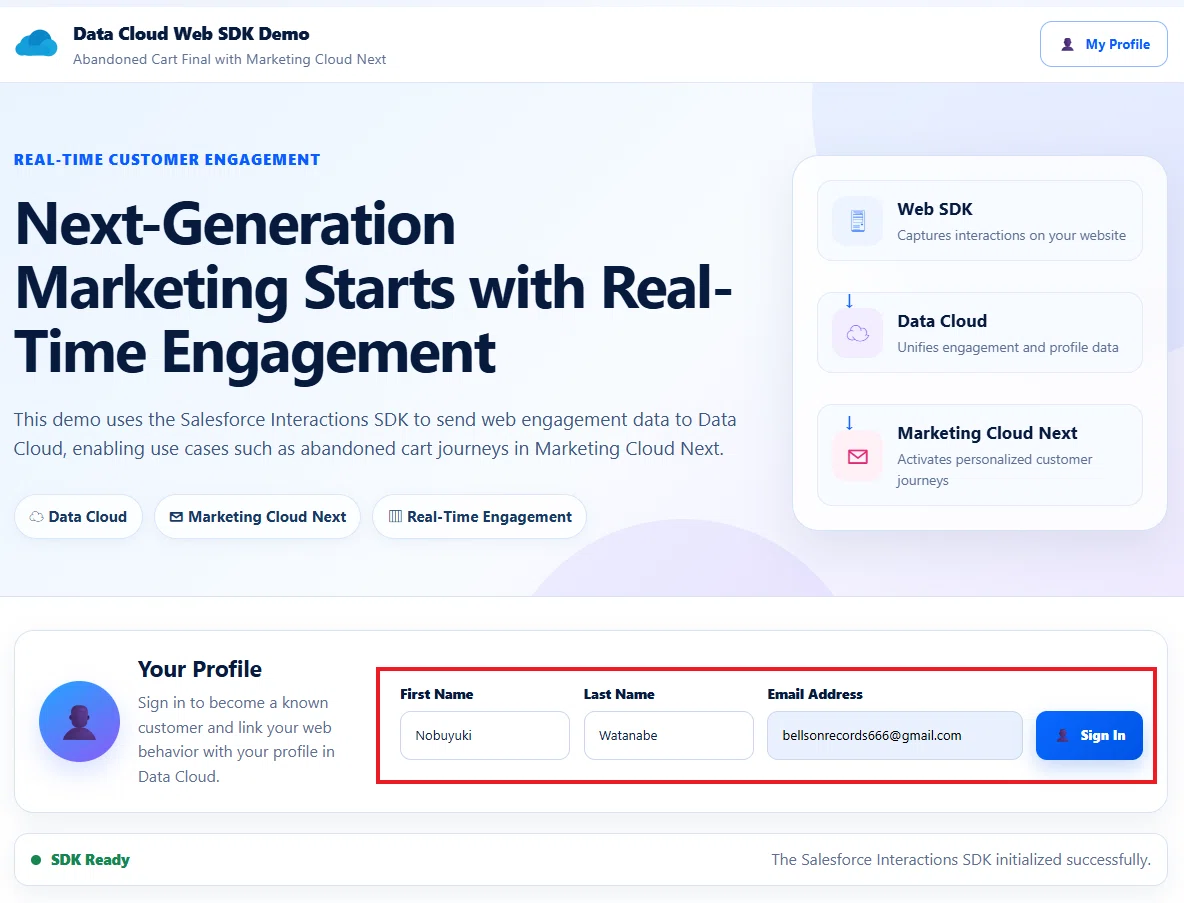
正常に送信されると、画面下部の Event Log に、次のイベントが表示されます。これは、顧客がサイトにログインした時のような状況です。
[30/07/2026, 22:49:20] SUCCESS: Party Identification
{
  "user": {
    "attributes": {
      "eventType": "partyIdentification",
      "IDName": "Email Address",
      "IDType": "Email",
      "userId": "bellsonrecords666@gmail.com"
    },
    "anonymousId": "3357695ce071b393"
  },
  "source": {
    "pageType": "standard-abandoned-cart-demo",
    "url": "https://mcxkknz3m0zj3jqsxn4hm3dp3q-4.pub.sfmc-content.com/bard2ndo4nr",
    "urlReferrer": "",
    "channel": "Web"
  },
  "consents": []
}
[30/07/2026, 22:49:20] SDK EVENT: Processed event sent to Event API
{
  "actionEvent": {
    "user": {
      "attributes": {
        "eventType": "partyIdentification",
        "IDName": "Email Address",
        "IDType": "Email",
        "userId": "bellsonrecords666@gmail.com"
      },
      "anonymousId": "3357695ce071b393"
    },
    "source": {
      "pageType": "standard-abandoned-cart-demo",
      "url": "https://mcxkknz3m0zj3jqsxn4hm3dp3q-4.pub.sfmc-content.com/bard2ndo4nr",
      "urlReferrer": "",
      "channel": "Web"
    },
    "consents": []
  }
}
[30/07/2026, 22:49:20] SEND: Party Identification
{
  "user": {
    "attributes": {
      "eventType": "partyIdentification",
      "IDName": "Email Address",
      "IDType": "Email",
      "userId": "bellsonrecords666@gmail.com"
    }
  }
}
[30/07/2026, 22:49:20] SUCCESS: Contact Point Email
{
  "user": {
    "attributes": {
      "eventType": "contactPointEmail",
      "email": "bellsonrecords666@gmail.com"
    },
    "anonymousId": "3357695ce071b393"
  },
  "source": {
    "pageType": "standard-abandoned-cart-demo",
    "url": "https://mcxkknz3m0zj3jqsxn4hm3dp3q-4.pub.sfmc-content.com/bard2ndo4nr",
    "urlReferrer": "",
    "channel": "Web"
  },
  "consents": []
}
[30/07/2026, 22:49:20] SDK EVENT: Processed event sent to Event API
{
  "actionEvent": {
    "user": {
      "attributes": {
        "eventType": "contactPointEmail",
        "email": "bellsonrecords666@gmail.com"
      },
      "anonymousId": "3357695ce071b393"
    },
    "source": {
      "pageType": "standard-abandoned-cart-demo",
      "url": "https://mcxkknz3m0zj3jqsxn4hm3dp3q-4.pub.sfmc-content.com/bard2ndo4nr",
      "urlReferrer": "",
      "channel": "Web"
    },
    "consents": []
  }
}
[30/07/2026, 22:49:20] SEND: Contact Point Email
{
  "user": {
    "attributes": {
      "eventType": "contactPointEmail",
      "email": "bellsonrecords666@gmail.com"
    }
  }
}
[30/07/2026, 22:49:20] SUCCESS: Identity (Known Profile)
{
  "user": {
    "attributes": {
      "eventType": "identity",
      "isAnonymous": 0,
      "firstName": "Nobuyuki",
      "lastName": "Watanabe"
    },
    "anonymousId": "3357695ce071b393"
  },
  "source": {
    "pageType": "standard-abandoned-cart-demo",
    "url": "https://mcxkknz3m0zj3jqsxn4hm3dp3q-4.pub.sfmc-content.com/bard2ndo4nr",
    "urlReferrer": "",
    "channel": "Web"
  },
  "consents": []
}
[30/07/2026, 22:49:20] SDK EVENT: Processed event sent to Event API
{
  "actionEvent": {
    "user": {
      "attributes": {
        "eventType": "identity",
        "isAnonymous": 0,
        "firstName": "Nobuyuki",
        "lastName": "Watanabe"
      },
      "anonymousId": "3357695ce071b393"
    },
    "source": {
      "pageType": "standard-abandoned-cart-demo",
      "url": "https://mcxkknz3m0zj3jqsxn4hm3dp3q-4.pub.sfmc-content.com/bard2ndo4nr",
      "urlReferrer": "",
      "channel": "Web"
    },
    "consents": []
  }
}
[30/07/2026, 22:49:20] SEND: Identity (Known Profile)
{
  "user": {
    "attributes": {
      "eventType": "identity",
      "isAnonymous": 0,
      "firstName": "Nobuyuki",
      "lastName": "Watanabe"
    }
  }
}
[30/07/2026, 22:49:12] SDK EVENT: Processed event sent to Event API
{
  "actionEvent": {
    "source": {
      "pageType": "standard-abandoned-cart-demo",
      "locale": "en_US",
      "url": "https://mcxkknz3m0zj3jqsxn4hm3dp3q-4.pub.sfmc-content.com/bard2ndo4nr",
      "urlReferrer": "",
      "channel": "Web"
    },
    "user": {
      "anonymousId": "3357695ce071b393"
    },
    "interaction": null,
    "pageView": true,
    "consents": []
  }
}
[30/07/2026, 22:49:12] INFO: SDK Ready
{
  "shoppingCartId": "CART-9fd9e2e1-d1f8-4652-a84e-e77fa1f891f5",
  "anonymousIdManagedBySdk": true,
  "diagnosticHint": "Check SDK EVENT logs for user.anonymousId."
}
[30/07/2026, 22:49:12] INFO: Tracking consent supplied during SDK initialization
{
  "consentState": "OptIn"
}
[30/07/2026, 22:49:12] SDK EVENT: Processed event sent to Event API
{
  "actionEvent": {
    "interaction": {
      "name": "MetadataUpdate"
    },
    "consents": [
      {
        "purpose": "Tracking",
        "provider": "CloudPages Demo",
        "status": "Opt In"
      }
    ],
    "source": {
      "url": "https://mcxkknz3m0zj3jqsxn4hm3dp3q-4.pub.sfmc-content.com/bard2ndo4nr",
      "urlReferrer": "",
      "channel": "Web"
    },
    "user": {
      "anonymousId": "3357695ce071b393"
    }
  }
}
[30/07/2026, 22:49:12] INFO: SDK assigned anonymousId
{
  "previousAnonymousId": "",
  "newAnonymousId": "3357695ce071b393"
}
[30/07/2026, 22:49:12] INFO: SDK diagnostic handlers registered
Page loaded.
次に、任意の商品で Add to Cart をクリックします。これで、商品がカートに追加されました。
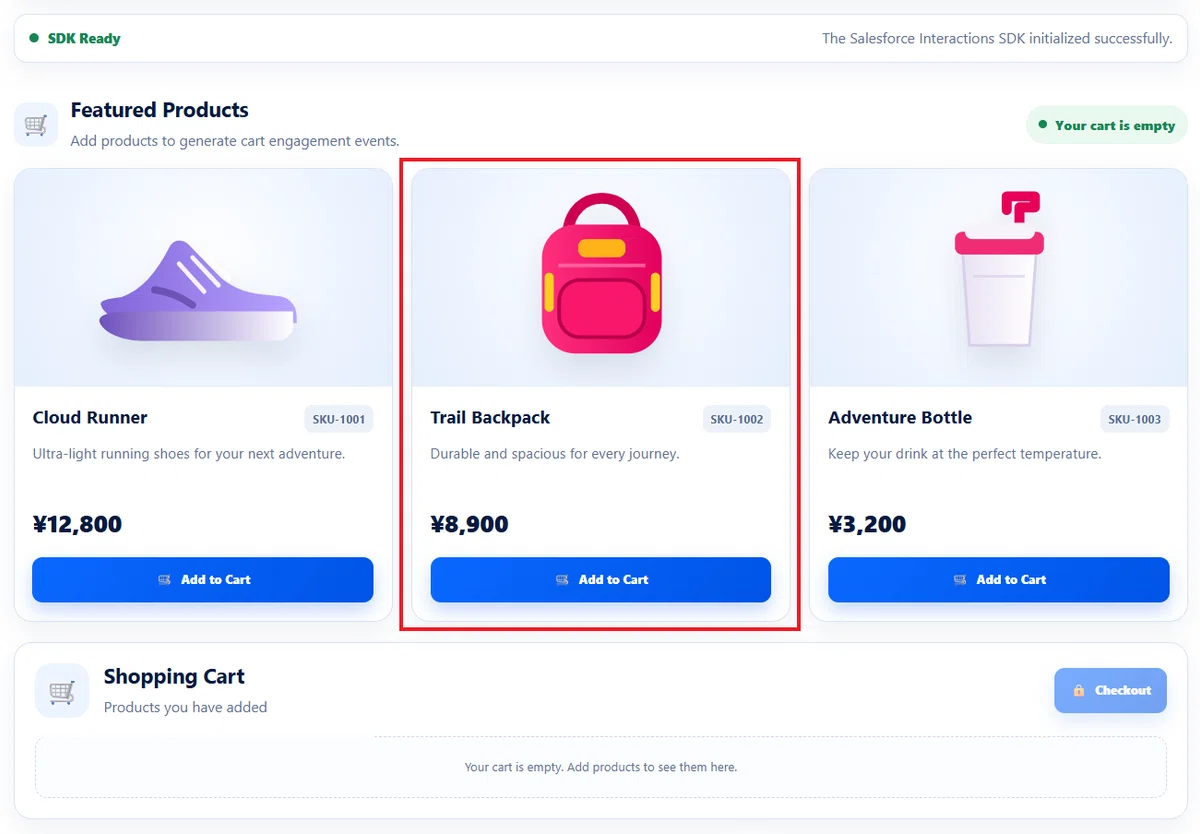
カートへ商品が追加されたことが、Event Log にも表示されます。Add To Cart イベント が表示されていることが分かります。
[30/07/2026, 22:50:10] SUCCESS: Add To Cart
{
  "interaction": {
    "name": "Add To Cart",
    "lineItem": {
      "catalogObjectType": "Product",
      "catalogObjectId": "SKU-1002",
      "quantity": 1,
      "price": 8900,
      "currency": "JPY",
      "attributes": {
        "shoppingCartId": "CART-9fd9e2e1-d1f8-4652-a84e-e77fa1f891f5",
        "engagementChannelAction": "cart-add",
        "adjustedTotalProductAmount": 8900,
        "totalProductAmount": 8900,
        "totalProductQuantity": 1,
        "productImageUrl": "https://image.s12.sfmc-content.com/lib/fe3311727364047e721170/m/1/SKU-1002.png",
        "productViewUrl": "https://mcxkknz3m0zj3jqsxn4hm3dp3q-4.pub.sfmc-content.com/bard2ndo4nr?product=SKU-1002",
        "deviceLocale": "ja"
      }
    }
  },
  "source": {
    "pageType": "standard-abandoned-cart-demo",
    "url": "https://mcxkknz3m0zj3jqsxn4hm3dp3q-4.pub.sfmc-content.com/bard2ndo4nr",
    "urlReferrer": "",
    "channel": "Web"
  },
  "user": {
    "anonymousId": "3357695ce071b393"
  },
  "consents": []
}
[30/07/2026, 22:50:10] SDK EVENT: Processed event sent to Event API
{
  "actionEvent": {
    "interaction": {
      "name": "Add To Cart",
      "lineItem": {
        "catalogObjectType": "Product",
        "catalogObjectId": "SKU-1002",
        "quantity": 1,
        "price": 8900,
        "currency": "JPY",
        "attributes": {
          "shoppingCartId": "CART-9fd9e2e1-d1f8-4652-a84e-e77fa1f891f5",
          "engagementChannelAction": "cart-add",
          "adjustedTotalProductAmount": 8900,
          "totalProductAmount": 8900,
          "totalProductQuantity": 1,
          "productImageUrl": "https://image.s12.sfmc-content.com/lib/fe3311727364047e721170/m/1/SKU-1002.png",
          "productViewUrl": "https://mcxkknz3m0zj3jqsxn4hm3dp3q-4.pub.sfmc-content.com/bard2ndo4nr?product=SKU-1002",
          "deviceLocale": "ja"
        }
      }
    },
    "source": {
      "pageType": "standard-abandoned-cart-demo",
      "url": "https://mcxkknz3m0zj3jqsxn4hm3dp3q-4.pub.sfmc-content.com/bard2ndo4nr",
      "urlReferrer": "",
      "channel": "Web"
    },
    "user": {
      "anonymousId": "3357695ce071b393"
    },
    "consents": []
  }
}
[30/07/2026, 22:50:10] SEND: Add To Cart
{
  "interaction": {
    "name": "Add To Cart",
    "lineItem": {
      "catalogObjectType": "Product",
      "catalogObjectId": "SKU-1002",
      "quantity": 1,
      "price": 8900,
      "currency": "JPY",
      "attributes": {
        "shoppingCartId": "CART-9fd9e2e1-d1f8-4652-a84e-e77fa1f891f5",
        "engagementChannelAction": "cart-add",
        "adjustedTotalProductAmount": 8900,
        "totalProductAmount": 8900,
        "totalProductQuantity": 1,
        "productImageUrl": "https://image.s12.sfmc-content.com/lib/fe3311727364047e721170/m/1/SKU-1002.png",
        "productViewUrl": "https://mcxkknz3m0zj3jqsxn4hm3dp3q-4.pub.sfmc-content.com/bard2ndo4nr?product=SKU-1002",
        "deviceLocale": "ja"
      }
    }
  }
}
このターンはカート放棄トリガーを試しているというよりは、まず購入の履歴自体が Data Cloud に格納されるかを確認したいので、Shopping Cart で Checkout もクリックします。
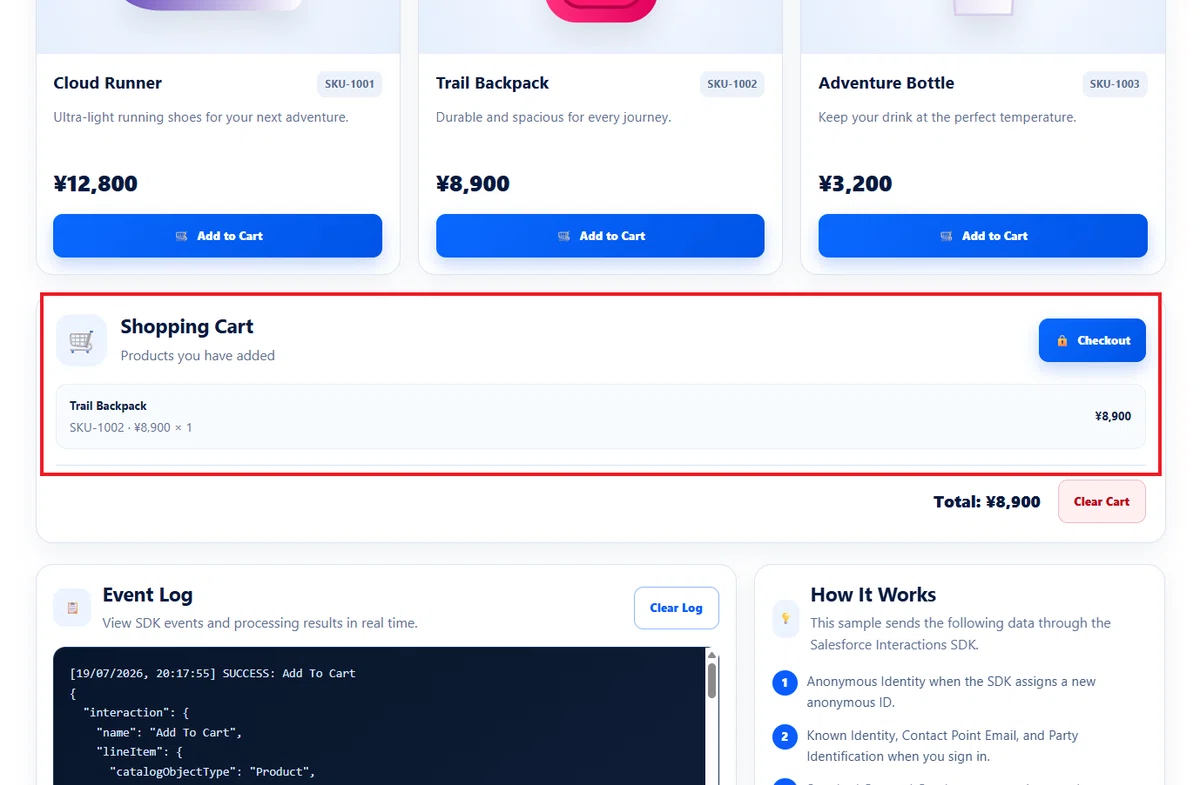
すると購入イベントが発生し、Event Log にも Purchase イベント が表示されました。
[30/07/2026, 22:51:12] INFO: New Shopping Cart ID created
{
  "shoppingCartId": "CART-f1ef5700-48cf-412a-aef8-53ddc6461138"
}
[30/07/2026, 22:51:12] SUCCESS: Product Order
{
  "interaction": {
    "name": "Purchase",
    "order": {
      "id": "ORDER-20260730135112",
      "currency": "JPY",
      "totalValue": 8900,
      "attributes": {
        "shoppingCartId": "CART-9fd9e2e1-d1f8-4652-a84e-e77fa1f891f5",
        "engagementChannelAction": "order-accepted"
      },
      "lineItems": [
        {
          "catalogObjectType": "Product",
          "catalogObjectId": "SKU-1002",
          "quantity": 1,
          "price": 8900,
          "currency": "JPY"
        }
      ]
    }
  },
  "source": {
    "pageType": "standard-abandoned-cart-demo",
    "url": "https://mcxkknz3m0zj3jqsxn4hm3dp3q-4.pub.sfmc-content.com/bard2ndo4nr",
    "urlReferrer": "",
    "channel": "Web"
  },
  "user": {
    "anonymousId": "3357695ce071b393"
  },
  "consents": []
}
[30/07/2026, 22:51:12] SDK EVENT: Processed event sent to Event API
{
  "actionEvent": {
    "interaction": {
      "name": "Purchase",
      "order": {
        "id": "ORDER-20260730135112",
        "currency": "JPY",
        "totalValue": 8900,
        "attributes": {
          "shoppingCartId": "CART-9fd9e2e1-d1f8-4652-a84e-e77fa1f891f5",
          "engagementChannelAction": "order-accepted"
        },
        "lineItems": [
          {
            "catalogObjectType": "Product",
            "catalogObjectId": "SKU-1002",
            "quantity": 1,
            "price": 8900,
            "currency": "JPY"
          }
        ]
      }
    },
    "source": {
      "pageType": "standard-abandoned-cart-demo",
      "url": "https://mcxkknz3m0zj3jqsxn4hm3dp3q-4.pub.sfmc-content.com/bard2ndo4nr",
      "urlReferrer": "",
      "channel": "Web"
    },
    "user": {
      "anonymousId": "3357695ce071b393"
    },
    "consents": []
  }
}
[30/07/2026, 22:51:12] SEND: Product Order
{
  "interaction": {
    "name": "Purchase",
    "order": {
      "id": "ORDER-20260730135112",
      "currency": "JPY",
      "totalValue": 8900,
      "attributes": {
        "shoppingCartId": "CART-9fd9e2e1-d1f8-4652-a84e-e77fa1f891f5",
        "engagementChannelAction": "order-accepted"
      },
      "lineItems": [
        {
          "catalogObjectType": "Product",
          "catalogObjectId": "SKU-1002",
          "quantity": 1,
          "price": 8900,
          "currency": "JPY"
        }
      ]
    }
  }
}
それでは、これらの Cloudpages から送信したイベントが、Data Cloud に取り込まれていることを確認してみましょう。
7. Data Cloud へ取り込まれたことを確認する
CloudPages から送信したイベントは、Data Cloud へニアリアルタイムで送信されます。ここで、データスペースの更新履歴やレコード数への反映を確認しがちですが、この数字は数分から数十分のタイムラグが発生します。
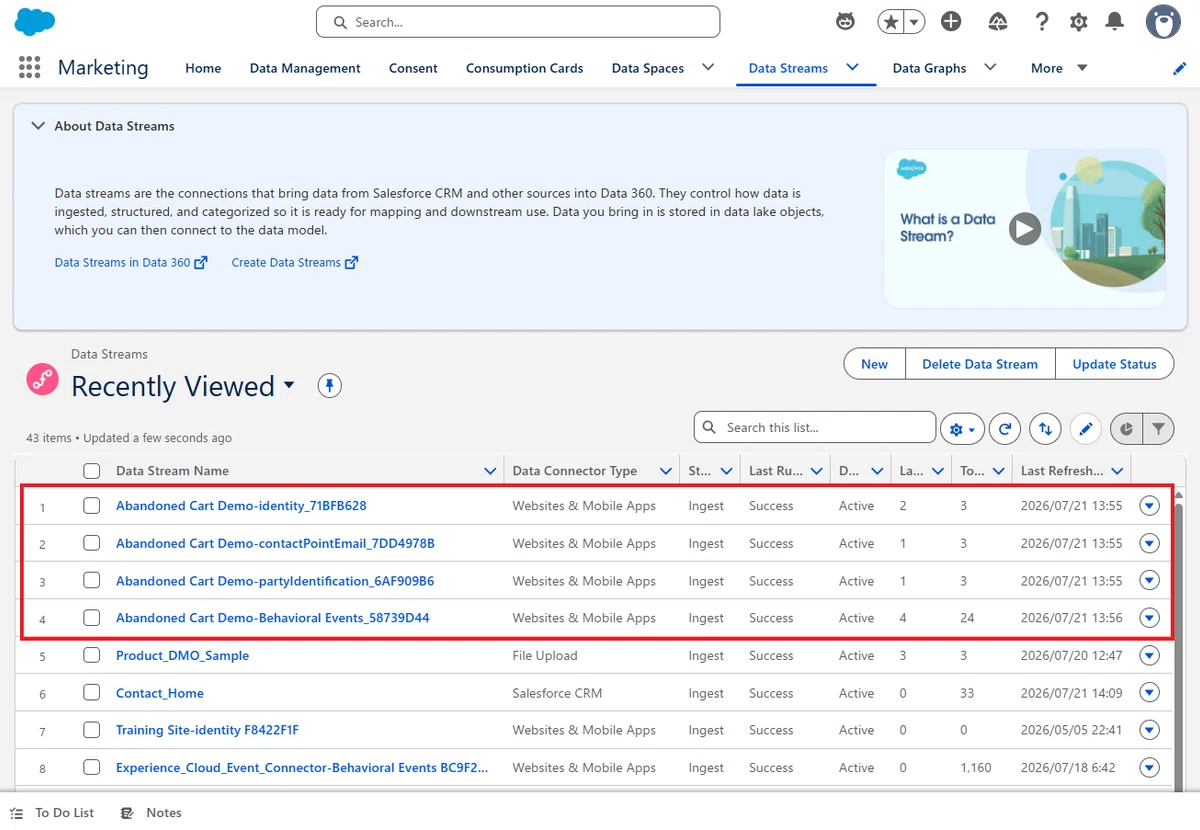
そのような仕様のため、イベントが正常に送信されたかをすぐ確認したい場合は、「Data Explorer」や「Query Editor」を使って、DLO や DMO を直接確認してください。
まずは Data Explorer を開き、今回作成した DMO を確認していきます。
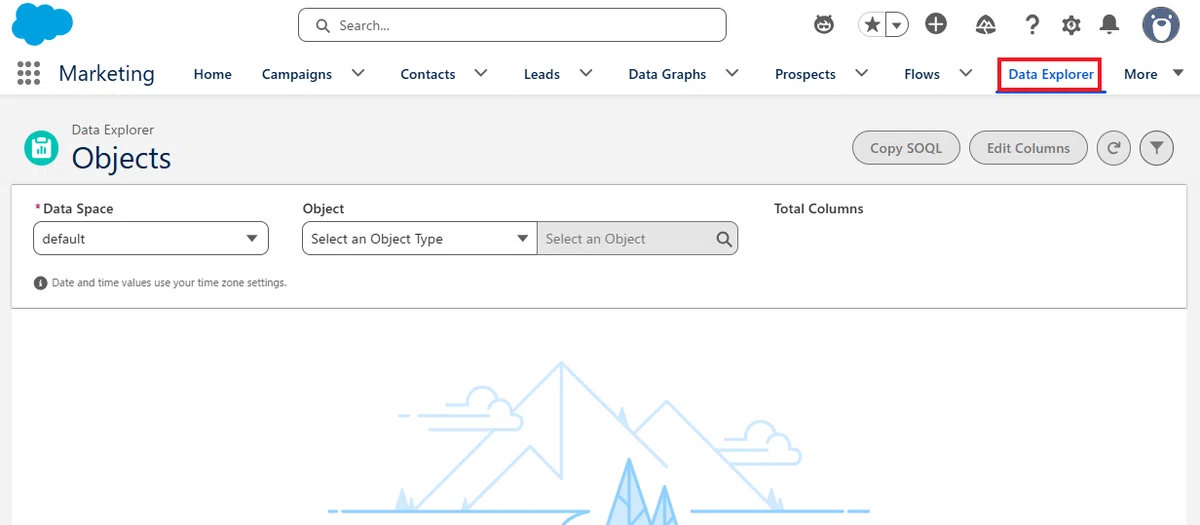
今回は、以下の 6 つの DMO を確認します。
Individual
Contact Point Email
Party Identification
Shopping Cart Engagement
Shopping Cart Product Engagement
Product Order Engagement
Individual
まずは Individual を開きます。Cloudpages で入力した氏名が登録されていることを確認してください。
例えば、今回のデモでは次のような情報が保存されています。
First Name:Nobuyuki
Last Name:Watanabe
Individual:f1eaf60386a03bbc
Is Anonymous:0(←既知のユーザー扱い)
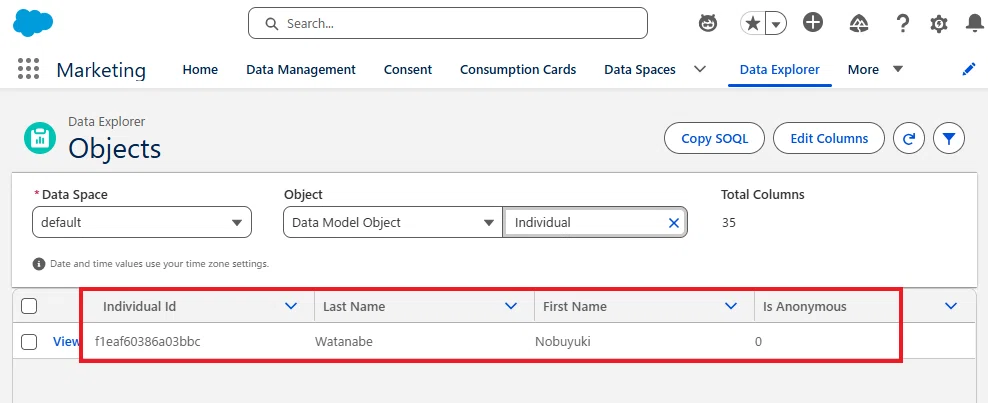
Tips:今回の Cloudpages では、ページを開いた時に、まず Anonymous Identity を送信し、その後の Sing In 時に Identity イベントを送信します。そのため、最終的には 既知ユーザー(Is Anonymous = 0) として Individual DMO が更新されます。
Contact Point Email
続いて、Contact Point Email を確認します。CloudPages で入力したメールアドレスが登録されていることを確認してください。
例えば、今回のデモでは次のようなレコードが作成されています。
Email Address:bellsonrecords666@gmail.com
Party:f1eaf60386a03bbc
Contact Point Email Id:f1eaf60386a03bbc

Party Identification
続いて、Party Identification を確認します。今回はメールアドレスを識別子として利用しているため、次のような情報が保存されます。
Identification Name:Email Address
Party Identification Type:Email
Identification Number:bellsonrecords666@gmail.com
Party:f1eaf60386a03bbc
Party Identification:f1eaf60386a03bbc
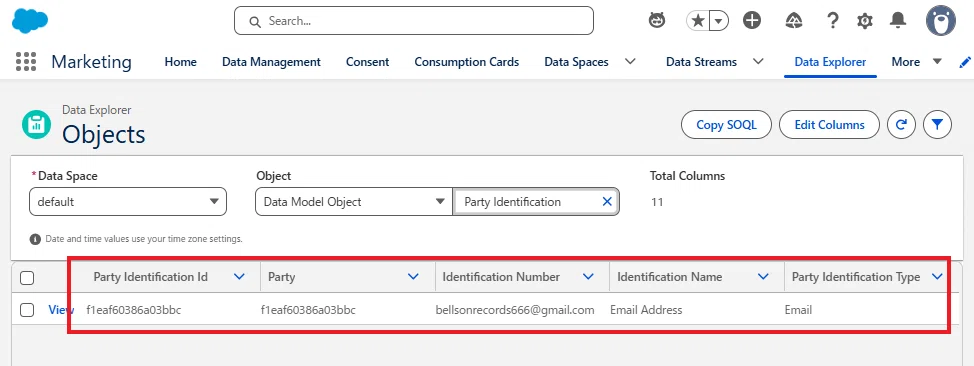
Shopping Cart Engagement
次に、Shopping Cart Engagement を確認します。Cloudpages で Add to Cart を実行すると、カートイベントが保存されます。
例えば、次のような項目を確認できます。
Shopping Cart Engagement Id:SCE-4c43b6b8-fc37-410b-aba1-f48319b470f0
Shopping Cart:CART-fa8ee5d2-52d8-4d83-add1-c5eb07e60938
Engagement Channel Action:cart-add
Individual:f1eaf60386a03bbc
Product Image URL:https://image.s12.sfmc-content.com/lib/fe3311727364047e721170/m/1/SKU-1002.png
Product View URL:https://mcxkknz3m0zj3jqsxn4hm3dp3q-4.pub.sfmc-content.com/uvccdeoyfgx?product=SKU-1002
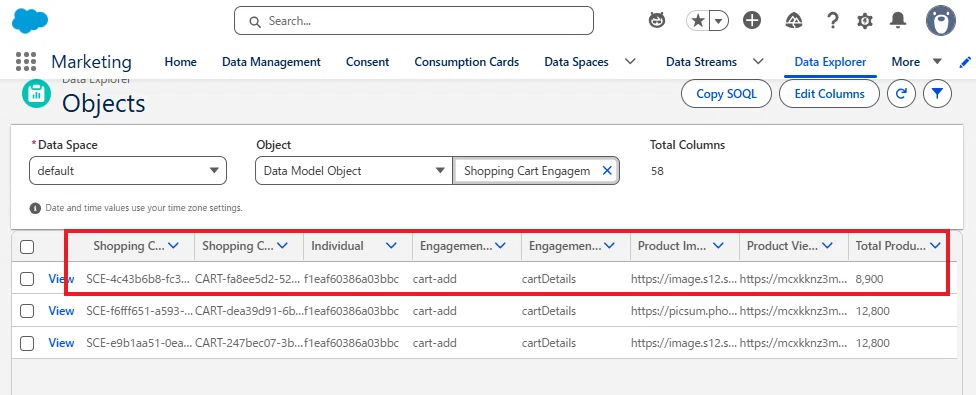
Tips:「Engagement Channel Action:cart-add」が存在していることが、今回の設定のポイントになります。この項目に「cart-add」があるレコードだけが、フローでトリガーの対象になります。
Shopping Cart Product Engagement
続いて、Shopping Cart Product Engagement を確認します。こちらには、カートへ追加した商品ごとの情報が保存されます。
例えば、今回のデモでは次のような情報を確認できます。
Shopping Cart Engagement:SCE-4c43b6b8-fc37-410b-aba1-f48319b470f0
Product Category:Product
Product:SKU-1002
Product Price:8,900
Individual:f1eaf60386a03bbc
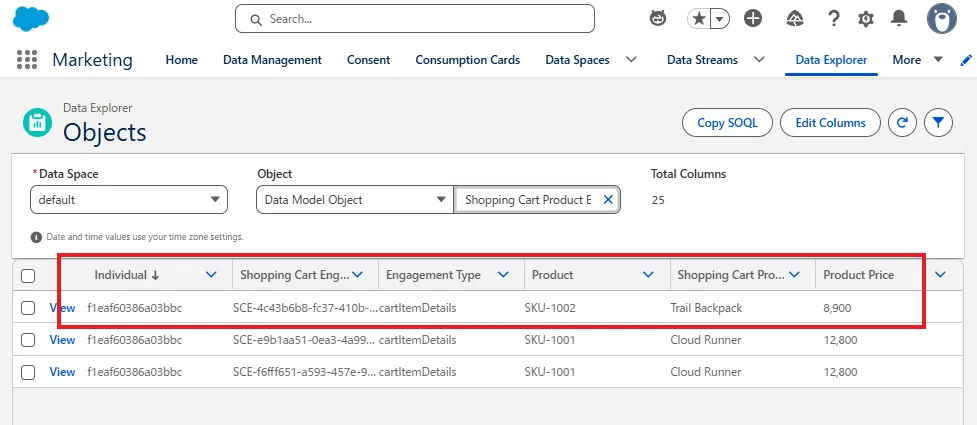
Tips:Shopping Cart Engagement:Shopping Cart Engagement Id と Shopping Cart Product Engagement:Shopping Cart Engagement が、後に JOIN(結合)されるため、同じ値である必要があります。
Product Order Engagement
最後に、Product Order Engagement を確認します。Cloudpages で Checkout を実行すると、購入イベントが保存されます。
例えば、次のような項目を確認できます。
Shopping Cart:CART-fa8ee5d2-52d8-4d83-add1-c5eb07e60938
Engagement Channel Action:order-accepted
Individual:f1eaf60386a03bbc
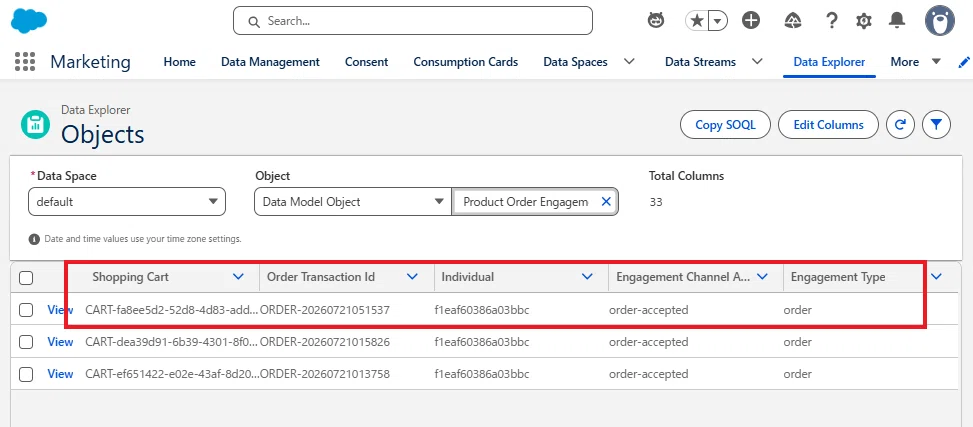
Tips:「Engagement Channel Action:order-accepted」が存在していることが、今回の設定のポイントになります。この項目に「order-accepted」があるレコードだけが「購入あり」として認識されます。
以上で、Cloudpages から送信したプロフィール情報とカートイベントが Data Cloud に正常に取り込まれたことを確認できました。
次は、このデータを利用して「Abandoned Shopping Cart Trigger」を作成し、カートに商品を残したユーザーへメールを送信する仕組みを構築していきます。
8. トリガーを設定する
ここまでで、Cloudpages から送信したプロフィール情報やカートイベントが Data Cloud に正常に取り込まれることを確認しました。
次は、カートに商品を追加したものの、一定時間購入しなかったユーザーを自動的に検知するための「Abandoned Shopping Cart Trigger」 を設定 します。
このトリガーを有効にすると、指定した時間が経過しても、購入イベントが発生しなかったユーザーを自動的に判定し、フローを起動できるようになります。
設定手順
設定を開き、クイック検索に「マーケティング機能」と入力して、トリガーを選択します。
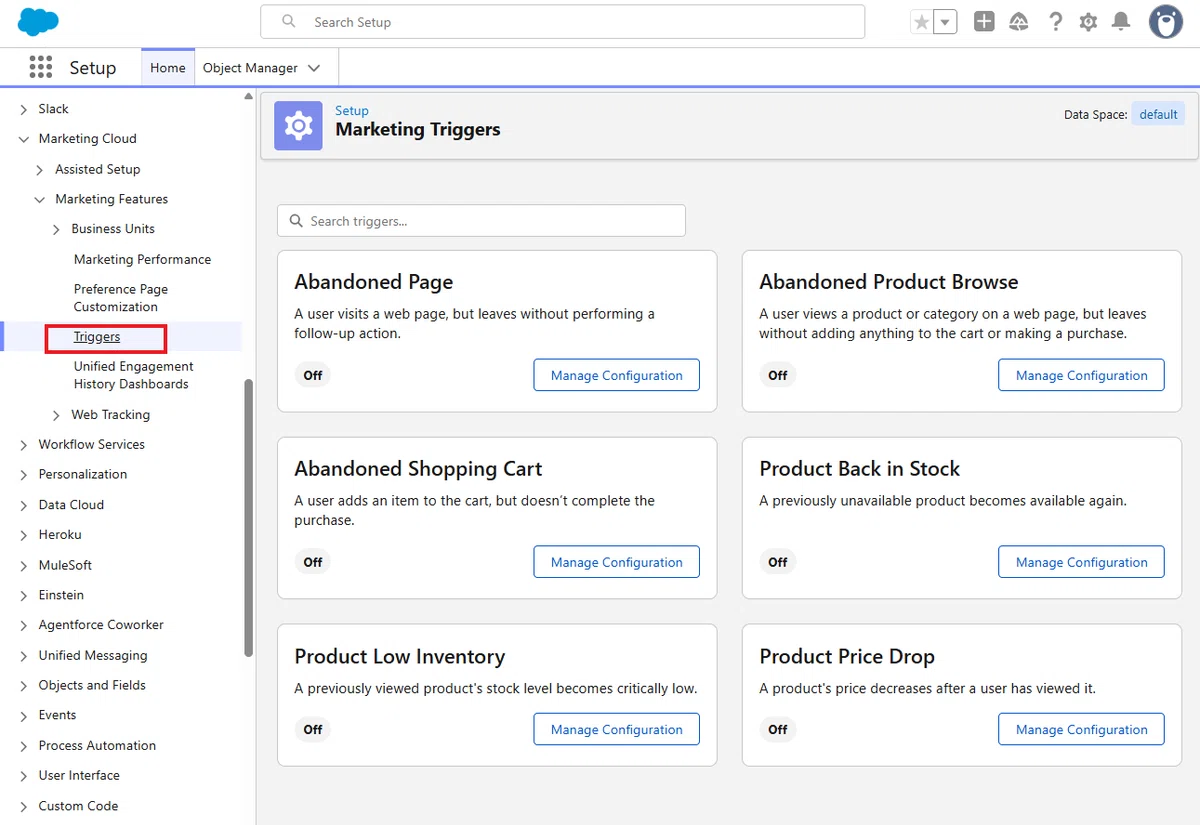
Abandoned Shopping Cart の Manage Configuration をクリックします。
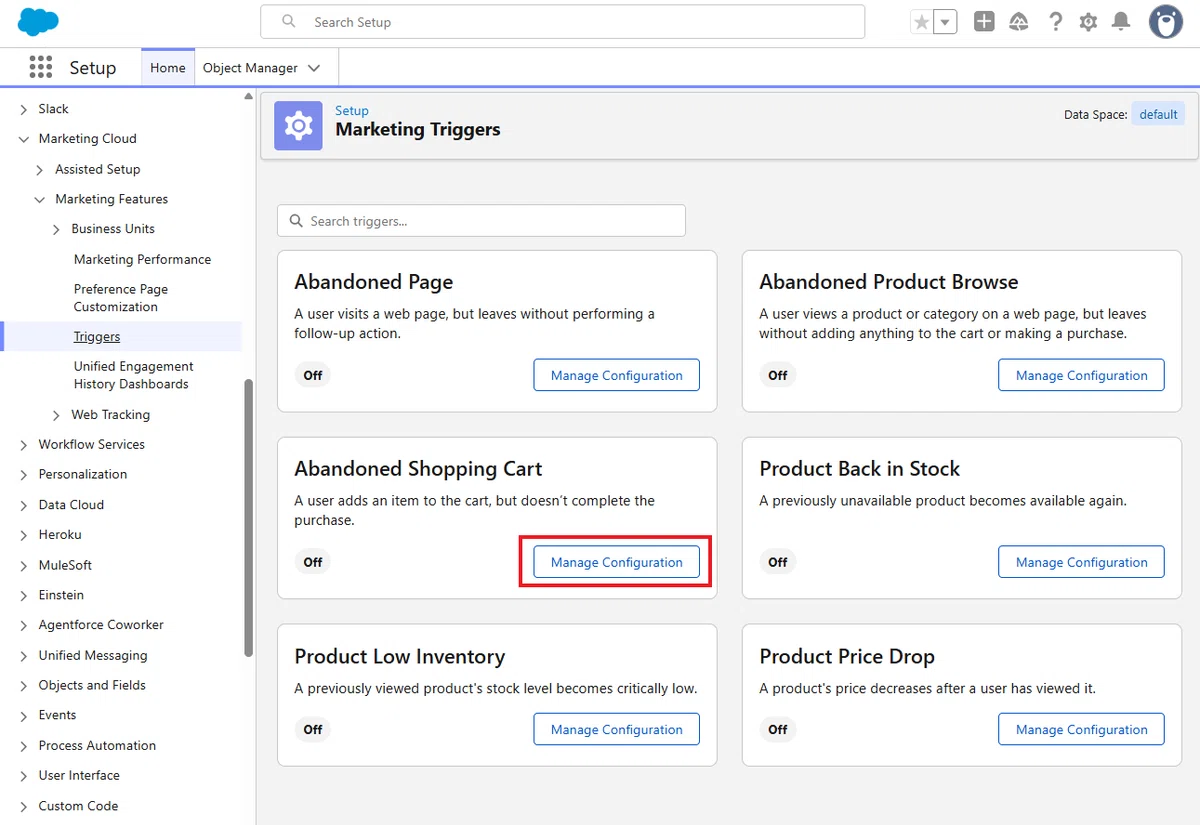
機能を有効化します。
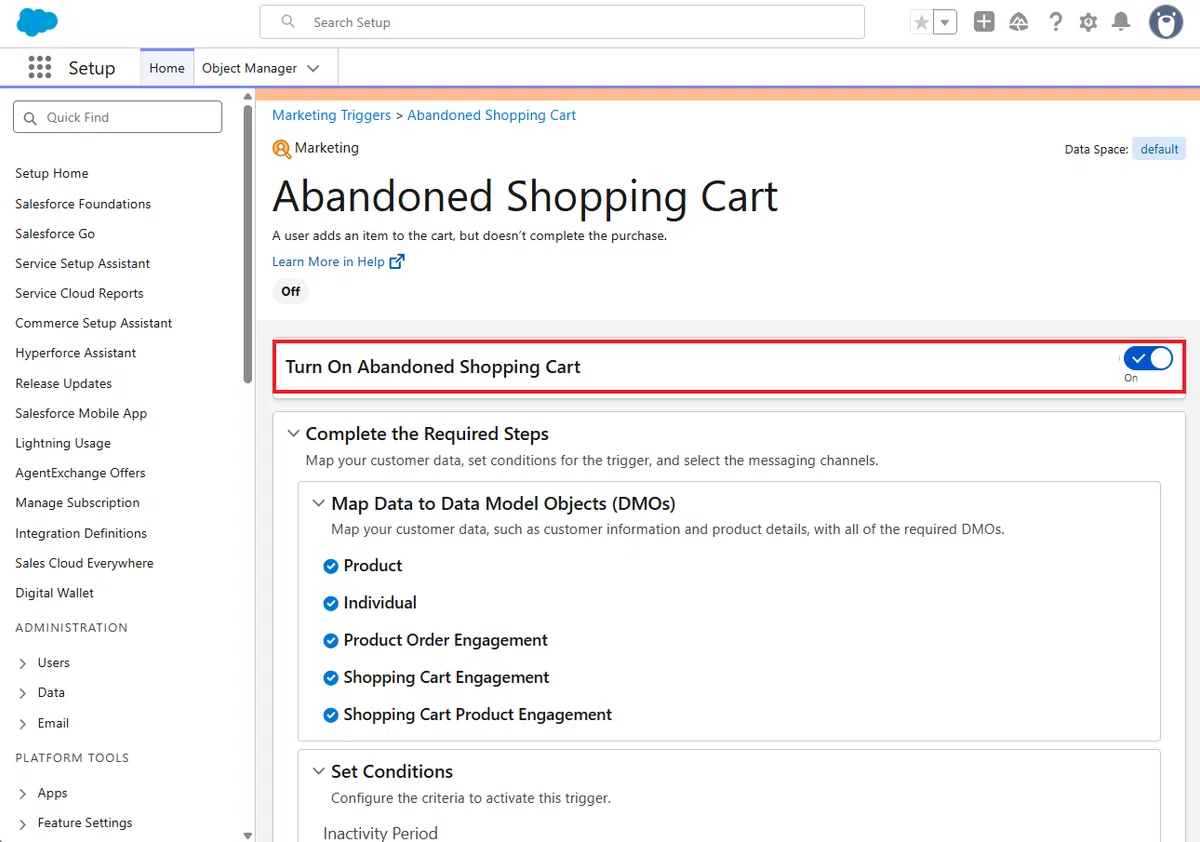
続いて、現時点の Map Data to Data Model Objects を確認します。
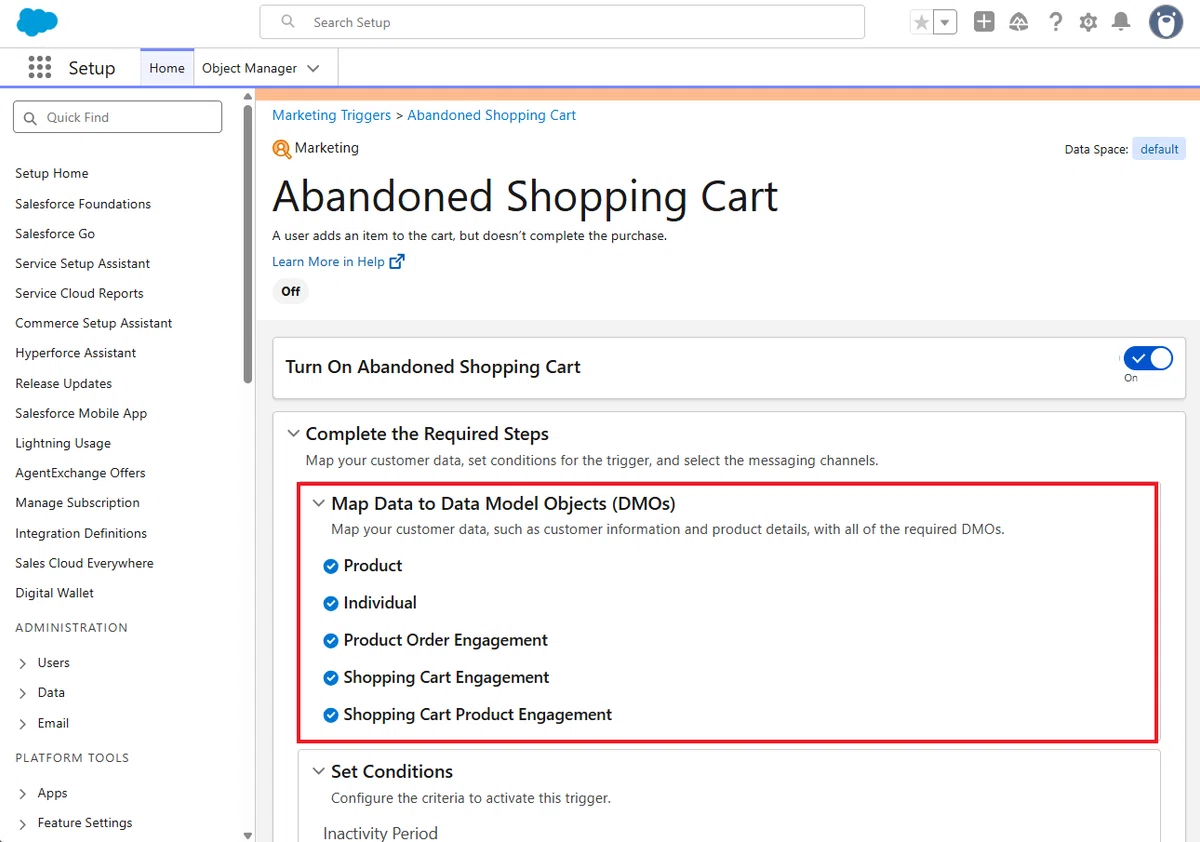
ここでは、Abandoned Shopping Cart Trigger に必要な DMO が正しく設定されているかを確認できます。すべて正常にマッピングされている場合は、各 DMO の横にチェックマークが表示されています。
続いて Inactivity Period を設定します。
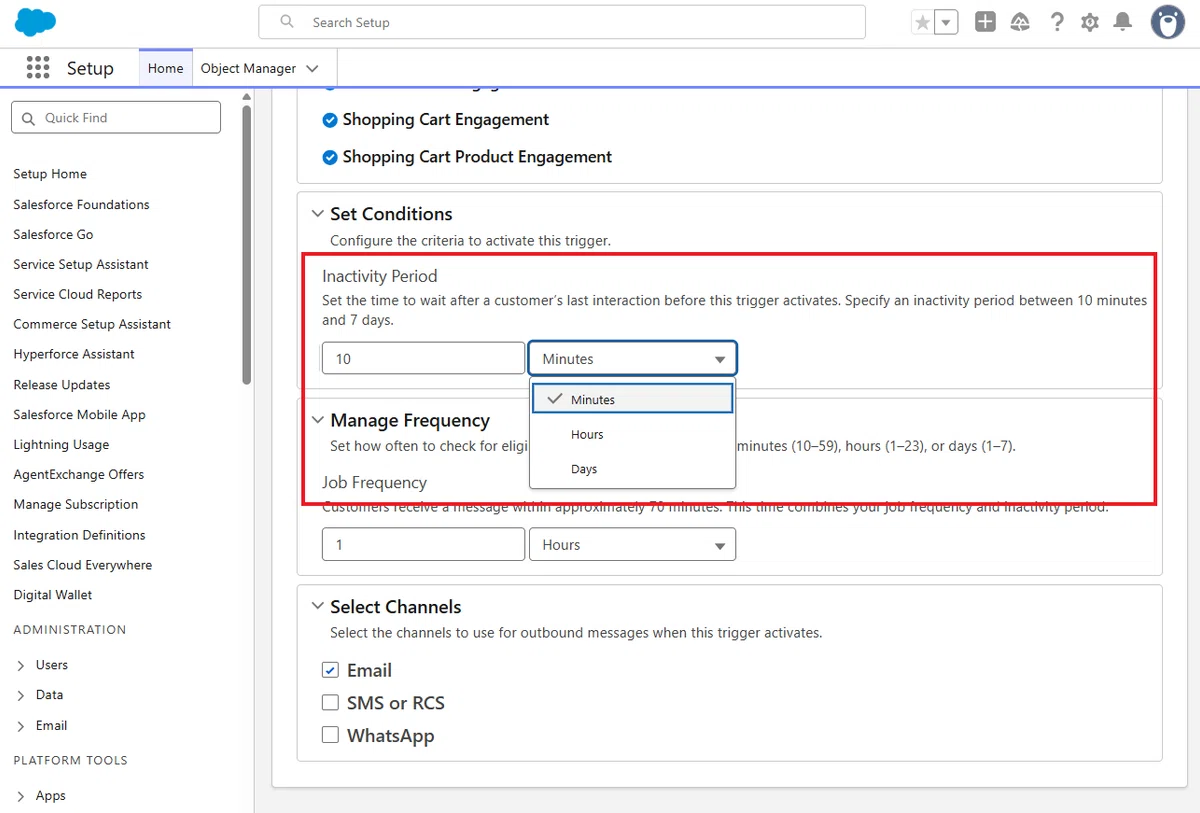
この値は「最後にカート操作を行ってから、どれだけ購入されなかったら放棄カートと判断するか」を表します。
今回は、動作確認を行いやすいように 最短の 10 分 に設定しますが、本番環境では、数時間から数日など、自社の運用に合わせて設定してください。
次に Job Frequency を設定します。
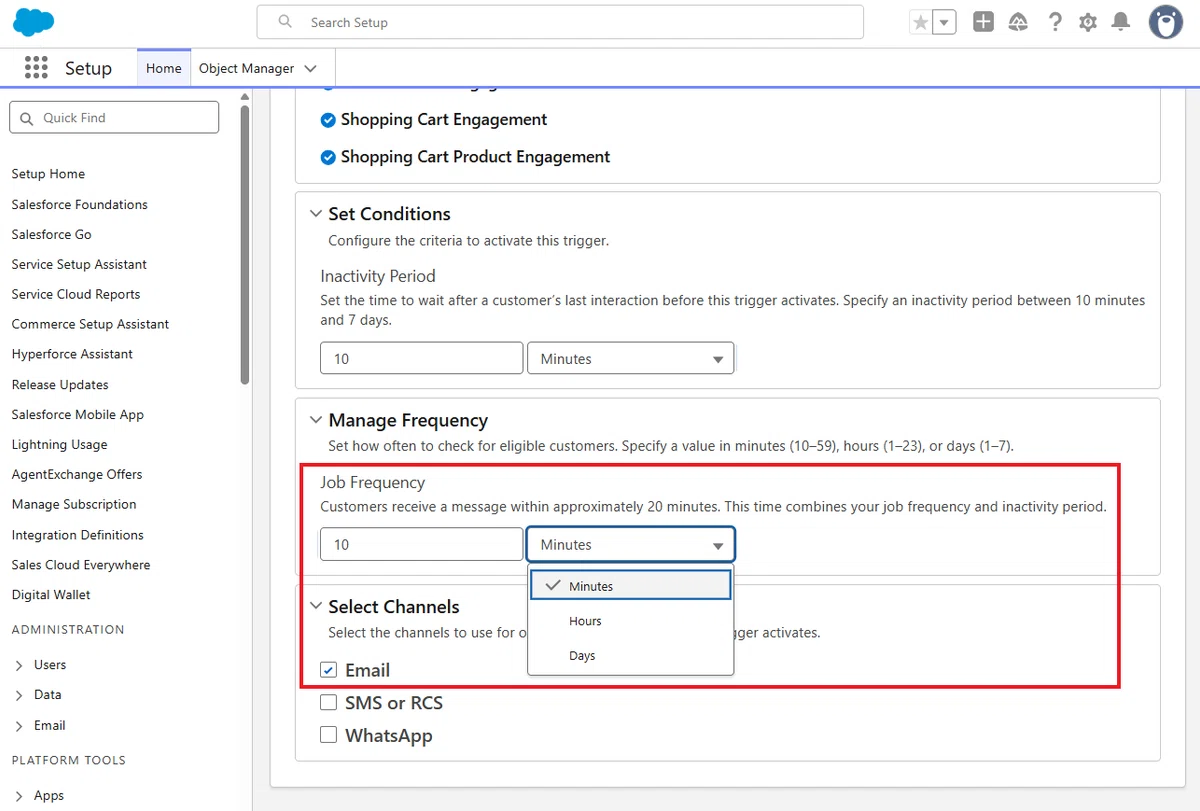
この値は「カート放棄シナリオをどれくらいの間隔で実行するか」を表します。
こちらも、今回は最短の 10 分 に設定します。
注意:間隔を短くすると、クレジットの消費量が高まりますので、ご注意ください。
この点、少し補足しておくと、例えば、
Inactivity Period:1 日
Job Frequency:1 日
と設定した場合、カートを操作してから 24 時間後~ 48 時間後のどこかのタイミングでメールが送信されることになります。
このロジックは Abandoned Shopping Cart データ変換 の「Compute SCE time window」アクティビティでコントロールされており、以下の計算式で対象期間となる Shopping Cart Engagement レコードを抽出しています。
Tips:こちら「対象者」を抽出しているわけではないのがポイントです。あくまで、「商品単位」でトリガーされることになります。そのため、一人に対して複数の商品をまとめてトリガー送信することはできません。
ssot__EngagementDateTm__c IS NOT NULL
AND
(
 (TO_UNIX_TIMESTAMP(NOW()) -
  TO_UNIX_TIMESTAMP(ssot__EngagementDateTm__c)) / 60
)
BETWEEN 1440 AND (1440 + 1440)
BETWEEN 1440 AND (1440 + 1440) は、つまり、
BETWEEN InactivityPeriod AND (InactivityPeriod + JobFrequency) ですので
Inactivity Period:1 日
Job Frequency:1 日 の場合、
抽出範囲:24 時間前~ 48 時間前
となります。
よって、仮にジョブが毎日 10 時に動く場合は、
7/25 10:00 実行:抽出範囲 7/23 10:00~7/24 10:00
7/26 10:00 実行:抽出範囲 7/24 10:00~7/25 10:00
となります。このため、レコードも基本的には重複しない仕組みです。
考慮事項:Abandoned Shopping Cart Trigger の場合
システムにより生成される Abandoned Shopping Cart Data Transform には
・ join ノード
・ computeRelative ノード(→ Now() などの相対時間)
が含まれるため、Incremental Run には対応しておらず、常に Full Run で実行されます。これは不具合ではなく、このトリガーの仕様です。
また、Abandoned Shopping Cart Trigger は、カート放棄イベントから一定時間経過したレコードを判定する仕組みのため、各 Job Frequency の実行時に全件を対象としてデータ変換を行う必要があります。そのため、eventId をプライマリーキーとしてマッピングしないことで、敢えて全件フル更新を行わせる工夫が必要です。つまり、All Event Data の eventId を Shopping Cart Engagement Id にマッピングさせないことで、敢えての全回の全件更新を起こしています。クレジット消費量が激しいので、Job Frequency で 1 日 1 回まとめて送信にするなど調整してください。
最後に、トリガーを利用するチャネルを選択します。

今回は Email を選択します。
これで Abandoned Shopping Cart Trigger の設定は完了です。
設定を保存すると、有効化処理が開始され、30 分 ~ 数時間 程度で、イベントトリガーフローで「カート放棄」のイベントが利用開始できます。
初回の有効化処理は、データ変換の有効化や DMO の有効化などを含むため多少時間がかかります
2 回目以降は、10 分程度で更新されます
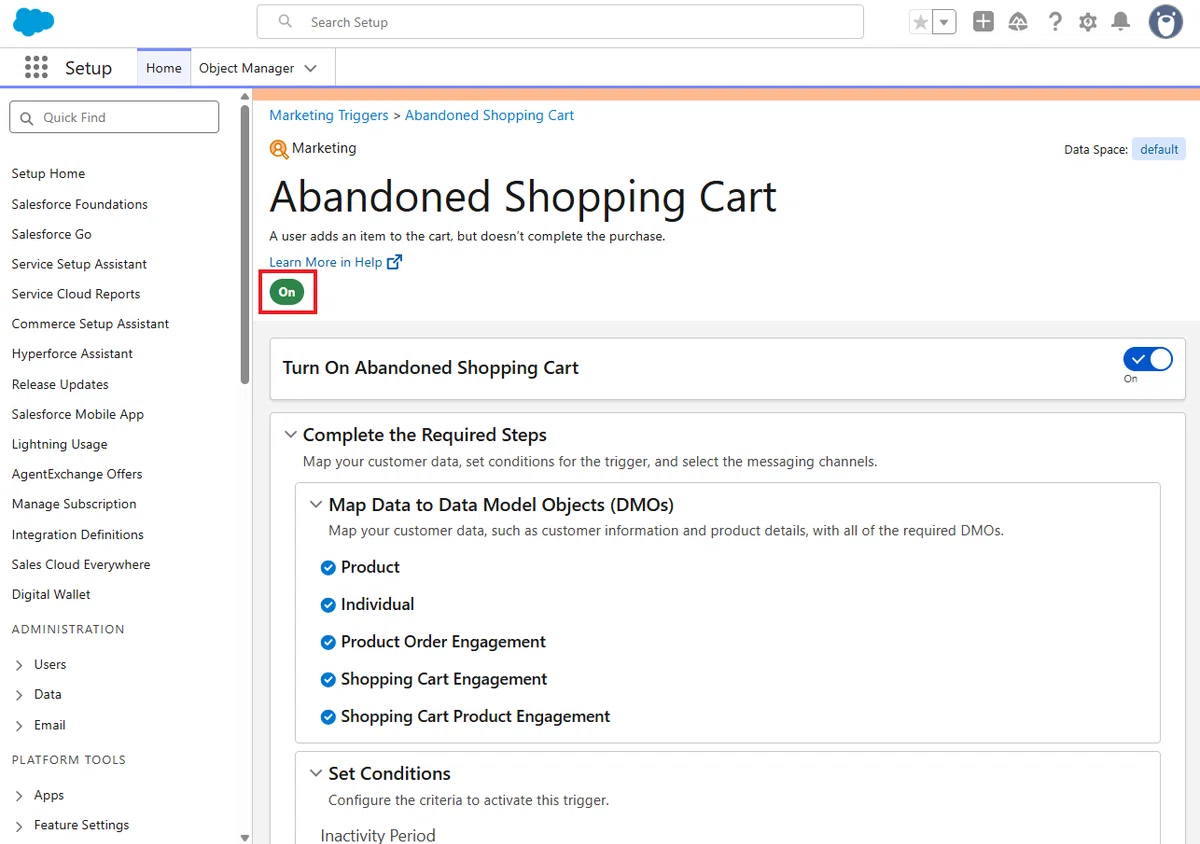
9. カート放棄専用オブジェクトについて
Abandoned Shopping Cart Trigger では、Shopping Cart Engagement、Shopping Cart Product Engagement、および Product Order Engagement などの DMO を利用して、放棄されたカートを判定します。
ではどのように利用されているかと言えば、初回でトリガー機能を有効化すると同時に「データ変換」が自動生成されます。
Abandoned Shopping Cart データ変換
→ Marketing Abandoned Shopping Cart を生成(配信リスト)
エンゲージメントカテゴリの DMO です。この DMO にレコードが入るとイベントトリガーフローがトリガーされます。Abandoned Shopping Cart Ssc データ変換
→ Marketing Abandoned Shopping Cart SSC を生成(カート情報)
→ Marketing Abandoned Shopping Cart SSPC を生成(商品情報)
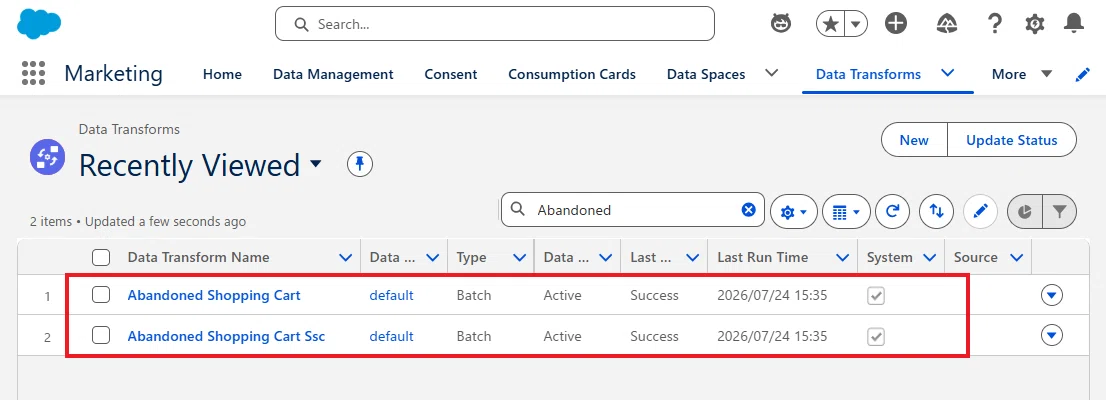
Tips:これらのデータ変換は、アクティビティが多めの内容になっていますので、生成データにレコードができない場合は、プレビュー用のテストデータを用意して、どの時点で落ちているかを確認することをオススメします。

フローでは、エンゲージメント DMO 自体を直接参照するのではなく、トリガー機能が提供する Marketing Abandoned Shopping Cart SSC(カート情報)および Marketing Abandoned Shopping Cart SSPC(商品情報)を参照します。 これにより、メール本文では、商品名・商品画像・価格・商品 URL など、実際にカートへ追加された商品の情報を簡単に利用できます。
Tips:「ちなみに、Product データはどこで使うのか?」という疑問があるかと思いますが、この商品情報を自動生成している「データ変換」の最後で Join(結合)されています。よって、最終的には Product データが存在しないと、メールで送信する商品情報が作れませんので注意してください。
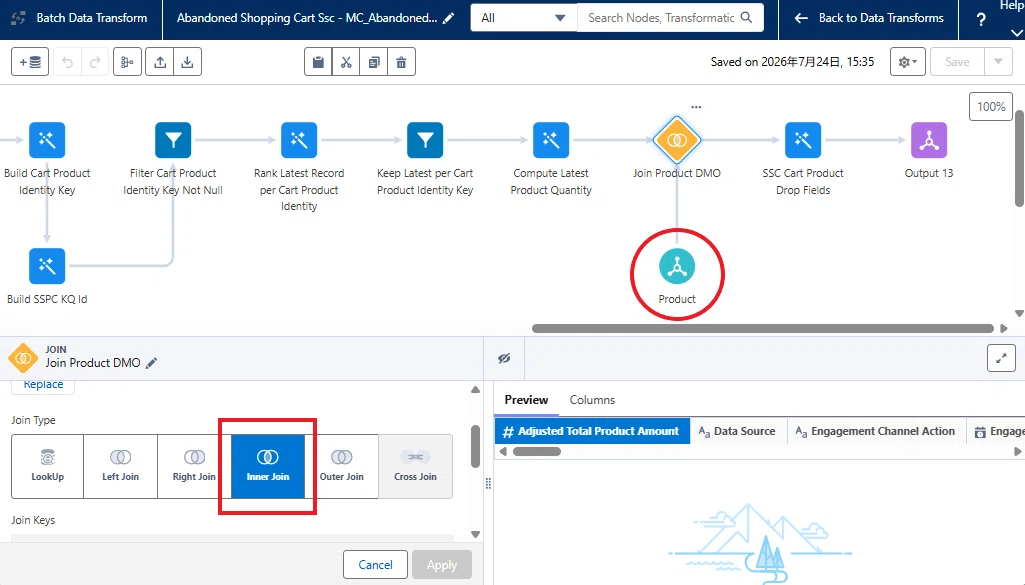
10. メールコンテンツの作成
続いて、メールコンテンツを作成します。
以下が、今回のメールコンテンツのサンプルになります。
<h2>You left something behind 👀</h2>

<p>Hi {First Name},</p>

<p>Your cart is waiting for you.</p>

<img
  src="{Product Image URL}"
  width="320"
>

<h3>{Product Name}</h3>

<p>
¥{Current Price}
</p>

<p>
<a href="{PDP URL}">
Return to your cart
</a>
</p>
上のセクションでも補足しましたが、Abandoned Shopping Cart Trigger を有効化すると、Marketing Abandoned Shopping Cart SSC(カート情報)と Marketing Abandoned Shopping Cart SSPC(商品情報)と呼ばれる DMO を利用できるようになります。
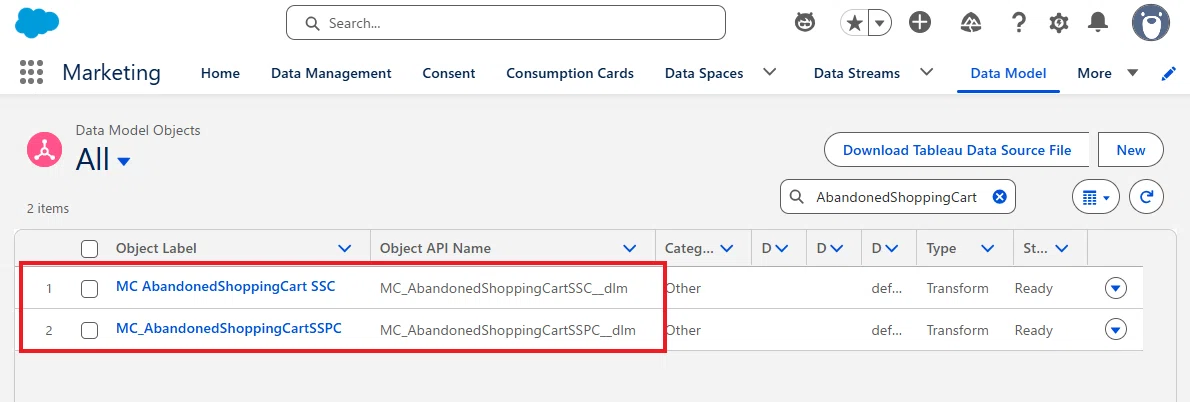
これらの DMO の主な中身は以下になります。
MC AbandonedShoppingCart SSC
cartAndIndividualUniqueKey:f1eaf60386a03bbc|CART-fa8ee5d2-52d8-4d83-add1-c5eb07e60938
SSC CartID:CART-fa8ee5d2-52d8-4d83-add1-c5eb07e60938
Individual ID:f1eaf60386a03bbc
Total Cart Value:8900
SSC Status:Purchased / Abandoned
MC_AbandonedShoppingCartSSPC
Cart Product Identity Key:f1eaf60386a03bbc|CART-fa8ee5d2-52d8-4d83-add1-c5eb07e60938|SKU-1002
Individual ID:f1eaf60386a03bbc
SSC CartID:CART-fa8ee5d2-52d8-4d83-add1-c5eb07e60938
Product SKU / Product ID:SKU-1002
Product Category:Bags
Product Subcategory:Backpack
Product Name:Trail Backpack
Current Price:8900
Product Image URL:https://image.s12.sfmc-content.com/lib/fe3311727364047e721170/m/1/SKU-1002.png
PDP URL(View URL):https://mcxkknz3m0zj3jqsxn4hm3dp3q-4.pub.sfmc-content.com/uvccdeoyfgx?product=SKU-1002
Tips:フローで「トリガーされるイベント情報」には SSC CartID が含まれていますので、SSC CartID でマッチングしたレコードを Get Records で取得して、そこで取得できた項目を「Content Variable」の機能でメール側に送ることが可能です。
今回のサンプルでイベント情報自体から取得できるもの
{First Name}

今回のサンプルで MC_AbandonedShoppingCartSSPCから取得できるもの
{Product Image URL}
{Product Name}
{Current Price}
{PDP URL}(View URL)
これら 4 つを Content Variable の対象とします。
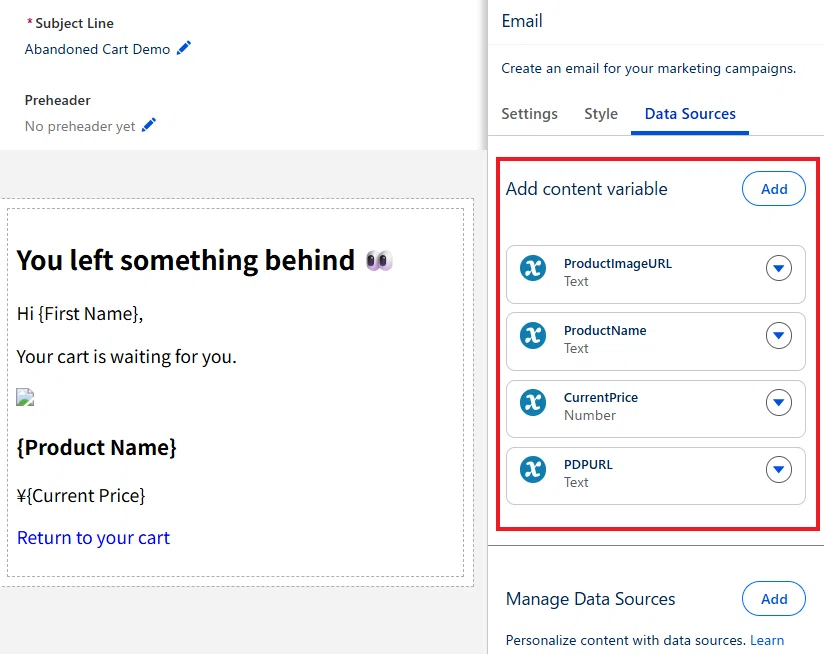
その後 AMPscript なども利用しながら、差し込み項目に割り当てます。
<h2>You left something behind 👀</h2>

<p>Hi {!$Expression.First_Name},</p>

<p>Your cart is waiting for you.</p>

<img
  src="{{$content.ProductImageURL}}"
  width="320"
>

<h3>{{$content.ProductName}}</h3>

<p>
¥%%=FormatNumber($content.CurrentPrice,"N0")=%%
</p>

<p>
<a href="{{$content.PDPURL}}">
Return to your cart
</a>
</p>
設定が完了したら、保存して公開してください。
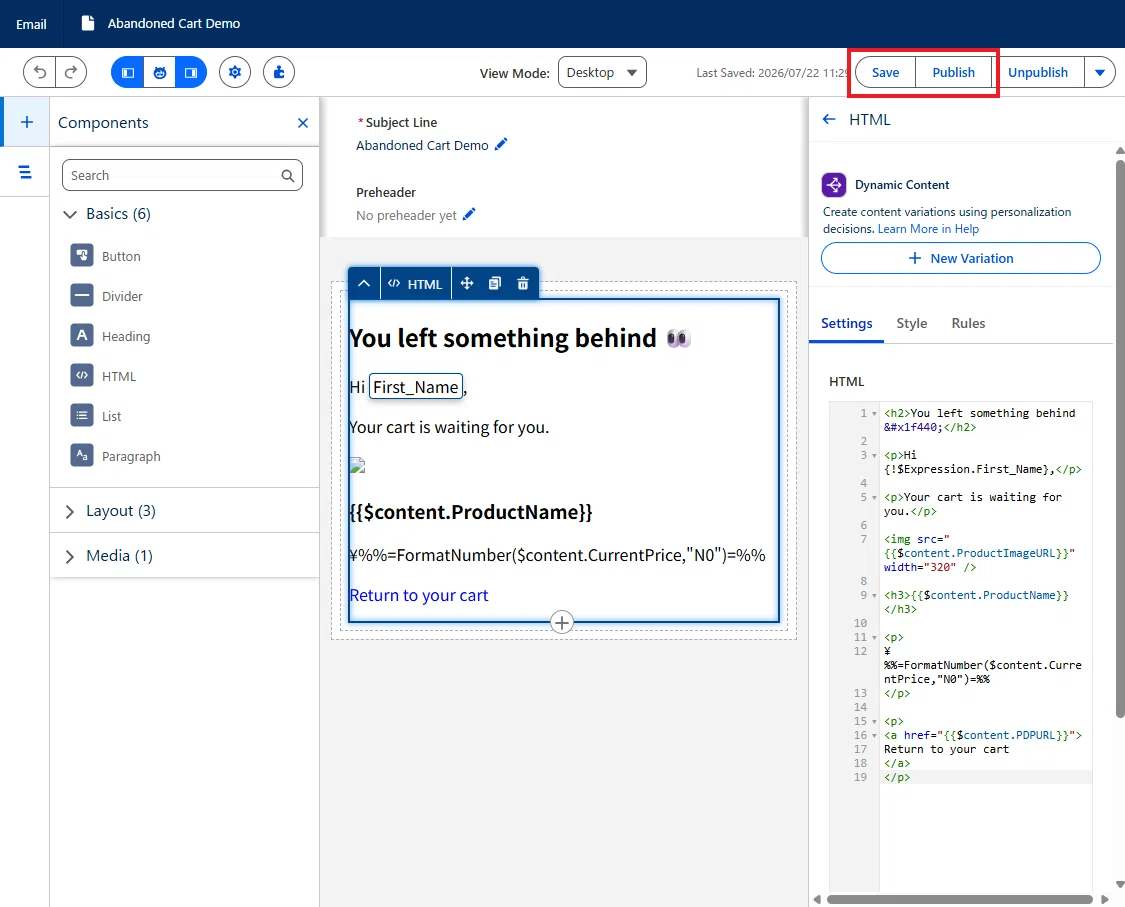
11. イベントトリガーフローの作成
続いて、フローの作成では、イベントトリガーフローを開きます。
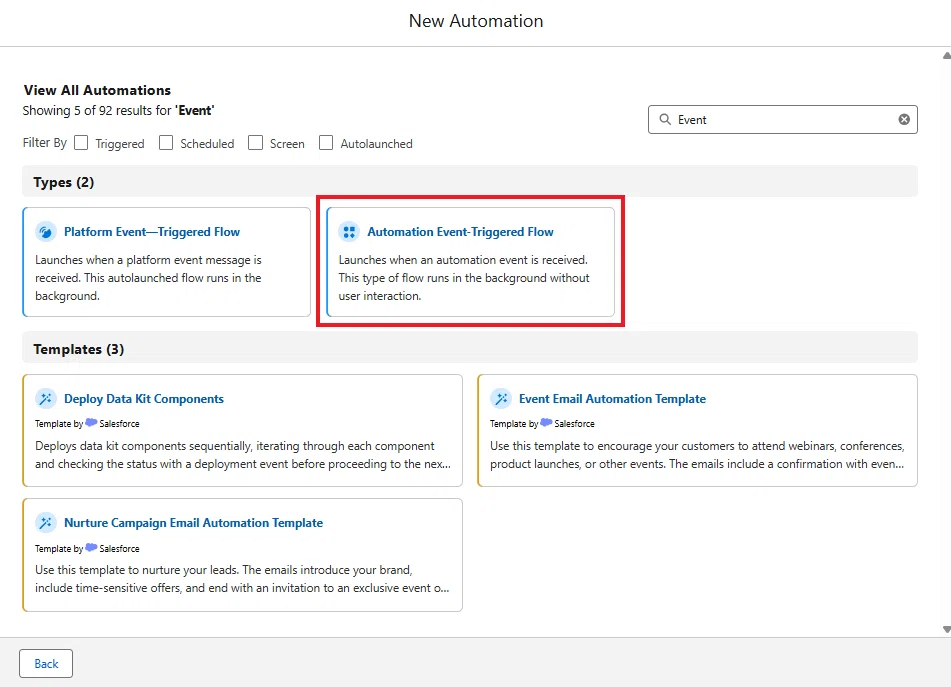
「Abandoned Shopping Cart」のイベントを開きます。
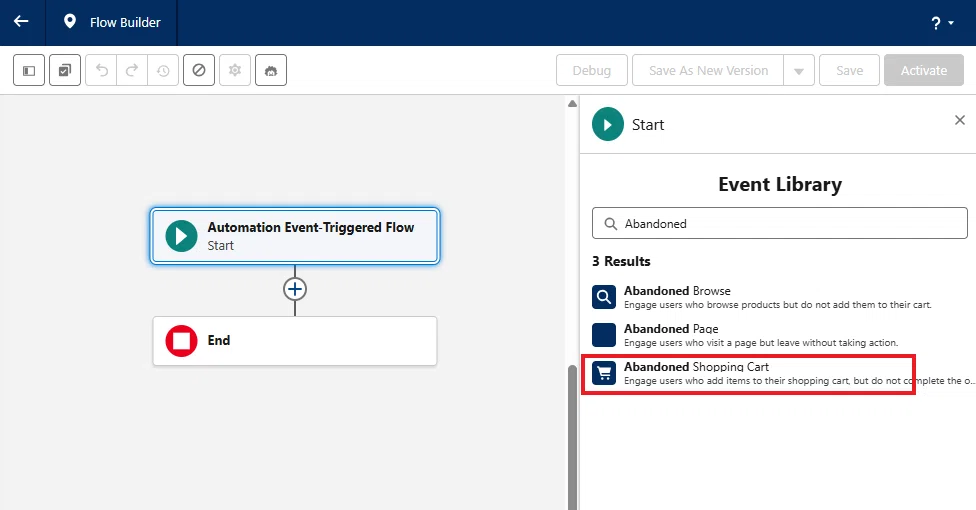
次に、以下の数式リソースを作成します。
API 参照名:EventEngagementDatePlus1Second
データタイプ:Date/Time
数式:{!$Event.EngagementDatetime__c} + (1 / 86400)
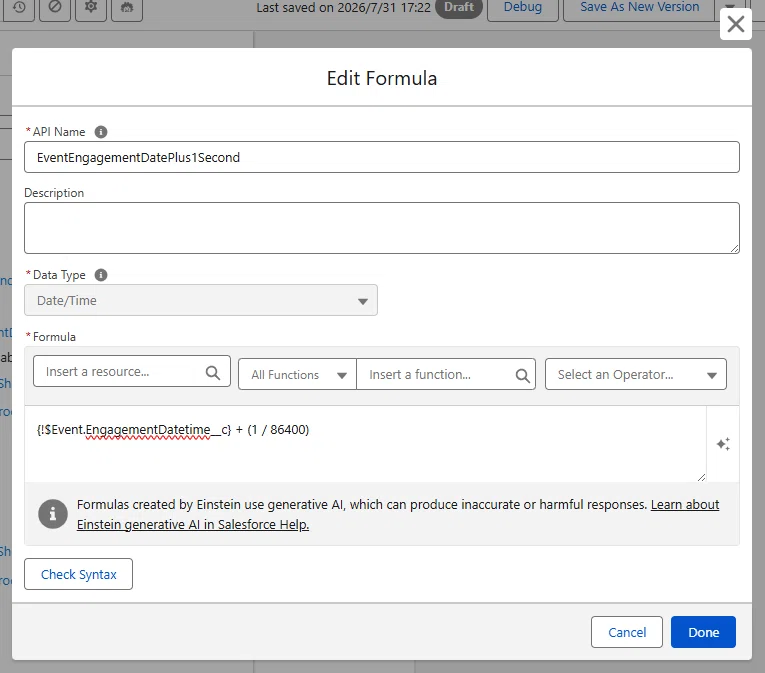
Get Records を配置して「Shopping Cart Product Engagement」(Data Cloud オブジェクト)を取得します。
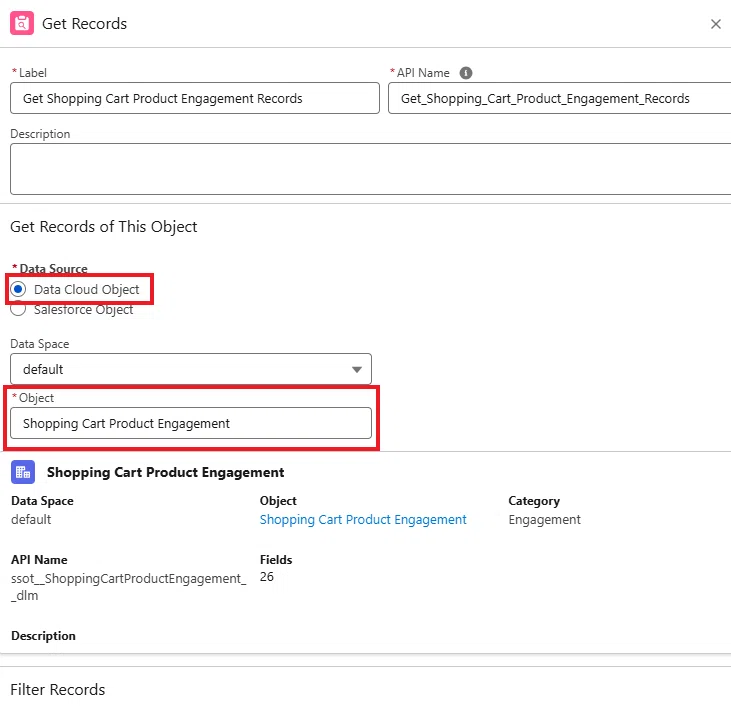
検索条件では以下を入力します。
Field:Shopping Cart Product Engagement > Engagement Date Time
Operator:Greater Than or Equal
Value:Event > Engagement date
AND
Field:Shopping Cart Product Engagement > Engagement Date Time
Operator:Less Than
Value:数式リソース:EventEngagementDatePlus1Second
AND
Field:Shopping Cart Product Engagement > Individual
Operator:Equal
Value:Event > Individual ID
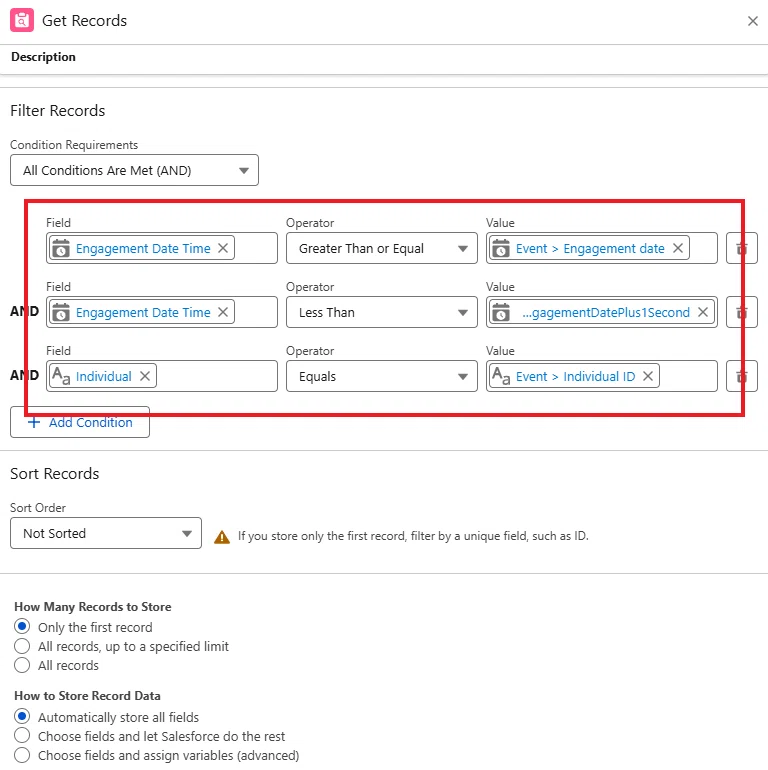
その下も、Get Records で「MC_AbandonedShoppingCartSSPC」(Data Cloud オブジェクト)を取得します。
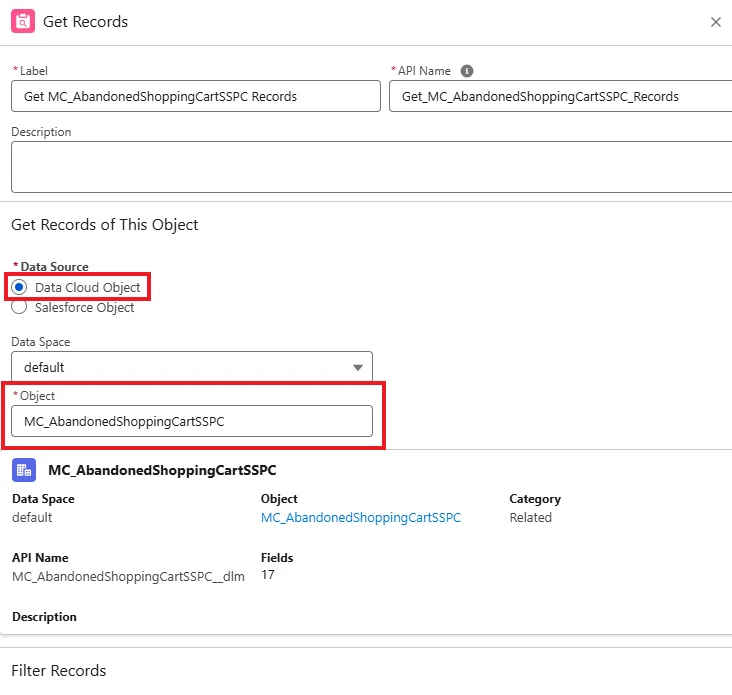
検索条件では以下を入力します。
Field:MC_AbandonedShoppingCartSSPC > SSC CartID
Operator:Equal
Value:Event > SSC CartID
AND
Field:MC_AbandonedShoppingCartSSPC > Product ID
Operator:Equal
Value:Get Shopping Cart Product Engagement Records > Product
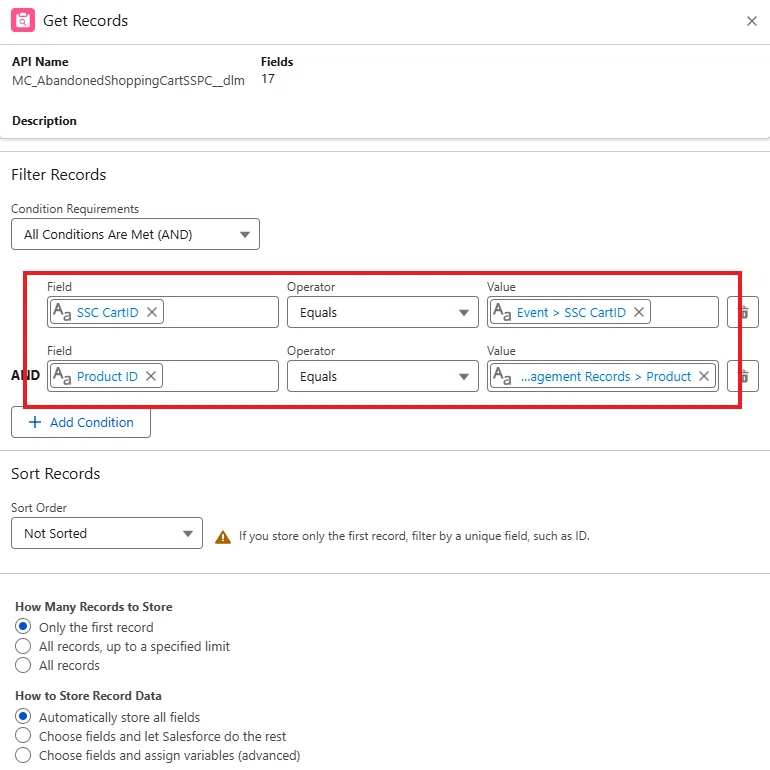
最後にメール要素を配置して、パーソナライズメッセージには、取得した MC_AbandonedShoppingCartSSPC の項目をそれぞれ割り当てます。
Current Price
PDP URL
Product Image URL
Product Name
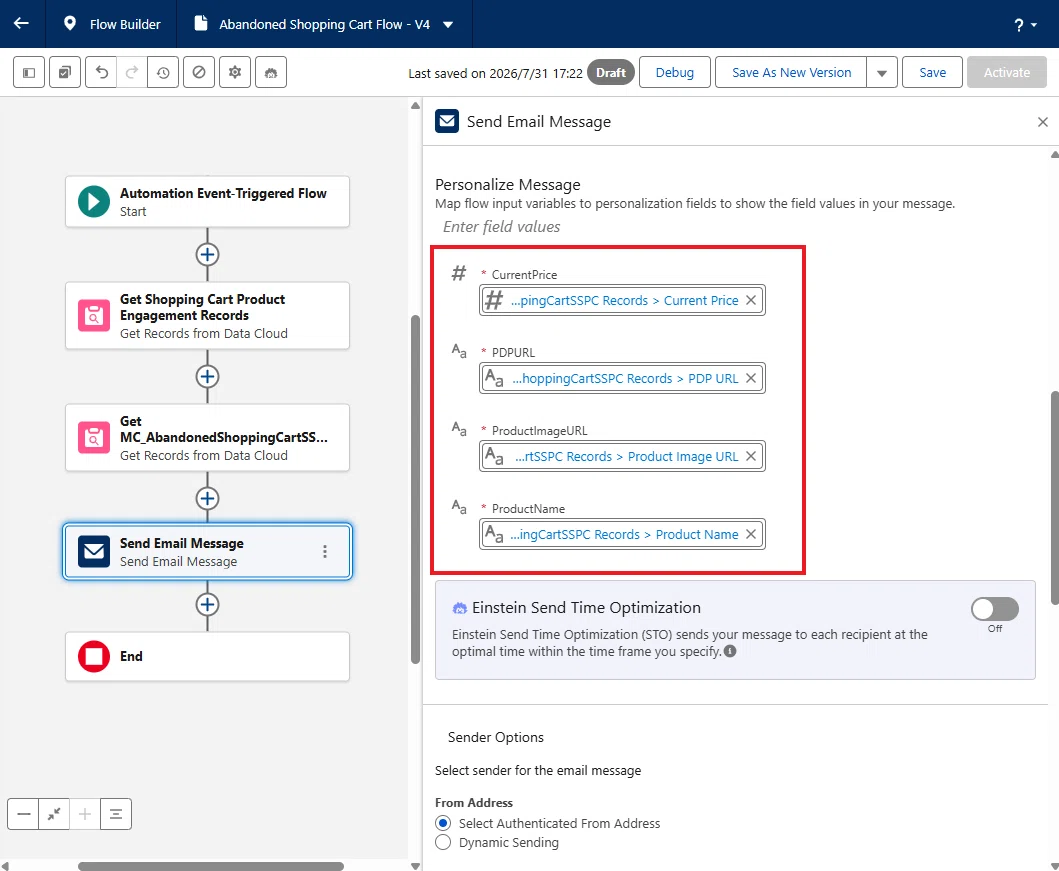
設定できたら、保存して、有効化します。
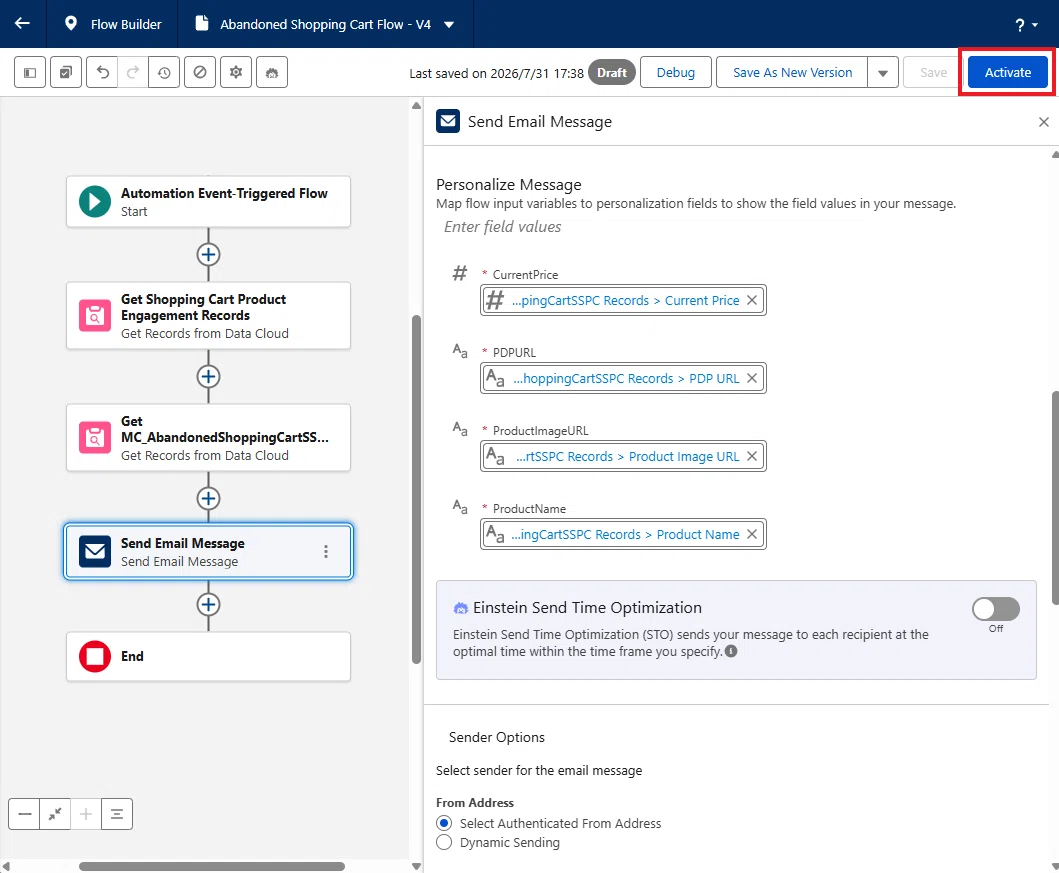
12. 実際に試す
シークレットモードで Website を開き、プロファイルを入力します。
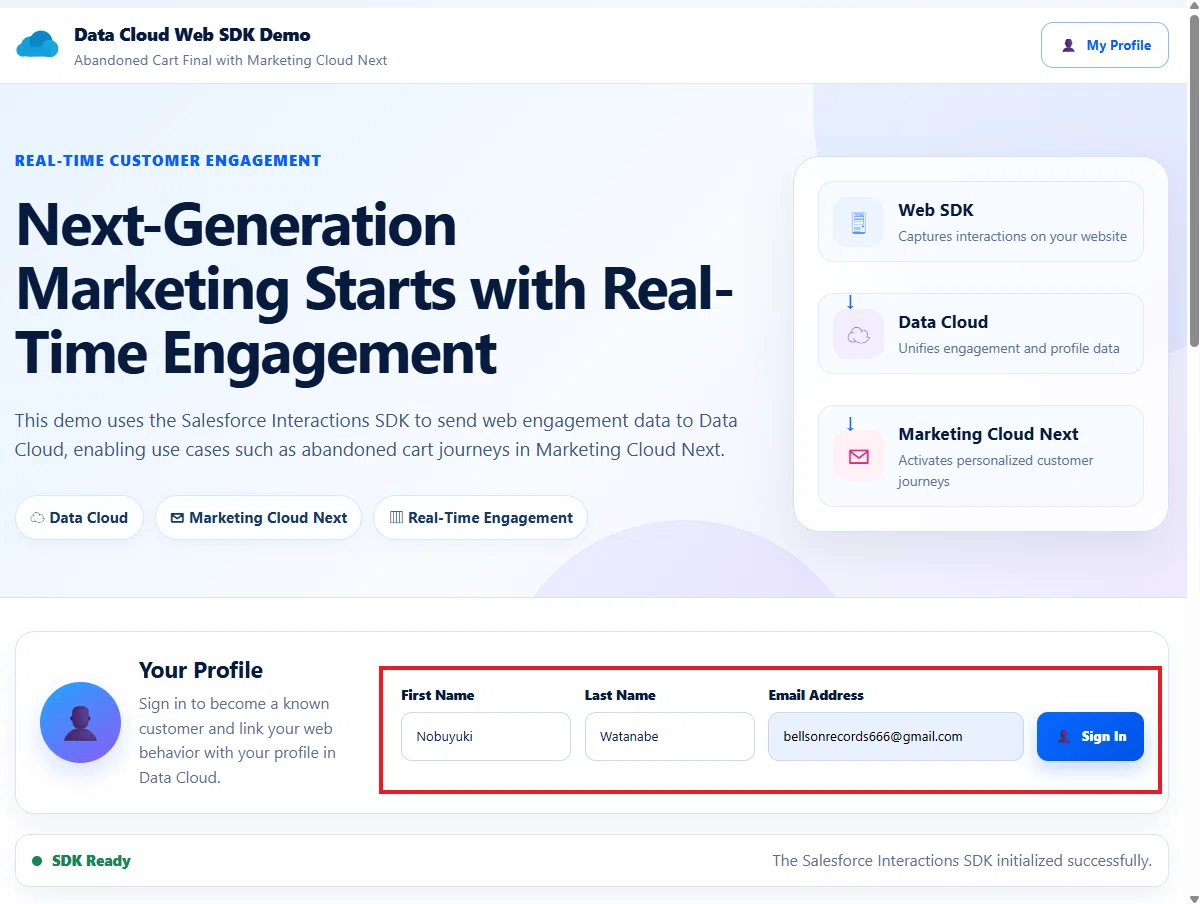
続いて、いずれかの商品をカートに入れたら、Checkout せずに、サイトから離れます。これがカートを放棄した状態になります。
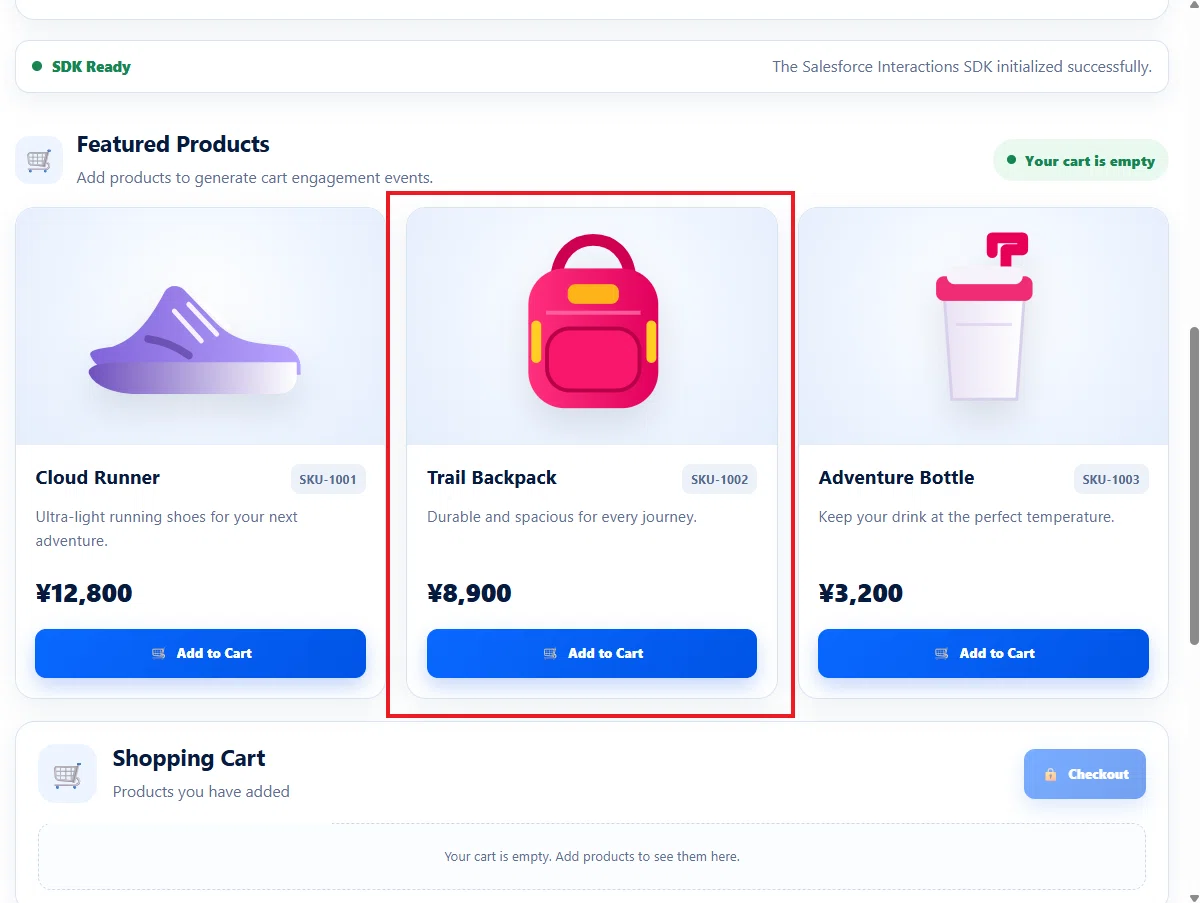
10 分 ~ 20 分待つとフローがトリガーされます。

メールを確認します。成功です。
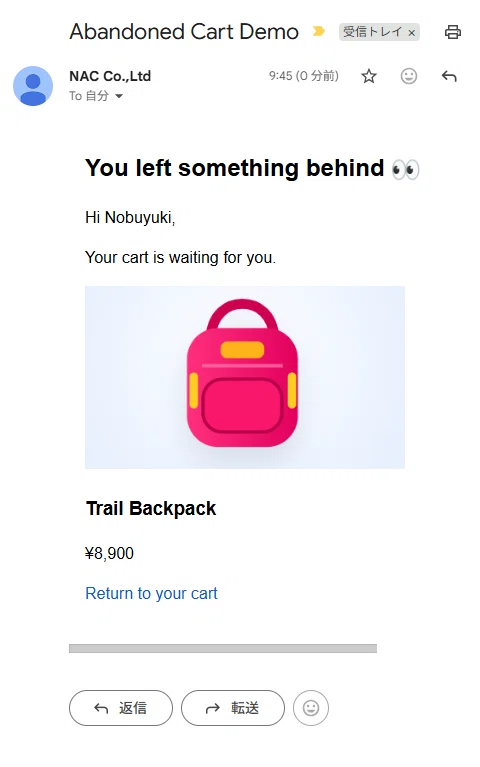
注意:複数の商品を同時にカートに入れたとしても、同一の Job Frequency では、最後にカートに入れた商品だけが選択される仕組み になっています。データ変換のフィルターで 1 つに絞る処理が入っています。
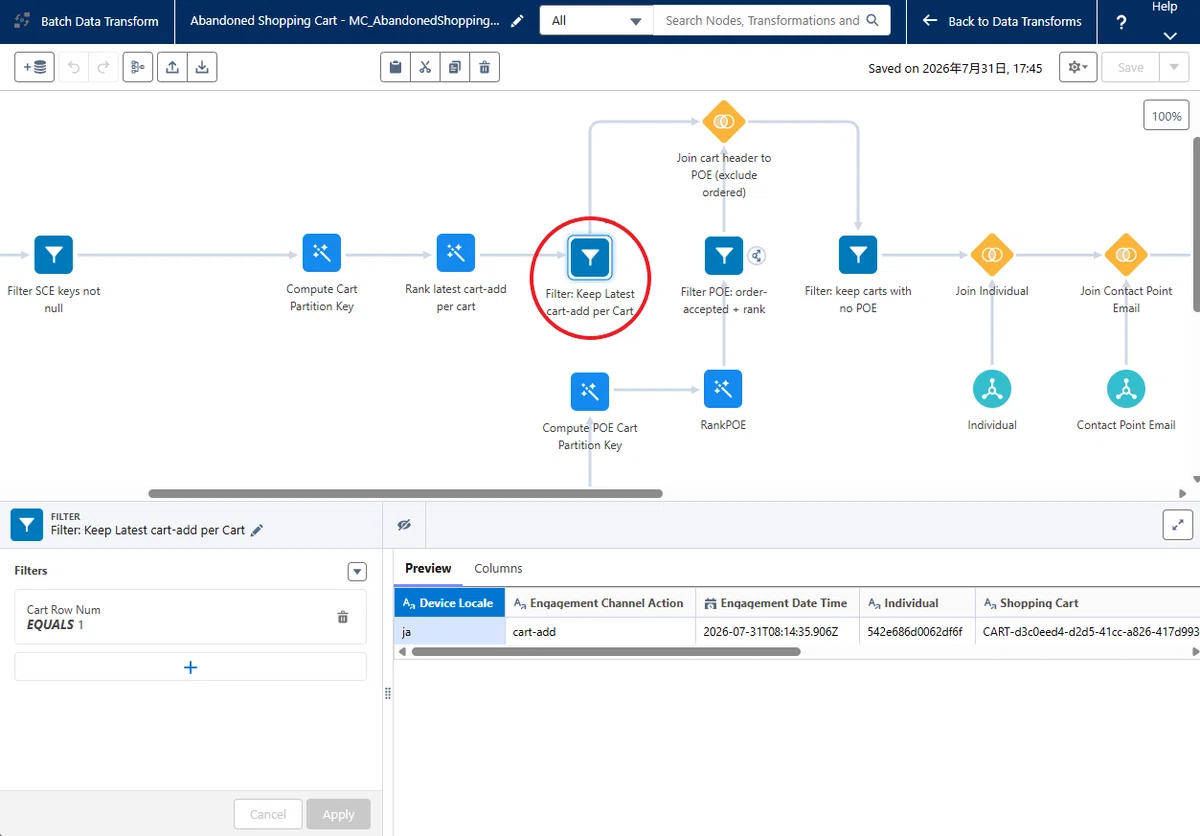
いかがでしたでしょうか。
Marketing Cloud Engagement の Behavioral Triggers と比較すると、今回の Marketing Triggers の実装は難易度がかなり高く、私自身も動作検証に多くの時間を費やしました。
今回の実装で特に重要だと感じたのは、DMO の適切なマッピングと、システムによって自動生成されるデータ変換(Data Transform)の仕組みを理解することです。これらは実際に手を動かして検証してみて初めて分かったポイントでしたので、ぜひ実装時の参考にしていただければと思います。
また、私のファーストインプレッションとしては、現時点ではすべてのお客様へ積極的に導入をおすすめできる段階とは言い切れません。実装や設定が複雑であるため、環境によっては期待どおりの動作を実現するまでに試行錯誤が必要になる可能性があります。
加えて、Data Cloud クレジットの消費についても十分に考慮する必要があります。設定や検証を繰り返していると想像以上のスピードでクレジットを消費する可能性があるため、小規模な環境や限られたクレジットで運用するケースでは、事前に十分な検討を行うことをおすすめします。
とはいえ、私の検証環境では一連の動作を確認できましたので、興味のある方はぜひチャレンジしてみてください。
今後も他の Marketing Trigger について検証を進め、実装方法や検証結果を引き続き共有していきたいと思います。
今回は以上です。
