Step83 pygame入門⑪:アイテムのランダム出現と足場の追加で、ゲームに変化をつける

前回のおさらいです(*^^*)
残り時間(60秒)の追加
時間切れでゲーム終了
スコア(Score)の表示
前回からはいよいよゲームの「カタチ」を整え始めました。
今回はさらに一歩進んで、
毎回ちがう展開になるゲーム
を目指しましょう!
1. やることの確認
今回は、これまでゲームに次の2つを追加します。
アイテムをランダムな位置に出現させる
足場(ブロック)を増やして、ステージに変化をつける
これにより、
さっきと同じ動きをしても
同じ結果にならない
という、「ゲームらしさ」が一気に高まりまってきます。
2. ランダムの実装
Pythonで「ランダム」を扱うときは、random モジュールを使います。
2.1 randomモジュールを使う準備
import randomランダムという仕組みを入れたい時にはこの1文だけで準備OK!
数字をランダムに選ぶ
リストからランダムに1つ選ぶ
といったことができるようになります。
3. アイテムをランダムな位置に出す
さて、これまでの作り方では、アイテムの位置を固定していました。
item_rect.topleft = (350, 260)しかしこれでは、一度ゲームを遊んだ後は「もう一度やりたい!」にはつながりづらいですね。
ですのでこれ(※アイテムのの位置)を、ランダムにしてみましょう。
3.1 ランダムな座標を作る
x = random.randint(50, 550)
y = random.randint(50, 300)
item_rect.topleft = (x, y)
解説
randint(a, b)
→ a 以上 b 以下の整数をランダムに返す画面の端に出ないよう、少し余裕を持たせています
3.2 なぜ毎回ちがう位置になるのか
プログラムを実行するたびに、
randint() が
別の数を返す
そのため、同じコードでも結果が変わる のです。
4. アイテムを「取り直し」できるようにする
次にアイテムを取った後には、新しい場所に再出現させてみましょう。
4.1 取得後に再配置する
if player_rect.colliderect(item_rect):
    score += 1
    item_rect.topleft = (
        random.randint(50, 550),
        random.randint(50, 300)
    )
これで、
取る
スコアが増える
別の場所に出る
という流れが完成します。
5. 足場を追加してみよう
次に、せっかくですからステージを少し難しくして面白くしましょう(^^)/
5.1 足場は「リスト」で管理する
blocks = [
    pygame.Rect(0, 400, 640, 40),
    pygame.Rect(200, 320, 120, 20),
    pygame.Rect(380, 260, 120, 20),
    pygame.Rect(100, 200, 100, 20),
]
解説
足場が増えても
for文でまとめて処理できる
これが「リスト管理」の強みです。
6. 完成コード(ランダム出現+足場追加)
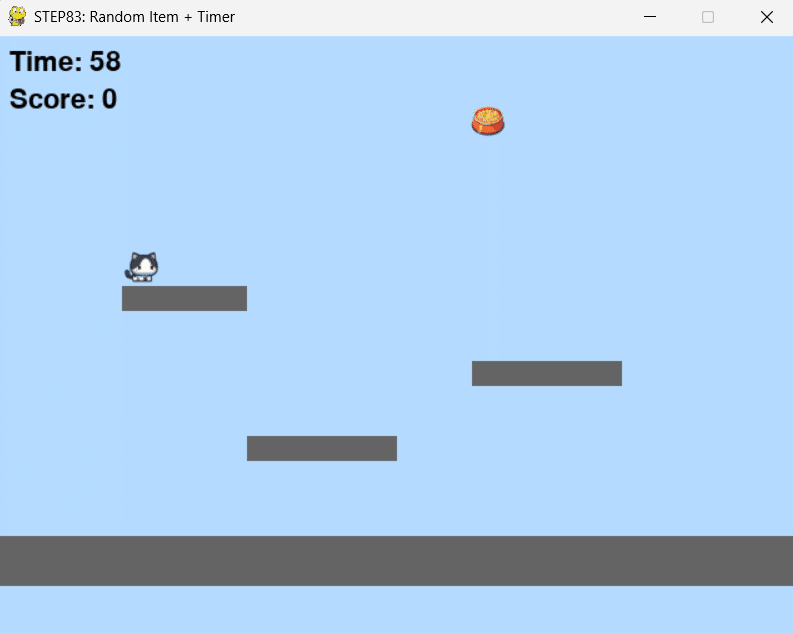
import pygame
import sys
import random

pygame.init()

WIDTH, HEIGHT = 640, 480
screen = pygame.display.set_mode((WIDTH, HEIGHT))
pygame.display.set_caption("STEP83: Random Item + Timer")

clock = pygame.time.Clock()

# フォント
font = pygame.font.SysFont(None, 32)
big_font = pygame.font.SysFont(None, 56)

# キャラクター
player_image = pygame.image.load("neko.png")
player_rect = player_image.get_rect()
player_rect.topleft = (100, 200)

speed = 5
gravity = 1
jump_power = -15

dx = 0
dy = 0
on_ground = False
facing_right = True

# 足場(ステージ)
blocks = [
    pygame.Rect(0, 400, 640, 40),      # 地面
    pygame.Rect(200, 320, 120, 20),    # 足場1
    pygame.Rect(380, 260, 120, 20),    # 足場2
    pygame.Rect(100, 200, 100, 20),    # 足場3
]

# アイテム(キャットフード)
item_image = pygame.image.load("catfood.png")
item_rect = item_image.get_rect()

def respawn_item():
    """アイテムをランダム位置に再配置する(画面の端すぎないように)"""
    item_rect.topleft = (
        random.randint(50, WIDTH - 50),
        random.randint(50, 320)
    )

respawn_item()

# スコア
score = 0

# タイマー&ゲームオーバー
TIME_LIMIT = 60
start_time = pygame.time.get_ticks()
game_over = False

while True:
    for event in pygame.event.get():
        if event.type == pygame.QUIT:
            pygame.quit()
            sys.exit()

        # ゲームオーバー中はジャンプなどの操作を受け付けない
        if not game_over:
            if event.type == pygame.KEYDOWN:
                if event.key == pygame.K_SPACE and on_ground:
                    dy = jump_power
                    on_ground = False

    keys = pygame.key.get_pressed()

    # ゲームオーバー中は「動き」を止める
    if not game_over:
        dx = 0
        if keys[pygame.K_RIGHT]:
            dx = speed
            facing_right = True
        if keys[pygame.K_LEFT]:
            dx = -speed
            facing_right = False

        # 横移動(ブロック衝突で戻す)
        player_rect.x += dx
        for block in blocks:
            if player_rect.colliderect(block):
                player_rect.x -= dx

        # 重力
        dy += gravity
        player_rect.y += dy

        # 着地判定(下から乗る形のみ)
        on_ground = False
        for block in blocks:
            if player_rect.colliderect(block):
                if dy > 0:
                    player_rect.bottom = block.top
                    dy = 0
                    on_ground = True

        # アイテム取得(取ったらスコア+1、ランダム再出現)
        if player_rect.colliderect(item_rect):
            score += 1
            respawn_item()

        # 画面外に出ない(左右だけ制限)
        if player_rect.left < 0:
            player_rect.left = 0
        if player_rect.right > WIDTH:
            player_rect.right = WIDTH

    # 残り時間計算(ゲームオーバーになったら固定)
    elapsed_time = (pygame.time.get_ticks() - start_time) // 1000
    remaining_time = TIME_LIMIT - elapsed_time

    if remaining_time <= 0:
        remaining_time = 0
        game_over = True

    # 描画
    screen.fill((180, 220, 255))

    # 足場描画
    for block in blocks:
        pygame.draw.rect(screen, (100, 100, 100), block)

    # アイテム描画(ゲームオーバーでも表示してOK)
    screen.blit(item_image, item_rect.topleft)

    # キャラ描画
    if facing_right:
        screen.blit(player_image, player_rect.topleft)
    else:
        flipped = pygame.transform.flip(player_image, True, False)
        screen.blit(flipped, player_rect.topleft)

    # 左上表示(Time / Score)
    time_text = font.render(f"Time: {remaining_time}", True, (0, 0, 0))
    score_text = font.render(f"Score: {score}", True, (0, 0, 0))
    screen.blit(time_text, (10, 10))
    screen.blit(score_text, (10, 40))

    # ゲームオーバー表示(中央にスコア)
    if game_over:
        result = big_font.render(f"Score: {score}", True, (0, 0, 0))
        rect = result.get_rect(center=(WIDTH // 2, HEIGHT // 2))
        screen.blit(result, rect)

    pygame.display.update()
    clock.tick(60)
7. 今回のポイント
ランダム処理は random.randint()
同じ処理でも、結果が毎回変わる
足場やアイテムは リストでまとめる
ゲームは「少しの変化」で一気に面白くなる
8. 練習問題
練習1
アイテムが出現する高さをもっと高くしてみましょう。
練習2
足場を1つ追加して、「ジャンプしないと取れない配置」を作ってみましょう。
練習3
アイテムを取るたびに、制限時間が少し増えるようにしてみましょう(次回への予習)。
10. 次回予告(次でいよいよ完成です!)
やっと次回で、pygameシリーズの終わりです。
BGMの追加
ゲームオーバー後のリトライ
最終的なまとめ
を行い、この横スクロールゲームを完成させましょう!
次の記事(シリーズ最終回)
いいなと思ったら応援しよう!
 よろしければ応援お願いします! いただいたチップは引き続きプログラミングや学びについて、皆さんの利益になるようなよい記事を書くことで恩返しをさせていただきます!