
Free Download!! 3D Gaussian Splatting Data (PLY)

We’ve put together a collection of 3DGS PLY files — actual 3D Gaussian Splatting data — available for download.
Feel free to use them for testing, research, or experimentation!
All files are released under the CC0 license (no restrictions).

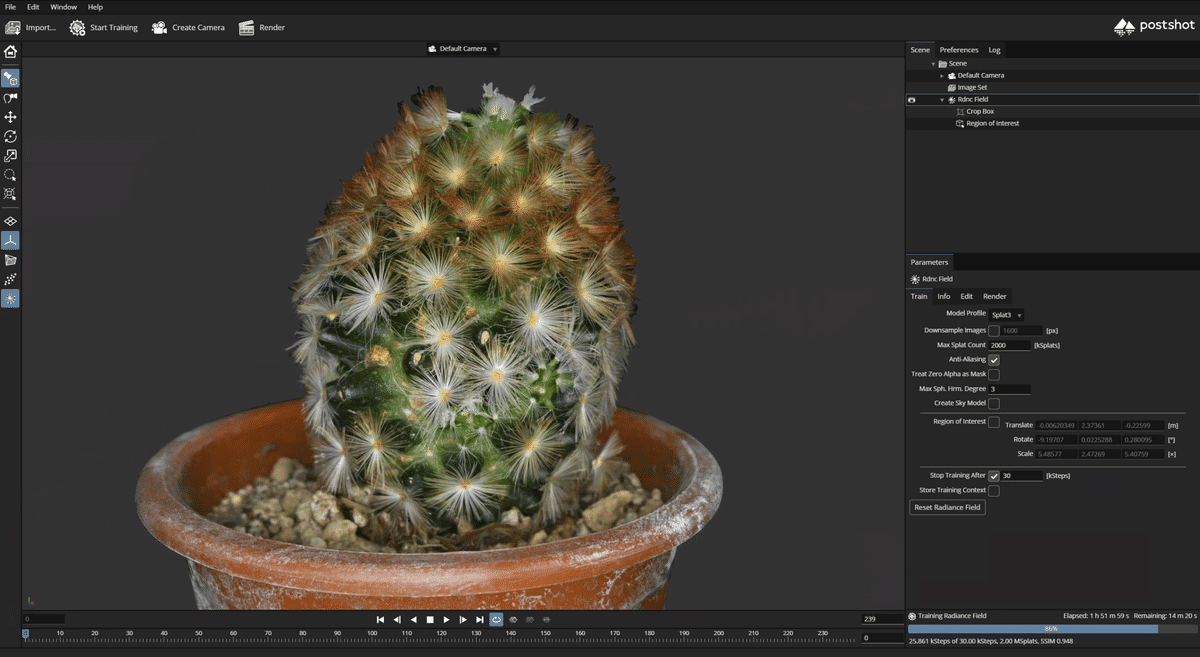
Free 3DGS PLY Sample Downloads
What's Included in the Sample Files
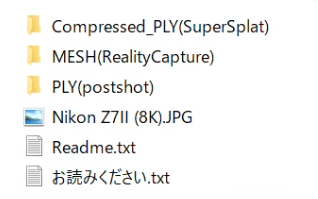
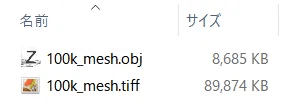
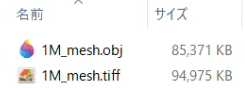
[What's Included in the Sample Files]
--Uncompressed PLY exported from Postshot
--Compressed PLY exported from SuperSplat
--100K polygon mesh + 8K TIFF texture exported from RealityCapture
--1million polygon mesh + 8K TIFF texture exported from RealityCapture
Try dragging and dropping the PLY file into SuperSplat to check it out!
Relationship Between 3DGS PLY File Size and Number of Splats
In traditional 3D workflows, it's often possible to dramatically reduce the polygon count and make up for it with high-quality textures to maintain visual fidelity.
However, with 3D Gaussian Splatting (3DGS), the visual quality is directly tied to the number of splats (points).
From our experience, if you're aiming to use 3DGS as a replacement for photography in a commercial project, you'll need at least 100k splats per subject — even for minimal use.
If you want to achieve a photorealistic impression at first glance, 1 million splats or more is ideal.
That said, a 1M splat scene can result in a file size of around 220MB, which means it’s not quite lightweight enough for casual use on mobile or e-commerce platforms (yet).
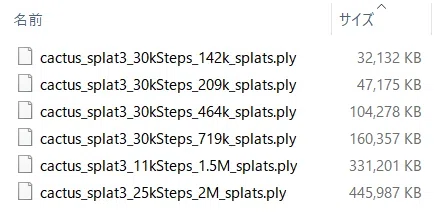
[Number of Splats and File Size of Uncompressed PLY Data]
--Generated using Postshot
142k Splats 32MB
209k Splats 47MB
464k Splats 104MB
719k Splats 159 MB
[Estimated File Size per Number of Splats]
1K=0.22MB
10K=2.2MB
100k=22MB
150k=33MB
200k=44MB
300k=66MB
500k=110MB
1M=220MB
3M=660MB
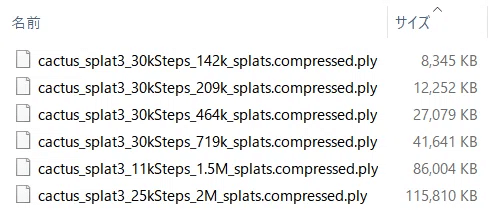
PlayCanvas's Compressed PLY format can reduce file size to about one-fourth of the original.
Several companies have also released their own compressed 3DGS formats, aiming to optimize data size and performance.
[PlayCanvas Compressed 3DGS PLY Format]
Approx. 1/4 the size of standard uncompressed PLY files
1K=0.055MB
10K=0.55MB
100k=5.5MB
150k=8.25MB
200k=11MB
300k=16.5MB
500k=27.5MB
1M=55MB
3M=165MB
Other Compressed 3DGS Formats
Niantic has released its own open-source format called SPZ, used in its mobile 3D scanning app Scaniverse and web-based visual editor Niantic Studio.
According to Niantic, this format can reduce data size by up to 90%.
Unfortunately, SPZ is not compatible with tools like postshot or SuperSplat.
Recommended Splat Counts for Video / CG Use
While it depends on your GPU memory, higher-resolution data is generally preferable for cinematic or CG applications.
A good baseline is around 3 million splats with 30k training steps, which is also the default in Postshot.
Embedding on the Web
If you're planning to embed a 3DGS scene on a website, especially for mobile viewing over 4G connections, keeping the file size down is essential.
We recommend targeting around 100k to 200k splats, with at least 30k training steps for decent visual quality.
This strikes a good balance between performance and appearance.
Adjusting Splat Count in Postshot
Unfortunately, unlike polygon-based workflows, there's no built-in “reduction” tool for splats just yet.
You’ll need to manually adjust your target splat count from the start.
Here’s how to do that:
Set image downscale to the default of 1600px
Enter your desired Max Splat Count
Keep the training steps at the default 30k (at least for initial tests)

If You Go Over the Max Splat Count
If your training exceeds the Max Splat Count, try reducing the image resolution below 1600px and retrain from scratch.
It’s basically an iterative process — gradually fine-tuning the splat count until you find the optimal balance.
On the flip side, if you're training with the default downscale of 1600px and find that the resulting splat count or image quality isn't sufficient, try increasing the image resolution.
(Just be warned — it’ll get significantly heavier on your system!)
Feel free to use these files for testing, research, or any kind of evaluation!
[What's Included in the Sample Files]
--Uncompressed PLY exported from Postshot
--Compressed PLY exported from SuperSplat
--100K polygon mesh + 8K TIFF texture exported from RealityCapture
--1million polygon mesh + 8K TIFF texture exported from RealityCapture
[Capture Details]
Camera: Nikon Z7II
Settings: ISO 100 / f10 / 1/25 sec / 50mm lens
Image Size: 8256 × 5504
Number of photos: 427
Generated data: 3DGS-PLY / OBJ
[Software Used]
Postshot v0.5.250
RealityCapture 1.5.1
[Disclaimer]
These assets are provided under the Creative Commons CC0 license, meaning you’re free to use them for commercial and non-commercial purposes without any copyright restrictions.
Please note that we take no responsibility for any issues, damages, or claims resulting from the use of these files. Use them at your own discretion and responsibility.
If you plan to share or post this content online, we’d appreciate it if you could include the following credit URL:
👉 https://www.steam-studio.jp
#GaussianSplatting
#出張3dスキャン
#3dスキャン
#3dスキャン サービス #3dscanstudio_iris#iris#3dscan#3dscanstudio#3dscanstudio_jp#toho_studio
#fullbody3dscanning #レスパスビジョン #lespacevision #tokyo #japan
#irisGaussianSplatting
