
Leaderboard


Popular Content
Showing content with the highest reputation since 10/24/26 in all areas
-
Here for all the Mew file. Feel free to add it to the Gen1 collection. Thanks so much to the 5 contributors on Leetchi/PayPal. 0151 - MEW - 51DD.pk14 points
-
There's no need to block traffic when running atmosphere or use emunand for this. Many people have had zero issues using the HOME viewer/dumper plugin with just the sysmodule and stock atmosphere.2 points
-
Found this on twitter: https://x.com/rimuru__8/status/21198058961215201941 point
-
Perhaps he refers to the fact that the earth ribbon behaves like certain event ribbons that prevent a Pokémon from being traded on public platforms.1 point
-
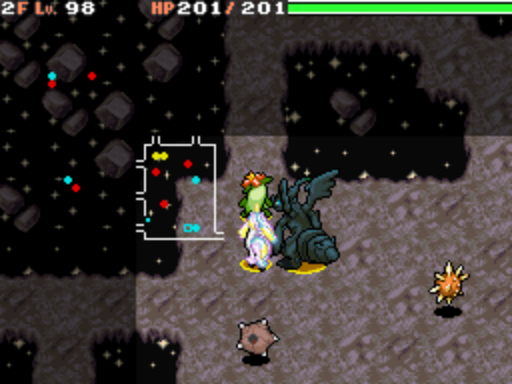
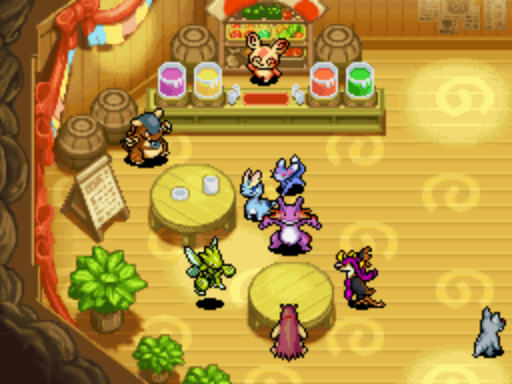
So this hack has been out for a few months but I've been putting off on posting it here for a while. But now that I've finished 1.1 with a slew of new features, I decided it was finally time! The goal of Explorers of Fortune was to add extra content and quality of life to Explorers of Sky as possible, while keeping the original's difficulty level and spirit! Sky was always a comfort game for me, so I didn't gel with similar hacks that focused more on difficulty. Thus I set out to create my own take on an expanded Sky, and I ended up very pleasantly surprised with the result! So without further ado... Story and characters: QoL and features: Dungeons: Pokemon: -New additions: -Regional Variants: -Added forms: -Shinies: Misc: -The game has a new title screen to tie into Zacian's questline! -The UI is now gold! -Intimidator's activation odds have been lowered. What's new in 1.2? Screenshots: Credits: Anonymous: Appraise All, Choose Starter, Expand Poke List, Add Experience Share, Add Types, Dungeon Interrupt, Implement Fairy Gummies, Move Shortcuts, Fix Evolution Glitch, Change Evo System, Change Fixed Floor Properties, Change Text Box Background, Externalize Mappa File, Externalize Waza File, Extract Anim Data, Extract Bar Item List, Extract Dungeon Data, Extract Hardcoded Item Lists, Extract Item Code, Extract Move Code, Extract Object Table, Extract SP Code, Provide ATUPX Support Frostbyte: Disable Tips, No Weather Stop, Same Type Partner, Better Enemy Evolution, Move Shortcuts, Compress IQ Data, Edit Extra Pokemon, Extra Space Cipnit: Far Off Pal Overdrive, Partners Trigger Hidden Traps, Reduce Jumpcut Pause Time, Complete Team Control Adex: Pitfall Trap Tweak, Special Actor Name, a TOOOOON of special processes psy_commando: Actor and Level Loader Jawshoeuh: Ivy Cudgel Happylappy, Chesyon, and I, with help from Adex, Hecka, Mond, deltaflare, and Frostbyte: StarterMenuTool Quiz Recreation Adex, Gelius, and Delta L: ManyNEWAbilities HappyLappy: CustomSpeciesFormChange Waaaaaaaaaaaaaaaaaaaaaaaay too many spriters to list here. check the included sprites/portraits credits document for the full list! Misc credits to Mond, happylappy, and Sergey, who were instrumental in me learning SkyTemple, and without, this hack would not be possible. Download You will need a US rom of Explorers of Sky. Use XDeltaUI to install the patch. Enjoy!
 1 point
-
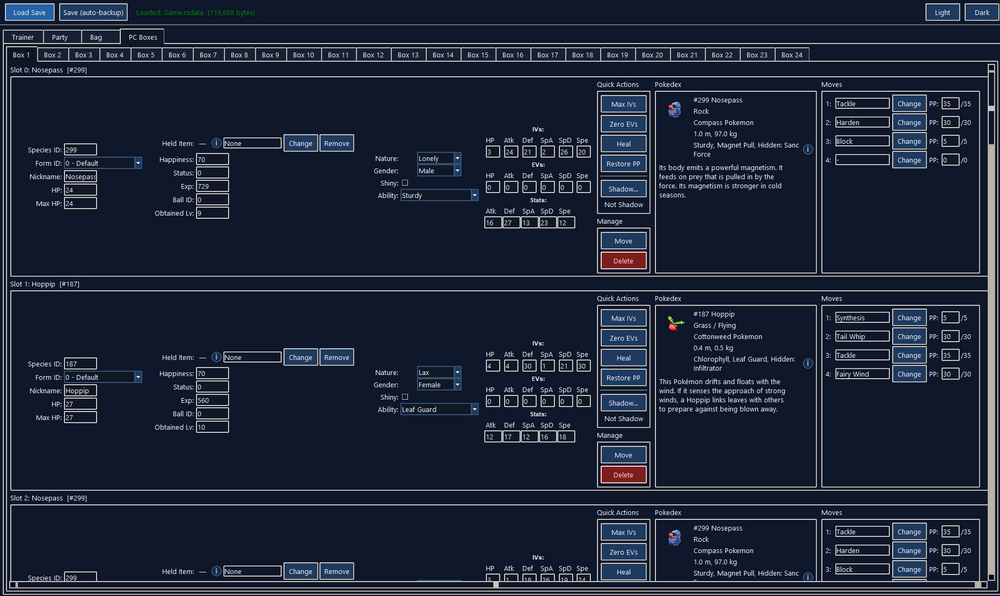
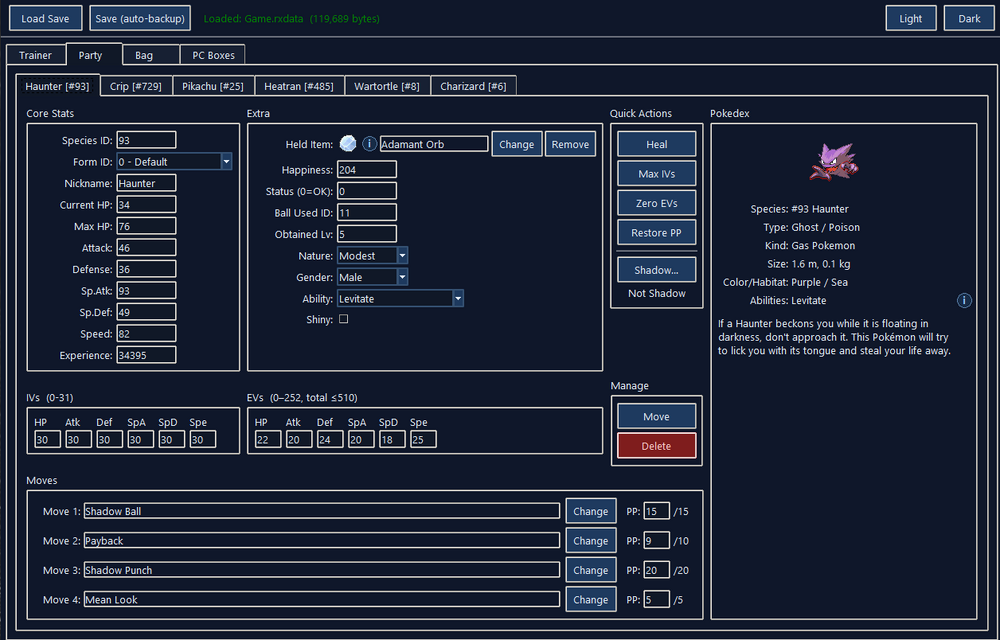
Hello everyone, Here is my save editor for Pokemon Insurgence: https://github.com/hebopaul/pok-insurgence-save-editor/releases It automatically finds and opens your latest save file, and can basically edit anything. Pokémon Create any Pokémon at any level, with the nature, ability, IVs and EVs you want Choose its moves — natural progression, TMs and tutors, or ones it could never normally learn Make it shiny, change its form, turn it into a Shadow Pokémon and purify it Full Pokédex info while you edit: sprites, types, abilities and what each one actually does Items and boxes Add any item or Poké Ball to your bag, sorted by pocket Manage your PC boxes — deposit and withdraw without walking to a Center Everything shows the game's own artwork and descriptions Trainer Badges, money, Battle Points and play stats Build Library 141 ready-made Pokémon you can send straight to your PC Or write your own sets in plain text and keep them in your library Map See where you are on the world map Move your character to any town, route or building in the game Set where you respawn, and where Teleport sends you Safety Every save is backed up automatically before it's written Name your own backups before trying something risky, and roll back whenever you like Plus one-click healing, PP restore, max IVs, zero EVs and all badges — and dark/light themes. Feel free to give feedback. Cheers!
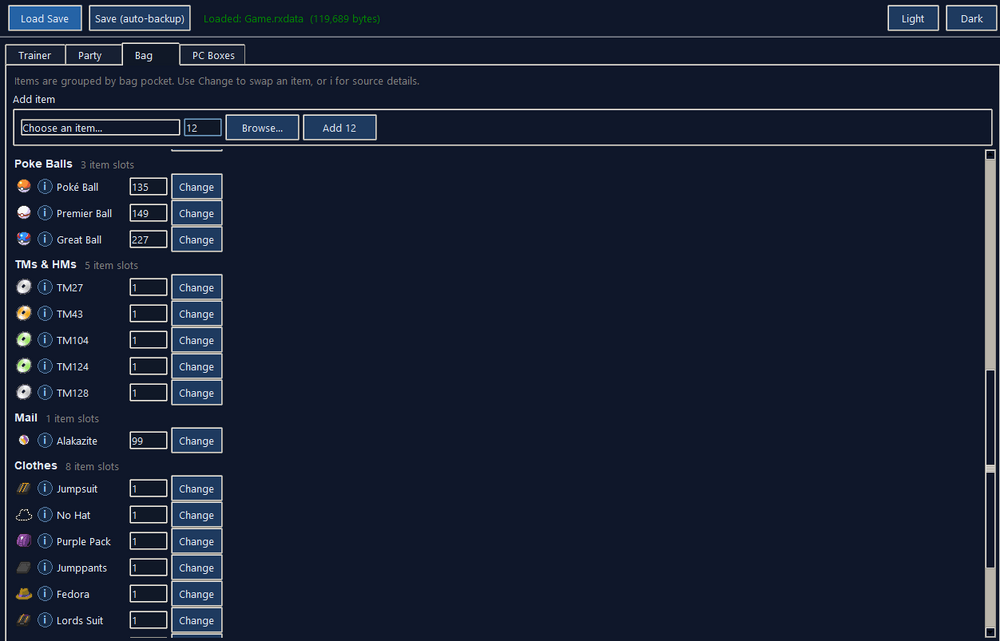


 1 point
-
Its language is Japanese, yet its nickname is English. PKHeX is correctly flagging it as illegal. Just because you forced an unofficial distribution server to send you an event gift, does not make it legal. PKHeX's "Verify All" is a cross comparison check & against the save file, not individual check. Because you can already see the individual checks individually.1 point
-
The game applies the Shiny Charm boost by confirming it exists inside your bag. Nothing more. Shiny Charm - Bulbapedia, the community-driven Pokémon encyclopedia So, you can just delete it from your bag and you're back to default odds.1 point
-
If you did, it would skip the cutscene, effectively skipping the potential crash as well. It worked for everyone else so it should work for you too It's not a bug, as per the disclaimer from the first post: I don't always add starter animation for non-list starters. If a Pokémon has a missing animation, don't report it! You are mentioning two moves that are not in the game, as such there's no issue here. Alpha doesn't follow mainline movepool in current version and still won't in the soon coming 3.1. However, long-term, 4.0 will add moves from gen 5+ along with gen 5+ species.1 point
-
There is not. You can create a Pokemon with any PID value you wish, so use the calculation method to determine whichever PID you want.1 point
-
Because it's not a recognized trainer name, as nobody had provided a legitimate copy. There are many others that aren't archived. List of European language event Pokémon distributions in Generation I - Bulbapedia, the community-driven Pokémon encyclopedia1 point
-
Receive an unmodified WC6, then change the date in the resulting Pokemon. It can't have OT memories because it is an event, it automatically is handled by you. The memory editor applies simple fixes, such as if it has no memory selection but values for other memory components (feeling) present.1 point
-
If anyone comes across this thread in the future and wants to know if I got the automation tool working, that answer is yes. However, it will not be made public because I don’t feel comfortable putting a tool out there that requires you to run as administrator just to get it to run properly.1 point
-
Don't rename your save file; the program expects it to be called `sav.dat` for it to properly recognize as a Virtual Console save file. There's no file-content difference to detect otherwise.1 point
-
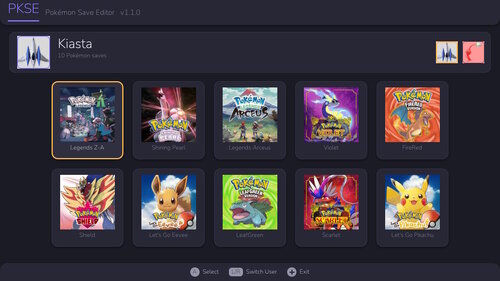
Version 1.2.0
1186 downloads
⚠ DUE TO SIZE LIMITATIONS IMPOSED RECENTLY ON UPLOADS I'M NO LONGER ABLE TO CONTINUE PROVIDING UPDATES HERE. SEE MY GITHUB: https://github.com/kiasta/PKSE FOR THE LATEST RELEASES ⚠ PKSE is an open-source Pokémon save editor that runs directly on a hacked Nintendo Switch console. It reads, edits, and writes save files in place on the console, so no PC, save transfer, or external tooling is required. SUPPORTED GAMES Gen 3: FireRed / LeafGreen Gen 7: Let's Go, Pikachu! / Eevee! Gen 8: Sword / Shield, Brilliant Diamond / Shining Pearl, Legends: Arceus Gen 9: Scarlet / Violet, Legends: Z-A Per-game save version and DLC detection is handled automatically. CROSS-GAME BANK PKSE includes a native storage bank shared by every supported game. A Pokémon deposited from one game is converted into the destination game's format on withdrawal, preserving origin data: OT, trainer IDs, met location and level, IVs, nature, and PID. EDITING Party and box Pokémon: species, level, stats, IVs/EVs (AVs in Let's Go), nature, ability, moves, held item, ball, OT/met/origin data, shininess, gender, and ribbons. Trainer info and item pouches are editable with per-game item and count limits enforced. A Pokémon creator builds an entity from scratch in any supported game's format, with legal values highlighted. LEGALITY A legality checker flags illegal values as you edit. It is informational only — it never blocks an edit or silently alters your data. Encounter matching is not yet implemented, so the checker should not be treated as a substitute for PKHeX's legality analysis. SAVE HANDLING Backup and restore are performed on-console with retained backup history. Users are strongly encouraged to take a backup with Checkpoint or an equivalent tool before first use. INTERFACE HOME-style UI built with NanoVG, 256px HD sprites, full touch controls, and scrollable storage and lists. REQUIREMENTS A Nintendo Switch running custom firmware with access to the Homebrew Menu. Place PKSE.nro in sd:/switch/. Tested on firmware 22.5.0. PKSE operates only on save data already present on your own console. CREDITS Built using PKHeX as a reference throughout — much of the format and structure knowledge behind this tool comes from that project and the documentation work of this community. Licensed under AGPL-3.0 license. Source and releases: https://github.com/kiasta/PKSE PKSE_1.2.0.7z1 point -
As previously mentioned, the PCD uploaded for the gift had a hardcoded 0x0004 value for the Sanity/Flags, which is not a valid resting state. The game sets that flag when it temporarily decrypts a Pokémon. All slots at rest are encrypted and should have all-zero Sanity/Flags. The file has been fixed over a year ago. Fixed Worlds 2008 Lucario by Bl4ckSh4rk · Pull Request #558 · projectpokemon/EventsGallery The original file with an error was possibly dumped from a RAM capture of the game while it was running & viewing the gift, resulting in data that does not match the natural resting state that a savefile/injector would want.1 point
-
The dusk stone is used instead1 point
-

Version r12
42 downloads
Release 12 of PPSE-DS brings the addition of pokedex editing, form editing, and a host of bugfixes.1 point -
Version 1.0.0
1571 downloads
Contents: 1) Intro 2) Installation Guide 2.1) Disclaimers 2.2) Downloading & Applying the Patch to My Pokémon Ranch 3) Connecting to the Nintendo DS 3.1) Cartridge Methods 3.2) ROM File Methods 4) Call for Translators 5) Contact 6) History 7) Credits 1) Intro: My Pokémon Ranch is a game released for the Nintendo Wii in 2008 as a downloadable WiiWare title. It was developed by Ambrella and published by Nintendo. The game acts as a playground/sandbox for interacting and watching various different Pokémon on a Ranch, as well as storing them. Players can move Pokémon around, have Pokémon play with toys, take photos of them, or have them interact with one another. Each day, Hayley brings a new Pokémon to add to the Ranch. The original version of My Pokémon Ranch has the capability of connecting to the Nintendo DS mainline Pokémon games of that era, Pokémon Diamond & Pokémon Pearl. This connectivity allows them to transfer Pokémon to and from My Pokémon Ranch, allowing it be used for additional box storage, not dissimilar to Pokémon Box: Ruby & Sapphire on the Nintendo GameCube. After certain capacity milestones have been reached, the player can be rewarded with special event Pokémon, such as Phione or Mew. On November 5, 2008, an update to My Pokémon Ranch was released in Japan that allowed it to connect to Pokémon Platinum. Not only did this update boast additional connectivity, but it also included an increased storage capacity, support for (at this time) Platinum-specific Pokémon forms, new toys and ranches to visit, new music, new Pokémon interactions, updated Platinum-related encounter information and more. Unfortunately, this update was never officially released outside of Japan, so international players were unable to enjoy the full My Pokémon Ranch experience... ...Until now. Introducing the My Pokémon Ranch: Platinum Version English fan localization patch! 2) Installation Guide: 2.1) Disclaimers: This patch is a non-profit fan project that is not associated with Nintendo, Game Freak, The Pokémon Company, or Ambrella Co. Ltd. Please make sure you read these instructions carefully! This guide does not take any responsibility for user error or damaged consoles. This guide requires the USA version of My Pokémon Ranch as a base to apply a patch. The patched version, like the original USA version, only supports connecting to English copies of Pokémon Diamond, Pearl, and Platinum (other languages may be supported in a future update). Included in the patch is the ability to receive guest visitors to the ranch via WiiLink, which may come at a later date. A modded Wii console is required to be able to install this patch. For information on how to Homebrew your Wii, see the guides on wii.hacks.guide. Installing this patch will upgrade any existing USA My Pokémon Ranch saves to work with the Platinum version of the game. This format change is irreversible, so it is recommended to back up your save file. To do this, you can use SaveGame Manager GX. This patch can connect to Pokémon Diamond, Pearl, and Platinum (English) versions. However, due to signature changes in the data sent to the cartridges, special methods are required to connect to the cartridges going forward for all versions. They can be found in the Connecting to the Nintendo DS section. 2.2) Downloading & Applying the Patch to My Pokémon Ranch: Two different base WAD files are options to apply the patch to: the original USA release, and the updated USA release, which fixed a typo. These must have the correct SHA-1 hashes, listed below. You can verify you have the correct hash using a tool such as this one. 0f318003a97a99858c2ab4ef5da70f588bc90969 (Original USA) 7a7e059bcb5f91bbdcaf68e98540b86e7df62542 (Updated USA v256) To patch your WAD: Download the applicable patch file for your base WAD (Included in the above zip) and save it to a convenient location on your computer. We recommend using Rom Patcher JS to patch your game. Upload the .wad file as the ROM file, and the file from the first step as the Patch file. Click Apply patch, and save the patched .wad file your browser downloaded to your SD card or USB Drive. Use YAWM ModMii Edition to install the patched My Pokémon Ranch WAD file. Follow this guide from wii.hacks.guide for more details. Open My Pokémon Ranch on the Wii Menu and launch the game. If everything was done correctly, the game should boot up without any issues. If updating from an existing Ranch, Hayley will have a new introduction sequence acknowledging the update. 3) Connecting to the Nintendo DS: Now that we have installed the My Pokémon Ranch WAD, the next step is to patch or trick Pokémon Diamond, Pearl, and Platinum to connect to it. This is required because the DS does a digital signature check on the secondary ROM file the Wii sends, ensuring it’s signed by Nintendo. Because the patch has made changes to the secondary ROM, it is no longer properly signed by Nintendo, and so the signature check has to be removed. There are various methods available in order to patch your game. 3.1) Cartridge Methods: If you would like to use a physical copy of Pokémon Diamond, Pearl, or Platinum, you can use the MPR Connect app. This is not guaranteed to work with counterfeit copies of the game. TWiLight Menu++ (3DS HOME Menu): If you have not done so, follow these instructions to install TWiLight Menu++ onto your modded 3DS system. Download mpr-connect.nds from this GitHub link and save it to the roms/nds folder on your 3DS SD card. Launch the patched My Pokémon Ranch game on your Wii, and initiate a connection to the DS from the main menu. From the HOME Menu, launch TWiLight Menu++. Navigate to the MPR Connect application, then press A to boot it up. Insert a cartridge of Pokémon Diamond, Pearl, or Platinum into the cartridge slot. Press Start, and this should prompt the system to start a connection search to the Wii. If everything was done correctly, you should be now able to deposit and withdraw Pokémon on My Pokémon Ranch! TWiLight Menu++ (DSi Menu / Unlaunch): If you have not done so, follow these instructions to install TWiLight Menu++ onto your modded DSi system. Download mpr-connect.nds from this GitHub link and save it to the roms/nds folder on your DSi SD card. Launch the patched My Pokémon Ranch game on your Wii, and initiate a connection to the DS from the main menu. From the DSi Menu, launch TWiLight Menu++. Navigate to the MPR Connect application, then press A to boot it up. Insert a cartridge of Pokémon Diamond, Pearl, or Platinum into the cartridge slot. Press Start, and this should prompt the system to start a connection search to the Wii. If everything was done correctly, you should be now able to deposit and withdraw Pokémon on My Pokémon Ranch! Flashcard and Cartridge Swap: If you have a Slot-1 DS flashcard (R4, etc.), this can also be used to run MPR Connect on a DS Lite or DS Phat console. This method will not work on DSi or 3DS/2DS consoles, unless your flashcard is a DSpico. Download mpr-connect.nds from this GitHub link and save it onto your flashcard’s microSD card. Launch the patched My Pokémon Ranch game on your Wii, and initiate a connection to the DS from the main menu. Boot your flashcard on your DS, navigate to MPR Connect, and launch it. While MPR Connect is running, eject your flashcard from your DS and replace it with your Pokémon cartridge. Press Start, and this should prompt the system to start a connection search to the Wii. If everything was done correctly, you should be now able to deposit and withdraw Pokémon on My Pokémon Ranch! Wii DS ROM Sender: If you don’t have a flashcard or DSi/3DS system, or simply do not want to mod your system, Wii DS ROM Sender can be used to send MPR Connect to your DS over DS Download Play. To set up Wii DS ROM Sender: Download Wii DS ROM Sender from this GitHub link and extract the contents of the zip file onto the root of your Wii’s SD Card. Save a copy of DS Download Station - Volume 1 (USA) onto your SD Card’s root as haxxstation.nds. The SHA-1 of this ROM must be: f18b55f3e1259c03e10d0ecb549693b42905ceb5. Download mpr-connect.nds from this GitHub link. If it does not exist already, create the folder srl on the root of your SD card, and copy mpr-connect.nds into it. Insert the SD Card back into your Wii. Then, to use it to run MPR Connect: Boot up your Wii and use the Homebrew Channel to launch Wii DS ROM Sender. Select mpr-connect.nds as the ROM to send, and begin sending it. Insert a cartridge of Pokémon Diamond, Pearl, or Platinum into the DS cartridge slot and boot up your DS (it is important to do this before downloading the ROM from the Wii). Launch the DS Download Play app. If you are using a 3DS/2DS, it will ask you if you want to download Nintendo DS or Nintendo 3DS titles. Select Nintendo DS. The option to download from the Wii should appear. The DS should download the HaxxStation ROM and start running it. Select the title in the list and download MPR Connect from the Wii (a dummy name will be shown in its place). The MPR Connect splash screen should appear on the DS. At this point, return to the Wii Menu, launch the patched My Pokémon Ranch game, and initiate a connection to the DS from the main menu. Press Start on the DS, and this should prompt the system to start a connection search to the Wii. If everything was done correctly, you should be now able to deposit and withdraw Pokémon on My Pokémon Ranch! 3.2) ROM File Methods: Backups of ROM files of Pokémon Diamond, Pearl or Platinum that are launched via a flashcard or TWiLight Menu++ can also be used if you'd prefer to play from those. We recommend using nds-bootstrap or pico-loader to load the game in order to guarantee connectivity with the Wii. Patching: The ROM file can be patched to remove the signature check. We recommend you use a ROM with one of the SHA-1 hashes below. You can verify this using a tool such as this one. Pokémon Diamond: a46233d8b79a69ea87aa295a0efad5237d02841e (USA Rev 5) 66d2fbfb0dbc1f86a3d726971196989b950092bc (EUR English Rev 5) Pokémon Pearl: 99083bf15ec7c6b81b4ba241ee10abd9e80999ac (USA Rev 5) b5652db288c75417de159d93d297689c885dbbd1 (EUR English Rev 5) Pokémon Platinum: ce81046eda7d232513069519cb2085349896dec7 (USA Rev 0) 0862ec35b24de5c7e2dcb88c9eea0873110d755c (USA Rev 1) 8d15cd443d4e83e20493c79d3f9dc408c4f51ae0 (EUR English Rev 10) To patch your ROM: Download the applicable patch for your ROM (included in the above zip) and save it to a convenient location on your computer. We recommend using Rom Patcher JS to patch your game. Upload the .nds file as the ROM file, and the file from the first step as the Patch file. Click Apply patch, and save the patched .nds file to your SD card you use with your flashcard or DSi/3DS system. If everything was done correctly, you should be now able to deposit and withdraw Pokémon on My Pokémon Ranch using the ROM file you have patched! AR Codes: AR cheat codes may be used to remove the signature check. This method working is dependent upon the ROM loading software, and is not guaranteed. Patching the ROM file is recommended over this, if available. Pokémon Diamond/Pearl: 5230F824 E24DDE12 0230F820 E3A00001 0230F824 E12FFF1E D2000000 00000000 Pokémon Platinum: 5230ED00 E24DDE12 0230ECFC E3A00001 0230ED00 E12FFF1E D2000000 00000000 4) Call for Translators: This release only includes a patch for the USA version of the game, and not the European version. The USA version only has English text in-game. The European version also has French, German, Italian and Spanish. To release a European patch, we are asking for translators to help us. If you are fluent in French, German, Italian or Spanish, are interested in volunteering, are able to actively test your work, and understand what a “variable” is, please reach out to us via Discord. 5) Contact: If you would like to contact us, visit our website at pokewii.net to join our Discord or contact us by email. 6) History: Development on this patch began in early 2023, but was envisioned even earlier in 2020 when working on a translation patch for the Pokémon Mystery Dungeon WiiWare games. The first big hurdle of this patch was reverse engineering a custom variant of the proprietary compression format (called ASH) which is used in this game. When that was figured out, the project began development shortly after. Localizing this patch was the easy part. The hard part, by far, was getting non-Japanese copies of the game working with this patch. Not only does the game perform a series of checks to make sure it’s connected to the right version, English Platinum and Japanese Platinum are very different, and lots of small things had to be fixed. This project was struggling to devise a solution to the signature issue, and often months went by without it being worked on. Many of the people who tried to reverse engineer this were scratching their heads. Several times during the development process, we had considered just releasing the game as-is, essentially giving up on Platinum connectivity. But, we persevered, and thanks to the help of several people, we were able to get a nice solution. Thank you for all the support. After 3 and a half years of development, we are excited to finally have it finished. - The Platinum Patch Team 7) Credits: - Abel5498 Beta Testing - Absol Special Thanks - Antonio231102 Development Support, Beta Testing - Bloombuds Special Thanks - Bob A Linx Beta Testing - Bubblblobb Special Thanks - Conanac ASH Compression Tools - Darkshade Project Management, Title Screen, English Translation - Droomish English Trailer Voiceover - Fillo Development Support, Spanish Translation - Finn Special Thanks - Friendsxix Special Thanks - Funaoe24 Special Thanks - Garhoogin Technical Tools & Scripts - Gensarde Reverse Engineering - idkwhereisthisname Italian Translation - JaneRandom Special Thanks - Jonko Reverse Engineering - Joshiki Special Thanks - Larsenv Development Support, Mod Compilation Script - Le gamer 66 French Translation - Le JARB French Translation - Lyn Special Thanks - Maple Special Thanks - Matthack Special Thanks - Mow Platinum Support Coordination - Mutty Italian Translation - Netcutae Special Thanks - NWPlayer123 Technical Tools & Scripts - Pistonfish German Translation - Prayag Special Thanks - Psi-Hate Reverse Engineering - RETIRE Reverse Engineering - Rush2802 Beta Testing - Ryuzac English Translation - scj643 Special Thanks - SirToastyToes Beta Testing, English Trailer, Ranch Evangelist - Soulo Beta Testing - Specialagentape Special Thanks - Speedy77 Beta Testing - St4tch Special Thanks - Starlightfish Beta Testing - The12thGripper Special Thanks - Valentino Beta Testing - Vanny Beta Testing - Venusupreme Special Thanks - Voidkrieger Beta Testing - wertercatt Development Support - wowjinxy Reverse Engineering - Zazsona Reverse Engineering, PKHeX Support1 point -

Version 1.0.1
2294 downloads
On Friday October 28th, 2022 at 16:00 EDT Zorua was re-released in Pokémon Go following up its failed launch on Tuesday October 25th, 2022. Zorua would show up on the map disguised as one of the buddy Pokemon players had had adventure with them that day. Once caught, the Pokémon would revert back into Zorua At 17:19 EDT a post was made on TheSilphRoad of a player claiming to have used their Go Plus to catch one of these Zorua; however, instead of reverting back to Zorua the Pokémon remained a Mewtwo. As it turned out, Zorua would retain the species that they had displayed on the map if they were caught using a Pokémon Go Plus or a Pokéball Plus. Shinyness was not retained & the IVs/level of the Pokémon would be randomly generated (Level 1-30, IV floor 0) but could be affected by weather boosts (Level 5-35, IV floor 4) based on the species being retained. It is unknown at this time if Pokémon caught with this method had any shiny chance at all. This meant that Pokémon caught through this method could be found at lower levels than ever before, as well as with IV floors never seen before in Go. It is worth noting that since players could only use the Pokémon Go Plus/Pokéball Plus for this glitch to occur, only Pokémon caught in a regular Pokéball could be obtained. PokéMiners User FakeJoesReal reported capturing a level 1 Mew using this method in the PokéMiners Discord which was spread quickly across Twitter. While GildNilson reported catching multiple low level Victini. By October 28th at 18:04 EDT Niantic disabled all Bluetooth pairing within Pokémon Go rendering the use of this glitch impossible. As an added measure Zorua had its ability to disguise itself as legendary/Mythical Pokémon removed temporarily. At 19:12 EDT on October 28th, 2022 Niantic announced that Zorua that failed to transform when caught would be changed to Zorua at a later date. As of the time of writing - this has not happened yet but the post will be updated with information when it does. FakeJoesReal transferred their level 1 Mew into Home at 20:08 EDT on October 28th and sent it to me to be preserved. Project Pokemon user Q8yShadow then backed up the EH1 and PH1. GileNilson transferred their Level 3 Victini into Pokémon Home at 19:53 EDT on October 28th, 2022 and send it to be preserved. @Sibuna_Switch then backed up the Pokémon from Home. These two Pokémon can be found as downloads in this thread. Additional documentation as well as more Pokémon are being worked on and this post will be updated as more comes in. Victini_HOME.mp4 Mew_GO.mp4 Mew_Go_Transfer.mp4 Mew_HOME.mp41 point -
We have cracked open My Pokemon Ranch around a year ago and have fully translated the Japanese exclusive Platinum version. However, there’s a problem with it that prevents it from being released, which is figuring out how to get the Japanese ROM that the Platinum version of the game sends over to the DS to transfer Pokemon to work with the US Platinum version of the game. The version that comes with the regular version of the game will give a message saying that the ROM only works with Diamond and Pearl version of the game. Unfortunately, any kind of patches we’ve done to the ARM9 will either give the game a black or white screen, and we are not sure what can be done to properly get past the check. Also, the transfer tool only will work on flash cart, because Twilight doesn’t support that feature, and the ROM is RSA signed. HaxxStation won’t work to distribute a patched version of the ROM as that targets the DS Download Station application. Here is some technical information for the people which can help. This was not written by me. The Glossary: MPR = My Pokemon Ranch EOO = Acronym unknown, a .dat executable file that lives within the DPPt ROM. It appears to be responsible for driving interactions with the Wii, such as downloading ROMs and booting to them. (I think Battle Revolution has it's own special version?) SRL = Acronym unknown, basically a .nds file. Used colloquially to refer to the ROM MPR sends to the Nintendo DS to upload Pokemon to Ranch, a-la DS Download Play. zukan = Japanese for Pokedex(?) - An important file in the SRLs GameID = The unique ID associated with each Pokemon game version (Diamond = 10 (0x0A), Pearl = 11 (0x0B), Platinum = 12 (0x0C)) LanguageID = Same as GameID, a unique ID associated to each language "DPPt Only" = A very common error thrown by the SRL, halting any progress Vanilla = Unmodified from original game code So, from what we can tell, a basic flowchart of the DS <-> Ranch communication works as follows: When "Connect to DS" is selected in MPR, the wireless signal begins to broadcast. At the minimum, this includes Ranch's game code (WMBJ, WMBE, etc.), wherein the fourth character represents the region. When the DS game boots to the main menu (where the save file is selected), it detects the communications for the Wii. If the region character matches the DS game's region, the "Connect to Wii" option appears. When selecting "Connect to Wii" this is where we suspect, possibly only in part, we start executing eoo.dat. The Wii will start uploading the SRL to the DS. The DS then boots the SRL, as it would any other DS cartridge, thus performing all the same signature checks (Unconfirmed, I think? But vanilla DPPt can't boot a modified SRL) At this point, the DS is now running the downloaded SRL, and following its logic. Generic properties of the SRL itself: - Ranch performs some sort of signature check on the SRL, and will crash if it does not match what is expected. We know for a fact the SRL header is included in these checks, but are not sure what, if anything else, may be included. This causes problems as you can problem guess, as the SRL includes the ROM size and where arm7.bin and arm9.bin start & end, meaning we're limited in what we can change in terms of filesizes unless we crack the header checks and can rewrite them. - The ROM contains some minimal text data in some strange encoding (@larsenv#0 is more familiar, he found the "DPPt Only" message) - Speaking of, the "DPPt Only" error is the bug bear. It appears to throw whenever there's anything the SRL doesn't like. Crucially, if English DPPt tries to run the vanilla Japanese Plat Update SRL, this error is thrown, though in Japanese. - The SRL makes references to most .narc files from DPPt, and in some select cases, actively appears to be running existence checks or loading the data to memory. As @specialagentape#0 mentioned, it's reusing a lot of content from the game itself. - There are a three clear iterations of the SRL: The original JP release, the US/EU release, and the Pt Update JP Release. - The original JP SRL is compressed in the same weird format as most Ranch files, the latter two are uncompressed. - While EU/US appear to be on the same or similar logic, they are not identical. As you would expect, EU contains large switch statement blocks to handle the various languages, while US and all JP releases are mono-language. Important .narc files: - personal.narc/personal_pearl.narc/personal_pl.narc: As the names imply, these correspond to Diamond/Pearl/Platinum respectively (though curiously, Platinum has both personal.narc and personal_pl.narc). The SRL references all three of these in logic that also refers to the GameIDs of those respective versions. Overwriting the SRL to force it to return a specific GameID following these checks though has no impact, and continues to result in the DPPt Only message regardless of version. - zukan.narc: This is the only file that _specifically_ moves due to regional differences. Between the D/P/Pt versions, we find some files come and go, such as the personal.narcs, but these are consistent across all regions. zukan.narc is the only file that is always in a different location (and file size) for EU/US versus JP. The Pt Update JP SRL attempts to call a function on the JP file path, and then a function on the international file path, despite never seeing an international release. This call happens in the same place as a check on the personal.narc files. When swapping the filepaths however, the game whitescreens. I won't go too much into the things I've tried, as I think a fresh mind is sorely needed, or at least, that's the excuse I'm giving because I've forgotten most of it. I'm also a Software Engineer by trade rather than a Reverse Engineer, so a lot of my approaches, assumptions, and assertions have probably been a bit naff anyway. But as mentioned above, changing GameIDs and filepaths on what seem to be checks against these things hasn't had any effect, or it's white screened. I was hoping finding where that DPPt Only message lived would help as we could trace it back, when trying to build a mental stack trace (we sadly don't have the tools to create crash reports due to using real hardware), I came to a dead end on some routes, and ultimately mental madness: https://transfer.archivete.am/EbEwt/ZazsonasVeryMessyStackTraceNotes.txt Now for the people who want to know how we cracked it open, My Pokemon Ranch uses a special version of ASH to compress its files. ASH is a compression algorithm which is based on Huffman which is used also on the following, but uses a different version. - Animal Crossing: City Folk - Super Mario Maker - Wii Menu Turns out the reason why My Pokemon Ranch ASH could not be extracted properly is because of the bit length of the leaf node. We have a decompressor that can extract My Pokemon Ranch files made by NWPlayer123. You will have to go to their GitHub Gist to find it because due to forum rules I don’t think we can link it because it’s based on info from the Wii SDK. A compressor also was made, but it works by using ASH Compressor by conanac to post process the file.1 point
-
1 point
-
These tutorials will guide you through backing up and restoring saves for your Gamecube games. These saves can be used with emulators, save editors, and as general save backups. Using a Console Requirements A Wii with Homebrew installed The latest release of GCMM. A mirror of version 1.4f can be found here. Instructions You have two choices regarding how you want to back up your save data. The first method will make an exact clone of your entire memory card, which is extremely useful for emulators and makes it far easier to transfer the data to a new memory card: The second way will only backup a particular save: Using Emulators If you're playing on an emulator instead of a console, getting your save data is far easier and requires no hardware except for a compatible computer. Read here to learn how to get your saves from certain emulators:1 point
-
I'm trying to ribbon master one of my mons, though that means getting the size ribbon in SV. Is anyone able to send a few batches since I'm not able to myself, I'd really appreciate the help. Attached is the file with the filled PC, if you're able to do it please message me on discord, IGN is Astelea. main0 points