
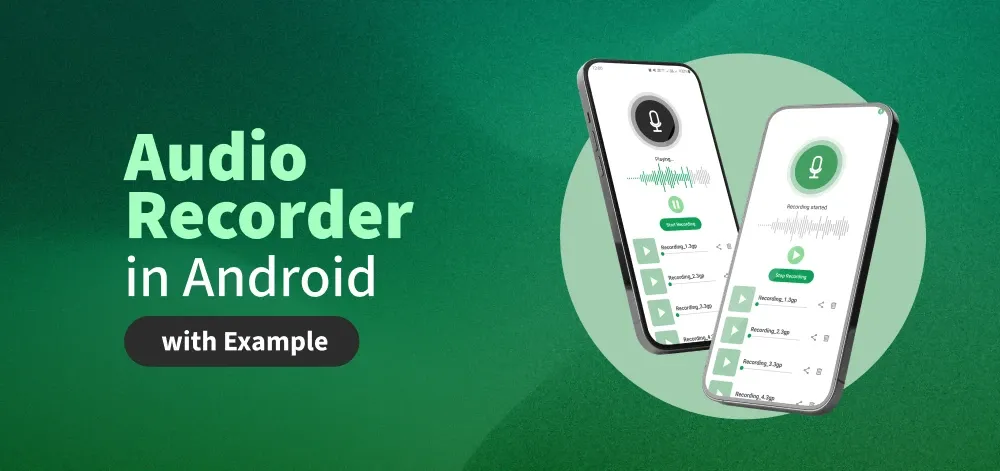
In Android for recording audio or video, there is a built-in class called MediaRecorder. This class in Android helps to easily record video and audio files. The Android multimedia framework provides built-in support for capturing and encoding common audio and video formats. In android for recording audio, we will use a device microphone along with MediaRecorder Class and for recording video, we will use the user's device Camera and MediaRecorder Class. Now in this article, we will see the implementation of an audio recorder in Android.
Important Methods of MediaRecorder Class
Method | Description |
|---|---|
| setAudioSource() | This method will specify the source of the audio to be recorded. |
| setAudioEncoder() | This method is used to specify the audio encoder. |
| setOutputFormat() | This method is used to specify the output format of our audio. |
| setOutputFile() | This method is used to specify the path of recorded audio files that are to be stored. |
| stop() | This method is used to stop the recording process. |
| start() | This method is used to start the recording process. |
| release() | This method is used to release the resource that is associated with the Media recorder class. |
Step by Step Implementation
Step 1: Create a New Project
To create a new project in Android Studio please refer to How to Create/Start a New Project in Android Studio.
Step 2: Working with manifest file
Navigate to app > manifests > AndroidManifest.xml and add the following permission under the <manifest/> tag.
<uses-permission android:name="android.permission.RECORD_AUDIO"/>In the same file, under the <application/> tag add the following lines of code for FileProvider.
<provider
    android:name="androidx.core.content.FileProvider"
    android:authorities="${applicationId}.provider"
    android:exported="false"
    android:grantUriPermissions="true">
    <meta-data
        android:name="android.support.FILE_PROVIDER_PATHS"
        android:resource="@xml/file_paths" />
</provider>
Navigate to app > res > xml, right click and select New > XML Resource File and set the name as file_paths.xml and add the following code to the file.
<?xml version="1.0" encoding="utf-8"?>
<paths>
    <external-files-path
        name="external_files"
        path="." />
</paths>
Step 3: Adding dependencies
Navigate to Gradle Scripts > build.gradle.kts (Module :app) and add the following dependencies
dependencies {
    ...
    implementation ("com.github.massoudss:waveformSeekBar:5.0.2")
    implementation ("com.github.lincollincol:amplituda:2.2.2")
}
Refer to the this repo to read the documentation for the dependencies.
Navigate to Gradle Scripts > settings.gradle.kts and add the following line under repositories {}
dependencyResolutionManagement {
    ...
    repositories {
        ...
        maven { setUrl("https://jitpack.io/") }
    }
}
Step 4: Adding drawable
Navigate to app > res > drawables, right click on the folder and select New Drawable Resource file and add the following drawables.
<vector xmlns:android="http://schemas.android.com/apk/res/android"
    android:width="32dp"
    android:height="32dp"
    android:viewportWidth="283"
    android:viewportHeight="283">
  <path
      android:pathData="M211.99,211.9C250.99,172.9 250.99,109.67 211.99,70.67C172.99,31.68 109.76,31.68 70.77,70.67C31.77,109.67 31.77,172.9 70.77,211.9C109.76,250.89 172.99,250.89 211.99,211.9Z"
      android:fillColor="#8DD998"/>
  <path
      android:pathData="M197.5,141.29L113.32,192.72L113.32,89.85L197.5,141.29Z"
      android:fillColor="#ffffff"/>
</vector>
<vector xmlns:android="http://schemas.android.com/apk/res/android"
    android:width="32dp"
    android:height="32dp"
    android:viewportWidth="284"
    android:viewportHeight="283">
  <path
      android:pathData="M212.64,212.17C251.63,173.18 251.63,109.95 212.64,70.95C173.64,31.95 110.41,31.95 71.42,70.95C32.42,109.95 32.42,173.18 71.42,212.17C110.41,251.17 173.64,251.17 212.64,212.17Z"
      android:fillColor="#8DD998"/>
  <path
      android:pathData="M130.45,94.48H102.79V188.64H130.45V94.48Z"
      android:fillColor="#ffffff"/>
  <path
      android:pathData="M181.31,94.48H153.65V188.64H181.31V94.48Z"
      android:fillColor="#ffffff"/>
</vector>
<vector xmlns:android="http://schemas.android.com/apk/res/android"
    android:width="200dp"
    android:height="200dp"
    android:viewportWidth="214"
    android:viewportHeight="200">
  <path
      android:pathData="M16.59,0.05L197.99,0.05A16,16 0,0 1,213.99 16.05L213.99,183.11A16,16 0,0 1,197.99 199.11L16.59,199.11A16,16 0,0 1,0.59 183.11L0.59,16.05A16,16 0,0 1,16.59 0.05z"
      android:fillColor="#A0CDAE"/>
  <path
      android:pathData="M148.22,99.58L86.82,137.1L86.82,62.07L148.22,99.58Z"
      android:fillColor="#ffffff"/>
</vector>
<vector xmlns:android="http://schemas.android.com/apk/res/android"
    android:width="200dp"
    android:height="200dp"
    android:viewportWidth="214"
    android:viewportHeight="201">
  <path
      android:pathData="M16.09,0.98L197.5,0.98A16,16 0,0 1,213.5 16.98L213.5,184.04A16,16 0,0 1,197.5 200.04L16.09,200.04A16,16 0,0 1,0.09 184.04L0.09,16.98A16,16 0,0 1,16.09 0.98z"
      android:fillColor="#A0CDAE"/>
  <path
      android:pathData="M95.19,53.43H67.53V147.58H95.19V53.43Z"
      android:fillColor="#ffffff"/>
  <path
      android:pathData="M146.06,53.43H118.4V147.58H146.06V53.43Z"
      android:fillColor="#ffffff"/>
</vector>
<vector xmlns:android="http://schemas.android.com/apk/res/android"
    android:width="200dp"
    android:height="200dp"
    android:viewportWidth="606"
    android:viewportHeight="606">
  <path
      android:pathData="M302.84,605.6C469.98,605.6 605.48,470.11 605.48,302.96C605.48,135.82 469.98,0.33 302.84,0.33C135.7,0.33 0.2,135.82 0.2,302.96C0.2,470.11 135.7,605.6 302.84,605.6Z"
      android:strokeAlpha="0.13"
      android:fillColor="#258D46"
      android:fillAlpha="0.13"/>
  <path
      android:pathData="M302.84,570.61C450.66,570.61 570.49,450.78 570.49,302.97C570.49,155.15 450.66,35.32 302.84,35.32C155.02,35.32 35.2,155.15 35.2,302.97C35.2,450.78 155.02,570.61 302.84,570.61Z"
      android:strokeAlpha="0.35"
      android:fillColor="#258D46"
      android:fillAlpha="0.35"/>
  <path
      android:pathData="M302.84,521.85C423.73,521.85 521.73,423.86 521.73,302.97C521.73,182.08 423.73,84.08 302.84,84.08C181.95,84.08 83.95,182.08 83.95,302.97C83.95,423.86 181.95,521.85 302.84,521.85Z"
      android:fillColor="#258D46"/>
  <path
      android:pathData="M307.01,338.05H298.68C279.11,338.05 263.25,322.19 263.25,302.63V236.64C263.25,217.07 279.11,201.21 298.68,201.21H307.01C326.58,201.21 342.44,217.07 342.44,236.64V302.63C342.44,322.19 326.58,338.05 307.01,338.05Z"
      android:strokeLineJoin="round"
      android:strokeWidth="18.096"
      android:fillColor="#00000000"
      android:strokeColor="#ffffff"
      android:strokeLineCap="round"/>
  <path
      android:pathData="M358.81,322.89C349.09,347.3 330.23,357.69 303.11,357.69C275.48,357.69 256.25,346.64 246.88,321.5"
      android:strokeLineJoin="round"
      android:strokeWidth="18.096"
      android:fillColor="#00000000"
      android:strokeColor="#ffffff"
      android:strokeLineCap="round"/>
  <path
      android:pathData="M303.28,363.91V398.45"
      android:strokeLineJoin="round"
      android:strokeWidth="18.096"
      android:fillColor="#00000000"
      android:strokeColor="#ffffff"
      android:strokeLineCap="round"/>
  <path
      android:pathData="M262.55,404.72H343.13"
      android:strokeLineJoin="round"
      android:strokeWidth="18.096"
      android:fillColor="#00000000"
      android:strokeColor="#ffffff"
      android:strokeLineCap="round"/>
</vector>
<vector xmlns:android="http://schemas.android.com/apk/res/android"
    android:width="200dp"
    android:height="200dp"
    android:viewportWidth="606"
    android:viewportHeight="606">
  <path
      android:pathData="M302.91,605.6C470.05,605.6 605.54,470.11 605.54,302.96C605.54,135.82 470.05,0.33 302.91,0.33C135.76,0.33 0.27,135.82 0.27,302.96C0.27,470.11 135.76,605.6 302.91,605.6Z"
      android:strokeAlpha="0.13"
      android:fillColor="#000000"
      android:fillAlpha="0.13"/>
  <path
      android:pathData="M302.91,570.61C450.72,570.61 570.55,450.78 570.55,302.97C570.55,155.15 450.72,35.32 302.91,35.32C155.09,35.32 35.26,155.15 35.26,302.97C35.26,450.78 155.09,570.61 302.91,570.61Z"
      android:strokeAlpha="0.35"
      android:fillColor="#000000"
      android:fillAlpha="0.35"/>
  <path
      android:pathData="M302.91,521.85C423.8,521.85 521.8,423.86 521.8,302.97C521.8,182.08 423.8,84.08 302.91,84.08C182.02,84.08 84.02,182.08 84.02,302.97C84.02,423.86 182.02,521.85 302.91,521.85Z"
      android:fillColor="#070707"/>
  <path
      android:pathData="M307.07,338.05H298.74C279.17,338.05 263.31,322.19 263.31,302.63V236.64C263.31,217.07 279.17,201.21 298.74,201.21H307.07C326.64,201.21 342.5,217.07 342.5,236.64V302.63C342.5,322.19 326.64,338.05 307.07,338.05Z"
      android:strokeLineJoin="round"
      android:strokeWidth="18.096"
      android:fillColor="#00000000"
      android:strokeColor="#ffffff"
      android:strokeLineCap="round"/>
  <path
      android:pathData="M358.87,322.89C349.16,347.3 330.3,357.69 303.17,357.69C275.54,357.69 256.32,346.64 246.94,321.5"
      android:strokeLineJoin="round"
      android:strokeWidth="18.096"
      android:fillColor="#00000000"
      android:strokeColor="#ffffff"
      android:strokeLineCap="round"/>
  <path
      android:pathData="M303.34,363.91V398.45"
      android:strokeLineJoin="round"
      android:strokeWidth="18.096"
      android:fillColor="#00000000"
      android:strokeColor="#ffffff"
      android:strokeLineCap="round"/>
  <path
      android:pathData="M262.62,404.72H343.19"
      android:strokeLineJoin="round"
      android:strokeWidth="18.096"
      android:fillColor="#00000000"
      android:strokeColor="#ffffff"
      android:strokeLineCap="round"/>
</vector>
<vector xmlns:android="http://schemas.android.com/apk/res/android"
    android:width="24dp"
    android:height="24dp"
    android:viewportWidth="960"
    android:viewportHeight="960">
  <path
      android:pathData="M280,840q-33,0 -56.5,-23.5T200,760v-520h-40v-80h200v-40h240v40h200v80h-40v520q0,33 -23.5,56.5T680,840L280,840ZM680,240L280,240v520h400v-520ZM360,680h80v-360h-80v360ZM520,680h80v-360h-80v360ZM280,240v520,-520Z"
      android:fillColor="#e8eaed"/>
</vector>
<vector xmlns:android="http://schemas.android.com/apk/res/android"
    android:width="24dp"
    android:height="24dp"
    android:viewportWidth="960"
    android:viewportHeight="960">
  <path
      android:pathData="M680,880q-50,0 -85,-35t-35,-85q0,-6 3,-28L282,568q-16,15 -37,23.5t-45,8.5q-50,0 -85,-35t-35,-85q0,-50 35,-85t85,-35q24,0 45,8.5t37,23.5l281,-164q-2,-7 -2.5,-13.5T560,200q0,-50 35,-85t85,-35q50,0 85,35t35,85q0,50 -35,85t-85,35q-24,0 -45,-8.5T598,288L317,452q2,7 2.5,13.5t0.5,14.5q0,8 -0.5,14.5T317,508l281,164q16,-15 37,-23.5t45,-8.5q50,0 85,35t35,85q0,50 -35,85t-85,35ZM680,800q17,0 28.5,-11.5T720,760q0,-17 -11.5,-28.5T680,720q-17,0 -28.5,11.5T640,760q0,17 11.5,28.5T680,800ZM200,520q17,0 28.5,-11.5T240,480q0,-17 -11.5,-28.5T200,440q-17,0 -28.5,11.5T160,480q0,17 11.5,28.5T200,520ZM680,240q17,0 28.5,-11.5T720,200q0,-17 -11.5,-28.5T680,160q-17,0 -28.5,11.5T640,200q0,17 11.5,28.5T680,240ZM680,760ZM200,480ZM680,200Z"
      android:fillColor="#e8eaed"/>
</vector>
Step 5: Working with the activity_main.xml file
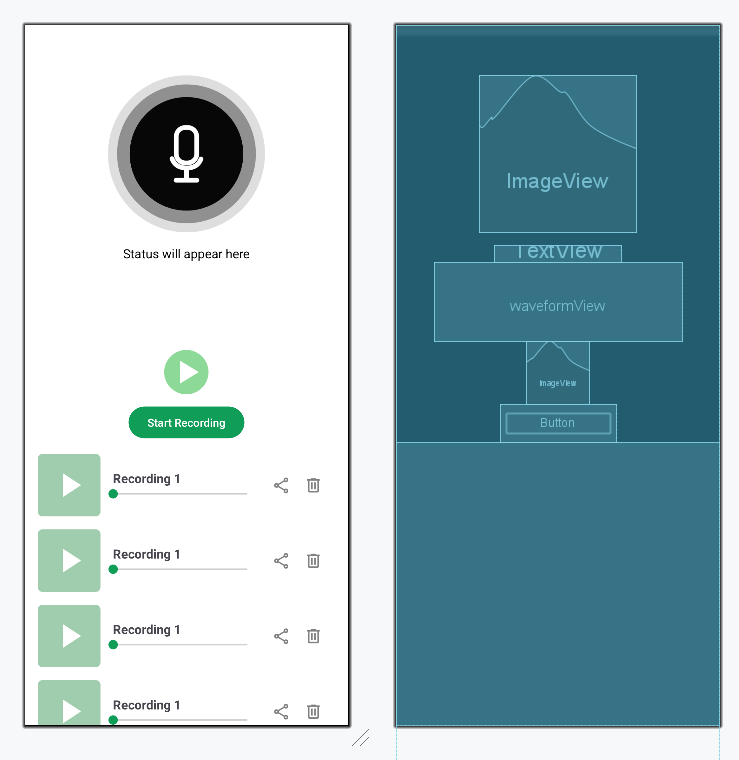
Navigate to the app > res > layout > activity_main.xml. Comments are added inside the code to understand the code in more detail. Create a new layout for each item of the recycler view and name it item_audio_recording.xml.
<?xml version="1.0" encoding="utf-8"?>
<!-- to make the entire page scroll -->
<!-- nest scroll view for smoother scrolling -->
<androidx.core.widget.NestedScrollView
    xmlns:android="http://schemas.android.com/apk/res/android"
    xmlns:app="http://schemas.android.com/apk/res-auto"
    xmlns:tools="http://schemas.android.com/tools"
    android:layout_width="match_parent"
    android:layout_height="match_parent"
    android:orientation="vertical"
    android:background="@color/white"
    tools:context=".MainActivity">

    <!--  main layout  -->
    <LinearLayout
        android:layout_width="match_parent"
        android:layout_height="wrap_content"
        android:orientation="vertical"
        android:gravity="center_horizontal">

        <!--  Mic image that updates on recording status  -->
        <ImageView
            android:id="@+id/micImage"
            android:layout_width="200dp"
            android:layout_height="200dp"
            android:layout_marginTop="64dp"
            android:src="@drawable/mic_close" />

        <!--  Status text that updates on recording/Playing  -->
        <TextView
            android:id="@+id/statusText"
            android:layout_width="wrap_content"
            android:layout_height="wrap_content"
            android:layout_marginTop="16dp"
            android:text="Status will appear here"
            android:textColor="@android:color/black"
            android:textSize="16sp" />

        <!-- to display audio progress -->
        <com.masoudss.lib.WaveformSeekBar
            android:id="@+id/waveformView"
            android:layout_width="wrap_content"
            android:layout_height="100dp"
            android:layout_marginHorizontal="48dp"
            app:wave_padding_top="2dp"
            app:wave_padding_Bottom="2dp"
            app:wave_padding_left="2dp"
            app:wave_padding_right="2dp"
            app:wave_gap="4dp"
            app:wave_width="3dp"
            app:wave_gravity="center"
            app:wave_corner_radius="2dp"
            app:wave_background_color="@color/grey"
            app:wave_progress_color="@color/colorPrimary" />

        <!--  Play/Stop saved recording button  -->
        <ImageView
            android:id="@+id/playStopButton"
            android:layout_width="80dp"
            android:layout_height="80dp"
            android:src="@drawable/play"
            app:layout_constraintEnd_toEndOf="parent"
            app:layout_constraintStart_toStartOf="parent"
            app:layout_constraintTop_toBottomOf="@+id/waveformView" />


        <!--  Start/Stop recording button  -->
        <Button
            android:id="@+id/startStopRecordingButton"
            android:layout_width="wrap_content"
            android:layout_height="wrap_content"
            android:text="Start Recording"
            app:layout_constraintEnd_toEndOf="parent"
            app:layout_constraintStart_toStartOf="parent"
            app:layout_constraintTop_toBottomOf="@+id/playStopButton" />

        <!-- to display list of saved recordings -->
        <androidx.recyclerview.widget.RecyclerView
            android:id="@+id/recordingsRecyclerView"
            android:layout_width="match_parent"
            android:layout_height="0dp"
            android:layout_weight="1"
            android:padding="8dp"
            tools:listitem="@layout/item_audio_recording"
            android:clipToPadding="false" />

    </LinearLayout>

</androidx.core.widget.NestedScrollView>
<androidx.constraintlayout.widget.ConstraintLayout
    xmlns:android="http://schemas.android.com/apk/res/android"
    xmlns:app="http://schemas.android.com/apk/res-auto"
    android:layout_width="match_parent"
    android:layout_height="wrap_content"
    android:orientation="vertical"
    android:padding="8dp">

    <!--  Play pause button  -->
    <ImageView
        android:id="@+id/playPauseButton"
        android:layout_width="80dp"
        android:layout_height="80dp"
        android:src="@drawable/play_square"
        app:layout_constraintBottom_toBottomOf="parent"
        app:layout_constraintStart_toStartOf="parent"
        app:layout_constraintTop_toTopOf="parent"
        app:layout_constraintVertical_bias="0.5" />

    <!-- to display file name -->
    <TextView
        android:id="@+id/fileName"
        android:layout_width="0dp"
        android:layout_height="wrap_content"
        android:layout_marginStart="16dp"
        android:layout_marginEnd="16dp"
        android:ellipsize="end"
        android:maxLines="1"
        android:text="Recording 1"
        android:textSize="16sp"
        android:textStyle="bold"
        app:layout_constraintBottom_toTopOf="@+id/seekBar"
        app:layout_constraintEnd_toEndOf="@+id/seekBar"
        app:layout_constraintStart_toEndOf="@+id/playPauseButton"
        app:layout_constraintTop_toTopOf="parent"
        app:layout_constraintVertical_chainStyle="packed" />

    <!--  to show audio progress  -->
    <SeekBar
        android:id="@+id/seekBar"
        android:layout_width="0dp"
        android:layout_height="wrap_content"
        android:layout_marginEnd="16dp"
        android:max="100"
        android:progressTint="@color/colorPrimary"
        android:thumbTint="@color/colorPrimary"
        app:layout_constraintBottom_toBottomOf="parent"
        app:layout_constraintEnd_toStartOf="@+id/share"
        app:layout_constraintStart_toEndOf="@+id/playPauseButton"
        app:layout_constraintTop_toBottomOf="@+id/fileName" />

    <!--  to delete a file  -->
    <ImageView
        android:id="@+id/delete"
        android:layout_width="24dp"
        android:layout_height="24dp"
        android:layout_marginEnd="16dp"
        android:src="@drawable/delete"
        app:layout_constraintBottom_toBottomOf="parent"
        app:layout_constraintEnd_toEndOf="parent"
        app:layout_constraintTop_toTopOf="parent"
        app:tint="@color/darker_grey" />

    <!--  to share a file  -->
    <ImageView
        android:id="@+id/share"
        android:layout_width="24dp"
        android:layout_height="24dp"
        android:layout_marginEnd="16dp"
        android:src="@drawable/share"
        app:layout_constraintBottom_toBottomOf="parent"
        app:layout_constraintEnd_toStartOf="@+id/delete"
        app:layout_constraintTop_toTopOf="parent"
        app:tint="@color/darker_grey" />
</androidx.constraintlayout.widget.ConstraintLayout>
Design UI:
Step 6: Creating a Model class
Navigate to app > java > {package-name}, right click and select New Java/Kotlin Class and set the name as AudioRecording and add the following code.
AudioRecording File:
package org.geeksforgeeks.demo;

// Model class representing an audio recording
public class AudioRecording {

    // path where the file is located
    private final String filePath;

    // name of the audio file
    private final String fileName;

    // to check whether the audio is playing or not
    private boolean isPlaying;

    public AudioRecording(String filePath, String fileName) {
        this.filePath = filePath;
        this.fileName = fileName;
        this.isPlaying = false;
    }

    public String getFilePath() {
        return filePath;
    }

    public String getFileName() {
        return fileName;
    }

    public boolean isPlaying() {
        return isPlaying;
    }

    public void setPlaying(boolean playing) {
        isPlaying = playing;
    }
}
package org.geeksforgeeks.demo

// Model class representing an audio recording
data class AudioRecording(
    // path where the file is located
    val filePath: String,
    // name of the audio file
    val fileName: String,
    // to check whether the audio is playing or not
    var isPlaying: Boolean = false
)
Step 7: Creating an Adapter
Navigate to app > java > {package-name}, right click and select New Java/Kotlin Class and set the name as AudioRecordingAdapter and add the following code.
AudioRecordingAdapter File:
package org.geeksforgeeks.demo;

import android.view.LayoutInflater;
import android.view.View;
import android.view.ViewGroup;
import android.widget.ImageView;
import android.widget.SeekBar;
import android.widget.TextView;

import androidx.annotation.NonNull;
import androidx.recyclerview.widget.RecyclerView;

import java.util.List;

// Adapter to display and manage a list of audio recordings
public class AudioRecordingAdapter extends RecyclerView.Adapter<AudioRecordingAdapter.AudioViewHolder> {

    private final List<AudioRecording> recordings;
    private final OnPlayClickListener onPlayClick;
    private final OnDeleteClickListener onDeleteClick;
    private final OnShareClickListener onShareClick;

    public AudioRecordingAdapter(List<AudioRecording> recordings,
                                 OnPlayClickListener onPlayClick,
                                 OnDeleteClickListener onDeleteClick,
                                 OnShareClickListener onShareClick) {
        this.recordings = recordings;
        this.onPlayClick = onPlayClick;
        this.onDeleteClick = onDeleteClick;
        this.onShareClick = onShareClick;
    }

    // ViewHolder class holds the views for each list item
    public static class AudioViewHolder extends RecyclerView.ViewHolder {
        ImageView playButton;
        TextView fileNameText;
        SeekBar seekBar;
        ImageView deleteButton;
        ImageView shareButton;

        public AudioViewHolder(@NonNull View itemView) {
            super(itemView);
            playButton = itemView.findViewById(R.id.playPauseButton);
            fileNameText = itemView.findViewById(R.id.fileName);
            seekBar = itemView.findViewById(R.id.seekBar);
            deleteButton = itemView.findViewById(R.id.delete);
            shareButton = itemView.findViewById(R.id.share);
        }
    }

    // Inflates the layout for each item in the list
    @NonNull
    @Override
    public AudioViewHolder onCreateViewHolder(@NonNull ViewGroup parent, int viewType) {
        View view = LayoutInflater.from(parent.getContext()).inflate(R.layout.item_audio_recording, parent, false);
        return new AudioViewHolder(view);
    }

    // Binds data to each item and sets up click listeners
    @Override
    public void onBindViewHolder(@NonNull AudioViewHolder holder, int position) {
        AudioRecording recording = recordings.get(position);

        holder.fileNameText.setText(recording.getFileName());

        // Update play button based on playback state
        holder.playButton.setImageResource(
                recording.isPlaying() ? R.drawable.pause_square : R.drawable.play_square
        );

        // Play button click triggers callback
        holder.playButton.setOnClickListener(v -> onPlayClick.onPlayClick(recording, holder.getAdapterPosition()));

        // Delete button click triggers callback
        holder.deleteButton.setOnClickListener(v -> onDeleteClick.onDeleteClick(recording, holder.getAdapterPosition()));

        // Share button click triggers callback
        holder.shareButton.setOnClickListener(v -> onShareClick.onShareClick(recording));

        // Reset seekBar to the beginning for now
        holder.seekBar.setProgress(0);
    }

    // Returns the size of the dataset
    @Override
    public int getItemCount() {
        return recordings.size();
    }

    // Interfaces for click callbacks
    public interface OnPlayClickListener {
        void onPlayClick(AudioRecording recording, int position);
    }

    public interface OnDeleteClickListener {
        void onDeleteClick(AudioRecording recording, int position);
    }

    public interface OnShareClickListener {
        void onShareClick(AudioRecording recording);
    }
}
package org.geeksforgeeks.demo

import android.view.LayoutInflater
import android.view.View
import android.view.ViewGroup
import android.widget.ImageView
import android.widget.SeekBar
import android.widget.TextView
import androidx.recyclerview.widget.RecyclerView

// Adapter to display and manage a list of audio recordings
class AudioRecordingAdapter(
    private val recordings: MutableList<AudioRecording>,
    private val onPlayClick: (AudioRecording, Int) -> Unit,
    private val onDeleteClick: (AudioRecording, Int) -> Unit,
    private val onShareClick: (AudioRecording) -> Unit
) : RecyclerView.Adapter<AudioRecordingAdapter.AudioViewHolder>() {

    // ViewHolder class holds the views for each list item
    inner class AudioViewHolder(itemView: View) : RecyclerView.ViewHolder(itemView) {
        val playButton: ImageView = itemView.findViewById(R.id.playPauseButton)
        val fileNameText: TextView = itemView.findViewById(R.id.fileName)
        val seekBar: SeekBar = itemView.findViewById(R.id.seekBar)
        val deleteButton: ImageView = itemView.findViewById(R.id.delete)
        val shareButton: ImageView = itemView.findViewById(R.id.share)
    }

    // Inflates the layout for each item in the list
    override fun onCreateViewHolder(parent: ViewGroup, viewType: Int): AudioViewHolder {
        val view = LayoutInflater.from(parent.context).inflate(R.layout.item_audio_recording, parent, false)
        return AudioViewHolder(view)
    }

    // Binds data to each item and sets up click listeners
    override fun onBindViewHolder(holder: AudioViewHolder, position: Int) {
        val recording = recordings[position]

        holder.fileNameText.text = recording.fileName

        // Update play button based on playback state
        holder.playButton.setImageResource(
            if (recording.isPlaying) R.drawable.pause_square else R.drawable.play_square
        )

        // Play button click triggers callback
        holder.playButton.setOnClickListener {
            onPlayClick(recording, holder.adapterPosition)
        }

        // Delete button click triggers callback
        holder.deleteButton.setOnClickListener {
            onDeleteClick(recording, holder.adapterPosition)
        }

        // Share button click triggers callback
        holder.shareButton.setOnClickListener {
            onShareClick(recording)
        }

        // Reset seekBar to the beginning for now
        holder.seekBar.progress = 0
    }

    // Returns the size of the dataset
    override fun getItemCount(): Int = recordings.size
}
Step 8: Working with the MainActivity file
Navigate to the app > java > Your app's package name > MainActivity. Below is the code for the MainActivity file. Comments are added inside the code to understand the code in more detail.
package org.geeksforgeeks.demo;

import android.Manifest;
import android.content.Intent;
import android.content.pm.PackageManager;
import android.media.MediaPlayer;
import android.media.MediaRecorder;
import android.net.Uri;
import android.os.Bundle;
import android.os.Handler;
import android.util.Log;
import android.widget.*;

import androidx.annotation.NonNull;
import androidx.appcompat.app.AppCompatActivity;
import androidx.core.app.ActivityCompat;
import androidx.core.content.ContextCompat;
import androidx.core.content.FileProvider;
import androidx.recyclerview.widget.LinearLayoutManager;
import androidx.recyclerview.widget.RecyclerView;
import com.masoudss.lib.WaveformSeekBar;
import java.io.File;
import java.io.IOException;
import java.text.SimpleDateFormat;
import java.util.ArrayList;
import java.util.Date;
import java.util.List;
import java.util.Locale;

public class MainActivity extends AppCompatActivity {

    // UI components
    private Button startStopRecordingButton;
    private ImageView playStopButton;
    private ImageView micImage;
    private TextView statusText;
    private WaveformSeekBar waveformView;
    private RecyclerView recyclerView;

    // Media components
    private MediaRecorder mRecorder;
    private MediaPlayer mPlayer;
    private String audioFilePath;

    // Flags
    private boolean isRecording = false;
    private boolean isPlaying = false;

    // List of saved recordings
    private final List<AudioRecording> recordings = new ArrayList<>();
    private AudioRecordingAdapter adapter;

    // State for currently playing item in the list
    private MediaPlayer playingPlayer = null;
    private int playingIndex = -1;
    private final Handler seekHandler = new Handler();

    // Called when the activity is first created
    @Override
    protected void onCreate(Bundle savedInstanceState) {
        super.onCreate(savedInstanceState);
        setContentView(R.layout.activity_main);

        // Initialize UI components
        micImage = findViewById(R.id.micImage);
        playStopButton = findViewById(R.id.playStopButton);
        startStopRecordingButton = findViewById(R.id.startStopRecordingButton);
        statusText = findViewById(R.id.statusText);
        waveformView = findViewById(R.id.waveformView);
        recyclerView = findViewById(R.id.recordingsRecyclerView);

        // Set up RecyclerView with linear layout and adapter
        recyclerView.setLayoutManager(new LinearLayoutManager(this));
        adapter = new AudioRecordingAdapter(
                recordings,
                this::playRecording,
                this::deleteRecording,
                this::shareRecording
        );
        recyclerView.setAdapter(adapter);

        // Load any saved recordings from storage
        loadRecordings();

        // Ask for mic permission if not already granted
        if (!checkPermissions()) requestPermissions();

        // Set click listener to start or stop recording
        startStopRecordingButton.setOnClickListener(v -> {
            if (!isRecording) startRecording();
            else stopRecording();
        });

        // Set click listener to play or stop last recorded file
        playStopButton.setOnClickListener(v -> {
            if (!isPlaying) playAudio();
            else stopAudio();
        });
    }

    // Generate a unique file path for each new recording
    private String getNewFilePath() {
        File dir = getExternalFilesDir(null);
        SimpleDateFormat formatter = new SimpleDateFormat("yyyy-MM-dd_HH-mm-ss", Locale.getDefault());
        String timeStamp = formatter.format(new Date());
        return new File(dir, "Recording_" + timeStamp + ".3gp").getAbsolutePath();
    }

    // Start recording using the MediaRecorder API
    private void startRecording() {
        if (!checkPermissions()) {
            requestPermissions();
            return;
        }

        audioFilePath = getNewFilePath();

        mRecorder = new MediaRecorder();
        mRecorder.setAudioSource(MediaRecorder.AudioSource.MIC);
        mRecorder.setOutputFormat(MediaRecorder.OutputFormat.THREE_GPP);
        mRecorder.setAudioEncoder(MediaRecorder.AudioEncoder.AMR_NB);
        mRecorder.setOutputFile(audioFilePath);

        try {
            mRecorder.prepare();
            mRecorder.start();
            isRecording = true;
            startStopRecordingButton.setText("Stop Recording");
            micImage.setImageResource(R.drawable.mic_open);
            statusText.setText("Recording started");
        } catch (IOException e) {
            Log.e("MainActivity", "Recording failed: " + e.getLocalizedMessage());
            statusText.setText("Recording failed");
        }
    }

    // Stop recording and save the file to list
    private void stopRecording() {
        if (mRecorder != null) {
            mRecorder.stop();
            mRecorder.release();
        }
        mRecorder = null;
        isRecording = false;
        startStopRecordingButton.setText("Start Recording");
        micImage.setImageResource(R.drawable.mic_close);
        statusText.setText("Recording saved");

        String fileName = new File(audioFilePath).getName();
        recordings.add(new AudioRecording(audioFilePath, fileName));
        adapter.notifyItemInserted(recordings.size() - 1);
    }

    // Play the most recent audio and show waveform animation
    private void playAudio() {
        if (audioFilePath == null || !new File(audioFilePath).exists()) {
            Toast.makeText(this, "No recording found to play", Toast.LENGTH_SHORT).show();
            return;
        }

        mPlayer = new MediaPlayer();
        try {
            mPlayer.setDataSource(audioFilePath);
            mPlayer.prepare();
            mPlayer.start();
            waveformView.setSampleFrom(audioFilePath);
            isPlaying = true;
            playStopButton.setImageResource(R.drawable.pause);
            statusText.setText("Playing...");
            seekHandler.post(updateWaveformRunnable);

            mPlayer.setOnCompletionListener(mp -> {
                stopAudio();
                statusText.setText("Playback complete");
            });
        } catch (IOException e) {
            Log.e("MainActivity", "Playback failed: " + e.getLocalizedMessage());
            statusText.setText("Playback failed");
        }
    }

    // Stop current audio playback
    private void stopAudio() {
        if (mPlayer != null) {
            mPlayer.release();
            mPlayer = null;
        }
        isPlaying = false;
        playStopButton.setImageResource(R.drawable.play);
        statusText.setText("Playback stopped");
        seekHandler.removeCallbacks(updateWaveformRunnable);
        waveformView.setProgress(0f);
    }

    // Periodically updates waveform progress while audio plays
    private final Runnable updateWaveformRunnable = new Runnable() {
        @Override
        public void run() {
            if (mPlayer != null && mPlayer.isPlaying()) {
                float progress = (mPlayer.getCurrentPosition() * 100f) / mPlayer.getDuration();
                waveformView.setProgress(progress);
                seekHandler.postDelayed(this, 100);
            }
        }
    };

    // Play audio from a recording in the list (by index)
    private void playRecording(AudioRecording recording, int index) {
        // Stop previously playing audio if different
        if (playingPlayer != null && playingIndex != index) stopPlaying();

        if (recording.isPlaying()) {
            stopPlaying();
        } else {
            playingPlayer = new MediaPlayer();
            try {
                playingPlayer.setDataSource(recording.getFilePath());
                playingPlayer.prepare();
                playingPlayer.start();
                recording.setPlaying(true);
                playingIndex = index;
                adapter.notifyItemChanged(index);

                playingPlayer.setOnCompletionListener(mp -> {
                    recording.setPlaying(false);
                    adapter.notifyItemChanged(index);
                    playingPlayer = null;
                    playingIndex = -1;
                });

                updateSeekBar(index);

            } catch (IOException e) {
                Log.e("MainActivity", "Playback failed: " + e.getLocalizedMessage());
            }
        }
    }

    // Stops currently playing list item
    private void stopPlaying() {
        if (playingPlayer != null) {
            playingPlayer.release();
            playingPlayer = null;
        }
        if (playingIndex >= 0 && playingIndex < recordings.size()) {
            recordings.get(playingIndex).setPlaying(false);
            adapter.notifyItemChanged(playingIndex);
            playingIndex = -1;
        }
    }

    // Updates the progress bar (seek bar) for the item being played
    private void updateSeekBar(int index) {
        Runnable runnable = new Runnable() {
            @Override
            public void run() {
                if (playingPlayer != null && playingPlayer.isPlaying() && index == playingIndex) {
                    int percent = (100 * playingPlayer.getCurrentPosition()) / playingPlayer.getDuration();
                    AudioRecordingAdapter.AudioViewHolder holder = (AudioRecordingAdapter.AudioViewHolder) recyclerView.findViewHolderForAdapterPosition(index);
                    if (holder != null) {
                        holder.seekBar.setProgress(percent);
                    }
                    seekHandler.postDelayed(this, 500);
                }
            }
        };
        seekHandler.post(runnable);
    }

    // Loads all previously recorded .3gp files from app storage
    private void loadRecordings() {
        File dir = getExternalFilesDir(null);
        if (dir != null) {
            File[] files = dir.listFiles();
            if (files != null) {
                for (File file : files) {
                    if (file.getName().endsWith(".3gp")) {
                        recordings.add(new AudioRecording(file.getAbsolutePath(), file.getName()));
                    }
                }
            }
        }
        adapter.notifyDataSetChanged();
    }

    // Deletes the selected recording from list and file system
    private void deleteRecording(AudioRecording recording, int index) {
        File file = new File(recording.getFilePath());
        if (file.exists()) file.delete();

        recordings.remove(index);
        adapter.notifyItemRemoved(index);
        Toast.makeText(this, "Recording deleted", Toast.LENGTH_SHORT).show();
    }

    // Shares the selected audio file using external apps
    private void shareRecording(AudioRecording recording) {
        File file = new File(recording.getFilePath());
        if (!file.exists()) return;

        Uri uri = FileProvider.getUriForFile(
                this,
                getPackageName() + ".provider",
                file
        );

        Intent shareIntent = new Intent(Intent.ACTION_SEND);
        shareIntent.setType("audio/*");
        shareIntent.putExtra(Intent.EXTRA_STREAM, uri);
        shareIntent.addFlags(Intent.FLAG_GRANT_READ_URI_PERMISSION);

        startActivity(Intent.createChooser(shareIntent, "Share recording via"));
    }

    // Checks if microphone permission is granted
    private boolean checkPermissions() {
        return ContextCompat.checkSelfPermission(this, Manifest.permission.RECORD_AUDIO) == PackageManager.PERMISSION_GRANTED;
    }

    // Requests microphone permission
    private void requestPermissions() {
        ActivityCompat.requestPermissions(this, new String[]{Manifest.permission.RECORD_AUDIO}, REQUEST_AUDIO_PERMISSION_CODE);
    }

    // Handles result from permission request dialog
    @Override
    public void onRequestPermissionsResult(int requestCode, @NonNull String[] permissions, @NonNull int[] grantResults) {
        super.onRequestPermissionsResult(requestCode, permissions, grantResults);
        if (requestCode == REQUEST_AUDIO_PERMISSION_CODE) {
            statusText.setText(grantResults.length > 0 && grantResults[0] == PackageManager.PERMISSION_GRANTED ? "Permission granted" : "Permission denied");
        }
    }

    // Constant for permission request code
    public static final int REQUEST_AUDIO_PERMISSION_CODE = 200;
}
package org.geeksforgeeks.demo

import android.Manifest
import android.content.Intent
import android.content.pm.PackageManager
import android.media.MediaPlayer
import android.media.MediaRecorder
import android.net.Uri
import android.os.Bundle
import android.os.Handler
import android.util.Log
import android.widget.*
import androidx.appcompat.app.AppCompatActivity
import androidx.core.app.ActivityCompat
import androidx.core.content.ContextCompat
import androidx.core.content.FileProvider
import androidx.recyclerview.widget.LinearLayoutManager
import androidx.recyclerview.widget.RecyclerView
import com.masoudss.lib.WaveformSeekBar
import java.io.File
import java.io.IOException
import java.text.SimpleDateFormat
import java.util.Date
import java.util.Locale

class MainActivity : AppCompatActivity() {

    // UI components
    private lateinit var startStopRecordingButton: Button
    private lateinit var playStopButton: ImageView
    private lateinit var micImage: ImageView
    private lateinit var statusText: TextView
    private lateinit var waveformView: WaveformSeekBar
    private lateinit var recyclerView: RecyclerView

    // Media components
    private var mRecorder: MediaRecorder? = null
    private var mPlayer: MediaPlayer? = null
    private lateinit var audioFilePath: String

    // Flags
    private var isRecording = false
    private var isPlaying = false

    // List of saved recordings
    private val recordings = mutableListOf<AudioRecording>()
    private lateinit var adapter: AudioRecordingAdapter

    // State for currently playing item in the list
    private var playingPlayer: MediaPlayer? = null
    private var playingIndex = -1
    private val seekHandler = Handler()

    // Called when the activity is first created
    override fun onCreate(savedInstanceState: Bundle?) {
        super.onCreate(savedInstanceState)
        setContentView(R.layout.activity_main)

        // Initialize UI components
        micImage = findViewById(R.id.micImage)
        playStopButton = findViewById(R.id.playStopButton)
        startStopRecordingButton = findViewById(R.id.startStopRecordingButton)
        statusText = findViewById(R.id.statusText)
        waveformView = findViewById(R.id.waveformView)
        recyclerView = findViewById(R.id.recordingsRecyclerView)

        // Set up RecyclerView with linear layout and adapter
        recyclerView.layoutManager = LinearLayoutManager(this)
        adapter = AudioRecordingAdapter(
            recordings,
            onPlayClick = { recording, index -> playRecording(recording, index) },
            onDeleteClick = { recording, index -> deleteRecording(recording, index) },
            onShareClick = { recording -> shareRecording(recording) }
        )
        recyclerView.adapter = adapter

        // Load any saved recordings from storage
        loadRecordings()

        // Ask for mic permission if not already granted
        if (!checkPermissions()) requestPermissions()

        // Set click listener to start or stop recording
        startStopRecordingButton.setOnClickListener {
            if (!isRecording) startRecording() else stopRecording()
        }

        // Set click listener to play or stop last recorded file
        playStopButton.setOnClickListener {
            if (!isPlaying) playAudio() else stopAudio()
        }
    }

    // Generate a unique file path for each new recording
    private fun getNewFilePath(): String {
        val dir = getExternalFilesDir(null)
        val formatter = SimpleDateFormat("yyyy-MM-dd_HH-mm-ss", Locale.getDefault())
        val timeStamp = formatter.format(Date())
        return File(dir, "Recording_$timeStamp.3gp").absolutePath
    }

    // Start recording using the MediaRecorder API
    private fun startRecording() {
        if (!checkPermissions()) {
            requestPermissions()
            return
        }

        audioFilePath = getNewFilePath()

        mRecorder = MediaRecorder().apply {
            setAudioSource(MediaRecorder.AudioSource.MIC)
            setOutputFormat(MediaRecorder.OutputFormat.THREE_GPP)
            setAudioEncoder(MediaRecorder.AudioEncoder.AMR_NB)
            setOutputFile(audioFilePath)

            try {
                prepare()
                start()
                isRecording = true
                startStopRecordingButton.text = "Stop Recording"
                micImage.setImageResource(R.drawable.mic_open)
                statusText.text = "Recording started"
            } catch (e: IOException) {
                Log.e("MainActivity", "Recording failed: ${e.localizedMessage}")
                statusText.text = "Recording failed"
            }
        }
    }

    // Stop recording and save the file to list
    private fun stopRecording() {
        mRecorder?.apply {
            stop()
            release()
        }

        mRecorder = null
        isRecording = false
        startStopRecordingButton.text = "Start Recording"
        micImage.setImageResource(R.drawable.mic_close)
        statusText.text = "Recording saved"

        val fileName = File(audioFilePath).name
        recordings.add(AudioRecording(audioFilePath, fileName))
        adapter.notifyItemInserted(recordings.size - 1)
    }

    // Play the most recent audio and show waveform animation
    private fun playAudio() {
        if (!::audioFilePath.isInitialized || !File(audioFilePath).exists()) {
            Toast.makeText(this, "No recording found to play", Toast.LENGTH_SHORT).show()
            return
        }

        mPlayer = MediaPlayer().apply {
            try {
                setDataSource(audioFilePath)
                prepare()
                start()
                waveformView.setSampleFrom(audioFilePath)
                this@MainActivity.isPlaying = true
                playStopButton.setImageResource(R.drawable.pause)
                statusText.text = "Playing..."
                handler.post(updateWaveformRunnable)

                setOnCompletionListener {
                    stopAudio()
                    statusText.text = "Playback complete"
                }

            } catch (e: IOException) {
                Log.e("MainActivity", "Playback failed: ${e.localizedMessage}")
                statusText.text = "Playback failed"
            }
        }
    }

    // Stop current audio playback
    private fun stopAudio() {
        mPlayer?.release()
        mPlayer = null
        isPlaying = false
        playStopButton.setImageResource(R.drawable.play)
        statusText.text = "Playback stopped"
        handler.removeCallbacks(updateWaveformRunnable)
        waveformView.progress = 0f
    }

    // Periodically updates waveform progress while audio plays
    private val handler = Handler()
    private val updateWaveformRunnable = object : Runnable {
        override fun run() {
            mPlayer?.let {
                if (it.isPlaying) {
                    val progress = (it.currentPosition.toFloat() / it.duration) * 100
                    waveformView.progress = progress
                    handler.postDelayed(this, 100)
                }
            }
        }
    }

    // Play audio from a recording in the list (by index)
    private fun playRecording(recording: AudioRecording, index: Int) {
        // Stop previously playing audio if different
        if (playingPlayer != null && playingIndex != index) stopPlaying()

        if (recording.isPlaying) {
            stopPlaying()
        } else {
            playingPlayer = MediaPlayer().apply {
                try {
                    setDataSource(recording.filePath)
                    prepare()
                    start()
                    recording.isPlaying = true
                    playingIndex = index
                    adapter.notifyItemChanged(index)

                    setOnCompletionListener {
                        recording.isPlaying = false
                        adapter.notifyItemChanged(index)
                        playingPlayer = null
                        playingIndex = -1
                    }

                    updateSeekBar(index)

                } catch (e: IOException) {
                    Log.e("MainActivity", "Playback failed: ${e.localizedMessage}")
                }
            }
        }
    }

    // Stops currently playing list item
    private fun stopPlaying() {
        playingPlayer?.release()
        playingPlayer = null
        if (playingIndex >= 0 && playingIndex < recordings.size) {
            recordings[playingIndex].isPlaying = false
            adapter.notifyItemChanged(playingIndex)
            playingIndex = -1
        }
    }

    // Updates the progress bar (seek bar) for the item being played
    private fun updateSeekBar(index: Int) {
        val runnable = object : Runnable {
            override fun run() {
                val player = playingPlayer ?: return
                if (player.isPlaying && index == playingIndex) {
                    val percent = (100 * player.currentPosition) / player.duration
                    val holder = recyclerView.findViewHolderForAdapterPosition(index)
                            as? AudioRecordingAdapter.AudioViewHolder
                    holder?.seekBar?.progress = percent
                    seekHandler.postDelayed(this, 500)
                }
            }
        }
        seekHandler.post(runnable)
    }

    // Loads all previously recorded .3gp files from app storage
    private fun loadRecordings() {
        val dir = getExternalFilesDir(null)
        dir?.listFiles()?.filter { it.name.endsWith(".3gp") }?.sortedBy { it.name }?.forEach {
            recordings.add(AudioRecording(it.absolutePath, it.name))
        }
        adapter.notifyDataSetChanged()
    }

    // Deletes the selected recording from list and file system
    private fun deleteRecording(recording: AudioRecording, index: Int) {
        val file = File(recording.filePath)
        if (file.exists()) file.delete()

        recordings.removeAt(index)
        adapter.notifyItemRemoved(index)
        Toast.makeText(this, "Recording deleted", Toast.LENGTH_SHORT).show()
    }

    // Shares the selected audio file using external apps
    private fun shareRecording(recording: AudioRecording) {
        val file = File(recording.filePath)
        if (!file.exists()) return

        val uri: Uri = FileProvider.getUriForFile(
            this,
            "${packageName}.provider",
            file
        )

        val shareIntent = Intent(Intent.ACTION_SEND).apply {
            type = "audio/*"
            putExtra(Intent.EXTRA_STREAM, uri)
            addFlags(Intent.FLAG_GRANT_READ_URI_PERMISSION)
        }

        startActivity(Intent.createChooser(shareIntent, "Share recording via"))
    }

    // Checks if microphone permission is granted
    private fun checkPermissions(): Boolean {
        return ContextCompat.checkSelfPermission(
            this,
            Manifest.permission.RECORD_AUDIO
        ) == PackageManager.PERMISSION_GRANTED
    }

    // Requests microphone permission
    private fun requestPermissions() {
        ActivityCompat.requestPermissions(
            this,
            arrayOf(Manifest.permission.RECORD_AUDIO),
            REQUEST_AUDIO_PERMISSION_CODE
        )
    }

    // Handles result from permission request dialog
    override fun onRequestPermissionsResult(
        requestCode: Int,
        permissions: Array<out String>,
        grantResults: IntArray
    ) {
        super.onRequestPermissionsResult(requestCode, permissions, grantResults)
        if (requestCode == REQUEST_AUDIO_PERMISSION_CODE) {
            statusText.text = if (grantResults.isNotEmpty() && grantResults[0] == PackageManager.PERMISSION_GRANTED)
                "Permission granted" else "Permission denied"
        }
    }

    // Constant for permission request code
    companion object {
        const val REQUEST_AUDIO_PERMISSION_CODE = 200
    }
}
Refer to the following github repo to get the entire code: Audio-Recorder-in-Android
