
Microsoft Azure is a cloud computing platform that provides services through different deployment models, such as:
- IaaS (Infrastructure as a Service)
- PaaS (Platform as a Service)
- SaaS (Software as a Service)
- Serverless Functions
Cloud deployment is increasingly popular as it reduces the need for on-premise infrastructure and offers scalability, flexibility and high availability. In this article, we will explain the steps to deploy a Spring Boot application integrated with a MySQL database on the Azure cloud platform.
Prerequisites
You must have the following things in your system for the Deployment of the Spring Boot Application with the MySQL Database:
- Azure account
- MySQL Workbench installed locally
- Spring Boot application with Maven
- GitHub account with your project uploaded
Step-by-Step Guide to Deploying a Spring Boot App to Azure with MySQL Database
The following are the step-by-step instructions that you can follow to deploy a Spring Boot application integrated with a MySQL Database on Azure:
Step 1: Start by deploying the MySQL database on Azure
- Open the Azure Portal and Search for MySQL Server to create a resource section.
- Click creates a resource after providing some basic details like the zone and choosing a plan of your choice.
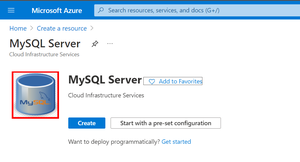
- Once the resource creation is done go to your dashboard and open the resource to view its details.
- Click on Connection security and add the current IP address.
- Click on Connection String and copy the JDBC connection string and store it for the meantime.
- Open MySQL Workbench in your local system.
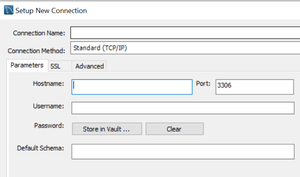
- Click on the '+' next to MySQL connections.
- Connection Name -> any name
- Hostname -> server name from Azure
- Username/Password -> credentials from setup
Step 2: Create a Database in MySQL Workbench
Run the following SQL commands in Workbench:
CREATE DATABASE springboot_db;
USE springboot_db;
Step 3: Configuring the Spring Boot Application for Deployment
Open application.properties file and add the following properties in it as provided below:
# Server and Database Config
server.port=8080
spring.datasource.url=jdbc:mysql://your-mysql-server.mysql.database.azure.com:3306/springboot_db?useSSL=true&requireSSL=true
spring.datasource.username=your-admin-user
spring.datasource.password=your-password
spring.datasource.driver-class-name=com.mysql.cj.jdbc.Driver  # Updated driver


# Hibernate/JPA Config
spring.jpa.hibernate.ddl-auto=update
spring.jpa.show-sql=true
spring.jpa.properties.hibernate.dialect=org.hibernate.dialect.MySQL8Dialect
Step 4: Add MySQL Dependency in pom.xml
pom.xml should use the latest MySQL Connector:
<dependency>
<groupId>mysql</groupId>
<artifactId>mysql-connector-java</artifactId>
<version>8.0.33</version>
</dependency>
Step 5: Run the Spring Boot Application
Now run the application as a Spring-Boot app. Upon running hibernate automatically configures the table structure for your project on the Azure MySQL database.
Step 6: Deploy the App to Azure
- Create an app service on Azure.
- Link your GitHub account under the Deployment Center of the App Service. Select the repository and branch that contains your Spring Boot project.
- Finally hit the create button.
These steps can be used to deploy a Spring Boot app with MySQL database on the Azure cloud platform.
Note:
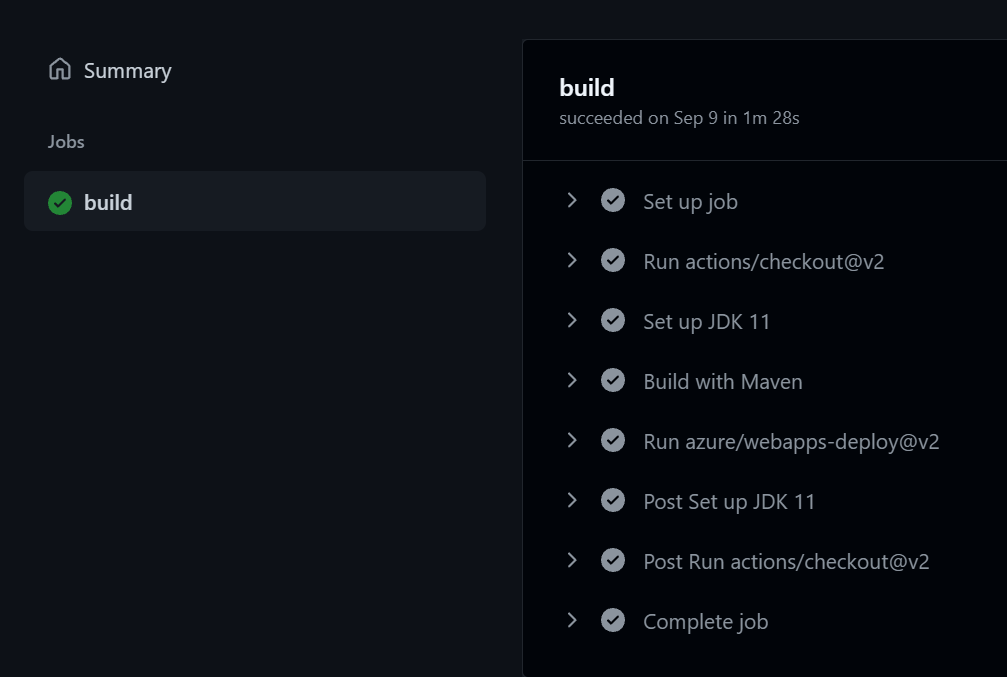
To see the deployment cycle go to the Actions tab of your Git-hub account and you will find the aforementioned actions in progress. Finally, if the application is error-free then a deployment link will be generated.
